Introduction
UX prototyping tools help teams turn product ideas into clickable, testable, and shareable user experiences before developers build the final product. In simple English, these tools help designers, product managers, founders, and development teams create screens, user flows, interactions, wireframes, design systems, and realistic app or website prototypes without writing full production code.
In product environment, prototyping is not just about drawing screens. Teams need faster validation, smoother collaboration, AI-assisted design workflows, reusable components, developer handoff, accessibility checks, and secure sharing. A good prototyping tool can reduce rework, improve stakeholder alignment, and help teams test ideas before investing heavily in engineering.
Best for: UX designers, product managers, startup teams, agencies, SaaS companies, enterprise product teams, and cross-functional design-development teams.
Not ideal for: teams that only need static graphics, companies with no product design workflow, or cases where a simple whiteboard, slide deck, or coded prototype is enough.
Key Trends in UX Prototyping Tools
- AI-assisted design workflows are becoming more common for layout suggestions, content generation, wireframe creation, and design cleanup.
- Design-to-code handoff is improving as product teams expect cleaner specs, inspect mode, variables, tokens, and reusable components.
- Interactive prototypes are becoming more realistic, including advanced animations, conditional logic, micro-interactions, and device-specific previews.
- Design systems are now central, with shared components, style libraries, tokens, and governance becoming important for scaling design quality.
- Cloud collaboration is the default for most modern teams, especially remote and distributed product teams.
- Enterprise security expectations are higher, including SSO, MFA, role permissions, audit logs, and controlled sharing.
- No-code and low-code prototyping is growing for founders, product managers, and non-design teams.
- Accessibility-aware design is becoming more important during early prototyping, not only during final development.
- Cross-tool interoperability matters more, especially with Jira, Slack, GitHub, Notion, Storybook, design systems, and user testing platforms.
- Flexible pricing models are important because teams want tools that can scale from individual design work to enterprise collaboration.
How We Selected These Tools
- Selected tools with strong recognition in UX, product design, prototyping, and collaborative design workflows.
- Considered tools suitable for solo creators, startups, agencies, mid-market teams, and enterprises.
- Prioritized platforms with practical prototyping features, not only static design capabilities.
- Looked at collaboration, sharing, versioning, developer handoff, and design system support.
- Included tools that support different prototype styles: low-fidelity, high-fidelity, interaction-heavy, and developer-friendly.
- Considered learning curve, workflow simplicity, and team adoption.
- Reviewed ecosystem strength, integrations, community usage, and documentation depth.
- Avoided guessing public ratings or compliance details where they are not confidently known.
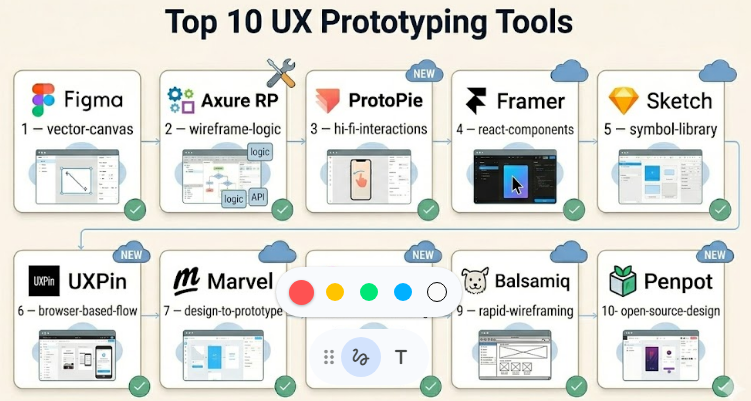
Top 10 UX Prototyping Tools
#1 — Figma
Short description :
Figma is one of the most widely used cloud-based design and prototyping tools for UX, UI, product, and design system teams. It is strong for real-time collaboration, interface design, reusable components, interactive prototypes, and developer handoff. Teams use it to create wireframes, high-fidelity screens, clickable flows, and shared design libraries. It works well for startups, agencies, SaaS companies, and enterprise product teams. Its biggest strength is bringing designers, developers, product managers, and stakeholders into one shared workspace.
Key Features
- Real-time multiplayer collaboration
- Interactive prototyping with transitions and overlays
- Component libraries and design systems
- Variables, styles, and reusable assets
- Developer handoff and inspect features
- Comments, sharing, and version history
- Large plugin and community ecosystem
Pros
- Excellent for collaborative product design teams.
- Strong balance of ease of use and professional depth.
- Large ecosystem makes onboarding easier.
Cons
- Advanced design systems require governance.
- Cloud-first workflow may not suit every security model.
- Costs can increase for larger teams.
Platforms / Deployment
Web / Windows / macOS / iOS / Android
Cloud
Security & Compliance
SSO/SAML, MFA, RBAC, and enterprise controls are available on higher plans. Some compliance details vary by plan. Use “Not publicly stated” for requirements that must be contractually verified.
Integrations & Ecosystem
Figma has one of the strongest ecosystems in modern design tooling, with integrations for product management, development, communication, and testing workflows.
- Jira
- Slack
- Microsoft Teams
- GitHub workflow support through ecosystem tools
- Storybook-related workflows
- Large plugin marketplace
Support & Community
Figma has strong documentation, learning resources, community templates, plugins, and enterprise support options. Community strength is one of its biggest advantages.
#2 — Axure RP
Short description :
Axure RP is a powerful UX prototyping tool built for complex, logic-heavy, and enterprise-grade prototypes. It is especially useful when teams need conditional logic, dynamic panels, form behavior, variables, and realistic business workflows. Product teams, UX architects, business analysts, and enterprise designers use Axure when basic click-through prototypes are not enough. It is stronger for interaction depth than visual simplicity. It is often used for complex SaaS, finance, healthcare, enterprise portals, and internal systems.
Key Features
- Advanced conditional logic
- Dynamic panels and adaptive views
- Form interactions and variables
- Complex user flows and simulations
- Team collaboration features
- Specification and documentation support
- High-fidelity enterprise workflow prototyping
Pros
- Excellent for complex product logic.
- Strong for enterprise UX and business workflows.
- Useful for validating realistic user scenarios.
Cons
- Higher learning curve than simpler design tools.
- Visual design workflow can feel less modern.
- Not ideal for quick lightweight mockups.
Platforms / Deployment
Windows / macOS
Cloud collaboration options available
Security & Compliance
Enterprise security details vary by plan. SSO and controlled team access may be available. Some compliance details are Not publicly stated.
Integrations & Ecosystem
Axure supports collaboration and handoff workflows, especially for teams that need detailed prototypes and specifications.
- Microsoft Teams workflow support may vary
- Jira workflow support may vary
- Design import/export workflows
- Specification sharing
- HTML prototype output
- Team project collaboration
Support & Community
Axure has mature documentation, training material, enterprise-focused guidance, and a long-standing UX community. Support options vary by plan.
#3 — ProtoPie
Short description :
ProtoPie is a high-fidelity interaction prototyping tool focused on realistic motion, device behavior, sensors, variables, formulas, and advanced interaction design. It is popular among UX designers, interaction designers, mobile app teams, automotive UX teams, and product teams that need prototypes to feel close to the final product. ProtoPie is especially strong when teams need prototypes beyond simple screen linking. It works well for mobile apps, smart devices, voice interfaces, hardware-connected experiences, and advanced micro-interactions.
Key Features
- Advanced interaction prototyping
- Variables, formulas, and conditions
- Sensor and device interaction support
- High-fidelity animation workflows
- Multi-device interaction support
- Sharing and user testing support
- Integration with design tools
Pros
- Excellent for realistic interactions.
- Strong for mobile and device-based prototypes.
- Useful for advanced usability testing.
Cons
- Can be more complex for beginners.
- Not a full UI design replacement for every team.
- Best value comes when advanced interactions are needed.
Platforms / Deployment
Windows / macOS / iOS / Android
Cloud sharing available
Security & Compliance
Security details vary by plan. Enterprise controls may be available. Some compliance details are Not publicly stated.
Integrations & Ecosystem
ProtoPie works well alongside design tools and testing workflows.
- Figma import/workflows
- Sketch workflows
- Adobe XD workflows may vary
- Device preview tools
- User testing workflows
- Sharing and collaboration features
Support & Community
ProtoPie provides documentation, tutorials, learning resources, and community examples. It has a strong niche community among interaction designers.
#4 — Framer
Short description :
Framer is a modern web design and prototyping platform that combines visual design, interactive components, publishing, and website creation. It is useful for designers, marketers, startup founders, and product teams that want prototypes or landing pages to look polished quickly. Framer is strong for interactive websites, marketing pages, product concepts, and high-fidelity web experiences. It is especially useful when the prototype may also become a live web experience. Its visual workflow makes it attractive for teams that want design speed with professional presentation.
Key Features
- Visual web design and prototyping
- Interactive components and animations
- Responsive design workflows
- CMS and publishing capabilities
- AI-assisted site generation features may be available
- Team collaboration
- Templates and reusable components
Pros
- Strong for polished web prototypes.
- Good for landing pages and startup demos.
- Combines design and publishing in one workflow.
Cons
- Less focused on deep enterprise app logic.
- May not replace specialized UX research tools.
- Advanced customization may require technical understanding.
Platforms / Deployment
Web
Cloud
Security & Compliance
Basic security features are available, but detailed compliance requirements should be verified by plan. Some details are Not publicly stated.
Integrations & Ecosystem
Framer connects well with modern web and design workflows.
- Figma import workflows
- CMS features
- Analytics integrations may vary
- Marketing tool workflows
- Custom code support
- Template ecosystem
Support & Community
Framer has strong documentation, tutorials, templates, and an active creator community. Support levels vary by plan.
#5 — Sketch
Short description :
Sketch is a well-known design platform used for interface design, design systems, and prototyping, especially by macOS-based design teams. It has a mature design workflow, strong symbol/component capabilities, and a long history in digital product design. Sketch is often used by agencies, UX/UI designers, and product teams that prefer a desktop-first design workflow with cloud collaboration support. It is suitable for wireframes, high-fidelity UI design, and clickable prototypes. Its plugin ecosystem and design system support remain valuable for many teams.
Key Features
- Vector-based interface design
- Symbols and reusable components
- Prototyping and screen linking
- Shared libraries
- Developer handoff support
- Plugin ecosystem
- Cloud collaboration options
Pros
- Strong desktop design experience for macOS users.
- Mature design system workflows.
- Useful plugin ecosystem.
Cons
- macOS-first limitation may affect mixed-device teams.
- Real-time collaboration may not feel as broad as some cloud-first tools.
- Less ideal for teams needing advanced interaction logic.
Platforms / Deployment
macOS / Web collaboration
Cloud collaboration options
Security & Compliance
Security and compliance details vary by plan. Some enterprise controls may be available. Not publicly stated for some compliance requirements.
Integrations & Ecosystem
Sketch has a mature ecosystem around UI design and handoff.
- Design system libraries
- Developer handoff tools
- Plugin ecosystem
- Collaboration tools
- Export workflows
- Third-party workflow integrations
Support & Community
Sketch has long-standing documentation, learning content, plugins, and a strong design community, especially among macOS-based designers.
#6 — UXPin
Short description :
UXPin is a UX design and prototyping platform focused on interactive prototypes, design systems, and code-backed design workflows. It is especially useful for teams that want prototypes closer to production behavior. UXPin supports advanced interactions, variables, states, and component-driven workflows. It can be valuable for product teams that want stronger alignment between design and development. UXPin is a good fit for SaaS teams, enterprise UX teams, and design system-focused organizations.
Key Features
- Interactive prototyping
- Variables and conditional interactions
- Design systems and reusable components
- Code-backed component workflows
- Team collaboration
- Developer handoff
- Usability testing support features may vary
Pros
- Strong for design-development alignment.
- Useful for realistic component behavior.
- Good fit for product teams with design systems.
Cons
- Learning curve can be higher than basic tools.
- May feel more structured than lightweight design tools.
- Best suited for teams with mature workflows.
Platforms / Deployment
Web
Cloud
Security & Compliance
Enterprise security controls may be available. Specific compliance details should be verified. Some details are Not publicly stated.
Integrations & Ecosystem
UXPin supports workflows that connect design systems, components, and development teams.
- Storybook-related workflows
- Git-based component workflows may vary
- Jira workflow support may vary
- Design system integrations
- Developer handoff
- Collaboration workflows
Support & Community
UXPin provides documentation, onboarding resources, and product education. Community size is smaller than Figma but focused on serious UX and product teams.
#7 — Marvel
Short description :
Marvel is a simple and accessible prototyping platform used for wireframes, clickable prototypes, user flows, and lightweight design collaboration. It is suitable for startups, freelancers, students, product managers, and teams that want to move quickly without a steep learning curve. Marvel is useful for early-stage product ideas, rapid validation, and simple usability testing. It may not be the deepest tool for advanced interaction design, but it remains useful for fast prototyping and stakeholder communication.
Key Features
- Quick clickable prototypes
- Wireframing support
- User flow creation
- Design collaboration
- Handoff features
- User testing features may vary
- Simple sharing workflows
Pros
- Easy for beginners and non-designers.
- Good for quick early-stage prototypes.
- Useful for simple stakeholder reviews.
Cons
- Less powerful for advanced interactions.
- Not ideal for large design system governance.
- May be limited for enterprise-grade workflows.
Platforms / Deployment
Web / iOS
Cloud
Security & Compliance
Security details vary by plan. Some compliance and enterprise details are Not publicly stated.
Integrations & Ecosystem
Marvel supports basic product design and collaboration workflows.
- Design import workflows
- User testing workflows
- Developer handoff
- Team collaboration
- Project sharing
- Product documentation workflows
Support & Community
Marvel has documentation and learning resources. Community and ecosystem strength are moderate compared with larger design platforms.
#8 — Justinmind
Short description :
Justinmind is a prototyping tool focused on interactive wireframes, web apps, mobile apps, and enterprise product flows. It is useful for UX designers and product teams that need clickable prototypes with forms, conditions, and realistic navigation. Justinmind can support low-fidelity and high-fidelity work, making it practical for both early discovery and detailed validation. It is often considered by teams that need stronger interaction capabilities than simple wireframing tools. It works well for business applications, dashboards, and app prototypes.
Key Features
- Interactive wireframes and prototypes
- Forms, conditions, and variables
- Web and mobile app prototyping
- UI kits and templates
- Team collaboration features
- User testing support may vary
- Export and sharing options
Pros
- Good balance of wireframing and interaction.
- Useful for business app prototypes.
- Supports detailed user flows.
Cons
- Interface may require learning time.
- Smaller ecosystem than Figma.
- Not always the first choice for visual-first teams.
Platforms / Deployment
Windows / macOS
Cloud sharing options may vary
Security & Compliance
Security and compliance details vary by plan. Some details are Not publicly stated.
Integrations & Ecosystem
Justinmind supports UX workflow integrations and prototype sharing.
- Design import workflows
- User testing workflows may vary
- Developer handoff
- UI kits
- Collaboration workflows
- Export options
Support & Community
Justinmind offers documentation, tutorials, and support resources. Community is focused but smaller than the largest design platforms.
#9 — Balsamiq
Short description :
Balsamiq is a low-fidelity wireframing tool designed for quick idea sketching and early product conversations. It is not meant for highly polished visual prototypes, but it is very useful when teams want to focus on structure, layout, and user flow before visual design. Product managers, founders, UX designers, business analysts, and non-design stakeholders often use Balsamiq because it is simple and fast. It helps reduce overthinking during the early design stage. It is best for wireframes, not advanced interactive prototypes.
Key Features
- Low-fidelity wireframing
- Drag-and-drop UI components
- Fast sketch-style design
- Simple collaboration
- Web and desktop options
- Easy sharing
- Suitable for early-stage ideation
Pros
- Very easy to learn.
- Helps teams focus on structure, not decoration.
- Good for early product planning.
Cons
- Not suitable for high-fidelity prototypes.
- Limited advanced interaction capabilities.
- Not a full design system tool.
Platforms / Deployment
Web / Windows / macOS
Cloud / Desktop options
Security & Compliance
Security details vary by plan. Some compliance details are Not publicly stated.
Integrations & Ecosystem
Balsamiq works best as an early-stage wireframing tool and can fit into broader product workflows.
- Export workflows
- Collaboration sharing
- Product documentation workflows
- Basic project organization
- Works alongside design tools
- Useful for early stakeholder review
Support & Community
Balsamiq has simple documentation, educational resources, and a long-standing user base. It is known for being beginner-friendly.
#10 — Penpot
Short description :
Penpot is an open-source design and prototyping platform built for designers and developers. It is a strong option for teams that care about open standards, self-hosting possibilities, and design-development collaboration. Penpot supports interface design, prototyping, components, and shared libraries. It is especially attractive for organizations that prefer open-source tools or want more control over their design infrastructure. It may require more setup and governance than fully managed commercial platforms, especially for self-hosted use.
Key Features
- Open-source design platform
- Prototyping and interaction support
- Components and shared libraries
- Web-based collaboration
- Self-hosting option
- Developer-friendly workflow
- Team design workspace
Pros
- Open-source and flexible.
- Good for teams wanting self-hosted control.
- Strong design-development alignment potential.
Cons
- Ecosystem is smaller than Figma.
- Self-hosting requires technical ownership.
- Some enterprise polish may vary by setup.
Platforms / Deployment
Web
Cloud / Self-hosted
Security & Compliance
Security depends on deployment model and configuration. For managed or self-hosted compliance needs, verify directly. Some details are Not publicly stated.
Integrations & Ecosystem
Penpot is useful for teams that value open workflows and developer-friendly design collaboration.
- Open-source ecosystem
- Self-hosted workflows
- Design system libraries
- Developer collaboration
- Export workflows
- Community-driven extensibility
Support & Community
Penpot has open-source community support, documentation, and growing adoption. Enterprise-level support may vary depending on deployment and plan.
Comparison Table (Top 10)
| Tool Name | Best For | Platform(s) Supported | Deployment (Cloud/Self-hosted/Hybrid) | Standout Feature | Public Rating |
|---|---|---|---|---|---|
| Figma | Collaborative product design teams | Web, Windows, macOS, iOS, Android | Cloud | Real-time collaboration and design systems | N/A |
| Axure RP | Complex enterprise prototypes | Windows, macOS | Cloud collaboration options | Conditional logic and dynamic prototypes | N/A |
| ProtoPie | Advanced interaction design | Windows, macOS, iOS, Android | Cloud sharing available | Realistic micro-interactions | N/A |
| Framer | Web prototypes and landing pages | Web | Cloud | Design-to-published web experience | N/A |
| Sketch | macOS-based design teams | macOS, Web collaboration | Cloud collaboration options | Mature UI design workflow | N/A |
| UXPin | Design systems and code-backed prototypes | Web | Cloud | Component-driven prototyping | N/A |
| Marvel | Simple prototypes and quick validation | Web, iOS | Cloud | Beginner-friendly prototyping | N/A |
| Justinmind | Interactive wireframes and app flows | Windows, macOS | Cloud sharing options may vary | Form and flow prototyping | N/A |
| Balsamiq | Low-fidelity wireframing | Web, Windows, macOS | Cloud, Desktop options | Fast sketch-style wireframes | N/A |
| Penpot | Open-source design teams | Web | Cloud, Self-hosted | Open-source and self-hosting flexibility | N/A |
Evaluation & UX Prototyping Tools
| Tool Name | Core (25%) | Ease (15%) | Integrations (15%) | Security (10%) | Performance (10%) | Support (10%) | Value (15%) | Weighted Total (0–10) |
|---|---|---|---|---|---|---|---|---|
| Figma | 9 | 9 | 10 | 8 | 9 | 9 | 8 | 8.95 |
| Axure RP | 9 | 6 | 7 | 7 | 8 | 8 | 7 | 7.65 |
| ProtoPie | 9 | 7 | 8 | 7 | 8 | 8 | 7 | 7.95 |
| Framer | 8 | 8 | 8 | 7 | 8 | 8 | 8 | 7.90 |
| Sketch | 8 | 8 | 8 | 7 | 8 | 8 | 7 | 7.75 |
| UXPin | 8 | 7 | 8 | 7 | 8 | 7 | 7 | 7.55 |
| Marvel | 7 | 9 | 7 | 6 | 7 | 7 | 8 | 7.35 |
| Justinmind | 8 | 7 | 7 | 6 | 7 | 7 | 7 | 7.15 |
| Balsamiq | 6 | 10 | 6 | 6 | 8 | 8 | 8 | 7.25 |
| Penpot | 7 | 7 | 7 | 7 | 7 | 7 | 9 | 7.25 |
These scores are comparative, not absolute. A higher score does not automatically mean the tool is best for every team. For example, Balsamiq scores lower on high-fidelity prototyping but can be the best choice for early wireframing. Axure may feel harder to learn, but it is much stronger for complex enterprise logic. Always validate the score against your team size, design maturity, security needs, and prototype depth.
Which UX Prototyping Tools
Solo / Freelancer
Solo designers and freelancers usually need speed, affordability, and easy client sharing. Figma, Framer, Marvel, Balsamiq, and Penpot are practical choices. Figma is strong for professional UI work, Framer is useful for polished web demos, and Balsamiq is excellent for quick early wireframes.
SMB
Small and medium businesses should focus on collaboration, ease of onboarding, pricing flexibility, and integration with project management tools. Figma is often a strong default, while UXPin and ProtoPie are useful when interaction depth matters. Marvel can work well for lightweight teams that do not need complex design governance.
Mid-Market
Mid-market companies need stronger design systems, reusable components, permissions, handoff, and workflow consistency. Figma, Sketch, UXPin, ProtoPie, and Axure RP are worth shortlisting. The right choice depends on whether the team values collaboration, advanced interactions, or enterprise workflow modeling.
Enterprise
Enterprise teams should evaluate SSO, MFA, role permissions, audit logs, compliance documentation, admin controls, scalability, and support. Figma, Axure RP, UXPin, Sketch, and Penpot may be suitable depending on deployment and governance needs. Enterprises with strict hosting requirements may also consider self-hosted options like Penpot.
Budget vs Premium
For budget-conscious teams, Penpot, Balsamiq, Marvel, and entry-level plans of major tools may be enough. Premium teams should consider Figma, ProtoPie, Axure RP, UXPin, and Framer when they need deeper collaboration, advanced interactions, or enterprise support.
Feature Depth vs Ease of Use
If ease of use matters most, choose Figma, Balsamiq, Marvel, or Framer. If feature depth matters more, consider Axure RP, ProtoPie, UXPin, or Justinmind. The mistake many teams make is buying a complex tool when they only need simple validation.
Integrations & Scalability-
For scaling teams, integrations with Jira, Slack, GitHub, Storybook, design systems, and documentation tools become important. Figma has the broadest ecosystem, while UXPin is useful for component-driven workflows. Penpot is attractive when open-source flexibility matters.
Security & Compliance Needs
Teams with strong security needs should not choose based only on design features. Check SSO, MFA, RBAC, audit logs, encryption, admin controls, data residency, vendor documentation, and compliance requirements. If details are not publicly stated, confirm directly before purchase.
Frequently Asked Questions (FAQs)
1. What are UX prototyping tools?
UX prototyping tools help teams create clickable or interactive versions of websites, mobile apps, dashboards, and digital products before development begins. They help validate ideas, test user flows, and reduce expensive rework.
2. How much do UX prototyping tools usually cost?
Pricing depends on the vendor, plan, user count, and enterprise features. Many tools offer free or starter plans, while advanced collaboration, SSO, admin controls, and enterprise support usually require paid plans.
3. Which UX prototyping tool is best for beginners?
Balsamiq, Marvel, Figma, and Framer are easier for beginners compared with advanced tools like Axure RP or ProtoPie. Beginners should start with simple wireframes and clickable flows before moving into complex interactions.
4. Which tool is best for advanced interactions?
ProtoPie and Axure RP are strong choices for advanced interactions. ProtoPie is excellent for motion, device behavior, and micro-interactions, while Axure RP is strong for conditional logic, forms, and enterprise workflows.
5. Are UX prototyping tools secure for enterprise teams?
Some tools offer enterprise security features such as SSO, MFA, RBAC, audit logs, and admin controls. However, security varies by vendor and plan, so enterprises should verify compliance and contractual details before adoption.
6. Can UX prototyping tools replace front-end development?
No, prototyping tools do not fully replace front-end development. They help teams validate designs and interactions before coding, but production-ready apps still require engineering, testing, security review, and deployment.
7. What is the biggest mistake teams make when choosing a prototyping tool?
The biggest mistake is choosing the most popular tool without matching it to the team’s workflow. A simple team may not need advanced logic, while an enterprise product team may quickly outgrow lightweight tools.
8. Can product managers use UX prototyping tools?
Yes, product managers can use tools like Balsamiq, Marvel, Figma, and Framer to explain ideas, map flows, and collaborate with designers. They do not always need advanced visual design skills to create useful prototypes.
9. How important are integrations?
Integrations are very important for growing teams. Connections with Jira, Slack, GitHub, Storybook, documentation tools, and user testing platforms help reduce manual work and keep design connected to delivery.
10. Is it difficult to switch UX prototyping tools later?
Switching can be difficult if your team has many design files, components, libraries, and workflows inside one platform. Before switching, test file migration, component rebuilding, team training, and developer handoff impact.
Conclusion
UX prototyping tools are now a core part of modern product design because they help teams move from idea to validation faster. The best tool is not always the one with the most features. For many teams, Figma is a strong all-around choice because of collaboration and ecosystem strength. ProtoPie and Axure RP are better for advanced interactions and complex logic. Balsamiq is still useful for early wireframes, while Framer is excellent for polished web prototypes. UXPin, Sketch, Justinmind, Marvel, and Penpot each serve different team needs depending on workflow, budget, security, and design maturity.
