Introduction
Wireframing tools help teams create simple layouts of websites, mobile apps, dashboards, and digital products before detailed design or development begins. In plain English, a wireframe is like a blueprint for a digital product. It shows where buttons, menus, forms, images, content blocks, and user actions will appear without focusing too much on colors, branding, or final visuals.
Wireframing matters because product teams need to validate structure early. Before spending time on high-fidelity UI design or coding, teams can use wireframes to check user flows, reduce confusion, collect stakeholder feedback, and avoid costly rework.
Best for: UX designers, product managers, founders, agencies, business analysts, developers, startup teams, and enterprise product teams.
Not ideal for: teams that already have finalized UI designs, projects that only need written documentation, or cases where full coded prototypes are required from the beginning.
Key Trends in Wireframing Tools
- AI-assisted wireframing is helping teams generate early layouts faster from prompts, notes, or product ideas.
- Collaborative cloud workspaces are becoming standard for remote teams and cross-functional reviews.
- Low-fidelity to high-fidelity workflows are improving, allowing teams to start simple and gradually refine designs.
- Design system support is becoming more important, even during early wireframing.
- Product manager-friendly tools are growing because non-designers also need to map ideas visually.
- Whiteboarding and wireframing are merging, especially for discovery workshops.
- Developer handoff is improving, with better specs, comments, and export options.
- Security controls matter more, especially for enterprise teams sharing confidential product concepts.
- Template libraries are expanding for SaaS, mobile apps, dashboards, landing pages, and user flows.
- Integration with project tools like Jira, Slack, Notion, and documentation platforms is now expected.
How We Selected These Tools
- Selected tools that are widely recognized in UX, product design, and wireframing workflows.
- Considered ease of use for beginners and depth for professional teams.
- Included tools for solo users, startups, agencies, SMBs, and enterprises.
- Prioritized tools with strong wireframing, collaboration, and sharing capabilities.
- Considered support for low-fidelity, mid-fidelity, and high-fidelity workflows.
- Reviewed ecosystem strength, templates, integrations, and documentation.
- Balanced dedicated wireframing tools with broader UX design platforms.
- Avoided guessed ratings, certifications, and compliance claims.
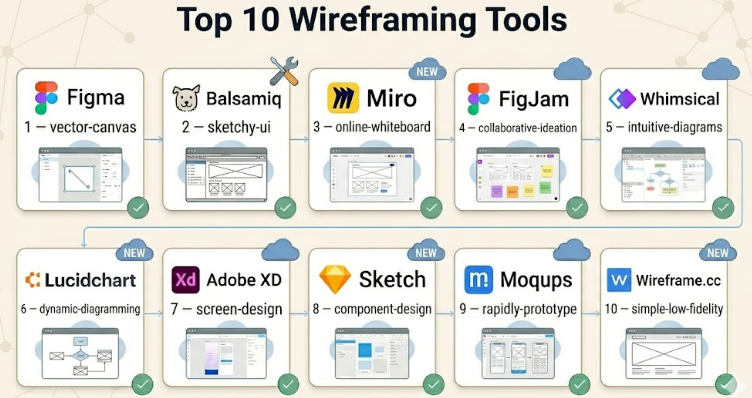
Top 10 Wireframing Tools
#1 — Figma
Short description :
Figma is a cloud-based design and wireframing tool used by UX designers, UI designers, product managers, and development teams. It supports low-fidelity wireframes, high-fidelity UI designs, prototypes, comments, shared libraries, and developer handoff. Figma is especially strong for teams that need real-time collaboration and scalable design systems. It works well for startups, agencies, SaaS companies, and enterprise product teams. Its biggest advantage is allowing multiple people to work together in one shared design file.
Key Features
- Real-time collaboration
- Wireframing and UI design tools
- Component libraries and styles
- Prototyping and screen linking
- Commenting and review workflows
- Developer handoff support
- Large template and plugin ecosystem
Pros
- Excellent for team collaboration.
- Strong balance of wireframing, UI design, and prototyping.
- Large community and template library.
Cons
- Can feel too advanced for very simple wireframes.
- Cloud-first workflow may not suit every organization.
- Larger teams need proper file and library governance.
Platforms / Deployment
Web / Windows / macOS / iOS / Android
Cloud
Security & Compliance
SSO/SAML, MFA, RBAC, and enterprise admin controls are available on higher plans. Some compliance details vary by plan and should be verified directly.
Integrations & Ecosystem
Figma has one of the strongest ecosystems for product design and wireframing workflows.
- Jira
- Slack
- Microsoft Teams
- Notion workflow support through integrations
- Developer handoff tools
- Large plugin marketplace
Support & Community
Figma has strong documentation, tutorials, templates, community files, plugins, and enterprise support options. Its community is one of the strongest in the design tool market.
#2 — Balsamiq
Short description :
Balsamiq is a dedicated low-fidelity wireframing tool designed to make early product ideas simple and fast. It uses a sketch-like style that helps teams focus on layout, content structure, and user flow instead of visual polish. Balsamiq is popular with product managers, founders, business analysts, UX designers, and non-design stakeholders. It is especially useful during early discovery, planning, and brainstorming. It is not meant for polished UI design, but it is excellent for quick wireframe thinking.
Key Features
- Low-fidelity sketch-style wireframes
- Drag-and-drop UI components
- Simple page linking
- Fast layout creation
- Web and desktop options
- Easy sharing and exporting
- Beginner-friendly interface
Pros
- Very easy to learn.
- Helps teams focus on structure instead of decoration.
- Great for early-stage product planning.
Cons
- Not suitable for high-fidelity design.
- Limited advanced prototyping features.
- Less useful once teams need polished visual design.
Platforms / Deployment
Web / Windows / macOS
Cloud / Desktop options
Security & Compliance
Security details vary by plan. Some compliance details are Not publicly stated.
Integrations & Ecosystem
Balsamiq fits well into early product planning and documentation workflows.
- Export options
- Collaboration sharing
- Product documentation workflows
- Presentation-friendly wireframes
- Works alongside design tools
- Useful for stakeholder review
Support & Community
Balsamiq has clear documentation, learning resources, and a long-standing user base. It is well known for simplicity and beginner-friendly onboarding.
#3 — Miro
Short description :
Miro is a collaborative online whiteboard that also works well for wireframing, journey mapping, brainstorming, and product discovery. It is especially useful for remote teams that need to plan ideas visually before moving into detailed design. Miro is not only a wireframing tool; it also supports workshops, diagrams, user flows, product strategy boards, and team planning. It is a strong choice for product managers, UX teams, agile teams, and consultants. Its value comes from combining wireframes with broader collaboration.
Key Features
- Online collaborative whiteboard
- Wireframe templates and UI kits
- Sticky notes and journey maps
- Real-time team collaboration
- Diagrams and user flow mapping
- Workshop facilitation tools
- Integration with productivity platforms
Pros
- Excellent for workshops and discovery.
- Easy for non-designers to participate.
- Strong collaboration features.
Cons
- Not ideal for polished UI design.
- Large boards can become messy without structure.
- Advanced wireframing depth is limited compared with design tools.
Platforms / Deployment
Web / Windows / macOS / iOS / Android
Cloud
Security & Compliance
Enterprise plans may include SSO, admin controls, and security features. Specific compliance details should be verified by plan.
Integrations & Ecosystem
Miro integrates well with collaboration, documentation, and agile workflows.
- Jira
- Slack
- Microsoft Teams
- Google Workspace
- Notion workflow support may vary
- Product planning tools
Support & Community
Miro provides strong documentation, templates, academy-style learning resources, and support plans. It has a large community of product, design, and agile users.
#4 — FigJam
Short description :
FigJam is Figma’s collaborative whiteboarding tool, often used for early wireframes, brainstorming, flow mapping, design workshops, and product planning. It is useful when teams want to move from rough ideas to structured design work inside the Figma ecosystem. FigJam works well for UX teams, product managers, researchers, and cross-functional teams. It is especially helpful for early-stage wireframes, user journeys, sitemap planning, and ideation. Teams already using Figma often find FigJam convenient because both tools work closely together.
Key Features
- Collaborative whiteboarding
- Simple wireframe creation
- Sticky notes and diagrams
- User flow mapping
- Templates and widgets
- Easy movement into Figma
- Real-time comments and collaboration
Pros
- Strong fit for teams already using Figma.
- Easy for workshops and early planning.
- Good for moving from ideas to design files.
Cons
- Not a full high-fidelity design tool by itself.
- Best value comes when paired with Figma.
- Complex boards need clear organization.
Platforms / Deployment
Web / Windows / macOS / iOS / Android
Cloud
Security & Compliance
Security features are aligned with Figma workspace plans. Enterprise-level details vary by plan and should be verified.
Integrations & Ecosystem
FigJam benefits from the wider Figma ecosystem.
- Figma design workflow
- Jira
- Slack
- Microsoft Teams
- Widgets and templates
- Product planning workflows
Support & Community
FigJam has strong documentation, templates, examples, and community resources through the Figma ecosystem.
#5 — Whimsical
Short description :
Whimsical is a visual collaboration tool for wireframes, flowcharts, mind maps, docs, and product planning. It is known for being simple, clean, and fast. Product managers, designers, founders, and startup teams use Whimsical to map ideas without heavy design complexity. It is especially useful for early-stage wireframes, user flows, product specs, and planning documents. Whimsical is a good choice when teams want speed, clarity, and lightweight collaboration.
Key Features
- Wireframes and UI blocks
- Flowcharts and diagrams
- Mind maps
- Collaborative documents
- Simple visual workspace
- Fast templates
- Team sharing and commenting
Pros
- Very clean and easy to use.
- Good for product planning and early wireframes.
- Combines diagrams, docs, and wireframes.
Cons
- Less powerful for high-fidelity UI design.
- Limited advanced prototyping capabilities.
- Not ideal for complex design systems.
Platforms / Deployment
Web
Cloud
Security & Compliance
Security details vary by plan. Some compliance details are Not publicly stated.
Integrations & Ecosystem
Whimsical supports lightweight product and planning workflows.
- Documentation workflows
- Team collaboration
- Export options
- Product planning boards
- Flowchart workflows
- Sharing and comments
Support & Community
Whimsical provides documentation and support resources. Its community is smaller than larger design platforms but strong among product and startup teams.
#6 — Lucidchart
Short description :
Lucidchart is a diagramming and visual planning tool that can also be used for wireframes, user flows, architecture diagrams, and process maps. It is especially helpful for business analysts, product managers, enterprise teams, and technical teams that need structured diagrams along with wireframes. Lucidchart is not primarily a UI design tool, but it is useful for planning layouts, workflows, systems, and information architecture. It works well when wireframing is part of broader documentation and process planning.
Key Features
- Wireframe shapes and templates
- Flowcharts and diagrams
- Process mapping
- Team collaboration
- Enterprise documentation support
- Diagram templates
- Sharing and presentation options
Pros
- Strong for structured diagrams and workflows.
- Useful for business and technical teams.
- Good enterprise collaboration features.
Cons
- Not ideal for high-fidelity UI design.
- Wireframing is not its only focus.
- Interaction prototyping is limited.
Platforms / Deployment
Web
Cloud
Security & Compliance
Enterprise plans may include SSO, admin controls, and security features. Specific compliance details should be verified by plan.
Integrations & Ecosystem
Lucidchart integrates with business, documentation, and productivity workflows.
- Google Workspace
- Microsoft 365
- Slack
- Atlassian tools
- Documentation platforms
- Diagram export workflows
Support & Community
Lucidchart has strong documentation, enterprise support options, templates, and onboarding resources.
#7 — Adobe XD
Short description :
Adobe XD is a UX/UI design and prototyping tool used for wireframes, interface layouts, and interactive prototypes. It has been popular among designers who work inside the Adobe ecosystem. Adobe XD supports artboards, components, prototypes, sharing, and design review. However, teams should carefully review current availability and product direction before adopting it for a new long-term workflow. It may still be used by existing teams, but new buyers should compare it with actively expanding alternatives.
Key Features
- Wireframing and UI design
- Artboards and components
- Interactive prototyping
- Design sharing
- Adobe ecosystem alignment
- Repeat grids and layout tools
- Basic developer handoff
Pros
- Familiar for Adobe users.
- Good for UI layouts and clickable prototypes.
- Simple interface for design workflows.
Cons
- Product direction should be verified before new adoption.
- Ecosystem momentum is lower than some competitors.
- May not be the best long-term choice for new teams.
Platforms / Deployment
Windows / macOS
Cloud sharing options may vary
Security & Compliance
Security and compliance details vary by Adobe plan and organization setup. Some details are Not publicly stated.
Integrations & Ecosystem
Adobe XD connects best with Adobe-based creative workflows.
- Adobe Creative Cloud workflows
- Design asset workflows
- Prototype sharing
- Export options
- Collaboration workflows
- Developer handoff features
Support & Community
Documentation and community resources exist, but buyers should verify current support and roadmap before selecting it as a primary tool.
#8 — Sketch
Short description :
Sketch is a macOS-based design platform used for wireframes, UI design, design systems, and clickable prototypes. It has a strong history in digital product design and remains useful for teams that prefer a desktop-first workflow. Sketch works well for UX/UI designers, agencies, and product teams using macOS. It supports symbols, shared libraries, reusable components, and design handoff. It is especially practical for teams that want wireframing and visual design in the same environment.
Key Features
- Wireframing and UI design
- Symbols and reusable components
- Shared libraries
- Prototyping and screen linking
- Plugin ecosystem
- Developer handoff
- Cloud collaboration options
Pros
- Strong macOS design experience.
- Mature component and library workflows.
- Useful plugin ecosystem.
Cons
- macOS-first limitation.
- Less ideal for mixed-device design teams.
- Cloud collaboration may not feel as broad as cloud-first tools.
Platforms / Deployment
macOS / Web collaboration
Cloud collaboration options
Security & Compliance
Security and compliance details vary by plan. Some enterprise details are Not publicly stated.
Integrations & Ecosystem
Sketch has a mature ecosystem around UI design and wireframing.
- Plugin ecosystem
- Design system libraries
- Developer handoff tools
- Export workflows
- Collaboration tools
- Third-party design workflows
Support & Community
Sketch has long-standing documentation, community resources, templates, and plugins. It remains strong among macOS-focused design teams.
#9 — Moqups
Short description :
Moqups is an online wireframing, mockup, and diagramming tool designed for fast visual planning. It is useful for product teams, founders, business analysts, and UX designers who need to create wireframes, sitemaps, user flows, and simple prototypes. Moqups sits between simple sketch tools and heavier design platforms. It is practical for teams that want quick collaboration without too much complexity. It works well for websites, dashboards, mobile app layouts, and early product concepts.
Key Features
- Wireframes and mockups
- Diagramming tools
- Sitemaps and flowcharts
- Real-time collaboration
- UI component libraries
- Comments and feedback
- Export and sharing options
Pros
- Easy to use for quick wireframes.
- Combines wireframes and diagrams.
- Good for early-stage product planning.
Cons
- Not as deep as full UI design platforms.
- Advanced prototyping features are limited.
- Smaller ecosystem than larger tools.
Platforms / Deployment
Web
Cloud
Security & Compliance
Security details vary by plan. Some compliance details are Not publicly stated.
Integrations & Ecosystem
Moqups supports lightweight collaboration and planning workflows.
- Export options
- Team comments
- Diagramming workflows
- Product documentation
- UI libraries
- Sharing links
Support & Community
Moqups provides documentation and support resources. Community size is moderate compared with major design platforms.
#10 — Wireframe.cc
Short description :
Wireframe.cc is a simple browser-based wireframing tool focused on speed and minimalism. It is best for quick rough layouts, early idea sketching, and simple page structures. The tool removes many visual distractions, helping users focus on the basic layout of a screen. It is useful for founders, product managers, students, and teams that need quick wireframes without a complex design platform. It is not suitable for advanced UI design or complex team systems, but it is helpful for fast concept work.
Key Features
- Minimal browser-based wireframing
- Simple drawing interface
- Quick layout creation
- Low-fidelity screen sketches
- Easy sharing
- Fast concept validation
- Simple page structure planning
Pros
- Very simple and fast.
- Good for quick early ideas.
- Minimal learning curve.
Cons
- Limited collaboration and design depth.
- Not suitable for high-fidelity design.
- Limited ecosystem and integrations.
Platforms / Deployment
Web
Cloud
Security & Compliance
Not publicly stated.
Integrations & Ecosystem
Wireframe.cc is intentionally simple and does not focus heavily on integrations.
- Basic sharing
- Export options may vary
- Browser-based workflow
- Simple layout planning
- Works alongside other tools
- Lightweight review process
Support & Community
Support and community resources are limited compared with larger platforms. It is best for users who need speed and simplicity.
Comparison Table (Top 10)
| Tool Name | Best For | Platform(s) Supported | Deployment | Standout Feature | Public Rating |
|---|---|---|---|---|---|
| Figma | Collaborative wireframing and design | Web, Windows, macOS, iOS, Android | Cloud | Real-time collaboration | N/A |
| Balsamiq | Low-fidelity wireframes | Web, Windows, macOS | Cloud / Desktop options | Sketch-style wireframing | N/A |
| Miro | Workshops and visual planning | Web, Windows, macOS, iOS, Android | Cloud | Whiteboard-based collaboration | N/A |
| FigJam | Early ideation and Figma workflows | Web, Windows, macOS, iOS, Android | Cloud | Figma-connected whiteboarding | N/A |
| Whimsical | Fast wireframes and flowcharts | Web | Cloud | Clean visual planning workspace | N/A |
| Lucidchart | Diagrams and structured planning | Web | Cloud | Process and flow mapping | N/A |
| Adobe XD | UI wireframes and prototypes | Windows, macOS | Cloud sharing options may vary | Adobe ecosystem alignment | N/A |
| Sketch | macOS design teams | macOS, Web collaboration | Cloud collaboration options | Mature design workflow | N/A |
| Moqups | Wireframes, mockups, and diagrams | Web | Cloud | Wireframes plus diagramming | N/A |
| Wireframe.cc | Simple quick wireframes | Web | Cloud | Minimal wireframe sketching | N/A |
Evaluation & Wireframing Tools
| Tool Name | Core (25%) | Ease (15%) | Integrations (15%) | Security (10%) | Performance (10%) | Support (10%) | Value (15%) | Weighted Total (0–10) |
|---|---|---|---|---|---|---|---|---|
| Figma | 9 | 9 | 10 | 8 | 9 | 9 | 8 | 8.95 |
| Balsamiq | 8 | 10 | 6 | 6 | 8 | 8 | 8 | 7.90 |
| Miro | 8 | 9 | 9 | 8 | 8 | 8 | 8 | 8.30 |
| FigJam | 8 | 9 | 9 | 8 | 8 | 8 | 8 | 8.25 |
| Whimsical | 8 | 9 | 7 | 7 | 8 | 7 | 8 | 7.80 |
| Lucidchart | 7 | 8 | 8 | 8 | 8 | 8 | 7 | 7.60 |
| Adobe XD | 7 | 8 | 7 | 7 | 7 | 7 | 6 | 7.00 |
| Sketch | 8 | 8 | 8 | 7 | 8 | 8 | 7 | 7.75 |
| Moqups | 7 | 8 | 6 | 6 | 7 | 7 | 8 | 7.05 |
| Wireframe.cc | 6 | 10 | 4 | 4 | 7 | 5 | 8 | 6.40 |
These scores are comparative and should be used as a practical guide, not as a universal ranking. A tool with a lower score may still be the best choice for a specific use case. For example, Wireframe.cc is limited but useful for quick sketches, while Figma is stronger for teams that need collaboration, design systems, and handoff. Always test tools with a real project before choosing one.
Which Wireframing Tools
Solo / Freelancer
Solo users usually need speed, low cost, and simple sharing. Balsamiq, Wireframe.cc, Whimsical, Moqups, and Figma are practical options. If you want very quick rough wireframes, Balsamiq or Wireframe.cc is enough. If you also need polished UI later, Figma is a better long-term choice.
SMB
Small and medium businesses should focus on collaboration, affordability, templates, and easy onboarding. Figma, Miro, FigJam, Whimsical, and Moqups work well for SMB teams. These tools help product managers, designers, developers, and stakeholders work together without creating a heavy process.
Mid-Market
Mid-market teams usually need stronger collaboration, design consistency, reusable components, and integrations. Figma, Sketch, Miro, FigJam, and Lucidchart are good options. If the team is scaling its product design function, Figma or Sketch can support both wireframing and detailed UI design.
Enterprise
Enterprise teams should evaluate security, admin controls, SSO, permissions, audit logs, support, and governance. Figma, Miro, Lucidchart, Sketch, and FigJam are stronger candidates for large teams. Enterprises should verify compliance and data controls before choosing any platform.
Budget vs Premium
Budget-focused teams can start with Wireframe.cc, Balsamiq, Moqups, Whimsical, or free/starter plans of larger platforms. Premium teams should consider Figma, Miro, FigJam, Sketch, or Lucidchart when they need collaboration, governance, templates, and integrations.
Feature Depth vs Ease of Use
If ease of use matters most, Balsamiq, Wireframe.cc, Whimsical, and Moqups are good choices. If feature depth matters more, Figma, Sketch, Miro, FigJam, and Lucidchart provide broader workflows. Teams should avoid choosing overly complex software when their main need is simple layout planning.
Integrations & Scalability-
For scalable workflows, integrations matter a lot. Figma, Miro, FigJam, and Lucidchart are stronger for teams that need to connect wireframes with project management, documentation, and collaboration tools. Smaller tools are easier to use but may become limited as teams grow.
Security & Compliance Needs
Security-focused teams should review SSO, MFA, role permissions, audit logs, sharing controls, encryption, data retention, and admin policies. Do not assume every plan includes enterprise security. If security details are not publicly stated, verify them before using the tool for sensitive product work.
Frequently Asked Questions (FAQs)
1. What is a wireframing tool?
A wireframing tool helps teams create simple screen layouts before final design or development. It shows the structure of a page or app screen, including buttons, menus, forms, content areas, and user actions.
2. Why are wireframing tools important?
Wireframing tools help teams test ideas early and avoid expensive rework. They make it easier to discuss layout, flow, and user experience before investing time in detailed UI design or coding.
3. Which wireframing tool is best for beginners?
Balsamiq, Wireframe.cc, Whimsical, and Moqups are beginner-friendly because they are simple and fast. Figma is also good for beginners who want to grow into professional UI design later.
4. Are wireframing tools different from prototyping tools?
Yes, but they overlap. Wireframing tools focus on layout and structure, while prototyping tools focus more on interaction and user flow. Many modern tools support both wireframing and prototyping.
5. Can product managers use wireframing tools?
Yes, product managers often use wireframing tools to explain ideas, map flows, and collect feedback. Tools like Balsamiq, Whimsical, Miro, FigJam, and Figma are especially useful for product planning.
6. Do wireframing tools require design skills?
Not always. Low-fidelity tools are easy for non-designers because they focus on structure instead of visual polish. However, tools like Figma and Sketch become more powerful when users understand basic design principles.
7. What is the biggest mistake while creating wireframes?
The biggest mistake is focusing too much on colors, icons, and final visuals too early. Wireframes should first solve layout, content priority, user flow, and usability before moving into high-fidelity design.
8. Are wireframing tools secure for enterprise work?
Some tools provide enterprise security features like SSO, MFA, RBAC, admin controls, and audit logs. However, security varies by vendor and plan, so enterprises should verify details before adoption.
9. Can wireframes be shared with developers?
Yes, most modern wireframing tools allow sharing, commenting, exporting, or handoff. Tools like Figma and Sketch are stronger for developer handoff, while Balsamiq and Whimsical are better for early planning.
10. How do I choose the right wireframing tool?
Start by identifying your team size, design maturity, budget, collaboration needs, and security requirements. Then shortlist 2–3 tools and test them on a real project before making a final decision.
Conclusion
Wireframing tools are essential for teams that want to build better digital products with less confusion and fewer costly mistakes. The right tool depends on your workflow, team size, budget, design maturity, and security needs. Figma is a strong all-around choice for collaborative design teams, while Balsamiq is excellent for quick low-fidelity wireframes. Miro and FigJam are great for workshops and product discovery, while Whimsical and Moqups work well for lightweight planning. Lucidchart is useful when diagrams and business workflows matter, and Sketch remains valuable for macOS-based design teams.
