Introduction
DJ mixing software helps DJs prepare, organize, mix, perform, record, and manage music sets using laptops, controllers, turntables, mixers, and digital audio libraries. These tools allow users to beatmatch tracks, set cue points, apply effects, loop sections, sync tempos, manage playlists, analyze waveforms, and perform live transitions with greater control.
DJ mixing software matters because modern DJs work across many formats and performance environments. A beginner may need easy mixing and controller support, while a professional club DJ may need advanced library management, DVS support, reliable hardware integration, low-latency performance, and strong audio stability. Mobile DJs, event DJs, radio DJs, livestream DJs, and producers also use DJ software to prepare sets, record mixes, and perform across different venues.
Common use cases include:
- Mixing songs for live DJ sets
- Preparing playlists and crates for events
- Beatmatching, looping, and cueing tracks
- Performing with DJ controllers or turntables
- Recording mixtapes and practice sessions
- Managing large music libraries
- Adding effects, samples, and transitions
- Livestreaming or broadcasting DJ performances
Buyers should evaluate:
- Hardware controller compatibility
- Beatgrid and waveform accuracy
- Library management
- Cue points, loops, and hot cues
- Effects and sampler features
- DVS and turntable support
- Streaming service compatibility
- Recording and broadcasting options
- Stability and low-latency performance
- Learning curve and community support
Best for: Beginner DJs, professional DJs, club DJs, mobile DJs, wedding DJs, radio DJs, livestream performers, music producers, and educators teaching DJ workflows.
Not ideal for: Users who only want casual music playback without live mixing, beatmatching, cueing, performance controls, or controller support. A regular media player may be enough for simple listening.
Key Trends in DJ Mixing Software
- Streaming library integration: DJs increasingly expect access to streaming-supported catalogs alongside local files, though offline and licensing limitations still matter.
- Stems and real-time separation: Modern DJ software is adding tools to isolate vocals, drums, bass, and instrumentals for creative live remixing.
- Controller-first workflows: Many DJs now start with compact controllers instead of traditional turntables or CDJs.
- AI-assisted track preparation: Beatgrid detection, key analysis, BPM analysis, and smart playlists are becoming more accurate.
- Hybrid DJ-producer workflows: DJ software increasingly overlaps with remixing, sampling, looping, and live performance tools.
- Cloud library management: DJs want cue points, playlists, and libraries synced across devices.
- Livestream and recording support: Online performance workflows have made recording and broadcast-friendly features more important.
- Better hardware ecosystems: Software choice is often tied to controller brands, mixers, audio interfaces, and club-standard setups.
- Mobile DJ flexibility: Wedding and event DJs need stable software, fast search, playlist organization, and backup-friendly workflows.
- Performance reliability: Stability, low latency, and hardware compatibility remain more important than flashy features during live gigs.
How We Selected These Tools
The DJ mixing software below was selected based on recognition, performance reliability, feature depth, hardware ecosystem, ease of use, professional adoption, and fit across beginner, intermediate, and advanced DJ workflows.
The evaluation considered:
- Market adoption and professional mindshare
- Mixing, cueing, looping, and effects capability
- Hardware controller and mixer compatibility
- Library management and track preparation
- Audio quality and playback stability
- DVS, turntable, and club setup support
- Beginner-friendly onboarding
- Advanced performance features
- Recording, streaming, and broadcast support
- Fit for solo DJs, mobile DJs, clubs, educators, and event businesses
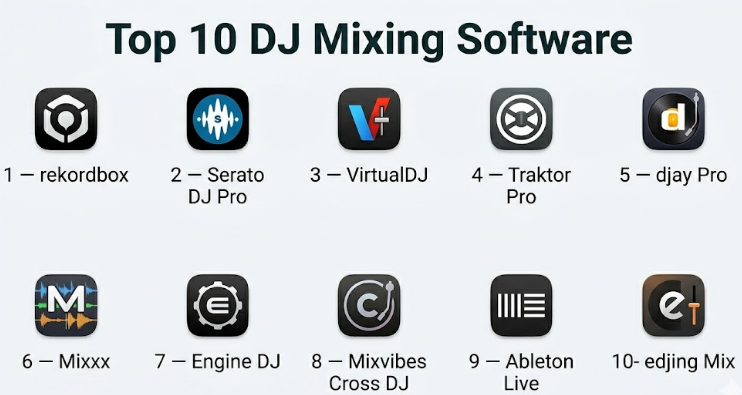
Top 10 DJ Mixing Software
#1 — rekordbox
Short description :
rekordbox is a DJ performance and music management platform closely associated with Pioneer DJ and AlphaTheta hardware. It is widely used by DJs who perform on club-standard players, controllers, and professional DJ setups. The software helps users prepare playlists, set cue points, analyze tracks, manage libraries, and perform live. It is especially valuable for DJs who want their library preparation to translate smoothly into club and festival environments.
Key Features
- Music library management
- Beatgrid, BPM, and key analysis
- Hot cues, memory cues, and loops
- Performance mode for DJ controllers
- Export mode for compatible DJ hardware
- Effects and sampler features
- Cloud and device library workflows depending on plan
Pros
- Strong fit for club and professional DJ workflows
- Excellent integration with Pioneer DJ and AlphaTheta hardware
- Good for preparing USB drives and performance libraries
Cons
- Best value is tied to compatible hardware
- Some advanced features may require paid plans
- Beginners may need time to understand library preparation
Platforms / Deployment
- Windows / macOS / iOS / Android features vary
- Local / Cloud-assisted depending on plan and setup
Security & Compliance
Not publicly stated for major enterprise compliance certifications. Users should protect accounts, local libraries, backups, and cloud sync settings.
Integrations & Ecosystem
rekordbox is strongest inside the Pioneer DJ and AlphaTheta ecosystem.
- Pioneer DJ and AlphaTheta controllers
- Club media players
- USB export workflows
- Cloud library sync depending on plan
- Streaming source support depending on region and plan
- DJ performance hardware workflows
Support & Community
rekordbox has extensive documentation, tutorials, official support resources, and a large global DJ community. Community learning resources are strong because of its professional hardware ecosystem.
#2 — Serato DJ Pro
Short description :
Serato DJ Pro is a professional DJ software platform widely used by club DJs, hip-hop DJs, scratch DJs, open-format DJs, and performers who rely on controllers, mixers, and DVS setups. It is known for stability, strong hardware support, and performance-focused workflows. Serato is especially popular among DJs who value reliable live performance, cue control, effects, and flexible hardware choices.
Key Features
- Professional DJ mixing interface
- Hot cues, loops, and beat jump
- DVS support with compatible hardware
- Effects and sampler tools
- Library organization and crates
- Stems features depending on version
- Recording and performance workflows
Pros
- Strong reputation for performance reliability
- Excellent for controller and DVS DJs
- Popular among open-format and scratch DJs
Cons
- Full features may require paid licenses or compatible hardware
- Library management can feel less polished than some alternatives
- Hardware compatibility should be checked before purchase
Platforms / Deployment
- Windows / macOS
- Local
Security & Compliance
Not publicly stated for major enterprise compliance certifications. Users should manage licenses, accounts, libraries, and backups carefully.
Integrations & Ecosystem
Serato has a strong hardware and performance ecosystem.
- DJ controllers
- Club mixers
- DVS systems
- Effects expansions depending on plan
- Streaming support depending on region and service
- Recording and performance workflows
Support & Community
Serato has official documentation, support resources, and a very strong DJ community. It is widely discussed in controller, turntablist, and performance DJ circles.
#3 — VirtualDJ
Short description :
VirtualDJ is a flexible DJ software platform used by beginners, mobile DJs, event DJs, video DJs, and professionals who want broad hardware support and many built-in features. It supports audio mixing, video mixing, karaoke workflows, stems, controllers, effects, and broadcasting. VirtualDJ is especially useful for DJs who need versatility across weddings, events, parties, livestreams, and mixed media performances.
Key Features
- Audio and video mixing
- Real-time stems separation
- Controller support
- Karaoke and video workflows
- Effects and sampler tools
- Automatic beatmatching and sync
- Recording and broadcasting features
Pros
- Very versatile for many DJ styles
- Strong for mobile and event DJs
- Good feature depth without needing one hardware ecosystem
Cons
- Interface can feel busy
- Professional licensing should be reviewed carefully
- Some club DJs may prefer rekordbox or Serato workflows
Platforms / Deployment
- Windows / macOS
- Local
Security & Compliance
Not publicly stated for major enterprise compliance certifications. Users should manage licensing, account access, and media library backups.
Integrations & Ecosystem
VirtualDJ supports a broad range of DJ workflows.
- DJ controllers
- Video and karaoke setups
- Broadcasting workflows
- Streaming source support depending on plan and region
- Effects and sample workflows
- Event DJ performance setups
Support & Community
VirtualDJ has documentation, forums, tutorials, and a large user community. It is especially popular among mobile DJs and flexible performance users.
#4 — Traktor Pro
Short description :
Traktor Pro is a DJ mixing software platform known for creative performance features, effects, remix decks, looping, and integration with Native Instruments hardware. It is useful for electronic music DJs, techno DJs, house DJs, live remix performers, and users who want deeper control over performance layers. Traktor has long been respected for creative mixing and effects-based workflows.
Key Features
- Four-deck mixing
- Advanced effects
- Remix decks
- Looping and beat jump
- Cue points and beatgrid tools
- Controller mapping
- Native Instruments hardware integration
Pros
- Strong creative performance features
- Excellent effects and remix workflows
- Good for electronic music and live remixing
Cons
- Hardware ecosystem is more specific
- Beginners may find deeper features complex
- Some workflows may feel less mainstream than rekordbox or Serato
Platforms / Deployment
- Windows / macOS
- Local
Security & Compliance
Not publicly stated for major enterprise compliance certifications. Users should manage licenses, libraries, and backups properly.
Integrations & Ecosystem
Traktor works best with Native Instruments and advanced controller workflows.
- Native Instruments controllers
- Custom MIDI mappings
- Remix decks
- Effects workflows
- Electronic music performance setups
- Audio interface and mixer workflows
Support & Community
Traktor has documentation, official support, and a dedicated user community. It remains respected among electronic music DJs and creative performance users.
#5 — djay Pro
Short description :
djay Pro is a modern DJ software platform designed for users who want a polished interface, AI-assisted features, streaming-friendly workflows, and strong Apple ecosystem support. It is suitable for beginners, mobile DJs, casual performers, and professionals who want an intuitive interface with advanced features like neural mixing. djay Pro is especially strong for users who perform on Mac, iPad, or iPhone.
Key Features
- AI-assisted neural mixing features
- Two-deck and multi-deck mixing depending on platform
- Controller support
- Streaming source support depending on region and plan
- Loops, cues, and effects
- Automix features
- Touch-friendly interface on supported devices
Pros
- Very user-friendly interface
- Strong Apple device experience
- Good AI-assisted creative mixing tools
Cons
- Best experience may be on Apple devices
- Professional hardware support should be verified
- Streaming access depends on service availability and licensing
Platforms / Deployment
- macOS / iOS / iPadOS / Windows / Android features vary
- Local / Cloud-assisted depending on setup
Security & Compliance
Not publicly stated for major enterprise compliance certifications. Users should protect accounts, device access, and music libraries.
Integrations & Ecosystem
djay Pro works well for modern and mobile DJ workflows.
- Apple ecosystem
- DJ controllers
- Touchscreen mixing
- Streaming-supported libraries depending on region
- AI-assisted mixing
- Automix and casual performance workflows
Support & Community
djay Pro has documentation and user support resources. It is popular among beginner DJs, mobile users, and Apple-focused performers.
#6 — Mixxx
Short description :
Mixxx is a free and open-source DJ mixing software platform suitable for beginners, hobbyists, educators, Linux users, and technical DJs who want a capable DJ tool without subscription cost. It supports mixing, cues, loops, BPM detection, controller mapping, and basic performance workflows. Mixxx is a strong option for learning DJ fundamentals and for users who value open-source software.
Key Features
- Free and open-source DJ software
- Two-deck and multi-deck mixing features
- BPM and beatgrid tools
- Cue points and loops
- Controller mapping
- Recording support
- Cross-platform availability
Pros
- Free and open-source
- Good for learning DJ basics
- Works across major desktop operating systems
Cons
- Interface and polish may lag behind premium tools
- Hardware support may require configuration
- Advanced professional workflows may be limited
Platforms / Deployment
- Windows / macOS / Linux
- Local
Security & Compliance
Open-source software. Major enterprise compliance certifications are Not publicly stated. Users should install from trusted sources and keep software updated.
Integrations & Ecosystem
Mixxx supports flexible learning and technical DJ workflows.
- MIDI controller mapping
- Local music libraries
- Recording workflows
- Open-source customization
- Linux DJ setups
- Educational DJ practice
Support & Community
Mixxx has community documentation, forums, and open-source contributor support. It is strong for learners and technical users comfortable with community-driven tools.
#7 — Engine DJ
Short description :
Engine DJ is a DJ software and operating ecosystem associated with Denon DJ and standalone DJ hardware workflows. It helps DJs manage music libraries, prepare tracks, analyze files, set cue points, and perform on compatible standalone systems. Engine DJ is especially relevant for DJs using Denon DJ or Engine-powered hardware who want laptop-free performance and modern standalone workflows.
Key Features
- Music library preparation
- Track analysis and beatgrids
- Hot cues and loops
- Standalone DJ hardware support
- Playlist and crate organization
- Cloud or streaming features depending on hardware and setup
- Performance-focused device ecosystem
Pros
- Strong for standalone DJ hardware workflows
- Good for laptop-free performance preparation
- Modern ecosystem for compatible devices
Cons
- Best value depends on compatible hardware
- Smaller ecosystem than some older DJ platforms
- Users should validate controller and library compatibility
Platforms / Deployment
- Windows / macOS for desktop preparation
- Standalone hardware ecosystem
- Local / Device-based workflows
Security & Compliance
Not publicly stated for major enterprise compliance certifications. Users should manage accounts, library backups, and device updates carefully.
Integrations & Ecosystem
Engine DJ is strongest in compatible DJ hardware environments.
- Denon DJ hardware
- Standalone DJ systems
- USB and library export workflows
- Streaming support depending on device and region
- Cue and playlist preparation
- Performance device workflows
Support & Community
Engine DJ has official documentation and a growing community among Denon DJ and standalone hardware users.
#8 — Mixvibes Cross DJ
Short description :
Mixvibes Cross DJ is DJ mixing software designed for users who want a practical DJ platform with mixing, cueing, looping, effects, and controller support. It is suitable for beginners, hobbyists, and mobile DJs who need an approachable DJ workflow. Cross DJ has also been known for mobile and desktop DJing options, making it useful for users who want flexibility across devices.
Key Features
- Two-deck DJ mixing
- Cue points and loops
- Effects and EQ controls
- Controller support
- Music library management
- Recording features
- Mobile DJ options depending on version
Pros
- Approachable for beginners
- Useful for simple DJ setups
- Good for casual and mobile workflows
Cons
- Smaller ecosystem than Serato, rekordbox, or VirtualDJ
- Advanced professional features may be limited
- Hardware support should be checked carefully
Platforms / Deployment
- Windows / macOS / iOS / Android features vary by version
- Local
Security & Compliance
Not publicly stated for major enterprise compliance certifications. Users should manage app sources, device permissions, and local libraries properly.
Integrations & Ecosystem
Cross DJ fits straightforward DJ workflows.
- DJ controllers
- Local music libraries
- Mobile DJ setups
- Recording workflows
- Cue and loop preparation
- Basic performance workflows
Support & Community
Support resources are available, though the community is smaller than larger DJ platforms. It can still be useful for beginners and casual users.
#9 — Ableton Live
Short description :
Ableton Live is not traditional DJ software, but it is widely used by DJs, producers, and live performers for hybrid DJ sets, remixing, looping, warping, sampling, and live arrangement. It is especially useful for electronic music performers who want to combine DJing with production elements. Ableton Live is ideal for users who want to perform original edits, stems, loops, and live arrangements rather than only mixing finished tracks.
Key Features
- Session View for live performance
- Audio warping and tempo matching
- Loop launching
- MIDI controller support
- Effects and instruments
- Recording and arrangement workflows
- Stems, samples, and production integration
Pros
- Excellent for hybrid DJ-producer sets
- Powerful creative performance environment
- Strong for electronic music and live remixing
Cons
- Not a traditional DJ deck interface
- Higher learning curve
- May be overkill for basic DJ mixing
Platforms / Deployment
- Windows / macOS
- Local
Security & Compliance
Not publicly stated for major enterprise compliance certifications. Users should manage licenses, project files, plugins, and backups carefully.
Integrations & Ecosystem
Ableton Live supports deep creative performance workflows.
- MIDI controllers
- Audio interfaces
- Plugins
- Samples and loops
- Live performance setups
- Music production workflows
Support & Community
Ableton has strong documentation, official learning resources, and a large global community of producers, live performers, and electronic musicians.
#10 — edjing Mix
Short description :
edjing Mix is a mobile-focused DJ app designed for casual DJs, beginners, and users who want to mix music directly from phones or tablets. It includes basic DJ controls, effects, cue points, loops, and a simple interface for mobile performance. It is not a replacement for professional club software, but it is useful for learning, casual mixing, parties, and mobile-first users.
Key Features
- Mobile DJ mixing
- Two-deck interface
- Cue points and loops
- Basic effects
- EQ controls
- Automix features
- Touchscreen-friendly workflow
Pros
- Easy to start on mobile devices
- Good for casual mixing and learning
- No full desktop setup required
Cons
- Not ideal for professional club setups
- Limited hardware control compared with desktop DJ software
- Feature depth depends on mobile plan and device capability
Platforms / Deployment
- iOS / Android
- Mobile / Cloud-assisted features may vary
Security & Compliance
Not publicly stated for major enterprise compliance certifications. Users should manage app permissions, account access, and music source permissions carefully.
Integrations & Ecosystem
edjing Mix is designed for mobile DJ workflows.
- Mobile music libraries
- Touchscreen mixing
- Basic effects
- Automix
- Casual performance workflows
- Mobile sharing and recording features depending on setup
Support & Community
edjing Mix has support resources and a casual user community. It is best suited for beginners and mobile-first users.
Comparison Table
| Tool Name | Best For | Platform(s) Supported | Deployment | Standout Feature | Public Rating |
|---|---|---|---|---|---|
| rekordbox | Club DJs and Pioneer DJ users | Windows, macOS, mobile features vary | Local / Cloud-assisted | Club-ready library preparation | N/A |
| Serato DJ Pro | Open-format, scratch, and controller DJs | Windows, macOS | Local | Reliable controller and DVS performance | N/A |
| VirtualDJ | Mobile, event, and video DJs | Windows, macOS | Local | Versatile audio, video, karaoke, and stems | N/A |
| Traktor Pro | Electronic and creative performance DJs | Windows, macOS | Local | Effects, remix decks, and creative mixing | N/A |
| djay Pro | Apple users and modern mobile DJs | macOS, iOS, iPadOS, Windows, Android features vary | Local / Cloud-assisted | AI-assisted neural mixing | N/A |
| Mixxx | Beginners and open-source users | Windows, macOS, Linux | Local | Free open-source DJ mixing | N/A |
| Engine DJ | Denon DJ and standalone hardware users | Windows, macOS, standalone hardware | Local / Device-based | Standalone DJ hardware workflow | N/A |
| Mixvibes Cross DJ | Beginners and casual mobile DJs | Windows, macOS, iOS, Android features vary | Local | Simple DJ mixing workflow | N/A |
| Ableton Live | Hybrid DJ-producer performances | Windows, macOS | Local | Live remixing and production integration | N/A |
| edjing Mix | Mobile-first casual DJs | iOS, Android | Mobile / Cloud-assisted | Touchscreen mobile DJ mixing | N/A |
Evaluation & DJ Mixing Software
| Tool Name | Core (25%) | Ease (15%) | Integrations (15%) | Security (10%) | Performance (10%) | Support (10%) | Value (15%) | Weighted Total (0–10) |
|---|---|---|---|---|---|---|---|---|
| rekordbox | 9 | 7 | 9 | 7 | 9 | 8 | 8 | 8.15 |
| Serato DJ Pro | 9 | 8 | 9 | 7 | 9 | 8 | 8 | 8.35 |
| VirtualDJ | 9 | 8 | 8 | 7 | 8 | 8 | 8 | 8.15 |
| Traktor Pro | 8 | 7 | 8 | 7 | 8 | 8 | 8 | 7.75 |
| djay Pro | 8 | 9 | 8 | 7 | 8 | 7 | 8 | 8.00 |
| Mixxx | 7 | 7 | 6 | 8 | 7 | 7 | 10 | 7.35 |
| Engine DJ | 8 | 7 | 8 | 7 | 8 | 8 | 8 | 7.75 |
| Mixvibes Cross DJ | 7 | 8 | 6 | 7 | 7 | 6 | 8 | 7.10 |
| Ableton Live | 9 | 5 | 9 | 8 | 9 | 9 | 7 | 8.05 |
| edjing Mix | 6 | 9 | 5 | 7 | 7 | 6 | 8 | 6.85 |
The scoring is comparative and should be used as a practical shortlist guide, not a universal ranking. Serato DJ Pro, rekordbox, and VirtualDJ are strong all-round professional options. Traktor Pro and Ableton Live are better for creative and electronic performance workflows. Mixxx is valuable for free and open-source learning, while djay Pro is excellent for mobile and Apple-friendly workflows.
Which DJ Mixing Software Is Right for You?
Solo / Freelancer
Solo DJs should choose software based on performance style and hardware. If you are starting out, Mixxx, djay Pro, VirtualDJ, or entry-level rekordbox setups can help you learn mixing, cues, loops, and playlists. If you plan to play professional gigs, Serato DJ Pro or rekordbox may be better long-term choices.
Freelance DJs should prioritize reliability, controller compatibility, backup library management, and quick search during live events.
SMB
Small DJ businesses, wedding DJs, event teams, and entertainment companies need stable software that supports quick setup, large music libraries, playlists, requests, recording, and backup workflows. VirtualDJ, Serato DJ Pro, rekordbox, and djay Pro are practical candidates.
For mobile event businesses, video support, karaoke features, automix, and fast library search may matter more than club-standard workflows.
Mid-Market
Mid-market entertainment teams, DJ academies, event production firms, and music training organizations should standardize around tools that match their hardware and training goals. rekordbox is useful if students or DJs will use club-standard Pioneer DJ workflows. Serato DJ Pro is strong for open-format and scratch-based training.
VirtualDJ can be useful for event-oriented training because it supports many performance scenarios, including audio, video, and mobile DJ workflows.
Enterprise
Large entertainment companies, venues, clubs, training institutes, and media organizations should evaluate software based on hardware ecosystem, licensing, performance stability, training requirements, and support. rekordbox and Serato DJ Pro are common choices in professional environments, while Engine DJ may be relevant for standalone hardware setups.
Enterprises should not choose only by features. They should validate hardware compatibility, license management, backup workflows, offline performance, update policies, and support expectations.
Budget vs Premium
Budget-focused users can start with Mixxx or mobile DJ apps to learn basic mixing. Some hardware bundles may also unlock software features depending on the controller.
Premium software is worth considering when the DJ needs reliable gig performance, controller support, DVS, stems, library management, advanced effects, recording, or professional hardware integration.
Feature Depth vs Ease of Use
For ease of use, djay Pro, edjing Mix, Mixvibes Cross DJ, and basic VirtualDJ workflows are more approachable for beginners.
For feature depth, Serato DJ Pro, rekordbox, VirtualDJ, Traktor Pro, and Ableton Live provide more professional control. Ableton Live is very deep, but it is better for hybrid DJ-producer performances than traditional deck-based DJing.
Integrations & Scalability
Software choice should match hardware. rekordbox works best with Pioneer DJ and AlphaTheta workflows. Serato DJ Pro works well with many controllers, mixers, and DVS setups. Engine DJ is best for compatible standalone hardware. Traktor Pro fits Native Instruments and custom controller workflows.
Scalability depends on how well the software handles large libraries, controller upgrades, performance backups, cue point management, and export workflows.
Security & Compliance Needs
For individual DJs, security mainly means protecting music libraries, licenses, cloud accounts, backups, and performance devices. Always keep offline backups of music and playlists before a live event.
For businesses and training institutes, license management, account ownership, device access, copyright-compliant music usage, and backup procedures are important. DJ software does not replace proper music licensing or public performance rights.
Frequently Asked Questions
1. What is DJ mixing software?
DJ mixing software is an application that helps DJs play, mix, cue, loop, beatmatch, organize, and perform music using a computer, controller, mixer, turntables, or mobile device. It replaces or enhances traditional DJ hardware workflows.
2. Which DJ software is best for beginners?
Mixxx, djay Pro, VirtualDJ, and beginner-friendly rekordbox setups are good starting points. Beginners should choose software that works with their controller and teaches core skills like beatmatching, cueing, looping, and library organization.
3. Which DJ software is best for professional club DJs?
rekordbox and Serato DJ Pro are strong choices for many professional DJs. rekordbox is especially relevant for club and Pioneer DJ workflows, while Serato DJ Pro is strong for controller, scratch, and open-format DJs.
4. Which DJ software is best for mobile DJs?
VirtualDJ, Serato DJ Pro, rekordbox, and djay Pro can all work for mobile DJs. VirtualDJ is especially versatile for events because it supports audio, video, karaoke, recording, and many controller workflows.
5. Can I DJ without a controller?
Yes, most DJ software can be used with a keyboard and mouse, but a controller gives better hands-on control. For learning and live performance, a controller is strongly recommended because it improves timing, transitions, and workflow.
6. What is DVS in DJ software?
DVS means Digital Vinyl System. It allows DJs to control digital music files using special control vinyl or CDs with turntables or CDJs. Serato DJ Pro, rekordbox, Traktor Pro, and some other tools support DVS depending on hardware and license.
7. What are stems in DJ software?
Stems allow DJs to separate parts of a track, such as vocals, drums, bass, and instruments. This helps DJs create live mashups, remove vocals, isolate beats, and perform more creative transitions.
8. Can DJ software use streaming music?
Some DJ software supports streaming services depending on region, licensing, and plan. However, streaming may have restrictions, and DJs should not rely only on streaming for important live events without a backup plan.
9. What is the biggest mistake beginner DJs make?
The biggest mistake is relying too much on sync and effects without learning timing, phrasing, beatmatching, and music selection. Software helps, but good DJing still depends on listening skill and crowd understanding.
10. Is Ableton Live DJ software?
Ableton Live is not traditional DJ software, but many DJs use it for hybrid DJ-producer performances, live remixing, loops, samples, and electronic sets. It is powerful but has a different workflow from deck-based DJ tools.
11. How important is hardware compatibility?
Hardware compatibility is very important. Before choosing DJ software, check whether your controller, mixer, audio interface, or standalone hardware is officially supported. Unsupported hardware can create setup problems during performance.
12. How should I choose DJ mixing software?
Start with your DJ style, hardware, budget, and future goals. Choose rekordbox for club workflows, Serato DJ Pro for open-format and DVS performance, VirtualDJ for mobile event flexibility, Traktor Pro for creative electronic sets, djay Pro for Apple-friendly workflows, and Mixxx for free open-source learning.
Conclusion
DJ mixing software is the foundation of modern digital DJ performance. The right choice depends on your hardware, music style, performance environment, budget, and long-term goals. rekordbox is strong for club and Pioneer DJ workflows, Serato DJ Pro is excellent for open-format, controller, and DVS DJs, and VirtualDJ is highly versatile for mobile and event DJs. Traktor Pro is ideal for creative electronic performance, djay Pro works well for modern Apple-friendly and AI-assisted mixing, and Mixxx is a valuable free option for learning. Ableton Live is best for hybrid DJ-producer sets rather than traditional deck mixing.
