Introduction
Goal tracking apps have evolved into essential tools for individuals and teams seeking to improve focus, productivity, and long-term achievement. In the landscape has shifted towards highly integrated, AI-driven solutions that not only track progress but also offer actionable insights and predictive analytics. These platforms help users set meaningful objectives, monitor performance, and maintain accountability in both personal and professional contexts.
Real-world use cases include:
- Freelancers monitoring project milestones and deadlines.
- Marketing teams aligning campaign goals with quarterly OKRs.
- Developers and product teams tracking feature delivery against sprints.
- Health and wellness enthusiasts monitoring fitness, nutrition, and lifestyle goals.
- Educational institutions guiding students with progress tracking and personalized study plans.
When evaluating goal tracking apps, buyers should consider:
- Goal-setting flexibility (OKRs, KPIs, personal targets)
- Real-time progress tracking and visualization
- AI and predictive analytics support
- Collaboration and team management features
- Integration capabilities with existing software
- Mobile and cross-platform accessibility
- Security and data privacy standards
- Reporting and export options
- Ease of use and onboarding
- Customer support quality
Best for: Professionals, teams, SMBs, and enterprises looking to align objectives and measure progress efficiently.
Not ideal for: Users with very basic needs or those relying on manual spreadsheets; simple task managers may suffice instead.
Key Trends in Goal Tracking Apps
- AI-driven insights: Predictive analytics and AI coaching suggest goal adjustments.
- Integration-first platforms: Seamless connections with calendars, task management, CRM, and messaging tools.
- Cross-platform accessibility: Mobile-first approaches and web dashboards for real-time updates.
- Gamification & engagement: Badges, streaks, and leaderboards to enhance motivation.
- Security & compliance: SOC 2, GDPR, and enterprise-grade encryption becoming standard.
- Automation of reminders: AI-powered nudges, automatic check-ins, and progress summaries.
- Customizable dashboards: Users can tailor visualizations to their workflow or company OKRs.
- Adaptive goal setting: AI adapts targets based on historical performance and trends.
- Affordable tiered pricing: Freemium to enterprise pricing models, balancing feature depth with cost.
- Data-driven performance reviews: Integration with HR or performance systems for actionable insights.
How We Selected These Tools (Methodology)
- Market adoption & mindshare: Tools widely used across industries and regions.
- Feature completeness: Platforms offering robust goal creation, tracking, reporting, and collaboration.
- Reliability/performance: Minimal downtime, fast synchronization, responsive mobile/web apps.
- Security posture: Platforms with strong authentication, encryption, and compliance adherence.
- Integration ecosystem: Availability of APIs, native integrations, and plug-ins for popular software.
- Customer fit across segments: Evaluated for freelancers, SMBs, mid-market, and enterprise users.
- Ease of use & onboarding: Simple setup, intuitive interfaces, and helpful tutorials.
- Community & support: Active user communities, documentation, and responsive support channels.
- Innovation & AI adoption: Use of AI for predictive analytics, suggestions, and task prioritization.
- Scalability: Ability to support growing teams, additional goals, and cross-department workflows.
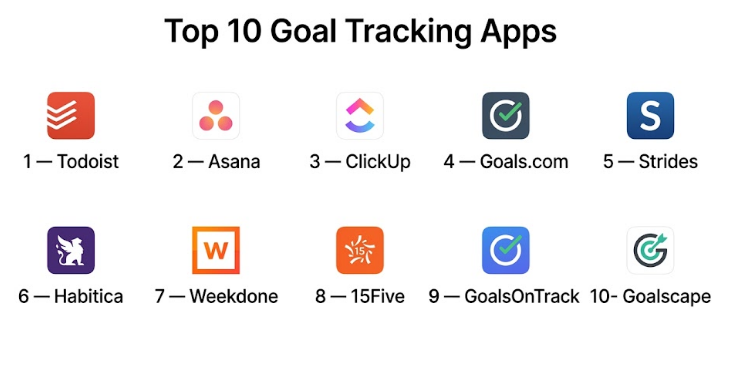
Top 10 Goal Tracking Apps
#1 — Todoist
Short description : Todoist is a versatile task and goal management app for individuals and teams, offering a blend of simplicity and productivity features. Suitable for freelancers, SMBs, and large teams needing structured task tracking.
Key Features
- Task and sub-task management with deadlines
- Goal tracking with progress visualization
- Natural language input for tasks
- Productivity analytics and trends
- Collaboration on shared projects
- Priority levels and custom labels
- Mobile and desktop apps with offline support
Pros
- Simple and intuitive interface
- Extensive integrations with calendars and messaging tools
Cons
- Limited advanced reporting in free version
- AI goal suggestions not as robust as competitors
Platforms / Deployment
- Web / Windows / macOS / iOS / Android
- Cloud
Security & Compliance
- SSO/SAML
- Not publicly stated for SOC 2 or ISO certifications
Integrations & Ecosystem
Todoist integrates widely across productivity tools:
- Google Calendar
- Slack
- Microsoft Teams
- Zapier
- Outlook
- Alexa voice commands
Support & Community
- Extensive documentation
- Community forums
- Email and chat support
- Active user base
#2 — Asana
Short description : Asana is an enterprise-grade task and goal management platform designed for teams to track objectives, projects, and outcomes in a collaborative environment.
Key Features
- Project and goal mapping with OKRs
- Timeline and Kanban views
- AI-powered workload insights
- Reporting dashboards for managers
- Task dependencies and priorities
- Integration with major enterprise apps
- Templates for goal setting
Pros
- Excellent for team collaboration
- Strong project visualization
Cons
- Can be complex for individual users
- Premium pricing required for advanced features
Platforms / Deployment
- Web / Windows / macOS / iOS / Android
- Cloud
Security & Compliance
- SSO/SAML, MFA
- SOC 2 Type II
- GDPR
Integrations & Ecosystem
- Slack, Microsoft Teams, Google Workspace
- Salesforce, Jira, Zoom
- Zapier and custom APIs
Support & Community
- Knowledge base and tutorials
- Customer support tiers for enterprise
- Vibrant community forum
#3 — ClickUp
Short description : ClickUp is a flexible goal and task management platform for individuals and teams, supporting project management, OKRs, and personal productivity tracking.
Key Features
- Goal hierarchy and progress tracking
- Multiple project views (list, board, Gantt)
- Time tracking and reminders
- AI assistance for task management
- Customizable dashboards
- Templates for recurring goals
- Mobile and desktop synchronization
Pros
- Highly customizable workflows
- Affordable pricing tiers
Cons
- Steeper learning curve
- Occasional interface clutter
Platforms / Deployment
- Web / Windows / macOS / Linux / iOS / Android
- Cloud
Security & Compliance
- SSO/SAML, encryption
- GDPR
- Not publicly stated for SOC 2
Integrations & Ecosystem
- Google Workspace, Slack, Zoom
- Zapier, GitHub, Outlook
- API for custom integrations
Support & Community
- Documentation and knowledge base
- Online forums
- Responsive support
#4 — Goals.com
Short description : Goals.com is a personal and professional goal-setting platform emphasizing habit building, milestone tracking, and AI recommendations to maintain focus.
Key Features
- Milestone creation and monitoring
- AI-driven goal recommendations
- Habit tracking and streaks
- Reminders and notifications
- Dashboard visualization
- Community challenges
- Mobile-first design
Pros
- Strong personal goal tracking features
- Motivational reminders and habit streaks
Cons
- Limited enterprise features
- Smaller integration ecosystem
Platforms / Deployment
- Web / iOS / Android
- Cloud
Security & Compliance
- Not publicly stated
Integrations & Ecosystem
- Limited integrations, mostly calendar sync
- API access Varies / N/A
Support & Community
- Email support
- Community forums
- Documentation
#5 — Strides
Short description : Strides focuses on individual goal and habit tracking, with visual progress charts and customizable milestones for personal or small team use.
Key Features
- Habit and goal trackers
- Progress charts and streak monitoring
- Custom reminders
- Check-ins and journaling
- Dashboard overviews
- Templates for recurring goals
Pros
- Intuitive personal goal tracking
- Motivational progress visualizations
Cons
- Limited collaboration features
- Web version less robust than mobile
Platforms / Deployment
- iOS / Web
- Cloud
Security & Compliance
- Not publicly stated
Integrations & Ecosystem
- Apple Health
- Calendar sync
- Varies / N/A
Support & Community
- Email support
- Limited online resources
#6 — Habitica
Short description : Habitica gamifies goal tracking, turning tasks and objectives into role-playing game elements, appealing to individuals and small teams motivated by gamification.
Key Features
- Gamified task and goal tracking
- Reward and punishment mechanics
- Team challenges
- Habit and streak tracking
- Mobile and web access
- Avatar progression and leveling
Pros
- Highly motivating gamified approach
- Community-driven challenges
Cons
- Less suited for enterprise reporting
- Learning curve for gamified system
Platforms / Deployment
- Web / iOS / Android
- Cloud
Security & Compliance
- Not publicly stated
Integrations & Ecosystem
- Basic calendar sync
- API access Varies / N/A
Support & Community
- Community forums
- Documentation available
#7 — Weekdone
Short description : Weekdone is an OKR-focused goal tracking app designed for teams to set, monitor, and review objectives with weekly progress reports.
Key Features
- OKR and KPI tracking
- Weekly check-ins
- Progress dashboards
- Reporting for management
- Team collaboration features
- Custom reminders and notifications
Pros
- Excellent for structured enterprise goals
- Clear reporting for leadership
Cons
- Limited personal goal features
- Mobile experience slightly limited
Platforms / Deployment
- Web / iOS / Android
- Cloud
Security & Compliance
- SSO/SAML
- GDPR
- Not publicly stated for SOC 2
Integrations & Ecosystem
- Slack, Google Workspace, Jira
- Zapier and APIs for custom workflows
Support & Community
- Documentation and knowledge base
- Email support
- Active user community
#8 — 15Five
Short description : 15Five focuses on employee engagement and goal tracking, blending OKRs with performance reviews and continuous feedback for mid-market to enterprise teams.
Key Features
- OKR tracking
- Weekly check-ins
- Performance feedback integration
- Goal dashboards
- Reporting and analytics
- Engagement surveys
Pros
- Combines goal tracking with employee performance insights
- Supports mid-market and enterprise scalability
Cons
- Pricing can be high for small teams
- Personal goal features limited
Platforms / Deployment
- Web / iOS / Android
- Cloud
Security & Compliance
- SSO/SAML, MFA
- GDPR
- Not publicly stated for SOC 2
Integrations & Ecosystem
- Slack, Microsoft Teams, Google Workspace
- API access for custom workflows
Support & Community
- Dedicated support for enterprise
- Documentation and onboarding materials
#9 — GoalsOnTrack
Short description : GoalsOnTrack is a personal and professional goal management tool designed for structured goal setting, habit tracking, and progress reporting.
Key Features
- SMART goal creation
- Habit tracker
- Milestones and sub-goals
- Progress visualization
- Task management
- Templates for goal planning
Pros
- Comprehensive goal planning tools
- Detailed progress tracking
Cons
- Interface feels dated
- Limited collaboration features
Platforms / Deployment
- Web / Windows / iOS / Android
- Cloud
Security & Compliance
- Not publicly stated
Integrations & Ecosystem
- Calendar sync
- Varies / N/A
Support & Community
- Email support
- Documentation available
#10 — Goalscape
Short description : Goalscape visualizes goals using a circular, hierarchical structure, ideal for visual planners and project managers tracking multiple objectives simultaneously.
Key Features
- Circular goal mapping
- Progress tracking and percentages
- Task and sub-goal hierarchy
- Collaborative planning
- Milestone markers
- Visual dashboards
Pros
- Unique visual approach for goal planning
- Good for complex projects
Cons
- Learning curve for new users
- Limited integrations
Platforms / Deployment
- Web / Windows / macOS / iOS
- Cloud
Security & Compliance
- Not publicly stated
Integrations & Ecosystem
- Basic calendar sync
- Varies / N/A
Support & Community
- Documentation
- Email support
- Small active user community
Comparison Table (Top 10)
| Tool Name | Best For | Platform(s) Supported | Deployment | Standout Feature | Public Rating |
|---|---|---|---|---|---|
| Todoist | Individuals, SMBs | Web, Windows, macOS, iOS, Android | Cloud | Natural language task input | N/A |
| Asana | Teams, Enterprises | Web, Windows, macOS, iOS, Android | Cloud | Project visualization & OKRs | N/A |
| ClickUp | Teams, SMBs | Web, Windows, macOS, Linux, iOS, Android | Cloud | Customizable workflows | N/A |
| Goals.com | Individuals, small teams | Web, iOS, Android | Cloud | AI-driven goal suggestions | N/A |
| Strides | Individuals, SMBs | iOS, Web | Cloud | Habit & streak tracking | N/A |
| Habitica | Individuals, small teams | Web, iOS, Android | Cloud | Gamified goal tracking | N/A |
| Weekdone | Teams, Enterprises | Web, iOS, Android | Cloud | Weekly OKR check-ins | N/A |
| 15Five | Mid-market, Enterprise | Web, iOS, Android | Cloud | Integrated employee feedback | N/A |
| GoalsOnTrack | Individuals, SMBs | Web, Windows, iOS, Android | Cloud | SMART goal planning | N/A |
| Goalscape | Visual planners, Project managers | Web, Windows, macOS, iOS | Cloud | Circular visual goal mapping | N/A |
Evaluation & Goal Tracking Apps
| Tool Name | Core (25%) | Ease (15%) | Integrations (15%) | Security (10%) | Performance (10%) | Support (10%) | Value (15%) | Weighted Total (0–10) |
|---|---|---|---|---|---|---|---|---|
| Todoist | 8 | 9 | 8 | 7 | 9 | 8 | 9 | 8.25 |
| Asana | 9 | 8 | 9 | 9 | 9 | 9 | 8 | 8.75 |
| ClickUp | 9 | 7 | 9 | 8 | 9 | 8 | 9 | 8.65 |
| Goals.com | 7 | 8 | 6 | 6 | 7 | 7 | 8 | 7.15 |
| Strides | 7 | 9 | 5 | 6 | 7 | 7 | 8 | 7.2 |
| Habitica | 6 | 7 | 5 | 6 | 7 | 6 | 7 | 6.55 |
| Weekdone | 8 | 8 | 8 | 7 | 8 | 8 | 7 | 7.85 |
| 15Five | 8 | 7 | 8 | 8 | 8 | 9 | 7 | 7.85 |
| GoalsOnTrack | 7 | 7 | 6 | 6 | 7 | 7 | 8 | 7.05 |
| Goalscape | 8 | 6 | 5 | 6 | 7 | 7 | 7 | 6.85 |
Interpretation: Scores reflect comparative strengths across key categories. Weighted totals help identify platforms that balance core features, usability, integrations, security, and value. Higher scores indicate more comprehensive solutions for a broad range of users.
Which Goal Tracking Apps
Solo / Freelancer
- Todoist, Strides, and Goals.com are ideal for individuals managing personal tasks or freelance projects.
SMB
- ClickUp, Asana, and GoalsOnTrack provide a balance of collaboration, reporting, and ease of adoption.
Mid-Market
- Weekdone and 15Five deliver structured OKRs and team alignment suitable for mid-sized organizations.
Enterprise
- Asana and 15Five excel at enterprise-grade security, integrations, and reporting.
Budget vs Premium
- Free or freemium tools: Todoist, Strides, Habitica.
- Premium/Enterprise: Asana, ClickUp, 15Five for advanced reporting, integrations, and security.
Feature Depth vs Ease of Use
- Feature-heavy tools: ClickUp, Asana, 15Five — may require onboarding.
- Lightweight and intuitive: Todoist, Strides, Goals.com — faster adoption for individuals.
Integrations & Scalability
- Asana, ClickUp, Weekdone — broad ecosystem, scalable to large teams.
- Limited integrations: Habitica, Strides, Goalscape — better for single users or small teams.
Security & Compliance Needs
- Enterprise-focused: Asana, 15Five, Weekdone — SSO, GDPR, SOC 2 readiness.
- Personal use: Todoist, Strides, Habitica — basic security sufficient for individual data.
Frequently Asked Questions (FAQs)
1. What pricing models do goal tracking apps offer?
Most platforms provide freemium plans with basic tracking, while premium tiers unlock advanced reporting, integrations, and AI features. Enterprise subscriptions often include dedicated support and compliance guarantees.
2. How easy is onboarding for new users?
Ease varies by platform; apps like Todoist and Strides are intuitive for individuals, while ClickUp and Asana may require structured onboarding for teams.
3. Can goal tracking apps handle large teams?
Yes, enterprise-grade apps like Asana, 15Five, and Weekdone are designed for scalability with team dashboards, OKR alignment, and performance analytics.
4. How secure is my data in these apps?
Top enterprise platforms support SSO/SAML, MFA, and GDPR compliance. Personal apps may rely on basic encryption and account-level authentication.
5. Are integrations available with other software?
Most tools integrate with calendars, email, messaging apps, and project management tools. Enterprise apps often offer API access for custom workflows.
6. Can I track both personal and professional goals?
Yes, apps like ClickUp and Goals.com allow both personal and professional goal tracking with customizable dashboards.
7. What common mistakes should I avoid when using these tools?
- Setting unrealistic goals
- Ignoring analytics or progress insights
- Overcomplicating workflows or features
- Not aligning team goals with overall objectives
8. How do AI features help with goal tracking?
AI can predict goal completion risks, suggest adjustments, and provide productivity insights based on historical performance.
9. Can I switch tools if needed?
Yes, most apps allow exporting tasks and progress data, but migration may require manual adjustments for complex goal hierarchies.
10. Are these apps suitable for remote teams?
Absolutely. Many platforms offer cloud-based collaboration, mobile access, and integrations with remote communication tools for distributed teams.
Conclusion
Goal tracking apps in 2026 have evolved beyond simple to-do lists, offering AI-driven insights, enterprise-grade integrations, and visualization tools for personal and professional growth. Choosing the right platform depends on your use case: solo productivity, SMB team coordination, mid-market OKRs, or enterprise alignment.
