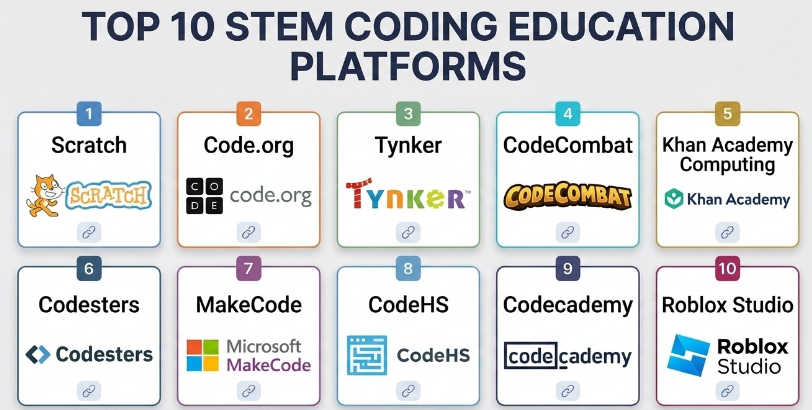
Introduction
STEM coding education platforms help students learn programming, computational thinking, robotics, problem-solving, mathematics, logic, engineering concepts, and digital creativity through structured lessons, projects, games, simulations, and hands-on coding environments. These platforms are used by schools, parents, tutors, coding academies, STEM labs, and learners who want to build practical technology skills from beginner to advanced levels.
STEM coding education matters because coding is no longer limited to software developers. Students use coding to understand automation, robotics, AI, games, data, web development, electronics, and engineering systems. A good STEM coding platform makes learning visual, interactive, and project-based so learners can build confidence instead of only memorizing syntax.
Common use cases include:
- Teaching block-based coding to beginners
- Helping students transition from blocks to text-based programming
- Running school coding classes
- Teaching robotics, electronics, and engineering concepts
- Preparing learners for Python, JavaScript, or Java
- Supporting coding clubs and STEM labs
- Creating games, animations, and interactive stories
- Teaching AI, data science, and computational thinking basics
- Running coding bootcamps for children and teens
- Supporting remote or hybrid coding education
Buyers should evaluate:
- Age group and skill level fit
- Block-based and text-based coding support
- Curriculum structure
- Teacher dashboards and classroom tools
- Project-based learning quality
- Robotics or hardware integration
- Assessment and progress tracking
- Student safety and privacy controls
- Ease of onboarding
- Long-term learning path from beginner to advanced
Best for: Schools, coding academies, STEM educators, parents, tutors, after-school programs, students, homeschool learners, nonprofit education groups, and training centers teaching programming and STEM skills.
Not ideal for: Learners who only need advanced professional software engineering tools, enterprise developer platforms, or highly specialized university-level computer science environments.
Key Trends in STEM Coding Education Platforms
- Block-to-text learning paths: Platforms increasingly help students move from visual coding to Python, JavaScript, Java, or other real-world programming languages.
- AI and data literacy: Coding education now includes AI basics, machine learning concepts, data handling, and ethical technology awareness.
- Project-based learning: Students learn better by building games, apps, animations, robots, websites, and simulations instead of only completing quizzes.
- Robotics and maker integration: STEM coding platforms often connect with robotics kits, microcontrollers, sensors, and electronics.
- Teacher-friendly dashboards: Schools need progress tracking, assignments, classroom management, and curriculum support.
- Gamified coding: Badges, levels, challenges, and missions help keep younger learners engaged.
- Inclusive beginner design: More platforms focus on friendly interfaces, visual feedback, and low-friction learning for students with no coding background.
- Remote learning support: Browser-based platforms make coding lessons easier to deliver from school, home, or hybrid classrooms.
- Assessment-ready coding tasks: Teachers increasingly need measurable learning outcomes, not only creative projects.
- Career pathway alignment: Older students are looking for platforms that connect coding basics to real skills like web development, Python, AI, robotics, and app development.
How We Selected These Tools
The platforms below were selected based on educational usefulness, recognition, curriculum quality, student engagement, teacher support, coding progression, STEM relevance, and fit across different learning environments.
The evaluation considered:
- Market adoption and education mindshare
- Age group suitability
- Block-based and text-based coding support
- Project quality and hands-on learning depth
- STEM, robotics, AI, or computational thinking coverage
- Teacher dashboard and classroom management features
- Assessment and progress tracking
- Ease of use for students and educators
- Safety, privacy, and classroom readiness
- Fit for solo learners, schools, coding centers, and large education programs
Top 10 STEM Coding Education Platforms
#1 — Scratch
Short description :
Scratch is one of the most widely recognized beginner coding platforms for children and early learners. It uses block-based coding to help students create stories, games, animations, and interactive projects without needing to type complex syntax. Scratch is especially useful for teaching computational thinking, sequencing, loops, events, conditions, variables, and creative problem-solving. It is a strong starting point for younger learners entering the world of coding.
Key Features
- Block-based programming
- Game, animation, and story creation
- Beginner-friendly visual interface
- Community project sharing
- Event-based programming concepts
- Creativity-focused learning
- Good introduction to computational thinking
Pros
- Excellent for beginners and young learners
- Encourages creativity through projects
- Easy to use in classrooms and at home
Cons
- Not designed for advanced text-based programming
- Community sharing requires supervision for younger students
- Learners eventually need another platform for professional coding languages
Platforms / Deployment
- Web / Desktop options may vary
- Cloud / Local depending on setup
Security & Compliance
Not publicly stated for all institutional compliance needs. Schools and parents should review account settings, sharing controls, student privacy, and moderation features.
Integrations & Ecosystem
Scratch fits beginner coding and creative STEM workflows.
- Classroom coding lessons
- Creative projects
- Student portfolios
- Game design activities
- Animation learning
- Computational thinking exercises
Support & Community
Scratch has a large educator and student community, classroom resources, and strong global recognition. It is widely used for introductory coding education.
#2 — Code.org
Short description :
Code.org is a structured computer science education platform designed for schools, teachers, and students. It offers beginner-friendly coding lessons, block-based activities, app design, game development, and computer science concepts. Code.org is especially useful for classrooms because it provides organized curriculum paths, teacher tools, and age-appropriate learning sequences. It is a strong option for schools introducing coding at scale.
Key Features
- Structured computer science curriculum
- Block-based and text-based learning paths
- Teacher dashboard
- Student progress tracking
- App and game design activities
- Course-based lessons
- Age-appropriate coding content
Pros
- Strong classroom curriculum structure
- Good for schools and teachers
- Supports progression from beginner concepts to more advanced coding
Cons
- Some learners may want more open-ended creative freedom
- Advanced learners may outgrow beginner courses
- Best results require teacher guidance
Platforms / Deployment
- Web
- Cloud
Security & Compliance
Education use should be reviewed by schools for student privacy, account management, classroom settings, and data policies.
Integrations & Ecosystem
Code.org fits school-based coding education workflows.
- Classroom assignments
- Teacher dashboards
- Student progress reports
- Computer science courses
- Coding activities
- App and game projects
Support & Community
Code.org has strong educator resources, curriculum support, and broad adoption in school environments.
#3 — Tynker
Short description :
Tynker is a coding education platform for children and teens that offers block-based coding, text-based programming, game design, robotics, Minecraft-style activities, and structured coding courses. It is useful for parents, schools, and coding academies that want a guided learning path from beginner to intermediate coding. Tynker is especially strong for engaging younger learners through games and project-based activities.
Key Features
- Block-based coding
- Python and JavaScript learning paths
- Game and animation projects
- Robotics and hardware support depending on setup
- Minecraft-style coding activities
- Course-based learning
- Student progress tracking
Pros
- Good progression from blocks to text coding
- Engaging for kids and teens
- Strong project-based learning experience
Cons
- Full access may require paid plans
- Some activities are more entertainment-focused than academic
- Advanced learners may need more professional coding environments later
Platforms / Deployment
- Web / iOS / Android features may vary
- Cloud
Security & Compliance
Not publicly stated for all compliance needs. Parents and schools should review student accounts, privacy settings, and classroom controls.
Integrations & Ecosystem
Tynker supports broad STEM coding workflows.
- Coding courses
- Game design
- Robotics activities
- Minecraft-style coding
- Mobile learning
- Teacher and parent progress tracking
Support & Community
Tynker provides learning resources, support materials, and structured content for students, parents, and educators.
#4 — CodeCombat
Short description :
CodeCombat teaches programming through game-based coding challenges where learners write real code to control characters and solve problems. It is especially useful for students who are ready to move beyond blocks into text-based languages such as Python or JavaScript. CodeCombat makes syntax and logic more engaging by connecting lessons to game progress. It is a strong choice for middle school, high school, and coding academy learners.
Key Features
- Game-based coding lessons
- Python and JavaScript learning
- Real code writing
- Level-based progression
- Problem-solving challenges
- Classroom tools depending on plan
- Student engagement through gameplay
Pros
- Makes text-based coding more engaging
- Good transition from beginner to real programming
- Strong for logic and problem-solving practice
Cons
- Game format may not suit every learner
- Some features may require paid access
- Students still need broader coding practice outside the game
Platforms / Deployment
- Web
- Cloud
Security & Compliance
Not publicly stated for all education compliance requirements. Schools should review classroom account settings, student data handling, and privacy controls.
Integrations & Ecosystem
CodeCombat fits gamified coding education workflows.
- Python lessons
- JavaScript lessons
- Classroom coding challenges
- Game-based learning
- Student progress tracking
- Coding club activities
Support & Community
CodeCombat provides educator resources, support materials, and a learner community around game-based coding.
#5 — Khan Academy Computing
Short description :
Khan Academy Computing offers free learning resources for computer programming, computer science, algorithms, internet concepts, and digital skills. It is useful for students who want structured explanations and practice exercises in a simple learning environment. Khan Academy Computing is especially helpful for learners who want to understand programming logic, JavaScript-style drawing, algorithms, and computer science basics. It works well for self-paced study.
Key Features
- Computer programming lessons
- Computer science concepts
- Interactive coding exercises
- Video explanations
- Self-paced learning
- Practice challenges
- Beginner-friendly curriculum
Pros
- Very accessible for self-learners
- Strong explanations and practice
- Useful for foundational computer science learning
Cons
- Less classroom hardware or robotics focus
- Not a full coding bootcamp platform
- Project depth may be limited compared with specialized coding platforms
Platforms / Deployment
- Web / iOS / Android features may vary
- Cloud
Security & Compliance
Education use should be reviewed for student account settings, classroom use, and privacy requirements.
Integrations & Ecosystem
Khan Academy Computing fits self-paced learning and classroom support.
- Programming lessons
- Computer science foundations
- Practice exercises
- Teacher-supported learning
- Student self-study
- Concept review workflows
Support & Community
Khan Academy has strong educational resources, broad recognition, and large learner adoption across many subjects.
#6 — Codesters
Short description :
Codesters is a coding education platform focused on teaching Python through visual, interactive, and project-based lessons. It is designed for classrooms and helps students learn real coding syntax while still seeing visual results on screen. Codesters is useful for middle school, high school, and beginner Python learners. It helps bridge the gap between block-based coding and full text-based programming.
Key Features
- Python coding lessons
- Visual project output
- Classroom curriculum
- Teacher dashboard
- Student progress tracking
- Interactive coding environment
- Project-based learning
Pros
- Strong for beginner Python education
- Good classroom structure
- Helps students see visual results while coding
Cons
- Focused mainly on Python
- May not cover broader STEM hardware use cases
- Full classroom features may require licensing
Platforms / Deployment
- Web
- Cloud
Security & Compliance
Not publicly stated for all compliance needs. Schools should review student accounts, teacher controls, privacy policies, and reporting settings.
Integrations & Ecosystem
Codesters fits Python classroom workflows.
- Python assignments
- Visual coding projects
- Teacher-led lessons
- Student progress dashboards
- Coding practice
- Classroom assessment workflows
Support & Community
Codesters provides teacher resources and support materials for schools teaching Python and computer science fundamentals.
#7 — MakeCode
Short description :
MakeCode is a coding education platform that supports block-based and JavaScript or Python-style programming for physical computing, microcontrollers, and STEM projects. It is especially useful for learners working with devices such as microcontrollers, robotics kits, and electronics-based activities. MakeCode helps students connect code with real-world hardware behavior. It is a strong fit for maker education, STEM labs, and hands-on engineering learning.
Key Features
- Block-based coding
- JavaScript and Python-style coding options depending on target
- Microcontroller and hardware support
- Simulator-based testing
- Physical computing projects
- Beginner-friendly interface
- STEM and maker education workflows
Pros
- Strong for hands-on hardware learning
- Good bridge from blocks to text coding
- Useful for STEM labs and maker classrooms
Cons
- Best value requires compatible hardware or devices
- Some projects need teacher guidance
- Less focused on general web or app development
Platforms / Deployment
- Web
- Cloud / Device-based hardware workflows
Security & Compliance
Security depends on classroom accounts, device usage, browser permissions, and institutional policies. Compliance is Varies / N/A.
Integrations & Ecosystem
MakeCode supports maker and hardware-based STEM education.
- Microcontrollers
- Robotics projects
- Electronics activities
- Simulators
- Block and text coding
- Classroom STEM projects
Support & Community
MakeCode has strong education and maker community adoption. It is widely used for hardware-connected coding activities.
#8 — CodeHS
Short description :
CodeHS is a computer science education platform designed for schools teaching coding, cybersecurity, web development, AP-style computer science, and broader technology courses. It includes curriculum, coding environments, teacher tools, assignments, and progress tracking. CodeHS is especially useful for middle school and high school programs that want structured computer science pathways. It is more classroom and curriculum-oriented than casual coding apps.
Key Features
- Computer science curriculum
- Web-based coding environment
- Teacher dashboard
- Assignments and grading tools
- Python, Java, web development, and cybersecurity content depending on course
- Progress tracking
- Classroom management support
Pros
- Strong for formal computer science classes
- Good teacher and school support
- Covers multiple coding and technology pathways
Cons
- Full features may require school licensing
- More structured than casual learning platforms
- Younger beginners may need simpler starting tools
Platforms / Deployment
- Web
- Cloud
Security & Compliance
Schools should review student data policies, privacy controls, account management, and classroom administration settings before adoption.
Integrations & Ecosystem
CodeHS fits school computer science education workflows.
- Teacher assignments
- Coding courses
- Web development learning
- Cybersecurity basics
- Java and Python learning
- Student progress tracking
Support & Community
CodeHS provides teacher resources, curriculum support, and school-focused onboarding material. It is well suited for formal coding education programs.
#9 — Codecademy
Short description :
Codecademy is an interactive coding learning platform for older students, beginners, career switchers, and learners who want practical text-based programming skills. It covers programming languages, web development, data science, computer science, and related technical topics. While it is not only for school-age STEM learners, it is useful for teens and adults who want to move into real-world coding. It is best for learners ready for structured text-based programming.
Key Features
- Interactive coding lessons
- Python, JavaScript, HTML, CSS, SQL, and more
- Career and skill paths
- Web-based coding practice
- Projects and quizzes
- Progress tracking
- Beginner to intermediate learning paths
Pros
- Strong for text-based coding skills
- Good for older students and adults
- Useful career-oriented learning paths
Cons
- Less suitable for very young children
- Full access may require paid plans
- Limited robotics or hardware-focused STEM learning
Platforms / Deployment
- Web
- Cloud
Security & Compliance
Not publicly stated for all institutional compliance needs. Schools and organizations should review account, privacy, and data handling settings before adoption.
Integrations & Ecosystem
Codecademy fits self-paced programming and career learning workflows.
- Web development
- Data science
- Programming foundations
- Interactive exercises
- Skill paths
- Project-based practice
Support & Community
Codecademy provides learning resources, help materials, and a broad learner community focused on coding and technology skills.
#10 — Roblox Studio
Short description :
Roblox Studio is a game creation platform that allows students and creators to build interactive 3D games and experiences using scripting. It is especially useful for learners interested in game design, creative coding, simulation building, and interactive world creation. While it is not a traditional classroom coding curriculum by itself, it can be powerful for project-based STEM education when guided properly. It helps students connect coding with creativity and real user experiences.
Key Features
- 3D game creation
- Scripting-based coding
- Interactive world building
- Physics and game logic
- Asset and scene creation
- Project publishing workflows
- Creative STEM learning
Pros
- Highly engaging for game-focused learners
- Strong project-based creativity
- Teaches scripting, logic, and design thinking
Cons
- Requires strong supervision for younger learners
- Not a complete structured coding curriculum by itself
- Students can get distracted without clear learning goals
Platforms / Deployment
- Windows / macOS
- Cloud / Local development environment
Security & Compliance
Schools and parents should review account settings, online safety, moderation, sharing, communication controls, and student privacy before classroom use.
Integrations & Ecosystem
Roblox Studio supports creative coding and game development workflows.
- Game design
- 3D world creation
- Scripting lessons
- Student projects
- Creative coding clubs
- Simulation-style learning
Support & Community
Roblox Studio has a large creator community and many learning resources. It is best used in education with clear guidance and project goals.
Comparison Table
| Tool Name | Best For | Platform(s) Supported | Deployment | Standout Feature | Public Rating |
|---|---|---|---|---|---|
| Scratch | Beginner creative coding | Web, desktop options vary | Cloud / Local | Block-based stories, games, and animations | N/A |
| Code.org | School computer science curriculum | Web | Cloud | Structured classroom coding courses | N/A |
| Tynker | Kids and teens coding pathways | Web, iOS, Android features vary | Cloud | Block-to-text coding progression | N/A |
| CodeCombat | Game-based text coding | Web | Cloud | Python and JavaScript through gameplay | N/A |
| Khan Academy Computing | Self-paced CS foundations | Web, iOS, Android features vary | Cloud | Free interactive computing lessons | N/A |
| Codesters | Beginner Python classrooms | Web | Cloud | Visual Python coding projects | N/A |
| MakeCode | Hardware and maker STEM | Web | Cloud / Device-based workflows | Microcontroller and physical computing support | N/A |
| CodeHS | Formal school CS programs | Web | Cloud | Full classroom coding curriculum | N/A |
| Codecademy | Older learners and career coding | Web | Cloud | Interactive text-based coding paths | N/A |
| Roblox Studio | Game design and creative coding | Windows, macOS | Cloud / Local | 3D game creation with scripting | N/A |
Evaluation & STEM Coding Education Platforms
| Tool Name | Core (25%) | Ease (15%) | Integrations (15%) | Security (10%) | Performance (10%) | Support (10%) | Value (15%) | Weighted Total (0–10) |
|---|---|---|---|---|---|---|---|---|
| Scratch | 8 | 10 | 7 | 8 | 8 | 9 | 10 | 8.70 |
| Code.org | 9 | 9 | 8 | 8 | 8 | 9 | 10 | 8.85 |
| Tynker | 8 | 9 | 8 | 8 | 8 | 8 | 8 | 8.20 |
| CodeCombat | 8 | 8 | 7 | 7 | 8 | 7 | 8 | 7.65 |
| Khan Academy Computing | 8 | 9 | 7 | 8 | 8 | 8 | 10 | 8.35 |
| Codesters | 8 | 8 | 7 | 8 | 8 | 8 | 8 | 7.90 |
| MakeCode | 9 | 8 | 9 | 8 | 8 | 8 | 9 | 8.45 |
| CodeHS | 9 | 8 | 8 | 8 | 8 | 9 | 8 | 8.30 |
| Codecademy | 9 | 8 | 7 | 8 | 8 | 8 | 8 | 8.05 |
| Roblox Studio | 8 | 7 | 7 | 7 | 8 | 8 | 9 | 7.75 |
The scoring is comparative and should be used as a shortlist guide, not as a universal ranking. Code.org and Scratch are excellent for school-level coding foundations. MakeCode is strong for hardware and maker STEM. CodeHS is better for formal computer science classes. Codecademy is stronger for older learners and career-oriented coding. Roblox Studio is powerful for creative game-based learning when properly guided.
Which STEM Coding Education Platform Is Right for You?
Solo / Freelancer
Solo tutors and freelance coding teachers should choose platforms based on learner age and skill level. Scratch is ideal for young beginners, while CodeCombat and Codesters are better for learners moving into Python or JavaScript. MakeCode is strong if the tutor teaches microcontrollers, electronics, or robotics-style STEM activities.
Freelancers should avoid using only one platform for every student. Younger children need visual creativity, while older students need real programming practice and structured projects.
SMB
Small coding academies, coaching centers, and after-school programs need platforms that are easy to teach, engaging, and structured. Scratch, Code.org, Tynker, CodeCombat, Codesters, and MakeCode are practical options.
SMBs should focus on repeatable lesson plans, student progress tracking, parent-friendly outcomes, and project-based learning. A platform that produces visible student projects can also improve learner confidence.
Mid-Market
Mid-sized schools and education groups usually need curriculum alignment, teacher dashboards, assessment tools, and age-based progression. Code.org, CodeHS, Tynker, Codesters, and MakeCode can support structured classroom programs.
For project-based STEM labs, MakeCode and Roblox Studio can add creativity and hardware or game-design depth. For foundational coding, Scratch and Code.org remain strong starting points.
Enterprise
Large school networks, universities, nonprofit education programs, and training organizations should evaluate platforms based on curriculum coverage, data privacy, classroom management, reporting, accessibility, support, and scalability.
Enterprise buyers should avoid selecting only based on student excitement. The platform must fit teaching goals, age groups, assessment needs, device availability, and long-term learning pathways.
Budget vs Premium
Budget-focused educators can start with Scratch, Code.org, Khan Academy Computing, MakeCode, and selected free-access learning resources. These platforms can support strong learning outcomes with proper teacher guidance.
Premium platforms may be worth it when schools need structured curriculum, teacher dashboards, grading, classroom management, student tracking, and more advanced lesson pathways.
Feature Depth vs Ease of Use
For ease of use, Scratch, Code.org, Khan Academy Computing, and Tynker are beginner-friendly. They are good for learners who are new to coding.
For feature depth, CodeHS, Codecademy, MakeCode, Roblox Studio, and Codesters provide stronger pathways into real programming, hardware, or project-based development.
Integrations & Scalability
Scalability depends on classrooms, student accounts, teacher dashboards, device access, curriculum structure, and reporting. Code.org and CodeHS are strong for school-scale adoption. Tynker and Codesters can support structured coding programs. MakeCode scales well for maker labs when hardware is available.
Schools should test platforms with real students before wide adoption. A platform may look good in a demo but still fail if teachers find it hard to manage.
Security & Compliance Needs
Schools should review student privacy, account creation, classroom sharing, online communities, communication settings, data retention, and parental consent.
For platforms with public sharing or community features, younger learners need supervision. Safe classroom settings and clear digital behavior rules are important.
Frequently Asked Questions
1. What is a STEM coding education platform?
A STEM coding education platform teaches programming, logic, problem-solving, robotics, engineering, mathematics, or digital creation through interactive lessons, projects, games, simulations, and coding environments.
2. Which platform is best for young beginners?
Scratch is one of the best starting points for young beginners because it uses visual blocks and encourages creativity through games, stories, and animations. Code.org and Tynker are also strong beginner-friendly options.
3. Which platform is best for school classrooms?
Code.org, CodeHS, Tynker, Codesters, and MakeCode are strong classroom options. The best choice depends on grade level, teacher experience, curriculum goals, and whether the class needs blocks, Python, JavaScript, Java, or hardware projects.
4. Which platform is best for Python learning?
Codesters, CodeCombat, Codecademy, CodeHS, and some Tynker pathways can support Python learning. Codesters is useful for visual beginner Python, while Codecademy and CodeHS are better for older learners.
5. Which platform is best for robotics or hardware learning?
MakeCode is a strong choice for hardware and maker education because it supports microcontroller and physical computing workflows. Tynker may also support some robotics and hardware-related activities depending on setup.
6. Are block-based coding platforms useful?
Yes. Block-based coding helps beginners understand logic, sequencing, loops, conditions, and events without getting stuck on syntax errors. It is especially useful for younger students before they move to text-based programming.
7. When should students move from blocks to text coding?
Students should move to text coding when they understand basic logic and are ready to type syntax. A gradual transition is best. Platforms like Tynker, CodeCombat, Codesters, and MakeCode can help bridge this gap.
8. Can coding education platforms teach real programming skills?
Yes, but it depends on the platform and learning path. Platforms with Python, JavaScript, Java, web development, or hardware projects can teach practical programming skills when combined with projects and practice.
9. What is the biggest mistake in teaching coding to children?
The biggest mistake is focusing only on syntax and ignoring creativity, logic, and problem-solving. Children learn better when they build projects, experiment, debug mistakes, and see visible results.
10. Are these platforms good for remote learning?
Yes. Many STEM coding platforms are web-based and work well for remote or hybrid learning. Teachers should still provide guidance, assignments, feedback, and project reviews.
11. Do students need powerful computers?
Most beginner coding platforms work in a browser and do not require powerful computers. However, game development, 3D creation, robotics simulators, or advanced coding environments may need stronger devices.
12. How should I choose the right STEM coding education platform?
Start with learner age, skill level, teaching goal, device access, and curriculum needs. Choose Scratch or Code.org for beginners, MakeCode for hardware STEM, CodeHS for school computer science, Codesters for Python classrooms, and Codecademy for older learners moving toward career skills.
Conclusion
STEM coding education platforms help learners build creativity, logic, problem-solving, and real technology skills through hands-on projects. The best platform depends on age group, learning style, curriculum needs, and long-term goals. Scratch and Code.org are excellent for beginners and schools, Tynker supports a strong block-to-text path, CodeCombat makes real coding more engaging through games, and Khan Academy Computing is useful for self-paced foundations. Codesters is strong for beginner Python, MakeCode is ideal for hardware and maker STEM, CodeHS fits formal school computer science programs, Codecademy supports older learners, and Roblox Studio works well for creative game-based learning when supervised properly.
