Introduction
File Compression Tools help users reduce file size, package multiple files together, protect archives with passwords, and share large data more easily. In simple words, these tools make files smaller and easier to store, send, back up, and organize.
They matter because businesses and individuals handle large documents, images, videos, backups, software files, logs, and datasets every day. A good compression tool can save storage space, speed up file transfer, improve backup workflows, and support secure file sharing.
Common use cases include:
- Compressing large folders for email or cloud upload
- Creating ZIP, RAR, 7z, TAR, or GZIP archives
- Password-protecting sensitive files
- Splitting large archives into smaller parts
- Extracting downloaded software or backup files
Buyers should evaluate:
- Supported archive formats
- Compression speed and ratio
- Encryption and password protection
- Ease of use
- Batch compression
- Cross-platform support
- Recovery options
- Command-line support
- Integration with file managers
- Pricing and licensing
Best for: IT teams, developers, students, designers, office users, backup administrators, freelancers, and businesses that regularly store, send, or manage large files.
Not ideal for: users who only need occasional basic ZIP extraction already built into their operating system, or teams that need full enterprise backup software instead of file-level compression.
Key Trends in File Compression Tools
- Stronger encryption support is becoming more important for secure file sharing.
- Cross-platform support matters as teams work across Windows, macOS, Linux, and mobile devices.
- Open-source compression tools remain popular because they are flexible and cost-effective.
- Cloud storage workflows are changing how users compress and share files.
- Command-line compression is still important for developers, DevOps teams, and automated backup scripts.
- Better support for large files is now expected because users work with videos, datasets, logs, and system backups.
- Multi-format extraction is a major requirement because users receive many archive types.
- Simple user interfaces remain important for non-technical users.
- Portable and lightweight tools are preferred by IT support teams.
- Security-conscious users now check encryption, password handling, and update history before choosing a tool.
How We Selected These Tools
The tools below were selected based on practical evaluation logic:
- Recognition and adoption among general users and IT teams
- Support for popular compression formats
- Ease of installation and daily use
- Strength of compression and extraction capabilities
- Availability across operating systems
- Security features such as encryption and password protection
- Suitability for personal, professional, and technical users
- Long-term product maturity
- Community trust and documentation quality
- Value for money and free availability where relevant
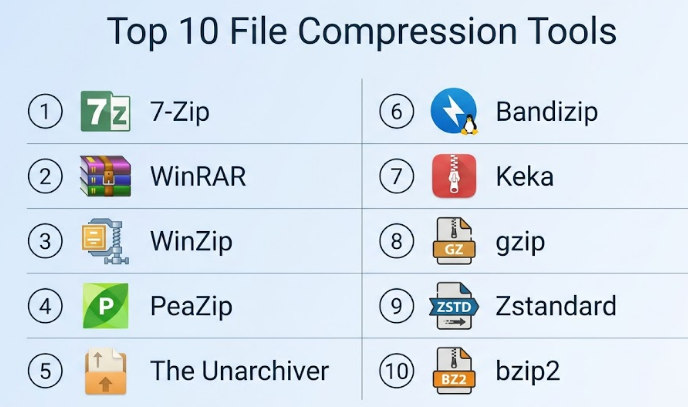
Top 10 File Compression Tools
#1 — 7-Zip
Short description :
7-Zip is a widely used open-source file compression tool known for strong compression, simple design, and support for many archive formats. It is especially popular among Windows users, developers, IT teams, and technical users who want a free and reliable compression utility. Its native 7z format is known for good compression ratios. 7-Zip is also useful for extracting many common archive types. It is lightweight, fast, and practical for everyday file management.
Key Features
- Supports 7z, ZIP, TAR, GZIP, BZIP2, XZ, and more
- Strong compression ratio with 7z format
- AES-256 encryption support for 7z and ZIP
- File manager integration
- Command-line version available
- Split archive support
- Open-source licensing
Pros
- Free and lightweight.
- Strong compression performance.
- Good for technical and everyday users.
Cons
- Interface looks basic.
- Native macOS support is limited compared with alternatives.
- Some advanced options may confuse beginners.
Platforms / Deployment
Windows / Linux through command-line or ports / macOS through unofficial or related builds.
Self-hosted desktop utility.
Security & Compliance
Supports password protection and AES-256 encryption for selected archive formats. Enterprise compliance certifications: Not publicly stated.
Integrations & Ecosystem
7-Zip integrates well with file management workflows and automation scripts.
- Windows context menu
- Command-line automation
- Backup scripts
- Developer workflows
- Archive extraction workflows
- File packaging tasks
Support & Community
7-Zip has strong community usage and plenty of user guides available. Official support is limited compared with commercial tools, but community knowledge is very strong.
#2 — WinRAR
Short description :
WinRAR is a long-standing file compression tool best known for creating and extracting RAR archives. It is widely used by Windows users who need strong archive management, recovery records, split archives, password protection, and support for many file formats. WinRAR is useful for both personal and business users. It is especially helpful when working with RAR files or large archive sets. Its interface is traditional but familiar to many users.
Key Features
- Creates RAR and ZIP archives
- Extracts many archive formats
- Password protection and encryption
- Split archive support
- Recovery record support
- Context menu integration
- Archive repair features
Pros
- Strong RAR format support.
- Reliable for large and split archives.
- Useful recovery and repair options.
Cons
- Paid license after trial period.
- Interface feels older than newer tools.
- RAR creation is mostly tied to WinRAR.
Platforms / Deployment
Windows / macOS and Linux through command-line versions.
Desktop utility.
Security & Compliance
Supports password protection and encryption for archives. Enterprise compliance certifications: Not publicly stated.
Integrations & Ecosystem
WinRAR works well in everyday file management and archive handling workflows.
- Windows File Explorer integration
- Command-line use
- Archive repair tasks
- Split archive workflows
- Email attachment preparation
- Backup packaging
Support & Community
WinRAR has long product history, documentation, and broad user familiarity. Commercial licensing provides a more formal product model than purely community-driven tools.
#3 — WinZip
Short description :
WinZip is a commercial file compression and file management tool designed for users who want ZIP compression, encryption, file sharing, PDF tools, and cloud integration in one package. It is popular among business users, office users, and professionals who prefer a polished interface. WinZip supports many archive formats and includes productivity features beyond basic compression. It is useful for teams that need simple file packaging, encryption, and sharing workflows.
Key Features
- ZIP creation and extraction
- Supports multiple archive formats
- File encryption and password protection
- Cloud storage integration
- PDF and file management tools
- File sharing features
- Batch compression options
Pros
- Easy interface for business users.
- Good file sharing and productivity features.
- Strong brand recognition.
Cons
- Paid software.
- May feel heavy for users who only need basic compression.
- Some features may be unnecessary for technical users.
Platforms / Deployment
Windows / macOS / iOS / Android depending on product version.
Cloud-connected desktop and mobile utility.
Security & Compliance
Supports encryption and password protection. Enterprise compliance certifications: Not publicly stated.
Integrations & Ecosystem
WinZip is useful for office workflows and cloud-based file sharing.
- Cloud storage services
- Email workflows
- PDF tools
- Windows and macOS file systems
- Mobile file management
- Office productivity workflows
Support & Community
WinZip offers product documentation and commercial support options. It is suitable for users who prefer vendor-backed software.
#4 — PeaZip
Short description :
PeaZip is a free and open-source archive manager that supports many file formats and works across major desktop platforms. It is useful for users who want a graphical compression tool with strong format support and security options. PeaZip is popular among privacy-conscious users and those who prefer open-source software. It can create, convert, extract, and manage archives in a clean interface. It is a good balance between power and usability.
Key Features
- Supports many archive formats
- Open-source archive manager
- Password protection and encryption
- Archive conversion tools
- Secure deletion features
- File split and join support
- Cross-platform availability
Pros
- Free and open-source.
- Strong format support.
- Good security-focused utilities.
Cons
- Interface may feel less polished than premium tools.
- Some advanced features need learning.
- Compression performance depends on selected format.
Platforms / Deployment
Windows / Linux / macOS.
Desktop utility.
Security & Compliance
Supports encrypted archives and password protection depending on format. Enterprise compliance certifications: Not publicly stated.
Integrations & Ecosystem
PeaZip works well for users who need broad archive handling and privacy-focused file tasks.
- File manager integration
- Archive conversion workflows
- Secure deletion workflows
- Backup packaging
- Multi-format extraction
- Cross-platform file handling
Support & Community
PeaZip has active open-source documentation and community support. Formal enterprise support is not publicly stated.
#5 — The Unarchiver
Short description :
The Unarchiver is a popular macOS tool focused mainly on extracting archive files. It is useful for Mac users who often receive compressed files in different formats and want a simple, lightweight extraction experience. Unlike full compression suites, it is more focused on opening archives than creating advanced compressed files. It is a good choice for users who want a smooth Mac-native archive extraction tool. It is especially useful for handling older or less common archive formats.
Key Features
- Extracts many archive formats
- Simple macOS experience
- Supports older archive formats
- Lightweight installation
- Easy default archive opener
- Good for quick extraction
- Beginner-friendly interface
Pros
- Very easy for Mac users.
- Good multi-format extraction.
- Lightweight and simple.
Cons
- Limited archive creation features.
- Not ideal for advanced compression workflows.
- Mostly focused on macOS users.
Platforms / Deployment
macOS.
Desktop utility.
Security & Compliance
Security features are mainly related to safe archive extraction. Advanced encryption and compliance certifications: Not publicly stated.
Integrations & Ecosystem
The Unarchiver fits naturally into Mac file workflows.
- macOS Finder workflows
- Archive extraction tasks
- Downloaded file handling
- Legacy archive opening
- Simple desktop productivity
- Multi-format unpacking
Support & Community
The Unarchiver has strong recognition among Mac users. Support and community details vary by distribution and product version.
#6 — Bandizip
Short description :
Bandizip is a fast and user-friendly file compression tool that supports many archive formats. It is popular with Windows users who want a clean interface, quick extraction, password protection, and practical archive management. Bandizip is useful for personal users, office workers, and IT users who need speed and simplicity. It includes features for previewing archives and handling large files. It offers both free and paid options depending on feature needs.
Key Features
- Supports ZIP, 7z, RAR extraction, TAR, and more
- Fast compression and extraction
- Password protection support
- Archive preview features
- Split archive support
- Multi-core compression support
- Clean user interface
Pros
- Fast and easy to use.
- Good format support.
- Cleaner interface than many older tools.
Cons
- Some features may require paid versions.
- Free version may include limitations depending on region/version.
- Not as open-source friendly as 7-Zip or PeaZip.
Platforms / Deployment
Windows / macOS depending on product version.
Desktop utility.
Security & Compliance
Supports encrypted archives and password protection depending on format. Enterprise compliance certifications: Not publicly stated.
Integrations & Ecosystem
Bandizip works well for everyday file compression and extraction.
- Windows context menu
- macOS file workflows
- Large file archiving
- Password-protected archives
- Split archive handling
- Office file sharing
Support & Community
Bandizip provides product documentation and support resources. Community visibility is moderate, with strong user adoption in desktop compression use cases.
#7 — Keka
Short description :
Keka is a macOS file archiver known for a clean interface, simple drag-and-drop workflow, and support for many compression formats. It is a practical choice for Mac users who want more control than the built-in archive utility. Keka can create compressed files, split archives, and protect archives with passwords. It is suitable for designers, developers, students, and office users on macOS. It keeps compression tasks simple without feeling too technical.
Key Features
- Supports 7z, ZIP, TAR, GZIP, BZIP2, XZ, and more
- Extracts many archive formats
- Password protection support
- Split archive support
- Drag-and-drop workflow
- macOS-friendly interface
- Lightweight operation
Pros
- Excellent fit for macOS users.
- Simple and clean interface.
- Good balance of power and ease.
Cons
- Mostly focused on macOS.
- Not ideal for Windows-based teams.
- Some users may still prefer free built-in tools for basic ZIP tasks.
Platforms / Deployment
macOS.
Desktop utility.
Security & Compliance
Supports password-protected archives depending on format. Enterprise compliance certifications: Not publicly stated.
Integrations & Ecosystem
Keka fits naturally into macOS productivity and file management workflows.
- Finder-based workflows
- Drag-and-drop compression
- Multi-format extraction
- Password-protected file sharing
- Split archive creation
- Local backup packaging
Support & Community
Keka has strong recognition among Mac users and helpful documentation. Support depends on distribution channel and product version.
#8 — gzip
Short description :
gzip is a widely used command-line compression tool mainly used on Unix-like systems. It is common in Linux environments, server workflows, software packaging, logs, and DevOps automation. gzip is not a full graphical archive manager, but it is highly important for technical users. It is often used with TAR to create compressed archive files. It is simple, reliable, and deeply integrated into many systems.
Key Features
- Command-line file compression
- Common in Linux and Unix systems
- Frequently used with TAR
- Fast and lightweight
- Useful for log compression
- Good for scripts and automation
- Strong ecosystem compatibility
Pros
- Very reliable for technical workflows.
- Lightweight and widely available.
- Excellent for automation and servers.
Cons
- Not beginner-friendly for non-technical users.
- Compresses single streams, often paired with TAR for folders.
- No modern graphical interface by default.
Platforms / Deployment
Linux / macOS / Unix-like systems / Windows through compatible environments.
Command-line utility.
Security & Compliance
gzip itself is not focused on encryption or password protection. Security and compliance: Not publicly stated.
Integrations & Ecosystem
gzip is deeply integrated into technical workflows.
- Linux shell scripts
- Server log rotation
- TAR archive workflows
- Backup scripts
- Software distribution
- DevOps automation
Support & Community
gzip has long-standing community usage and strong documentation across Unix and Linux ecosystems. Formal commercial support depends on operating system vendor support.
#9 — Zstandard
Short description :
Zstandard, often called zstd, is a modern compression tool and algorithm designed for high compression speed and good compression ratios. It is popular in technical environments where performance matters, such as data pipelines, backups, software distribution, and large-scale systems. zstd is more developer-focused than consumer-focused. It is useful for teams that need efficient compression in automated workflows. It is especially valuable when speed and scalability are important.
Key Features
- High-speed compression and decompression
- Good compression ratio
- Command-line utility
- Suitable for large-scale workflows
- Dictionary compression support
- Useful in data and system pipelines
- Open-source ecosystem
Pros
- Excellent speed-performance balance.
- Strong for technical and large data use cases.
- Good fit for automation.
Cons
- Not ideal for casual users.
- GUI support depends on third-party tools.
- Less familiar than ZIP or RAR for general users.
Platforms / Deployment
Linux / macOS / Windows through available builds and package managers.
Command-line utility and library.
Security & Compliance
Zstandard is a compression tool, not an encryption-focused archive suite. Compliance certifications: Not publicly stated.
Integrations & Ecosystem
Zstandard is useful in modern technical infrastructure and data workflows.
- Backup systems
- Data pipelines
- Package managers
- DevOps scripts
- Storage optimization
- High-performance applications
Support & Community
Zstandard has strong technical community adoption and documentation. Formal support depends on the environment or vendor using it.
#10 — bzip2
Short description :
bzip2 is a traditional command-line compression tool commonly used in Unix and Linux environments. It is known for better compression ratios than some older tools, though it can be slower in many cases. bzip2 is useful for technical users, system administrators, and developers working with archives, logs, source packages, and backup files. It is not designed as a modern graphical compression app. However, it remains important because many systems and archives still support it.
Key Features
- Command-line compression
- Good compression ratio
- Common in Unix and Linux systems
- Often used with TAR
- Useful for source packages
- Lightweight utility
- Broad compatibility
Pros
- Reliable and widely supported.
- Good compression for many file types.
- Useful in technical environments.
Cons
- Slower than many newer tools.
- Not beginner-friendly.
- No built-in modern GUI experience.
Platforms / Deployment
Linux / macOS / Unix-like systems / Windows through compatible environments.
Command-line utility.
Security & Compliance
bzip2 is not mainly an encryption or compliance tool. Security and compliance certifications: Not publicly stated.
Integrations & Ecosystem
bzip2 is common in technical and archival workflows.
- TAR archives
- Linux package workflows
- Backup scripts
- Source code distribution
- Server environments
- Command-line automation
Support & Community
bzip2 has long community usage and broad system-level support. Formal support depends on operating system vendors and distribution maintainers.
Comparison Table
| Tool Name | Best For | Platform(s) Supported | Deployment | Standout Feature | Public Rating |
|---|---|---|---|---|---|
| 7-Zip | Free strong compression | Windows / Linux / macOS through related builds | Desktop / Self-hosted | High compression ratio with 7z | N/A |
| WinRAR | RAR archive users | Windows / macOS / Linux command-line | Desktop | RAR creation and recovery records | N/A |
| WinZip | Business file sharing | Windows / macOS / iOS / Android | Desktop / Mobile / Cloud-connected | Compression with productivity features | N/A |
| PeaZip | Open-source multi-format archive management | Windows / Linux / macOS | Desktop | Broad format support and security utilities | N/A |
| The Unarchiver | Mac archive extraction | macOS | Desktop | Simple multi-format extraction | N/A |
| Bandizip | Fast desktop compression | Windows / macOS | Desktop | Fast extraction and clean interface | N/A |
| Keka | macOS compression | macOS | Desktop | Simple Mac-friendly archiving | N/A |
| gzip | Linux and server compression | Linux / macOS / Unix / Windows compatible environments | Command-line | Lightweight automation compression | N/A |
| Zstandard | High-speed technical compression | Linux / macOS / Windows | Command-line / Library | Fast compression and decompression | N/A |
| bzip2 | Traditional Unix compression | Linux / macOS / Unix / Windows compatible environments | Command-line | Good compression ratio for technical use | N/A |
Evaluation & File Compression Tools
| Tool Name | Core (25%) | Ease (15%) | Integrations (15%) | Security (10%) | Performance (10%) | Support (10%) | Value (15%) | Weighted Total (0–10) |
|---|---|---|---|---|---|---|---|---|
| 7-Zip | 9 | 8 | 8 | 8 | 8 | 7 | 10 | 8.45 |
| WinRAR | 9 | 8 | 8 | 8 | 8 | 8 | 7 | 8.10 |
| WinZip | 8 | 9 | 8 | 8 | 8 | 8 | 7 | 8.05 |
| PeaZip | 8 | 8 | 8 | 8 | 7 | 7 | 9 | 7.95 |
| The Unarchiver | 7 | 9 | 7 | 6 | 8 | 7 | 8 | 7.45 |
| Bandizip | 8 | 9 | 8 | 7 | 8 | 7 | 8 | 8.00 |
| Keka | 8 | 9 | 7 | 7 | 8 | 7 | 8 | 7.85 |
| gzip | 7 | 5 | 9 | 5 | 9 | 8 | 9 | 7.45 |
| Zstandard | 8 | 5 | 9 | 5 | 10 | 8 | 9 | 7.80 |
| bzip2 | 7 | 5 | 8 | 5 | 7 | 7 | 8 | 6.90 |
These scores are comparative and based on general usability, technical capability, ecosystem fit, and practical value. A high score does not mean the tool is best for every user. For example, Zstandard is excellent for technical workflows, while WinZip may be easier for office users. Choose based on your operating system, file formats, security needs, automation requirements, and budget.
Which File Compression Tool
Solo / Freelancer
Solo users usually need a simple, reliable tool that can create ZIP files and extract common formats. 7-Zip is a strong free option for Windows users. Keka is a good fit for macOS users who want a clean interface. The Unarchiver is best if the main need is extracting files rather than creating advanced archives.
SMB
Small businesses should choose tools that are easy for employees to understand. WinZip, Bandizip, 7-Zip, and PeaZip are practical options. If staff members are non-technical, a polished interface may be more important than advanced command-line features.
Mid-Market
Mid-market companies should consider file security, password protection, standard formats, and support. WinZip and WinRAR may fit teams that want commercial tools. 7-Zip and PeaZip can work well when cost control and flexibility are important.
Enterprise
Enterprises should evaluate security controls, update policies, licensing, support, software deployment, and compatibility with managed desktops. Commercial tools may provide easier procurement, while open-source tools may offer better cost control. IT teams should standardize approved archive formats and password rules.
Budget vs Premium
For budget-conscious users, 7-Zip and PeaZip offer strong value. For premium users who want commercial support and a polished experience, WinZip and WinRAR are practical choices. The right decision depends on whether you need only compression or also support, file management, sharing, and policy-friendly licensing.
Feature Depth vs Ease of Use
7-Zip, PeaZip, WinRAR, and WinZip offer deeper archive management. The Unarchiver and Keka are easier for Mac users. gzip, bzip2, and Zstandard are powerful for technical workflows but not ideal for beginners.
Integrations & Scalability-
For technical scalability, command-line tools like gzip, Zstandard, and bzip2 are strong because they work well in scripts, servers, and automated pipelines. For desktop integration, 7-Zip, WinRAR, WinZip, Bandizip, PeaZip, and Keka are more practical.
Security & Compliance Needs
For sensitive files, choose tools that support strong encryption and password protection. Also define internal rules for password sharing, archive naming, retention, and approved formats. Compression alone is not a full security solution, so sensitive business data may also need secure storage, access control, and backup policies.
Frequently Asked Questions
1. What is a file compression tool?
A file compression tool reduces file size and can package many files into one archive. It helps users store, send, back up, and organize files more efficiently.
2. What is the most common compressed file format?
ZIP is one of the most common formats because it is widely supported across Windows, macOS, Linux, and many business systems. It is usually the safest choice for sharing with general users.
3. Are free compression tools safe?
Many free tools are safe when downloaded from trusted sources and kept updated. Open-source tools like 7-Zip and PeaZip are widely used, but users should still follow basic security practices.
4. What is the difference between ZIP, RAR, and 7z?
ZIP is widely compatible, RAR is known for strong archive features, and 7z often gives strong compression ratios. The best format depends on sharing needs, compression goals, and tool support.
5. Can compressed files be password protected?
Yes, many tools support password protection and encryption. However, users should choose strong passwords and avoid sharing passwords through the same channel as the archive.
6. Which tool is best for Windows users?
7-Zip is a strong free choice, while WinRAR and WinZip are popular commercial options. Bandizip is also useful for users who want a modern and fast interface.
7. Which tool is best for macOS users?
Keka is strong for compression on macOS, while The Unarchiver is excellent for extracting many archive formats. WinZip also supports macOS for users who prefer commercial software.
8. What is the best tool for developers and servers?
gzip, Zstandard, bzip2, and 7-Zip command-line tools are useful for developers and server workflows. Zstandard is especially strong where speed and scale matter.
9. Can compression reduce every file size?
No. Some files, such as already compressed videos, images, and archives, may not shrink much. Compression works best on text files, logs, documents, datasets, and uncompressed folders.
10. What are common mistakes when using compression tools?
Common mistakes include using weak passwords, choosing uncommon formats for sharing, forgetting passwords, compressing already compressed files, and ignoring archive corruption checks.
Conclusion
File Compression Tools remain essential for everyday file management, business sharing, software delivery, backups, and technical automation. The best tool depends on the user’s operating system, skill level, file format needs, security expectations, and budget. 7-Zip is a strong free option for many users, WinRAR is excellent for RAR workflows, WinZip is useful for business users who want a polished experience, and PeaZip is a good open-source alternative. Mac users may prefer Keka or The Unarchiver, while developers and system teams may rely on gzip, Zstandard, and bzip2 for automation.
