Introduction
Developer Portal Software helps engineering teams create a central place where developers can discover services, APIs, documentation, ownership details, deployment workflows, templates, security checks, and internal platform resources. In simple words, it works like a home page for developers, where teams can find what they need without depending on tribal knowledge, scattered documents, or repeated Slack messages.
For modern software teams, developer portals matter because engineering environments are becoming more complex. Teams now manage microservices, Kubernetes, CI/CD pipelines, cloud infrastructure, security policies, compliance requirements, AI-assisted development workflows, and platform engineering standards. A good developer portal reduces confusion, improves onboarding, and helps developers build faster with fewer mistakes.
Common use cases include:
- Internal service catalog and ownership tracking
- API documentation and developer onboarding
- Golden path templates for new services
- Software lifecycle management
- Platform engineering self-service workflows
Buyers should evaluate:
- Service catalog quality
- Self-service automation
- Integration depth
- Security and access control
- Ease of setup
- Developer experience
- Governance features
- Customization options
- Documentation support
- Long-term scalability
Best for: platform engineering teams, DevOps teams, SRE teams, API teams, large engineering organizations, fast-growing SaaS companies, and enterprises with many services, tools, and teams.
Not ideal for: very small teams with only a few services, companies without internal platform complexity, or teams that only need simple static API documentation instead of a full developer portal.
Key Trends in Developer Portal Software
- Internal Developer Portals are becoming platform engineering hubs, not just documentation websites.
- AI-assisted search and recommendations are becoming useful for finding services, docs, owners, incidents, and templates faster.
- Service catalog automation is growing, where metadata is pulled from Git, CI/CD tools, Kubernetes, cloud accounts, and observability platforms.
- Golden paths and software templates are becoming standard for improving developer productivity and reducing setup errors.
- Security and compliance checks are being added earlier in the software lifecycle through scorecards, maturity checks, and policy visibility.
- Backstage-based ecosystems are expanding, with commercial vendors offering managed and enterprise-ready versions.
- API discovery and internal API governance are becoming more important as organizations scale microservices and platform APIs.
- Self-service infrastructure workflows are growing, especially for Kubernetes, environments, secrets, databases, and deployment pipelines.
- Developer experience metrics are becoming more visible through scorecards, ownership health, documentation quality, and operational readiness.
- Hybrid deployment models are important for regulated industries that need control over data, plugins, and security policies.
How We Selected These Tools
The tools below were selected using practical evaluation logic based on:
- Market adoption and developer mindshare
- Relevance to internal developer portals and platform engineering
- Service catalog and software ownership capabilities
- Strength of integrations with DevOps, cloud, and observability tools
- Support for self-service workflows and developer productivity
- Security posture signals such as SSO, RBAC, auditability, and enterprise controls
- Suitability across startups, SMBs, mid-market teams, and enterprises
- Documentation, onboarding, and community maturity
- Extensibility through APIs, plugins, templates, or workflow automation
- Long-term fit for modern engineering organizations
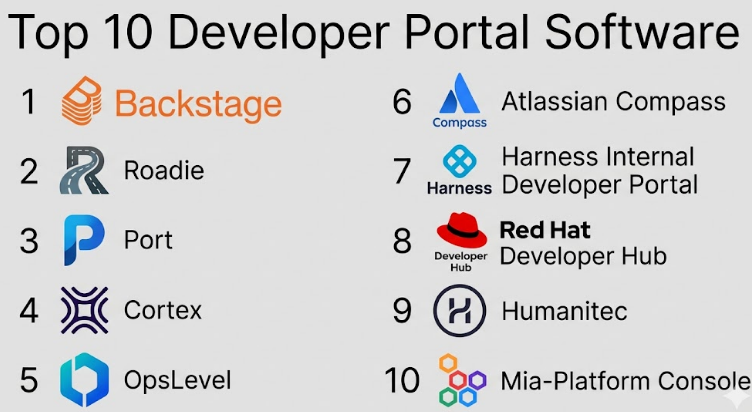
Top 10 Developer Portal Software
#1 — Backstage
Short description :
Backstage is an open-source framework for building internal developer portals. It was originally created by Spotify and is widely used by platform engineering teams that want a customizable developer experience layer. Backstage is best suited for organizations that have engineering capacity to build, configure, and maintain their own portal. It provides a strong foundation for service catalogs, software templates, documentation, plugins, and internal tooling. It is flexible, but it requires ownership and technical investment.
Key Features
- Open-source internal developer portal framework
- Service catalog for ownership and metadata
- Software templates for creating new services
- TechDocs support for documentation
- Plugin-based architecture
- Kubernetes and CI/CD visibility through plugins
- Strong customization options
Pros
- Highly flexible and developer-friendly.
- Strong ecosystem and wide community adoption.
- Good fit for platform teams that want full control.
Cons
- Requires engineering effort to implement and maintain.
- Plugin quality can vary by use case.
- May be too heavy for small teams.
Platforms / Deployment
Cloud / Self-hosted / Hybrid depending on implementation.
Security & Compliance
Supports enterprise security patterns through plugins and configuration, including SSO, authentication providers, role-based access patterns, and access control options. Specific compliance certifications depend on the implementation and hosting environment. SOC 2, ISO 27001, HIPAA: Not publicly stated for the open-source project itself.
Integrations & Ecosystem
Backstage has one of the strongest ecosystems in this category because it is plugin-driven and widely extended by the community.
- GitHub, GitLab, Bitbucket
- Kubernetes
- Jenkins, CircleCI, Argo CD
- PagerDuty and incident tools
- Documentation systems
- Cloud and observability tools
Support & Community
Backstage has strong community support, active documentation, and broad ecosystem awareness. Enterprise support depends on whether it is self-managed or used through a commercial provider.
#2 — Roadie
Short description :
Roadie is a managed Backstage-based developer portal designed for teams that want the power of Backstage without maintaining the full platform themselves. It is useful for companies that like Backstage’s ecosystem but do not want to spend heavy internal engineering time on setup, hosting, upgrades, and operational maintenance. Roadie is strong for service catalogs, TechDocs, software templates, and plugin-based developer workflows. It is especially helpful for growing engineering teams that need a faster path to an internal developer portal.
Key Features
- Managed Backstage experience
- Service catalog and ownership tracking
- TechDocs support
- Software templates
- Plugin management
- SaaS-based portal operations
- Developer onboarding support
Pros
- Reduces Backstage maintenance burden.
- Good for teams that want faster implementation.
- Keeps the familiar Backstage model.
Cons
- Less control than fully self-hosted Backstage.
- Pricing may not fit very small teams.
- Deep customization may still need expert setup.
Platforms / Deployment
Cloud.
Security & Compliance
Supports common enterprise security needs such as SSO and access control depending on plan and configuration. Specific certifications: Not publicly stated.
Integrations & Ecosystem
Roadie benefits from the Backstage ecosystem and supports many common developer tool integrations.
- GitHub, GitLab, Bitbucket
- Kubernetes
- CI/CD tools
- Documentation tools
- Incident management tools
- Backstage plugins
Support & Community
Roadie offers managed product support and onboarding guidance. Community strength is connected to the broader Backstage ecosystem.
#3 — Port
Short description :
Port is an internal developer portal platform focused on software catalogs, self-service actions, scorecards, and developer experience workflows. It is designed for platform engineering teams that want a flexible portal without building everything from scratch. Port is strong when teams need to model complex software entities, define ownership, create developer workflows, and connect portal actions with infrastructure or DevOps tools. It fits modern organizations that want both visibility and action from one developer portal.
Key Features
- Flexible software catalog
- Self-service actions
- Scorecards and maturity checks
- Workflow automation
- API-driven extensibility
- Integration with DevOps and cloud tools
- Custom data models for engineering assets
Pros
- Strong self-service workflow capabilities.
- Flexible catalog modeling.
- Useful for platform engineering maturity tracking.
Cons
- May require careful planning for data models.
- Advanced workflows can take time to design.
- Smaller teams may not need the full feature depth.
Platforms / Deployment
Cloud / Hybrid depending on plan and architecture.
Security & Compliance
Supports enterprise security controls such as SSO, RBAC, and audit-related capabilities depending on plan. Specific certifications: Not publicly stated unless confirmed by vendor documentation.
Integrations & Ecosystem
Port focuses heavily on connecting engineering systems into a single portal experience.
- GitHub, GitLab, Bitbucket
- Kubernetes
- Terraform and infrastructure tools
- CI/CD platforms
- Cloud providers
- Incident and observability tools
Support & Community
Port provides product documentation and customer support. Community visibility is growing, especially among platform engineering teams.
#4 — Cortex
Short description :
Cortex is a developer portal and service catalog platform focused on ownership, scorecards, service maturity, and engineering standards. It helps teams understand who owns what, which services are healthy, and where operational improvements are needed. Cortex is useful for organizations that want strong visibility into service quality, production readiness, documentation health, and team accountability. It is especially relevant for engineering leaders, platform teams, and SRE teams managing many services.
Key Features
- Service catalog
- Ownership tracking
- Scorecards and standards
- Production readiness tracking
- Team and service maturity insights
- Integrations with engineering tools
- Operational health visibility
Pros
- Strong scorecard and maturity model.
- Good for service ownership governance.
- Useful for engineering leadership visibility.
Cons
- May feel governance-heavy for very small teams.
- Best value appears when many services exist.
- Custom workflows may require setup effort.
Platforms / Deployment
Cloud.
Security & Compliance
Supports enterprise access control patterns such as SSO and RBAC depending on plan. Specific certifications: Not publicly stated.
Integrations & Ecosystem
Cortex connects with common tools used across software delivery and operations.
- GitHub, GitLab, Bitbucket
- PagerDuty
- Datadog
- Kubernetes
- CI/CD systems
- Documentation and incident tools
Support & Community
Cortex offers product documentation, onboarding, and customer support. Community strength is more product-led than open-source community-led.
#5 — OpsLevel
Short description :
OpsLevel is a service catalog and developer portal platform built around service ownership, operational maturity, and engineering standards. It helps teams track service health, dependencies, ownership, documentation, and readiness. OpsLevel is useful for organizations that want to improve reliability, reduce unknown ownership, and build stronger engineering governance. It is especially valuable for platform teams, SRE teams, and engineering managers who need a clear view of software systems.
Key Features
- Service catalog
- Ownership and dependency tracking
- Service maturity scorecards
- Operational readiness checks
- Engineering standards tracking
- Integration with DevOps tools
- Reporting for service health
Pros
- Strong focus on service ownership.
- Good for reliability and operational maturity.
- Helpful for reducing service confusion.
Cons
- May need cultural adoption to be effective.
- Less useful if service metadata is not maintained.
- Some advanced use cases may require process changes.
Platforms / Deployment
Cloud.
Security & Compliance
Supports enterprise controls such as SSO and role-based access depending on plan. Specific certifications: Not publicly stated.
Integrations & Ecosystem
OpsLevel integrates with common systems used for service delivery and operations.
- GitHub, GitLab, Bitbucket
- PagerDuty
- Kubernetes
- CI/CD tools
- Monitoring platforms
- Documentation tools
Support & Community
OpsLevel provides documentation and customer support. It has strong relevance among teams focused on service ownership and reliability maturity.
#6 — Atlassian Compass
Short description :
Atlassian Compass is a developer experience and software component catalog platform from Atlassian. It helps engineering teams track components, ownership, dependencies, scorecards, and operational health. Compass is especially useful for organizations already using Atlassian tools such as Jira, Confluence, Bitbucket, and incident workflows. It is designed to bring software architecture, team ownership, and health signals into one place.
Key Features
- Software component catalog
- Ownership tracking
- Scorecards
- Dependency visibility
- Atlassian ecosystem integration
- Team and service health insights
- Developer experience visibility
Pros
- Strong fit for Atlassian-heavy teams.
- Easy connection with Jira and related workflows.
- Good for component visibility and ownership.
Cons
- Best value is within Atlassian ecosystem.
- May not be as flexible as open frameworks.
- Deep customization may be limited compared with Backstage.
Platforms / Deployment
Cloud.
Security & Compliance
Atlassian products commonly support enterprise security features such as SSO, MFA, audit logs, and access controls depending on plan. Specific compliance coverage depends on Atlassian product and plan. If unsure for a buyer’s exact plan, verify directly.
Integrations & Ecosystem
Compass is strongest when used with Atlassian’s broader ecosystem.
- Jira
- Confluence
- Bitbucket
- Incident management workflows
- GitHub
- CI/CD and observability integrations
Support & Community
Atlassian has mature documentation, support resources, and ecosystem partners. Compass benefits from the broader Atlassian product ecosystem.
#7 — Harness Internal Developer Portal
Short description :
Harness Internal Developer Portal is designed for platform teams that want developer self-service, software catalogs, and workflow automation connected with modern software delivery. It is useful for organizations already using Harness for CI/CD, feature flags, cloud cost management, security testing, or software delivery workflows. The portal helps teams simplify developer onboarding, standardize service creation, and connect engineering workflows in one place.
Key Features
- Internal developer portal capabilities
- Service catalog
- Software templates
- Self-service workflows
- Integration with Harness software delivery modules
- Developer onboarding support
- Workflow automation
Pros
- Strong fit for Harness users.
- Good connection between portal and delivery pipelines.
- Useful for platform engineering standardization.
Cons
- Best value may depend on Harness ecosystem usage.
- May be too broad for teams needing only documentation.
- Implementation requires process alignment.
Platforms / Deployment
Cloud / Hybrid depending on Harness setup.
Security & Compliance
Harness generally supports enterprise security controls such as SSO, RBAC, audit trails, and governance features depending on product and plan. Specific certifications for this exact module: Not publicly stated here.
Integrations & Ecosystem
Harness connects well with modern DevOps and platform workflows.
- GitHub, GitLab, Bitbucket
- Kubernetes
- CI/CD pipelines
- Cloud providers
- Security scanning tools
- Observability and incident tools
Support & Community
Harness provides enterprise documentation, customer support, and onboarding resources. Community strength is connected to the broader Harness user base.
#8 — Red Hat Developer Hub
Short description :
Red Hat Developer Hub is an enterprise-ready internal developer platform based on Backstage. It is designed for organizations that want Backstage-style developer portal capabilities with enterprise support, governance, and Red Hat ecosystem alignment. It is especially useful for teams using OpenShift, Kubernetes, and enterprise platform engineering practices. Red Hat Developer Hub is a strong option for regulated or large organizations that want a supported developer portal approach.
Key Features
- Backstage-based developer portal
- Enterprise support model
- Service catalog
- Software templates
- Documentation integration
- OpenShift and Kubernetes alignment
- Plugin-based extensibility
Pros
- Good fit for enterprise Kubernetes environments.
- Supported approach for Backstage adoption.
- Strong alignment with Red Hat ecosystem.
Cons
- Best suited for Red Hat-oriented environments.
- May require platform engineering expertise.
- Could be more than small teams need.
Platforms / Deployment
Cloud / Self-hosted / Hybrid depending on enterprise environment.
Security & Compliance
Supports enterprise identity and access patterns depending on deployment. Security posture depends on configuration, Red Hat environment, and customer controls. Specific certifications for the portal use case: Not publicly stated.
Integrations & Ecosystem
Red Hat Developer Hub connects strongly with Kubernetes and enterprise platform tooling.
- OpenShift
- Kubernetes
- Git repositories
- CI/CD tools
- Backstage plugins
- Enterprise identity systems
Support & Community
Red Hat provides enterprise-grade support and documentation. Community strength is also supported by the broader Backstage ecosystem.
#9 — Humanitec
Short description :
Humanitec is a platform engineering solution focused on internal developer platforms, golden paths, and self-service infrastructure workflows. While it is not only a traditional developer portal, it supports developer self-service by helping teams standardize how applications consume infrastructure and platform resources. Humanitec is best for organizations that want to reduce manual infrastructure work, improve developer workflows, and build platform abstractions for Kubernetes and cloud-native environments.
Key Features
- Internal developer platform capabilities
- Golden path support
- Self-service infrastructure workflows
- Platform orchestration
- Kubernetes-focused workflows
- Environment and resource management
- Developer experience standardization
Pros
- Strong for platform engineering automation.
- Helps reduce infrastructure ticket dependency.
- Useful for Kubernetes and cloud-native teams.
Cons
- Not a simple documentation-first portal.
- Requires platform engineering maturity.
- May be complex for teams without Kubernetes needs.
Platforms / Deployment
Cloud / Hybrid depending on architecture.
Security & Compliance
Supports enterprise access and governance patterns depending on configuration. Specific certifications: Not publicly stated.
Integrations & Ecosystem
Humanitec is strongest around platform, infrastructure, and deployment workflows.
- Kubernetes
- Terraform and infrastructure tools
- CI/CD systems
- Cloud providers
- Git repositories
- Observability and delivery tools
Support & Community
Humanitec provides documentation and enterprise support. Community presence is strongest in platform engineering and internal developer platform discussions.
#10 — Mia-Platform Console
Short description :
Mia-Platform Console is a platform engineering and developer portal solution that helps teams manage software delivery, microservices, APIs, Kubernetes workflows, and internal developer experience. It is useful for organizations building cloud-native platforms that need governance, self-service, templates, and operational visibility. Mia-Platform Console fits teams that want a structured platform layer for developers and operators, especially in microservices-heavy environments.
Key Features
- Developer portal and platform console capabilities
- Microservices management
- API and service visibility
- Kubernetes-oriented workflows
- Templates and reusable patterns
- Platform governance
- Delivery lifecycle support
Pros
- Good fit for cloud-native and microservices teams.
- Useful for platform governance and standardization.
- Combines developer experience with operational control.
Cons
- May require platform maturity to get full value.
- Could be too advanced for small engineering teams.
- Buyers should validate ecosystem fit before adoption.
Platforms / Deployment
Cloud / Hybrid depending on setup.
Security & Compliance
Supports enterprise access and governance patterns depending on deployment. Specific certifications: Not publicly stated.
Integrations & Ecosystem
Mia-Platform Console works best in cloud-native environments with strong DevOps and platform workflows.
- Kubernetes
- Git repositories
- CI/CD tools
- API management workflows
- Cloud infrastructure
- Monitoring and operational tools
Support & Community
Mia-Platform provides product documentation and customer support. Community visibility is more enterprise and platform-focused.
Comparison Table
| Tool Name | Best For | Platform(s) Supported | Deployment | Standout Feature | Public Rating |
|---|---|---|---|---|---|
| Backstage | Teams wanting full customization | Web | Cloud / Self-hosted / Hybrid | Open-source plugin ecosystem | N/A |
| Roadie | Managed Backstage adoption | Web | Cloud | Managed Backstage experience | N/A |
| Port | Self-service developer workflows | Web | Cloud / Hybrid | Flexible catalog and actions | N/A |
| Cortex | Service ownership and scorecards | Web | Cloud | Engineering maturity scorecards | N/A |
| OpsLevel | Operational readiness and service ownership | Web | Cloud | Service health and ownership tracking | N/A |
| Atlassian Compass | Atlassian ecosystem teams | Web | Cloud | Component catalog with Atlassian integration | N/A |
| Harness Internal Developer Portal | Harness and DevOps delivery teams | Web | Cloud / Hybrid | Portal connected to delivery workflows | N/A |
| Red Hat Developer Hub | Enterprise Backstage and OpenShift teams | Web | Cloud / Self-hosted / Hybrid | Supported Backstage-based portal | N/A |
| Humanitec | Platform engineering automation | Web | Cloud / Hybrid | Self-service infrastructure workflows | N/A |
| Mia-Platform Console | Cloud-native platform teams | Web | Cloud / Hybrid | Microservices and platform governance | N/A |
Evaluation & Developer Portal Software
| Tool Name | Core (25%) | Ease (15%) | Integrations (15%) | Security (10%) | Performance (10%) | Support (10%) | Value (15%) | Weighted Total (0–10) |
|---|---|---|---|---|---|---|---|---|
| Backstage | 9 | 6 | 9 | 7 | 8 | 8 | 9 | 8.15 |
| Roadie | 8 | 8 | 8 | 7 | 8 | 8 | 8 | 7.90 |
| Port | 9 | 8 | 9 | 8 | 8 | 8 | 8 | 8.40 |
| Cortex | 8 | 8 | 8 | 8 | 8 | 8 | 7 | 7.85 |
| OpsLevel | 8 | 8 | 8 | 8 | 8 | 8 | 7 | 7.85 |
| Atlassian Compass | 8 | 8 | 8 | 8 | 8 | 8 | 8 | 8.00 |
| Harness Internal Developer Portal | 8 | 7 | 8 | 8 | 8 | 8 | 7 | 7.65 |
| Red Hat Developer Hub | 8 | 7 | 8 | 8 | 8 | 9 | 7 | 7.75 |
| Humanitec | 8 | 7 | 8 | 8 | 8 | 8 | 7 | 7.65 |
| Mia-Platform Console | 8 | 7 | 8 | 8 | 8 | 8 | 7 | 7.65 |
These scores are comparative and should be used as a starting point, not as a final buying decision. A tool with a lower score may still be the best option if it fits your stack, team size, compliance needs, and platform maturity. Always validate integrations, security controls, pricing, onboarding effort, and developer adoption through a pilot before choosing.
Which Developer Portal Software
Solo / Freelancer
Solo developers usually do not need a full internal developer portal. A lightweight documentation site, Git repository README structure, or simple API documentation tool may be enough. If you still want a portal-style experience, Backstage may be useful for learning, but it can be too much for daily solo work.
Best practical fit:
- Simple documentation tools
- Lightweight API docs
- Backstage only for learning or portfolio use
SMB
Small and medium businesses should focus on ease of setup and practical value. Roadie, Port, Atlassian Compass, Cortex, and OpsLevel can be strong choices depending on the problem. If the team is struggling with ownership, use Cortex or OpsLevel. If the team needs self-service workflows, Port may be stronger. If the company already uses Atlassian tools, Compass is a natural option.
Best practical fit:
- Roadie for managed Backstage
- Port for self-service workflows
- Atlassian Compass for Atlassian users
- Cortex or OpsLevel for ownership and scorecards
Mid-Market
Mid-market companies usually need better governance, automation, and visibility. They often have many services, multiple teams, and growing platform complexity. Port, Cortex, OpsLevel, Roadie, Harness Internal Developer Portal, and Backstage are strong choices here. The best option depends on whether the company wants to build deeply or buy a more managed experience.
Best practical fit:
- Port for flexible workflows and catalog modeling
- Cortex for scorecards and standards
- OpsLevel for operational maturity
- Roadie for managed Backstage
- Harness for delivery-connected workflows
Enterprise
Enterprises need scalability, access control, governance, compliance alignment, auditability, support, and integration flexibility. Backstage, Red Hat Developer Hub, Port, Cortex, OpsLevel, Harness, and Mia-Platform Console are strong options depending on architecture. Regulated organizations should pay close attention to deployment model, identity integration, audit logs, data handling, and vendor support.
Best practical fit:
- Red Hat Developer Hub for supported Backstage and OpenShift environments
- Backstage for maximum control
- Port for enterprise self-service workflows
- Cortex or OpsLevel for service standards
- Harness for DevOps delivery integration
- Mia-Platform Console for cloud-native platform governance
Budget vs Premium
Budget-focused teams should start by defining the real problem. If the goal is only documentation, avoid buying a full developer portal. If the goal is service ownership, choose a catalog-focused platform. If the goal is developer self-service, choose a tool with strong automation.
Premium tools make sense when:
- Many teams use the platform
- Onboarding is slow
- Service ownership is unclear
- Developers depend too much on tickets
- Compliance and scorecards matter
- Platform engineering is a strategic function
Feature Depth vs Ease of Use
Backstage gives deep flexibility but requires engineering ownership. Roadie reduces that burden. Port gives strong workflow flexibility without forcing teams to build everything from zero. Cortex and OpsLevel are easier when the focus is service ownership and standards. Compass is easier for Atlassian-heavy teams.
Choose depth when your team has platform engineers. Choose ease when you need faster adoption and less maintenance.
Integrations & Scalability-
Developer portals become valuable when they connect with real engineering systems. Before buying, check whether the tool integrates with your Git provider, CI/CD platform, cloud provider, Kubernetes setup, observability tools, incident tools, documentation system, and identity provider.
For scalability, also check:
- Can the catalog handle hundreds or thousands of services?
- Can teams own their metadata?
- Can access be managed safely?
- Can workflows be reused?
- Can scorecards be customized?
- Can the platform support multiple business units?
Security & Compliance Needs
Security-focused teams should evaluate SSO, SAML, MFA, RBAC, audit logs, encryption, data residency, admin controls, and compliance documentation. Do not assume every vendor has every certification. Ask vendors directly for security documents, compliance reports, architecture details, and access control options.
For regulated industries, shortlist tools that support:
- Strong identity integration
- Clear audit trails
- Role-based permissions
- Secure deployment options
- Vendor security documentation
- Controlled plugin and integration management
Frequently Asked Questions
1. What is Developer Portal Software?
Developer Portal Software is a central platform where developers can find services, APIs, documentation, ownership details, templates, workflows, and platform resources. It helps engineering teams reduce confusion and improve productivity.
2. Is Developer Portal Software only for large companies?
No, but large and growing teams usually get the most value. Small teams may only need documentation, while larger teams need service catalogs, scorecards, self-service workflows, and governance.
3. What is the difference between a developer portal and an API portal?
An API portal mainly helps users discover and consume APIs. A developer portal is broader and may include service catalogs, ownership, documentation, templates, infrastructure workflows, scorecards, and internal platform tools.
4. What pricing model is common for developer portal tools?
Pricing varies widely. Some tools use user-based pricing, team-based pricing, usage-based pricing, enterprise contracts, or open-source self-hosting costs. If pricing is not public, treat it as “Varies / N/A.”
5. How long does implementation usually take?
Implementation depends on catalog complexity, integrations, access control, data quality, and workflow needs. A basic setup can be simple, but a mature internal developer portal requires planning, ownership, and adoption.
6. What are common mistakes when choosing a developer portal?
Common mistakes include choosing a tool before defining the problem, ignoring developer adoption, underestimating catalog maintenance, skipping security review, and trying to automate everything from day one.
7. Are open-source developer portals better than commercial tools?
Not always. Open-source tools like Backstage offer flexibility and control, but they require maintenance. Commercial tools can reduce setup effort, provide support, and deliver faster time-to-value.
8. How important are integrations?
Integrations are extremely important. A developer portal becomes useful when it connects with Git, CI/CD, Kubernetes, cloud platforms, documentation, observability, incident tools, and identity providers.
9. Can developer portals improve security?
Yes, when implemented correctly. They can show service ownership, enforce standards, surface missing documentation, track maturity, connect security checks, and improve visibility across software systems.
10. What is the best developer portal for platform engineering?
There is no single best option for every team. Backstage is strong for customization, Port is strong for self-service workflows, Cortex and OpsLevel are strong for scorecards, and Red Hat Developer Hub is strong for supported enterprise Backstage use cases.
Conclusion
Developer Portal Software has become an important part of modern platform engineering because it gives developers one trusted place to discover services, understand ownership, follow golden paths, and use self-service workflows. The right tool can reduce onboarding friction, improve service visibility, strengthen governance, and help teams build software with more confidence. However, the best choice depends on your team size, engineering maturity, existing tools, security needs, and long-term platform strategy. Backstage is excellent for customization, Roadie simplifies managed Backstage adoption, Port is strong for self-service workflows, Cortex and OpsLevel help with scorecards and ownership, Compass fits Atlassian users, and enterprise teams may prefer Red Hat Developer Hub, Harness, Humanitec, or Mia-Platform Console depending on their architecture.
