Introduction
UX research tools help teams understand how real users think, behave, struggle, and make decisions while using a product, website, app, or service. In simple English, these tools support activities like user interviews, usability testing, surveys, screen recordings, prototype testing, heatmaps, feedback collection, research repositories, and product analytics.
In product environment, UX research is no longer only for design teams. Product managers, marketers, founders, customer success teams, and engineering leaders also need user evidence before making product decisions. With AI-assisted analysis, remote testing, faster recruitment, and stronger privacy expectations, UX research tools now help companies reduce guesswork and build better digital experiences.
Best for: UX researchers, product managers, designers, founders, SaaS teams, agencies, enterprise product teams, and companies that want evidence-based product decisions.
Not ideal for: very small teams that only need occasional informal feedback, companies without active product discovery needs, or teams that already use simple survey tools and do not need testing, recording, analytics, or research repository features.
Key Trends in UX Research Tools
- AI-assisted research analysis is becoming more common, helping teams summarize interviews, identify themes, tag insights, and reduce manual synthesis time.
- Remote usability testing continues to grow because teams need access to users across locations, devices, and time zones.
- Research repositories are now important for storing insights, interview notes, clips, tags, and customer evidence in one searchable place.
- Privacy and compliance expectations are stronger, especially for enterprise teams handling user recordings, personal data, and customer feedback.
- Product analytics and UX research are merging, allowing teams to connect behavioral data with qualitative user feedback.
- Continuous discovery workflows are becoming standard, where teams regularly collect insights instead of running research only before major launches.
- Participant recruitment panels are becoming a key buying factor because fast recruitment can reduce research delays.
- Integrations with design and product tools such as Figma, Jira, Slack, product analytics platforms, and customer support systems are more important.
- Self-serve research tools are growing among product managers and designers who need faster testing without waiting for dedicated research teams.
- Flexible pricing models are becoming important because teams want to scale research without overpaying for unused seats or participant credits.
How We Selected These Tools Methodology
- Chosen tools are widely recognized in UX research, product discovery, usability testing, user feedback, or digital experience research.
- The list includes a balanced mix of enterprise platforms, SMB-friendly tools, survey-based research tools, usability testing platforms, and behavioral analytics tools.
- Tools were evaluated based on core research capabilities such as interviews, usability testing, surveys, recordings, heatmaps, research repositories, and reporting.
- Ease of use was considered because modern teams need research tools that non-researchers can also adopt.
- Integration ecosystem was reviewed at a category level, including design tools, product management tools, analytics platforms, and communication apps.
- Security posture was considered, but only commonly known or clearly stated details are included. Unknown details are marked as “Not publicly stated.”
- Customer fit was considered across solo users, startups, SMBs, mid-market companies, and enterprises.
- The final list avoids tools that are too narrow unless they play an important role in UX research workflows.
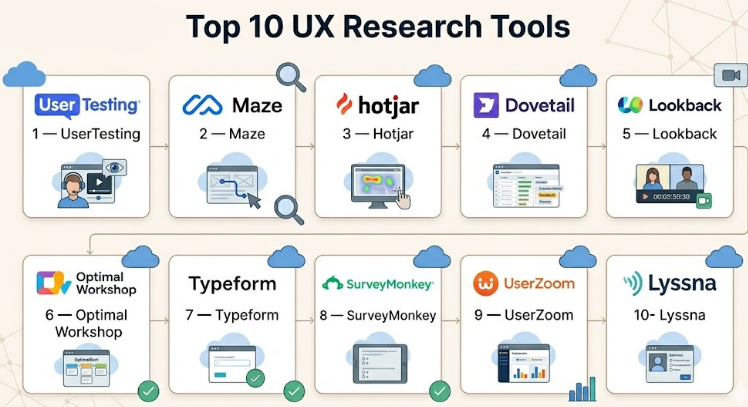
Top 10 UX Research Tools
#1 — UserTesting
Short description :
UserTesting is a well-known UX research platform focused on collecting human feedback through video-based testing, interviews, and usability studies. It is useful for teams that want to see and hear how users interact with products, websites, apps, prototypes, or concepts. Product teams use it to validate ideas before launch and understand friction in real user journeys. It is especially strong for remote research and moderated or unmoderated testing. Enterprise teams often use it to scale user insights across departments.
Key Features
- Video-based usability testing
- Moderated and unmoderated research support
- Participant recruitment options
- Prototype and website testing
- Highlight reels and insight sharing
- Research templates and study setup workflows
- AI-assisted insight support in some workflows
Pros
- Strong for capturing real user reactions and spoken feedback.
- Suitable for both early-stage concept testing and live product testing.
- Useful for teams that need quick access to participant feedback.
Cons
- Can be expensive for smaller teams.
- Advanced research programs may require setup discipline.
- Some teams may find it broader than needed for simple surveys.
Platforms / Deployment
Web-based platform
Cloud deployment
Security & Compliance
Enterprise security features may include SSO, access controls, and privacy-related controls. Specific certifications vary by plan and region. Use “Not publicly stated” where exact details are not confirmed.
Integrations & Ecosystem
UserTesting fits well into modern product, design, and research workflows. It is commonly used alongside design, collaboration, and product management tools.
- Design and prototype workflows
- Product management workflows
- Research repositories
- Collaboration tools
- Analytics and reporting workflows
Support & Community
UserTesting provides documentation, onboarding resources, customer support, and enterprise support options. Community strength is strong because the platform is widely known in UX research circles.
#2 — Maze
Short description :
Maze is a user research and product discovery platform often used for prototype testing, concept validation, surveys, and usability research. It is popular with product designers, UX researchers, and product managers who want fast feedback without building complex research operations. Maze is useful for testing design ideas before development begins. It supports rapid research cycles and helps teams collect structured feedback from users. It is a strong fit for teams that work heavily with design prototypes.
Key Features
- Prototype testing
- Usability tests
- Surveys and feedback forms
- Automated reports
- Participant recruitment options
- Design tool integrations
- AI-supported analysis in selected workflows
Pros
- Good for quick design validation.
- Easy for product and design teams to adopt.
- Strong fit for continuous discovery workflows.
Cons
- May not replace deep moderated interview tools.
- Enterprise governance needs may require higher plans.
- Advanced qualitative synthesis may need supporting tools.
Platforms / Deployment
Web-based platform
Cloud deployment
Security & Compliance
Security details vary by plan. Enterprise-grade features may include SSO and access controls. Exact certifications should be verified directly. If uncertain, use “Not publicly stated.”
Integrations & Ecosystem
Maze is commonly used with design and collaboration tools. It works best when connected to prototype workflows and product discovery processes.
- Figma-style prototype workflows
- Design collaboration tools
- Survey workflows
- Product research workflows
- Team reporting workflows
Support & Community
Maze offers documentation, templates, onboarding content, and support options. It has a strong community among product designers and startup product teams.
#3 — Hotjar
Short description :
Hotjar is a behavior analytics and feedback platform used to understand how users interact with websites and digital products. It is known for heatmaps, session recordings, surveys, and feedback widgets. Marketing teams, product teams, UX designers, and conversion optimization teams use it to identify friction points in user journeys. Hotjar is useful when teams want visual evidence of where users click, scroll, hesitate, or drop off. It is especially helpful for website optimization and landing page research.
Key Features
- Heatmaps
- Session recordings
- On-site surveys
- Feedback widgets
- Conversion funnel insights
- User behavior tracking
- Dashboard and reporting tools
Pros
- Easy to understand visual user behavior.
- Useful for conversion optimization and website UX improvement.
- Simple setup for many web teams.
Cons
- Less focused on deep interview-based research.
- Data volume and privacy settings need careful configuration.
- Not ideal as a full research repository.
Platforms / Deployment
Web-based platform
Cloud deployment
Security & Compliance
Hotjar provides privacy and data protection controls. GDPR-related features are commonly associated with the platform. Exact certifications and enterprise controls should be verified. Use “Not publicly stated” where uncertain.
Integrations & Ecosystem
Hotjar connects well with web analytics, product, and marketing workflows. It is often used by teams already working with analytics and conversion tools.
- Website analytics tools
- Tag management systems
- Product analytics workflows
- Marketing platforms
- Feedback and survey workflows
Support & Community
Hotjar has strong documentation, learning resources, and support options. It is widely adopted, so community knowledge and practical tutorials are easy to find.
#4 — Dovetail
Short description :
Dovetail is a customer insights and research repository platform designed to help teams organize, analyze, and share qualitative research. UX researchers use it to store interviews, notes, recordings, tags, themes, and insights. It is especially useful for companies running many research projects and needing a central place for customer knowledge. Dovetail helps prevent research from being lost in scattered documents. It is strong for synthesis, tagging, and building a searchable research memory.
Key Features
- Research repository
- Interview analysis
- Tagging and themes
- Video and transcript support
- Insight sharing
- Searchable customer knowledge base
- Collaboration and workspace organization
Pros
- Strong for managing research knowledge over time.
- Helps teams reuse insights across projects.
- Useful for qualitative synthesis and research operations.
Cons
- Not primarily a participant recruitment platform.
- Requires good tagging and governance habits.
- Smaller teams may not need a full repository.
Platforms / Deployment
Web-based platform
Cloud deployment
Security & Compliance
Security features may include access controls, workspace permissions, and enterprise controls. Specific certifications are plan-dependent or not always publicly clear. Use “Not publicly stated” where uncertain.
Integrations & Ecosystem
Dovetail works well with interview, transcription, research, and collaboration workflows. It often becomes the central insight layer for research teams.
- Video interview tools
- Transcription workflows
- Collaboration tools
- Product documentation workflows
- Research reporting workflows
Support & Community
Dovetail provides documentation, templates, learning resources, and customer support. It has a strong presence among UX researchers and research operations professionals.
#5 — Lookback
Short description :
Lookback is a UX research platform focused on live and recorded research sessions. It helps teams conduct moderated interviews, usability tests, and user sessions with screen, camera, and voice capture. UX researchers and product designers use Lookback when they want to observe real users interacting with products or prototypes. It is useful for remote research and collaborative observation. Teams can capture user behavior and reactions in context.
Key Features
- Moderated usability testing
- Unmoderated research support
- Screen and camera recording
- Live observation
- Session notes and collaboration
- Mobile and desktop research support
- Research session management
Pros
- Good for user interviews and live usability testing.
- Helps teams observe user behavior directly.
- Strong fit for qualitative UX research.
Cons
- May need additional tools for large-scale analytics.
- Participant recruitment may require separate workflows depending on needs.
- Repository features may not be as deep as dedicated insight platforms.
Platforms / Deployment
Web-based platform
Cloud deployment
Device support varies by research setup
Security & Compliance
Security and privacy details vary. Access controls and data handling features may be available. Exact certifications are not confidently stated here, so use “Not publicly stated.”
Integrations & Ecosystem
Lookback fits into research workflows where live sessions, recordings, and participant observation matter.
- Video research workflows
- Design prototype testing
- Team collaboration
- Research note-taking
- Insight sharing workflows
Support & Community
Lookback provides support resources and documentation. It is known in the UX research community, especially among teams conducting moderated sessions.
#6 — Optimal Workshop
Short description :
Optimal Workshop is a UX research platform focused on information architecture, content organization, navigation testing, and user behavior research. It is commonly used for card sorting, tree testing, first-click testing, and surveys. UX researchers, content strategists, and product designers use it to understand how users expect information to be grouped and labeled. It is very useful for improving website navigation, menus, product structure, and content findability.
Key Features
- Card sorting
- Tree testing
- First-click testing
- Surveys
- Participant recruitment options
- Information architecture research
- Visual reports and analysis
Pros
- Strong for navigation and information architecture testing.
- Useful for website redesigns and content-heavy products.
- Research methods are focused and practical.
Cons
- Less broad than full UX research suites.
- Not mainly designed for interview repositories.
- May need supporting tools for video usability testing.
Platforms / Deployment
Web-based platform
Cloud deployment
Security & Compliance
Security details vary by plan. Enterprise features may exist, but exact certifications should be verified. Use “Not publicly stated” where details are unclear.
Integrations & Ecosystem
Optimal Workshop fits well into UX research and content strategy workflows. It is often used before redesigns or major navigation changes.
- UX research workflows
- Website redesign projects
- Content strategy workflows
- Survey-based research
- Information architecture planning
Support & Community
Optimal Workshop provides educational resources, documentation, and support. It has strong recognition among UX researchers working on structure and navigation problems.
#7 — Typeform
Short description :
Typeform is a form and survey platform that can support UX research through user surveys, feedback forms, screening questionnaires, and customer discovery questions. While it is not a full UX research suite, it is widely used because of its clean interface and flexible survey experience. Product teams use Typeform to collect structured feedback from users, beta testers, customers, and prospects. It is especially useful for lightweight research, recruitment screeners, and feedback collection.
Key Features
- Interactive forms and surveys
- Conditional logic
- Research screeners
- Feedback collection
- Templates
- Reporting dashboards
- Integration support
Pros
- Very easy for teams to create and share surveys.
- Good user experience for respondents.
- Useful for lightweight research and participant screening.
Cons
- Not a full usability testing platform.
- Limited for deep qualitative synthesis.
- Advanced analytics may require connected tools.
Platforms / Deployment
Web-based platform
Cloud deployment
Security & Compliance
Typeform includes common privacy and account security controls. Exact enterprise compliance details may vary by plan. Use “Not publicly stated” for certifications that are not confirmed.
Integrations & Ecosystem
Typeform has a broad ecosystem and is often connected to CRM, marketing, automation, and analytics tools.
- CRM tools
- Marketing automation tools
- Spreadsheets and databases
- Collaboration platforms
- Workflow automation tools
Support & Community
Typeform has strong documentation, templates, and support resources. It is widely used outside UX as well, which gives it a large user community.
#8 — SurveyMonkey
Short description :
SurveyMonkey is a widely used survey platform that supports UX research through questionnaires, customer feedback surveys, market research, and user satisfaction studies. It is useful for teams that need structured responses at scale. UX and product teams can use it to validate user needs, collect feature feedback, measure satisfaction, and support research planning. It is not only for UX, but it remains valuable for quantitative user research.
Key Features
- Survey creation
- Question logic
- Response collection
- Reporting and dashboards
- Audience and panel options
- Templates
- Data export options
Pros
- Strong for collecting structured feedback at scale.
- Familiar to many business users.
- Useful for customer satisfaction and product feedback research.
Cons
- Not focused on usability testing or session recordings.
- Survey quality depends heavily on question design.
- Deep research synthesis may require another tool.
Platforms / Deployment
Web-based platform
Cloud deployment
Security & Compliance
Security and compliance features vary by plan. Enterprise plans may include stronger controls. Exact certifications should not be assumed. Use “Not publicly stated” where uncertain.
Integrations & Ecosystem
SurveyMonkey works across business research, customer experience, marketing, and product feedback workflows.
- CRM tools
- Collaboration tools
- Data export workflows
- Marketing tools
- Reporting tools
Support & Community
SurveyMonkey has extensive documentation, templates, and support resources. Its large user base makes it easy to find guidance for common survey use cases.
#9 — UserZoom
Short description :
UserZoom is an enterprise-focused UX research platform designed for usability testing, benchmarking, participant research, and experience measurement. It is suited for larger teams that need structured research programs across multiple products or business units. UX researchers, research operations teams, and enterprise product teams use it for scalable research processes. It is especially useful when companies need repeatable testing, governance, and research measurement.
Key Features
- Usability testing
- Benchmarking studies
- Participant management options
- Surveys and research studies
- Research operations support
- Reporting and analytics
- Enterprise collaboration workflows
Pros
- Strong fit for enterprise research programs.
- Useful for repeatable and scalable UX testing.
- Supports structured research across teams.
Cons
- May be too complex for very small teams.
- Pricing and setup may be enterprise-oriented.
- Teams may need training to use advanced workflows well.
Platforms / Deployment
Web-based platform
Cloud deployment
Security & Compliance
Enterprise security features may include access controls, SSO, and compliance-oriented options. Exact certifications should be verified directly. Use “Not publicly stated” where uncertain.
Integrations & Ecosystem
UserZoom fits into enterprise research and product experience workflows. It is often used with product, design, and research operations systems.
- Research operations workflows
- Product experience measurement
- Survey workflows
- Usability testing workflows
- Enterprise reporting processes
Support & Community
UserZoom provides enterprise support, onboarding, and documentation. It is recognized among mature UX research teams and larger organizations.
#10 — Lyssna
Short description :
Lyssna, formerly known as UsabilityHub, is a user research platform used for design testing, preference testing, first-click testing, five-second testing, and surveys. It helps teams validate design decisions quickly before investing in development. Designers, marketers, and product teams use it to understand user reactions to visuals, messaging, layouts, and prototypes. It is practical for fast feedback and lightweight research.
Key Features
- First-click testing
- Five-second testing
- Preference testing
- Surveys
- Prototype feedback
- Participant panel options
- Design validation workflows
Pros
- Good for fast design and messaging feedback.
- Easy to use for non-research specialists.
- Helpful for early-stage product and marketing decisions.
Cons
- Not a complete research repository.
- Less suitable for deep moderated interviews.
- Advanced enterprise governance may require plan review.
Platforms / Deployment
Web-based platform
Cloud deployment
Security & Compliance
Security details vary by plan. Access control and privacy features may be available. Exact compliance certifications are not confidently stated here, so use “Not publicly stated.”
Integrations & Ecosystem
Lyssna is useful in design validation and lightweight research workflows. It connects naturally with product design, marketing, and testing processes.
- Design testing workflows
- Survey workflows
- Prototype feedback
- Marketing message testing
- Research reporting workflows
Support & Community
Lyssna provides documentation, help resources, and support options. It is known among designers and product teams needing quick feedback.
Comparison Table Top 10
| Tool Name | Best For | Platform(s) Supported | Deployment Cloud/Self-hosted/Hybrid | Standout Feature | Public Rating |
|---|---|---|---|---|---|
| UserTesting | Enterprise UX testing and video feedback | Web | Cloud | Human feedback through recorded and live testing | N/A |
| Maze | Prototype testing and fast product discovery | Web | Cloud | Rapid usability testing and automated reports | N/A |
| Hotjar | Website behavior analytics and feedback | Web | Cloud | Heatmaps and session recordings | N/A |
| Dovetail | Research repository and insight management | Web | Cloud | Centralized qualitative research knowledge | N/A |
| Lookback | Moderated interviews and usability sessions | Web, device support varies | Cloud | Live observation and recorded user sessions | N/A |
| Optimal Workshop | Information architecture research | Web | Cloud | Card sorting and tree testing | N/A |
| Typeform | UX surveys and research screeners | Web | Cloud | Clean interactive survey experience | N/A |
| SurveyMonkey | Scalable surveys and feedback collection | Web | Cloud | Large-scale structured survey research | N/A |
| UserZoom | Enterprise UX research programs | Web | Cloud | Scalable usability testing and benchmarking | N/A |
| Lyssna | Fast design validation and preference testing | Web | Cloud | First-click and five-second testing | N/A |
Evaluation & UX Research Tools
| Tool Name | Core 25% | Ease 15% | Integrations 15% | Security 10% | Performance 10% | Support 10% | Value 15% | Weighted Total 0–10 |
|---|---|---|---|---|---|---|---|---|
| UserTesting | 9 | 8 | 8 | 8 | 8 | 9 | 7 | 8.15 |
| Maze | 8 | 9 | 8 | 7 | 8 | 8 | 8 | 8.05 |
| Hotjar | 8 | 9 | 8 | 7 | 8 | 8 | 8 | 8.05 |
| Dovetail | 8 | 8 | 8 | 8 | 8 | 8 | 8 | 8.00 |
| Lookback | 8 | 8 | 7 | 7 | 8 | 7 | 7 | 7.55 |
| Optimal Workshop | 8 | 8 | 7 | 7 | 8 | 8 | 8 | 7.75 |
| Typeform | 7 | 9 | 9 | 7 | 8 | 8 | 8 | 7.95 |
| SurveyMonkey | 7 | 8 | 8 | 7 | 8 | 8 | 8 | 7.65 |
| UserZoom | 9 | 7 | 8 | 8 | 8 | 8 | 7 | 7.95 |
| Lyssna | 7 | 9 | 7 | 7 | 8 | 7 | 8 | 7.65 |
These scores are comparative, not absolute. A higher score does not automatically mean the tool is the best choice for every team. For example, UserTesting may score high for enterprise usability research, while Maze may be better for fast prototype testing. Typeform and SurveyMonkey are strong for surveys, but they are not replacements for full usability testing platforms. Always validate the score against your actual use case, budget, security needs, and team maturity.
Which UX Research Tools
Solo / Freelancer
Solo designers, consultants, and freelance UX researchers usually need tools that are easy to start, affordable, and quick to use. Maze, Lyssna, Typeform, and Hotjar are practical choices because they support lightweight testing, surveys, and quick feedback collection.
For freelance UX audits, Hotjar can help show user behavior through heatmaps and recordings. For design validation, Maze and Lyssna are better choices. For simple user feedback forms and screening surveys, Typeform is a strong option.
SMB
Small and medium businesses need tools that balance cost, usability, and team collaboration. Maze, Hotjar, Typeform, SurveyMonkey, and Optimal Workshop are good options depending on the research need.
If the SMB is improving a website, Hotjar is useful. If the team is testing product flows or prototypes, Maze is a better fit. If they need survey-based feedback at scale, SurveyMonkey or Typeform may be enough.
Mid-Market
Mid-market teams often need stronger collaboration, repeatable research processes, and better reporting. Dovetail, Maze, UserTesting, Hotjar, and Optimal Workshop can work well together or separately depending on the workflow.
A growing product team may use Maze for prototype testing, Dovetail for research storage, and Hotjar for behavioral analytics. This combination helps connect what users say with what users actually do.
Enterprise
Enterprise teams usually need governance, permission controls, security review, support, research operations, and scalable insight sharing. UserTesting, UserZoom, and Dovetail are strong candidates for enterprise UX research programs.
Enterprises should focus on SSO, RBAC, audit logs, data retention, privacy controls, contract support, and integration with existing product and compliance systems. The best choice should pass internal security and procurement checks before rollout.
Budget vs Premium
Budget-conscious teams should start with tools like Typeform, SurveyMonkey, Lyssna, Maze, or Hotjar depending on the research method they need. These tools can support valuable research without a heavy research operations setup.
Premium teams with larger research needs may prefer UserTesting, UserZoom, or Dovetail because they support deeper research workflows, larger teams, and more structured insight management.
Feature Depth vs Ease of Use
If ease of use matters most, Maze, Typeform, Lyssna, and Hotjar are easier starting points. They help non-researchers collect useful feedback without complex setup.
If feature depth matters more, UserTesting, UserZoom, Dovetail, and Optimal Workshop provide stronger capabilities for structured research, advanced testing, synthesis, or specialized methods.
Integrations & Scalability-
Teams should check whether the tool connects with design, product management, analytics, communication, and documentation systems. A UX research tool becomes more valuable when insights can move into product decisions quickly.
For scaling, look for workspace management, templates, permission controls, reusable study formats, tagging systems, APIs, data exports, and integration with tools your team already uses.
Security & Compliance Needs
Security-focused teams should review SSO, SAML, MFA, RBAC, audit logs, encryption, data retention, GDPR support, and enterprise compliance documents before purchasing.
If research includes sensitive user recordings, customer data, health information, financial data, or regulated industries, security review should happen early. In these cases, do not rely only on feature lists. Ask for official security documentation and legal review before rollout.
Frequently Asked Questions FAQs
1. What are UX research tools used for?
UX research tools help teams collect, analyze, and share user insights. They can support usability testing, interviews, surveys, heatmaps, prototype testing, session recordings, and research repositories. The goal is to understand user needs and reduce guesswork in product decisions.
2. Are UX research tools only for UX researchers?
No. UX researchers benefit the most, but product managers, designers, marketers, founders, customer success teams, and growth teams can also use them. Many modern tools are built for cross-functional teams, not only trained researchers.
3. What pricing models are common for UX research tools?
Common pricing models include per-seat pricing, usage-based pricing, participant-credit pricing, project-based pricing, and enterprise contracts. Some tools may offer free or starter plans, while enterprise platforms usually require custom pricing.
4. How long does onboarding usually take?
Simple tools like survey platforms or heatmap tools can be adopted quickly. Larger platforms with research operations, governance, repositories, and enterprise permissions may require more planning, training, and internal rollout.
5. What is the biggest mistake teams make when buying UX research tools?
The biggest mistake is buying a tool before defining the research workflow. Teams should first decide whether they need surveys, usability testing, interviews, heatmaps, repository management, participant recruitment, or all of these together.
6. Are UX research tools secure?
Many established tools provide security controls, but security varies by vendor and plan. Teams should review SSO, MFA, encryption, RBAC, audit logs, data retention, GDPR support, and compliance documents before selecting a tool.
7. Can UX research tools scale for enterprise teams?
Yes, but not every tool scales the same way. Enterprise teams should look for permission management, workspace controls, research governance, support tiers, data privacy controls, and integrations with existing enterprise systems.
8. Which UX research tool is best for prototype testing?
Maze, UserTesting, Lyssna, and Lookback are strong options for prototype testing depending on the depth required. Maze and Lyssna are useful for fast validation, while UserTesting and Lookback are better for richer user feedback and session observation.
9. Which tool is best for surveys?
Typeform and SurveyMonkey are strong choices for survey-based UX research. They are useful for collecting structured feedback, screening participants, validating ideas, and measuring user satisfaction.
10. Which tool is best for research repositories?
Dovetail is one of the strongest options for research repository workflows. It helps teams store interviews, notes, tags, themes, and insights in one searchable place so research can be reused across projects.
Conclusion
UX research tools are now essential for teams that want to build products based on real user evidence rather than assumptions. However, there is no single best tool for every company. UserTesting and UserZoom are strong for larger research programs, Maze and Lyssna are useful for fast design validation, Hotjar helps with behavior analytics, Dovetail supports research knowledge management, and Typeform or SurveyMonkey work well for structured feedback.
