Introduction
Accessibility auditing tools help teams check whether websites, web apps, documents, and digital products are usable for people with disabilities. In simple words, these tools help find issues related to screen readers, keyboard navigation, color contrast, form labels, image alt text, page structure, ARIA usage, and compliance readiness.
Accessibility matters more now because digital products are used by everyone, across many devices, abilities, and environments. Businesses also face stronger legal, ethical, and customer-experience expectations. A website that is not accessible can block users from buying, learning, applying, booking, or completing important tasks.
Best for: QA teams, developers, UX teams, compliance teams, digital agencies, ecommerce companies, SaaS businesses, public-sector teams, and enterprises managing many websites.
Not ideal for: teams expecting full accessibility compliance from automation alone. Accessibility tools help detect many issues, but human review, assistive technology testing, and expert judgment are still important.
Key Trends in Accessibility Auditing Tools
- AI-assisted accessibility review is becoming more common for issue prioritization, plain-English remediation guidance, and faster triage.
- Shift-left accessibility testing is growing, with teams testing during design and development instead of waiting until launch.
- Continuous monitoring is now expected, especially for large websites with frequent content updates.
- Developer-first accessibility testing is increasing through browser extensions, APIs, CI/CD checks, and component-level testing.
- Accessibility overlays are being questioned more carefully, because overlays alone do not replace proper remediation.
- WCAG alignment remains a key buying factor, especially for organizations that need structured accessibility governance.
- Design system accessibility is becoming important, helping teams prevent repeated issues across reusable components.
- Manual audit support is still critical, because automated tools cannot detect every accessibility problem.
- Reporting for legal and compliance teams is improving, with dashboards, exportable reports, and risk tracking.
- Procurement teams are asking deeper security questions, including SSO, role-based access, data handling, and audit trails.
How We Selected These Tools
The tools below were selected using practical evaluation logic for accessibility auditing and digital quality teams.
- Recognition and adoption in accessibility, QA, UX, and compliance workflows.
- Strength of automated accessibility scanning and issue detection.
- Support for WCAG-related testing and remediation guidance.
- Fit for developers, designers, content teams, compliance teams, and enterprises.
- Availability of browser extensions, dashboards, APIs, monitoring, and reports.
- Ability to support both one-time audits and ongoing accessibility governance.
- Quality of documentation, support, onboarding, and education resources.
- Practical usefulness for websites, web apps, design systems, and digital content.
- Balance between ease of use, technical depth, scalability, and price/value.
- Clear distinction between automated testing and the need for human validation.
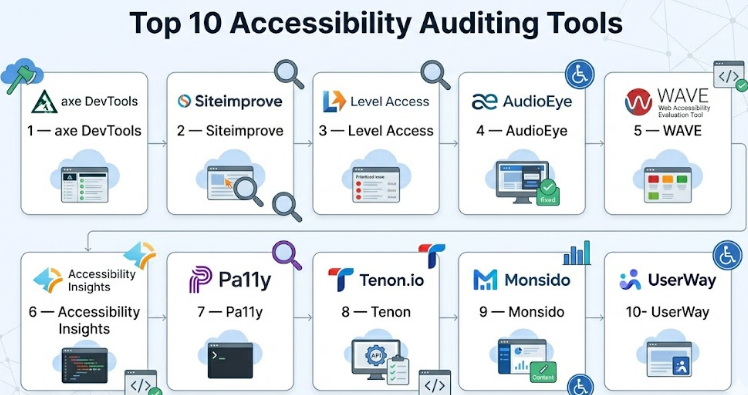
Top 10 Accessibility Auditing Tools
#1 — axe DevTools
Short description :
axe DevTools by Deque is one of the most widely used accessibility testing tools for developers and QA teams. It helps identify accessibility issues directly inside development and testing workflows. Teams can use it through browser extensions, automated testing integrations, and developer pipelines. It is especially useful for finding WCAG-related issues early before they reach production. axe DevTools is a strong choice for engineering teams that want practical accessibility testing inside daily development work.
Key Features
- Browser extension for quick page-level accessibility checks.
- Developer-focused accessibility issue detection.
- Support for automated testing workflows.
- Clear issue explanations and remediation guidance.
- Integration with common testing frameworks.
- Useful for shift-left accessibility practices.
- Strong fit for QA and engineering teams.
Pros
- Very developer-friendly and practical.
- Helps catch accessibility issues early.
- Strong ecosystem and wide industry usage.
Cons
- Automated testing cannot catch every accessibility issue.
- Teams still need manual audits and screen reader testing.
- Advanced enterprise features may require paid plans.
Platforms / Deployment
Web / Browser extension / Developer tools
Cloud / Local workflow / Enterprise options vary
Security & Compliance
Enterprise security features may include SSO, access controls, and governance options depending on plan. Specific compliance certifications should be verified during procurement.
Integrations & Ecosystem
axe DevTools fits well into developer and QA workflows, especially where accessibility testing is part of CI/CD.
- Selenium
- Cypress
- Playwright
- Browser extensions
- CI/CD pipelines
- Developer test suites
- QA automation workflows
Support & Community
Deque provides strong documentation, accessibility education resources, training options, and enterprise support. The axe ecosystem is widely known among accessibility professionals and developers.
#2 — Siteimprove
Short description :
Siteimprove is a digital governance platform that includes accessibility auditing, quality assurance, SEO, analytics, and policy monitoring. It is suitable for enterprises, universities, government teams, and large organizations managing many web pages. Siteimprove helps teams monitor accessibility issues across websites and prioritize fixes through dashboards and reports. It is useful for non-technical stakeholders as well as web teams. Its strength is centralized visibility, governance, and ongoing monitoring.
Key Features
- Website-wide accessibility scanning.
- WCAG-focused issue reporting.
- Quality assurance and content checks.
- Dashboards for governance and tracking.
- Issue prioritization and remediation guidance.
- Multi-site monitoring.
- Reporting for stakeholders and compliance teams.
Pros
- Strong for large websites and multi-team governance.
- Useful dashboards for non-technical users.
- Combines accessibility with broader digital quality checks.
Cons
- May be more than small teams need.
- Pricing can be enterprise-oriented.
- Developers may still need separate testing tools for code-level workflows.
Platforms / Deployment
Web
Cloud
Security & Compliance
Security features may include SSO, role-based access, and enterprise controls depending on plan. Specific certifications and compliance details should be verified.
Integrations & Ecosystem
Siteimprove fits well into governance and web management workflows.
- CMS workflows
- Analytics workflows
- Reporting dashboards
- Accessibility governance processes
- Content quality workflows
- Enterprise web teams
Support & Community
Siteimprove provides onboarding, documentation, customer support, and enterprise guidance. It is especially strong for organizations that need structured accessibility monitoring across many pages.
#3 — Level Access
Short description :
Level Access provides accessibility solutions for auditing, monitoring, remediation, training, and compliance programs. It is especially relevant for enterprises that need expert accessibility support along with tools. The platform helps teams identify accessibility issues, manage remediation, and build a long-term accessibility program. It is useful for organizations with legal, compliance, product, and engineering stakeholders. Its strength is combining technology with accessibility expertise and program support.
Key Features
- Accessibility auditing and monitoring.
- Expert-led accessibility services.
- WCAG-focused issue detection and reporting.
- Remediation guidance and tracking.
- Training and accessibility program support.
- Governance workflows for enterprises.
- Support for digital accessibility maturity programs.
Pros
- Strong enterprise accessibility expertise.
- Good fit for organizations needing more than scanning.
- Useful for legal, compliance, and product teams.
Cons
- May be too advanced for small websites.
- Cost and scope may be enterprise-focused.
- Buyers should clearly define service and tool requirements.
Platforms / Deployment
Web
Cloud / Services-based support
Security & Compliance
Enterprise security features may be available depending on contract. Specific certifications, SSO, audit logs, and compliance controls should be verified directly.
Integrations & Ecosystem
Level Access is useful for accessibility governance, remediation planning, and enterprise workflows.
- Accessibility audits
- Compliance workflows
- Product team processes
- Engineering remediation workflows
- Training programs
- Governance reporting
Support & Community
Level Access offers professional accessibility support, training, documentation, and expert guidance. It is best for organizations that want a mature accessibility program, not only automated scans.
#4 — AudioEye
Short description :
AudioEye provides accessibility scanning, monitoring, reporting, and remediation support for websites. It is used by businesses that want continuous accessibility monitoring and guided improvements. AudioEye combines automated detection with expert support and remediation services. It can be useful for small businesses, agencies, and larger organizations that need help maintaining accessibility over time. Buyers should understand that automation and remediation support do not remove the need for responsible design and development practices.
Key Features
- Automated accessibility scanning.
- Continuous website monitoring.
- Issue reporting and remediation guidance.
- Expert accessibility support options.
- Dashboard for accessibility tracking.
- Support for WCAG-related improvements.
- Tools for ongoing accessibility maintenance.
Pros
- Useful for teams needing monitoring and guidance.
- Combines automation with expert support options.
- Can help teams start accessibility improvements faster.
Cons
- Automated fixes should not replace proper remediation.
- Buyers should review overlay-related expectations carefully.
- Complex web apps may still need manual expert audits.
Platforms / Deployment
Web
Cloud
Security & Compliance
Security details may vary by plan and contract. Buyers should verify SSO, data handling, access controls, and compliance documentation during procurement.
Integrations & Ecosystem
AudioEye supports accessibility improvement workflows for website teams and agencies.
- Website monitoring
- Accessibility dashboards
- Remediation workflows
- Agency workflows
- Compliance reporting
- Content team processes
Support & Community
AudioEye provides support resources, documentation, and expert assistance options. It is useful for teams that need guided accessibility improvements and ongoing monitoring.
#5 — WAVE
Short description :
WAVE is a well-known accessibility evaluation tool used by developers, designers, educators, and content teams. It helps users identify accessibility issues directly on web pages with visual feedback. WAVE is especially useful for quick manual checks, learning accessibility basics, and reviewing page structure. It is not a full enterprise governance platform, but it is valuable for practical page-level inspection. It works well for teams that need a simple and accessible way to understand common web accessibility issues.
Key Features
- Visual accessibility feedback on web pages.
- Detection of common accessibility issues.
- Browser extension support.
- Page structure and heading review.
- Color contrast checking.
- Useful for education and quick audits.
- Simple page-level testing workflow.
Pros
- Easy to use and understand.
- Good for learning and quick manual checks.
- Helpful visual presentation of issues.
Cons
- Not a complete enterprise monitoring platform.
- Manual review is still required.
- Limited for large-scale automated governance needs.
Platforms / Deployment
Web / Browser extension
Cloud / Local browser workflow
Security & Compliance
Not publicly stated for enterprise-style compliance controls. Since usage is often page-level, buyers should assess data handling based on their workflow.
Integrations & Ecosystem
WAVE is strongest as a browser-based inspection and learning tool.
- Browser extension workflow
- Manual QA process
- Content review
- Developer accessibility checks
- Training and education
- Page-level audits
Support & Community
WAVE has strong recognition in the accessibility community and useful educational value. Support is more tool-resource focused than enterprise onboarding.
#6 — Accessibility Insights
Short description :
Accessibility Insights is a practical accessibility testing tool created for developers, testers, and product teams. It helps teams find and fix accessibility issues through automated checks and guided manual testing. It is useful for web apps, Windows apps, and teams that want structured accessibility review. Accessibility Insights is particularly helpful because it encourages both automated scanning and human validation. It is a good choice for teams that want a free, developer-friendly accessibility testing workflow.
Key Features
- Fast automated accessibility checks.
- Guided manual assessment workflow.
- Browser extension support.
- Support for web accessibility testing.
- Clear issue guidance.
- Useful for developers and QA teams.
- Encourages manual validation beyond automation.
Pros
- Practical and easy to start.
- Good for developer and QA workflows.
- Helps teams understand manual testing needs.
Cons
- Not a full enterprise monitoring platform.
- Reporting and governance features are limited.
- Large organizations may need additional tools.
Platforms / Deployment
Web / Browser extension / Windows support
Local workflow
Security & Compliance
Not publicly stated for enterprise governance controls. Security depends on how the tool is used within the team environment.
Integrations & Ecosystem
Accessibility Insights works well for development and manual testing workflows.
- Browser-based testing
- Manual QA review
- Developer checks
- Accessibility learning
- Issue validation
- Component testing workflows
Support & Community
Documentation and learning resources are available. Community adoption is strong among developers and testers who want a practical accessibility testing starting point.
#7 — Pa11y
Short description :
Pa11y is an open-source accessibility testing tool used by developers and technical teams. It helps run automated accessibility tests from the command line and can be included in development pipelines. Pa11y is a strong option for teams that prefer open-source tooling and want to automate accessibility checks in CI/CD. It is especially useful for technical teams comfortable with scripts, configuration, and custom workflows. It is not a full commercial governance platform, but it can be very effective for automated checks.
Key Features
- Open-source accessibility testing.
- Command-line testing support.
- Automation-friendly workflow.
- Useful for CI/CD pipelines.
- Supports repeatable accessibility checks.
- Configurable testing setup.
- Good fit for technical teams.
Pros
- Strong option for developer-led teams.
- Flexible and automation-friendly.
- No heavy platform lock-in.
Cons
- Requires technical setup and maintenance.
- Limited enterprise dashboards out of the box.
- Manual accessibility review is still needed.
Platforms / Deployment
Windows / macOS / Linux
Self-hosted / Local / CI/CD workflow
Security & Compliance
Not publicly stated. Security depends on internal deployment, CI/CD configuration, and data handling practices.
Integrations & Ecosystem
Pa11y fits technical automation workflows.
- Command-line testing
- CI/CD pipelines
- Developer scripts
- Accessibility regression checks
- Custom reporting workflows
- Open-source development processes
Support & Community
Pa11y has an open-source community and documentation. Support is community-driven rather than enterprise support unless implemented through internal teams or consultants.
#8 — Tenon
Short description :
Tenon is an accessibility testing tool focused on helping teams identify accessibility issues and integrate testing into development workflows. It is useful for developers, QA teams, and organizations that want accessibility testing through APIs and automation. Tenon can support automated checks and structured reporting for web accessibility issues. It is best suited for teams that want a technical accessibility testing layer rather than only a visual browser extension. Buyers should validate current feature availability and support needs before selecting it.
Key Features
- Automated accessibility testing.
- API-driven testing workflows.
- Developer and QA-friendly reporting.
- WCAG-related issue detection.
- Integration with custom workflows.
- Useful for continuous testing.
- Helps support repeatable accessibility checks.
Pros
- Good for technical accessibility workflows.
- API support can help with automation.
- Useful for teams building custom quality gates.
Cons
- Less visible than larger enterprise platforms.
- Buyers should validate current support and roadmap.
- May require technical setup.
Platforms / Deployment
Web / API workflow
Cloud / Varies
Security & Compliance
Not publicly stated. Buyers should verify security controls, data handling, and compliance support directly.
Integrations & Ecosystem
Tenon can support custom developer and QA pipelines.
- API workflows
- CI/CD testing
- Developer scripts
- QA automation
- Custom dashboards
- Accessibility reporting
Support & Community
Support and documentation availability should be reviewed during evaluation. It is more suitable for teams comfortable with technical configuration.
#9 — Monsido
Short description :
Monsido is a web governance platform that includes accessibility checking, quality assurance, content policy, SEO, and website monitoring features. It is often useful for organizations managing many pages, such as education, public sector, healthcare, and enterprise websites. Monsido helps teams monitor accessibility issues and track digital quality over time. It is suitable for content teams, web managers, compliance teams, and digital governance leaders. Its strength is website-wide monitoring and multi-stakeholder reporting.
Key Features
- Website accessibility scanning.
- Quality assurance checks.
- Content policy monitoring.
- SEO and web governance features.
- Dashboards and reporting.
- Multi-page monitoring.
- Useful for content and compliance teams.
Pros
- Good for large content-heavy websites.
- Helpful governance dashboards.
- Combines accessibility with broader website quality checks.
Cons
- May not be enough for developer-level testing alone.
- Pricing and feature depth should be validated.
- Manual audits are still required for complete review.
Platforms / Deployment
Web
Cloud
Security & Compliance
Enterprise security features may be available depending on plan. Specific details such as SSO, audit logs, and compliance certifications should be verified.
Integrations & Ecosystem
Monsido supports website management and digital governance workflows.
- CMS workflows
- Content quality checks
- Accessibility reporting
- SEO monitoring
- Governance dashboards
- Web team collaboration
Support & Community
Monsido provides documentation, support, onboarding, and customer success resources. It is especially useful for teams managing accessibility at website scale.
#10 — UserWay
Short description :
UserWay provides accessibility scanning, monitoring, widgets, and remediation-related solutions for websites. It is used by businesses that want to improve accessibility visibility and manage common accessibility issues. UserWay can help teams identify issues and provide tools for ongoing improvements. It is suitable for small businesses, agencies, and organizations looking for accessibility monitoring and remediation support. However, buyers should understand that widgets and automation are not a complete replacement for proper accessibility design, development, and manual testing.
Key Features
- Accessibility scanning and monitoring.
- Accessibility widget options.
- Issue detection and dashboard reporting.
- Remediation support options.
- Website accessibility tracking.
- Support for common accessibility improvements.
- Useful for agencies and website owners.
Pros
- Easy for website owners to start.
- Offers monitoring and remediation support.
- Useful for teams with limited accessibility resources.
Cons
- Widgets alone do not guarantee accessibility compliance.
- Complex products need deeper manual testing.
- Buyers should review technical fit carefully.
Platforms / Deployment
Web
Cloud
Security & Compliance
Security and compliance details may vary by plan. Buyers should verify SSO, data handling, access controls, and compliance documentation.
Integrations & Ecosystem
UserWay fits website accessibility monitoring and remediation workflows.
- Website monitoring
- Accessibility dashboard
- Remediation workflows
- Agency workflows
- Content team processes
- Compliance tracking
Support & Community
UserWay provides customer support and product resources. It is useful for website owners and agencies that need accessible website improvement workflows.
Comparison Table (Top 10)
| Tool Name | Best For | Platform(s) Supported | Deployment | Standout Feature | Public Rating |
|---|---|---|---|---|---|
| axe DevTools | Developers and QA teams | Web, Browser extension, CI/CD workflows | Cloud / Local / Varies | Developer-first accessibility testing | N/A |
| Siteimprove | Enterprise web governance | Web | Cloud | Accessibility plus digital quality monitoring | N/A |
| Level Access | Enterprise accessibility programs | Web | Cloud / Services-based | Expert-led accessibility governance | N/A |
| AudioEye | Monitoring and remediation support | Web | Cloud | Continuous monitoring with support options | N/A |
| WAVE | Quick page-level accessibility checks | Web, Browser extension | Cloud / Local browser workflow | Visual accessibility feedback | N/A |
| Accessibility Insights | Developer and manual QA workflows | Web, Browser extension, Windows | Local workflow | Guided manual accessibility testing | N/A |
| Pa11y | Open-source automated testing | Windows, macOS, Linux | Self-hosted / Local / CI/CD | Command-line accessibility automation | N/A |
| Tenon | API-based accessibility testing | Web / API workflow | Cloud / Varies | Developer-friendly API testing | N/A |
| Monsido | Content-heavy websites | Web | Cloud | Website governance and monitoring | N/A |
| UserWay | Website owners and agencies | Web | Cloud | Accessibility monitoring and widget options | N/A |
Evaluation & Accessibility Auditing Tools
| Tool Name | Core (25%) | Ease (15%) | Integrations (15%) | Security (10%) | Performance (10%) | Support (10%) | Value (15%) | Weighted Total (0–10) |
|---|---|---|---|---|---|---|---|---|
| axe DevTools | 9 | 8 | 9 | 8 | 9 | 9 | 8 | 8.55 |
| Siteimprove | 8 | 8 | 8 | 8 | 8 | 9 | 7 | 7.95 |
| Level Access | 9 | 7 | 8 | 8 | 8 | 9 | 7 | 8.10 |
| AudioEye | 7 | 8 | 7 | 7 | 7 | 8 | 7 | 7.30 |
| WAVE | 7 | 9 | 6 | 6 | 8 | 7 | 9 | 7.45 |
| Accessibility Insights | 8 | 8 | 7 | 7 | 8 | 7 | 9 | 7.80 |
| Pa11y | 7 | 6 | 8 | 7 | 8 | 6 | 9 | 7.30 |
| Tenon | 7 | 7 | 8 | 6 | 7 | 6 | 7 | 6.95 |
| Monsido | 7 | 8 | 7 | 7 | 7 | 8 | 7 | 7.25 |
| UserWay | 7 | 8 | 6 | 7 | 7 | 7 | 7 | 7.05 |
The scores are comparative and should not be treated as universal rankings. A developer team may prefer axe DevTools, Accessibility Insights, or Pa11y, while a compliance team may prefer Siteimprove, Level Access, or Monsido. Tools with lower scores may still be excellent for specific use cases. Always validate with a pilot, real pages, real users, and manual accessibility review.
Which Accessibility Auditing Tools
Solo / Freelancer
Solo developers and freelancers should start with practical, low-friction tools such as WAVE, Accessibility Insights, axe DevTools, or Pa11y. These tools help catch common accessibility issues without needing a large platform. For small client projects, a browser extension plus manual keyboard testing can be a strong starting point.
SMB
Small and mid-sized businesses should consider axe DevTools, AudioEye, UserWay, Monsido, or Siteimprove depending on needs. If the team has developers, axe DevTools and Accessibility Insights are useful. If the team manages many content pages, Monsido or Siteimprove may be better.
Mid-Market
Mid-market teams usually need both technical testing and governance. A good setup may include axe DevTools for developers and Siteimprove, Monsido, or Level Access for monitoring and reporting. Teams should focus on ownership, remediation workflow, issue tracking, and repeat testing.
Enterprise
Enterprises should prioritize governance, accessibility maturity, compliance reporting, expert support, and integration with development workflows. Level Access, Siteimprove, axe DevTools, and Monsido are strong candidates. Enterprise buyers should verify SSO, audit logs, RBAC, support SLAs, and documentation before purchase.
Budget vs Premium
Budget-focused teams can start with WAVE, Accessibility Insights, and Pa11y. Premium buyers should evaluate Siteimprove, Level Access, axe DevTools enterprise options, Monsido, or AudioEye. The right choice depends on whether the team needs developer testing, website monitoring, expert audits, or compliance reporting.
Feature Depth vs Ease of Use
WAVE and Accessibility Insights are easy to start with. axe DevTools offers strong developer depth. Siteimprove and Monsido provide broader governance. Level Access offers deeper program support. Pa11y is flexible but requires technical setup.
Integrations & Scalability-
For CI/CD and developer workflows, axe DevTools, Pa11y, Tenon, and Accessibility Insights are strong options. For large website monitoring, Siteimprove and Monsido are better suited. For enterprise accessibility programs, Level Access may provide stronger governance support.
Security & Compliance Needs
Security-focused buyers should check SSO, RBAC, audit logs, encryption, data retention, compliance documentation, and vendor security reviews. Enterprise teams should never assume a tool is compliant by default. Accessibility compliance also requires process, remediation, manual testing, and documentation.
Frequently Asked Questions (FAQs)
1. What is an accessibility auditing tool?
An accessibility auditing tool checks websites, web apps, or digital content for accessibility issues. It helps identify problems related to keyboard access, screen readers, color contrast, headings, labels, forms, and page structure.
2. Can accessibility tools guarantee full compliance?
No. Automated tools can detect many issues, but they cannot find every accessibility problem. Human testing, assistive technology testing, design review, and expert judgment are still required.
3. What standards do accessibility tools usually check against?
Most tools focus on WCAG-related checks. However, the depth of coverage varies by tool. Teams should review what each platform tests automatically and what still requires manual review.
4. Are free accessibility tools enough?
Free tools are useful for learning and basic checks. They are often enough for small teams starting out. Larger teams usually need monitoring, reporting, governance, integrations, and expert support.
5. What is the biggest mistake teams make with accessibility testing?
The biggest mistake is testing too late. Accessibility should be checked during design, development, QA, and after release. Waiting until the end usually makes fixes slower and more expensive.
6. Do accessibility overlays solve accessibility problems?
Overlays may help with some user-facing adjustments, but they do not replace proper coding, semantic HTML, keyboard support, screen reader testing, and manual remediation.
7. Which teams should use accessibility auditing tools?
Developers, QA testers, UX designers, product managers, content teams, compliance teams, and digital leaders can all benefit. Accessibility is a shared responsibility, not only a QA task.
8. Can accessibility testing be added to CI/CD?
Yes. Developer-focused tools such as axe DevTools, Pa11y, and API-based tools can be added to CI/CD workflows. This helps catch issues before code reaches production.
9. How often should accessibility audits be done?
Accessibility should be monitored continuously for active websites. Full manual audits should be done when launching major redesigns, new user flows, new templates, or important product changes.
10. What should buyers check before choosing a tool?
Buyers should check WCAG coverage, automation depth, manual testing support, reporting, integrations, security controls, remediation guidance, pricing, and support quality.
Conclusion
Accessibility auditing tools are important for building digital products that more people can use with confidence. The best tool depends on the team’s size, technical maturity, compliance needs, and website complexity. Developer teams may benefit most from axe DevTools, Accessibility Insights, or Pa11y. Large organizations may need Siteimprove, Level Access, Monsido, or similar governance platforms. Website owners may consider AudioEye or UserWay for monitoring and support, but they should not rely only on automation or widgets.
