Introduction
Meal planning apps help users plan meals ahead of time, organize recipes, create grocery lists, manage nutrition goals, reduce food waste, and make daily cooking easier. In simple words, these apps help answer one common question: “What should I cook today?”
These tools are useful for busy professionals, families, students, fitness users, parents, nutrition coaches, and anyone who wants more control over weekly food routines. Instead of deciding meals at the last minute, users can plan breakfast, lunch, dinner, snacks, and grocery shopping in advance.
Meal planning apps can also support healthier eating habits. Some apps focus on recipes and grocery lists, while others include calorie tracking, diet plans, macros, fasting support, or nutrition coaching. The best app depends on whether the user wants simple planning, family grocery coordination, weight management, recipe discovery, or structured diet support.
Real-world use cases include:
- Planning weekly breakfast, lunch, dinner, and snacks.
- Creating grocery lists from selected meals.
- Saving favorite recipes in one place.
- Planning meals for weight loss, muscle gain, or healthy eating.
- Managing family meals and shared shopping lists.
- Reducing food waste by planning around available ingredients.
- Supporting special diets like vegetarian, vegan, keto, low-carb, or high-protein eating.
Key evaluation criteria for buyers:
- Meal calendar and weekly planning features.
- Recipe saving and discovery.
- Grocery list automation.
- Nutrition and calorie tracking.
- Diet customization options.
- Family sharing and collaboration.
- Ease of use while shopping and cooking.
- Cross-device sync.
- Free vs premium value.
- Privacy and data handling.
Best for: Families, busy professionals, students, home cooks, fitness users, meal-prep users, nutrition coaches, wellness-focused individuals, and people trying to build consistent eating habits.
Not ideal for: Users who rarely cook, people who dislike structured planning, or anyone needing clinical medical diet planning without support from a qualified dietitian or healthcare professional.
Key Trends in Meal Planning Apps
- AI-based meal suggestions are becoming more common, helping users plan meals based on ingredients, diet preferences, cooking time, and food goals.
- Grocery list automation is now a core feature, because users want meal plans to convert directly into shopping lists.
- Diet-specific meal plans are growing, including vegetarian, vegan, keto, low-carb, high-protein, gluten-free, dairy-free, and balanced meal options.
- Family sharing is becoming important, especially for households where multiple people shop, cook, or update meal plans.
- Recipe import features are expected, allowing users to save meals from different online sources into one organized library.
- Nutrition-aware planning is expanding, helping users connect meal planning with calories, macros, protein, fiber, and healthy eating habits.
- Food waste reduction is becoming a practical benefit, as users plan meals around what they already have at home.
- Cross-device cooking workflows are now standard, because users may plan meals on a laptop and cook from a phone or tablet.
- Meal prep support is growing, especially for users who cook in batches for fitness, work lunches, or busy weekdays.
- Simple user experience matters more than feature overload, because meal planning only works when users can follow it consistently.
How We Selected These Tools
The tools below were selected based on their practical usefulness for meal planning, recipe management, grocery lists, diet support, nutrition awareness, and household cooking workflows. The evaluation focused on:
- Market recognition among home cooks, families, and wellness users.
- Strength of weekly meal planning and calendar features.
- Recipe discovery, recipe saving, and recipe organization.
- Grocery list creation and shopping workflow support.
- Diet, nutrition, and goal-based customization.
- Ease of use for beginners and busy users.
- Fit for families, individuals, fitness users, and meal-prep users.
- Cross-device sync and mobile experience.
- Privacy and security visibility where clearly known; otherwise marked as “Not publicly stated.”
- Overall value based on feature depth, usability, and daily cooking usefulness.
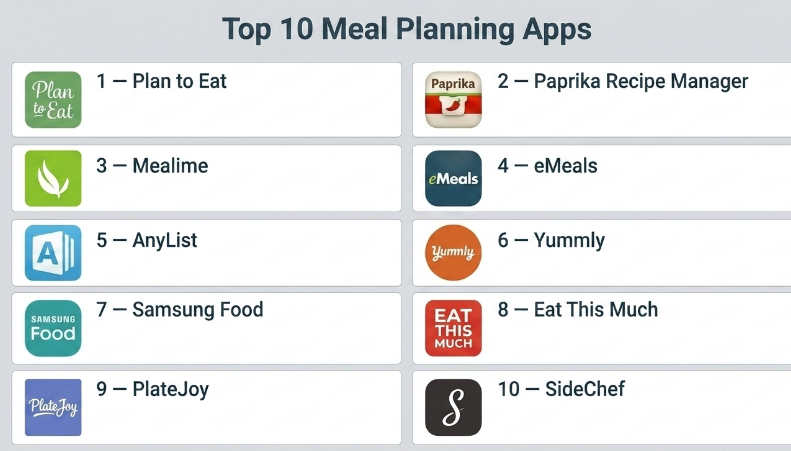
Top 10 Meal Planning Apps
#1 — Plan to Eat
Short description :
Plan to Eat is a meal planning app focused on helping users save recipes, organize meals, build weekly plans, and generate grocery lists. It is especially useful for families and home cooks who want a planning-first workflow. Users can add recipes to a calendar, plan meals ahead, and automatically create shopping lists from selected recipes. The app is practical for reducing last-minute meal stress and making grocery shopping easier. Plan to Eat is best for users who want a dedicated meal planning system rather than only recipe discovery.
Key Features
- Weekly and monthly meal planning calendar.
- Recipe saving and organization.
- Grocery list generation from meal plans.
- Recipe import tools.
- Drag-and-drop meal planning.
- Family meal planning support.
- Cross-device access.
Pros
- Strong meal planning workflow.
- Excellent for organized weekly cooking.
- Grocery list automation saves time.
Cons
- Less focused on recipe discovery.
- Subscription may be required.
- Best value comes when users plan consistently.
Platforms / Deployment
Web / iOS / Android
Cloud / Mobile app-based
Security & Compliance
Not publicly stated
Integrations & Ecosystem
Plan to Eat works well for users who want recipes, meal planning, and grocery lists in one structured workflow.
- Recipe library.
- Meal calendar.
- Grocery list creation.
- Family planning workflows.
- Batch cooking and meal prep support.
Support & Community
Plan to Eat provides support resources, user guidance, and a loyal community among organized home cooks and meal planners.
#2 — Paprika Recipe Manager
Short description :
Paprika Recipe Manager is a powerful recipe and meal planning app for users who want to save recipes, edit them, scale servings, create grocery lists, and organize cooking routines. It is useful for serious home cooks, families, and meal-prep users who collect recipes from many places. Paprika combines recipe management with meal planning and shopping list tools. It is especially good for users who want full control over their personal recipe library. The app is best for people who want a long-term digital cookbook plus planning features.
Key Features
- Recipe saving and organization.
- Meal planning calendar.
- Grocery list creation.
- Ingredient scaling and conversion.
- Recipe editing and notes.
- Online recipe import.
- Cross-device sync with supported versions.
Pros
- Strong recipe management and planning combination.
- Great for serious home cooks.
- Useful grocery and ingredient tools.
Cons
- App purchase may be required per platform.
- Interface is practical but not highly modern.
- Sync setup may require extra steps.
Platforms / Deployment
iOS / Android / Windows / macOS
Cloud sync / App-based
Security & Compliance
Not publicly stated
Integrations & Ecosystem
Paprika works as a full recipe and meal planning workspace for users who want organized cooking routines.
- Personal recipe library.
- Meal planning calendar.
- Grocery list workflows.
- Recipe scaling.
- Cooking notes and categories.
Support & Community
Paprika has support documentation and a strong user base among recipe collectors and home cooks.
#3 — Mealime
Short description :
Mealime is a meal planning app designed for quick, healthy, and simple meal plans. It helps users choose meals based on preferences, dietary needs, and cooking goals, then creates grocery lists automatically. Mealime is useful for busy professionals, couples, small families, and people who want healthier meals without complex planning. The app focuses on reducing decision fatigue and making home cooking easier. It is best for users who want simple guided meal plans with easy grocery preparation.
Key Features
- Personalized meal plans.
- Diet and preference filters.
- Grocery list generation.
- Simple recipe instructions.
- Healthy meal ideas.
- Cooking time-friendly recipes.
- Meal plan customization.
Pros
- Very beginner-friendly.
- Good for quick healthy meal planning.
- Grocery lists are easy to use.
Cons
- Less flexible for advanced recipe organization.
- Premium may be needed for full access.
- Recipe selection may not suit every cuisine preference.
Platforms / Deployment
iOS / Android
Cloud / Mobile app-based
Security & Compliance
Not publicly stated
Integrations & Ecosystem
Mealime is useful for users who want a guided path from meal selection to grocery shopping.
- Personalized meal plans.
- Grocery list workflows.
- Diet filters.
- Simple cooking instructions.
- Healthy home cooking routines.
Support & Community
Mealime offers app support and user guidance. Its strongest value is simplicity for busy users.
#4 — eMeals
Short description :
eMeals is a meal planning app focused on ready-made meal plans, grocery lists, and family-friendly cooking. It helps users choose weekly meal plans based on diet style, household needs, or cooking preferences. eMeals is useful for families and busy households that want less planning work and more structured meal ideas. The app can reduce decision fatigue by providing planned menus and shopping lists. It is best for users who want curated meal plans rather than building everything from scratch.
Key Features
- Curated weekly meal plans.
- Grocery list generation.
- Diet-specific meal plans.
- Family meal planning support.
- Recipe instructions.
- Meal plan categories.
- Shopping workflow support.
Pros
- Good for busy families.
- Saves time with ready-made plans.
- Useful for structured weekly cooking.
Cons
- Less flexible for users who want full custom control.
- Subscription may be required.
- Recipe preferences may vary by household taste.
Platforms / Deployment
iOS / Android / Web
Cloud / Mobile app-based
Security & Compliance
Not publicly stated
Integrations & Ecosystem
eMeals fits households that want meal plans and grocery lists prepared quickly.
- Weekly menu planning.
- Grocery lists.
- Diet-focused meal plans.
- Family cooking workflows.
- Shopping preparation.
Support & Community
eMeals provides app support and customer resources. It is especially useful for families looking for ready-made planning help.
#5 — AnyList
Short description :
AnyList is a grocery list and meal planning app that helps households organize shopping and recipes. It is especially useful for families, roommates, and shared households because multiple users can update lists together. AnyList supports recipe storage, ingredient lists, shared grocery planning, and simple meal planning. It may not be the deepest recipe discovery app, but it is excellent for practical shopping coordination. The app is best for users who care most about shared grocery lists and household planning.
Key Features
- Shared grocery lists.
- Recipe storage.
- Meal planning support.
- Ingredient-to-list conversion.
- List sharing with family members.
- Category-based shopping organization.
- Cross-device sync.
Pros
- Excellent for shared shopping lists.
- Great for families and households.
- Simple and practical for daily use.
Cons
- Recipe discovery is limited.
- Advanced features may require paid access.
- Meal planning features are lighter than dedicated meal planners.
Platforms / Deployment
iOS / Android / Web
Cloud / Mobile app-based
Security & Compliance
Not publicly stated
Integrations & Ecosystem
AnyList connects recipes, shopping, and household coordination in a simple workflow.
- Shared grocery lists.
- Recipe ingredient import.
- Household shopping workflows.
- Meal planning.
- Cross-device list sync.
Support & Community
AnyList has documentation, app support, and a strong user base among families and organized grocery shoppers.
#6 — Yummly
Short description :
Yummly is a recipe discovery and meal planning app that helps users find recipes based on preferences, ingredients, allergies, diets, and cooking goals. It is useful for people who need cooking inspiration and want personalized recipe recommendations. Yummly can support meal planning and shopping preparation, making it practical for busy users who want variety. It is especially helpful when users do not know what to cook. The app is best for users who value recipe discovery along with planning support.
Key Features
- Personalized recipe recommendations.
- Recipe saving and collections.
- Diet and allergy filters.
- Ingredient-based search.
- Meal planning support.
- Shopping list features may vary.
- Guided cooking instructions.
Pros
- Strong recipe discovery experience.
- Useful filters for diets and allergies.
- Good for users needing cooking inspiration.
Cons
- Less focused on deep personal recipe management.
- Some features may require premium access.
- Recipe quality may vary by source.
Platforms / Deployment
iOS / Android / Web
Cloud / Mobile app-based
Security & Compliance
Not publicly stated
Integrations & Ecosystem
Yummly supports users who want meal ideas and personalized cooking recommendations.
- Recipe discovery.
- Diet-based search.
- Saved recipe collections.
- Meal planning support.
- Shopping list workflows.
Support & Community
Yummly provides app support and user resources. It is popular among home cooks looking for recipe inspiration.
#7 — Samsung Food
Short description :
Samsung Food is a recipe and meal planning app that helps users discover recipes, save favorites, plan meals, and create grocery lists. It supports users who want a modern planning experience with food inspiration and preference-based recommendations. Samsung Food is useful for individuals and families who want recipe discovery connected with meal organization. It can help users move from “what should I cook?” to a planned grocery list. The app is best for users who want recipe ideas and planning in one modern platform.
Key Features
- Recipe discovery and saving.
- Meal planning support.
- Grocery list creation.
- Personalized recipe recommendations.
- Diet and preference filters.
- Cooking guidance.
- Smart kitchen ecosystem features may vary.
Pros
- Good mix of discovery and meal planning.
- Modern user experience.
- Useful for preference-based recipe ideas.
Cons
- Best value may depend on ecosystem usage.
- Some users may prefer deeper recipe editing.
- Advanced features may vary by region or setup.
Platforms / Deployment
iOS / Android / Web
Cloud / Mobile app-based
Security & Compliance
Not publicly stated
Integrations & Ecosystem
Samsung Food fits users who want recipe discovery, meal planning, and grocery preparation together.
- Recipe discovery.
- Meal planning.
- Grocery list workflows.
- Diet preference filtering.
- Smart kitchen workflows may vary.
Support & Community
Samsung Food provides app guidance and support resources. It is useful for users who want a modern recipe-to-meal-planning experience.
#8 — Eat This Much
Short description :
Eat This Much is a meal planning app focused on automatic meal plans based on calories, macros, diet preferences, and food goals. It is useful for fitness users, weight management users, and people who want structured nutrition planning. The app can generate meal plans that match specific calorie targets and dietary styles. Eat This Much is especially helpful for users who do not want to manually build every meal plan. It is best for users who want automated meal planning with nutrition targets.
Key Features
- Automatic meal plan generation.
- Calorie and macro-based planning.
- Diet preference support.
- Grocery list generation.
- Recipe and meal customization.
- Weight goal support.
- Meal prep and batch planning options may vary.
Pros
- Strong for calorie and macro-based planning.
- Helpful for fitness and weight goals.
- Saves time with automated meal suggestions.
Cons
- Generated meals may need personal adjustment.
- Premium may be needed for full features.
- Less ideal for users who prefer fully manual planning.
Platforms / Deployment
iOS / Android / Web
Cloud / Mobile app-based
Security & Compliance
Not publicly stated
Integrations & Ecosystem
Eat This Much supports users who want nutrition-based meal plans with less manual planning.
- Calorie-based planning.
- Macro targets.
- Grocery lists.
- Diet preference workflows.
- Weight management planning.
Support & Community
Eat This Much provides support resources and user guidance for goal-based meal planning.
#9 — PlateJoy
Short description :
PlateJoy is a personalized meal planning app focused on health goals, dietary preferences, and lifestyle needs. It helps users create customized meal plans and grocery lists based on food preferences, cooking habits, and nutrition goals. PlateJoy is useful for users who want more tailored planning than a simple recipe app. It can support different eating styles and household preferences. The app is best for users who want personalized meal plans with a wellness-focused approach.
Key Features
- Personalized meal plans.
- Diet and lifestyle preference support.
- Grocery list generation.
- Meal customization.
- Nutrition-aware planning.
- Household preference support.
- Recipe recommendations.
Pros
- Strong personalization.
- Useful for health-focused meal planning.
- Good for users with specific diet preferences.
Cons
- Premium access may be required.
- Not ideal for users who only need a free recipe organizer.
- Meal plans may still need manual adjustment.
Platforms / Deployment
Web / iOS / Android options may vary
Cloud / Mobile app-based
Security & Compliance
Not publicly stated
Integrations & Ecosystem
PlateJoy supports personalized meal planning based on health and lifestyle preferences.
- Diet-based planning.
- Grocery lists.
- Personalized recipes.
- Meal customization.
- Wellness-focused planning.
Support & Community
PlateJoy provides app support and user guidance. Its strongest value is personalization for health-focused users.
#10 — SideChef
Short description :
SideChef is a cooking and meal planning app that combines recipes, guided cooking, meal planning, and grocery support. It is useful for users who want step-by-step cooking instructions along with planning help. SideChef is especially helpful for beginners and home cooks who want more guidance in the kitchen. The app supports recipe discovery, meal planning, and shopping preparation. It is best for users who want cooking instruction and meal planning together.
Key Features
- Guided cooking instructions.
- Recipe discovery.
- Meal planning support.
- Grocery list creation.
- Step-by-step cooking mode.
- Diet and preference filters may vary.
- Smart kitchen features may vary.
Pros
- Good for beginner cooks.
- Strong guided cooking experience.
- Useful for recipe discovery and planning.
Cons
- May not be as strong for advanced recipe organization.
- Some features may depend on region or setup.
- Premium or partner features may vary.
Platforms / Deployment
iOS / Android / Web
Cloud / Mobile app-based
Security & Compliance
Not publicly stated
Integrations & Ecosystem
SideChef supports users who want recipe discovery, cooking guidance, and planning workflows.
- Step-by-step cooking.
- Meal planning.
- Grocery lists.
- Recipe discovery.
- Kitchen-friendly cooking mode.
Support & Community
SideChef provides app support and cooking guidance resources. It is especially useful for beginner cooks and users who want more guided kitchen help.
Comparison Table
| Tool Name | Best For | Platform(s) Supported | Deployment | Standout Feature | Public Rating |
|---|---|---|---|---|---|
| Plan to Eat | Weekly meal planning and grocery lists | Web / iOS / Android | Cloud / Mobile app-based | Meal calendar with grocery automation | N/A |
| Paprika Recipe Manager | Recipe organization and meal planning | iOS / Android / Windows / macOS | Cloud sync / App-based | Strong recipe library plus planning | N/A |
| Mealime | Quick healthy meal plans | iOS / Android | Cloud / Mobile app-based | Simple personalized meal plans | N/A |
| eMeals | Family-ready weekly meal plans | iOS / Android / Web | Cloud / Mobile app-based | Curated meal plans and grocery lists | N/A |
| AnyList | Shared grocery and household planning | iOS / Android / Web | Cloud / Mobile app-based | Shared grocery lists | N/A |
| Yummly | Recipe discovery and inspiration | iOS / Android / Web | Cloud / Mobile app-based | Personalized recipe recommendations | N/A |
| Samsung Food | Recipe discovery and modern planning | iOS / Android / Web | Cloud / Mobile app-based | Recipe recommendations with planning | N/A |
| Eat This Much | Calorie and macro-based meal plans | iOS / Android / Web | Cloud / Mobile app-based | Automatic meal plan generation | N/A |
| PlateJoy | Personalized health-focused meal plans | Web / iOS / Android options vary | Cloud / Mobile app-based | Personalized diet-based planning | N/A |
| SideChef | Guided cooking and meal planning | iOS / Android / Web | Cloud / Mobile app-based | Step-by-step cooking guidance | N/A |
Evaluation & Meal Planning Apps
| Tool Name | Core (25%) | Ease (15%) | Integrations (15%) | Security (10%) | Performance (10%) | Support (10%) | Value (15%) | Weighted Total (0–10) |
|---|---|---|---|---|---|---|---|---|
| Plan to Eat | 9 | 8 | 7 | 6 | 8 | 8 | 8 | 7.85 |
| Paprika Recipe Manager | 9 | 8 | 7 | 6 | 9 | 8 | 8 | 8.05 |
| Mealime | 8 | 9 | 6 | 6 | 8 | 7 | 8 | 7.55 |
| eMeals | 8 | 8 | 7 | 6 | 8 | 7 | 7 | 7.40 |
| AnyList | 7 | 9 | 7 | 6 | 8 | 8 | 8 | 7.65 |
| Yummly | 8 | 9 | 7 | 6 | 8 | 7 | 7 | 7.60 |
| Samsung Food | 8 | 8 | 8 | 6 | 8 | 7 | 8 | 7.65 |
| Eat This Much | 8 | 8 | 7 | 6 | 8 | 7 | 8 | 7.55 |
| PlateJoy | 8 | 8 | 7 | 6 | 8 | 7 | 7 | 7.40 |
| SideChef | 7 | 8 | 7 | 6 | 8 | 7 | 7 | 7.20 |
These scores are comparative and should be used as a shortlist guide, not as a universal ranking. A higher score usually means stronger planning features, better usability, or broader workflow fit. A lower score does not mean the app is weak. For example, AnyList is excellent for shared grocery lists, while Eat This Much is stronger for calorie and macro-based meal planning. The right choice depends on your lifestyle, cooking habits, nutrition goals, and household needs.
Which Meal Planning App Should You Choose?
Solo / Freelancer
Solo users and freelancers should focus on apps that reduce daily decision-making. Mealime, Plan to Eat, Paprika Recipe Manager, and Eat This Much are useful depending on the goal.
If you want simple healthy meals, choose Mealime. If you want strong recipe organization, choose Paprika Recipe Manager. If you want calorie-based meal plans, choose Eat This Much.
SMB
Small wellness teams, fitness coaches, nutrition consultants, and cooking instructors may need apps that support repeatable meal planning and grocery workflows. Plan to Eat, Paprika Recipe Manager, Mealime, and PlateJoy can be practical options.
SMBs should choose tools that are easy for clients or team members to follow. A meal planning app should simplify routines, not create more work.
Mid-Market
Mid-market wellness programs, gyms, nutrition communities, and health-focused teams may need meal planning tools with customization, grocery support, and diet-based options. PlateJoy, Eat This Much, Samsung Food, and Yummly may be useful depending on the audience.
At this stage, privacy, user consent, and food preference flexibility matter. Meal plans should be adaptable to culture, budget, diet, and cooking ability.
Enterprise
Enterprises should be careful when using meal planning apps in wellness programs. Food choices, diet goals, weight goals, and health preferences are personal. Participation should be voluntary, and employee data should not be used for performance evaluation.
Enterprise wellness teams should evaluate privacy, accessibility, diet inclusivity, support quality, and whether the app promotes sustainable habits rather than restrictive eating.
Budget vs Premium
Budget-conscious users can start with free or basic versions of Yummly, Samsung Food, Mealime, or AnyList. These apps can help with recipe ideas, meal planning, and grocery lists without heavy commitment.
Premium tools may be better when users need advanced meal plans, diet personalization, grocery automation, cross-device sync, or deeper recipe organization. Plan to Eat, Paprika Recipe Manager, PlateJoy, and Eat This Much are strong options for more structured users.
Feature Depth vs Ease of Use
If ease of use matters most, Mealime, AnyList, Yummly, and Samsung Food are good choices. These apps are simple enough for everyday planning.
If feature depth matters more, Paprika Recipe Manager, Plan to Eat, Eat This Much, and PlateJoy provide stronger planning, customization, or nutrition-focused workflows.
Integrations & Scalability
Meal planning becomes more useful when it connects with recipes, grocery lists, calendars, nutrition goals, household sharing, and shopping workflows. AnyList, Plan to Eat, Paprika Recipe Manager, and Samsung Food are useful for practical planning.
For scalability, users should check cross-device sync, family sharing, export options, grocery list sharing, recipe import quality, and privacy settings.
Security & Compliance Needs
Meal planning apps may store food preferences, allergies, diet goals, grocery habits, family routines, and nutrition-related information. This data should be treated carefully.
If security and compliance details are not clearly available, mark them as “Not publicly stated” and review privacy settings before using the app for sensitive dietary or health-related planning.
Frequently Asked Questions
1. What are meal planning apps?
Meal planning apps help users plan meals ahead of time, organize recipes, create grocery lists, manage diet preferences, and reduce daily cooking stress. Some apps also include nutrition tracking, grocery delivery support, and family sharing.
2. How are meal planning apps different from recipe apps?
Recipe apps mainly help users find or save recipes. Meal planning apps go further by helping users schedule meals, build weekly menus, create grocery lists, and sometimes match meals to nutrition goals.
3. Which meal planning app is best for families?
Plan to Eat, AnyList, eMeals, and Paprika Recipe Manager are strong options for families. They support weekly planning, grocery lists, shared organization, and repeatable cooking routines.
4. Which app is best for healthy meal planning?
Mealime, PlateJoy, Eat This Much, and Lifesum-style planning workflows are useful for healthier meal planning. The best choice depends on whether users want simple healthy meals, diet personalization, or calorie-based plans.
5. Can meal planning apps create grocery lists?
Yes. Many meal planning apps can convert selected recipes into grocery lists. Plan to Eat, AnyList, Paprika Recipe Manager, Mealime, and eMeals are especially useful for this workflow.
6. Are meal planning apps good for weight loss?
They can help users plan meals, reduce random snacking, manage portions, and follow calorie or macro goals. However, weight loss depends on overall habits, consistency, activity, sleep, stress, and professional guidance when needed.
7. Can meal planning apps support special diets?
Many apps support special diets such as vegetarian, vegan, keto, low-carb, gluten-free, high-protein, dairy-free, and balanced eating. Users should test the filters and recipe quality before relying on any app fully.
8. Are meal planning apps useful for meal prep?
Yes. Meal planning apps are very useful for meal prep because they help users choose recipes, batch meals, create shopping lists, and plan food for multiple days. This can save time and reduce food waste.
9. What common mistakes should users avoid?
Common mistakes include choosing too many complex recipes, ignoring cooking time, not checking grocery lists, planning meals that do not match real schedules, and using strict plans that are hard to follow.
10. Do meal planning apps replace nutritionists?
No. Meal planning apps can support healthy routines, but they do not replace a qualified dietitian or healthcare professional. People with medical conditions, allergies, pregnancy needs, or eating disorder concerns should seek professional guidance.
Conclusion
Meal planning apps are useful for anyone who wants to cook with less stress, shop more efficiently, eat more intentionally, and reduce last-minute food decisions. They help users organize recipes, plan weekly meals, create grocery lists, manage diet preferences, and build better cooking routines. However, the best meal planning app depends on the user’s lifestyle. A busy professional may prefer Mealime, a family may choose AnyList or eMeals, a serious home cook may prefer Paprika Recipe Manager, and a fitness-focused user may benefit from Eat This Much or PlateJoy.
