Introduction
Recipe management apps help users save, organize, plan, edit, and reuse recipes in one place. In simple words, these apps work like a digital recipe book where you can store family recipes, online recipes, meal ideas, shopping lists, cooking notes, nutrition details, and weekly meal plans.
These tools are useful because many people collect recipes from different places: websites, videos, social media, cookbooks, handwritten notes, friends, and family. Without a proper system, recipes become scattered and difficult to find. A good recipe management app helps users search quickly, categorize meals, scale ingredients, create grocery lists, plan weekly meals, and reduce food waste.
Recipe management apps are also helpful for busy parents, home cooks, food bloggers, fitness users, nutrition coaches, chefs, and meal-prep users who want more control over cooking routines.
Real-world use cases include:
- Saving recipes from different sources in one organized library.
- Creating weekly meal plans for family or personal use.
- Building grocery lists from selected recipes.
- Scaling ingredients for more or fewer servings.
- Organizing recipes by cuisine, diet, meal type, or occasion.
- Storing personal cooking notes and family recipes.
- Supporting meal prep, nutrition goals, and kitchen planning.
Key evaluation criteria for buyers:
- Recipe saving and import quality.
- Meal planning features.
- Grocery list generation.
- Recipe categorization and tagging.
- Ingredient scaling and conversion.
- Nutrition tracking or diet support.
- Cross-device sync.
- Family sharing and collaboration.
- Offline access.
- Pricing and premium value.
Best for: Home cooks, families, students, busy professionals, food bloggers, meal-prep users, nutrition coaches, personal chefs, and anyone who wants to organize recipes and cook more efficiently.
Not ideal for: Users who rarely cook, people who only need a simple notes app, or teams needing restaurant-grade inventory, costing, and professional kitchen management software.
Key Trends in Recipe Management Apps
- Meal planning is becoming a core feature because users want to plan breakfast, lunch, dinner, snacks, and grocery shopping from one place.
- Recipe importing from websites is now expected, allowing users to save recipes without manually copying every ingredient and instruction.
- AI-assisted recipe suggestions are growing, helping users create meals from available ingredients, dietary goals, or cooking preferences.
- Grocery list automation is becoming more important, especially for families and busy users who want faster shopping preparation.
- Diet and allergy filters are gaining attention, including vegetarian, vegan, gluten-free, keto, low-carb, high-protein, dairy-free, and balanced meal options.
- Cross-device sync is now essential, because users may save recipes on a laptop but cook from a phone or tablet in the kitchen.
- Family sharing is becoming useful, allowing household members to plan meals together and update shopping lists.
- Nutrition-aware recipe planning is expanding, especially for fitness users and people tracking calories, macros, or healthier eating patterns.
- Offline cooking access matters, especially when users are cooking in kitchens with weak internet or while traveling.
- Food waste reduction is becoming a practical benefit, as users plan meals around ingredients they already have.
How We Selected These Tools
The tools below were selected based on practical usefulness for recipe saving, meal planning, grocery lists, cooking organization, and home kitchen workflows. The evaluation focused on:
- Market recognition among home cooks, families, and recipe collectors.
- Strength of recipe import, organization, and search features.
- Meal planning and grocery list capabilities.
- Ease of use while cooking in the kitchen.
- Cross-device access and sync.
- Support for tags, collections, categories, and custom notes.
- Fit for different users, including beginners, families, meal-prep users, and food bloggers.
- Nutrition, diet, and customization features where available.
- Privacy and security visibility where clearly known; otherwise marked as “Not publicly stated.”
- Overall value based on feature depth, usability, and daily cooking usefulness.
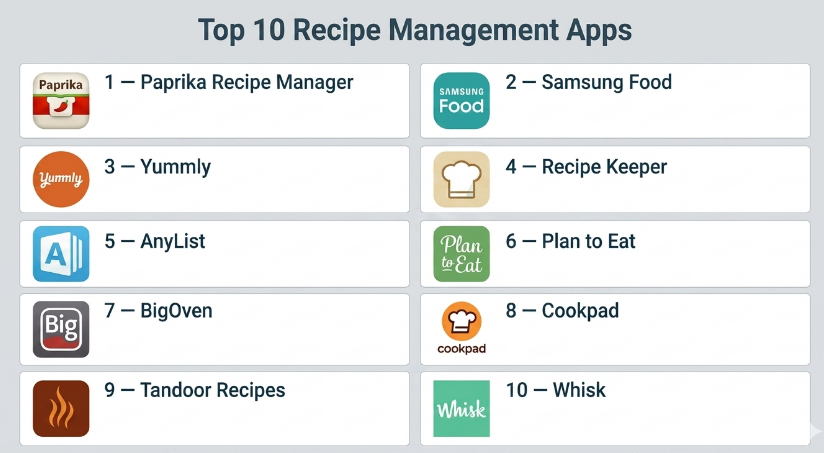
Top 10 Recipe Management Apps
#1 — Paprika Recipe Manager
Short description :
Paprika Recipe Manager is one of the most popular recipe management apps for home cooks who want strong recipe organization, meal planning, grocery lists, and cross-device access. It allows users to save recipes, edit ingredients, add notes, scale servings, and create shopping lists. Paprika is especially useful for people who collect recipes from many sources and want one clean place to manage them. It is practical, flexible, and focused on real cooking workflows. The app is best for users who want a powerful personal recipe library with meal planning support.
Key Features
- Recipe saving and organization.
- Recipe import from online sources.
- Meal planning calendar.
- Grocery list creation.
- Ingredient scaling and conversion.
- Cooking notes and custom categories.
- Cross-device sync with supported versions.
Pros
- Strong all-around recipe management features.
- Excellent for meal planning and grocery lists.
- Good fit for serious home cooks and families.
Cons
- App purchase may be required per platform.
- Interface may feel functional rather than modern.
- Some sync features may require account setup.
Platforms / Deployment
iOS / Android / Windows / macOS
Cloud sync / App-based
Security & Compliance
Not publicly stated
Integrations & Ecosystem
Paprika works well as a personal cooking command center. It connects recipe storage, meal planning, grocery preparation, and cooking notes in one workflow.
- Recipe library organization.
- Meal calendar planning.
- Grocery list workflows.
- Cross-device cooking access.
- Ingredient scaling and recipe editing.
Support & Community
Paprika has documentation, support resources, and a strong user base among organized home cooks. It is known for practical reliability rather than social or community-driven features.
#2 — Samsung Food
Short description :
Samsung Food is a recipe and meal planning app designed for discovering recipes, saving meals, planning weekly food, and creating grocery lists. It supports users who want inspiration along with organization. The app can help users collect recipes, plan meals, and explore cooking ideas based on preferences. It is especially useful for people who want recipe discovery and planning in the same place. Samsung Food is best for users who want a modern recipe app with meal inspiration and smart kitchen-friendly features.
Key Features
- Recipe discovery and saving.
- Meal planning support.
- Grocery list creation.
- Personalized recipe recommendations.
- Diet and preference filters.
- Cooking guidance and recipe collections.
- Smart kitchen ecosystem features may vary.
Pros
- Good balance of discovery and organization.
- Useful for meal planning and grocery preparation.
- Modern app experience.
Cons
- Best value may depend on ecosystem usage.
- Recipe import and organization preferences may vary.
- Advanced features may not suit users wanting a simple offline recipe book.
Platforms / Deployment
iOS / Android / Web
Cloud / Mobile app-based
Security & Compliance
Not publicly stated
Integrations & Ecosystem
Samsung Food fits users who want recipe inspiration connected with planning and shopping.
- Recipe discovery.
- Meal planning.
- Grocery list workflows.
- Diet preference filtering.
- Smart kitchen workflows may vary.
Support & Community
Samsung Food provides support resources and app guidance. Its strength is combining recipe discovery with practical planning features.
#3 — Yummly
Short description :
Yummly is a recipe discovery and meal planning app that helps users find recipes based on preferences, ingredients, diets, allergies, and cooking goals. It is useful for home cooks who want personalized recipe recommendations and easy cooking inspiration. Yummly can support meal planning and shopping preparation, making it helpful for busy families and individuals. The app is especially useful when users do not know what to cook and want filtered recipe ideas. It is best for users who value discovery and personalization.
Key Features
- Personalized recipe recommendations.
- Recipe saving and collections.
- Diet and allergy filters.
- Ingredient-based recipe search.
- Meal planning support.
- Shopping list features may vary.
- Cooking instructions and guided recipes.
Pros
- Strong recipe discovery experience.
- Helpful filters for diets and preferences.
- Good for users needing cooking inspiration.
Cons
- Less focused on deep personal recipe editing than some tools.
- Some features may require account or premium access.
- Recipe quality can vary by source.
Platforms / Deployment
iOS / Android / Web
Cloud / Mobile app-based
Security & Compliance
Not publicly stated
Integrations & Ecosystem
Yummly supports cooking inspiration and personalized meal discovery.
- Recipe recommendations.
- Diet-based search.
- Saved recipe collections.
- Shopping list workflows.
- Meal planning support.
Support & Community
Yummly provides app support and user guidance. It is popular among users who want recipe ideas based on taste and dietary preferences.
#4 — Recipe Keeper
Short description :
Recipe Keeper is a recipe management app designed to help users collect, organize, edit, and share recipes across devices. It supports manual recipe entry, importing from websites, scanning recipes, meal planning, and grocery list creation. Recipe Keeper is especially useful for people who want to digitize family recipes or organize a long-term personal cookbook. The app is practical for home cooks who want strong organization without too much complexity. It is best for users who want a flexible digital recipe box.
Key Features
- Recipe storage and organization.
- Website recipe import.
- Manual recipe entry.
- Meal planner.
- Shopping list creation.
- Recipe scanning features may vary.
- Cross-device sync.
Pros
- Good for organizing personal and family recipes.
- Flexible recipe entry and editing.
- Useful meal planning and shopping list features.
Cons
- Premium or platform purchases may be required.
- Interface may feel basic to some users.
- Advanced nutrition features may be limited.
Platforms / Deployment
iOS / Android / Windows / macOS
Cloud sync / App-based
Security & Compliance
Not publicly stated
Integrations & Ecosystem
Recipe Keeper works well for users building a personal recipe library.
- Family recipe storage.
- Meal planning.
- Grocery list creation.
- Recipe import and scanning.
- Cross-device recipe access.
Support & Community
Recipe Keeper provides support resources and user guidance. It is useful for home cooks who want a dependable recipe organizer.
#5 — AnyList
Short description :
AnyList is a grocery list and recipe management app designed for families and households. It helps users create shopping lists, save recipes, organize ingredients, and share lists with others. AnyList is especially useful for people who plan meals and shop with family members or roommates. The app is not only a recipe tool; it is also very strong for grocery coordination. It is best for households that need shared shopping lists and simple recipe-based grocery planning.
Key Features
- Shared grocery lists.
- Recipe storage.
- Meal planning support.
- Ingredient-to-list conversion.
- List sharing with family members.
- Category-based shopping organization.
- Cross-device sync.
Pros
- Excellent for shared grocery planning.
- Good for families and households.
- Simple and practical daily use.
Cons
- Recipe features may be lighter than dedicated recipe managers.
- Some advanced features require paid plans.
- Less focused on recipe discovery.
Platforms / Deployment
iOS / Android / Web
Cloud / Mobile app-based
Security & Compliance
Not publicly stated
Integrations & Ecosystem
AnyList connects recipe planning with grocery shopping, making it useful for household coordination.
- Shared grocery lists.
- Recipe ingredient import.
- Family shopping workflows.
- Meal planning.
- Cross-device list sync.
Support & Community
AnyList provides documentation and app support. It has a loyal user base among families and organized grocery shoppers.
#6 — Plan to Eat
Short description :
Plan to Eat is a meal planning and recipe management app focused on helping users plan meals, save recipes, and automatically build shopping lists. It is especially useful for people who want to simplify weekly meal planning and reduce last-minute cooking decisions. The app helps users organize recipes, drag meals into a calendar, and generate grocery lists based on planned meals. Plan to Eat is best for families, meal preppers, and home cooks who want a planning-first approach.
Key Features
- Recipe saving and organization.
- Meal planning calendar.
- Automatic shopping list generation.
- Recipe import tools.
- Food prep and planning workflows.
- Family meal planning support.
- Cross-device access.
Pros
- Strong meal planning workflow.
- Useful for reducing grocery and cooking stress.
- Good for families and weekly planners.
Cons
- Less focused on recipe discovery.
- Subscription may be required.
- Users must plan consistently to get full value.
Platforms / Deployment
Web / iOS / Android
Cloud / Mobile app-based
Security & Compliance
Not publicly stated
Integrations & Ecosystem
Plan to Eat is designed around weekly meal planning and shopping preparation.
- Recipe library.
- Meal calendar.
- Grocery list generation.
- Family meal planning.
- Batch cooking and prep workflows.
Support & Community
Plan to Eat offers support resources and user guidance. Its community is strongest among meal planners and organized home cooks.
#7 — BigOven
Short description :
BigOven is a recipe discovery, organization, and meal planning app that helps users find recipes, save favorites, plan meals, and create grocery lists. It is useful for home cooks who want a mix of recipe inspiration and practical kitchen planning. BigOven also supports using leftover ingredients to discover meal ideas, which can help reduce food waste. It is best for users who want both a recipe library and a discovery-focused cooking app.
Key Features
- Recipe discovery.
- Saved recipe collections.
- Meal planning.
- Grocery list creation.
- Leftover ingredient recipe ideas.
- Recipe clipping features may vary.
- Community recipe content.
Pros
- Good for recipe inspiration.
- Useful leftover ingredient feature.
- Supports meal planning and grocery lists.
Cons
- Recipe quality may vary due to community content.
- Premium may be needed for advanced features.
- Personal recipe organization may feel lighter than dedicated managers.
Platforms / Deployment
iOS / Android / Web
Cloud / Mobile app-based
Security & Compliance
Not publicly stated
Integrations & Ecosystem
BigOven supports recipe discovery and practical meal planning.
- Recipe collections.
- Grocery lists.
- Leftover-based recipe search.
- Meal planning.
- Community recipe content.
Support & Community
BigOven provides app support and a recipe community. It is useful for users who want ongoing cooking inspiration.
#8 — Cookpad
Short description :
Cookpad is a community-focused recipe app where users can discover, share, and save home-cooked recipes. It is useful for people who enjoy learning from other home cooks and exploring everyday recipes. Cookpad is less like a private recipe vault and more like a social recipe-sharing platform. Users can find practical homemade dishes, save ideas, and share their own cooking. It is best for users who want community-based recipe inspiration rather than only personal recipe organization.
Key Features
- Community recipe sharing.
- Recipe discovery.
- User-created recipe collections.
- Home-cooking focused content.
- Ability to publish personal recipes.
- Search by dish, ingredient, or style.
- Cooking inspiration from real users.
Pros
- Strong home-cooking community feel.
- Good for discovering practical everyday meals.
- Useful for sharing personal recipes.
Cons
- Recipe quality and formatting can vary.
- Not as strong for private meal planning.
- Less suitable for users wanting advanced grocery automation.
Platforms / Deployment
iOS / Android / Web
Cloud / Mobile app-based
Security & Compliance
Not publicly stated
Integrations & Ecosystem
Cookpad is built around community recipe sharing and everyday cooking inspiration.
- User-generated recipes.
- Recipe sharing.
- Home cooking ideas.
- Saved recipe collections.
- Community interaction.
Support & Community
Cookpad has a strong community-driven model. Its value comes from real home cooks sharing practical recipes and cooking experiences.
#9 — Tandoor Recipes
Short description :
Tandoor Recipes is a self-hosted recipe management solution for users who want control over their recipe library and data. It is especially useful for privacy-conscious users, technical users, families, and small groups that prefer self-hosting. Tandoor supports recipe management, meal planning, shopping lists, and household-style organization. It is more technical than most consumer apps, but it offers flexibility and ownership. It is best for users who are comfortable with self-hosted tools and want a customizable recipe management system.
Key Features
- Self-hosted recipe management.
- Recipe organization and search.
- Meal planning support.
- Shopping list creation.
- Household sharing features.
- Recipe import options.
- Customizable setup.
Pros
- Strong data control for self-hosting users.
- Useful for technical households and privacy-focused users.
- Flexible recipe and meal planning features.
Cons
- Requires technical setup.
- Not ideal for non-technical beginners.
- Hosting and maintenance are user responsibility.
Platforms / Deployment
Web
Self-hosted
Security & Compliance
Depends on self-hosted configuration
Integrations & Ecosystem
Tandoor Recipes is useful for users who want ownership and control over recipe data.
- Self-hosted recipe library.
- Household recipe sharing.
- Meal planning.
- Shopping lists.
- Custom deployment workflows.
Support & Community
Tandoor has community-driven support and documentation. It is best suited for users comfortable with self-hosted software environments.
#10 — Whisk
Short description :
Whisk is a recipe saving, meal planning, and grocery list app designed to help users move from recipe ideas to shopping and cooking. It allows users to save recipes, organize collections, plan meals, and create smart shopping lists. Whisk is useful for people who want a modern recipe planning experience with grocery support. It can help reduce the gap between finding a recipe and actually cooking it. The app is best for users who want recipe organization connected with shopping and meal preparation.
Key Features
- Recipe saving and organization.
- Meal planning support.
- Smart shopping lists.
- Recipe collections.
- Ingredient-based planning.
- Grocery workflow support.
- Cross-device access.
Pros
- Good connection between recipes and shopping.
- Useful for modern meal planning.
- Clean recipe organization workflow.
Cons
- Feature availability may vary by region.
- Some users may prefer deeper personal recipe editing.
- Grocery integrations may not fit every location.
Platforms / Deployment
iOS / Android / Web
Cloud / Mobile app-based
Security & Compliance
Not publicly stated
Integrations & Ecosystem
Whisk supports users who want a smooth path from saved recipes to meal planning and shopping.
- Recipe collections.
- Meal planning.
- Grocery list workflows.
- Ingredient-based shopping.
- Cross-device recipe access.
Support & Community
Whisk provides app support and user resources. It is useful for people who want practical recipe-to-shopping workflows.
Comparison Table
| Tool Name | Best For | Platform(s) Supported | Deployment | Standout Feature | Public Rating |
|---|---|---|---|---|---|
| Paprika Recipe Manager | Serious home cooks and recipe organizers | iOS / Android / Windows / macOS | Cloud sync / App-based | Powerful recipe library and meal planning | N/A |
| Samsung Food | Recipe discovery and smart meal planning | iOS / Android / Web | Cloud / Mobile app-based | Personalized recipe recommendations | N/A |
| Yummly | Personalized recipe discovery | iOS / Android / Web | Cloud / Mobile app-based | Diet and preference-based recipe search | N/A |
| Recipe Keeper | Family recipes and digital cookbook organization | iOS / Android / Windows / macOS | Cloud sync / App-based | Flexible recipe saving and editing | N/A |
| AnyList | Shared grocery and household planning | iOS / Android / Web | Cloud / Mobile app-based | Shared grocery lists from recipes | N/A |
| Plan to Eat | Weekly meal planning | Web / iOS / Android | Cloud / Mobile app-based | Meal calendar and grocery automation | N/A |
| BigOven | Recipe inspiration and leftovers | iOS / Android / Web | Cloud / Mobile app-based | Leftover ingredient recipe ideas | N/A |
| Cookpad | Community home-cooking recipes | iOS / Android / Web | Cloud / Mobile app-based | User-generated home recipe community | N/A |
| Tandoor Recipes | Self-hosted recipe control | Web | Self-hosted | Private customizable recipe system | N/A |
| Whisk | Recipe-to-shopping workflows | iOS / Android / Web | Cloud / Mobile app-based | Smart shopping lists and meal planning | N/A |
Evaluation & Recipe Management Apps
| Tool Name | Core (25%) | Ease (15%) | Integrations (15%) | Security (10%) | Performance (10%) | Support (10%) | Value (15%) | Weighted Total (0–10) |
|---|---|---|---|---|---|---|---|---|
| Paprika Recipe Manager | 9 | 8 | 7 | 6 | 9 | 8 | 8 | 8.05 |
| Samsung Food | 8 | 8 | 8 | 6 | 8 | 7 | 8 | 7.65 |
| Yummly | 8 | 9 | 7 | 6 | 8 | 7 | 7 | 7.60 |
| Recipe Keeper | 8 | 8 | 7 | 6 | 8 | 7 | 8 | 7.60 |
| AnyList | 7 | 9 | 7 | 6 | 8 | 8 | 8 | 7.65 |
| Plan to Eat | 8 | 8 | 7 | 6 | 8 | 8 | 7 | 7.55 |
| BigOven | 7 | 8 | 6 | 5 | 7 | 7 | 7 | 6.85 |
| Cookpad | 7 | 8 | 6 | 5 | 7 | 7 | 8 | 6.95 |
| Tandoor Recipes | 8 | 6 | 7 | 8 | 8 | 6 | 8 | 7.35 |
| Whisk | 8 | 8 | 8 | 6 | 8 | 7 | 8 | 7.75 |
These scores are comparative and should be used as a shortlist guide, not as a universal ranking. A higher score usually means stronger recipe organization, better meal planning, or easier daily use. A lower score does not mean the app is weak; it may simply serve a more specific user group. For example, Tandoor Recipes is excellent for self-hosted users, while AnyList is stronger for shared grocery planning.
Which Recipe Management App Should You Choose?
Solo / Freelancer
Solo users should choose a recipe app based on cooking style and planning habits. If you want a strong personal recipe library, Paprika Recipe Manager or Recipe Keeper are excellent options. If you want cooking inspiration, Yummly, Samsung Food, or BigOven may be better.
If you mostly need grocery lists, AnyList is very practical. If privacy and self-hosting matter, Tandoor Recipes is worth considering.
SMB
Small food bloggers, meal-prep services, nutrition coaches, and cooking instructors may need apps that organize recipes clearly and support planning. Paprika Recipe Manager, Recipe Keeper, Plan to Eat, and Whisk can help structure recipes and grocery workflows.
SMBs should choose tools that save time and reduce manual work. A recipe app should make it easier to plan, shop, and cook, not add more admin effort.
Mid-Market
Mid-market wellness teams, cooking communities, food content teams, and nutrition-focused groups may need recipe organization, team sharing, meal planning, and repeatable workflows. Plan to Eat, Whisk, Samsung Food, and AnyList may be useful depending on whether the focus is meal planning, grocery lists, or recipe discovery.
At this level, teams should check collaboration, user permissions, export options, and whether the app supports real daily workflows.
Enterprise
Recipe management apps are usually consumer or small-team focused, but enterprises in wellness, food media, education, or employee well-being may use them for content planning or lifestyle programs. For enterprise use, privacy, data handling, support, user management, and content rights should be reviewed carefully.
If the need is professional menu costing, inventory control, kitchen operations, or restaurant management, a dedicated foodservice management platform may be more suitable than a consumer recipe app.
Budget vs Premium
Budget-conscious users can start with simple or free recipe discovery and organization tools. Cookpad, Samsung Food, Yummly, and basic versions of recipe apps can be useful for casual cooking.
Premium apps are better when users need cross-device sync, meal planning, grocery automation, recipe imports, family sharing, offline access, and long-term recipe organization. Paprika Recipe Manager, Recipe Keeper, AnyList, and Plan to Eat are practical premium-style options.
Feature Depth vs Ease of Use
If feature depth matters most, Paprika Recipe Manager, Recipe Keeper, Plan to Eat, and Tandoor Recipes provide stronger organization and planning. These tools are useful for people who want a long-term recipe system.
If ease of use matters most, AnyList, Yummly, Samsung Food, and Cookpad may feel simpler for everyday users.
Integrations & Scalability
Recipe apps become more useful when they connect recipes with meal plans, grocery lists, calendars, household sharing, and cross-device sync. Whisk, AnyList, Plan to Eat, and Paprika Recipe Manager are strong choices for practical planning workflows.
For scalability, users should consider whether the app can handle hundreds of recipes, custom categories, shared access, grocery list automation, and backup/export options.
Security & Compliance Needs
Recipe apps may store food preferences, dietary habits, shopping patterns, family routines, and account information. While this may not feel as sensitive as medical data, privacy still matters.
If security details are not clearly available, mark them as “Not publicly stated” and review vendor privacy settings before storing personal dietary details or household information.
Frequently Asked Questions
1. What are recipe management apps?
Recipe management apps help users save, organize, edit, search, plan, and reuse recipes. Many apps also include grocery lists, meal planning, ingredient scaling, cooking notes, and recipe import features.
2. Are recipe management apps different from recipe discovery apps?
Yes. Recipe management apps focus on organizing your own recipe library. Recipe discovery apps focus more on finding new recipes. Some apps combine both features, but the depth may vary.
3. Which recipe app is best for meal planning?
Plan to Eat, Paprika Recipe Manager, Whisk, and AnyList are strong options for meal planning. They help users select meals, organize calendars, and prepare shopping lists.
4. Which app is best for saving family recipes?
Recipe Keeper and Paprika Recipe Manager are useful for saving family recipes because they support manual entry, editing, categories, and long-term recipe organization.
5. Can recipe apps create grocery lists automatically?
Yes, many recipe apps can create grocery lists from selected recipes. AnyList, Plan to Eat, Paprika Recipe Manager, and Whisk are especially useful for recipe-to-shopping workflows.
6. Can recipe apps scale ingredients?
Many recipe managers allow users to scale ingredients based on serving size. This is useful when cooking for one person, a family, or a larger group.
7. Are recipe apps useful for meal prep?
Yes. Recipe apps help meal-prep users plan meals, repeat favorite recipes, create shopping lists, and organize cooking schedules. They are especially helpful for weekly planning.
8. Do recipe apps support special diets?
Many apps support diet filters or tags such as vegetarian, vegan, keto, gluten-free, dairy-free, low-carb, and high-protein. Support varies by app, so users should test filters before choosing.
9. Can I use a recipe app offline?
Some apps support offline access, but availability varies. Users who cook in areas with weak internet should choose an app that stores recipes locally or supports offline viewing.
10. What common mistakes should users avoid?
Common mistakes include saving too many recipes without organizing them, not using tags, failing to update cooking notes, ignoring grocery list features, and choosing a recipe discovery app when they actually need a recipe organizer.
Conclusion
Recipe management apps are useful for anyone who wants to cook with less confusion, save recipes properly, plan meals ahead, and make grocery shopping easier. They help users move from scattered recipe screenshots, browser bookmarks, and handwritten notes into a cleaner and more reliable cooking system. The best app depends on how you cook. A family may need shared grocery lists, a meal-prep user may need weekly planning, a home cook may need a strong recipe library, and a privacy-focused user may prefer self-hosting.
