Introduction
Email Client Software helps users read, send, organize, search, and manage emails from one or more accounts in a single place. In simple words, it is the workspace where professionals handle daily communication, attachments, calendars, contacts, tasks, and sometimes team collaboration.
Email still remains one of the most important business communication channels. Modern email clients are no longer limited to inbox management. They now include AI writing assistance, smart search, spam filtering, scheduling, calendar sync, encryption, mobile access, team workflows, and integrations with CRM, project management, storage, and productivity tools.
Common use cases include:
- Managing personal and work email accounts together
- Handling business communication across teams
- Scheduling meetings and calendar follow-ups
- Organizing high-volume inboxes with rules and folders
- Improving privacy, security, and compliance for sensitive communication
Buyers should evaluate:
- Ease of use
- Multi-account support
- Search and filtering
- Calendar and contact management
- Security controls
- Mobile and desktop experience
- Integrations
- Offline access
- AI and automation features
- Pricing and support quality
Best for: professionals, founders, sales teams, support teams, IT managers, students, freelancers, and businesses that depend heavily on email communication.
Not ideal for: users who only need basic webmail, teams already using chat-first collaboration tools with minimal email usage, or companies needing full helpdesk/ticketing systems instead of inbox-based workflows.
Key Trends in Email Client Software
- AI-assisted writing is becoming common for drafting replies, summarizing long threads, improving tone, and reducing repetitive typing.
- Unified inboxes are more important as users manage multiple personal, business, and shared accounts.
- Privacy-first email clients are gaining attention because users want stronger encryption, tracking protection, and data control.
- Calendar-first communication is growing, especially for remote teams that schedule meetings directly from email threads.
- Cross-platform consistency matters because users expect the same experience on desktop, web, tablet, and mobile.
- Security expectations are higher, including MFA, phishing protection, suspicious link warnings, and admin controls.
- Workflow automation is becoming useful through rules, templates, snooze, send later, smart folders, and quick actions.
- Business integrations with CRM, cloud storage, project management, and communication tools are now important buying factors.
- Lightweight clients are preferred by users who dislike slow, complex enterprise email platforms.
- Open-source and self-managed options remain valuable for users who want control, transparency, and flexibility.
How We Selected These Tools
The tools were selected using practical evaluation logic based on:
- Market adoption and general user recognition
- Feature completeness for personal and business email
- Support for multiple platforms and devices
- Reliability, performance, and usability signals
- Security and privacy features that are clearly known
- Integrations with common productivity ecosystems
- Suitability for different segments, from freelancers to enterprises
- Long-term product maturity and user trust
- Balance between cloud-first, desktop-first, and privacy-first options
- Value for users with different budgets and workflows
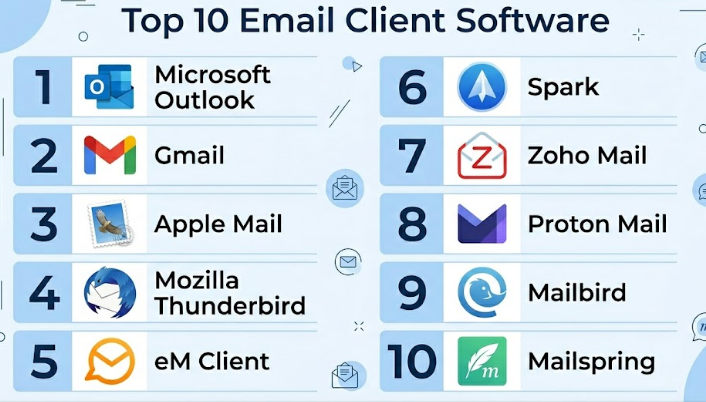
Top 10 Email Client Software
#1 — Microsoft Outlook
Short description :
Microsoft Outlook is one of the most widely used email clients for businesses, enterprises, and professionals. It combines email, calendar, contacts, tasks, and Microsoft productivity tools in one environment. Outlook is especially strong for organizations already using Microsoft services. It supports business communication, meeting scheduling, shared calendars, and advanced mailbox management. It is suitable for individuals, SMBs, and large enterprises that need a reliable and structured communication platform.
Key Features
- Email, calendar, contacts, and tasks in one workspace
- Strong integration with Microsoft productivity tools
- Shared calendars and meeting scheduling
- Rules, folders, categories, and focused inbox
- Desktop, web, and mobile access
- Enterprise admin and security controls
- AI-powered assistance available in supported plans
Pros
- Very strong for business and enterprise users
- Deep calendar and meeting management features
- Works well inside Microsoft-based organizations
Cons
- Can feel complex for basic users
- Some advanced features depend on paid plans
- Desktop app may feel heavy on older systems
Platforms / Deployment
Web / Windows / macOS / iOS / Android
Cloud / Hybrid
Security & Compliance
Supports MFA, SSO, encryption, admin controls, and enterprise security features through Microsoft business plans. Compliance availability depends on plan and configuration.
Integrations & Ecosystem
Outlook has one of the strongest ecosystems for business users because it connects closely with productivity, calendar, storage, meetings, and identity tools.
- Microsoft Teams
- OneDrive
- SharePoint
- Microsoft 365 apps
- CRM and workflow tools
- Calendar and contact sync
Support & Community
Microsoft provides extensive documentation, business support plans, admin resources, and a large user community. Support quality depends on the subscription level.
#2 — Gmail
Short description :
Gmail is a cloud-based email client widely used by individuals, startups, SMBs, and enterprises through Google Workspace. It is known for clean search, fast web access, spam filtering, and strong integration with Google productivity tools. Gmail works well for users who prefer browser-based email and cloud-first workflows. It is especially useful for teams already using Google Drive, Calendar, Meet, and Docs. Gmail is simple for beginners but powerful enough for many business environments.
Key Features
- Fast web-based email experience
- Strong search and filtering
- Labels, categories, and inbox organization
- Google Calendar and Meet integration
- Spam and phishing protection
- Smart Compose and writing assistance
- Mobile apps for iOS and Android
Pros
- Easy to use and familiar to many users
- Excellent search and spam filtering
- Strong Google Workspace integration
Cons
- Offline desktop experience is limited compared with native clients
- Interface may feel too simple for advanced mailbox workflows
- Business controls depend on Workspace plan
Platforms / Deployment
Web / iOS / Android
Cloud
Security & Compliance
Supports MFA, SSO, encryption in transit, admin controls, and business security features through Google Workspace. Compliance depends on plan and configuration.
Integrations & Ecosystem
Gmail connects strongly with the Google ecosystem and many third-party business tools.
- Google Calendar
- Google Drive
- Google Meet
- Google Docs
- CRM tools
- Browser extensions and add-ons
Support & Community
Google provides help documentation, Workspace admin resources, community forums, and paid support options for business customers.
#3 — Apple Mail
Short description :
Apple Mail is the default email client for Apple users across macOS, iPhone, and iPad. It is best for people who want a simple, clean, and native email experience within the Apple ecosystem. Apple Mail supports multiple email accounts and works well with iCloud, Gmail, Outlook, and IMAP accounts. It is not the most advanced business email client, but it is reliable for everyday communication. It is especially useful for users who prefer built-in apps instead of third-party tools.
Key Features
- Native email client for Apple devices
- Supports multiple email accounts
- Clean and simple interface
- Smart mailboxes and basic filtering
- iCloud integration
- Privacy-focused Apple ecosystem features
- Works with common email providers
Pros
- Free and built into Apple devices
- Simple and lightweight experience
- Good for personal and basic business email
Cons
- Limited advanced team features
- Not ideal for complex enterprise workflows
- Apple-only experience
Platforms / Deployment
macOS / iOS / iPadOS
Cloud / Local client
Security & Compliance
Supports Apple account security features and encrypted connections where configured. Enterprise compliance details are not publicly stated for Apple Mail as a standalone client.
Integrations & Ecosystem
Apple Mail works best inside the Apple ecosystem and supports standard email protocols.
- iCloud
- Apple Calendar
- Apple Contacts
- Gmail accounts
- Outlook accounts
- IMAP-based email accounts
Support & Community
Apple provides official support documentation and device-level support. Community support is strong because Apple Mail is widely used.
#4 — Mozilla Thunderbird
Short description :
Mozilla Thunderbird is a free and open-source desktop email client. It is popular with users who want control, flexibility, and local email management. Thunderbird supports multiple accounts, IMAP, POP3, extensions, calendar features, and advanced configuration. It is a good choice for technical users, privacy-conscious users, and organizations that prefer open-source software. It may require more setup effort than cloud-first email clients.
Key Features
- Free and open-source email client
- Multi-account support
- IMAP and POP3 support
- Add-ons and extensions
- Calendar and contact features
- Local message storage options
- Strong customization flexibility
Pros
- No subscription required
- Good for advanced users and open-source advocates
- Flexible account and mailbox management
Cons
- Interface may feel less modern than premium tools
- Setup can be technical for beginners
- Business support is limited compared with enterprise vendors
Platforms / Deployment
Windows / macOS / Linux
Local client / Self-managed
Security & Compliance
Supports secure email protocols and encryption-related capabilities depending on setup. Formal compliance certifications are not publicly stated for Thunderbird as a standalone client.
Integrations & Ecosystem
Thunderbird has an extension-based ecosystem and supports open email standards.
- IMAP
- POP3
- SMTP
- Calendar add-ons
- Contact sync tools
- Community extensions
Support & Community
Thunderbird has strong community support, documentation, forums, and open-source contributors. Dedicated enterprise support varies by third-party provider.
#5 — eM Client
Short description :
eM Client is a desktop email client designed for users who want email, calendar, contacts, tasks, notes, and chat-style productivity in one application. It is popular among professionals, SMB users, and people who need a polished alternative to default email clients. eM Client supports many email providers and offers a clean interface with practical productivity features. It works well for users who want a desktop-focused email experience without enterprise complexity.
Key Features
- Email, calendar, contacts, tasks, and notes
- Multi-account support
- Modern desktop interface
- PGP encryption support
- Fast search and conversation view
- Templates and quick text
- Translation features in supported versions
Pros
- Clean and practical desktop experience
- Good balance of features and usability
- Useful for SMB and professional users
Cons
- Full feature access may require paid licensing
- Not as enterprise-heavy as Outlook
- Linux support is not a primary focus
Platforms / Deployment
Windows / macOS / iOS / Android
Local client / Cloud-connected
Security & Compliance
Supports secure email connections and PGP encryption features. Formal compliance details are not publicly stated.
Integrations & Ecosystem
eM Client works with common email and calendar services.
- Gmail
- Outlook accounts
- Exchange
- iCloud
- IMAP services
- Calendar and contact sync
Support & Community
eM Client provides documentation, knowledge base resources, and support options depending on license level.
#6 — Spark
Short description :
Spark is a modern email client focused on productivity, team collaboration, smart inbox management, and clean design. It is useful for professionals, founders, remote teams, and users who want faster email handling. Spark includes features like smart inbox, snooze, send later, templates, shared drafts, and team comments. It is especially useful for people who treat email as a daily workflow tool rather than only a message reader.
Key Features
- Smart inbox organization
- Snooze and send later
- Email templates
- Team collaboration features
- Shared drafts and comments
- Cross-device sync
- Modern user interface
Pros
- Strong productivity-focused design
- Good for teams and busy professionals
- Clean mobile and desktop experience
Cons
- Some advanced features require paid plans
- May not suit users who prefer traditional inbox layouts
- Enterprise controls may vary by plan
Platforms / Deployment
Windows / macOS / iOS / Android
Cloud-connected
Security & Compliance
Supports standard security controls and account authentication based on provider. Detailed compliance information varies by plan and is not always publicly stated.
Integrations & Ecosystem
Spark connects with common productivity and storage workflows.
- Google services
- Microsoft accounts
- iCloud
- Cloud storage tools
- Calendar tools
- Team collaboration workflows
Support & Community
Spark provides product documentation, help resources, and customer support depending on plan. Community visibility is moderate.
#7 — Zoho Mail
Short description :
Zoho Mail is a business-focused email platform and client that works well for SMBs, startups, and organizations using Zoho’s wider business suite. It offers webmail, mobile apps, admin controls, custom domain email, collaboration features, and integration with Zoho CRM and other Zoho applications. It is a strong option for businesses that want email plus business tools without relying fully on Microsoft or Google ecosystems.
Key Features
- Business email with custom domain support
- Webmail and mobile access
- Admin console for organizations
- Calendar, contacts, tasks, and notes
- Zoho ecosystem integration
- Email retention and control options in business plans
- Clean ad-free business email experience
Pros
- Good value for SMBs
- Strong fit for Zoho ecosystem users
- Business-focused admin features
Cons
- Less common than Microsoft and Google in large enterprises
- Some users may need time to learn the Zoho ecosystem
- Advanced features depend on plan
Platforms / Deployment
Web / iOS / Android
Cloud
Security & Compliance
Supports MFA, admin controls, encryption in transit, and business security features. Compliance availability depends on plan and region.
Integrations & Ecosystem
Zoho Mail works best with Zoho business applications.
- Zoho CRM
- Zoho Projects
- Zoho Calendar
- Zoho Desk
- Zoho Cliq
- Third-party email clients through standard protocols
Support & Community
Zoho provides documentation, support plans, admin guides, and community forums. Support experience varies by subscription level.
#8 — Proton Mail
Short description :
Proton Mail is a privacy-focused email client and secure email service. It is best for users and organizations that prioritize encryption, privacy, and protection from tracking. Proton Mail is suitable for journalists, consultants, privacy-conscious professionals, small businesses, and users who want stronger control over email privacy. It offers web and mobile apps, encrypted email features, custom domain support in paid plans, and a growing productivity ecosystem.
Key Features
- Privacy-focused email experience
- End-to-end encryption for Proton-to-Proton emails
- Web and mobile apps
- Custom domain support in paid plans
- Calendar and storage ecosystem options
- Tracking protection features
- Strong privacy positioning
Pros
- Excellent choice for privacy-conscious users
- Clean and secure email experience
- Useful for sensitive communication
Cons
- Some integrations are more limited than mainstream suites
- Collaboration features are not as broad as Microsoft or Google
- Migration may require planning
Platforms / Deployment
Web / iOS / Android / Desktop bridge for supported use cases
Cloud
Security & Compliance
Known for encryption-focused design, MFA, and privacy controls. Enterprise compliance details vary by plan and should be verified directly during procurement.
Integrations & Ecosystem
Proton Mail focuses more on secure communication than broad third-party integrations.
- Proton Calendar
- Proton Drive
- Custom domains
- Email import tools
- Bridge for supported desktop clients
- Standard email workflows
Support & Community
Proton provides documentation, support resources, and a strong privacy-focused user community. Support level depends on plan.
#9 — Mailbird
Short description :
Mailbird is a Windows-focused email client designed for users who want a simple, attractive, and unified inbox experience. It supports multiple email accounts and integrates with productivity tools. Mailbird is useful for freelancers, SMB users, and professionals who want a clean desktop email client without the complexity of enterprise platforms. It focuses on usability, speed, and practical everyday inbox management.
Key Features
- Unified inbox for multiple accounts
- Clean desktop interface
- App integrations
- Email tracking features in supported plans
- Snooze and productivity tools
- Contact management
- Customizable layout
Pros
- Easy to use for daily email management
- Good for Windows users with multiple accounts
- Clean and modern interface
Cons
- Historically strongest on Windows
- Some features require paid plans
- Not ideal for large enterprise control needs
Platforms / Deployment
Windows / macOS availability may vary by version
Local client / Cloud-connected
Security & Compliance
Supports secure account connections based on provider settings. Formal compliance details are not publicly stated.
Integrations & Ecosystem
Mailbird includes integrations aimed at productivity and communication.
- Google Workspace tools
- Calendar tools
- Messaging apps
- Task apps
- Cloud productivity tools
- Multiple email providers
Support & Community
Mailbird provides documentation, customer support resources, and user guides. Community strength is moderate.
#10 — Mailspring
Short description :
Mailspring is a modern desktop email client popular with users who want a lightweight and clean email experience. It supports multiple accounts, unified inbox, search, templates, read receipts in paid plans, and productivity-focused features. Mailspring is a good option for developers, freelancers, and desktop users who want a simpler alternative to heavier clients. It is not as enterprise-focused as Outlook or Google Workspace, but it can be useful for individual productivity.
Key Features
- Unified inbox
- Multiple account support
- Fast search
- Email templates
- Read receipts in supported plans
- Clean desktop interface
- Productivity-focused shortcuts
Pros
- Lightweight and easy to use
- Good for individuals and technical users
- Supports major desktop platforms
Cons
- Not ideal for large enterprise administration
- Some advanced features require paid plan
- Ecosystem is smaller than mainstream suites
Platforms / Deployment
Windows / macOS / Linux
Local client / Cloud-connected
Security & Compliance
Supports secure email provider connections. Formal compliance details are not publicly stated.
Integrations & Ecosystem
Mailspring is more focused on email productivity than broad business integrations.
- Gmail
- Outlook accounts
- IMAP providers
- SMTP support
- Desktop workflows
- Productivity features
Support & Community
Mailspring provides documentation and user support resources. Community and enterprise support are more limited than larger platforms.
Comparison Table
| Tool Name | Best For | Platform(s) Supported | Deployment | Standout Feature | Public Rating |
|---|---|---|---|---|---|
| Microsoft Outlook | Enterprise and Microsoft users | Web, Windows, macOS, iOS, Android | Cloud / Hybrid | Deep calendar and Microsoft integration | N/A |
| Gmail | Cloud-first users and Google Workspace teams | Web, iOS, Android | Cloud | Fast search and simple webmail experience | N/A |
| Apple Mail | Apple users | macOS, iOS, iPadOS | Cloud / Local client | Native Apple ecosystem experience | N/A |
| Mozilla Thunderbird | Open-source and technical users | Windows, macOS, Linux | Self-managed / Local client | Free open-source flexibility | N/A |
| eM Client | Professionals and SMB users | Windows, macOS, iOS, Android | Local client / Cloud-connected | Email, calendar, tasks, and notes in one app | N/A |
| Spark | Productivity-focused teams | Windows, macOS, iOS, Android | Cloud-connected | Smart inbox and team collaboration | N/A |
| Zoho Mail | SMBs and Zoho users | Web, iOS, Android | Cloud | Business email with Zoho ecosystem | N/A |
| Proton Mail | Privacy-focused users | Web, iOS, Android | Cloud | Encryption-first email experience | N/A |
| Mailbird | Windows-focused professionals | Windows, macOS availability varies | Local client / Cloud-connected | Unified inbox with productivity integrations | N/A |
| Mailspring | Lightweight desktop users | Windows, macOS, Linux | Local client / Cloud-connected | Simple modern desktop email client | N/A |
Evaluation & Email Client Software
| Tool Name | Core (25%) | Ease (15%) | Integrations (15%) | Security (10%) | Performance (10%) | Support (10%) | Value (15%) | Weighted Total (0–10) |
|---|---|---|---|---|---|---|---|---|
| Microsoft Outlook | 9 | 8 | 10 | 9 | 8 | 9 | 8 | 8.75 |
| Gmail | 9 | 9 | 10 | 9 | 9 | 8 | 8 | 8.90 |
| Apple Mail | 7 | 9 | 7 | 8 | 8 | 8 | 9 | 7.95 |
| Mozilla Thunderbird | 8 | 7 | 7 | 7 | 8 | 7 | 10 | 7.85 |
| eM Client | 8 | 8 | 8 | 7 | 8 | 7 | 8 | 7.80 |
| Spark | 8 | 9 | 8 | 7 | 8 | 7 | 8 | 8.00 |
| Zoho Mail | 8 | 8 | 8 | 8 | 8 | 8 | 9 | 8.15 |
| Proton Mail | 8 | 8 | 6 | 10 | 8 | 7 | 7 | 7.70 |
| Mailbird | 7 | 8 | 7 | 6 | 8 | 7 | 8 | 7.25 |
| Mailspring | 7 | 8 | 6 | 6 | 8 | 6 | 8 | 7.00 |
These scores are comparative, not absolute. A higher score does not always mean the tool is the best for every user. For example, Proton Mail scores very high on privacy, while Outlook and Gmail score higher on ecosystem depth. Buyers should use the table to shortlist tools, then validate real workflow fit, integrations, security needs, and pricing.
Which Email Client Software
Solo / Freelancer
Solo users should focus on simplicity, cost, multi-account support, and mobile access. Gmail, Apple Mail, Thunderbird, Spark, Mailbird, and Mailspring are practical options depending on device preference. If privacy is a top priority, Proton Mail is a strong choice. If the user already works inside Microsoft tools, Outlook is better.
SMB
Small and medium businesses need custom domain email, admin controls, shared calendars, mobile access, and predictable pricing. Zoho Mail, Gmail, Outlook, and eM Client are strong fits. Zoho Mail can be attractive for budget-conscious SMBs, while Gmail and Outlook are better for teams already using Google or Microsoft productivity suites.
Mid-Market
Mid-market companies should prioritize security, identity management, admin controls, retention policies, integrations, and support. Outlook, Gmail, and Zoho Mail are usually stronger choices for this segment. Spark can work well for productivity-focused teams, but IT teams should validate security, admin, and compliance needs before wider rollout.
Enterprise
Enterprises usually need SSO, MFA, audit controls, compliance support, device management, data governance, and strong vendor support. Microsoft Outlook and Gmail through business suites are the most practical enterprise options. Zoho Mail may fit some business cases, but larger organizations should carefully review security, compliance, and integration requirements.
Budget vs Premium
For low-cost or no-cost use, Apple Mail, Thunderbird, Gmail personal accounts, and Mailspring can be useful. For premium business workflows, Outlook, Google Workspace, Zoho Mail, Spark, and eM Client offer more structured features. Budget buyers should avoid choosing only by price because migration, admin effort, and productivity loss can cost more later.
Feature Depth vs Ease of Use
Outlook offers strong feature depth but may feel complex. Gmail is easier for many users but may not satisfy every advanced desktop workflow. Thunderbird is flexible but more technical. Spark and Mailbird are easier for productivity-focused users. Apple Mail is simple but limited for advanced business needs.
Integrations & Scalability-
For integration-heavy teams, Outlook and Gmail are the strongest choices because they connect deeply with productivity, calendar, storage, and identity ecosystems. Zoho Mail is strong for companies already using Zoho tools. Thunderbird, Mailspring, and Apple Mail are better for individual or smaller workflows where standard email protocols are enough.
Security & Compliance Needs
For security-heavy organizations, evaluate MFA, SSO, encryption, admin controls, audit logs, retention policies, phishing protection, and compliance requirements. Outlook and Gmail are strong for enterprise security ecosystems. Proton Mail is strong for privacy-first communication. Thunderbird can be secure when configured properly, but compliance responsibility is more self-managed.
Frequently Asked Questions
1. What is Email Client Software?
Email Client Software is an application used to send, receive, organize, search, and manage email. It may be web-based, desktop-based, mobile-based, or available across all platforms.
2. Is Gmail an email client or an email service?
Gmail works as both a web-based email client and an email service. Users can access Gmail directly through the web or connect it with other email clients through supported protocols.
3. Which email client is best for business users?
Outlook and Gmail are strong choices for business users because they offer calendars, admin controls, mobile access, and broad integrations. Zoho Mail is also useful for SMBs that want business email with good value.
4. Which email client is best for privacy?
Proton Mail is a strong privacy-focused option because it is built around encrypted communication and privacy-first design. Thunderbird can also be useful for privacy-conscious users who want local control and open-source flexibility.
5. What are common pricing models for email clients?
Pricing may be free, one-time license, monthly subscription, annual subscription, or bundled inside a productivity suite. Business pricing often depends on storage, security, admin controls, and support level.
6. What should companies check before switching email clients?
Companies should check migration tools, account compatibility, calendar sync, contacts, mobile access, security controls, user training, and integration support. A pilot test with a small team is safer than a full instant migration.
7. Do email clients support multiple accounts?
Most modern email clients support multiple accounts, but the experience varies. Outlook, Thunderbird, eM Client, Spark, Mailbird, and Mailspring are commonly used for multi-account workflows.
8. What are the biggest mistakes when choosing email software?
Common mistakes include choosing only by price, ignoring security needs, skipping migration planning, not testing mobile apps, and failing to check calendar or contact sync. Teams should also verify admin controls before rollout.
9. Are desktop email clients better than webmail?
Desktop clients can be better for offline access, multiple accounts, and local workflows. Webmail can be better for simplicity, cloud access, and reduced setup. The best choice depends on work style and security needs.
10. Can email clients integrate with CRM and project management tools?
Yes, many email clients integrate with CRM, calendar, storage, task, and productivity tools. Outlook, Gmail, Zoho Mail, Spark, and Mailbird are stronger for integration-focused workflows.
Conclusion
Email Client Software is still a critical part of daily work, even as chat, project management, and collaboration tools continue to grow. The best email client depends on the user’s environment, budget, security needs, device preference, and workflow style. Outlook and Gmail are strong for business ecosystems, Apple Mail is simple for Apple users, Thunderbird is flexible and open-source, Zoho Mail is practical for SMBs, Proton Mail is strong for privacy, and tools like Spark, eM Client, Mailbird, and Mailspring offer focused productivity benefits.
