Introduction
Application Modernization Tools help teams upgrade old software so it can run better on cloud, containers, microservices, APIs, DevOps pipelines, and modern security models. In simple words, these tools help companies move from slow, costly, legacy applications to faster, scalable, secure, and easier-to-maintain platforms.
Application modernization matters because many businesses still depend on older systems that are difficult to change, expensive to operate, and risky to scale. Modernization tools help with code analysis, cloud migration, containerization, refactoring, dependency mapping, automation, and platform migration.
Common use cases include legacy application migration, monolith-to-microservices planning, cloud readiness assessment, mainframe modernization, container adoption, DevOps enablement, and security improvement.
Buyers should evaluate:
- Cloud readiness assessment
- Code analysis depth
- Automation capability
- Kubernetes and container support
- Security and compliance features
- CI/CD integrations
- Migration planning
- Cost visibility
- Support quality
- Enterprise scalability
Best for: IT leaders, cloud teams, DevOps teams, platform engineers, enterprise architects, software modernization teams, and companies with complex legacy systems.
Not ideal for: very small teams with simple applications, startups already built on modern cloud-native stacks, or teams that only need basic hosting migration instead of deeper modernization.
Key Trends in Application Modernization Tools
- AI-assisted modernization is becoming more common for code explanation, dependency analysis, documentation generation, and refactoring guidance.
- Container-first modernization is growing as enterprises move legacy apps into Kubernetes, OpenShift, and managed container platforms.
- Hybrid cloud modernization remains important because many enterprises cannot move everything to public cloud at once.
- Mainframe modernization is gaining attention as companies try to reduce dependency on older systems while keeping business logic intact.
- Security-by-design modernization is now expected, including RBAC, audit logs, SSO, secrets management, and policy controls.
- Application portfolio assessment is becoming a key first step before migration, helping teams decide what to rehost, refactor, rebuild, retire, or replace.
- Platform engineering integration is increasing, where modernization tools connect with internal developer platforms, CI/CD, observability, and infrastructure automation.
- Cost optimization is becoming a major driver, especially for cloud migrations that need better workload sizing and architecture planning.
- API-led modernization is growing because businesses want older systems to connect with modern apps, mobile platforms, and partner ecosystems.
- Low-risk incremental modernization is preferred over big-bang migration, especially for large enterprises with mission-critical applications.
How We Selected These Tools
The tools below were selected using practical buyer-focused criteria:
- Market recognition and common enterprise adoption
- Strength in application modernization, migration, refactoring, or platform transformation
- Support for cloud-native, hybrid, or container-based modernization
- Fit for different company sizes and modernization maturity levels
- Integration with cloud platforms, DevOps tools, CI/CD pipelines, and security workflows
- Ability to support assessment, planning, execution, and governance
- Reliability signals based on ecosystem maturity and enterprise usage
- Security and compliance posture where confidently known
- Developer and operations team usability
- Long-term platform relevance for modern software delivery
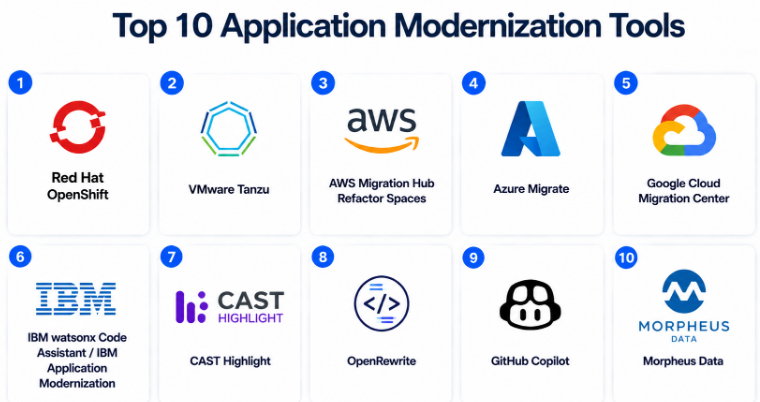
Top 10 Application Modernization Tools
#1 — Red Hat OpenShift
Short description :
Red Hat OpenShift is an enterprise Kubernetes platform used to modernize applications through containers, automation, DevOps workflows, and hybrid cloud deployment. It is best suited for enterprises that want a consistent platform across on-premises, private cloud, and public cloud. Teams use it to move traditional applications into containers, run microservices, and standardize deployment pipelines. It is strong for regulated industries, platform engineering teams, and organizations already using Red Hat technologies. OpenShift is not only a modernization tool; it is also a long-term application platform.
Key Features
- Enterprise Kubernetes platform for modern application deployment
- Supports containers, microservices, and hybrid cloud workloads
- Built-in CI/CD and developer workflow capabilities
- Strong ecosystem around Red Hat Enterprise Linux and Ansible
- Supports application migration and modernization toolkits
- Integrated security controls and policy management
- Useful for both legacy and cloud-native applications
Pros
- Strong enterprise-grade Kubernetes foundation
- Good fit for hybrid cloud and regulated environments
- Large ecosystem and mature documentation
Cons
- Can be complex for small teams
- Requires Kubernetes and platform engineering skills
- Cost may be high for smaller organizations
Platforms / Deployment
Cloud / Self-hosted / Hybrid
Security & Compliance
Supports RBAC, SSO/SAML integrations, audit logs, container security controls, and enterprise access management. Compliance certifications vary by deployment and environment.
Integrations & Ecosystem
Red Hat OpenShift works well in enterprise DevOps and hybrid cloud environments. It connects with CI/CD tools, monitoring platforms, automation systems, and cloud services.
- Red Hat Ansible Automation Platform
- GitOps tools
- CI/CD pipelines
- Container registries
- Monitoring and observability tools
- Public cloud platforms
Support & Community
OpenShift has strong enterprise support, detailed documentation, partner services, training options, and a large Kubernetes-based ecosystem.
#2 — VMware Tanzu
Short description :
VMware Tanzu is a modernization platform designed to help teams build, run, and manage applications across Kubernetes and cloud environments. It is commonly used by enterprises already invested in VMware infrastructure. Tanzu supports containerized workloads, platform operations, developer productivity, and application lifecycle management. It helps companies modernize without completely abandoning existing VMware environments. It is useful for enterprises moving from virtual-machine-heavy infrastructure toward cloud-native platforms.
Key Features
- Kubernetes platform for enterprise application modernization
- Helps bridge traditional VMware environments and cloud-native delivery
- Supports container lifecycle management
- Developer platform capabilities for modern app delivery
- Works across private, public, and hybrid cloud environments
- Good fit for VM-to-container modernization paths
- Supports platform operations and governance
Pros
- Strong fit for VMware-heavy enterprises
- Helps modernize existing infrastructure gradually
- Useful for hybrid and private cloud strategies
Cons
- Can be expensive and complex
- Best value comes when already using VMware ecosystem
- Requires platform operations expertise
Platforms / Deployment
Cloud / Self-hosted / Hybrid
Security & Compliance
Supports enterprise security models, access controls, and platform governance. Specific compliance details vary by edition and deployment.
Integrations & Ecosystem
VMware Tanzu fits well with VMware infrastructure and enterprise platform teams. It also integrates with modern DevOps and Kubernetes ecosystems.
- VMware Cloud Foundation
- Kubernetes tools
- CI/CD systems
- Container registries
- Observability platforms
- Cloud infrastructure platforms
Support & Community
VMware Tanzu has enterprise support, partner services, product documentation, and a mature VMware customer ecosystem.
#3 — AWS Migration Hub Refactor Spaces
Short description :
AWS Migration Hub Refactor Spaces helps teams incrementally refactor existing applications into microservices on AWS. It is useful when companies want to reduce modernization risk by breaking a monolith into smaller services step by step. The tool helps create the environment needed for incremental refactoring, routing, and service separation. It is best for teams already committed to AWS and looking for a structured path toward microservices. It works well when modernization is planned around AWS-native services.
Key Features
- Supports incremental application refactoring
- Helps modernize monolithic applications into microservices
- Designed for AWS-based modernization projects
- Reduces infrastructure setup effort for refactoring
- Helps route traffic between old and new services
- Works with AWS migration and cloud services
- Good for staged modernization instead of big-bang rewrite
Pros
- Strong fit for AWS modernization projects
- Helps reduce risk during refactoring
- Useful for monolith-to-microservices journeys
Cons
- Best suited for AWS environments
- Not a full application portfolio assessment tool
- Requires AWS architecture knowledge
Platforms / Deployment
Cloud
Security & Compliance
AWS services generally support IAM, encryption options, logging, and access controls. Compliance depends on AWS service configuration and customer implementation.
Integrations & Ecosystem
AWS Migration Hub Refactor Spaces works best inside the AWS ecosystem and connects naturally with cloud-native AWS services.
- AWS Migration Hub
- AWS IAM
- Amazon API Gateway
- AWS Lambda
- Amazon ECS / EKS
- AWS networking services
Support & Community
AWS provides documentation, support plans, partner ecosystem support, and cloud migration guidance.
#4 — Azure Migrate
Short description :
Azure Migrate is Microsoft’s migration and modernization hub for assessing, planning, and moving workloads to Azure. It is widely used for server, database, web application, and virtual desktop migration planning. For application modernization, it helps teams understand dependencies, readiness, sizing, and migration paths. It is best for organizations using Microsoft technologies, Windows Server, SQL Server, .NET, and Azure cloud services. It is especially useful for assessment-led modernization.
Key Features
- Central hub for migration assessment and planning
- Supports servers, databases, web apps, and workloads
- Helps with discovery, dependency mapping, and readiness assessment
- Strong fit for Microsoft and Azure environments
- Supports migration planning for cloud modernization
- Connects with Azure-native services
- Useful for phased migration and modernization programs
Pros
- Strong choice for Azure-focused organizations
- Good assessment and planning capabilities
- Works well with Microsoft enterprise environments
Cons
- Best value is within Azure ecosystem
- Not a complete refactoring platform by itself
- Advanced modernization still needs architecture work
Platforms / Deployment
Cloud / Hybrid
Security & Compliance
Supports Azure identity, access control, encryption, monitoring, and governance capabilities. Compliance depends on Azure configuration and customer environment.
Integrations & Ecosystem
Azure Migrate integrates with Microsoft cloud and enterprise tools, making it strong for companies already standardized on Azure.
- Azure App Service
- Azure Kubernetes Service
- Azure SQL
- Microsoft Entra ID
- Azure Monitor
- DevOps pipelines
Support & Community
Microsoft provides strong documentation, enterprise support, partner services, and a large Azure community.
#5 — Google Cloud Migration Center
Short description :
Google Cloud Migration Center helps organizations assess, plan, and execute cloud migration and modernization projects for Google Cloud. It supports discovery, workload assessment, cost estimation, and migration planning. It is useful for teams modernizing applications into Google Cloud services, containers, and managed platforms. The tool is best for enterprises that want data-driven migration planning before moving workloads. It helps reduce uncertainty in large cloud modernization programs.
Key Features
- Cloud migration and modernization assessment
- Workload discovery and inventory planning
- Cost estimation and migration recommendations
- Useful for infrastructure and application modernization planning
- Supports Google Cloud migration workflows
- Helps teams prioritize modernization waves
- Good fit for portfolio-level migration planning
Pros
- Strong for Google Cloud modernization planning
- Helps create structured migration roadmaps
- Useful for enterprise assessment work
Cons
- Best suited for Google Cloud direction
- Deep application refactoring needs additional tools
- May require cloud architecture expertise
Platforms / Deployment
Cloud
Security & Compliance
Uses Google Cloud security and identity controls. Specific compliance depends on deployment configuration and customer implementation.
Integrations & Ecosystem
Google Cloud Migration Center connects with Google Cloud infrastructure and modernization services.
- Google Kubernetes Engine
- Cloud Run
- Compute Engine
- Google Cloud operations tools
- Identity and access management
- Partner migration tools
Support & Community
Google Cloud offers documentation, enterprise support plans, partner ecosystem support, and cloud architecture guidance.
#6 — IBM watsonx Code Assistant / IBM Application Modernization
Short description :
IBM’s application modernization offerings focus on helping enterprises modernize complex legacy systems, including mainframe and hybrid cloud applications. IBM watsonx Code Assistant is positioned around AI-assisted code understanding and modernization support. These tools are useful for large organizations with older systems, enterprise architecture complexity, and strict governance needs. IBM is especially relevant for mainframe modernization, hybrid cloud transformation, and enterprise consulting-led modernization. It is best suited for large companies with complex portfolios.
Key Features
- AI-assisted modernization support
- Mainframe and enterprise application modernization focus
- Hybrid cloud modernization capabilities
- Supports code understanding and transformation workflows
- Strong consulting and enterprise services ecosystem
- Useful for regulated and complex IT environments
- Supports modernization planning and execution
Pros
- Strong enterprise and mainframe modernization expertise
- Useful for complex legacy environments
- AI-assisted capabilities can help reduce manual analysis
Cons
- May be too heavy for smaller companies
- Pricing and implementation may require enterprise engagement
- Best results often need consulting support
Platforms / Deployment
Cloud / Self-hosted / Hybrid
Security & Compliance
Enterprise security controls are available depending on product and deployment. Specific compliance details vary by offering and customer environment.
Integrations & Ecosystem
IBM modernization tools fit enterprise architecture, hybrid cloud, and legacy modernization programs.
- IBM Cloud
- Red Hat OpenShift
- Mainframe environments
- Enterprise DevOps tools
- Security and governance platforms
- Consulting-led transformation workflows
Support & Community
IBM provides enterprise support, consulting services, technical documentation, and partner-led modernization programs.
#7 — CAST Highlight
Short description :
CAST Highlight is an application portfolio analysis tool used to assess cloud readiness, software risk, technical debt, open-source exposure, and modernization opportunities. It is useful before a large migration or modernization program because it gives teams a fact-based view of application health. CIOs, enterprise architects, and modernization leaders use it to decide which applications to move, refactor, retire, or rebuild. It is best for portfolio-level modernization planning rather than day-to-day deployment. It works well when leadership needs clear modernization priorities.
Key Features
- Application portfolio assessment
- Cloud readiness analysis
- Software health and technical debt visibility
- Open-source risk insights
- Modernization planning support
- Helps prioritize migration waves
- Useful for executive and architecture reporting
Pros
- Strong for assessment-led modernization
- Helpful for large application portfolios
- Provides structured modernization insights
Cons
- Not a deployment platform
- Requires accurate application inventory and scans
- May need expert interpretation for complex decisions
Platforms / Deployment
Cloud / Hybrid
Security & Compliance
Security details vary by deployment and customer setup. Use “Not publicly stated” where specific certifications are not confirmed.
Integrations & Ecosystem
CAST Highlight is often used with cloud migration and modernization programs.
- AWS migration workflows
- Google Cloud migration planning
- Azure modernization planning
- Application portfolio tools
- Reporting workflows
- Enterprise architecture processes
Support & Community
CAST provides product documentation, customer support, and enterprise-focused onboarding resources. Community strength is more enterprise/vendor-led than open-source-led.
#8 — OpenRewrite
Short description :
OpenRewrite is an automated code refactoring tool used to modernize Java and other codebases through repeatable recipes. It is useful for teams upgrading frameworks, fixing dependency issues, improving code quality, and reducing manual modernization effort. Developers and platform teams use it when they need safe, consistent code changes across many repositories. It is especially helpful for large-scale framework upgrades and technical debt reduction. It is a developer-first modernization tool, not a full migration platform.
Key Features
- Automated code refactoring recipes
- Useful for framework and dependency upgrades
- Supports large-scale codebase modernization
- Helps reduce repetitive manual code changes
- Developer-first workflow
- Can support modernization across many repositories
- Useful for technical debt cleanup
Pros
- Strong for automated refactoring
- Good fit for developer productivity
- Helps standardize code modernization
Cons
- Not a full cloud migration platform
- Requires recipe knowledge and testing discipline
- Best fit depends on supported languages and frameworks
Platforms / Deployment
Web / Windows / macOS / Linux / Cloud / Self-hosted / Hybrid
Security & Compliance
Not publicly stated.
Integrations & Ecosystem
OpenRewrite fits into developer workflows and modernization pipelines.
- Git repositories
- CI/CD pipelines
- Build tools
- Code review workflows
- Developer IDE workflows
- Modernization recipe libraries
Support & Community
OpenRewrite has an active developer-focused ecosystem, documentation, and community support. Enterprise support may vary depending on vendor or commercial offering.
#9 — GitHub Copilot
Short description :
GitHub Copilot is an AI coding assistant that can support modernization by helping developers understand legacy code, generate refactoring suggestions, write tests, document code, and speed up repetitive coding tasks. It is not a dedicated application modernization platform, but it is highly useful inside modernization teams. Developers can use it during code migration, API redesign, test creation, and framework upgrades. It is best for teams that want AI assistance inside daily engineering workflows. It should be used with human review and strong governance.
Key Features
- AI-assisted coding and refactoring support
- Helps explain legacy code
- Can generate tests, documentation, and code suggestions
- Works inside developer environments
- Useful for repetitive modernization tasks
- Supports productivity during migration and refactoring
- Fits naturally into GitHub-based workflows
Pros
- Easy for developers to adopt
- Speeds up code understanding and test creation
- Useful across many modernization scenarios
Cons
- Not a full modernization planning tool
- Requires human review for accuracy and security
- Output quality depends on context and prompts
Platforms / Deployment
Web / Windows / macOS / Linux / Cloud
Security & Compliance
Supports enterprise access controls and admin settings depending on plan. Specific compliance depends on GitHub product edition and organization setup.
Integrations & Ecosystem
GitHub Copilot works best in software engineering workflows.
- GitHub repositories
- Visual Studio Code
- JetBrains IDEs
- GitHub Actions
- Pull request workflows
- Developer productivity tools
Support & Community
GitHub provides documentation, enterprise support options, and a very large developer ecosystem.
#10 — Morpheus Data
Short description :
Morpheus Data is a hybrid cloud management and automation platform that can support modernization by helping teams manage cloud resources, self-service provisioning, governance, automation, and workload operations. It is not only for application modernization, but it helps enterprises standardize infrastructure and platform operations during modernization programs. It is useful for organizations working across private cloud, public cloud, and hybrid environments. Teams use it to improve governance, automation, and cloud service delivery. It fits companies that need control across mixed infrastructure.
Key Features
- Hybrid cloud management platform
- Self-service provisioning and automation
- Governance and policy controls
- Supports multi-cloud operations
- Useful for modernization platform management
- Helps standardize infrastructure delivery
- Supports cost and lifecycle management
Pros
- Good for hybrid and multi-cloud environments
- Helps improve governance and automation
- Useful for platform operations teams
Cons
- Not a pure application refactoring tool
- May be complex for smaller teams
- Best value comes in multi-cloud or hybrid environments
Platforms / Deployment
Cloud / Self-hosted / Hybrid
Security & Compliance
Supports enterprise access control and governance features. Specific compliance details vary by deployment and edition.
Integrations & Ecosystem
Morpheus Data connects with infrastructure, cloud, automation, and IT operations ecosystems.
- Public cloud platforms
- Private cloud platforms
- Infrastructure automation tools
- ITSM systems
- CI/CD tools
- Monitoring platforms
Support & Community
Morpheus offers enterprise documentation, support options, and partner-led implementation services. Community visibility is more enterprise-focused than open-source-focused.
Comparison Table
| Tool Name | Best For | Platform(s) Supported | Deployment | Standout Feature | Public Rating |
|---|---|---|---|---|---|
| Red Hat OpenShift | Enterprise Kubernetes modernization | Web / Linux / Cloud | Cloud / Self-hosted / Hybrid | Enterprise Kubernetes platform | N/A |
| VMware Tanzu | VMware-heavy enterprises | Web / Cloud | Cloud / Self-hosted / Hybrid | VM-to-container modernization path | N/A |
| AWS Migration Hub Refactor Spaces | AWS microservices refactoring | Web / Cloud | Cloud | Incremental refactoring support | N/A |
| Azure Migrate | Azure migration planning | Web / Cloud | Cloud / Hybrid | Centralized Azure migration hub | N/A |
| Google Cloud Migration Center | Google Cloud migration assessment | Web / Cloud | Cloud | Portfolio migration planning | N/A |
| IBM watsonx Code Assistant / IBM Application Modernization | Mainframe and enterprise modernization | Web / Cloud / Enterprise environments | Cloud / Self-hosted / Hybrid | AI-assisted legacy modernization | N/A |
| CAST Highlight | Application portfolio assessment | Web / Cloud | Cloud / Hybrid | Cloud readiness and technical debt analysis | N/A |
| OpenRewrite | Automated code refactoring | Windows / macOS / Linux / Web | Cloud / Self-hosted / Hybrid | Recipe-based code modernization | N/A |
| GitHub Copilot | AI-assisted developer modernization | Web / Windows / macOS / Linux | Cloud | AI coding and refactoring assistance | N/A |
| Morpheus Data | Hybrid cloud governance and automation | Web / Cloud | Cloud / Self-hosted / Hybrid | Multi-cloud self-service automation | N/A |
Evaluation & Application Modernization Tools
| Tool Name | Core (25%) | Ease (15%) | Integrations (15%) | Security (10%) | Performance (10%) | Support (10%) | Value (15%) | Weighted Total (0–10) |
|---|---|---|---|---|---|---|---|---|
| Red Hat OpenShift | 9 | 7 | 9 | 9 | 9 | 9 | 8 | 8.55 |
| VMware Tanzu | 8 | 7 | 8 | 8 | 8 | 8 | 7 | 7.75 |
| AWS Migration Hub Refactor Spaces | 8 | 7 | 9 | 8 | 8 | 8 | 8 | 8.05 |
| Azure Migrate | 8 | 8 | 9 | 8 | 8 | 9 | 9 | 8.40 |
| Google Cloud Migration Center | 8 | 8 | 8 | 8 | 8 | 8 | 8 | 8.00 |
| IBM watsonx Code Assistant / IBM Application Modernization | 9 | 7 | 8 | 8 | 8 | 9 | 7 | 8.05 |
| CAST Highlight | 8 | 8 | 8 | 7 | 8 | 8 | 8 | 7.95 |
| OpenRewrite | 8 | 7 | 8 | 6 | 8 | 7 | 9 | 7.70 |
| GitHub Copilot | 7 | 9 | 9 | 8 | 8 | 8 | 9 | 8.10 |
| Morpheus Data | 8 | 7 | 8 | 8 | 8 | 8 | 7 | 7.75 |
These scores are comparative, not absolute. A higher score does not mean the tool is best for every company. For example, OpenShift may score high for enterprise Kubernetes, while OpenRewrite may be better for focused code refactoring. Buyers should use this table to shortlist tools, then validate fit through a pilot, security review, cost review, and integration testing.
Which Application Modernization Tools Should You Choose?
Solo / Freelancer
Solo developers and freelancers usually do not need heavy enterprise modernization platforms. A practical stack may include GitHub Copilot for code assistance and OpenRewrite for repeatable refactoring where supported. If the project is going to AWS, Azure, or Google Cloud, cloud-native migration tools can help with planning.
Best choices:
- GitHub Copilot
- OpenRewrite
- Azure Migrate for Azure projects
- AWS Migration Hub Refactor Spaces for AWS refactoring
SMB
Small and mid-sized businesses should focus on tools that reduce risk without creating too much operational complexity. Cloud-native migration tools are often easier to start with because they connect directly to the target cloud platform.
Best choices:
- Azure Migrate for Microsoft-heavy SMBs
- Google Cloud Migration Center for Google Cloud adoption
- AWS Migration Hub Refactor Spaces for AWS modernization
- GitHub Copilot for developer productivity
- OpenRewrite for codebase cleanup
Mid-Market
Mid-market companies usually need a mix of assessment, automation, and platform modernization. They may have multiple applications, older systems, and growing security needs. A combination of assessment tools and cloud-native platforms works well.
Best choices:
- CAST Highlight for portfolio assessment
- Red Hat OpenShift for container platform modernization
- Azure Migrate or Google Cloud Migration Center for cloud planning
- GitHub Copilot for engineering productivity
- Morpheus Data for hybrid cloud control
Enterprise
Enterprises need governance, security, hybrid cloud support, scale, and long-term platform strategy. They should avoid choosing tools only based on developer convenience. Portfolio assessment, platform standardization, compliance, and support maturity are critical.
Best choices:
- Red Hat OpenShift for enterprise Kubernetes
- VMware Tanzu for VMware-based modernization
- IBM Application Modernization for mainframe and complex legacy systems
- CAST Highlight for portfolio-level assessment
- Morpheus Data for hybrid cloud governance
Budget vs Premium
Budget-conscious teams should start with focused tools such as OpenRewrite and cloud-native migration services already included in their cloud ecosystem. Premium buyers should consider OpenShift, Tanzu, IBM, CAST Highlight, and Morpheus Data when they need governance, scale, and enterprise support.
A good approach is to avoid buying a large platform before completing a portfolio assessment. First understand the application estate, then decide where premium tooling is justified.
Feature Depth vs Ease of Use
Feature-rich platforms like OpenShift, Tanzu, IBM modernization offerings, and Morpheus Data are powerful, but they require skilled teams. Easier tools like GitHub Copilot, Azure Migrate, and Google Cloud Migration Center can help teams start faster.
If your team is early in modernization, choose simpler assessment and planning tools first. If your company already has platform engineering maturity, deeper platforms can deliver more value.
Integrations & Scalability-
Application modernization rarely happens in isolation. The selected tool should integrate with source control, CI/CD, identity systems, monitoring platforms, cloud services, and security workflows.
For scalability, enterprises should prioritize OpenShift, Tanzu, IBM, Morpheus Data, and cloud-native migration hubs. Developer teams focused on code should prioritize GitHub Copilot and OpenRewrite.
Security & Compliance Needs
Companies in banking, healthcare, insurance, government, and regulated industries should strongly evaluate SSO, RBAC, audit logs, encryption, access controls, data handling, and deployment options.
For strict governance, enterprise platforms like OpenShift, Tanzu, IBM modernization offerings, and Morpheus Data may be stronger fits. Cloud-native tools from AWS, Azure, and Google Cloud can also work well when configured properly within cloud governance frameworks.
Frequently Asked Questions
1. What are Application Modernization Tools?
Application Modernization Tools help companies upgrade older applications so they can run on modern platforms like cloud, containers, Kubernetes, APIs, and DevOps pipelines. They may support assessment, refactoring, migration, automation, security, and platform management.
2. How much do Application Modernization Tools cost?
Pricing varies widely. Some cloud migration tools may be part of a cloud platform, while enterprise platforms often use subscription, consumption, or custom pricing. If pricing is not clearly public, treat it as “Varies / N/A.”
3. How long does application modernization take?
It depends on application size, architecture, dependencies, compliance needs, and team skill. A small application may be modernized quickly, while a large enterprise portfolio may require phased planning, testing, migration, and governance.
4. What is the biggest mistake during modernization?
The biggest mistake is starting with tools before understanding the application portfolio. Teams should first assess business criticality, dependencies, technical debt, security risks, and modernization goals.
5. Are these tools only for cloud migration?
No. Many tools support cloud migration, but modernization also includes refactoring, containerization, API enablement, DevOps adoption, security improvements, and platform standardization.
6. Do Application Modernization Tools replace developers?
No. They support developers and architects, but they do not replace engineering judgment. AI and automation can speed up analysis and coding, but human review, testing, architecture, and security validation remain essential.
7. Which tool is best for Kubernetes modernization?
Red Hat OpenShift and VMware Tanzu are strong choices for Kubernetes-based modernization. OpenShift is especially strong for hybrid cloud and enterprise Kubernetes, while Tanzu fits well in VMware-centered environments.
8. Which tool is best for code refactoring?
OpenRewrite is strong for automated code refactoring, especially where recipe-based modernization is useful. GitHub Copilot can also assist developers with code explanation, test generation, and refactoring suggestions.
9. Which tool is best for application portfolio assessment?
CAST Highlight is a strong option for application portfolio assessment, cloud readiness analysis, technical debt visibility, and modernization prioritization. It is useful before large-scale modernization decisions.
10. Can small businesses use these tools?
Yes, but small businesses should avoid overbuying. They can start with cloud-native migration tools, GitHub Copilot, and focused refactoring tools before investing in large enterprise platforms.
Conclusion
Application modernization is not just a technical upgrade. It is a business decision that affects cost, speed, security, developer productivity, customer experience, and long-term platform flexibility. The best Application Modernization Tool depends on where your organization is starting from. A company with many legacy applications may need CAST Highlight for assessment, IBM for complex enterprise modernization, or Red Hat OpenShift for hybrid cloud execution. A cloud-focused team may prefer Azure Migrate, Google Cloud Migration Center, or AWS Migration Hub Refactor Spaces. Developer teams may get strong value from OpenRewrite and GitHub Copilot.
