Introduction
Localization QA tools are specialized software designed to validate and ensure the quality, consistency, and accuracy of translated content across multiple languages and regions. These tools go beyond simple spell-checking—they detect linguistic errors, formatting issues, UI truncation, and contextual mistakes, making them essential for software developers, content teams, and global organizations.
In with AI-assisted translation and globalization accelerating, delivering accurate and culturally appropriate content is critical to user engagement, brand reputation, and regulatory compliance. Organizations can no longer rely solely on human review; automated and integrated QA tools save time while maintaining high-quality standards.
Real-world use cases include:
- Validating web and mobile app interfaces for multilingual support.
- Detecting inconsistencies in marketing campaigns across different regions.
- Ensuring documentation, e-learning content, and software manuals are accurate.
- Monitoring translations in real-time for global software releases.
- Performing batch QA on large-scale localization projects.
Key evaluation criteria for buyers:
- Multi-language and regional support
- Automated QA checks with AI assistance
- Integration with TMS, CMS, and CI/CD systems
- Reporting, dashboards, and audit logs
- Ease of use and collaboration features
- Security and compliance with data privacy standards
- Cost-effectiveness and scalability
- Deployment flexibility (Cloud, On-premises, Hybrid)
Best for: Localization engineers, QA testers, global content teams, software developers, and enterprises managing complex multilingual projects.
Not ideal for: Small teams with minimal multilingual content, users who rely solely on human proofreading, or projects with very basic translation needs.
Key Trends in Localization QA Tools
- AI-assisted linguistic QA to detect grammar, terminology, and style errors.
- Seamless integration with modern TMS, CMS, and version control platforms.
- Real-time in-context validation for websites, apps, and software interfaces.
- Advanced reporting and dashboards to track translation quality and KPIs.
- Support for rare languages, complex scripts, and right-to-left text.
- Compliance with GDPR, ISO 27001, SOC 2, and other security standards.
- Cloud-first deployment models with optional on-premises or hybrid setups.
- Workflow automation for distributed teams with collaboration features.
- AI-driven glossary and style enforcement for consistency across projects.
- Pricing flexibility for enterprise, mid-market, and SMB use cases.
How We Selected These Tools (Methodology)
- Market adoption and mindshare, reflecting global recognition.
- Feature completeness for linguistic, technical, and formatting checks.
- Reliability and performance signals including batch processing speed.
- Security posture: encryption, SSO, and compliance certifications when available.
- Integration capabilities with TMS, CMS, APIs, and CI/CD pipelines.
- Customer fit across different organization sizes and industries.
- Vendor support, documentation, and community presence.
- Usability for translators, developers, and content managers.
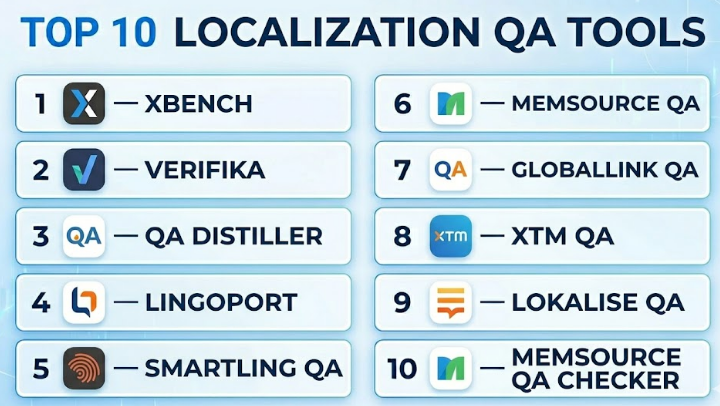
Top 10 Localization QA Tools
#1 — Xbench
Short description :
Xbench is a desktop-focused QA tool widely used by translators and localization teams. It performs automated checks for consistency, terminology, and formatting across multiple file types, making it ideal for detailed, language-intensive projects.
Key Features
- Multi-file batch processing and consistency checks
- Terminology validation with customizable glossaries
- Spell and grammar checks across supported formats
- Detailed error reports with filtering options
- Integration with major CAT tools
- Search and quick filtering of translation segments
Pros
- Reliable for large, complex localization projects
- Supports a wide variety of file formats
Cons
- Desktop-only; no cloud collaboration
- UI can feel outdated for new users
Platforms / Deployment
- Windows / macOS
- Self-hosted / Desktop
Security & Compliance
- Not publicly stated
Integrations & Ecosystem
Integrates with CAT tools to streamline QA workflows:
- SDL Trados
- MemoQ
- Wordfast
- Across
Support & Community
Active user forums and documentation; email support available.
#2 — Verifika
Short description :
Verifika is a cloud-based QA solution ideal for enterprise localization teams. It emphasizes automated error detection and reporting for large-scale translation projects.
Key Features
- Automated QA checks for formatting, punctuation, and numbers
- Glossary and terminology enforcement
- Visual in-context validation for web and software
- Multi-user workflow management
- Exportable QA dashboards and reports
Pros
- Efficient for large-scale projects
- Detailed and actionable reporting
Cons
- Internet connection required
- Steeper learning curve for beginners
Platforms / Deployment
- Web / Windows / macOS
- Cloud
Security & Compliance
- Not publicly stated
Integrations & Ecosystem
Integrates with CAT tools and TMS for seamless QA:
- SDL Trados
- Memsource
- Smartling
- Wordbee
Support & Community
Moderate community; vendor support with onboarding guides.
#3 — QA Distiller
Short description :
QA Distiller is a robust QA tool for translators, offering automated verification for translation quality, consistency, and formatting.
Key Features
- Detects untranslated, inconsistent, or missing segments
- Batch processing for multiple files
- Customizable QA rules and checks
- Supports TMX and XLIFF files
- Detailed filtering and reporting
Pros
- Comprehensive reporting for large projects
- Fast batch QA processing
Cons
- Desktop-only; no cloud features
- Interface may feel complex
Platforms / Deployment
- Windows
- Self-hosted / Desktop
Security & Compliance
- Not publicly stated
Integrations & Ecosystem
Works with popular CAT tools:
- SDL Trados
- MemoQ
- Wordfast
Support & Community
Active forums, good documentation, email support.
#4 — Lingoport
Short description :
Lingoport focuses on software internationalization testing, making it ideal for developer-centric QA workflows.
Key Features
- Continuous i18n (internationalization) testing
- Detects hard-coded strings, truncation, and encoding issues
- Integrates with CI/CD pipelines
- Supports multiple programming languages and frameworks
- Automated visual reporting
Pros
- Developer-focused, integrates into software lifecycle
- Enterprise-ready for complex projects
Cons
- Technical, requires developer knowledge
- Higher pricing for small teams
Platforms / Deployment
- Windows / macOS / Linux
- Cloud / On-premises
Security & Compliance
- Not publicly stated
Integrations & Ecosystem
- CI/CD (Jenkins, GitHub Actions)
- IDEs and code repositories
- TMS systems
Support & Community
Professional support, developer community contributions.
#5 — Smartling QA
Short description :
Smartling QA provides integrated QA for websites, apps, and software, ensuring content accuracy and visual consistency across languages.
Key Features
- Automated linguistic checks
- Visual context verification
- Glossary and style enforcement
- Workflow automation with translation memory
- Analytics dashboards for quality monitoring
Pros
- Cloud-based collaboration
- Strong integration with translation workflows
Cons
- Higher subscription costs
- Internet required
Platforms / Deployment
- Web / Windows / macOS / iOS / Android
- Cloud
Security & Compliance
- SOC 2, GDPR
- SSO, MFA, encryption
Integrations & Ecosystem
CMS and TMS integrations:
- WordPress
- Adobe Experience Manager
- Jira
- GitHub
Support & Community
24/7 support, active user community.
#6 — Memsource QA
Short description :
Memsource QA provides automated checks and AI-assisted suggestions for distributed localization teams.
Key Features
- Detects inconsistencies and formatting issues
- Terminology enforcement
- Integration with CMS and TMS
- AI-powered suggestions
- Detailed reporting dashboards
Pros
- AI-enhanced QA
- Cloud-based collaboration
Cons
- Advanced features require higher-tier plans
- Setup can be complex
Platforms / Deployment
- Web / Windows / macOS / iOS / Android
- Cloud
Security & Compliance
- Not publicly stated
Integrations & Ecosystem
- API for workflow automation
- CMS (WordPress, Drupal)
- TMS integration
Support & Community
Documentation and email support; active forums.
#7 — GlobalLink QA
Short description :
GlobalLink QA is an enterprise-level tool with extensive workflow automation and reporting capabilities for large localization teams.
Key Features
- Linguistic and technical QA
- Terminology validation
- Visual context verification
- Automated workflow assignment
- Management dashboards
Pros
- Enterprise-grade feature set
- Detailed reporting and analytics
Cons
- Overwhelming for small teams
- Enterprise pricing
Platforms / Deployment
- Web / Windows / macOS
- Cloud / Hybrid
Security & Compliance
- Not publicly stated
Integrations & Ecosystem
- TMS, CMS, project management tools
- API automation
Support & Community
Vendor support and documentation; moderate community.
#8 — XTM QA
Short description :
XTM QA is part of XTM Cloud, offering automated checks and in-context validation for web, software, and documentation.
Key Features
- Automated linguistic QA
- Terminology consistency
- In-context validation
- Multi-format support
- Reporting dashboards
Pros
- Cloud-based collaboration
- Seamless integration with XTM TMS
Cons
- Tied primarily to XTM ecosystem
Platforms / Deployment
- Web / Windows / macOS / iOS
- Cloud
Security & Compliance
- Not publicly stated
Integrations & Ecosystem
- CMS connectors
- API for custom automation
- XTM TMS
Support & Community
Documentation and vendor support; moderate community.
#9 — Lokalise QA
Short description :
Lokalise QA provides real-time QA for web, app, and software localization projects with collaborative features.
Key Features
- Real-time QA checks
- Glossary and style enforcement
- In-context visual QA
- API-driven automation
- Team dashboards
Pros
- Fast and efficient
- Cloud-based collaboration
Cons
- Technical knowledge required for full automation
- Subscription needed for enterprise features
Platforms / Deployment
- Web / Windows / macOS / iOS / Android
- Cloud
Security & Compliance
- Not publicly stated
Integrations & Ecosystem
- TMS and CMS connectors
- Slack and Jira integration
- API support
Support & Community
Comprehensive onboarding; email support; forums.
#10 — Memsource QA Checker
Short description :
Memsource QA Checker is a lightweight pre-delivery QA tool for freelancers and small teams, focusing on quick translation validation.
Key Features
- Detects missing translations and formatting issues
- Terminology checks
- Batch file validation
- Lightweight and fast
- Simple error reports
Pros
- Easy for freelancers and small teams
- Quick validation for tight deadlines
Cons
- Limited advanced reporting
- Not suitable for enterprise projects
Platforms / Deployment
- Windows / macOS
- Desktop / Cloud
Security & Compliance
- Not publicly stated
Integrations & Ecosystem
- Works with Memsource TMS
- Compatible with CAT tool exports
Support & Community
Documentation and limited support; community-driven.
Comparison Table (Top 10)
| Tool Name | Best For | Platform(s) Supported | Deployment | Standout Feature | Public Rating |
|---|---|---|---|---|---|
| Xbench | Freelancers & translators | Windows / macOS | Self-hosted | Multi-format consistency checks | N/A |
| Verifika | Enterprise localization teams | Web / Windows / macOS | Cloud | Automated error detection | N/A |
| QA Distiller | Professional translators | Windows | Self-hosted | Batch QA for large projects | N/A |
| Lingoport | Developer-centric QA | Windows / macOS / Linux | Cloud / On-premises | Continuous i18n testing | N/A |
| Smartling QA | Web, mobile, software apps | Web / Windows / macOS / iOS / Android | Cloud | Visual context verification | N/A |
| Memsource QA | Distributed teams | Web / Windows / macOS / iOS / Android | Cloud | AI-powered QA suggestions | N/A |
| GlobalLink QA | Large enterprises | Web / Windows / macOS | Cloud / Hybrid | Enterprise workflow automation | N/A |
| XTM QA | XTM users | Web / Windows / macOS / iOS | Cloud | In-context validation | N/A |
| Lokalise QA | Agile localization teams | Web / Windows / macOS / iOS / Android | Cloud | Real-time QA checks | N/A |
| Memsource QA Checker | Freelancers & small teams | Windows / macOS | Desktop / Cloud | Lightweight pre-delivery validation | N/A |
Evaluation & Localization QA Tools
| Tool Name | Core (25%) | Ease (15%) | Integrations (15%) | Security (10%) | Performance (10%) | Support (10%) | Value (15%) | Weighted Total (0–10) |
|---|---|---|---|---|---|---|---|---|
| Xbench | 8 | 7 | 7 | 5 | 8 | 7 | 8 | 7.55 |
| Verifika | 9 | 7 | 8 | 6 | 8 | 7 | 7 | 7.85 |
| QA Distiller | 8 | 6 | 6 | 5 | 7 | 6 | 7 | 6.85 |
| Lingoport | 9 | 7 | 8 | 6 | 9 | 7 | 7 | 8.05 |
| Smartling QA | 9 | 8 | 9 | 8 | 8 | 8 | 7 | 8.45 |
| Memsource QA | 9 | 8 | 9 | 7 | 8 | 8 | 7 | 8.55 |
| GlobalLink QA | 9 | 7 | 8 | 7 | 8 | 7 | 6 | 7.85 |
| XTM QA | 8 | 7 | 8 | 6 | 7 | 7 | 7 | 7.55 |
| Lokalise QA | 9 | 8 | 8 | 7 | 8 | 8 | 7 | 8.35 |
| Memsource QA Checker | 7 | 8 | 6 | 5 | 7 | 6 | 7 | 6.85 |
Interpretation: Weighted totals compare each tool’s strengths in core features, usability, integrations, security, performance, support, and value. Higher scores indicate broader applicability, while lower scores reflect niche or simpler use cases.
Which Localization QA Tools
Solo / Freelancer
- Xbench and Memsource QA Checker are lightweight, fast, and easy to use, ideal for individuals or small translation projects.
SMB
- Lokalise QA and Memsource QA balance automation and collaboration for small teams managing multiple languages.
Mid-Market
- Smartling QA and Verifika offer strong workflow automation, reporting dashboards, and centralized QA for mid-sized teams.
Enterprise
- GlobalLink QA, Lingoport, and Smartling QA support enterprise-scale QA, integrating with CI/CD pipelines, TMS, and CMS systems.
Budget vs Premium
- Budget-conscious teams benefit from Xbench or Memsource QA Checker. Premium solutions like Smartling QA deliver enterprise automation, reporting, and visual validation.
Feature Depth vs Ease of Use
- Lingoport and XTM QA are feature-rich but require technical expertise. Lokalise QA provides a good balance of advanced features and usability.
Integrations & Scalability
- Teams requiring deep TMS, CMS, or CI/CD integration should prioritize Smartling QA, Memsource QA, or Lingoport for scalable, multi-project workflows.
Security & Compliance Needs
- Organizations in regulated industries should consider Smartling QA for SOC 2 and GDPR compliance. Other tools require internal validation for security measures.
Frequently Asked Questions (FAQs)
1. What are the typical pricing models?
Most tools use subscription-based pricing, either per user, per project, or per word. Desktop tools may have a one-time license.
2. Can these tools integrate with existing TMS/CMS?
Yes, most top tools integrate with CAT tools, TMS platforms, and CMS to automate workflows and maintain consistency.
3. Are cloud-based tools more secure than desktop ones?
Security depends on vendor implementation. Cloud tools often include encryption, SSO, and compliance certifications, but verify internal policies.
4. How long does onboarding take?
Smaller desktop tools require minimal setup, often under a day. Enterprise cloud solutions may need weeks for full integration.
5. Can these tools handle multiple languages and scripts?
Yes, leading tools support hundreds of languages, including complex scripts and right-to-left languages.
6. Do AI features replace human review?
AI assists by detecting errors and inconsistencies but does not replace human judgment for context or cultural appropriateness.
7. How do I choose between desktop and cloud tools?
Consider team size, collaboration needs, and integration requirements. Freelancers may prefer desktop tools; teams may prefer cloud-based solutions.
8. Are these tools suitable for mobile app localization?
Yes, most offer in-context validation and visual QA for mobile apps, websites, and software interfaces.
9. What common mistakes should be avoided?
Ignoring context, skipping batch validation, and relying solely on spellchecking are common pitfalls. Always combine automated QA with human review.
10. Can I switch tools mid-project?
Yes, but ensure export
Conclusion
Localization QA tools are essential for organizations aiming to deliver accurate, consistent, and culturally appropriate content across multiple languages and regions. From freelancers using lightweight desktop solutions like Xbench or Memsource QA Checker to enterprise teams relying on Smartling QA, GlobalLink QA, or Lingoport, the right tool depends on project scale, team size, integration needs, and compliance requirements. Modern trends such as AI-assisted QA, in-context validation, and workflow automation make these tools increasingly indispensable in 2026 and beyond. Buyers should carefully evaluate features, deployment models, integrations, and security capabilities before selecting a solution.
