Introduction
Terminology Management Tools help organizations create, approve, store, update, and reuse standard terms across documents, websites, software products, translations, training content, support material, and marketing communication. In simple words, these tools make sure teams use the same approved words everywhere, especially when content is translated into multiple languages.
For global businesses, terminology consistency is not just a language issue. It affects brand trust, product understanding, legal accuracy, customer support quality, and user experience. If one product feature is described differently in different languages or regions, users can become confused and teams may waste time correcting avoidable mistakes.
Best for: Localization managers, technical writers, translators, product documentation teams, enterprise content teams, legal teams, SaaS companies, manufacturing companies, healthcare content teams, and global marketing departments.
Not ideal for: Very small teams with only a few translated pages, businesses that only need a simple spreadsheet glossary, or teams that do not yet have repeatable content and localization workflows.
Key Trends in Terminology Management Tools
- AI-assisted term extraction is becoming more common, helping teams identify repeated product names, technical phrases, and brand terms from large content libraries.
- Multilingual terminology governance is now important for global companies that need approved terms across regions, markets, and languages.
- Integration with Translation Management Systems is becoming a standard requirement because terminology must work directly inside translation workflows.
- Authoring tool integration is growing, especially for technical writers who need terminology suggestions while writing documentation.
- Terminology quality checks are becoming part of localization QA workflows to catch forbidden terms, inconsistent terms, and missing approved terms.
- Centralized termbases are replacing scattered spreadsheets because teams need version control, permissions, approval workflows, and audit visibility.
- API-first terminology systems are becoming useful for companies that want terminology inside CMS, help desk platforms, design systems, and developer workflows.
- Enterprise content governance is expanding terminology management beyond translation teams into marketing, legal, product, support, and compliance teams.
- Security expectations are rising, especially for regulated industries where terminology databases may include confidential product, medical, legal, or internal business language.
- Flexible pricing models are important because some teams need full enterprise governance, while others only need lightweight glossary management.
How We Selected These Tools
The tools below were selected based on practical relevance for terminology management, localization workflows, enterprise content consistency, and multilingual communication. The evaluation focused on:
- Market adoption and recognition among localization, translation, and content teams.
- Strength of terminology management features such as termbases, approval workflows, definitions, metadata, forbidden terms, and multilingual entries.
- Fit for different users, including freelancers, small teams, mid-market companies, and enterprises.
- Integration with translation tools, TMS platforms, authoring tools, CMS platforms, and API-based workflows.
- Workflow depth, including review, approval, governance, and role-based collaboration.
- Support for multilingual terminology, brand consistency, and technical documentation use cases.
- Usability for both language professionals and non-technical business users.
- Scalability for teams managing large terminology databases across multiple departments.
- Security and compliance visibility where publicly known; otherwise marked as “Not publicly stated.”
- Overall value based on feature depth, ecosystem strength, and practical business fit.
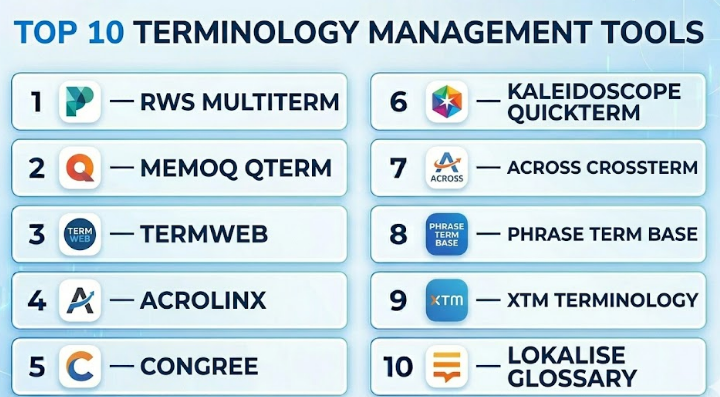
Top 10 Terminology Management Tools
#1 — RWS MultiTerm
Short description :
RWS MultiTerm is one of the most recognized terminology management tools in professional translation and localization environments. It is commonly used by translators, language service providers, and enterprise localization teams that need structured multilingual termbases. The tool helps teams store approved terms, definitions, synonyms, forbidden terms, and language-specific equivalents. It is especially useful for organizations already working within the RWS translation ecosystem. MultiTerm is best suited for teams that require formal terminology control, detailed term records, and strong compatibility with professional translation workflows.
Key Features
- Multilingual termbase creation and management.
- Support for definitions, examples, notes, term status, and metadata.
- Integration with professional translation workflows.
- Term lookup and terminology validation during translation.
- Support for approved and forbidden terminology.
- Import and export options for terminology exchange.
- Useful for technical, legal, medical, and enterprise localization content.
Pros
- Strong recognition in professional translation environments.
- Good fit for structured and detailed multilingual termbases.
- Works well for teams already using the RWS ecosystem.
Cons
- Can feel complex for beginners.
- Best value is usually achieved when used with related translation tools.
- May be more than what small teams need.
Platforms / Deployment
Windows / Web components vary by setup
Cloud / Self-hosted / Hybrid options may vary by product configuration
Security & Compliance
Not publicly stated
Integrations & Ecosystem
RWS MultiTerm is strongest when used inside the broader RWS translation and localization ecosystem. It supports terminology workflows for translators, reviewers, and localization managers.
- RWS translation tools
- Translation memory workflows
- Termbase import and export
- Localization QA workflows
- Enterprise translation environments
Support & Community
RWS has a mature professional translation ecosystem with documentation, training resources, partner networks, and enterprise support options. Community knowledge is strong among professional translators and localization teams.
#2 — memoQ Qterm
Short description :
memoQ Qterm is a terminology management system designed for organizations that need to store, manage, share, and control terminology across teams. It works well for localization teams, enterprise language departments, translation agencies, and companies that want terminology to become a reusable business asset. Qterm supports structured term entries, approval workflows, collaboration, and integration with memoQ translation workflows. It is useful for teams that need both translation productivity and terminology consistency. The tool is especially valuable when terminology must be shared across translators, reviewers, subject matter experts, and business users.
Key Features
- Centralized terminology database for teams.
- Multilingual term management with structured entries.
- Term approval and review workflows.
- Integration with memoQ translation workflows.
- Support for definitions, usage notes, and metadata.
- Role-based collaboration for terminology governance.
- Useful for enterprise localization and technical documentation.
Pros
- Strong fit for memoQ users and localization teams.
- Good collaboration features for terminology review.
- Helps standardize terminology across translation projects.
Cons
- Best suited for teams already using memoQ or professional translation workflows.
- May require setup effort for governance rules.
- Smaller teams may find the full terminology workflow heavy.
Platforms / Deployment
Web / Windows components may vary
Cloud / Self-hosted / Hybrid options may vary by setup
Security & Compliance
Not publicly stated
Integrations & Ecosystem
memoQ Qterm works closely with the memoQ ecosystem and supports terminology use during translation, review, and quality control.
- memoQ translation workflows
- Translation memory tools
- Termbase import and export
- Localization project workflows
- Enterprise terminology collaboration
Support & Community
memoQ has documentation, professional support, training resources, and an active language technology user base. Support options may vary by license and contract.
#3 — TermWeb
Short description :
TermWeb is a web-based terminology management solution used by organizations that need centralized access to approved terminology. It is designed for teams that want terminology to be searchable, shareable, and available across departments. TermWeb is useful for enterprises, translation teams, technical writers, and content governance teams that manage large multilingual termbases. It supports structured term records and can be integrated into broader language and authoring workflows. The tool is a good choice when terminology needs to be managed beyond individual translators and shared with wider business users.
Key Features
- Web-based terminology database.
- Centralized terminology access for teams.
- Multilingual term records and metadata.
- Search and lookup capabilities.
- Support for terminology governance workflows.
- Integration potential with authoring and language tools.
- Useful for enterprise-wide terminology sharing.
Pros
- Strong for centralized terminology access.
- Suitable for teams beyond only translators.
- Useful for enterprise terminology governance.
Cons
- Setup and configuration may require planning.
- Pricing and deployment details may vary.
- Smaller teams may not need its enterprise depth.
Platforms / Deployment
Web
Cloud / Self-hosted / Hybrid options may vary
Security & Compliance
Not publicly stated
Integrations & Ecosystem
TermWeb can be used as a central terminology source for content and translation workflows. Its value increases when connected with authoring, localization, and content governance systems.
- Translation tools
- Authoring tools
- Enterprise terminology workflows
- Termbase exchange formats
- Content governance systems
Support & Community
Support and onboarding vary by vendor arrangement. Documentation and enterprise support may be available depending on deployment and contract.
#4 — Acrolinx
Short description :
Acrolinx is an enterprise content governance platform that includes terminology management as part of a broader content quality and compliance workflow. It helps organizations enforce brand language, tone, style, clarity, and approved terminology across large content operations. Acrolinx is especially valuable for enterprises with many writers, reviewers, departments, and content channels. It is not only a terminology database but also a content checking system that guides writers while they create content. It is best for organizations that need terminology control at scale across documentation, marketing, support, legal, and product content.
Key Features
- Enterprise terminology governance.
- Content checking for approved and forbidden terms.
- Brand, tone, style, and terminology enforcement.
- Guidance for writers during content creation.
- Reporting on content quality and compliance.
- Integration with authoring and content workflows.
- Useful for large content operations and regulated teams.
Pros
- Strong for enterprise content consistency.
- Goes beyond term storage into active content governance.
- Useful across many departments, not only localization.
Cons
- May be too advanced for small teams.
- Pricing is likely enterprise-focused.
- Requires governance planning to get full value.
Platforms / Deployment
Web / Integration-based access
Cloud / Enterprise deployment options may vary
Security & Compliance
Not publicly stated
Integrations & Ecosystem
Acrolinx is designed to work inside the content creation process. It can connect with authoring environments and enterprise content workflows so writers can apply terminology rules while creating content.
- Authoring tools
- Content management systems
- Technical documentation workflows
- Enterprise content governance systems
- Terminology databases
Support & Community
Enterprise support, onboarding, and professional services are commonly associated with this type of platform. Community visibility is more enterprise-focused than open community-based.
#5 — Congree
Short description :
Congree is a content quality and terminology management platform focused on helping companies write consistent, clear, and controlled content. It is commonly used by organizations that need terminology, style, and language rules inside authoring workflows. Congree is useful for technical documentation teams, regulated industries, and enterprises where approved wording must be followed across large volumes of content. The platform supports terminology checking and writing assistance. It is a good fit for companies that want to connect terminology management with authoring quality and content governance.
Key Features
- Terminology checking during content creation.
- Writing assistance for controlled language and style.
- Support for approved and forbidden terms.
- Integration with authoring environments.
- Useful for technical documentation and enterprise content.
- Helps improve consistency before translation.
- Supports terminology governance workflows.
Pros
- Strong for technical writing and controlled language.
- Helps prevent terminology issues before localization.
- Useful for enterprise content standardization.
Cons
- May require implementation and configuration.
- More suitable for structured content teams than casual users.
- Pricing and deployment details may vary.
Platforms / Deployment
Web / Authoring integrations
Cloud / Self-hosted / Hybrid options may vary
Security & Compliance
Not publicly stated
Integrations & Ecosystem
Congree fits well into authoring and documentation environments where terminology quality must be checked before content is published or translated.
- Authoring tools
- Technical documentation platforms
- Terminology databases
- Content quality workflows
- Enterprise language governance systems
Support & Community
Support is generally vendor-led with onboarding and enterprise assistance. Community presence is more specialized among technical communication and enterprise content teams.
#6 — Kaleidoscope Quickterm
Short description :
Kaleidoscope Quickterm is a terminology management tool designed for building, maintaining, and sharing corporate terminology. It helps organizations manage approved vocabulary, definitions, multilingual terms, and governance workflows. Quickterm is useful for localization teams, terminology managers, technical writers, and companies that want structured terminology processes. It supports collaboration between language experts, subject matter experts, and business teams. The tool is especially useful when terminology maturity is important and companies want to move beyond basic glossaries.
Key Features
- Corporate terminology management.
- Term creation, review, and approval workflows.
- Multilingual term records and definitions.
- Support for terminology governance processes.
- Useful for cross-department terminology sharing.
- API and integration possibilities may vary by edition.
- Supports structured terminology maturity.
Pros
- Strong focus on professional terminology management.
- Useful for companies building formal terminology governance.
- Good fit for multilingual enterprise teams.
Cons
- May require terminology process maturity.
- Smaller teams may prefer simpler glossary tools.
- Some advanced capabilities may depend on edition.
Platforms / Deployment
Web
Cloud / Self-hosted / Hybrid options may vary
Security & Compliance
Not publicly stated
Integrations & Ecosystem
Quickterm can support corporate terminology workflows and may connect with broader language and content environments depending on configuration.
- Terminology governance workflows
- Translation environments
- Authoring systems
- API-based integrations
- Enterprise content processes
Support & Community
Vendor documentation and professional support may be available. Community knowledge is strongest among terminology specialists and enterprise language teams.
#7 — Across crossTerm
Short description :
Across crossTerm is the terminology management component associated with the Across Language Server ecosystem. It is designed for organizations managing translation, terminology, and language assets in a structured enterprise environment. crossTerm helps teams create and maintain terminology databases for consistent translation and communication. It is useful for companies that need centralized term management with workflow control. The tool is best suited for organizations already using Across or those that need a controlled language server environment.
Key Features
- Centralized termbase management.
- Support for multilingual terminology.
- Workflow support for term proposals and approvals.
- Integration with Across translation workflows.
- Browser-based terminology access may be available.
- Useful for enterprise translation governance.
- Supports terminology consistency across projects.
Pros
- Strong fit for Across ecosystem users.
- Useful for structured enterprise terminology workflows.
- Supports controlled term review and approval.
Cons
- Best value comes within the Across environment.
- May not be ideal for teams using unrelated translation stacks.
- Setup may require language technology expertise.
Platforms / Deployment
Web / Windows components may vary
Self-hosted / Hybrid options may vary
Security & Compliance
Not publicly stated
Integrations & Ecosystem
crossTerm is closely connected with Across language technology workflows. It is most useful when terminology, translation, and project management are handled inside the same environment.
- Across Language Server
- Translation workflows
- Enterprise termbase management
- Term approval processes
- Browser-based terminology access
Support & Community
Vendor support and documentation are available through the Across ecosystem. Community visibility is more specialized among enterprise localization teams.
#8 — Phrase Term Base
Short description :
Phrase Term Base is part of the broader Phrase localization platform and helps teams manage approved terms inside translation and software localization workflows. It is useful for product teams, localization managers, developers, and translation teams that need terminology consistency across app strings, websites, documentation, and product content. Phrase is especially useful for teams that want terminology management close to translation workflows and developer-friendly localization processes. It supports glossary-style term management and helps reduce inconsistent terminology during translation. It is best for software-focused localization teams.
Key Features
- Termbase support inside localization workflows.
- Glossary-based terminology control.
- Useful for software, app, and website localization.
- Integration with translation management processes.
- Developer-friendly workflow support.
- Supports multilingual terminology usage.
- Helps reduce inconsistent product language.
Pros
- Strong fit for software localization teams.
- Good integration with localization workflows.
- Useful for agile product and engineering teams.
Cons
- Terminology features are part of a broader localization platform.
- May not satisfy highly specialized standalone terminology governance needs.
- Advanced needs may require higher-tier platform features.
Platforms / Deployment
Web
Cloud
Security & Compliance
Not publicly stated
Integrations & Ecosystem
Phrase works well for teams that need localization automation and terminology within software delivery workflows.
- Translation management workflows
- Developer tools
- API-based localization processes
- Software string management
- Product localization workflows
Support & Community
Phrase has documentation, support options, and a user base across localization and software teams. Support levels may vary by plan.
#9 — XTM Terminology
Short description :
XTM Terminology is part of the XTM translation management environment and supports terminology consistency across localization projects. It is useful for companies already using XTM for translation workflows and wanting terminology rules to be available during translation and review. The tool helps teams maintain approved terms, improve translation consistency, and reduce quality issues across multilingual content. It is a practical option for mid-market and enterprise teams that want terminology management inside a cloud-based TMS. It is best when the organization wants terminology tightly connected to project management, translation memory, and QA.
Key Features
- Terminology management inside XTM workflows.
- Multilingual termbase support.
- Terminology guidance during translation.
- Integration with translation memory and QA workflows.
- Useful for web, documentation, and software localization.
- Cloud-based collaboration for distributed teams.
- Supports localization project consistency.
Pros
- Good fit for XTM users.
- Helps connect terminology with translation QA.
- Useful for centralized localization teams.
Cons
- Primarily valuable inside the XTM ecosystem.
- Less suitable as a standalone terminology-only system.
- Advanced functionality may depend on configuration.
Platforms / Deployment
Web
Cloud
Security & Compliance
Not publicly stated
Integrations & Ecosystem
XTM Terminology works best inside the XTM Cloud ecosystem, where terminology can support translation, review, and quality workflows.
- XTM translation workflows
- Translation memory
- Localization QA
- Project management workflows
- CMS and localization connectors depending on setup
Support & Community
Vendor documentation and enterprise support options are available. Community presence is mainly among XTM users and localization teams.
#10 — Lokalise Glossary
Short description :
Lokalise Glossary helps software and product localization teams maintain consistent terms across app, web, and digital product content. It is useful for agile teams that need terminology support inside modern localization workflows. The tool helps translators and reviewers understand approved terms, product names, feature labels, and brand language. Lokalise is especially useful for SaaS companies, mobile app teams, and product-led businesses that localize frequently. It is not a heavy standalone terminology governance system, but it works well for teams that need practical glossary control inside fast-moving localization projects.
Key Features
- Glossary support for localization projects.
- Useful for app, web, and SaaS product content.
- Helps standardize product and brand terms.
- Supports translator guidance during localization.
- Works inside collaborative localization workflows.
- API and automation support through the broader platform.
- Helpful for agile and distributed localization teams.
Pros
- Easy to use for product and software teams.
- Good fit for fast localization cycles.
- Works well with collaborative translation workflows.
Cons
- Glossary functionality may be lighter than dedicated terminology systems.
- Best suited for teams already using the Lokalise platform.
- Enterprise terminology governance may need deeper tools.
Platforms / Deployment
Web
Cloud
Security & Compliance
Not publicly stated
Integrations & Ecosystem
Lokalise fits into modern software localization workflows where product teams, developers, translators, and reviewers collaborate.
- Software localization workflows
- Design and development tools
- API-based automation
- Project management tools
- Translation workflow integrations
Support & Community
Lokalise provides documentation, onboarding resources, and support options. Community strength is good among SaaS and software localization teams.
Comparison Table
| Tool Name | Best For | Platform(s) Supported | Deployment | Standout Feature | Public Rating |
|---|---|---|---|---|---|
| RWS MultiTerm | Professional translators and enterprise localization teams | Windows / Web components vary | Cloud / Self-hosted / Hybrid varies | Structured multilingual termbase management | N/A |
| memoQ Qterm | memoQ users and terminology governance teams | Web / Windows components vary | Cloud / Self-hosted / Hybrid varies | Collaborative terminology workflows | N/A |
| TermWeb | Enterprise terminology sharing | Web | Cloud / Self-hosted / Hybrid varies | Centralized web-based terminology access | N/A |
| Acrolinx | Enterprise content governance | Web / Integrations | Cloud / Enterprise deployment varies | Terminology enforcement during content creation | N/A |
| Congree | Technical writing and controlled language teams | Web / Authoring integrations | Cloud / Self-hosted / Hybrid varies | Terminology and style checking in authoring workflows | N/A |
| Kaleidoscope Quickterm | Corporate terminology governance | Web | Cloud / Self-hosted / Hybrid varies | Structured terminology review and approval | N/A |
| Across crossTerm | Across ecosystem users | Web / Windows components vary | Self-hosted / Hybrid varies | Enterprise termbase management inside Across | N/A |
| Phrase Term Base | Software localization teams | Web | Cloud | Termbase inside developer-friendly localization workflows | N/A |
| XTM Terminology | XTM Cloud users | Web | Cloud | Terminology connected with TMS and QA workflows | N/A |
| Lokalise Glossary | SaaS, app, and product localization teams | Web | Cloud | Simple glossary control for agile localization | N/A |
Evaluation & Terminology Management Tools
| Tool Name | Core (25%) | Ease (15%) | Integrations (15%) | Security (10%) | Performance (10%) | Support (10%) | Value (15%) | Weighted Total (0–10) |
|---|---|---|---|---|---|---|---|---|
| RWS MultiTerm | 9 | 7 | 8 | 6 | 8 | 8 | 7 | 7.85 |
| memoQ Qterm | 9 | 8 | 8 | 6 | 8 | 8 | 8 | 8.10 |
| TermWeb | 8 | 7 | 7 | 6 | 8 | 7 | 7 | 7.35 |
| Acrolinx | 8 | 7 | 8 | 7 | 8 | 8 | 6 | 7.45 |
| Congree | 8 | 7 | 8 | 6 | 8 | 7 | 7 | 7.45 |
| Kaleidoscope Quickterm | 8 | 7 | 7 | 6 | 7 | 7 | 7 | 7.15 |
| Across crossTerm | 8 | 6 | 7 | 6 | 7 | 7 | 7 | 7.00 |
| Phrase Term Base | 8 | 8 | 9 | 7 | 8 | 8 | 8 | 8.15 |
| XTM Terminology | 8 | 8 | 8 | 7 | 8 | 8 | 7 | 7.85 |
| Lokalise Glossary | 7 | 9 | 9 | 7 | 8 | 8 | 8 | 8.00 |
These scores are comparative, not absolute. A higher score does not always mean the tool is the best choice for every company. For example, a lightweight glossary tool may score well for ease of use and value, while a dedicated enterprise terminology system may be stronger for governance and complex term records. Buyers should use the scoring table as a shortlist guide, then validate the final choice through a pilot project.
Which Terminology Management Tools
Solo / Freelancer
Freelancers and individual translators usually need simple terminology lookup, reusable termbases, and compatibility with translation workflows. RWS MultiTerm and memoQ Qterm are strong choices if the freelancer already works with professional CAT tools. For lighter needs, a glossary inside Phrase or Lokalise may be enough, especially for software localization projects.
The key is to avoid overbuying. A solo user does not always need advanced governance workflows, role-based approval, or enterprise dashboards.
SMB
Small and mid-sized businesses usually need terminology consistency across marketing, support, product, and translation content. Phrase Term Base, Lokalise Glossary, and XTM Terminology are practical options when localization is connected to software, websites, and digital products.
If the SMB has technical documentation or regulated content, Congree or Acrolinx may be worth considering, but only if the team has enough content volume to justify a governance-focused platform.
Mid-Market
Mid-market teams often need a balance between usability, integrations, and terminology governance. memoQ Qterm, TermWeb, XTM Terminology, and Phrase Term Base can support growing localization teams that need approved terms, workflows, and better collaboration.
At this stage, teams should focus on process maturity. A terminology tool only works well when someone owns term approval, cleanup, usage rules, and review cycles.
Enterprise
Enterprises should prioritize governance, scalability, integrations, permissions, reporting, and cross-department use. Acrolinx, Congree, TermWeb, Kaleidoscope Quickterm, RWS MultiTerm, and memoQ Qterm are more suitable for larger teams with formal terminology processes.
Enterprise buyers should also evaluate security, support, onboarding, API flexibility, and how the terminology system connects with authoring, translation, CMS, and documentation platforms.
Budget vs Premium
Budget-conscious teams can start with terminology features built into broader localization platforms such as Phrase, Lokalise, or XTM, especially when they do not need complex governance. Premium solutions like Acrolinx, Congree, TermWeb, or Kaleidoscope Quickterm are better for teams that need controlled terminology across departments.
The best budget decision is not always the cheapest tool. It is the tool that reduces rework, prevents translation inconsistency, and fits the team’s workflow without creating extra complexity.
Feature Depth vs Ease of Use
Dedicated terminology systems usually provide deeper governance, metadata, approval flows, and advanced term structures. However, they may require more setup and user training. Glossary features inside localization platforms are easier to adopt but may not offer the same depth.
Choose feature depth when terminology is business-critical. Choose ease of use when your main goal is to help translators and reviewers follow approved terms quickly.
Integrations & Scalability
If your team works with CMS platforms, TMS platforms, authoring tools, design tools, code repositories, or documentation systems, integrations should be a major buying factor. A terminology database that sits separately and is rarely checked will not deliver strong value.
For scalability, prioritize APIs, import/export formats, permission controls, workflow automation, and compatibility with existing translation and content tools.
Security & Compliance Needs
Organizations in healthcare, legal, finance, government, manufacturing, and enterprise software should evaluate security carefully. Check for SSO, MFA, RBAC, encryption, audit logs, data residency, and compliance documentation.
If security details are not publicly stated, ask the vendor directly before purchase. Terminology databases may include confidential product names, unreleased features, legal language, internal process terms, and sensitive business vocabulary.
Frequently Asked Questions
1. What are Terminology Management Tools?
Terminology Management Tools help teams store and manage approved words, phrases, definitions, translations, and usage rules. They ensure that everyone uses the same language across documents, software, marketing, support, and localization projects.
2. How are terminology tools different from simple glossaries?
A simple glossary is usually a static list of terms. A terminology management tool adds structure, workflows, approvals, metadata, multilingual entries, user permissions, search, version control, and integrations with translation or content systems.
3. Who needs terminology management software?
Localization teams, translators, technical writers, product teams, legal teams, healthcare content teams, SaaS companies, manufacturing firms, and enterprises with multilingual content benefit most. Any team that must use consistent terms across many channels can benefit.
4. What pricing models do these tools usually follow?
Pricing varies by vendor and deployment model. Some tools are licensed per user, some are part of larger translation platforms, and enterprise tools may use custom pricing based on users, integrations, support, and deployment needs.
5. How long does implementation take?
Simple glossary tools can be adopted quickly, especially inside existing localization platforms. Enterprise terminology systems may take longer because teams need to define workflows, roles, approval processes, imports, term structure, and integrations.
6. What are common mistakes when using terminology tools?
Common mistakes include importing messy spreadsheets without cleanup, not assigning term ownership, skipping approval workflows, adding too many duplicate terms, ignoring forbidden terms, and failing to train writers and translators on how to use the system.
7. Can terminology tools improve translation quality?
Yes. They help translators use approved terms consistently, reduce ambiguity, and avoid incorrect product or technical wording. They also reduce review time because reviewers do not need to repeatedly correct the same terminology issues.
8. Do terminology tools replace translators or reviewers?
No. These tools support translators, reviewers, writers, and localization managers. They provide approved language guidance, but human judgment is still needed for context, tone, cultural fit, legal accuracy, and final quality decisions.
9. Are terminology tools useful before translation begins?
Yes. The best terminology work often happens before translation. When source content uses approved terms consistently, translation becomes faster, clearer, and less expensive. Tools like Acrolinx and Congree are especially useful for pre-translation content control.
10. Can terminology tools integrate with TMS and CAT tools?
Many terminology tools integrate with translation management systems, CAT tools, authoring platforms, and content workflows. Integration quality varies, so buyers should test whether approved terms appear naturally inside their real translation or writing environment.
Conclusion
Terminology Management Tools play an important role in building clear, consistent, and trustworthy communication across languages, teams, and markets. The right tool helps organizations reduce translation rework, improve documentation quality, protect brand language, and create a single source of truth for approved terms. However, there is no single best tool for every company. A freelance translator may prefer a tool connected to their CAT workflow, while a SaaS product team may need glossary features inside a localization platform. A large enterprise may need advanced governance, authoring integrations, approval workflows, and strong security controls.
