Introduction
Media Server Software helps users store, organize, stream, transcode, and deliver audio, video, images, and other media files across devices and networks. In simple words, it works as a central media hub that allows content to be accessed from smart TVs, mobile phones, desktops, browsers, gaming consoles, and streaming devices.
Media server software is useful for homes, creators, IT teams, media businesses, educational institutions, broadcasters, and enterprises that need controlled media delivery. It matters because media libraries are growing, users expect smooth playback, and teams need better control over access, formats, streaming quality, metadata, and device compatibility.
Buyers should evaluate transcoding quality, supported devices, streaming protocols, library management, security, remote access, user permissions, scalability, storage support, metadata handling, plugins, APIs, and deployment flexibility.
Best for: home media users, creators, studios, schools, IT teams, broadcasters, SaaS teams, and organizations managing large video/audio libraries.
Not ideal for: users who only need simple cloud file storage, basic video sharing, or public social video distribution.
Key Trends in Media Server Software
- Self-hosted media systems are becoming popular for users who want ownership and control over their content.
- Hardware-accelerated transcoding is now important for smooth playback and lower server load.
- Remote streaming access is becoming a standard requirement for personal and business users.
- Multi-device support is critical because users expect playback on TVs, browsers, mobile apps, tablets, and streaming boxes.
- Metadata automation helps organize movies, shows, music, photos, lectures, and business media libraries.
- Open-source media servers are growing among privacy-focused users and technical teams.
- Enterprise streaming workflows require better scalability, monitoring, logging, and protocol support.
- Security and access control are more important because media libraries may include private, licensed, or sensitive content.
- Container-based deployment is common for teams using Docker, Kubernetes, or home lab environments.
- Live streaming and VOD workflows are increasingly combined in modern media delivery systems.
How We Selected These Tools
The tools below were selected based on practical use cases and market recognition:
- Popularity among home users, IT teams, media professionals, and developers.
- Support for media streaming, transcoding, and library management.
- Compatibility with multiple devices and operating systems.
- Flexibility for self-hosted, cloud, and hybrid deployment models.
- Strength of community, documentation, and ongoing ecosystem support.
- Support for common media formats and streaming protocols.
- Security options such as user access, authentication, and permissions.
- Suitability for small, mid-sized, and larger media environments.
- Integration potential with storage systems, containers, plugins, and APIs.
- Practical balance of features, ease of use, performance, and value.
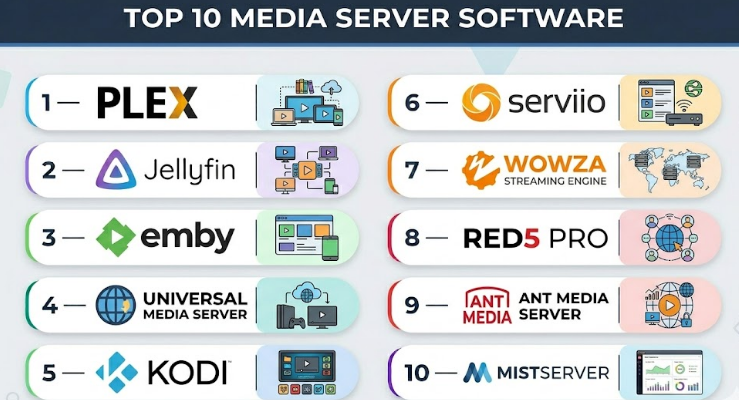
Top 10 Media Server Software
#1 — Plex
Short description :
Plex is one of the most widely recognized media server platforms for organizing and streaming personal media libraries.
It allows users to manage movies, TV shows, music, photos, and other media from a central server.
Plex is popular because it provides a polished interface, strong device support, and easy remote access.
It works well for home users, small teams, creators, and media enthusiasts who want a simple but powerful media experience.
The platform also includes metadata management, transcoding, user sharing, and client apps for many devices.
It is best for users who want convenience, usability, and broad device compatibility.
Key Features
- Centralized media library management.
- Automatic metadata fetching and organization.
- Remote streaming support.
- Multi-device playback apps.
- Transcoding for different devices and network speeds.
- User sharing and managed access.
- Support for movies, TV, music, and photos.
Pros
- Very easy to use for personal and small-team media libraries.
- Strong device compatibility across TVs, phones, browsers, and streaming devices.
- Polished interface and simple setup experience.
Cons
- Some advanced features require paid access.
- Privacy-focused users may prefer fully open-source alternatives.
- Performance depends heavily on server hardware for transcoding.
Platforms / Deployment
Windows / macOS / Linux / Web / iOS / Android / Smart TVs / Streaming devices
Self-hosted / Cloud-connected features
Security & Compliance
Supports user accounts, remote access controls, sharing permissions, and secure access features.
Enterprise compliance details are not publicly stated.
Integrations & Ecosystem
Plex has a strong ecosystem for personal media streaming and device compatibility.
- NAS systems.
- Smart TVs and streaming devices.
- Mobile and desktop apps.
- Media metadata services.
- Home server and home lab setups.
Support & Community
Plex has strong documentation, active community discussions, paid support options, and a large user base. Community knowledge is one of its biggest strengths.
#2 — Jellyfin
Short description :
Jellyfin is a free and open-source media server software focused on privacy, control, and self-hosted media streaming.
It allows users to manage movies, shows, music, photos, and other media without relying on a commercial service.
Jellyfin is popular among technical users, privacy-focused users, home lab builders, and open-source communities.
It supports multiple clients, user permissions, live TV features, metadata management, and transcoding.
It is best for users who want full ownership of their media server environment.
Jellyfin is a strong choice when cost, control, and open-source transparency matter.
Key Features
- Free and open-source media server.
- Self-hosted media library management.
- User accounts and access permissions.
- Transcoding and streaming support.
- Metadata management.
- Live TV and DVR support depending on setup.
- Multiple client apps and web playback.
Pros
- No mandatory paid subscription.
- Strong privacy and self-hosting control.
- Active open-source community.
Cons
- Setup may require more technical knowledge than Plex.
- Client app polish may vary by platform.
- Support is mostly community-driven.
Platforms / Deployment
Windows / macOS / Linux / Docker / Web / iOS / Android / TV apps support varies
Self-hosted
Security & Compliance
Supports user permissions, authentication, and self-hosted access control.
Enterprise certifications are not publicly stated.
Integrations & Ecosystem
Jellyfin works well in open-source, home lab, and self-hosted ecosystems.
- Docker environments.
- NAS devices.
- Web and mobile clients.
- Metadata providers.
- Open-source plugins and community tools.
Support & Community
Jellyfin has an active open-source community, documentation, forums, and community-maintained clients. Formal enterprise support is not publicly stated.
#3 — Emby
Short description :
Emby is a media server platform that helps users organize, stream, and manage personal media libraries across devices.
It sits between Plex and Jellyfin in many buyer discussions because it offers polished features while still supporting self-hosted control.
Emby supports movies, TV, music, photos, live TV, DVR, users, and parental controls.
It is useful for families, home media users, and small environments that need structured access management.
The platform includes device apps, metadata management, and streaming controls.
It is best for users who want a flexible media server with strong library and user management.
Key Features
- Media library organization.
- Multi-device streaming.
- User profiles and parental controls.
- Live TV and DVR support depending on setup.
- Metadata and artwork management.
- Remote access capabilities.
- Transcoding support.
Pros
- Good balance between ease of use and control.
- Strong user management features.
- Useful for family and shared media environments.
Cons
- Some advanced features require paid access.
- Smaller ecosystem than Plex.
- Setup and configuration may require moderate technical knowledge.
Platforms / Deployment
Windows / macOS / Linux / NAS / Docker / Web / iOS / Android / Smart TV support varies
Self-hosted
Security & Compliance
Supports user accounts, access controls, parental controls, and remote access settings.
Enterprise compliance details are not publicly stated.
Integrations & Ecosystem
Emby integrates well with personal server, NAS, and home entertainment setups.
- NAS systems.
- TV and mobile clients.
- Live TV tuners.
- Metadata services.
- Home media workflows.
Support & Community
Emby provides documentation, support resources, and community forums. Paid features and support availability vary by plan.
#4 — Universal Media Server
Short description :
Universal Media Server is a free media server software focused on DLNA and UPnP streaming across home network devices.
It is useful for users who want to stream media to smart TVs, gaming consoles, and compatible devices without complex setup.
The software supports many media formats and can transcode content for device compatibility.
Universal Media Server is a practical choice for local network streaming.
It may not offer the same polished remote access and library experience as Plex or Jellyfin.
It is best for users who need simple home network media sharing.
Key Features
- DLNA and UPnP media streaming.
- Broad device compatibility.
- Media transcoding support.
- Local network media sharing.
- Support for video, audio, and image files.
- Automatic device detection.
- Free usage model.
Pros
- Good for simple local media streaming.
- Free and practical for home networks.
- Supports many device types.
Cons
- Interface is less modern than premium platforms.
- Limited advanced library management.
- Not ideal for polished remote streaming experiences.
Platforms / Deployment
Windows / macOS / Linux
Self-hosted / Local network
Security & Compliance
Basic local network controls are available.
Advanced enterprise security and compliance details are not publicly stated.
Integrations & Ecosystem
Universal Media Server is focused mainly on DLNA and local network device compatibility.
- Smart TVs.
- Gaming consoles.
- DLNA-compatible devices.
- Local storage systems.
- Home network media setups.
Support & Community
Support is mainly community-based through documentation and user discussions. It is suitable for users comfortable with basic technical configuration.
#5 — Kodi
Short description :
Kodi is a popular open-source media center software used to play and organize media on local devices and home theater systems.
Although it is not a traditional server-only product, it is often used as part of media server and home entertainment setups.
Kodi is strong for users who want a customizable media interface with plugins, skins, and local playback options.
It supports video, music, photos, live TV, and many add-ons.
Kodi works best as a media center front-end and can connect with storage and server systems.
It is ideal for home theater users and technical media enthusiasts.
Key Features
- Open-source media center.
- Local and network media playback.
- Add-ons and plugin ecosystem.
- Custom themes and interface options.
- Live TV and PVR support depending on setup.
- Support for many media formats.
- Home theater-friendly experience.
Pros
- Highly customizable.
- Strong open-source community.
- Excellent for home theater setups.
Cons
- Not a complete server replacement for all use cases.
- Add-on quality may vary.
- Requires careful configuration for best experience.
Platforms / Deployment
Windows / macOS / Linux / Android / Raspberry Pi / TV devices support varies
Local / Self-hosted ecosystem
Security & Compliance
Security depends on installation, add-ons, and network configuration.
Enterprise compliance details are not publicly stated.
Integrations & Ecosystem
Kodi has a strong plugin and home media ecosystem.
- Local storage.
- Network shares.
- PVR and TV tuners.
- Media metadata tools.
- Home theater devices.
Support & Community
Kodi has a large open-source community, documentation, forums, add-ons, and long-running user support ecosystem.
#6 — Serviio
Short description :
Serviio is a media server software designed for streaming media files to DLNA-compatible devices.
It helps users stream video, audio, and images to smart TVs, Blu-ray players, gaming consoles, and mobile devices.
Serviio focuses on device compatibility and local network media delivery.
It supports transcoding, metadata, and profiles for different playback devices.
It is useful for users who want a lightweight media server for home or small office environments.
Serviio is best for DLNA-based streaming and simple media sharing.
Key Features
- DLNA media streaming.
- Video, audio, and image support.
- Device profiles for compatibility.
- Media transcoding.
- Metadata support.
- Local and remote access options depending on setup.
- Lightweight media server design.
Pros
- Good DLNA device compatibility.
- Lightweight and practical.
- Useful for home network media streaming.
Cons
- Interface is not as polished as Plex.
- Advanced features may require paid edition.
- Limited business-focused video management features.
Platforms / Deployment
Windows / macOS / Linux / NAS support varies
Self-hosted
Security & Compliance
Basic access and server configuration controls are available.
Enterprise security and compliance details are not publicly stated.
Integrations & Ecosystem
Serviio works mainly with DLNA and home network media devices.
- Smart TVs.
- Gaming consoles.
- Blu-ray players.
- NAS devices.
- Local network storage.
Support & Community
Serviio provides documentation and community support resources. Formal enterprise-grade support is not publicly stated.
#7 — Wowza Streaming Engine
Short description :
Wowza Streaming Engine is a professional media server software for live and on-demand streaming workflows.
It is used by broadcasters, enterprises, developers, event teams, and streaming businesses that need more control over media delivery.
Wowza supports multiple streaming protocols and can be deployed in custom environments.
It is more advanced than home media server tools and is built for professional streaming use cases.
The software is useful for low-latency streaming, live events, surveillance, training, and custom broadcast workflows.
It is best for technical teams that need configurable streaming infrastructure.
Key Features
- Live and on-demand streaming.
- Support for multiple streaming protocols.
- Low-latency streaming options.
- Custom streaming workflows.
- Transcoding and adaptive bitrate support.
- Developer APIs.
- On-premises or cloud-friendly deployment options.
Pros
- Strong for professional streaming workflows.
- Flexible deployment and configuration.
- Suitable for live video use cases.
Cons
- Requires technical knowledge.
- Not ideal for simple personal media libraries.
- Cost and setup may be higher than consumer tools.
Platforms / Deployment
Windows / Linux / Cloud environments
Self-hosted / Cloud / Hybrid
Security & Compliance
Supports secure streaming configuration, access controls, and professional deployment security patterns.
Specific compliance certifications should be validated directly.
Integrations & Ecosystem
Wowza fits into professional streaming and broadcast ecosystems.
- Live encoders.
- CDN workflows.
- Custom video applications.
- Broadcast systems.
- APIs and monitoring tools.
Support & Community
Wowza provides documentation, technical support, professional resources, and a mature streaming user base. It is best suited for technical teams.
#8 — Red5 Pro
Short description :
Red5 Pro is a media server platform focused on real-time and low-latency video streaming.
It is used for interactive video applications, live events, auctions, gaming, sports, education, and real-time communication use cases.
Red5 Pro is more developer and infrastructure-oriented than personal media server software.
It supports scalable streaming and can be deployed across cloud and edge environments.
The platform is useful when delay must be kept very low for interactive experiences.
It is best for teams building real-time video products.
Key Features
- Low-latency live streaming.
- Real-time video delivery.
- Scalable server architecture.
- Cloud and edge deployment support.
- APIs and SDKs.
- Interactive streaming workflows.
- Support for professional streaming use cases.
Pros
- Strong for low-latency use cases.
- Useful for interactive video products.
- Flexible for developers and technical teams.
Cons
- Not designed for simple home media libraries.
- Requires engineering knowledge.
- Pricing and deployment planning may be complex.
Platforms / Deployment
Linux / Cloud environments / Web and mobile app support through SDKs
Self-hosted / Cloud / Hybrid
Security & Compliance
Security depends on deployment architecture, access design, and configuration.
Specific compliance details are not publicly stated.
Integrations & Ecosystem
Red5 Pro is used in real-time streaming and interactive application ecosystems.
- Web and mobile applications.
- Cloud infrastructure.
- Edge streaming workflows.
- Real-time communication products.
- Custom APIs and SDKs.
Support & Community
Red5 Pro provides technical documentation and support resources. It is mainly suited for developers, streaming engineers, and businesses building live video platforms.
#9 — Ant Media Server
Short description :
Ant Media Server is a streaming media server focused on live streaming, ultra-low latency, and scalable video delivery.
It supports live video, on-demand streaming, WebRTC, adaptive streaming, and cloud deployment models.
Ant Media Server is useful for webinars, surveillance, live commerce, education, gaming, and interactive video applications.
It can be used by startups, developers, enterprises, and streaming product teams.
The platform is stronger for technical streaming workflows than simple media library browsing.
It is best for teams that need real-time streaming and flexible deployment.
Key Features
- Low-latency and ultra-low-latency streaming.
- WebRTC support.
- Live and on-demand streaming.
- Adaptive bitrate streaming.
- Cloud and on-premises deployment.
- REST APIs.
- Scalable cluster support depending on edition.
Pros
- Strong for low-latency streaming.
- Flexible deployment options.
- Useful for developers and live video platforms.
Cons
- Requires technical setup and management.
- Not ideal for casual home media users.
- Advanced scaling may require paid editions or expertise.
Platforms / Deployment
Linux / Docker / Cloud environments
Self-hosted / Cloud / Hybrid
Security & Compliance
Supports secure streaming configuration and access options depending on setup.
Specific enterprise compliance certifications are not publicly stated.
Integrations & Ecosystem
Ant Media Server fits into live streaming and developer ecosystems.
- WebRTC applications.
- Cloud infrastructure.
- Mobile and web apps.
- REST API workflows.
- Live event platforms.
Support & Community
Ant Media provides documentation, community resources, and commercial support options. It is best for teams with technical streaming knowledge.
#10 — MistServer
Short description :
MistServer is a media server software designed for streaming video and audio across different protocols and environments.
It is often considered by technical users who need flexible media delivery and streaming control.
MistServer can support live and on-demand workflows depending on deployment.
It is useful for developers, broadcasters, and organizations that need protocol flexibility.
The software is more technical than consumer-friendly platforms like Plex or Emby.
It is best for teams that need customizable streaming infrastructure.
Key Features
- Live and on-demand streaming support.
- Multiple streaming protocol support.
- Flexible media delivery.
- Developer-oriented configuration.
- Monitoring and control options.
- Suitable for custom streaming workflows.
- Self-hosted deployment.
Pros
- Flexible for technical streaming use cases.
- Supports multiple delivery scenarios.
- Good fit for custom infrastructure teams.
Cons
- Requires technical knowledge.
- Not ideal for simple media library users.
- Smaller mainstream visibility than larger platforms.
Platforms / Deployment
Linux / Cloud environments support varies
Self-hosted / Hybrid depending on setup
Security & Compliance
Security depends on configuration and deployment environment.
Enterprise compliance details are not publicly stated.
Integrations & Ecosystem
MistServer fits into custom media delivery and technical streaming ecosystems.
- Streaming workflows.
- Custom applications.
- Encoding tools.
- CDN workflows.
- Developer-controlled infrastructure.
Support & Community
Support and documentation are available, but community size may be smaller than major open-source or enterprise platforms. Best suited for technically confident users.
Comparison Table
| Tool Name | Best For | Platform(s) Supported | Deployment | Standout Feature | Public Rating |
|---|---|---|---|---|---|
| Plex | Home and small-team media libraries | Windows, macOS, Linux, Web, iOS, Android, TVs | Self-hosted / Cloud-connected | Polished personal media experience | N/A |
| Jellyfin | Privacy-focused self-hosting | Windows, macOS, Linux, Docker, Web, mobile apps | Self-hosted | Free open-source media server | N/A |
| Emby | Family and shared media libraries | Windows, macOS, Linux, NAS, Docker, mobile apps | Self-hosted | Strong user and library controls | N/A |
| Universal Media Server | Local DLNA streaming | Windows, macOS, Linux | Self-hosted | Simple DLNA device compatibility | N/A |
| Kodi | Home theater media center | Windows, macOS, Linux, Android, Raspberry Pi | Local / Self-hosted ecosystem | Highly customizable media center | N/A |
| Serviio | DLNA media streaming | Windows, macOS, Linux, NAS support varies | Self-hosted | Lightweight local streaming | N/A |
| Wowza Streaming Engine | Professional live streaming | Windows, Linux, cloud environments | Self-hosted / Cloud / Hybrid | Configurable streaming engine | N/A |
| Red5 Pro | Real-time video applications | Linux, cloud environments, SDK-based apps | Self-hosted / Cloud / Hybrid | Low-latency interactive streaming | N/A |
| Ant Media Server | WebRTC and live streaming | Linux, Docker, cloud environments | Self-hosted / Cloud / Hybrid | Ultra-low-latency streaming | N/A |
| MistServer | Custom streaming infrastructure | Linux, cloud support varies | Self-hosted / Hybrid | Protocol-flexible media delivery | N/A |
Evaluation & Media Server Software
| Tool Name | Core (25%) | Ease (15%) | Integrations (15%) | Security (10%) | Performance (10%) | Support (10%) | Value (15%) | Weighted Total (0–10) |
|---|---|---|---|---|---|---|---|---|
| Plex | 8 | 9 | 8 | 7 | 8 | 8 | 8 | 8.10 |
| Jellyfin | 8 | 7 | 8 | 7 | 8 | 7 | 10 | 7.95 |
| Emby | 8 | 8 | 7 | 7 | 8 | 7 | 8 | 7.65 |
| Universal Media Server | 7 | 7 | 6 | 6 | 7 | 6 | 9 | 7.00 |
| Kodi | 7 | 7 | 8 | 6 | 8 | 8 | 9 | 7.55 |
| Serviio | 7 | 7 | 6 | 6 | 7 | 6 | 8 | 6.85 |
| Wowza Streaming Engine | 9 | 6 | 8 | 8 | 9 | 8 | 7 | 7.95 |
| Red5 Pro | 8 | 6 | 8 | 7 | 9 | 7 | 7 | 7.55 |
| Ant Media Server | 8 | 6 | 8 | 7 | 9 | 7 | 8 | 7.70 |
| MistServer | 7 | 6 | 7 | 6 | 8 | 6 | 8 | 6.95 |
These scores are comparative and should be used as a practical guide, not a final verdict. A home user may value ease of use more than protocol depth, while a streaming company may prioritize low latency and deployment flexibility. Plex may be better for a polished personal library, while Wowza, Red5 Pro, and Ant Media Server are stronger for professional streaming. Always match the score with your real use case, technical skill, and budget.
Which Media Server Software Is Right for You?
Solo / Freelancer
Solo users usually need a simple platform that can organize and stream personal or professional media without heavy setup. Plex is a strong option for ease of use and device support. Jellyfin is better for users who want a free, open-source, privacy-focused system.
Freelancers who manage client video libraries should also consider access control, backup strategy, and remote viewing security.
SMB
Small businesses should choose based on whether they need internal media sharing, training videos, live streaming, or customer-facing media. Emby and Plex can work for small controlled libraries. Ant Media Server or Wowza Streaming Engine may be better if live streaming is part of the business.
SMBs should avoid complex platforms unless they have technical resources to manage servers and streaming workflows.
Mid-Market
Mid-market teams often need better scalability, user controls, storage planning, and performance. Wowza Streaming Engine is useful for professional streaming. Jellyfin may work for self-hosted internal libraries if the team has technical skills. Ant Media Server is suitable for low-latency live video.
At this level, teams should evaluate monitoring, bandwidth, server load, transcoding needs, and access control.
Enterprise
Enterprises should focus on scalability, security, governance, reliability, and technical support. Wowza Streaming Engine, Red5 Pro, and Ant Media Server are more suitable for advanced streaming infrastructure. For internal media libraries, enterprises may need a broader video management platform instead of only media server software.
Enterprise buyers should validate architecture, security model, logging, support, redundancy, and compliance needs before adoption.
Budget vs Premium
For budget-conscious users, Jellyfin, Kodi, and Universal Media Server are attractive because they provide strong functionality without heavy licensing costs. However, they may require more self-management.
Premium or business users may prefer Plex, Emby, Wowza Streaming Engine, Red5 Pro, or Ant Media Server depending on whether they need polished UX, professional streaming, or low-latency performance.
Feature Depth vs Ease of Use
If ease of use matters most, Plex, Emby, and Serviio are easier for many users. If feature depth and technical control matter more, Wowza Streaming Engine, Red5 Pro, Ant Media Server, and MistServer are stronger.
For open-source control, Jellyfin and Kodi are excellent choices, but they may require more configuration.
Integrations & Scalability-
For home and small-team use, integration needs may be simple: NAS, smart TVs, phones, and local storage. For business streaming, integrations may include encoders, CDNs, cloud platforms, APIs, monitoring tools, and custom applications.
Wowza Streaming Engine, Ant Media Server, and Red5 Pro are stronger for scalable streaming workflows. Plex, Jellyfin, and Emby are stronger for organized media libraries.
Security & Compliance Needs
Security depends heavily on deployment. Self-hosted tools require proper network configuration, updates, user permissions, encryption, and remote access protection. Business streaming tools require stronger access control, logging, authentication, and secure delivery.
For sensitive or licensed media, teams should carefully review user access, storage security, backup policies, and streaming permissions.
Frequently Asked Questions
1. What is Media Server Software?
Media Server Software stores, organizes, streams, and sometimes transcodes media files so they can be played on different devices. It can be used for personal entertainment, business training, live streaming, broadcasting, or custom video applications.
2. How is media server software different from video hosting platforms?
Media server software is often self-hosted or infrastructure-focused, while video hosting platforms usually provide managed cloud hosting, analytics, player tools, and business workflows. Media servers give more control, but they may require more setup and maintenance.
3. Which media server is best for beginners?
Plex is one of the easiest choices for beginners because it has a polished interface and broad device support. Emby is also beginner-friendly, while Jellyfin is better for users who are comfortable with self-hosted open-source software.
4. Which media server is best for privacy?
Jellyfin is a strong privacy-focused option because it is open source and self-hosted. Users can control where their media is stored and how access is managed. However, proper server security is still important.
5. Which media server is best for professional streaming?
Wowza Streaming Engine, Red5 Pro, and Ant Media Server are better suited for professional streaming workflows. They support advanced live streaming, low latency, custom deployment, and technical streaming use cases.
6. Do media servers need powerful hardware?
It depends on the use case. Direct playback may not require much power, but transcoding high-resolution video can require strong CPU or GPU resources. Hardware acceleration can improve performance and reduce server load.
7. Can I run media server software on a NAS?
Yes, many media servers can run on NAS devices, depending on the NAS model and supported packages. Plex, Emby, Jellyfin, and Serviio are commonly considered for NAS-based setups, but performance depends on hardware.
8. What is transcoding?
Transcoding converts media into a format or quality level that a device or network can handle. For example, a server may convert a large high-resolution file into a smaller stream for mobile playback.
9. Is open-source media server software better?
Open-source tools like Jellyfin and Kodi are excellent for control, transparency, and cost. However, they may require more setup and community-based troubleshooting. Commercial tools may offer smoother interfaces and more formal support.
10. Can media servers support live streaming?
Yes, some media servers support live streaming. Wowza Streaming Engine, Red5 Pro, Ant Media Server, and MistServer are more suitable for live streaming and real-time delivery than basic home media servers.
Conclusion
Media Server Software is useful for anyone who needs better control over media storage, streaming, playback, and delivery. The best option depends on whether the goal is personal media streaming, private self-hosting, home theater playback, professional broadcasting, low-latency live video, or custom application development. Plex is strong for ease of use, Jellyfin is excellent for open-source control, Emby offers balanced media management, Kodi is powerful for home theater setups, and Wowza, Red5 Pro, Ant Media Server, and MistServer are better for technical streaming workflows.
