Introduction
Video Management Platforms help businesses organize, store, secure, publish, search, stream, analyze, and manage video content from one central system. In simple words, they work like a professional video library for companies, schools, media teams, training teams, and digital businesses.
These platforms matter because video is now used for employee training, customer education, marketing, webinars, internal communication, product demos, compliance learning, sales enablement, and online learning. A normal file storage system is not enough when teams need permissions, search, analytics, version control, captions, workflows, and secure playback.
Buyers should evaluate ease of use, video library management, search, security, integrations, analytics, live streaming, access control, AI features, scalability, compliance needs, and pricing model.
Best for: enterprises, education teams, HR teams, marketing teams, training departments, media companies, SaaS companies, and organizations managing large video libraries.
Not ideal for: individuals who only upload a few public videos, teams that only need basic file sharing, or creators who mainly want public audience discovery.
Key Trends in Video Management Platforms
- AI-powered video search is becoming more important, allowing users to search spoken words, captions, metadata, and topics inside videos.
- Automatic transcription and captions are now expected for accessibility, training, and compliance.
- Secure internal video libraries are growing as companies use video for employee training and executive communication.
- Role-based access control is becoming a key buying requirement for enterprises and regulated industries.
- Video analytics is shifting from views to learning and engagement insights, including completion rates, drop-off points, and viewer behavior.
- LMS, CMS, CRM, and collaboration integrations are now important for connecting video with business workflows.
- Hybrid and remote work have increased demand for searchable recorded meetings, training libraries, and internal video knowledge bases.
- Compliance and governance are stronger priorities, especially for healthcare, finance, education, and enterprise learning.
- Live-to-VOD workflows are becoming common, where live sessions are automatically recorded, indexed, and added to a searchable video library.
- Developer APIs and automation are useful for teams that want video management inside custom portals, apps, or learning platforms.
How We Selected These Tools
The Top 10 platforms were selected based on practical buyer needs:
- Market recognition in video management, enterprise video, education video, and business video workflows.
- Strong video library, content organization, search, and playback capabilities.
- Support for secure access, permissions, privacy, and admin controls.
- Ability to handle both live and on-demand video use cases.
- Integration ecosystem with LMS, CMS, SSO, collaboration, and analytics tools.
- Suitability for different customer sizes, from SMBs to large enterprises.
- Reliability for storing and delivering business-critical video content.
- Support quality, documentation, onboarding, and vendor maturity.
- Fit for modern use cases such as training, internal communication, media libraries, and customer education.
- Balanced comparison across enterprise, education, developer-first, and business-focused platforms.
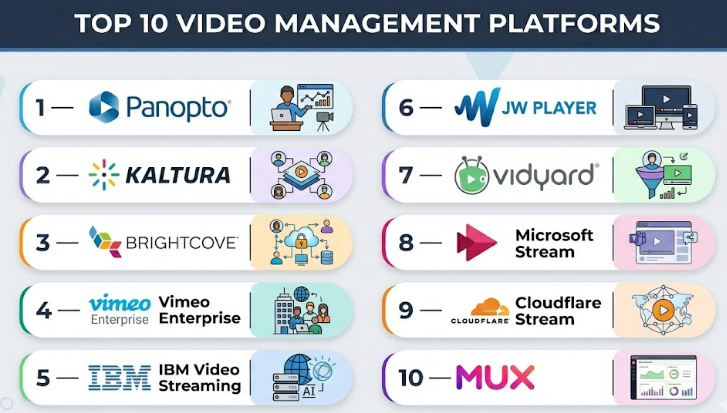
Top 10 Video Management Platforms
#1 — Panopto
Short description :
Panopto is a video management platform built strongly for education, enterprise learning, and internal knowledge sharing.
It helps organizations record, upload, manage, search, stream, and secure video content from one central library.
It is widely used for lecture capture, employee training, onboarding, compliance learning, and searchable knowledge bases.
Panopto is useful when teams need more than simple hosting and want structured video management.
Its search and learning-focused features make it a strong choice for organizations with large training libraries.
It is best for universities, enterprises, healthcare organizations, and internal education teams.
Key Features
- Centralized video library management.
- Search inside videos using captions, transcripts, and metadata.
- Lecture capture and training video workflows.
- Secure video sharing and permission controls.
- Live streaming and on-demand playback.
- LMS and enterprise integrations.
- Viewer analytics and engagement tracking.
Pros
- Strong for education and corporate learning.
- Excellent video search and knowledge management.
- Good fit for secure internal video libraries.
Cons
- May feel complex for small teams.
- Less focused on marketing lead generation.
- Implementation may require planning for large organizations.
Platforms / Deployment
Web / Windows / macOS / iOS / Android support may vary
Cloud / Self-hosted options may vary
Security & Compliance
Supports SSO, permissions, secure video access, and enterprise identity workflows on selected plans.
Specific compliance certifications should be validated during procurement.
Integrations & Ecosystem
Panopto fits well into education, HR, training, and knowledge management ecosystems.
- LMS integrations.
- Video conferencing integrations.
- SSO and identity systems.
- Collaboration tools.
- Analytics and reporting workflows.
Support & Community
Panopto provides documentation, onboarding resources, support plans, and training materials. It has strong recognition in education and enterprise learning environments.
#2 — Kaltura
Short description :
Kaltura is a flexible video management platform used by enterprises, educational institutions, media teams, and digital businesses.
It supports video portals, live and on-demand video, virtual events, learning video, and internal communication.
Kaltura is strong when teams need customization, extensibility, and advanced video workflows.
It is suitable for organizations that want to manage video at scale across multiple departments.
The platform can support education, training, enterprise communication, and media delivery use cases.
It is best for larger teams that need flexibility and control.
Key Features
- Video content management.
- Live and on-demand video workflows.
- Video portals and branded experiences.
- Learning and education video support.
- APIs and customization options.
- Role-based access management.
- Virtual event and webinar capabilities.
Pros
- Flexible and enterprise-friendly.
- Strong fit for education and large organizations.
- Supports complex video workflows.
Cons
- Setup can be more complex than simpler tools.
- May require technical or implementation support.
- Smaller teams may not need its full capability.
Platforms / Deployment
Web
Cloud / Hybrid / Self-hosted options may vary
Security & Compliance
Supports enterprise access controls, permissions, SSO options, and secure video workflows depending on configuration.
Specific compliance details should be confirmed directly.
Integrations & Ecosystem
Kaltura has a broad ecosystem for video learning, enterprise communication, and media workflows.
- LMS integrations.
- CMS and portal integrations.
- Identity and SSO systems.
- APIs and developer tools.
- Virtual event platforms.
Support & Community
Kaltura offers documentation, enterprise support, professional services, and implementation help. Support experience may depend on deployment type and contract level.
#3 — Brightcove
Short description :
Brightcove is an enterprise video platform designed for large organizations, media companies, publishers, and digital experience teams.
It supports video management, streaming, monetization, analytics, live events, and secure delivery.
Brightcove is useful for companies that need reliable video operations at scale.
It is often used by teams managing large video libraries, global audiences, and professional digital video experiences.
The platform is better suited for enterprise and media use cases than simple team-level video storage.
It is best for organizations where video is a business-critical channel.
Key Features
- Enterprise video content management.
- Live streaming and on-demand video.
- Video monetization and advertising support.
- Advanced analytics and reporting.
- Global video delivery.
- APIs and workflow customization.
- Enterprise governance and admin controls.
Pros
- Strong for enterprise-scale video.
- Good fit for media and digital experience teams.
- Mature video delivery and analytics capabilities.
Cons
- May be expensive for smaller teams.
- Implementation can require technical planning.
- Not the simplest option for basic video libraries.
Platforms / Deployment
Web
Cloud
Security & Compliance
Enterprise controls may include SSO, roles, access management, encryption, and governance features.
Specific compliance coverage should be validated directly with the vendor.
Integrations & Ecosystem
Brightcove works well in enterprise media, marketing, digital experience, and monetization ecosystems.
- CMS and DXP integrations.
- Marketing and analytics tools.
- Advertising systems.
- APIs for custom workflows.
- Enterprise identity systems.
Support & Community
Brightcove provides enterprise support, documentation, onboarding, and professional services options. It is best suited for teams with formal video operations.
#4 — Vimeo Enterprise
Short description :
Vimeo Enterprise is a business-focused video management solution for organizations that need secure video hosting, internal communication, branded video, events, and team collaboration.
It builds on Vimeo’s simple video experience but adds enterprise-oriented management and governance capabilities.
It is useful for companies that want a clean, professional video library without heavy technical complexity.
Teams can use it for marketing videos, internal announcements, training videos, executive communication, and event recordings.
Vimeo Enterprise is a strong fit for teams that value usability and polished presentation.
It works well for businesses that want professional video management with less operational burden.
Key Features
- Branded video hosting and management.
- Private video sharing and access controls.
- Live streaming and event support on selected plans.
- Team collaboration and review tools.
- Video analytics and engagement insights.
- Customizable video player.
- Enterprise admin and security features on selected plans.
Pros
- Easy to use for business teams.
- Clean and professional viewing experience.
- Good balance of hosting, management, and collaboration.
Cons
- Advanced enterprise needs may require custom plans.
- Not as developer-first as API infrastructure platforms.
- May not match specialized education platforms for LMS-heavy workflows.
Platforms / Deployment
Web / iOS / Android
Cloud
Security & Compliance
May include SSO/SAML, privacy controls, domain restrictions, team permissions, and enterprise access controls on selected plans.
Compliance details should be confirmed during evaluation.
Integrations & Ecosystem
Vimeo Enterprise fits into marketing, internal communication, and business video workflows.
- Website and CMS embeds.
- Collaboration tools.
- Marketing workflows.
- Analytics tools.
- API access for custom use cases.
Support & Community
Vimeo offers documentation, business support, enterprise onboarding, and a large user base. Support level depends on plan and contract.
#5 — IBM Video Streaming
Short description :
IBM Video Streaming is a business and enterprise video platform for live and on-demand video delivery.
It is used for corporate communication, live events, webinars, internal broadcasts, and professional streaming needs.
The platform helps organizations manage video content, stream events, and deliver secure viewing experiences.
It is useful for enterprises that need reliable video distribution with business-grade controls.
IBM Video Streaming is better suited for formal business communication than casual creator hosting.
It is a good fit for companies with structured event and internal communication workflows.
Key Features
- Live video streaming.
- On-demand video management.
- Enterprise video delivery.
- Access control and privacy options.
- Video analytics and reporting.
- Event streaming workflows.
- Business-grade streaming infrastructure.
Pros
- Strong for enterprise live streaming.
- Useful for corporate events and internal communication.
- Suitable for professional business video delivery.
Cons
- May be more than small teams need.
- Interface and workflows may require learning.
- Pricing and advanced capabilities may need vendor discussion.
Platforms / Deployment
Web
Cloud
Security & Compliance
Supports secure video delivery and enterprise access controls depending on plan.
Specific compliance details should be validated directly.
Integrations & Ecosystem
IBM Video Streaming can support enterprise event, communication, and video management workflows.
- Corporate communication systems.
- Event workflows.
- Analytics tools.
- Website embeds.
- Enterprise identity workflows may vary.
Support & Community
IBM provides enterprise support options, documentation, and business-grade service resources. Support depth may depend on contract level.
#6 — JW Player
Short description :
JW Player is a video platform known for its strong player technology, content delivery, monetization, and video management capabilities.
It is commonly used by publishers, media companies, and digital businesses that need reliable video playback and advertising workflows.
The platform supports video hosting, streaming, analytics, and audience engagement.
JW Player is useful when video is part of a publishing, media, or digital content business.
It is not only a player; it can also support broader video management and distribution needs.
It is best for teams that need performance, player control, and monetization features.
Key Features
- High-performance video player.
- Video hosting and streaming.
- Content management capabilities.
- Advertising and monetization tools.
- Analytics and audience insights.
- Adaptive playback support.
- APIs and developer customization.
Pros
- Strong video player and playback performance.
- Good fit for publishers and media teams.
- Supports monetization-focused workflows.
Cons
- May be less simple for non-technical teams.
- Not primarily built for employee training libraries.
- Advanced use cases may need technical support.
Platforms / Deployment
Web
Cloud
Security & Compliance
Security options may include access controls and secure delivery features depending on plan.
Specific compliance claims are not always publicly stated and should be confirmed.
Integrations & Ecosystem
JW Player works well in publishing, advertising, content, and media ecosystems.
- CMS integrations.
- Advertising platforms.
- Analytics tools.
- APIs and SDKs.
- Media workflow systems.
Support & Community
JW Player offers documentation, technical resources, and enterprise support options. Its ecosystem is strong among publishers, video developers, and media businesses.
#7 — Vidyard
Short description :
Vidyard is a video management and video engagement platform focused on sales, marketing, customer communication, and business video sharing.
It helps teams create, manage, share, and track videos used in buyer journeys and customer conversations.
Vidyard is especially useful for sales teams using personalized videos and marketing teams tracking viewer engagement.
It can support video libraries, analytics, CRM-connected workflows, and team-based video usage.
It is not a traditional media management platform, but it is strong for revenue-focused video management.
It is best for B2B companies using video to improve pipeline, communication, and customer education.
Key Features
- Video hosting and management.
- Sales video recording and sharing.
- Viewer engagement analytics.
- CRM and marketing integrations.
- Personalized video workflows.
- Team video libraries.
- Calls to action and engagement tools.
Pros
- Strong for sales and marketing teams.
- Easy for users to record and share business videos.
- Useful analytics for buyer engagement.
Cons
- Not ideal for large media streaming operations.
- Less suitable for education-heavy LMS workflows.
- Advanced features may require higher plans.
Platforms / Deployment
Web / Browser-based tools / Desktop recording support may vary
Cloud
Security & Compliance
May include SSO, permissions, privacy controls, and team-level access features on selected plans.
Specific compliance details should be confirmed with the vendor.
Integrations & Ecosystem
Vidyard fits well into revenue, marketing, and sales technology stacks.
- CRM integrations.
- Sales engagement platforms.
- Marketing automation tools.
- Email and outreach workflows.
- Analytics and reporting tools.
Support & Community
Vidyard provides documentation, onboarding content, support resources, and enablement material. Its community is strongest among sales, marketing, and revenue teams.
#8 — Microsoft Stream
Short description :
Microsoft Stream is a video management solution within the Microsoft ecosystem for workplace video, meetings, training, and internal communication.
It is useful for organizations already using Microsoft 365 and Teams.
Stream helps teams manage recorded meetings, training videos, internal announcements, and knowledge-sharing content.
It works well when video needs to stay inside an existing Microsoft environment with identity and access controls.
It is not usually chosen as a public marketing video platform.
It is best for companies that want internal video management connected to Microsoft workflows.
Key Features
- Internal video storage and sharing.
- Integration with Microsoft 365 and Teams.
- Meeting recording management.
- Search and discovery within Microsoft environment.
- Permission-based access.
- Support for workplace communication.
- Enterprise identity alignment.
Pros
- Strong fit for Microsoft 365 users.
- Useful for internal communication and meeting recordings.
- Familiar environment for enterprise employees.
Cons
- Not ideal for public marketing video hosting.
- Less flexible for advanced external video experiences.
- Best value appears when already using Microsoft ecosystem.
Platforms / Deployment
Web / Microsoft 365 environment
Cloud
Security & Compliance
Security and compliance are aligned with Microsoft 365 controls, including identity, permissions, and admin governance depending on configuration.
Specific compliance needs should be validated by Microsoft 365 plan and tenant setup.
Integrations & Ecosystem
Microsoft Stream works best inside Microsoft’s productivity and collaboration ecosystem.
- Microsoft Teams.
- SharePoint.
- OneDrive.
- Microsoft 365 identity and permissions.
- Workplace communication workflows.
Support & Community
Microsoft provides documentation, admin resources, enterprise support channels, and a large user community. Support depends on Microsoft 365 plan and support agreement.
#9 — Cloudflare Stream
Short description :
Cloudflare Stream is a developer-first video management and streaming platform for teams building video into applications, websites, and digital products.
It helps developers upload, encode, store, stream, and deliver video through APIs.
It is useful for SaaS platforms, education apps, marketplaces, communities, and product teams needing custom video experiences.
Cloudflare Stream is not mainly designed for non-technical content teams.
It is best for engineering teams that want scalable video infrastructure without managing encoding and delivery manually.
Its strength is performance, API access, and global delivery.
Key Features
- Video upload, encoding, and streaming.
- API-first video workflows.
- Adaptive playback.
- Global delivery infrastructure.
- Custom player and embed options.
- Usage-based model.
- Developer documentation and platform tools.
Pros
- Strong for developers and product teams.
- Scalable video delivery.
- Good fit for custom apps and SaaS platforms.
Cons
- Requires technical implementation.
- Limited built-in marketing workflows.
- Not ideal for simple business users needing a ready-made video portal.
Platforms / Deployment
Web / API
Cloud
Security & Compliance
Cloudflare provides strong platform security capabilities, but specific Stream-related requirements should be validated based on account, plan, and architecture.
Integrations & Ecosystem
Cloudflare Stream fits technical and product-led ecosystems.
- APIs.
- Web applications.
- SaaS platforms.
- Cloudflare services.
- Custom analytics and product workflows.
Support & Community
Cloudflare has strong documentation, developer resources, community forums, and support plans. Enterprise support depends on contract level.
#10 — Mux
Short description :
Mux is a developer-first video platform for teams building video management, streaming, and playback into products.
It provides APIs for video upload, encoding, live streaming, playback, analytics, and monitoring.
Mux is useful for SaaS products, online learning platforms, creator platforms, fitness apps, marketplaces, and media products.
It is not a simple drag-and-drop business video library.
It is best when engineering teams need reliable video infrastructure and full control over the user experience.
Mux works well for companies that treat video as part of their product.
Key Features
- API-based video management.
- On-demand and live video support.
- Encoding and adaptive streaming.
- Playback analytics and quality monitoring.
- Developer tools and documentation.
- Custom video workflows.
- Scalable infrastructure for product teams.
Pros
- Excellent for engineering-led video products.
- Strong playback analytics.
- Flexible for custom video experiences.
Cons
- Requires developer resources.
- Not ideal for non-technical teams.
- Usage-based costs should be monitored carefully.
Platforms / Deployment
Web / API
Cloud
Security & Compliance
Supports secure delivery patterns and developer-controlled access workflows.
Specific compliance details should be validated with vendor documentation and procurement review.
Integrations & Ecosystem
Mux is built for product engineering and custom app ecosystems.
- APIs and SDKs.
- Web and mobile apps.
- Product analytics systems.
- Custom players.
- Cloud-native workflows.
Support & Community
Mux has strong developer documentation, technical guides, and support options. Its community is strongest among software engineers, product teams, and video developers.
Comparison Table (Top 10)
| Tool Name | Best For | Platform(s) Supported | Deployment | Standout Feature | Public Rating |
|---|---|---|---|---|---|
| Panopto | Education and enterprise learning | Web, desktop/mobile support varies | Cloud / Self-hosted options vary | Searchable video knowledge library | N/A |
| Kaltura | Enterprise and education video workflows | Web | Cloud / Hybrid / Self-hosted options vary | Flexible video management platform | N/A |
| Brightcove | Enterprise and media video operations | Web | Cloud | Large-scale video delivery | N/A |
| Vimeo Enterprise | Business video and branded video libraries | Web, iOS, Android | Cloud | Clean business video experience | N/A |
| IBM Video Streaming | Enterprise live and on-demand video | Web | Cloud | Business-grade event streaming | N/A |
| JW Player | Publishers and media teams | Web | Cloud | Strong video player and monetization | N/A |
| Vidyard | Sales and marketing video management | Web, browser-based tools | Cloud | CRM-connected video engagement | N/A |
| Microsoft Stream | Internal workplace video | Web, Microsoft 365 environment | Cloud | Microsoft 365 integration | N/A |
| Cloudflare Stream | Developer-led video applications | Web, API | Cloud | API-first global video delivery | N/A |
| Mux | Product teams building video features | Web, API | Cloud | Developer-first video infrastructure | N/A |
Evaluation & Video Management Platforms
| Tool Name | Core (25%) | Ease (15%) | Integrations (15%) | Security (10%) | Performance (10%) | Support (10%) | Value (15%) | Weighted Total (0–10) |
|---|---|---|---|---|---|---|---|---|
| Panopto | 9 | 7 | 9 | 8 | 8 | 8 | 7 | 8.10 |
| Kaltura | 9 | 6 | 9 | 8 | 8 | 8 | 7 | 7.95 |
| Brightcove | 9 | 7 | 9 | 9 | 9 | 9 | 7 | 8.45 |
| Vimeo Enterprise | 8 | 9 | 8 | 8 | 8 | 8 | 8 | 8.15 |
| IBM Video Streaming | 8 | 7 | 7 | 8 | 8 | 8 | 7 | 7.60 |
| JW Player | 8 | 7 | 8 | 7 | 9 | 8 | 7 | 7.75 |
| Vidyard | 8 | 9 | 9 | 7 | 8 | 8 | 7 | 8.10 |
| Microsoft Stream | 7 | 8 | 9 | 8 | 8 | 8 | 8 | 8.00 |
| Cloudflare Stream | 8 | 7 | 8 | 8 | 9 | 8 | 8 | 8.00 |
| Mux | 9 | 7 | 9 | 8 | 9 | 8 | 8 | 8.40 |
The scores are comparative and should not be treated as a universal ranking. A platform with a high score may still be a poor fit if it does not match your workflow. For example, Mux is strong for developers, while Panopto is stronger for training libraries. Enterprises should give more weight to security, governance, support, and integration depth. Smaller teams should focus more on ease of use, pricing clarity, and setup speed.
Which Video Management Platforms
Solo / Freelancer
Solo professionals usually need simple video upload, clean playback, privacy controls, and easy sharing. Vimeo Enterprise may be more than needed, but Vimeo-style business video tools can be useful for polished client-facing content. If the goal is simple public exposure, a public video platform may be enough.
Freelancers who create paid courses or private client training should consider platforms that offer secure embedding, password protection, and viewer analytics.
SMB
SMBs should focus on ease of use, video organization, branded playback, analytics, and affordable scaling. Vimeo Enterprise, Vidyard, and Panopto can be good choices depending on whether the main use case is marketing, sales, or training.
SMBs should avoid overly complex enterprise systems unless they need advanced governance, LMS integrations, or live event workflows.
Mid-Market
Mid-market companies usually need structured video libraries, permission management, analytics, integrations, and team workflows. Panopto is strong for training and internal knowledge. Vidyard is better for sales and marketing. Kaltura is useful when the company needs customization and multiple video use cases.
At this stage, teams should evaluate user roles, admin controls, content ownership, analytics depth, and integration with business systems.
Enterprise
Enterprises need strong security, governance, scalability, compliance review, onboarding, and support. Brightcove, Kaltura, Panopto, Microsoft Stream, and IBM Video Streaming are strong candidates depending on the use case.
For public media and large-scale video operations, Brightcove and JW Player may be better. For internal learning, Panopto and Microsoft Stream may be stronger. For custom product video, Mux and Cloudflare Stream are more suitable.
Budget vs Premium
Budget-conscious teams should begin with a clear use case and avoid paying for features they will not use. A simple business video platform may be enough for small libraries. Usage-based platforms like Cloudflare Stream or Mux may be cost-effective for technical teams, but usage must be monitored.
Premium buyers should consider enterprise platforms when video is critical to training, communication, customer experience, or revenue.
Feature Depth vs Ease of Use
If ease of use matters most, Vimeo Enterprise, Vidyard, and Microsoft Stream are usually easier for business users. If feature depth is more important, Brightcove, Kaltura, Panopto, Mux, and Cloudflare Stream offer more advanced capabilities.
The right choice depends on who manages the platform daily. A marketing manager, training manager, IT admin, and software engineer will not need the same product.
Integrations & Scalability-
For LMS-heavy workflows, Panopto and Kaltura are strong. For Microsoft-based organizations, Microsoft Stream is practical. For sales and marketing workflows, Vidyard is useful. For developer-led scalability, Mux and Cloudflare Stream are better choices.
Scalability should include not only video traffic but also library size, permissions, metadata, search, analytics, support, and total cost.
Security & Compliance Needs
Security-focused buyers should review SSO, SAML, MFA, RBAC, audit logs, encryption, domain restrictions, watermarking, retention policies, and admin governance. Do not assume every security feature is included in every plan.
Enterprise teams should run a security review before purchase and confirm compliance requirements directly with the vendor.
Frequently Asked Questions (FAQs)
1. What is a Video Management Platform?
A Video Management Platform helps organizations upload, organize, search, secure, stream, and analyze video content. It is more advanced than basic video hosting because it includes library management, permissions, metadata, analytics, and workflow controls.
2. How is a Video Management Platform different from a Video Hosting Platform?
A video hosting platform mainly focuses on storing and delivering video. A video management platform goes deeper by helping teams organize large libraries, manage permissions, search content, track usage, and connect video with business workflows.
3. Which Video Management Platform is best for training teams?
Panopto and Kaltura are strong choices for training and education because they support searchable video libraries, LMS integrations, permissions, and structured learning workflows. Microsoft Stream can also work well for internal training in Microsoft-based organizations.
4. Which platform is best for developers?
Mux and Cloudflare Stream are better for developers because they provide APIs, encoding, streaming, playback, and custom video workflows. They are ideal when video must be built into a product or app.
5. What pricing model do these platforms use?
Pricing may depend on users, storage, bandwidth, video hours, live streaming, security features, support level, or enterprise contract terms. Many enterprise platforms use custom pricing, so buyers should validate total cost before purchase.
6. What is the biggest mistake companies make?
The biggest mistake is choosing a platform without defining the main use case. A sales team, training team, media publisher, and developer team need different features. Start with the workflow first, then compare tools.
7. Are Video Management Platforms secure?
Many platforms offer security features such as SSO, permissions, private sharing, encryption, access controls, and admin roles. However, security varies by product and plan, so companies should review vendor documentation and confirm requirements.
8. Can these platforms integrate with LMS tools?
Yes, many video management platforms support LMS integrations. Panopto and Kaltura are especially strong in education and training workflows. Buyers should confirm compatibility with their specific learning system.
9. Can I migrate videos from one platform to another?
Yes, but migration requires planning. Teams may need to move video files, metadata, captions, embed codes, analytics history, permissions, folders, and integrations. A migration audit should be completed before switching.
10. Do small businesses need a Video Management Platform?
Small businesses may not need a full enterprise video management platform if they only have a few public videos. However, if they manage training, private customer videos, paid courses, or internal content, a structured platform can save time and reduce risk.
Conclusion
Video Management Platforms are important for organizations that treat video as a serious business asset. The right platform can help teams store videos securely, organize large libraries, improve search, manage permissions, deliver smooth playback, and understand viewer engagement. However, there is no single best platform for every company. Panopto may be ideal for training and education, Brightcove may fit enterprise media teams, Vidyard may work better for sales and marketing, Microsoft Stream may suit Microsoft-based workplaces, and Mux or Cloudflare Stream may be stronger for developer-led video products.
