Introduction
Load balancers are systems that distribute incoming traffic across multiple servers, applications, containers, cloud services, or network resources. In simple words, they help prevent one server from becoming overloaded while others stay idle. This improves speed, uptime, security, and user experience.
In technology environment, load balancers are important because modern applications run across cloud, hybrid cloud, Kubernetes, microservices, APIs, and edge networks. Businesses need applications to stay available even during traffic spikes, outages, cyberattacks, or infrastructure changes.
Common use cases include:
- Distributing web application traffic across multiple servers
- Improving uptime for e-commerce, banking, SaaS, and healthcare apps
- Supporting Kubernetes and container-based workloads
- Managing API traffic and application delivery
- Protecting applications with SSL, WAF, routing, and access controls
Buyers should evaluate:
- Layer 4 and Layer 7 load balancing
- Performance and latency
- Cloud, hybrid, or self-hosted deployment
- SSL/TLS handling
- Security features
- Kubernetes and API support
- Observability and monitoring
- Automation and infrastructure-as-code support
- Pricing model
- Support and documentation quality
Best for: IT managers, DevOps teams, platform engineers, cloud architects, security teams, SaaS companies, e-commerce businesses, enterprises, and growing digital platforms that need reliable application availability.
Not ideal for: Very small websites with low traffic, simple static sites, or teams that can rely on basic hosting-level traffic distribution. In some cases, a CDN, reverse proxy, API gateway, or managed cloud service may be enough.
Key Trends in Load Balancers
- Cloud-native load balancing is becoming standard as more teams run applications across AWS, Azure, Google Cloud, Kubernetes, and hybrid environments.
- AI-assisted operations are emerging through smarter traffic analytics, anomaly detection, automated scaling signals, and predictive capacity planning.
- Security is now built into application delivery, with stronger focus on WAF, DDoS protection, TLS management, access control, bot protection, and zero-trust alignment.
- Kubernetes integration is now a major requirement, especially for teams using ingress controllers, service mesh, and container-based deployment models.
- API and microservices traffic management is growing, making Layer 7 routing, header-based routing, rate limiting, and service discovery more important.
- Edge load balancing is expanding as businesses want faster response times for global users across multiple regions.
- Automation and infrastructure-as-code support matter more, especially for DevOps teams using Terraform, GitOps, CI/CD, and configuration pipelines.
- Hybrid deployment models remain important because many enterprises still operate a mix of on-premises data centers, private cloud, and public cloud.
- Observability is becoming a buyer priority, including logs, metrics, tracing, real-time dashboards, and integration with monitoring platforms.
- Pricing clarity is a growing concern, especially for cloud-based load balancers where bandwidth, rules, endpoints, and traffic volume can affect cost.
How We Selected These Tools
The tools below were selected based on practical buyer evaluation logic:
- Strong market adoption and enterprise recognition
- Support for modern application delivery patterns
- Layer 4 and Layer 7 load balancing capabilities
- Reliability, performance, and scalability signals
- Cloud, hybrid, self-hosted, and Kubernetes compatibility
- Security features such as TLS, access control, WAF, and logging
- Integration with DevOps, cloud, monitoring, and automation ecosystems
- Fit for different buyer segments, from SMB to enterprise
- Documentation, support, and community presence
- Long-term relevance infrastructure needs
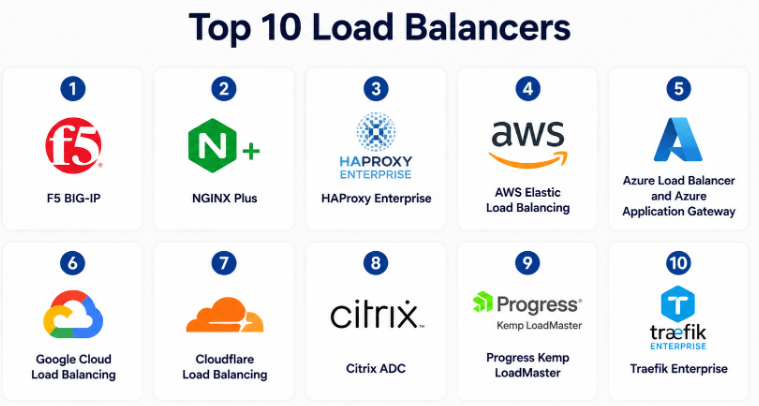
Top 10 Load Balancers
#1 — F5 BIG-IP
Short description :
F5 BIG-IP is an enterprise-grade application delivery and load balancing platform used by large organizations that need advanced traffic management, high availability, security, and deep application control. It is commonly used in banking, telecom, healthcare, government, SaaS, and high-traffic enterprise environments. BIG-IP supports advanced Layer 4 and Layer 7 traffic handling, SSL offloading, policy-based routing, application security, and hybrid deployment. It is best suited for teams with complex infrastructure and strong security needs. The platform is powerful, but it usually requires experienced administrators.
Key Features
- Advanced Layer 4 and Layer 7 load balancing
- SSL/TLS offloading and traffic inspection
- Global server load balancing support
- Application delivery and traffic policies
- Integration with WAF and security modules
- High availability and failover features
- Suitable for hybrid and enterprise environments
Pros
- Very strong enterprise feature depth
- Excellent for complex, mission-critical workloads
- Strong security and traffic control capabilities
Cons
- Can be expensive for smaller teams
- Requires skilled administration
- Setup and tuning may take time
Platforms / Deployment
Cloud / Self-hosted / Hybrid
Security & Compliance
Supports enterprise security capabilities such as SSL/TLS, access control, logging, authentication integrations, and advanced traffic policies. Specific compliance certifications vary by product, deployment, and customer environment. Not publicly stated.
Integrations & Ecosystem
F5 has a strong enterprise ecosystem and integrates well with cloud, security, monitoring, and automation platforms.
- Public cloud platforms
- Kubernetes and container environments
- SIEM and monitoring tools
- Identity and access management systems
- DevOps automation workflows
- Security and WAF services
Support & Community
F5 offers enterprise support, documentation, training, and partner-led implementation services. Community resources are available, but the platform is usually managed by experienced network, security, or platform teams.
#2 — NGINX Plus
Short description :
NGINX Plus is a commercial load balancing and application delivery solution based on the popular NGINX technology. It is widely used by web teams, SaaS companies, DevOps teams, and platform engineers that need high-performance traffic routing. NGINX Plus is known for reverse proxy, load balancing, API gateway use cases, caching, SSL termination, and Kubernetes-friendly deployment. It works well for modern web applications and microservices. It is often selected by teams that want flexibility, performance, and strong developer familiarity.
Key Features
- HTTP, TCP, and UDP load balancing
- Reverse proxy and application delivery
- SSL/TLS termination
- API gateway capabilities
- Health checks and session persistence
- Kubernetes ingress support
- Real-time activity monitoring
Pros
- Strong performance and lightweight architecture
- Familiar to developers and DevOps teams
- Good fit for web, API, and microservices workloads
Cons
- Advanced enterprise features require commercial edition
- Security depth may need additional tools
- Complex setups require tuning experience
Platforms / Deployment
Linux / Cloud / Self-hosted / Hybrid
Security & Compliance
Supports SSL/TLS, authentication integrations, access controls, logging, and traffic policies. Specific certifications depend on the vendor environment and deployment. Not publicly stated.
Integrations & Ecosystem
NGINX Plus fits well into modern DevOps and cloud-native ecosystems.
- Kubernetes ingress
- CI/CD pipelines
- Monitoring tools
- API management workflows
- Cloud infrastructure
- Configuration automation tools
Support & Community
NGINX has a very strong community around the open-source ecosystem. NGINX Plus includes commercial support, documentation, and enterprise guidance.
#3 — HAProxy Enterprise
Short description :
HAProxy Enterprise is a high-performance load balancer and application delivery platform built around the widely used HAProxy technology. It is trusted by teams that need fast, reliable, and efficient traffic distribution for web applications, APIs, databases, and TCP services. HAProxy Enterprise is popular among DevOps, infrastructure, SaaS, and platform teams that want strong performance with operational control. It supports advanced routing, observability, security controls, and enterprise support. It is a strong choice for both high-traffic and cost-conscious environments.
Key Features
- Layer 4 and Layer 7 load balancing
- High-performance TCP and HTTP traffic handling
- SSL/TLS termination
- Advanced health checks
- Rate limiting and access control
- Observability and logging support
- Enterprise management features
Pros
- Excellent performance and reliability
- Strong fit for DevOps and infrastructure teams
- Flexible for web, API, and TCP workloads
Cons
- Configuration can be technical for beginners
- Some advanced features need enterprise edition
- UI experience may not suit all non-technical users
Platforms / Deployment
Linux / Cloud / Self-hosted / Hybrid
Security & Compliance
Supports TLS, access control, rate limiting, logging, and security-focused traffic rules. Specific compliance certifications are not publicly stated.
Integrations & Ecosystem
HAProxy integrates well with modern infrastructure and automation workflows.
- Kubernetes
- Cloud platforms
- Monitoring and logging tools
- CI/CD workflows
- Infrastructure automation
- Service discovery systems
Support & Community
HAProxy has a strong technical community and mature documentation. HAProxy Enterprise includes vendor support and enterprise guidance.
#4 — AWS Elastic Load Balancing
Short description :
AWS Elastic Load Balancing is a managed load balancing service for applications running on Amazon Web Services. It helps distribute traffic across EC2 instances, containers, IP addresses, Lambda functions, and multiple availability zones. It is commonly used by cloud teams that want managed scaling, high availability, and tight AWS integration. AWS offers multiple load balancing options, including application, network, gateway, and classic load balancers. It is best for teams already using AWS heavily.
Key Features
- Managed cloud load balancing
- Application and network load balancing options
- Auto scaling integration
- Multi-availability-zone support
- TLS termination
- Health checks
- Integration with AWS security and monitoring services
Pros
- Strong native AWS integration
- Reduces operational management burden
- Good scalability for cloud workloads
Cons
- Best suited mainly for AWS environments
- Pricing can become complex with traffic growth
- Cross-cloud use cases are limited
Platforms / Deployment
Cloud
Security & Compliance
Supports TLS, IAM integration, security groups, logging, and integration with AWS security services. AWS has broad compliance programs, but specific workload compliance depends on configuration and customer use.
Integrations & Ecosystem
AWS Elastic Load Balancing works deeply inside the AWS ecosystem.
- EC2
- ECS and EKS
- Lambda
- Auto Scaling
- CloudWatch
- AWS security services
Support & Community
AWS provides documentation, enterprise support plans, partner ecosystem support, and a large user community.
#5 — Azure Load Balancer and Azure Application Gateway
Short description :
Azure Load Balancer and Azure Application Gateway are Microsoft Azure services used for distributing traffic across cloud applications and services. Azure Load Balancer is commonly used for Layer 4 traffic distribution, while Azure Application Gateway supports Layer 7 routing and web application delivery. These services are best for organizations already using Microsoft Azure, Windows Server, Microsoft identity services, or hybrid Microsoft infrastructure. They are useful for enterprise applications, web workloads, and cloud migration projects.
Key Features
- Layer 4 and Layer 7 load balancing options
- Native Azure integration
- Web application routing
- SSL/TLS termination
- Autoscaling support
- Health probes
- Integration with Azure monitoring and security services
Pros
- Strong fit for Azure-based environments
- Managed service reduces infrastructure overhead
- Good integration with Microsoft ecosystem
Cons
- Less attractive outside Azure-heavy environments
- Some advanced configurations can be complex
- Pricing depends on usage and selected service
Platforms / Deployment
Cloud / Hybrid
Security & Compliance
Supports TLS, Azure identity integration, logging, access controls, and integration with Azure security tools. Microsoft Azure has broad compliance programs, but workload compliance depends on configuration.
Integrations & Ecosystem
Azure load balancing services integrate well with Microsoft cloud and enterprise systems.
- Azure Virtual Machines
- Azure Kubernetes Service
- Azure Monitor
- Microsoft Entra ID
- Azure Firewall
- Hybrid network services
Support & Community
Microsoft provides documentation, enterprise support, learning resources, and a large partner ecosystem.
#6 — Google Cloud Load Balancing
Short description :
Google Cloud Load Balancing is a managed cloud load balancing service for applications running on Google Cloud. It supports global and regional load balancing, web traffic distribution, TCP/UDP traffic, SSL handling, and integration with Google Cloud services. It is often selected by teams that need global reach, low-latency routing, and scalable cloud-native application delivery. It works well for cloud applications, APIs, Kubernetes workloads, and global SaaS platforms. It is strongest for teams already invested in Google Cloud.
Key Features
- Global and regional load balancing
- HTTP(S), TCP, SSL, and UDP support
- Managed cloud-native scaling
- Integration with Google Kubernetes Engine
- Health checks
- SSL/TLS support
- Cloud monitoring integration
Pros
- Strong global load balancing capability
- Good fit for Google Cloud-native workloads
- Managed service reduces operational burden
Cons
- Best value is inside Google Cloud
- Multi-cloud setups may need extra design work
- Pricing and configuration can be difficult for beginners
Platforms / Deployment
Cloud
Security & Compliance
Supports TLS, IAM integration, logging, and integration with Google Cloud security services. Google Cloud has broad compliance programs, but workload compliance depends on configuration.
Integrations & Ecosystem
Google Cloud Load Balancing integrates with the Google Cloud platform.
- Google Kubernetes Engine
- Compute Engine
- Cloud CDN
- Cloud Armor
- Cloud Monitoring
- Cloud Logging
Support & Community
Google Cloud offers documentation, support plans, partner support, and strong cloud-native learning resources.
#7 — Cloudflare Load Balancing
Short description :
Cloudflare Load Balancing is a cloud-based traffic steering and availability service designed for websites, APIs, and internet-facing applications. It helps route traffic across multiple origins, data centers, cloud providers, and regions. It is especially useful for businesses already using Cloudflare for CDN, DNS, DDoS protection, WAF, or edge security. The platform is strong for global routing, failover, health checks, and performance optimization. It is best for teams that want simple cloud-based global traffic management.
Key Features
- Global traffic steering
- Origin health checks
- Fast failover
- Geo-routing and latency-based routing
- Integration with CDN and DNS
- DDoS and WAF ecosystem support
- Multi-cloud and multi-origin support
Pros
- Easy to use for internet-facing applications
- Strong edge network and security ecosystem
- Good fit for multi-region failover
Cons
- Not a traditional internal data center load balancer
- Advanced features may require paid plans
- Deep application delivery controls may be limited compared to enterprise ADC tools
Platforms / Deployment
Cloud
Security & Compliance
Supports TLS, DDoS protection, WAF ecosystem, access controls, and security logging depending on plan and configuration. Compliance details vary by service and plan. Not publicly stated.
Integrations & Ecosystem
Cloudflare works well for web, DNS, edge, and security workflows.
- DNS
- CDN
- WAF
- DDoS protection
- API protection
- Multi-cloud origins
Support & Community
Cloudflare has strong documentation and a large user community. Support levels vary by plan.
#8 — Citrix ADC
Short description :
Citrix ADC is an enterprise application delivery controller used for load balancing, application acceleration, security, and availability. It is commonly used in enterprise, virtual desktop, healthcare, finance, government, and large application environments. Citrix ADC supports advanced traffic management, SSL offloading, global server load balancing, web application security, and hybrid deployment. It is suitable for organizations that need strong control over application traffic and enterprise-grade delivery. It may require skilled administrators for best results.
Key Features
- Enterprise load balancing
- Application delivery control
- SSL/TLS offloading
- Global server load balancing
- Application acceleration
- Security policy support
- Hybrid deployment options
Pros
- Strong enterprise application delivery features
- Good fit for complex corporate environments
- Useful where Citrix ecosystem already exists
Cons
- Can be complex to configure and manage
- May be costly for smaller teams
- Best suited for experienced IT teams
Platforms / Deployment
Cloud / Self-hosted / Hybrid
Security & Compliance
Supports TLS, access control, logging, authentication integrations, and application security features. Specific compliance details vary by deployment and customer configuration. Not publicly stated.
Integrations & Ecosystem
Citrix ADC works with enterprise infrastructure and application delivery environments.
- Citrix ecosystem
- Virtual desktop infrastructure
- Enterprise identity systems
- Monitoring tools
- Cloud platforms
- Security tools
Support & Community
Citrix provides enterprise documentation, support services, training, and partner implementation resources.
#9 — Progress Kemp LoadMaster
Short description :
Progress Kemp LoadMaster is a load balancing and application delivery solution designed for enterprises, SMBs, managed service providers, and hybrid infrastructure teams. It supports web applications, Microsoft workloads, cloud applications, and traditional server environments. Kemp LoadMaster is known for being easier to operate than some highly complex enterprise ADC platforms. It offers load balancing, SSL acceleration, health checking, traffic routing, and application delivery controls. It is a practical choice for teams that want strong capabilities without unnecessary complexity.
Key Features
- Layer 4 and Layer 7 load balancing
- SSL acceleration and termination
- Health checking
- Application delivery templates
- High availability
- Web application delivery support
- Hybrid and virtual appliance options
Pros
- Easier to manage than many enterprise ADC tools
- Good fit for SMB and mid-market teams
- Supports common business applications
Cons
- May not match the deepest enterprise customization of larger ADC platforms
- Advanced security may require additional modules or tools
- Pricing and packaging can vary
Platforms / Deployment
Cloud / Self-hosted / Hybrid
Security & Compliance
Supports TLS, access controls, logging, and application delivery security features. Specific compliance certifications are not publicly stated.
Integrations & Ecosystem
Kemp LoadMaster integrates with common enterprise and application environments.
- Microsoft workloads
- Cloud platforms
- Virtualization platforms
- Monitoring systems
- Web applications
- Managed service environments
Support & Community
Progress Kemp provides documentation, support options, and partner services. Community visibility is moderate compared with open-source-heavy tools.
#10 — Traefik Enterprise
Short description :
Traefik Enterprise is a modern cloud-native load balancing and ingress solution designed for Kubernetes, microservices, APIs, and containerized environments. It is popular with DevOps and platform engineering teams that want dynamic service discovery, simple routing, and strong Kubernetes alignment. Traefik is especially useful where applications change frequently and need automated routing updates. It supports modern deployment patterns better than many traditional appliance-first load balancers. It is best for teams running containers, microservices, and cloud-native platforms.
Key Features
- Kubernetes-native ingress and routing
- Dynamic service discovery
- API and microservices traffic handling
- TLS management
- Middleware-based routing controls
- Observability support
- Multi-cluster and enterprise features
Pros
- Strong fit for Kubernetes and containers
- Developer-friendly and automation-friendly
- Good for fast-changing microservices environments
Cons
- Less suited for traditional enterprise data center ADC use cases
- Enterprise features require commercial edition
- Teams new to Kubernetes may need learning time
Platforms / Deployment
Cloud / Self-hosted / Hybrid
Security & Compliance
Supports TLS, access control, middleware policies, and integration with cloud-native security patterns. Specific compliance certifications are not publicly stated.
Integrations & Ecosystem
Traefik fits naturally into DevOps and Kubernetes environments.
- Kubernetes
- Docker
- CI/CD workflows
- Monitoring tools
- Service discovery systems
- Cloud-native platforms
Support & Community
Traefik has an active open-source community and documentation. Enterprise support is available for commercial users.
Comparison Table
| Tool Name | Best For | Platform(s) Supported | Deployment | Standout Feature | Public Rating |
|---|---|---|---|---|---|
| F5 BIG-IP | Large enterprises and complex application delivery | Cloud / Self-hosted / Hybrid | Hybrid | Deep enterprise traffic control | N/A |
| NGINX Plus | Web, API, and microservices workloads | Linux / Cloud / Hybrid | Hybrid | High-performance reverse proxy and load balancing | N/A |
| HAProxy Enterprise | High-performance DevOps and infrastructure teams | Linux / Cloud / Hybrid | Hybrid | Fast and reliable traffic handling | N/A |
| AWS Elastic Load Balancing | AWS-based applications | Cloud | Cloud | Native AWS scaling and availability | N/A |
| Azure Load Balancer and Azure Application Gateway | Azure and Microsoft enterprise environments | Cloud / Hybrid | Cloud / Hybrid | Strong Microsoft ecosystem integration | N/A |
| Google Cloud Load Balancing | Google Cloud and global applications | Cloud | Cloud | Global cloud traffic distribution | N/A |
| Cloudflare Load Balancing | Global web and API traffic steering | Cloud | Cloud | Edge-based routing and failover | N/A |
| Citrix ADC | Enterprise application delivery | Cloud / Self-hosted / Hybrid | Hybrid | Advanced ADC capabilities | N/A |
| Progress Kemp LoadMaster | SMB, mid-market, and hybrid teams | Cloud / Self-hosted / Hybrid | Hybrid | Practical ADC with easier management | N/A |
| Traefik Enterprise | Kubernetes and microservices teams | Cloud / Self-hosted / Hybrid | Hybrid | Cloud-native dynamic routing | N/A |
Evaluation & Load Balancers
| Tool Name | Core (25%) | Ease (15%) | Integrations (15%) | Security (10%) | Performance (10%) | Support (10%) | Value (15%) | Weighted Total (0–10) |
|---|---|---|---|---|---|---|---|---|
| F5 BIG-IP | 10 | 6 | 9 | 9 | 9 | 9 | 7 | 8.55 |
| NGINX Plus | 9 | 8 | 9 | 8 | 9 | 8 | 8 | 8.45 |
| HAProxy Enterprise | 9 | 7 | 8 | 8 | 10 | 8 | 9 | 8.50 |
| AWS Elastic Load Balancing | 8 | 8 | 9 | 8 | 9 | 8 | 8 | 8.25 |
| Azure Load Balancer and Azure Application Gateway | 8 | 8 | 9 | 8 | 8 | 8 | 8 | 8.15 |
| Google Cloud Load Balancing | 8 | 8 | 9 | 8 | 9 | 8 | 8 | 8.25 |
| Cloudflare Load Balancing | 8 | 9 | 8 | 8 | 9 | 8 | 8 | 8.30 |
| Citrix ADC | 9 | 6 | 8 | 8 | 8 | 8 | 7 | 7.95 |
| Progress Kemp LoadMaster | 8 | 8 | 7 | 7 | 8 | 8 | 8 | 7.75 |
| Traefik Enterprise | 8 | 8 | 9 | 7 | 8 | 7 | 8 | 7.95 |
These scores are comparative, not absolute. A higher score does not mean the tool is always better for every company. For example, F5 may be stronger for complex enterprise traffic control, while Traefik may be better for Kubernetes-first teams. Buyers should use the scores as a starting point, then validate fit through architecture review, pricing review, pilot testing, and security checks.
Which Load Balancers
Solo / Freelancer
Solo developers, small consultants, and freelancers usually do not need a heavy enterprise ADC. A simple managed load balancer from a cloud provider or a lightweight reverse proxy may be enough.
Good options:
- NGINX Plus for web and API projects
- HAProxy for performance-focused self-managed setups
- Cloudflare Load Balancing for simple global failover
- AWS, Azure, or Google Cloud load balancing if the project is already cloud-hosted
The main goal should be simple setup, low maintenance, and predictable cost.
SMB
Small and medium businesses need reliability without creating too much operational complexity. They should choose tools that are easy to manage and support common business applications.
Good options:
- Progress Kemp LoadMaster for practical application delivery
- Cloudflare Load Balancing for web-facing services
- NGINX Plus for web applications and APIs
- AWS Elastic Load Balancing for AWS-hosted applications
- Azure Application Gateway for Azure-based businesses
SMBs should avoid overbuying enterprise features they may not use.
Mid-Market
Mid-market companies often need stronger scalability, better observability, security controls, and hybrid support. They may run multiple applications across cloud and on-premises systems.
Good options:
- HAProxy Enterprise for performance and flexibility
- NGINX Plus for web, API, and microservices workloads
- Kemp LoadMaster for easier hybrid application delivery
- Cloud provider load balancers for cloud-native workloads
- Traefik Enterprise for Kubernetes-heavy teams
Mid-market buyers should focus on automation, monitoring, support, and integration with existing DevOps workflows.
Enterprise
Enterprises usually need high availability, advanced routing, security, compliance support, auditability, global traffic control, and strong vendor support.
Good options:
- F5 BIG-IP for complex enterprise application delivery
- Citrix ADC for enterprise ADC and application delivery use cases
- HAProxy Enterprise for high-performance infrastructure teams
- NGINX Plus for application and API delivery
- Cloud provider load balancers for large-scale cloud workloads
Enterprises should run architecture workshops, security reviews, and performance testing before final selection.
Budget vs Premium
Budget-conscious teams should consider HAProxy, NGINX-based approaches, cloud-native load balancers, or Cloudflare depending on the workload. These can offer strong value with lower operational burden.
Premium buyers should consider F5 BIG-IP, Citrix ADC, and enterprise-grade HAProxy or NGINX editions when advanced routing, security, support, and application delivery controls are required.
Feature Depth vs Ease of Use
If feature depth is the priority, F5 BIG-IP and Citrix ADC are strong choices. They offer deep control, but they also require more expertise.
If ease of use is more important, Cloudflare Load Balancing, cloud provider load balancers, and Kemp LoadMaster may be more practical.
If the team is developer-heavy, NGINX Plus, HAProxy Enterprise, and Traefik Enterprise can be very effective.
Integrations & Scalability-
For AWS workloads, AWS Elastic Load Balancing is usually the natural first choice. For Azure workloads, Azure Load Balancer and Azure Application Gateway make sense. For Google Cloud workloads, Google Cloud Load Balancing is a strong fit.
For Kubernetes and microservices, Traefik Enterprise, NGINX Plus, and HAProxy Enterprise are strong options. For multi-cloud web traffic, Cloudflare Load Balancing can be useful.
Security & Compliance Needs
Security-focused buyers should look closely at TLS support, WAF integration, access control, audit logging, DDoS protection, role-based access, and compliance alignment.
Enterprises in banking, healthcare, government, and regulated industries should not choose based only on price. They should validate security controls, support model, logging depth, failover behavior, and compliance requirements before purchase.
Frequently Asked Questions
1. What is a load balancer?
A load balancer distributes traffic across multiple servers or services. It helps applications stay fast, available, and stable even when traffic increases or one server fails.
2. Do small businesses need a load balancer?
Small businesses may need a load balancer if they run important websites, apps, APIs, or customer portals. For very small static websites, basic hosting or CDN-level routing may be enough.
3. What is the difference between Layer 4 and Layer 7 load balancing?
Layer 4 load balancing works at the network transport level, such as TCP or UDP. Layer 7 load balancing works at the application level and can route traffic based on URLs, headers, cookies, or application rules.
4. How much do load balancers cost?
Pricing depends on the vendor, deployment type, traffic volume, bandwidth, number of rules, support plan, and enterprise features. Cloud load balancers often use usage-based pricing, while enterprise ADC tools may use licenses or subscriptions.
5. What are common mistakes when choosing a load balancer?
Common mistakes include choosing only by price, ignoring security needs, underestimating traffic growth, skipping failover testing, and not checking integration with monitoring, Kubernetes, CI/CD, or cloud platforms.
6. Are cloud load balancers better than self-hosted load balancers?
Cloud load balancers are easier to operate for cloud-native workloads. Self-hosted or hybrid load balancers may be better when teams need deeper control, on-premises support, custom routing, or strict enterprise architecture.
7. Which load balancer is best for Kubernetes?
Traefik Enterprise, NGINX Plus, and HAProxy Enterprise are strong options for Kubernetes and microservices. Cloud provider load balancers also work well when Kubernetes is running inside AWS, Azure, or Google Cloud.
8. Can load balancers improve security?
Yes, many load balancers support TLS termination, access control, logging, rate limiting, and integration with WAF or DDoS protection. However, a load balancer should be part of a broader security architecture, not the only security layer.
9. How difficult is load balancer implementation?
Implementation can be simple for managed cloud services and more complex for enterprise ADC platforms. Difficulty depends on traffic rules, SSL setup, failover design, security needs, and application architecture.
10. Can I switch from one load balancer to another?
Yes, but switching requires planning. Teams should map current routing rules, SSL certificates, DNS settings, health checks, session persistence, monitoring, and rollback plans before migration.
Conclusion
Load balancers are no longer simple traffic distribution tools. They now sit at the center of modern application delivery, cloud reliability, API performance, security, and user experience. The best option depends on your infrastructure, team skills, security needs, budget, and growth plans. F5 BIG-IP and Citrix ADC are strong for complex enterprise environments. NGINX Plus and HAProxy Enterprise are excellent for performance-focused DevOps and platform teams. AWS, Azure, and Google Cloud load balancers are natural choices for cloud-native workloads. Cloudflare is useful for edge traffic steering and failover, while Traefik Enterprise is strong for Kubernetes-first environments.
