Introduction
Artifact and container signing and verification tools help teams prove that software artifacts, container images, SBOMs, Helm charts, build metadata, and release packages are authentic, unchanged, and produced by trusted systems. In simple words, these tools answer one important question: Can we trust this software before it runs in production?
In modern software delivery, teams use containers, CI/CD pipelines, open-source dependencies, Kubernetes, cloud registries, and automated release workflows. This increases speed, but it also increases supply chain risk. A signed artifact gives engineering, DevOps, DevSecOps, and platform teams a way to verify identity, integrity, provenance, and policy compliance before deployment.
Common use cases include:
- Signing container images before pushing them to production registries
- Verifying images during Kubernetes admission control
- Attaching and validating SBOMs and provenance metadata
- Enforcing trusted build pipelines
- Meeting internal compliance and audit requirements
Buyers should evaluate:
- Signing and verification workflow
- Registry and Kubernetes integration
- SBOM and provenance support
- Keyless signing support
- Policy enforcement
- CI/CD compatibility
- Developer experience
- Auditability
- Enterprise support
- Open-source ecosystem strength
Best for: DevOps teams, platform engineers, security engineers, release managers, SRE teams, regulated businesses, cloud-native companies, and enterprises that need stronger software supply chain trust.
Not ideal for: Very small teams with no containerized workloads, teams without CI/CD maturity, or businesses that only need basic vulnerability scanning without signing, provenance, or deployment verification.
Key Trends in Artifact/Container Signing & Verification Tools
- Keyless signing is becoming more practical because teams want fewer long-lived private keys in pipelines.
- SBOM and provenance verification are now expected, not optional, especially for enterprise software supply chains.
- Kubernetes admission control is a major enforcement point for verifying signed images before they run.
- Policy-as-code integration is growing, allowing teams to define trust rules in GitOps workflows.
- AI-generated code and packages increase trust concerns, making artifact provenance more important.
- Cloud registries are adding stronger attestation workflows for containers, charts, and metadata.
- Developer-first CLI tools remain important because signing must fit naturally into CI/CD pipelines.
- Enterprise buyers want audit logs, RBAC, SSO, and reporting, not only command-line verification.
- Open standards are gaining value because companies want interoperability across registries and tools.
- Compliance teams are asking for proof, including build origin, signer identity, and deployment history.
How We Selected These Tools
The tools were selected using practical evaluation logic:
- Strong market recognition in container security, artifact signing, or software supply chain security
- Support for signing, verification, attestations, provenance, or policy enforcement
- Compatibility with modern CI/CD workflows
- Kubernetes and cloud-native ecosystem relevance
- Open-source community strength where applicable
- Enterprise adoption signals and platform maturity
- Registry, pipeline, and developer workflow integration
- Security posture and auditability
- Practical fit for solo developers, SMBs, mid-market teams, and enterprises
- Long-term relevance for modern software delivery
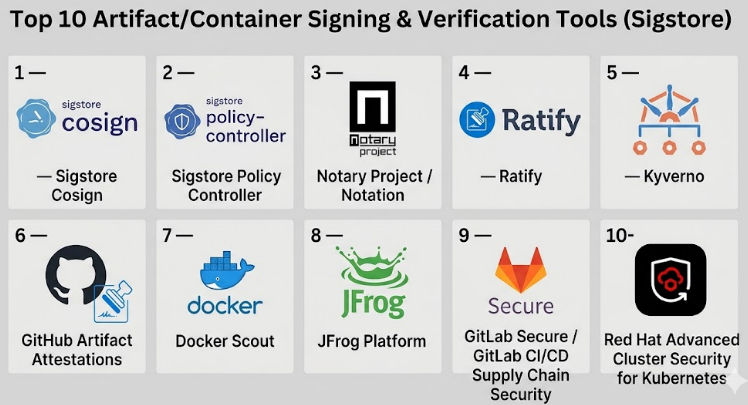
Top 10 Artifact/Container Signing & Verification Tools
#1 — Sigstore Cosign
Short description :
Sigstore Cosign is one of the most recognized tools for signing and verifying container images and software artifacts.It is widely used by cloud-native, DevOps, and security teams that want a developer-friendly signing workflow.Cosign supports container image signatures, blobs, attestations, and keyless signing patterns.
It is especially useful for teams adopting software supply chain security without building everything from scratch.Cosign is a strong fit for open-source projects, platform teams, and Kubernetes-focused organizations.
Key Features
- Container image signing and verification
- Support for keyless signing workflows
- Artifact and blob signing support
- Attestation support for provenance and metadata
- Works well with OCI registries
- Useful in CI/CD pipelines
- Strong open-source ecosystem
Pros
- Developer-friendly and widely adopted
- Strong fit for cloud-native security workflows
- Works well with modern DevOps pipelines
Cons
- Requires learning signing, identity, and trust concepts
- Enterprise governance may need additional tools
- Policy enforcement usually requires integration with other systems
Platforms / Deployment
Linux / macOS / Windows
Cloud / Self-hosted / Hybrid
Security & Compliance
Open-source signing and verification tool.
SSO/SAML, MFA, SOC 2, ISO 27001, GDPR, HIPAA: Not publicly stated.
Integrations & Ecosystem
Cosign fits well into CI/CD, registries, Kubernetes, and software supply chain workflows.
- GitHub Actions
- GitLab CI/CD
- Kubernetes admission controllers
- OCI registries
- SBOM and provenance workflows
- Policy engines
Support & Community
Cosign has strong open-source community support, active documentation, and broad ecosystem awareness. Enterprise support depends on the vendor or platform using it.
#2 — Sigstore Policy Controller
Short description :
Sigstore Policy Controller helps Kubernetes teams enforce signature and attestation verification rules before workloads run.
It is useful when organizations want to move from optional signing to active deployment control.
Instead of only signing images, teams can block unsigned or untrusted images at admission time.
It works well for platform engineering teams building secure Kubernetes environments.
It is best suited for teams already using Sigstore-style signing workflows.
Key Features
- Kubernetes admission policy enforcement
- Signature verification before deployment
- Attestation verification support
- Policy-based trust decisions
- Strong fit for platform teams
- Works with signed container images
- Helps prevent untrusted workloads
Pros
- Strong Kubernetes-native enforcement model
- Helps turn signing into real security control
- Useful for platform-wide governance
Cons
- Mainly useful for Kubernetes environments
- Requires policy planning and testing
- May need training for DevOps and security teams
Platforms / Deployment
Kubernetes / Linux
Self-hosted / Hybrid
Security & Compliance
Provides Kubernetes-based enforcement for signed artifacts.
SSO/SAML, MFA, SOC 2, ISO 27001, GDPR, HIPAA: Not publicly stated.
Integrations & Ecosystem
Sigstore Policy Controller works best with Cosign and Kubernetes-native workflows.
- Kubernetes
- Cosign
- OCI registries
- GitOps workflows
- CI/CD pipelines
- Policy-driven deployment processes
Support & Community
Community support is connected to the Sigstore ecosystem. Documentation is useful for Kubernetes users, but implementation may require platform engineering skills.
#3 — Notary Project / Notation
Short description :
Notary Project and Notation provide tools and specifications for signing and verifying OCI artifacts.
It is a strong choice for teams that want standards-focused container signing.
Notation is commonly used for container image signing, verification, and registry-based trust workflows.
It fits organizations that care about interoperability and structured artifact signing.
It is useful for cloud-native teams, registry vendors, and enterprise platform teams.
Key Features
- OCI artifact signing and verification
- Standards-oriented signing workflow
- Registry-focused signature handling
- CLI-based developer workflow
- Plugin-based extensibility
- Support for container images and related artifacts
- Useful for enterprise supply chain trust
Pros
- Strong standards focus
- Good fit for registry-based signing
- Useful for enterprise container workflows
Cons
- May feel more technical for new users
- Ecosystem adoption varies by platform
- Requires trust policy configuration
Platforms / Deployment
Linux / macOS / Windows
Cloud / Self-hosted / Hybrid
Security & Compliance
Artifact signing and verification focused.
SSO/SAML, MFA, SOC 2, ISO 27001, GDPR, HIPAA: Not publicly stated.
Integrations & Ecosystem
Notation fits registry, CI/CD, and cloud-native artifact workflows.
- OCI registries
- Azure Key Vault
- AWS signing workflows
- CI/CD pipelines
- Kubernetes policy tools
- Artifact registries
Support & Community
Notary Project has a strong open-source and cloud-native community. Enterprise support depends on the vendor or cloud platform using it.
#4 — Ratify
Short description :
Ratify is a verification engine used to validate container images and artifacts before deployment.
It is especially useful in Kubernetes environments where teams need admission-time verification.
Ratify can help enforce signed image policies and validate supply chain metadata.
It is a strong option for teams using OCI artifacts and policy-based deployment controls.
It works best when combined with signing tools like Notation or related registry workflows.
Key Features
- Kubernetes admission verification
- Artifact verification engine
- Support for signed container images
- Policy-based validation workflows
- OCI artifact support
- Extensible verifier model
- Works with cloud-native security workflows
Pros
- Strong Kubernetes enforcement fit
- Useful for structured verification workflows
- Extensible for different verification needs
Cons
- More useful for platform teams than casual users
- Requires Kubernetes policy knowledge
- Best value comes with a broader signing strategy
Platforms / Deployment
Kubernetes / Linux
Self-hosted / Hybrid
Security & Compliance
Verification-focused tool for Kubernetes and artifact trust.
SSO/SAML, MFA, SOC 2, ISO 27001, GDPR, HIPAA: Not publicly stated.
Integrations & Ecosystem
Ratify works well in policy-driven container environments.
- Kubernetes
- OCI registries
- Notation workflows
- Admission controllers
- CI/CD pipelines
- Cloud-native security tools
Support & Community
Ratify has community-driven documentation and adoption in cloud-native security workflows. Enterprise support depends on implementation partners and cloud ecosystem usage.
#5 — Kyverno
Short description :
Kyverno is a Kubernetes policy engine that can help enforce image verification and supply chain policies.
It is not only a signing tool, but it is highly relevant for verifying container trust at deployment time.
Teams use Kyverno to validate, mutate, generate, and enforce Kubernetes policies.
For artifact signing workflows, Kyverno can help block unsigned or untrusted images.
It is a strong fit for Kubernetes teams that want policy-as-code without complex custom development.
Key Features
- Kubernetes-native policy engine
- Image verification policy support
- Admission control enforcement
- Policy-as-code workflows
- Works with GitOps practices
- Can validate deployment rules
- Broad Kubernetes security use cases
Pros
- Strong Kubernetes policy experience
- Useful beyond signing and verification
- Good fit for platform governance
Cons
- Not a dedicated signing tool
- Requires policy design discipline
- Mainly relevant for Kubernetes environments
Platforms / Deployment
Kubernetes / Linux
Self-hosted / Hybrid
Security & Compliance
Kubernetes policy enforcement tool.
SSO/SAML, MFA, SOC 2, ISO 27001, GDPR, HIPAA: Not publicly stated.
Integrations & Ecosystem
Kyverno works across Kubernetes, GitOps, and container security workflows.
- Kubernetes
- GitOps tools
- OCI registries
- Sigstore Cosign workflows
- CI/CD pipelines
- Policy-as-code repositories
Support & Community
Kyverno has strong documentation and an active cloud-native community. Commercial support may be available through ecosystem vendors.
#6 — GitHub Artifact Attestations
Short description :
GitHub Artifact Attestations help teams create and verify provenance for software built through GitHub workflows.It is useful for organizations already using GitHub Actions as their main CI/CD platform.
The tool helps connect build identity, source code, and generated artifacts.
It is especially useful for teams that want supply chain trust inside developer workflows.
It works well for DevOps, platform, and security teams standardizing on GitHub.
Key Features
- Build provenance for artifacts
- Integration with GitHub Actions
- Artifact verification workflows
- Developer-friendly CI/CD experience
- Useful for release governance
- Helps improve supply chain visibility
- Strong fit for GitHub-native teams
Pros
- Natural fit for GitHub users
- Reduces friction in CI/CD adoption
- Helps connect artifacts to source and build workflow
Cons
- Best suited for GitHub-based teams
- May not cover all non-GitHub workflows
- Enterprise governance may require additional tools
Platforms / Deployment
Web / Linux / macOS / Windows through CI workflows
Cloud / Hybrid
Security & Compliance
GitHub platform security features may include enterprise identity and access controls depending on plan.
Specific compliance details: Not publicly stated for this tool section.
Integrations & Ecosystem
GitHub Artifact Attestations work best inside GitHub-based development pipelines.
- GitHub Actions
- GitHub repositories
- Release workflows
- Package publishing workflows
- CI/CD security processes
- Policy verification workflows
Support & Community
Support depends on GitHub plan and enterprise agreement. Documentation and developer ecosystem are strong.
#7 — Docker Scout
Short description :
Docker Scout is a container security and analysis tool that also supports attestation-related workflows.
It is useful for teams using Docker images, Docker workflows, and container security checks.
Docker Scout helps teams understand image contents, vulnerabilities, provenance, and related metadata.
For signing and verification, it is most relevant where Docker’s image attestations and secure image workflows are used.
It is a practical option for teams already invested in Docker’s ecosystem.
Key Features
- Container image analysis
- SBOM and provenance-related workflows
- Image security insights
- Integration with Docker tooling
- CI/CD-friendly usage
- Useful for Docker Hardened Images
- Developer-friendly container visibility
Pros
- Easy fit for Docker-based teams
- Combines container insight with security workflows
- Useful for developer and security collaboration
Cons
- Not a universal signing platform
- Best value depends on Docker ecosystem usage
- Advanced governance may require additional controls
Platforms / Deployment
Web / Linux / macOS / Windows
Cloud / Hybrid
Security & Compliance
Container security and attestation-related verification workflows.
SSO/SAML, MFA, SOC 2, ISO 27001, GDPR, HIPAA: Not publicly stated for this category context.
Integrations & Ecosystem
Docker Scout fits naturally into Docker-led container workflows.
- Docker Desktop
- Docker Hub
- CI/CD pipelines
- Container registries
- SBOM workflows
- Image security processes
Support & Community
Docker has broad documentation, strong brand recognition, and commercial support options depending on product plan.
#8 — JFrog Platform
Short description :
JFrog Platform is an enterprise software supply chain platform covering artifact management, security, distribution, and governance.
It is not only a signing tool, but it is highly relevant for organizations managing trusted software releases.
Teams use JFrog to control binaries, container images, packages, and release workflows across environments.
For signing and verification, it fits companies that need centralized artifact control and enterprise governance.
It is strongest for mid-market and enterprise teams with complex artifact ecosystems.
Key Features
- Enterprise artifact repository management
- Software supply chain security workflows
- Container and package ecosystem support
- Release governance capabilities
- Policy and security scanning workflows
- Integration with CI/CD tools
- Enterprise-scale artifact control
Pros
- Strong enterprise platform depth
- Good fit for complex artifact ecosystems
- Centralized control across many package types
Cons
- Can be more than small teams need
- Implementation may require planning
- Pricing and setup can be complex
Platforms / Deployment
Web / Linux
Cloud / Self-hosted / Hybrid
Security & Compliance
Enterprise access controls and security features vary by plan.
Specific certifications and compliance details: Not publicly stated here.
Integrations & Ecosystem
JFrog has a broad ecosystem across DevOps, DevSecOps, and artifact workflows.
- CI/CD tools
- Container registries
- Package managers
- Kubernetes workflows
- Security scanning tools
- Enterprise identity systems
Support & Community
JFrog provides enterprise support options, documentation, onboarding resources, and a mature ecosystem. Community support is also available through developer channels.
#9 — GitLab Secure / GitLab CI/CD Supply Chain Security
Short description :
GitLab provides CI/CD and security capabilities that support modern software supply chain workflows.
While it is not only a signing tool, it is relevant for teams managing build, release, scanning, and artifact workflows in one platform.GitLab can help teams connect source code, pipelines, container registries, and security controls.It is best for organizations that want DevSecOps governance in a single development platform.Signing and verification workflows may require integration with tools like Cosign or policy engines.
Key Features
- CI/CD pipeline automation
- Container registry workflows
- Security scanning capabilities
- Release governance support
- DevSecOps workflow integration
- Works with external signing tools
- Strong fit for platform teams
Pros
- Unified DevSecOps workflow
- Good fit for teams already using GitLab
- Supports automation-heavy release pipelines
Cons
- Signing may require additional tooling
- Best experience is within GitLab ecosystem
- Enterprise features vary by plan
Platforms / Deployment
Web / Linux
Cloud / Self-hosted / Hybrid
Security & Compliance
Enterprise security features vary by plan.
Specific SOC 2, ISO 27001, GDPR, HIPAA details for this category context: Not publicly stated.
Integrations & Ecosystem
GitLab integrates well with DevOps and software supply chain workflows.
- GitLab CI/CD
- Container registry
- Kubernetes
- Security scanning tools
- Cosign workflows
- Policy enforcement tools
Support & Community
GitLab has strong documentation, broad adoption, and commercial support options depending on plan. Community support is also strong.
#10 — Red Hat Advanced Cluster Security for Kubernetes
Short description :
Red Hat Advanced Cluster Security for Kubernetes helps teams secure Kubernetes workloads across build, deploy, and runtime stages.It is not only an artifact signing tool, but it is relevant for verifying and enforcing trusted container deployment policies.It is useful for enterprises running Kubernetes and OpenShift environments.Teams can use it to strengthen admission control, policy enforcement, and container risk management.It is best for organizations that need Kubernetes security governance at scale.
Key Features
- Kubernetes security policy enforcement
- Container risk visibility
- Admission control support
- Runtime security context
- OpenShift ecosystem fit
- Enterprise governance workflows
- Security reporting and controls
Pros
- Strong enterprise Kubernetes security fit
- Useful for regulated and large environments
- Good alignment with OpenShift deployments
Cons
- More enterprise-focused than lightweight tools
- May be complex for small teams
- Signing workflows may need external integration
Platforms / Deployment
Kubernetes / OpenShift / Linux
Cloud / Self-hosted / Hybrid
Security & Compliance
Enterprise Kubernetes security platform.
Specific compliance certifications for this category context: Not publicly stated.
Integrations & Ecosystem
Red Hat Advanced Cluster Security fits enterprise Kubernetes and platform security workflows.
- OpenShift
- Kubernetes
- CI/CD pipelines
- Container registries
- Policy workflows
- Enterprise security operations
Support & Community
Red Hat provides enterprise support, documentation, and professional services options. Community strength is strongest in Kubernetes and OpenShift ecosystems.
Comparison Table
| Tool Name | Best For | Platform(s) Supported | Deployment | Standout Feature | Public Rating |
|---|---|---|---|---|---|
| Sigstore Cosign | Developer-first signing and verification | Linux, macOS, Windows | Cloud / Self-hosted / Hybrid | Keyless signing and OCI artifact support | N/A |
| Sigstore Policy Controller | Kubernetes signature enforcement | Kubernetes, Linux | Self-hosted / Hybrid | Admission-time verification | N/A |
| Notary Project / Notation | Standards-based OCI signing | Linux, macOS, Windows | Cloud / Self-hosted / Hybrid | OCI-focused signing framework | N/A |
| Ratify | Kubernetes artifact verification | Kubernetes, Linux | Self-hosted / Hybrid | Extensible verification engine | N/A |
| Kyverno | Kubernetes policy-as-code verification | Kubernetes, Linux | Self-hosted / Hybrid | Image verification policies | N/A |
| GitHub Artifact Attestations | GitHub-native provenance | Web, CI workflows | Cloud / Hybrid | Build provenance inside GitHub workflows | N/A |
| Docker Scout | Docker image analysis and attestations | Web, Linux, macOS, Windows | Cloud / Hybrid | Container insight with attestation support | N/A |
| JFrog Platform | Enterprise artifact governance | Web, Linux | Cloud / Self-hosted / Hybrid | Centralized software supply chain control | N/A |
| GitLab Secure / GitLab CI/CD | DevSecOps pipeline governance | Web, Linux | Cloud / Self-hosted / Hybrid | Unified CI/CD and security workflow | N/A |
| Red Hat Advanced Cluster Security | Enterprise Kubernetes security | Kubernetes, OpenShift, Linux | Cloud / Self-hosted / Hybrid | Kubernetes security governance | N/A |
Evaluation & Artifact/Container Signing & Verification Tools
| Tool Name | Core (25%) | Ease (15%) | Integrations (15%) | Security (10%) | Performance (10%) | Support (10%) | Value (15%) | Weighted Total (0–10) |
|---|---|---|---|---|---|---|---|---|
| Sigstore Cosign | 9 | 8 | 9 | 8 | 8 | 8 | 9 | 8.55 |
| Sigstore Policy Controller | 8 | 7 | 8 | 8 | 8 | 7 | 8 | 7.75 |
| Notary Project / Notation | 8 | 7 | 8 | 8 | 8 | 7 | 8 | 7.75 |
| Ratify | 8 | 7 | 8 | 8 | 8 | 7 | 8 | 7.75 |
| Kyverno | 8 | 8 | 8 | 8 | 8 | 8 | 8 | 8.00 |
| GitHub Artifact Attestations | 8 | 9 | 8 | 8 | 8 | 8 | 8 | 8.15 |
| Docker Scout | 7 | 8 | 8 | 7 | 8 | 8 | 7 | 7.55 |
| JFrog Platform | 8 | 7 | 9 | 8 | 8 | 9 | 7 | 8.00 |
| GitLab Secure / GitLab CI/CD | 7 | 8 | 8 | 8 | 8 | 8 | 8 | 7.80 |
| Red Hat Advanced Cluster Security | 7 | 7 | 8 | 9 | 8 | 9 | 7 | 7.75 |
These scores are comparative, not public ratings.
A higher score means the tool is stronger across the listed criteria for artifact signing, verification, policy enforcement, and ecosystem fit.
Open-source tools may score higher on value and flexibility, while enterprise platforms may score higher on support and governance.
The right choice depends on your registry, CI/CD system, Kubernetes maturity, compliance needs, and internal security model.
Which Artifact/Container Signing & Verification Tools
Solo / Freelancer
Solo developers and freelancers should start with Sigstore Cosign because it is lightweight, practical, and widely recognized. It allows a single developer to sign images, verify artifacts, and learn modern software supply chain security without buying a large platform.
Best choices:
- Sigstore Cosign
- GitHub Artifact Attestations
- Docker Scout
SMB
Small and mid-sized teams need tools that are easy to implement and do not create heavy operational overhead. If the team uses GitHub, GitHub Artifact Attestations can be a natural fit. If the team runs Kubernetes, Kyverno or Sigstore Policy Controller can help enforce trust rules.
Best choices:
- Sigstore Cosign
- GitHub Artifact Attestations
- Kyverno
- Docker Scout
Mid-Market
Mid-market companies often need better governance, CI/CD integration, and deployment controls. A combination of signing, provenance, registry management, and Kubernetes admission control works best.
Best choices:
- Sigstore Cosign
- Notary Project / Notation
- Kyverno
- Ratify
- GitLab Secure / GitLab CI/CD
Enterprise
Enterprises usually need centralized governance, auditability, compliance alignment, and support. They may use open-source signing tools together with commercial platforms for reporting, access control, and policy enforcement.
Best choices:
- JFrog Platform
- Red Hat Advanced Cluster Security
- GitLab Secure / GitLab CI/CD
- Notary Project / Notation
- Sigstore Cosign
Budget vs Premium
For budget-conscious teams, open-source tools like Cosign, Kyverno, Notation, Ratify, and Sigstore Policy Controller provide strong value. Premium platforms like JFrog, GitLab, Docker Scout, and Red Hat Advanced Cluster Security are better when teams need enterprise support, dashboards, governance, and broader security workflows.
Feature Depth vs Ease of Use
If ease of use matters most, choose tools already connected to your workflow, such as GitHub Artifact Attestations for GitHub users or Docker Scout for Docker users. If feature depth matters more, combine Cosign or Notation with Kubernetes policy tools and enterprise governance platforms.
Integrations & Scalability-
For integration-heavy environments, look at JFrog Platform, GitLab, GitHub, Kyverno, and Cosign. These tools fit well into CI/CD, registries, Kubernetes, and DevSecOps pipelines. For large-scale Kubernetes environments, Kyverno, Ratify, Sigstore Policy Controller, and Red Hat Advanced Cluster Security are stronger choices.
Security & Compliance Needs
If compliance is a major driver, do not rely only on image signing. You need signing, verification, provenance, SBOMs, audit logs, policy enforcement, access control, and reporting. Enterprises should evaluate JFrog, GitLab, Red Hat, and Kubernetes policy tools alongside Cosign or Notation.
Frequently Asked Questions
1. What is artifact and container signing?
Artifact and container signing is the process of adding a cryptographic signature to software artifacts, container images, or metadata. It helps prove that the artifact came from a trusted source and was not changed after signing.
2. Why is Sigstore important for container security?
Sigstore is important because it makes signing and verification easier for developers and DevOps teams. It supports modern workflows such as keyless signing, transparency logs, and artifact verification.
3. Do small teams really need container signing?
Small teams may not need a complex enterprise setup, but basic signing is still useful. If a team ships containers to production, signing helps reduce the risk of tampered or unknown images.
4. What is the difference between signing and scanning?
Signing proves authenticity and integrity. Scanning checks for vulnerabilities, secrets, or misconfigurations. Mature teams usually need both because they solve different security problems.
5. Can these tools stop all supply chain attacks?
No tool can stop every attack. Signing and verification reduce risk, but teams also need secure CI/CD, dependency control, access management, vulnerability scanning, and runtime protection.
6. How long does implementation usually take?
A basic signing workflow can be tested quickly, especially with Cosign or GitHub-based workflows. Full enterprise rollout takes longer because teams must define policies, ownership, registry rules, and deployment controls.
7. What are common mistakes when adopting signing tools?
Common mistakes include signing images but never verifying them, using long-lived keys without proper protection, skipping policy enforcement, and failing to train developers on the workflow.
8. Do these tools work with Kubernetes?
Yes, many tools work well with Kubernetes. Cosign, Kyverno, Ratify, Sigstore Policy Controller, and Red Hat Advanced Cluster Security are especially relevant for Kubernetes verification and admission control workflows.
9. What pricing model should buyers expect?
Open-source tools are often free to use, but operational cost still exists. Enterprise platforms may use subscription, seat-based, usage-based, or custom pricing models. If pricing is unclear, treat it as Varies / N/A.
10. Can teams switch tools later?
Yes, but switching can require changes in CI/CD pipelines, registry workflows, trust policies, and Kubernetes admission rules. Teams should prefer standards-based workflows to reduce lock-in.
Conclusion
Artifact and container signing is becoming a core part of modern software supply chain security. As teams ship more containers, automate more releases, and depend on more third-party packages, trust becomes just as important as speed. Tools like Sigstore Cosign, Notary Project, Kyverno, Ratify, GitHub Artifact Attestations, Docker Scout, JFrog, GitLab, and Red Hat Advanced Cluster Security all solve different parts of the trust problem.
