Introduction
Ad Blocking Tools help users block unwanted ads, pop-ups, tracking scripts, autoplay video ads, malicious ads, and intrusive web elements. In simple words, these tools make browsing cleaner, faster, safer, and less distracting.
They matter now because online advertising has become more complex. Many websites use trackers, third-party scripts, cookie banners, sponsored placements, and heavy ad networks. Some ads may also lead to phishing pages, malware downloads, or scam websites. For individuals, ad blockers improve browsing comfort. For businesses, they can reduce risk, improve productivity, and protect users from malicious advertising.
Common use cases include safer personal browsing, blocking YouTube or website ads where supported, reducing tracking, improving page load speed, protecting children from inappropriate ads, and helping teams avoid risky ad-based redirects.
Buyers should evaluate:
- Browser compatibility
- Tracker blocking
- Malware and phishing protection
- Custom filter lists
- Privacy controls
- Mobile support
- Performance impact
- Ease of use
- Whitelisting options
- Business or managed policy support
Best for: individual users, families, privacy-focused users, remote workers, small teams, schools, and businesses that want cleaner and safer browsing.
Not ideal for: users who do not browse ad-heavy websites, organizations needing full enterprise web security, or companies that require centralized secure web gateway controls instead of personal ad blocking.
Key Trends in Ad Blocking Tools
- Privacy-first blocking is becoming more important as users want fewer trackers and less behavioral profiling.
- Browser policy changes are affecting extension-based blockers, so tool compatibility matters more than before.
- DNS-level ad blocking is growing for homes, teams, and networks.
- Mobile ad blocking is improving, especially for Safari, Android browsers, and DNS-based filtering.
- Anti-tracking features are now expected, not just basic ad removal.
- AI-assisted filtering is emerging, mainly for detecting suspicious patterns and improving filter accuracy.
- Acceptable ads models remain debated, as some tools allow non-intrusive ads by default.
- Enterprise browser management is becoming relevant for teams that want controlled ad blocking policies.
- Malvertising protection is a key reason for adoption, especially for security-conscious users.
- Performance optimization matters, because poor blockers can slow browsing instead of improving it.
How We Selected These Tools
- Market recognition among privacy, security, and browser users.
- Support for popular browsers and platforms.
- Strength of ad blocking and tracker blocking.
- Practical ease of use for non-technical users.
- Advanced controls for power users where available.
- Reputation for performance and filter quality.
- Mobile and desktop availability.
- Flexibility through custom rules or filter lists.
- Fit across personal, family, SMB, and technical use cases.
- Conservative evaluation of public information without guessing ratings.
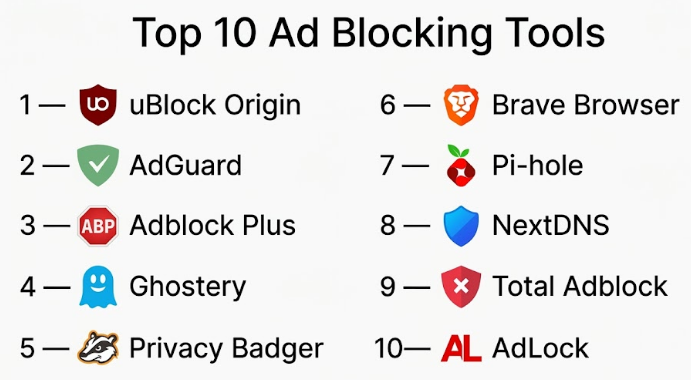
Top 10 Ad Blocking Tools
#1 — uBlock Origin
Short description :
uBlock Origin is one of the most respected ad blocking tools for users who want strong control, low resource usage, and advanced filtering. It blocks ads, trackers, malware domains, pop-ups, and unwanted scripts using filter lists. It is especially popular with privacy-focused and technical users. The tool is lightweight and highly customizable. It is best for people who want powerful blocking without unnecessary extra features.
Key Features
- Strong ad and tracker blocking
- Custom filter list support
- Element picker for manual blocking
- Malware domain blocking through lists
- Lightweight browser performance
- Advanced dynamic filtering options
- Open-source project
Pros
- Very powerful and resource-efficient.
- Good choice for privacy-focused users.
- Highly customizable for advanced users.
Cons
- Advanced settings may confuse beginners.
- Browser compatibility may vary by platform.
- No full enterprise management layer.
Platforms / Deployment
Web / Windows / macOS / Linux
Browser extension
Security & Compliance
Open-source. Enterprise compliance certifications are Not publicly stated.
Integrations & Ecosystem
uBlock Origin works mainly through browser extension ecosystems and filter lists.
- Browser extension stores
- Custom filter lists
- Community-maintained blocklists
- Manual rule creation
- Element blocking tools
Support & Community
Documentation and community support are strong. Formal business support is Not publicly stated.
#2 — AdGuard
Short description :
AdGuard is a popular ad blocking and privacy protection platform for browsers, desktops, and mobile devices. It blocks ads, trackers, phishing pages, and unwanted web elements. It is useful for individuals, families, and users who want broader device-level protection beyond a browser extension. AdGuard also offers DNS-based filtering options. It is a strong option for users who want a polished and easy-to-use experience.
Key Features
- Browser ad blocking
- Desktop and mobile apps
- DNS filtering option
- Tracker protection
- Phishing and malicious site blocking
- Custom filtering rules
- Parental control features in some offerings
Pros
- Strong platform coverage.
- User-friendly interface.
- Good balance of privacy and usability.
Cons
- Some advanced features may require paid plans.
- Setup varies by operating system.
- Business compliance details are limited.
Platforms / Deployment
Web / Windows / macOS / Android / iOS
Cloud / App-based / DNS-based
Security & Compliance
Supports privacy controls and filtering features. SOC 2, ISO 27001, and HIPAA details are Not publicly stated.
Integrations & Ecosystem
AdGuard works through apps, extensions, DNS filtering, and custom rules.
- Browser extensions
- Desktop applications
- Mobile apps
- DNS filtering
- Custom blocklists
- Family filtering workflows
Support & Community
Documentation is available, and user community visibility is strong. Support options vary by plan.
#3 — Adblock Plus
Short description :
Adblock Plus is one of the most widely known ad blocking tools for mainstream users. It blocks banners, pop-ups, video ads, and tracking elements through browser extensions. It is easy to install and simple to use, making it suitable for non-technical users. It also supports acceptable ads settings, which allow certain non-intrusive ads by default. This makes it practical but sometimes debated among privacy-focused users.
Key Features
- Browser-based ad blocking
- Pop-up blocking
- Tracker blocking options
- Custom filter lists
- Acceptable ads settings
- Whitelisting controls
- Simple user interface
Pros
- Easy for beginners.
- Wide browser availability.
- Simple controls for common ad blocking needs.
Cons
- Acceptable ads model may not suit everyone.
- Less advanced than power-user tools.
- Privacy users may prefer stricter blockers.
Platforms / Deployment
Web / Windows / macOS / Linux / Android / iOS
Browser extension / App-based where available
Security & Compliance
Privacy and filtering controls are available. Enterprise compliance details are Not publicly stated.
Integrations & Ecosystem
Adblock Plus works mostly within browser extension ecosystems.
- Browser extensions
- Custom filter lists
- Allowlist controls
- Acceptable ads settings
- Basic privacy controls
Support & Community
Documentation and community visibility are strong due to long market presence. Formal support varies.
#4 — Ghostery
Short description :
Ghostery is a privacy-focused browser extension that blocks ads, trackers, analytics scripts, and other web tracking technologies. It is useful for users who want to understand and reduce online tracking. Ghostery is more privacy-centered than a basic ad blocker. It gives visibility into trackers and allows users to control what gets blocked. It is a strong option for people who care about both cleaner browsing and data privacy.
Key Features
- Ad blocking
- Tracker detection and blocking
- Privacy dashboard
- Anti-tracking controls
- Browser performance improvement
- Custom blocking controls
- Site-level permissions
Pros
- Strong tracker visibility.
- Good privacy-focused experience.
- Easy enough for everyday users.
Cons
- May not be as aggressive as some advanced blockers.
- Some users may need to tune settings.
- Enterprise compliance details are limited.
Platforms / Deployment
Web / Windows / macOS / Linux
Browser extension
Security & Compliance
Privacy controls are available. SOC 2, ISO 27001, and HIPAA details are Not publicly stated.
Integrations & Ecosystem
Ghostery mainly integrates with browser ecosystems and privacy workflows.
- Browser extensions
- Tracker databases
- Site-level controls
- Privacy dashboards
- Custom blocking preferences
Support & Community
Documentation is available. Community recognition is strong in privacy-focused browsing.
#5 — Privacy Badger
Short description :
Privacy Badger is a privacy tool created to block invisible trackers rather than only visible ads. It learns to block trackers that follow users across websites. While it is not a traditional full ad blocker, it can reduce many ads that depend on tracking scripts. It is useful for users who care more about privacy than cosmetic ad removal. Privacy Badger is best used alone or alongside another blocker depending on user preference.
Key Features
- Automatic tracker blocking
- Privacy-focused browsing protection
- Blocks third-party tracking behavior
- Simple browser extension
- Minimal setup required
- Open-source approach
- Good educational value for privacy awareness
Pros
- Strong privacy mission.
- Simple for non-technical users.
- Good complement to ad blockers.
Cons
- Not designed as a full ad blocker.
- May not remove all visual ads.
- Limited enterprise management.
Platforms / Deployment
Web / Windows / macOS / Linux
Browser extension
Security & Compliance
Open-source privacy tool. Enterprise compliance certifications are Not publicly stated.
Integrations & Ecosystem
Privacy Badger works through browser extension environments and privacy-focused workflows.
- Browser extensions
- Tracker blocking logic
- Privacy education resources
- Site-level controls
- Open-source ecosystem
Support & Community
Community support and documentation are available. Formal enterprise support is Not publicly stated.
#6 — Brave Browser
Short description :
Brave Browser includes built-in ad blocking, tracker blocking, fingerprinting protection, and privacy controls. Unlike extension-based blockers, Brave provides these features directly inside the browser. It is useful for users who want privacy and ad blocking without installing many add-ons. Brave works well for individuals, families, and privacy-minded professionals. It is also a good option when browser-level protection is preferred over separate extensions.
Key Features
- Built-in ad blocking
- Tracker blocking
- Fingerprinting protection
- Privacy-focused browser controls
- HTTPS upgrade support where applicable
- Script blocking options
- Cross-platform browser availability
Pros
- No separate extension needed.
- Strong privacy-first browsing experience.
- Good option for everyday users.
Cons
- Requires switching browsers.
- Some websites may need setting adjustments.
- Enterprise policy controls may not fit all businesses.
Platforms / Deployment
Windows / macOS / Linux / iOS / Android
Browser-based
Security & Compliance
Includes privacy and security controls. Enterprise compliance certifications are Not publicly stated.
Integrations & Ecosystem
Brave works as a full browser ecosystem rather than a standalone extension.
- Browser extensions
- Sync features
- Privacy controls
- Search and browsing tools
- Web app compatibility
Support & Community
Documentation and user community are strong. Enterprise support options are Varies / N/A.
#7 — Pi-hole
Short description :
Pi-hole is a network-level ad blocking solution that blocks ads and trackers through DNS filtering. It is commonly used by technical users, home labs, small offices, and privacy enthusiasts. Instead of installing an extension on every browser, Pi-hole can filter traffic for many devices on the same network. It is powerful but requires some technical setup. It is best for users comfortable managing a self-hosted DNS filtering system.
Key Features
- Network-wide DNS ad blocking
- Tracker domain blocking
- Custom blocklists
- Local admin dashboard
- Query logging
- Device-level visibility
- Self-hosted control
Pros
- Blocks ads across many devices.
- Good for home networks and technical users.
- Highly customizable.
Cons
- Requires technical setup.
- Does not block every in-page ad.
- Remote device protection needs extra configuration.
Platforms / Deployment
Linux / Raspberry Pi / Docker-supported environments
Self-hosted
Security & Compliance
Self-hosted security depends on user configuration. Enterprise compliance certifications are Not publicly stated.
Integrations & Ecosystem
Pi-hole fits well into home lab, self-hosted, and network-level filtering setups.
- DNS servers
- Router configuration
- Custom blocklists
- Local network tools
- Docker environments
- Monitoring dashboards
Support & Community
Community support is strong. Documentation and forums are widely used. Formal business support is Not publicly stated.
#8 — NextDNS
Short description :
NextDNS is a cloud-based DNS filtering and privacy platform that blocks ads, trackers, malware domains, and unwanted content across devices. It is useful for individuals, families, small teams, and technical users who want DNS-level control without self-hosting. NextDNS offers customizable profiles, logs, blocklists, and device support. It is easier to manage than a fully self-hosted option like Pi-hole. It is a strong choice for users who want cloud-based DNS filtering with flexible controls.
Key Features
- DNS-based ad blocking
- Tracker and malware blocking
- Custom blocklists
- Device-level profiles
- Logging and analytics controls
- Parental control options
- Cross-device configuration
Pros
- Easier than self-hosting.
- Good privacy and filtering controls.
- Works across many device types.
Cons
- DNS filtering cannot remove every ad format.
- Requires DNS configuration.
- Some advanced usage may need technical knowledge.
Platforms / Deployment
Web / Windows / macOS / Linux / iOS / Android
Cloud / DNS-based
Security & Compliance
Supports encrypted DNS options and privacy controls. Enterprise compliance details are Not publicly stated.
Integrations & Ecosystem
NextDNS works through DNS configuration and device-level profiles.
- DNS settings
- Mobile configuration profiles
- Router setup
- Custom blocklists
- Analytics dashboards
- Parental control workflows
Support & Community
Documentation is available. Community visibility is strong among privacy and DNS filtering users.
#9 — Total Adblock
Short description :
Total Adblock is an ad blocking tool aimed at everyday users who want a simple way to block ads, pop-ups, trackers, and intrusive web elements. It is designed for ease of use rather than deep technical configuration. It can be useful for users who want a guided, consumer-friendly experience. Total Adblock is best suited for personal browsing and simple ad control. Advanced users may prefer more customizable tools.
Key Features
- Ad blocking
- Pop-up blocking
- Tracker blocking
- Browser extension support
- Simple dashboard
- Whitelisting controls
- Consumer-friendly setup
Pros
- Easy for beginners.
- Simple user experience.
- Useful for basic ad blocking needs.
Cons
- Less transparent for advanced users than open-source tools.
- Some features may require paid plans.
- Enterprise details are limited.
Platforms / Deployment
Web / Windows / macOS / iOS / Android
Browser extension / App-based where available
Security & Compliance
Security and privacy details are Varies / N/A. Enterprise compliance certifications are Not publicly stated.
Integrations & Ecosystem
Total Adblock mainly works through browser and consumer device workflows.
- Browser extensions
- Mobile apps where available
- Allowlist settings
- Basic privacy controls
- Consumer support channels
Support & Community
Support availability varies by plan. Public community strength is lower than open-source tools.
#10 — AdLock
Short description :
AdLock is an ad blocking tool designed to block ads, pop-ups, banners, video ads, and tracking scripts across browsers and apps where supported. It is useful for users who want device-level ad blocking instead of only browser-based blocking. AdLock focuses on cleaner browsing, privacy, and performance improvement. It is suitable for personal users and small teams that want a simple paid ad blocking experience. It may not be the best choice for enterprise-managed filtering.
Key Features
- Ad and banner blocking
- Pop-up blocking
- Tracker blocking
- App-level filtering where supported
- Browser protection
- Anti-phishing features where available
- Custom filtering controls
Pros
- Good for device-level blocking.
- Simple user experience.
- Can reduce distractions across browsing sessions.
Cons
- Paid model may not suit all users.
- Enterprise compliance details are limited.
- Advanced filter control may be less deep than technical tools.
Platforms / Deployment
Windows / macOS / Android / iOS
App-based / Browser-supported
Security & Compliance
Privacy and filtering controls are available. SOC 2, ISO 27001, and HIPAA details are Not publicly stated.
Integrations & Ecosystem
AdLock fits consumer and small-team browsing workflows.
- Desktop apps
- Mobile apps
- Browser support
- Custom filters
- Whitelist controls
- Privacy settings
Support & Community
Support resources are available, but community strength is moderate compared with larger open-source ad blocking tools.
Comparison Table
| Tool Name | Best For | Platform(s) Supported | Deployment | Standout Feature | Public Rating |
|---|---|---|---|---|---|
| uBlock Origin | Power users and privacy-focused browsing | Web, Windows, macOS, Linux | Browser extension | Lightweight advanced filtering | N/A |
| AdGuard | Individuals, families, and multi-device users | Web, Windows, macOS, Android, iOS | App-based / DNS / Extension | Broad platform coverage | N/A |
| Adblock Plus | Beginner-friendly ad blocking | Web, Windows, macOS, Linux, Android, iOS | Browser extension / App-based | Simple mainstream ad blocking | N/A |
| Ghostery | Privacy and tracker visibility | Web, Windows, macOS, Linux | Browser extension | Tracker detection and blocking | N/A |
| Privacy Badger | Anti-tracking focused users | Web, Windows, macOS, Linux | Browser extension | Automatic tracker blocking | N/A |
| Brave Browser | Users willing to switch browsers | Windows, macOS, Linux, iOS, Android | Browser-based | Built-in ad and tracker blocking | N/A |
| Pi-hole | Technical users and home networks | Linux, Raspberry Pi, Docker | Self-hosted | Network-wide DNS blocking | N/A |
| NextDNS | Cloud DNS filtering users | Web, Windows, macOS, Linux, iOS, Android | Cloud / DNS-based | Custom DNS filtering profiles | N/A |
| Total Adblock | Basic consumer ad blocking | Web, Windows, macOS, iOS, Android | Extension / App-based | Simple guided setup | N/A |
| AdLock | Device-level personal ad blocking | Windows, macOS, Android, iOS | App-based | App and browser ad blocking | N/A |
Evaluation & Ad Blocking Tools
| Tool Name | Core (25%) | Ease (15%) | Integrations (15%) | Security (10%) | Performance (10%) | Support (10%) | Value (15%) | Weighted Total |
|---|---|---|---|---|---|---|---|---|
| uBlock Origin | 10 | 8 | 8 | 8 | 10 | 8 | 10 | 9.00 |
| AdGuard | 9 | 9 | 8 | 8 | 8 | 8 | 8 | 8.40 |
| Adblock Plus | 8 | 9 | 7 | 7 | 8 | 8 | 8 | 7.90 |
| Ghostery | 8 | 8 | 7 | 8 | 8 | 7 | 8 | 7.75 |
| Privacy Badger | 7 | 9 | 6 | 8 | 8 | 7 | 9 | 7.70 |
| Brave Browser | 9 | 8 | 8 | 8 | 9 | 8 | 9 | 8.50 |
| Pi-hole | 8 | 6 | 8 | 8 | 9 | 8 | 9 | 8.00 |
| NextDNS | 8 | 8 | 8 | 8 | 9 | 7 | 8 | 8.05 |
| Total Adblock | 7 | 9 | 6 | 6 | 7 | 7 | 7 | 7.05 |
| AdLock | 7 | 8 | 6 | 7 | 7 | 7 | 7 | 7.05 |
These scores are comparative and based on practical buyer needs. A higher score does not mean the tool is always the best choice. For example, uBlock Origin is excellent for browser-level control, while Pi-hole is better for network-wide filtering. Choose based on platform, skill level, privacy needs, and management style.
Which Ad Blocking Tool
Solo / Freelancer
Solo users should start with simple and effective tools such as uBlock Origin, AdGuard, Brave Browser, Ghostery, or Privacy Badger. These tools are easy to install and can improve browsing comfort quickly.
If the user wants maximum control, uBlock Origin is a strong choice. If they want a browser with privacy built in, Brave Browser is practical. If they want device-level coverage, AdGuard or AdLock may be better.
SMB
Small businesses should think carefully before relying only on personal browser extensions. For basic ad and tracker control, AdGuard, NextDNS, or DNS-level filtering can be useful.
If the business needs managed security, reporting, compliance, or central policies, a secure web gateway or internet filtering platform may be better than a consumer ad blocker.
Mid-Market
Mid-market companies should evaluate whether ad blocking is a productivity tool or part of security strategy. If it is only for reducing distractions, browser-based tools may help. If it is for security, DNS filtering or secure web gateway tools are better.
NextDNS or network-level filtering can help smaller IT teams, but larger teams should check policy control, logging, and endpoint management.
Enterprise
Enterprises should not depend only on consumer ad blockers. They need centralized policy enforcement, user controls, audit logs, compliance support, and integration with security tools.
Ad blockers may still be used as part of browser hardening, but enterprise teams should combine them with secure web gateways, DNS security, endpoint protection, and Zero Trust controls.
Budget vs Premium
Budget users often choose uBlock Origin, Privacy Badger, Brave Browser, or Pi-hole because they provide strong value. These tools can be excellent when users are comfortable with setup and self-management.
Premium users may prefer AdGuard, AdLock, or Total Adblock for simpler apps, support, and device-level convenience.
Feature Depth vs Ease of Use
For feature depth, uBlock Origin, Pi-hole, and NextDNS are stronger. They allow more control, filtering customization, and advanced setup.
For ease of use, Adblock Plus, Total Adblock, Brave Browser, and AdGuard are easier for non-technical users.
Integrations & Scalability-
For individuals, browser compatibility matters most. For families and small teams, DNS profiles and device coverage matter more.
For larger organizations, scalability means admin controls, device management, SSO, reporting, and policy enforcement. In that case, ad blocking tools may need to be paired with broader internet filtering software.
Security & Compliance Needs
Ad blockers can reduce exposure to malicious ads and trackers, but they are not a complete compliance solution. Businesses should not treat consumer ad blockers as replacements for security platforms.
For compliance-sensitive environments, buyers should validate logging, policy control, user management, data privacy, and security documentation before deployment.
Frequently Asked Questions
1. What is an Ad Blocking Tool?
An Ad Blocking Tool blocks online advertisements, pop-ups, trackers, banners, and unwanted web scripts. It helps make browsing cleaner, faster, and safer.
2. Are ad blockers legal to use?
In most normal browsing situations, ad blockers are legal to use. However, some websites may restrict access or ask users to disable blockers before viewing content.
3. Do ad blockers block all ads?
No, not always. Some ads are difficult to block, especially server-side ads, sponsored content, native ads, and ads inside certain apps or closed platforms.
4. What is the difference between ad blocking and tracker blocking?
Ad blocking removes visible ads, while tracker blocking stops scripts that follow user behavior across websites. Many modern tools do both.
5. Are free ad blockers safe?
Many free ad blockers are safe, but users should choose trusted tools. Avoid unknown extensions with poor transparency, excessive permissions, or unclear privacy policies.
6. Can ad blockers improve browsing speed?
Yes, ad blockers can improve page speed by blocking heavy ad scripts and trackers. However, performance depends on the tool, browser, device, and website.
7. Do ad blockers work on mobile devices?
Yes, some ad blockers support mobile devices. Support depends on the operating system, browser, and whether the tool uses app-based, browser-based, or DNS-based blocking.
8. What is DNS-level ad blocking?
DNS-level ad blocking blocks ad and tracker domains before the device connects to them. It can protect many apps and devices, but it may not remove every visual ad placeholder.
9. What are common mistakes when choosing an ad blocker?
Common mistakes include installing unknown extensions, ignoring privacy policies, using too many blockers together, not checking browser compatibility, and expecting one tool to block every ad.
10. Can businesses use consumer ad blockers?
Small teams can use them for basic browsing comfort, but businesses with security, compliance, or reporting needs should use managed internet filtering or secure web gateway tools.
Conclusion
Ad Blocking Tools are useful for cleaner browsing, better privacy, faster page loading, and protection against intrusive or risky ads. The best tool depends on the user’s goal. uBlock Origin is strong for advanced browser control, AdGuard is practical for multi-device use, Brave Browser is useful for built-in privacy, Pi-hole is powerful for network-wide blocking, and NextDNS is a flexible cloud DNS option. Beginners may prefer Adblock Plus or Total Adblock, while privacy-focused users may like Ghostery or Privacy Badger.
