Introduction
Internet Filtering Software helps organizations control, monitor, and secure access to websites, web apps, online content, and internet traffic. In plain English, it decides what users can or cannot access online based on policies, categories, security risks, user roles, devices, locations, and compliance needs.
It matters now because work, learning, and browsing happen across cloud apps, remote devices, mobile networks, and unmanaged locations. A simple firewall rule is no longer enough. Businesses, schools, healthcare teams, and distributed companies need filtering that can block malware, phishing, adult content, gambling sites, unsafe downloads, shadow IT, and productivity-draining websites.
Buyers should evaluate:
- Web category filtering accuracy
- DNS-level and proxy-level protection
- Malware and phishing blocking
- Reporting and audit logs
- Identity-based policies
- Device coverage
- Cloud and hybrid deployment options
- Ease of policy management
- Integration with SSO, SIEM, MDM, and firewalls
- Support quality and pricing flexibility
Best for: IT managers, school administrators, MSPs, security teams, compliance-focused businesses, enterprises, SMBs, and organizations managing remote or hybrid users.
Not ideal for: very small teams with no compliance or security filtering requirement, users who only need basic browser parental controls, or organizations that already have full Secure Web Gateway coverage through a broader SASE platform.
Key Trends in Internet Filtering Software
- DNS-layer filtering is becoming standard because it is lightweight, fast to deploy, and useful for remote users.
- AI-assisted threat detection is improving phishing, malware, and suspicious domain identification.
- Cloud-delivered filtering is replacing appliance-heavy models for distributed teams and hybrid workforces.
- Zero Trust and SASE alignment is growing, especially in enterprise environments.
- Education-focused filtering now includes student safety signals, classroom controls, and device-level visibility.
- More tools support identity-based policies, allowing different rules for departments, roles, students, guests, and admins.
- Reporting is becoming more compliance-friendly, with audit logs, activity reports, and policy history.
- MSP-friendly management is improving, especially for multi-tenant administration.
- Filtering is moving beyond blocking websites into app control, risky download prevention, and shadow IT visibility.
- Privacy expectations are higher, so buyers now look closely at logging, data retention, and admin access controls.
How We Selected These Tools
The tools below were selected using practical buyer-focused evaluation logic:
- Strong market presence in web filtering, DNS filtering, secure web gateway, or education filtering.
- Feature completeness across category-based filtering, threat protection, reporting, and policy controls.
- Fit for different buyer segments, including SMB, education, MSP, mid-market, and enterprise.
- Deployment flexibility across cloud, hybrid, endpoint, network, and DNS-layer models.
- Security posture signals such as MFA, SSO, RBAC, encryption, logging, and enterprise policy controls.
- Integration strength with identity providers, SIEM tools, endpoint platforms, firewalls, and MDM systems.
- Practical usability for IT teams that need quick policy creation and simple reporting.
- Scalability for distributed users, branch offices, remote workers, schools, and multi-site organizations.
- Support ecosystem, documentation quality, onboarding assistance, and partner availability.
- Balanced inclusion of enterprise-grade, SMB-friendly, education-focused, and DNS-first products.
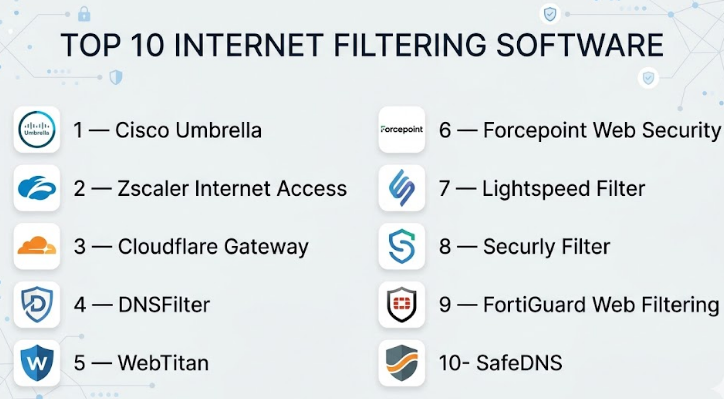
Top 10 Internet Filtering Software
#1 — Cisco Umbrella
Short description :
Cisco Umbrella is a cloud-delivered security platform widely used for DNS-layer security, web filtering, threat blocking, and secure internet access. It helps organizations stop users from reaching malicious domains before a connection is fully established. It is useful for enterprises, mid-market companies, schools, and distributed teams that need centralized protection across locations. Cisco Umbrella is especially strong for organizations already using Cisco security products. It can support web filtering, DNS security, reporting, and secure access policies from a cloud-managed console.
Key Features
- DNS-layer security and internet filtering
- Malware, phishing, and malicious domain blocking
- Category-based content filtering
- Cloud-managed policy enforcement
- Reporting and activity visibility
- Support for roaming users
- Integration with Cisco security ecosystem
Pros
- Strong fit for distributed and remote users.
- Good option for organizations already using Cisco security tools.
- DNS-layer protection can be fast to deploy.
Cons
- Advanced features may require higher-tier plans.
- Some teams may need security expertise for best configuration.
- Can feel broader than basic web filtering needs.
Platforms / Deployment
Web / Windows / macOS / iOS / Android
Cloud / Hybrid
Security & Compliance
Supports enterprise security controls such as SSO/SAML, MFA, encryption, policy controls, and reporting features. Specific compliance coverage varies by plan and customer environment.
Integrations & Ecosystem
Cisco Umbrella fits well into broader Cisco security environments and can connect with identity, endpoint, firewall, and security operations workflows.
- Cisco security products
- Identity providers
- SIEM workflows
- Endpoint security tools
- Network security platforms
- API-based security operations
Support & Community
Cisco offers enterprise documentation, partner support, onboarding resources, training content, and tiered support options. Community strength is high due to Cisco’s large security ecosystem.
#2 — Zscaler Internet Access
Short description :
Zscaler Internet Access is an enterprise-grade secure internet and web access platform. It combines web filtering, secure web gateway capabilities, cloud firewall, malware protection, data protection, and Zero Trust-aligned controls. It is best suited for large organizations, regulated industries, and globally distributed teams. Zscaler is not just a basic internet filter; it is a broader cloud security platform for controlling internet-bound traffic. It works well when security, scalability, and policy depth are top priorities.
Key Features
- Secure web gateway capabilities
- URL and category-based filtering
- Cloud firewall and threat protection
- SSL inspection support
- Data loss prevention options
- User and group-based policies
- Global cloud security architecture
Pros
- Strong enterprise scalability.
- Good fit for Zero Trust and SASE strategies.
- Deep policy and inspection capabilities.
Cons
- May be complex for small teams.
- Implementation can require planning.
- Premium features may increase total cost.
Platforms / Deployment
Web / Windows / macOS / Linux / iOS / Android
Cloud
Security & Compliance
Supports enterprise security controls such as SSO/SAML, MFA, encryption, audit logging, RBAC, and policy-based access. Compliance details vary by product package and customer configuration.
Integrations & Ecosystem
Zscaler has a strong enterprise ecosystem and commonly integrates with identity, endpoint, SIEM, network, and data security platforms.
- Identity providers
- SIEM platforms
- Endpoint protection tools
- CASB and DLP workflows
- Firewall and network tools
- API integrations
Support & Community
Zscaler provides enterprise documentation, customer success resources, professional services, and support tiers. Community strength is strong in enterprise security circles.
#3 — Cloudflare Gateway
Short description :
Cloudflare Gateway is part of Cloudflare’s Zero Trust platform and provides DNS filtering, HTTP filtering, security policies, and visibility for internet traffic. It is useful for companies that want cloud-native filtering without traditional hardware appliances. Cloudflare Gateway works well for startups, SMBs, mid-market companies, and enterprises that need fast global performance. It is especially attractive for teams already using Cloudflare for DNS, security, or networking.
Key Features
- DNS and HTTP filtering
- Malware and phishing protection
- Identity-based access policies
- Application and domain controls
- Remote user protection
- Cloud-based admin console
- Reporting and analytics
Pros
- Strong cloud-native architecture.
- Good fit for remote and hybrid teams.
- Integrates well with Cloudflare Zero Trust services.
Cons
- Some advanced controls require proper Zero Trust setup.
- May not fit teams wanting appliance-based deployment.
- Policy design can become complex at scale.
Platforms / Deployment
Web / Windows / macOS / Linux / iOS / Android
Cloud
Security & Compliance
Supports SSO, MFA, encryption, identity-based policies, logs, and role-based administration features. Specific compliance details vary by plan and configuration.
Integrations & Ecosystem
Cloudflare Gateway works best inside the broader Cloudflare ecosystem but also supports common identity and security integrations.
- Cloudflare Zero Trust
- Identity providers
- Device posture tools
- SIEM integrations
- API-based automation
- DNS and network services
Support & Community
Cloudflare provides documentation, developer resources, community support, and paid support options. Its developer and security community is active and broad.
#4 — DNSFilter
Short description :
DNSFilter is a cloud-based DNS filtering platform focused on threat protection, content filtering, and easy policy management. It is popular with SMBs, MSPs, schools, and organizations that want fast deployment without heavy infrastructure. DNSFilter uses domain categorization and threat intelligence to block unsafe or unwanted sites. It is especially useful for teams that need clear dashboards, multi-tenant management, and lightweight filtering. It is a practical choice when DNS-level control is enough for the use case.
Key Features
- DNS-based content filtering
- Threat and phishing protection
- Category-based blocking
- Multi-tenant MSP management
- Reporting and analytics
- Roaming client support
- Policy customization
Pros
- Easy to deploy and manage.
- Strong fit for MSPs and SMBs.
- Good balance of usability and filtering depth.
Cons
- DNS-layer filtering may not replace full secure web gateway needs.
- Deep traffic inspection may require other tools.
- Advanced enterprise controls may be limited compared with larger platforms.
Platforms / Deployment
Web / Windows / macOS / iOS / Android
Cloud
Security & Compliance
Supports security features such as encrypted DNS options, policy management, admin controls, and reporting. Specific compliance certifications are Not publicly stated.
Integrations & Ecosystem
DNSFilter is designed for simple deployment and MSP-friendly operations, with integrations focused on identity, endpoint, and management workflows.
- MSP platforms
- Roaming agents
- Directory services
- Reporting exports
- API access
- Security operations workflows
Support & Community
DNSFilter provides documentation, onboarding resources, support channels, and MSP-focused enablement. Community visibility is strong in the DNS filtering and MSP space.
#5 — WebTitan
Short description :
WebTitan is an internet filtering and DNS security solution from TitanHQ. It is commonly used by businesses, schools, MSPs, and public-sector organizations that need web content control and malware protection. It helps block unsafe websites, enforce acceptable use policies, and manage access by users or groups. WebTitan is known for being practical for SMB and MSP environments. It is a good fit for organizations that want filtering without unnecessary enterprise complexity.
Key Features
- DNS filtering and web content control
- Malware and phishing protection
- Category-based website blocking
- Policy-based access rules
- Reporting and user activity visibility
- MSP-friendly management
- Cloud-based administration
Pros
- Practical for SMBs and managed service providers.
- Straightforward filtering and reporting.
- Good fit for schools and workplace web controls.
Cons
- May not offer the same depth as large SASE platforms.
- Advanced security teams may need broader tooling.
- Some capabilities may depend on product edition.
Platforms / Deployment
Web / Windows / macOS
Cloud / Hybrid
Security & Compliance
Supports policy controls, reporting, and admin security features. Specific certifications such as SOC 2 or ISO 27001 are Not publicly stated.
Integrations & Ecosystem
WebTitan supports common business and MSP workflows, especially where centralized filtering and customer-level policy management are needed.
- Directory services
- MSP management workflows
- Reporting tools
- Network-level deployment
- Roaming user support
- API or management integrations where available
Support & Community
TitanHQ provides product documentation, customer support, onboarding assistance, and partner-focused resources. Community strength is stronger among SMB and MSP buyers than large open communities.
#6 — Forcepoint Web Security
Short description :
Forcepoint Web Security is an enterprise-focused web security and filtering platform designed for organizations that need user-aware protection, policy enforcement, and web traffic control. It is useful for regulated companies, government, finance, healthcare, and large enterprises with strict access requirements. Forcepoint focuses on secure web access, threat defense, data protection alignment, and policy management. It is better suited for structured IT and security teams than very small businesses.
Key Features
- URL and content filtering
- Secure web gateway capabilities
- Malware and threat protection
- User and group-based policies
- Reporting and analytics
- Data protection alignment
- Cloud and hybrid deployment options
Pros
- Strong enterprise policy depth.
- Good fit for regulated and security-sensitive environments.
- Supports broader security and data protection strategy.
Cons
- May require careful implementation.
- Can be more than small businesses need.
- Pricing and packaging may vary by environment.
Platforms / Deployment
Web / Windows / macOS
Cloud / Hybrid
Security & Compliance
Supports enterprise controls such as SSO/SAML, MFA, encryption, policy management, audit capabilities, and role-based administration. Specific certifications vary by product and deployment.
Integrations & Ecosystem
Forcepoint is often used in enterprise security stacks and can align with identity, endpoint, DLP, SIEM, and network security tools.
- Identity providers
- DLP workflows
- SIEM tools
- Endpoint security
- Network security systems
- Enterprise reporting platforms
Support & Community
Forcepoint offers enterprise support, documentation, partner resources, and professional services. Community strength is mainly enterprise and partner-driven.
#7 — Lightspeed Filter
Short description :
Lightspeed Filter is a web filtering solution built mainly for K–12 schools and education environments. It helps schools protect students, block inappropriate content, manage classroom internet access, and support compliance needs. It is designed for school-issued devices, student browsing visibility, and education-specific policy controls. Lightspeed Filter is most useful for districts and schools that need filtering across campus and remote learning environments. It is less suitable for general enterprise use outside education.
Key Features
- Education-focused web filtering
- Student safety and content control
- Category-based blocking
- Device and user-level policies
- Classroom and district visibility
- Reporting for school administrators
- Remote learning support
Pros
- Strong fit for K–12 environments.
- Designed around student safety needs.
- Useful for school-managed devices and policies.
Cons
- Not ideal for non-education businesses.
- May require school IT process alignment.
- Feature fit depends on education device ecosystem.
Platforms / Deployment
Web / Windows / macOS / ChromeOS / iOS
Cloud
Security & Compliance
Supports school-focused policy controls, reporting, user management, and administrative access features. Specific compliance details vary and should be validated during procurement.
Integrations & Ecosystem
Lightspeed Filter fits into education IT ecosystems and commonly works with school device management and identity environments.
- Google Workspace for Education
- Microsoft education environments
- MDM tools
- Chromebook management
- Student information workflows
- Reporting and admin dashboards
Support & Community
Lightspeed provides education-focused onboarding, documentation, support, and customer success resources. Community strength is high within school IT networks.
#8 — Securly Filter
Short description :
Securly Filter is an education-focused internet filtering platform designed to help schools manage student web access and online safety. It supports content filtering, student activity visibility, and school policy enforcement. Securly is commonly considered by K–12 districts that need filtering across school devices and remote learning contexts. It is useful for administrators who want a student-centered filtering approach. Like Lightspeed, it is most relevant for education rather than general corporate internet filtering.
Key Features
- K–12 web filtering
- Student safety-focused controls
- Category and keyword-based blocking
- Activity visibility and reporting
- Cloud-based management
- Support for school-managed devices
- Remote filtering support
Pros
- Strong education alignment.
- Useful for student safety and web access control.
- Designed for school IT teams.
Cons
- Not built primarily for enterprise web security.
- May not replace a corporate secure web gateway.
- Best value depends on school ecosystem fit.
Platforms / Deployment
Web / Windows / macOS / ChromeOS / iOS
Cloud
Security & Compliance
Supports administrative controls, reporting, and school-focused policy management. Specific certifications are Not publicly stated.
Integrations & Ecosystem
Securly is built around school technology environments and commonly supports education identity and device ecosystems.
- Google Workspace for Education
- Microsoft education environments
- Chromebook environments
- School device management
- Reporting workflows
- Student safety tools
Support & Community
Securly provides school-focused documentation, onboarding, and support resources. Its community strength is strongest within K–12 technology teams.
#9 — FortiGuard Web Filtering
Short description :
FortiGuard Web Filtering is part of Fortinet’s security services and is commonly used with FortiGate and broader Fortinet security infrastructure. It helps organizations block unwanted websites, enforce internet usage policies, and reduce exposure to risky domains. It is especially useful for companies that already use Fortinet firewalls or security appliances. FortiGuard Web Filtering fits branch offices, enterprises, schools, and distributed networks. It is strong when web filtering needs to sit close to firewall and network security controls.
Key Features
- URL and category-based filtering
- Threat intelligence-backed blocking
- Firewall-integrated policy enforcement
- Malware and risky site protection
- Reporting and logging
- User and group policy support
- Fortinet ecosystem integration
Pros
- Strong fit for Fortinet customers.
- Good network-level filtering control.
- Useful for branch and enterprise environments.
Cons
- Best value comes with Fortinet ecosystem usage.
- Less suitable if the organization wants vendor-neutral cloud-only filtering.
- Configuration may require firewall expertise.
Platforms / Deployment
Web / Windows / macOS / Linux
Cloud / Hybrid / Appliance-based
Security & Compliance
Supports firewall security controls, logging, admin roles, policy management, and encrypted traffic handling depending on configuration. Specific compliance certifications vary by Fortinet service and deployment.
Integrations & Ecosystem
FortiGuard Web Filtering is strongest inside the Fortinet Security Fabric and related network security architecture.
- FortiGate firewalls
- Fortinet Security Fabric
- SIEM tools
- Identity services
- Endpoint security
- Network reporting systems
Support & Community
Fortinet provides documentation, partner support, enterprise support plans, training, and a large security community.
#10 — SafeDNS
Short description :
SafeDNS is a DNS-based web filtering solution used by businesses, schools, libraries, homes, and service providers. It focuses on blocking inappropriate content, malicious domains, and unwanted website categories through DNS filtering. SafeDNS is a practical option for organizations that need simple content filtering without a large security platform. It can be useful for SMBs, public Wi-Fi networks, educational environments, and basic policy enforcement. It is best when buyers need affordable and straightforward filtering rather than advanced enterprise inspection.
Key Features
- DNS-based web filtering
- Category-based content blocking
- Malware and phishing protection
- Policy customization
- Reporting and usage visibility
- Cloud-based management
- Multi-profile filtering options
Pros
- Simple and practical for basic filtering.
- Good fit for SMBs, schools, and public access networks.
- Lower complexity than enterprise SASE platforms.
Cons
- Not as deep as secure web gateway platforms.
- Advanced compliance and inspection features may be limited.
- Best suited for DNS-layer filtering use cases.
Platforms / Deployment
Web / Windows / macOS / iOS / Android
Cloud
Security & Compliance
Supports policy controls, filtering profiles, and reporting. Specific enterprise compliance certifications are Not publicly stated.
Integrations & Ecosystem
SafeDNS is focused on straightforward DNS filtering and can fit into lightweight business, school, ISP, and Wi-Fi filtering setups.
- DNS configuration
- Router-level deployment
- Roaming clients
- Reporting dashboards
- Network policy workflows
- Service provider use cases
Support & Community
SafeDNS provides documentation, support resources, and business support options. Community visibility is moderate compared with larger enterprise platforms.
Comparison Table
| Tool Name | Best For | Platform(s) Supported | Deployment | Standout Feature | Public Rating |
|---|---|---|---|---|---|
| Cisco Umbrella | Enterprise and distributed teams | Web, Windows, macOS, iOS, Android | Cloud / Hybrid | DNS-layer security with Cisco ecosystem | N/A |
| Zscaler Internet Access | Large enterprises and SASE strategies | Web, Windows, macOS, Linux, iOS, Android | Cloud | Enterprise secure web gateway depth | N/A |
| Cloudflare Gateway | Cloud-native teams and remote workforces | Web, Windows, macOS, Linux, iOS, Android | Cloud | Zero Trust-aligned internet filtering | N/A |
| DNSFilter | SMBs and MSPs | Web, Windows, macOS, iOS, Android | Cloud | Easy DNS filtering and MSP management | N/A |
| WebTitan | SMBs, MSPs, and schools | Web, Windows, macOS | Cloud / Hybrid | Practical web filtering for managed environments | N/A |
| Forcepoint Web Security | Regulated enterprises | Web, Windows, macOS | Cloud / Hybrid | Enterprise policy and security depth | N/A |
| Lightspeed Filter | K–12 schools | Web, Windows, macOS, ChromeOS, iOS | Cloud | Student safety-focused filtering | N/A |
| Securly Filter | K–12 school districts | Web, Windows, macOS, ChromeOS, iOS | Cloud | Education-focused student web protection | N/A |
| FortiGuard Web Filtering | Fortinet customers and branch networks | Web, Windows, macOS, Linux | Cloud / Hybrid / Appliance-based | Firewall-integrated filtering | N/A |
| SafeDNS | SMBs, schools, and basic DNS filtering | Web, Windows, macOS, iOS, Android | Cloud | Simple DNS-based content control | N/A |
Evaluation & Internet Filtering Software
| Tool Name | Core (25%) | Ease (15%) | Integrations (15%) | Security (10%) | Performance (10%) | Support (10%) | Value (15%) | Weighted Total |
|---|---|---|---|---|---|---|---|---|
| Cisco Umbrella | 9 | 8 | 9 | 9 | 9 | 9 | 8 | 8.65 |
| Zscaler Internet Access | 10 | 7 | 9 | 10 | 9 | 9 | 7 | 8.80 |
| Cloudflare Gateway | 9 | 8 | 9 | 9 | 9 | 8 | 8 | 8.60 |
| DNSFilter | 8 | 9 | 8 | 8 | 8 | 8 | 9 | 8.30 |
| WebTitan | 8 | 8 | 7 | 7 | 8 | 8 | 8 | 7.75 |
| Forcepoint Web Security | 9 | 7 | 8 | 9 | 8 | 8 | 7 | 8.05 |
| Lightspeed Filter | 8 | 8 | 8 | 7 | 8 | 8 | 8 | 7.85 |
| Securly Filter | 8 | 8 | 7 | 7 | 8 | 8 | 8 | 7.70 |
| FortiGuard Web Filtering | 8 | 7 | 9 | 9 | 8 | 8 | 8 | 8.05 |
| SafeDNS | 7 | 9 | 6 | 7 | 8 | 7 | 9 | 7.50 |
These scores are comparative, not absolute. A higher score means the product is stronger across this specific evaluation model, but it does not automatically mean it is the best choice for every buyer. For example, Zscaler may score highly for enterprise depth, while DNSFilter may be better for an SMB that wants fast setup. Always validate your shortlist with a pilot, integration test, and policy review.
Which Internet Filtering Software
Solo / Freelancer
Solo users usually do not need a heavy enterprise filtering platform. If the goal is basic protection from malicious websites, phishing, and unsafe domains, DNS-based tools such as SafeDNS or DNSFilter may be enough.
For freelancers managing client devices or family-safe browsing, simple DNS filtering is easier than deploying a full secure web gateway. Avoid complex enterprise products unless you are managing client networks professionally.
SMB
SMBs should focus on ease of setup, clear reporting, reasonable pricing, and simple policy control. DNSFilter, WebTitan, Cloudflare Gateway, and SafeDNS are practical options.
If the SMB already uses Cisco, Fortinet, or Cloudflare, choosing a filtering product from that ecosystem may reduce management overhead. The best SMB choice is usually the one your IT team can deploy and maintain without deep security engineering.
Mid-Market
Mid-market companies need stronger identity integration, reporting, roaming user protection, and scalable policy management. Cisco Umbrella, Cloudflare Gateway, DNSFilter, WebTitan, FortiGuard Web Filtering, and Forcepoint can all fit depending on the environment.
If the company has remote workers, cloud apps, and branch offices, cloud-delivered filtering is usually easier to scale. If the company already runs Fortinet firewalls, FortiGuard Web Filtering may be a natural fit.
Enterprise
Enterprises usually need secure web gateway capabilities, identity-based policies, SIEM integration, audit logs, compliance support, and global scalability. Zscaler Internet Access, Cisco Umbrella, Forcepoint Web Security, Cloudflare Gateway, and FortiGuard Web Filtering are strong enterprise candidates.
Enterprises should avoid choosing only by feature count. They should test policy performance, SSL inspection needs, data retention controls, admin roles, incident response workflows, and integration with existing security operations.
Budget vs Premium
Budget-focused buyers should look at DNSFilter, SafeDNS, and WebTitan first. These tools can cover many common filtering needs without the complexity of full enterprise platforms.
Premium buyers should evaluate Zscaler, Cisco Umbrella, Forcepoint, Cloudflare Gateway, and FortiGuard Web Filtering. These platforms are better when web filtering is part of a larger security architecture.
Feature Depth vs Ease of Use
If ease of use is most important, DNSFilter, SafeDNS, and WebTitan are strong starting points. They are easier for smaller IT teams to understand and operate.
If feature depth is more important, Zscaler, Cisco Umbrella, Forcepoint, Cloudflare Gateway, and FortiGuard Web Filtering provide broader security capabilities. However, they require stronger planning and governance.
Integrations & Scalability
For companies with existing Cisco, Cloudflare, Fortinet, or enterprise identity tools, ecosystem fit matters. A technically strong tool can still become difficult if it does not integrate with your identity provider, SIEM, MDM, or endpoint tools.
Scalable filtering should support user groups, remote users, multiple locations, policy inheritance, reporting exports, and administrative delegation.
Security & Compliance Needs
Regulated organizations should prioritize audit logs, RBAC, SSO, MFA, encryption, policy history, reporting, and data handling controls. They should also validate whether vendor compliance documentation meets internal requirements.
Education buyers should prioritize student safety, age-based filtering, classroom visibility, device coverage, and school reporting. Enterprise buyers should focus more on secure web gateway, Zero Trust, SIEM, DLP, and incident response workflows.
Frequently Asked Questions
1. What is Internet Filtering Software?
Internet Filtering Software controls which websites, domains, apps, and web content users can access. It helps block unsafe, inappropriate, or non-compliant online activity based on company or school policies.
2. How is internet filtering different from a firewall?
A firewall controls network traffic, while internet filtering focuses more on web access, website categories, domains, content types, and user browsing rules. Many modern platforms combine both capabilities.
3. Is DNS filtering enough for business security?
DNS filtering is useful and often easy to deploy, but it may not replace a full secure web gateway. Businesses needing SSL inspection, DLP, deep traffic analysis, or advanced compliance controls may need a broader platform.
4. What pricing models are common?
Common pricing models include per user, per device, per site, per student, per endpoint, or tier-based subscriptions. Enterprise pricing often varies by features, support level, and deployment size.
5. How long does implementation usually take?
Basic DNS filtering can often be deployed quickly, especially for small teams. Enterprise secure web gateway rollouts may take longer because they require identity setup, policy design, testing, and integration planning.
6. What are common mistakes when choosing a filtering tool?
Common mistakes include choosing only by price, ignoring remote users, not testing bypass scenarios, skipping reporting needs, and failing to involve security, compliance, and IT operations teams early.
7. Can Internet Filtering Software support remote workers?
Yes, many modern tools support roaming clients, endpoint agents, cloud policies, and identity-based access for remote users. Buyers should confirm platform support before purchase.
8. What integrations should buyers check?
Buyers should check identity provider integration, SIEM support, MDM compatibility, firewall ecosystem fit, endpoint agent support, API availability, and reporting export options.
9. Is internet filtering useful for schools?
Yes, schools use internet filtering to protect students, block inappropriate content, manage classroom access, and support digital safety policies. Education-focused tools usually provide better student-specific workflows.
10. When should a company switch tools?
A company should consider switching when the current tool lacks remote user protection, produces poor reports, blocks inaccurately, fails compliance needs, does not scale, or cannot integrate with modern security systems.
Conclusion
Internet Filtering Software is no longer only about blocking distracting websites. It is now an important part of security, compliance, productivity, student safety, and remote workforce protection. The best product depends on your environment. A school may get better value from Lightspeed Filter or Securly Filter, while an enterprise may need Zscaler, Cisco Umbrella, Forcepoint, Cloudflare Gateway, or FortiGuard Web Filtering.
