Introduction
Dental Practice Management Software is a system that helps dental clinics manage daily clinical, administrative, and financial work in one place. It usually includes patient records, appointment scheduling, digital charting, treatment planning, insurance claims, billing, payments, reporting, patient communication, and sometimes imaging tools.
For modern dental clinics, this software matters because patients now expect faster booking, digital forms, reminders, online payments, and a smooth clinic experience. At the same time, dental teams need better control over revenue, compliance, staff productivity, and multi-location operations.
Common use cases include:
- Managing appointments and chair-side schedules
- Maintaining patient records and clinical charts
- Handling billing, insurance claims, and collections
- Sending patient reminders and recall messages
- Tracking practice performance through reports and dashboards
Buyers should evaluate:
- Core dental workflow coverage
- Ease of use for front-desk and clinical teams
- Billing and insurance claim capabilities
- Patient communication tools
- Imaging and charting support
- Reporting and analytics
- Integration ecosystem
- Security and compliance posture
- Cloud vs server-based deployment
- Support, onboarding, and training quality
Best for: Dental clinics, solo dentists, group practices, DSOs, orthodontic practices, specialty clinics, front-office teams, billing teams, and clinic owners who want to centralize daily operations.
Not ideal for: Very small clinics that only need basic appointment booking, clinics already using a hospital-wide EHR with dental modules, or practices that prefer separate best-of-breed tools for every workflow instead of one connected system.
Key Trends in Dental Practice Management Software
- Cloud-first dental operations: More practices are moving away from local servers and choosing cloud-based access for easier updates, backups, remote work, and multi-location visibility.
- AI-assisted front desk workflows: AI call tracking, missed-call recovery, smart reminders, automated follow-ups, and voice-based documentation are becoming more common.
- Better patient engagement: Online booking, digital forms, two-way texting, pay-by-link, patient portals, and automated recall campaigns are now expected features.
- Revenue cycle automation: Dental practices are looking for faster claims, insurance eligibility checks, payment reminders, collections dashboards, and billing automation.
- Integrated imaging and charting: Buyers prefer systems that connect charting, X-rays, treatment plans, and clinical notes without heavy manual switching.
- Multi-location reporting: Group practices and DSOs need dashboards that compare locations, providers, collections, production, chair utilization, and case acceptance.
- Security expectations are rising: MFA, audit logs, role-based access, encryption, secure backups, and compliance-ready workflows are now important buying factors.
- Interoperability matters more: Dental teams want bridges with imaging tools, payment processors, clearinghouses, accounting systems, marketing tools, and patient communication platforms.
- Subscription pricing models: Cloud systems often use monthly or annual subscriptions, while some traditional platforms may include licensing, hosting, support, and add-on service costs.
- Faster implementation pressure: Clinics want software that can be implemented with less disruption, better onboarding, and smoother data migration from legacy systems.
How We Selected These Tools
The tools below were selected using practical buyer-focused criteria, not only popularity. The goal is to include a balanced mix of traditional, cloud-first, SMB-friendly, and multi-location-ready dental platforms.
- Market recognition and adoption across dental practices
- Depth of core dental practice management features
- Scheduling, charting, billing, claims, and reporting capabilities
- Patient engagement and communication features
- Cloud readiness and remote accessibility
- Integration ecosystem with imaging, clearinghouses, payments, and communication tools
- Fit for solo practices, small clinics, group practices, and DSOs
- Security and compliance posture signals where publicly clear
- Support, onboarding, and training availability
- Practical long-term value for modern dental operations
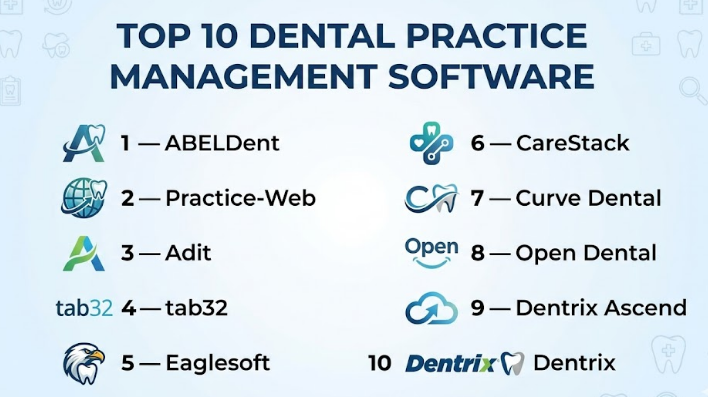
Top 10 Dental Practice Management Software
#1 — Dentrix
Short description : Dentrix is one of the most established dental practice management platforms, widely used by dental clinics that need strong administrative, clinical, billing, and reporting workflows. It is designed for practices that want a mature system with a broad ecosystem and long-standing industry presence. Dentrix is often a good fit for established dental offices that need deep functionality and staff familiarity. It supports everyday practice workflows such as scheduling, patient management, treatment planning, insurance, billing, and analytics. For clinics that value a proven platform with a large partner ecosystem, Dentrix remains a serious option.
Key Features
- Appointment scheduling and patient management
- Clinical charting and treatment planning
- Insurance eligibility and claims support
- Billing, collections, and payment workflows
- Reporting and practice analytics
- Imaging and patient engagement integrations
- Add-on ecosystem for marketing and communication
Pros
- Strong market recognition and mature dental workflow coverage
- Good fit for practices that need deep operational features
- Broad ecosystem and familiar workflows for many dental teams
Cons
- May feel complex for small practices with simple needs
- Some capabilities may require add-ons or connected solutions
- Implementation and training may take time for new users
Platforms / Deployment
Windows / Web components where applicable
Cloud / On-premise / Hybrid depending on product setup and connected services
Security & Compliance
Not publicly stated for all certification-level details. Practices should validate MFA, encryption, audit logs, access controls, backup model, HIPAA-related safeguards, and user permission management during procurement.
Integrations & Ecosystem
Dentrix has a broad ecosystem because of its long market presence. Many practices use it with imaging, claims, billing, communication, analytics, and patient engagement tools.
- Dental imaging systems
- Insurance and claims workflows
- Payment processing tools
- Patient communication tools
- Practice analytics solutions
- Marketing and recall tools
Support & Community
Dentrix has a large user base, training resources, and professional support options. New users should plan for onboarding, workflow setup, staff training, and possible consulting support depending on practice size.
#2 — Dentrix Ascend
Short description : Dentrix Ascend is a cloud-based dental practice management platform designed for practices that want remote access, centralized records, and modern workflows. It is commonly considered by small practices, growing practices, and multi-location dental organizations that want less dependence on local servers. The platform brings scheduling, billing, imaging, patient communication, analytics, and clinical workflows into a cloud environment. It is especially useful for teams that want easier access across locations and devices. Dentrix Ascend is a strong option for clinics modernizing from traditional practice management systems.
Key Features
- Cloud-based scheduling and patient records
- Billing, claims, and insurance workflow support
- Clinical charting and treatment planning
- Imaging and clinical workflow support
- Patient communication tools
- Analytics and reporting dashboards
- Multi-location access and centralized management
Pros
- Cloud-first access is helpful for modern and multi-location practices
- Easier to manage than server-heavy legacy setups
- Strong fit for clinics already familiar with the Dentrix ecosystem
Cons
- May not be the lowest-cost option for small practices
- Some teams may need time to adjust from legacy Dentrix
- Advanced needs may require configuration or add-on tools
Platforms / Deployment
Web / iOS / Android where applicable
Cloud
Security & Compliance
Not publicly stated for all certification-level details. Buyers should validate MFA, RBAC, audit logs, encryption, backup controls, data residency, HIPAA-related safeguards, and business associate requirements where relevant.
Integrations & Ecosystem
Dentrix Ascend connects well with dental business workflows and Henry Schein One ecosystem capabilities. It is useful for practices that want cloud-based access with connected patient, clinical, and business tools.
- Imaging workflows
- Billing and insurance workflows
- Patient communication
- Analytics and dashboards
- Payment and collections workflows
- Practice growth tools
Support & Community
Dentrix Ascend benefits from a strong vendor ecosystem, onboarding support, training resources, and practice support options. Multi-location practices should confirm implementation timelines and data migration support before purchase.
#3 — Open Dental
Short description : Open Dental is a widely recognized dental practice management system known for flexibility, strong feature depth, and a practical approach to integrations. It is often preferred by practices that want strong control, extensive bridges, and a cost-conscious alternative to some larger platforms. The system supports scheduling, charting, electronic claims, digital forms, reporting, and many third-party connections. Open Dental can work well for solo practices, small clinics, and growing teams that want function over heavy branding. It is also popular among practices that value transparency and customization.
Key Features
- Appointment scheduling and patient records
- Graphical tooth charting
- Electronic claims and clearinghouse support
- Digital forms and patient communication support
- Built-in and custom reporting queries
- Bridges to many third-party dental tools
- Open Dental Cloud option available
Pros
- Strong flexibility and integration-friendly design
- Good value for practices that want practical feature depth
- Useful reporting and customization options
Cons
- Interface may feel less polished than some newer cloud platforms
- Setup may require more configuration discipline
- Advanced workflows may need third-party bridges
Platforms / Deployment
Windows / Web access depending on setup
Cloud / Self-hosted / Hybrid depending on selected configuration
Security & Compliance
Not publicly stated for all certification-level details. Buyers should validate encryption, access controls, audit logging, backup process, user permissions, MFA options, and HIPAA-related safeguards.
Integrations & Ecosystem
Open Dental is known for its broad bridge ecosystem. This makes it useful for practices that already have preferred imaging, payment, communication, or claims tools.
- Imaging software bridges
- Clearinghouse connections
- Payment solutions
- Patient communication tools
- Reporting and query tools
- Third-party dental services
Support & Community
Open Dental has documentation, support resources, and an active user base. It may require more hands-on setup compared with highly packaged platforms, but many practices value that flexibility.
#4 — Curve Dental
Short description : Curve Dental is a cloud-based dental practice management platform built for modern dental teams that want access from anywhere, simplified IT needs, and connected clinical and business workflows. It is commonly considered by startups, single-location clinics, and multi-location practices moving away from server-based systems. Curve focuses on scheduling, patient management, charting, billing, imaging, reporting, and patient engagement. Its cloud-first model can help reduce local infrastructure management. It is a strong option for practices that want modern usability and easier remote access.
Key Features
- Cloud-based practice management
- Scheduling and patient records
- Clinical charting and treatment planning
- Dental imaging support
- Billing and payment workflows
- Patient engagement and communication tools
- Reporting and performance insights
Pros
- Cloud-first design supports remote and multi-location access
- Reduces dependency on local servers
- Modern user experience compared with many older systems
Cons
- Practices with complex legacy workflows may need careful migration
- Pricing and packaging may vary by practice needs
- Some integrations may require validation before selection
Platforms / Deployment
Web
Cloud
Security & Compliance
Not publicly stated for all certification-level details. Buyers should confirm encryption, MFA, audit logs, RBAC, backup controls, HIPAA-related safeguards, and data access policies.
Integrations & Ecosystem
Curve Dental supports common dental practice needs around imaging, communication, billing, and reporting. It is best evaluated by checking whether it connects with the specific tools already used by the clinic.
- Imaging systems
- Patient communication tools
- Billing workflows
- Payment processing
- Reporting dashboards
- Practice growth tools
Support & Community
Curve Dental provides onboarding and customer support resources. Practices should confirm migration support, training format, support hours, and availability of dedicated implementation assistance.
#5 — CareStack
Short description : CareStack is a cloud-based all-in-one dental software platform designed for growing practices, multi-location groups, and DSOs. It combines practice growth, patient experience, clinical workflows, revenue cycle management, analytics, and reporting into one system. CareStack is often attractive to organizations that want fewer separate tools and more centralized operational control. It supports multi-location scheduling, patient communications, billing workflows, and performance visibility. For practices scaling beyond one location, CareStack can be a strong candidate.
Key Features
- Multi-location scheduling
- Patient communication and notifications
- Clinical workflow support
- Revenue cycle management
- Analytics and reporting
- Membership plans and payment reminders
- Reputation and patient experience tools
Pros
- Strong fit for growing groups and multi-location operations
- Broad all-in-one workflow coverage
- Useful for practices that want centralized visibility
Cons
- May be more than a very small clinic needs
- Implementation requires careful workflow planning
- Pricing and packaging should be reviewed in detail
Platforms / Deployment
Web
Cloud
Security & Compliance
Not publicly stated for all certification-level details. Buyers should validate MFA, audit logs, encryption, RBAC, backup processes, HIPAA-related safeguards, and data handling requirements.
Integrations & Ecosystem
CareStack aims to reduce dependency on multiple separate tools by including many workflows natively. Still, buyers should verify all required integrations before committing.
- Patient communication
- Billing and payment workflows
- Insurance and revenue cycle tools
- Analytics dashboards
- Reputation management
- Multi-location operational reporting
Support & Community
CareStack typically suits practices that need structured onboarding and operational support. Buyers should evaluate implementation timelines, data migration support, admin training, and support tiers.
#6 — Eaglesoft
Short description : Eaglesoft is a dental practice management system from Patterson Dental, known for front-office workflows, scheduling, patient management, claims, charting, and imaging support. It is commonly used by established dental practices that prefer a traditional, feature-rich system. Eaglesoft can help teams manage daily operations from scheduling to payments and clinical documentation. It is especially relevant for practices already connected to Patterson Dental’s ecosystem. For teams that want an established desktop-centered platform, Eaglesoft remains a recognized choice.
Key Features
- Scheduling and appointment management
- Patient records and account management
- Clinical charting
- Insurance claims support
- Billing and payment workflows
- Digital imaging integration
- Reporting and administrative tools
Pros
- Established platform with strong dental workflow coverage
- Good fit for practices comfortable with Windows-based systems
- Imaging and front-office workflow support
Cons
- May feel less modern than cloud-native platforms
- Local infrastructure and IT needs may be higher
- Some practices may need add-ons for modern engagement features
Platforms / Deployment
Windows
On-premise / Hybrid depending on setup
Security & Compliance
Not publicly stated for all certification-level details. Practices should validate data backup, access permissions, audit logging, encryption, MFA options, and HIPAA-related controls.
Integrations & Ecosystem
Eaglesoft is connected to Patterson Dental workflows and supports dental imaging and administrative operations. Buyers should validate exact integrations for payments, communications, claims, and imaging.
- Digital imaging
- Claims workflows
- Payment processing
- Patient records
- Front-office workflows
- Reporting tools
Support & Community
Eaglesoft has vendor-backed support and training resources. Practices should review implementation help, technical support coverage, upgrade process, and staff training requirements.
#7 — tab32
Short description : tab32 is a cloud-based dental practice management platform built for modern dental practices that want scheduling, clinical charting, imaging, billing, patient communication, and reporting in one browser-based system. It is often considered by independent practices, small groups, and multi-location organizations. The platform focuses on standardizing workflows and improving access to practice data from anywhere. It also supports cloud imaging and patient engagement capabilities. tab32 can be a good fit for practices that want a cloud-native dental operating system.
Key Features
- Cloud-based scheduling
- Clinical charting and treatment planning
- Cloud imaging and radiology workflows
- Billing, claims, and payment workflows
- Patient communication and online booking
- Reporting and KPI visibility
- Multi-location support
Pros
- Browser-based access supports flexible operations
- Strong focus on clinical, imaging, and billing workflows
- Useful for growing practices that want cloud standardization
Cons
- Teams moving from legacy systems may need training
- Advanced workflow fit should be tested before rollout
- Pricing and packaging may vary by practice size
Platforms / Deployment
Web
Cloud
Security & Compliance
Not publicly stated for all certification-level details. Buyers should validate MFA, encryption, audit logs, access controls, backup processes, HIPAA-related safeguards, and cloud hosting requirements.
Integrations & Ecosystem
tab32 includes many core workflows natively and supports connected dental operations. Buyers should confirm compatibility with existing imaging hardware, payment tools, claims processes, and communication needs.
- Imaging and radiology workflows
- Patient communication
- Online booking
- Claims and billing workflows
- Reporting and dashboards
- Multi-location operations
Support & Community
tab32 offers onboarding and support resources. Practices should evaluate migration support, admin training, support response times, and assistance for multi-location rollout.
#8 — Adit
Short description : Adit is an AI-powered dental practice management and patient engagement platform that focuses strongly on front-desk automation, communication, online scheduling, forms, payments, reviews, analytics, and call intelligence. It is useful for practices that want to improve patient conversion, reduce missed calls, and automate administrative tasks. Adit can be attractive to growth-focused clinics that need modern communication workflows. It also supports dental practice management features beyond engagement. For practices where patient communication is a major bottleneck, Adit is worth evaluating.
Key Features
- AI call intelligence and missed-call recovery
- Online scheduling and digital forms
- Appointment reminders and recall workflows
- Patient communication and VoIP features
- Payments and billing support
- Reviews and reputation management
- Practice analytics dashboards
Pros
- Strong patient communication and automation capabilities
- Useful for improving front-desk productivity
- AI features are practical for missed calls and follow-ups
Cons
- May not fit practices seeking only traditional PMS workflows
- Buyers should validate depth of clinical charting needs
- Pricing and modules should be checked carefully
Platforms / Deployment
Web / iOS / Android where applicable
Cloud
Security & Compliance
Not publicly stated for all certification-level details. Buyers should validate encryption, MFA, audit logs, RBAC, HIPAA-related safeguards, call recording policies, and consent workflows.
Integrations & Ecosystem
Adit works best as a connected patient engagement and practice operations platform. It can be useful alongside existing dental systems, depending on integration availability.
- Online booking
- VoIP and call tracking
- Digital forms
- Payment tools
- Patient reminders
- Reviews and reputation tools
Support & Community
Adit provides customer support and onboarding resources. Buyers should confirm training quality, integration setup support, migration help, and whether support tiers vary by package.
#9 — Practice-Web
Short description : Practice-Web is a dental practice management solution built for modern dental offices that need scheduling, charting, billing, patient communication, reporting, and eServices. It is often considered by practices that want a comprehensive platform with strong day-to-day productivity features. Practice-Web includes tools for paperless workflows, reminders, patient forms, claims, eligibility, and communication. It can be useful for clinics that want a practical balance between core PMS functionality and patient engagement. It is especially relevant for teams focused on productivity and operational efficiency.
Key Features
- Appointment scheduling
- Clinical charting and treatment planning
- Billing and insurance processing
- Digital forms and paperless workflows
- Patient reminders and communication tools
- Reporting and analytics
- Patient and dentist portal features
Pros
- Broad dental workflow coverage
- Useful paperless and communication features
- Good fit for clinics wanting practical productivity tools
Cons
- Interface and workflow preferences should be tested by staff
- Some advanced features may depend on service packaging
- Buyers should validate integration depth before selection
Platforms / Deployment
Windows / Web components where applicable
Cloud / Hybrid depending on setup
Security & Compliance
Not publicly stated for all certification-level details. Buyers should validate access controls, MFA, encryption, audit logs, backup model, and HIPAA-related safeguards.
Integrations & Ecosystem
Practice-Web includes Smart eServices and connects with several common dental workflow areas. Practices should confirm compatibility with existing imaging, billing, payment, and communication tools.
- Digital forms
- Appointment reminders
- Claims and eligibility
- Patient billing
- Patient communication
- Portal workflows
Support & Community
Practice-Web provides user guides, training material, and support resources. Buyers should confirm onboarding process, response times, migration help, and support availability.
#10 — ABELDent
Short description : ABELDent is a dental practice management platform used by dental professionals, especially in North American markets. It supports appointment scheduling, patient records, clinical charting, billing, reporting, and multi-location practice needs. ABELDent also offers cloud options and newer AI-assisted documentation capabilities. It is a good fit for practices that want comprehensive clinical and administrative tools with training resources. Clinics looking for Canadian-market relevance may find ABELDent especially useful.
Key Features
- Appointment scheduling
- Patient records management
- Dental charting and clinical workflows
- Billing and administrative workflows
- Multi-location support
- Reporting and practice management tools
- AI-assisted clinical note support where available
Pros
- Good fit for practices needing full-featured dental workflows
- Supports multi-location use cases
- Training resources can help staff adoption
Cons
- Regional fit should be validated before purchase
- Some features may vary by edition or deployment model
- Buyers should confirm integration availability for their stack
Platforms / Deployment
Web / Windows where applicable
Cloud / Hybrid depending on selected setup
Security & Compliance
Not publicly stated for all certification-level details. Buyers should validate MFA, access controls, encryption, audit logs, backup model, data residency, and healthcare compliance requirements.
Integrations & Ecosystem
ABELDent supports core practice workflows and can be extended through related services and integrations. Buyers should validate imaging, payment, claims, communication, and reporting needs in advance.
- Patient scheduling
- Billing workflows
- Clinical documentation
- Reporting tools
- Multi-location management
- Patient communication workflows
Support & Community
ABELDent provides learning resources and support options. Practices should review training availability, implementation support, data conversion help, and response time commitments.
Comparison Table
| Tool Name | Best For | Platform(s) Supported | Deployment | Standout Feature | Public Rating |
|---|---|---|---|---|---|
| Dentrix | Established practices needing mature workflows | Windows / Web components | Cloud / On-premise / Hybrid | Mature ecosystem and deep practice management features | N/A |
| Dentrix Ascend | Cloud-first practices and multi-location teams | Web / iOS / Android where applicable | Cloud | Cloud-based access with Dentrix ecosystem familiarity | N/A |
| Open Dental | Value-focused clinics needing flexibility | Windows / Web access depending on setup | Cloud / Self-hosted / Hybrid | Broad bridge ecosystem and customization | N/A |
| Curve Dental | Modern practices moving to cloud | Web | Cloud | Cloud-first usability and reduced server dependency | N/A |
| CareStack | Growing groups and DSOs | Web | Cloud | All-in-one multi-location operations platform | N/A |
| Eaglesoft | Established clinics using traditional workflows | Windows | On-premise / Hybrid | Dental imaging and front-office workflow depth | N/A |
| tab32 | Cloud-native independent and group practices | Web | Cloud | Browser-based clinical, billing, and imaging workflows | N/A |
| Adit | Growth-focused practices needing patient engagement | Web / iOS / Android where applicable | Cloud | AI call intelligence and front-desk automation | N/A |
| Practice-Web | Productivity-focused dental offices | Windows / Web components | Cloud / Hybrid | Paperless workflows and Smart eServices | N/A |
| ABELDent | North American practices needing full PMS workflows | Web / Windows where applicable | Cloud / Hybrid | Scheduling, charting, reporting, and AI note support | N/A |
Evaluation & Dental Practice Management Software
The scoring below is comparative and practical. It is not a public review rating. It reflects category fit, visible feature depth, buyer relevance, deployment maturity, ecosystem strength, and likely fit for different practice sizes.
| Tool Name | Core (25%) | Ease (15%) | Integrations (15%) | Security (10%) | Performance (10%) | Support (10%) | Value (15%) | Weighted Total (0–10) |
|---|---|---|---|---|---|---|---|---|
| Dentrix | 9 | 7 | 9 | 7 | 8 | 8 | 7 | 7.95 |
| Dentrix Ascend | 8 | 8 | 8 | 7 | 8 | 8 | 7 | 7.75 |
| Open Dental | 8 | 7 | 9 | 7 | 8 | 7 | 9 | 8.00 |
| Curve Dental | 8 | 8 | 7 | 7 | 8 | 7 | 7 | 7.55 |
| CareStack | 9 | 7 | 8 | 7 | 8 | 8 | 7 | 7.95 |
| Eaglesoft | 8 | 7 | 8 | 7 | 8 | 8 | 7 | 7.60 |
| tab32 | 8 | 8 | 7 | 7 | 8 | 7 | 7 | 7.55 |
| Adit | 7 | 8 | 8 | 7 | 8 | 7 | 8 | 7.55 |
| Practice-Web | 8 | 7 | 8 | 7 | 7 | 7 | 8 | 7.60 |
| ABELDent | 8 | 7 | 7 | 7 | 7 | 7 | 7 | 7.35 |
These scores should be used as a starting point, not as a final buying decision. A tool with a lower total may still be the best fit for a specific clinic if it matches the workflow, budget, region, and integration needs. Before choosing any platform, run a pilot with real users, test billing and claims workflows, check data migration quality, and validate security controls. For multi-location practices, reporting, role permissions, and centralized management should be tested carefully.
Which Dental Practice Management Software
Solo / Freelancer
Solo dentists and very small clinics usually need software that is easy to learn, affordable, and not overloaded with enterprise workflows. The best choice should simplify scheduling, charting, billing, patient communication, and reminders without requiring a large admin team.
Good options to evaluate:
- Open Dental for flexibility and strong value
- Curve Dental for cloud-first simplicity
- tab32 for browser-based all-in-one workflows
- Practice-Web for practical productivity features
Solo practices should avoid buying a very complex enterprise platform unless they plan to scale quickly. Ease of use, support quality, and low IT burden matter more than having every advanced feature.
SMB
Small and medium dental practices need a balanced system that supports front desk, clinical charting, billing, claims, reminders, payments, and reporting. These clinics should choose software that improves daily efficiency without creating heavy implementation pressure.
Good options to evaluate:
- Dentrix for mature workflow depth
- Dentrix Ascend for cloud-based modernization
- Open Dental for cost-conscious flexibility
- Curve Dental for a modern cloud experience
- Adit if patient communication and missed-call recovery are major issues
SMBs should test how quickly staff can complete common tasks such as booking, updating records, creating treatment plans, sending claims, and collecting payments.
Mid-Market
Mid-market dental groups need stronger reporting, role-based workflows, multi-provider scheduling, billing visibility, and better operational controls. They often need more integrations and stronger analytics than a single-location clinic.
Good options to evaluate:
- CareStack for multi-location operational depth
- Dentrix Ascend for cloud access and centralized workflows
- Dentrix for established practices with mature processes
- tab32 for standardized cloud workflows
- Curve Dental for cloud-first multi-location needs
Mid-market buyers should focus on implementation planning, data migration, user permissions, location-level reporting, and integration with imaging and payment systems.
Enterprise
Enterprise dental organizations and DSOs need centralized control, strong reporting, scalable workflows, multi-location scheduling, role-based access, and revenue cycle visibility. They also need strong vendor support, training plans, and governance.
Good options to evaluate:
- CareStack for all-in-one DSO operations
- Dentrix Ascend for cloud-based multi-location management
- Dentrix for mature ecosystem depth
- tab32 for cloud-native standardization
- Curve Dental for cloud-first operational flexibility
Enterprise buyers should run formal pilots, validate service-level expectations, review security documents, test reporting at scale, and plan phased rollouts location by location.
Budget vs Premium
Budget-conscious practices should look closely at total cost, not only the monthly fee. Costs may include migration, support, training, add-ons, eClaims, reminders, payment processing, imaging bridges, and hardware changes.
- Budget-friendly direction: Open Dental, Practice-Web
- Balanced direction: Curve Dental, tab32, ABELDent
- Premium / growth-focused direction: Dentrix, Dentrix Ascend, CareStack, Adit depending on modules
The cheapest tool is not always the best value. If a system saves staff hours, reduces missed appointments, improves collections, and lowers IT burden, it may justify a higher subscription.
Feature Depth vs Ease of Use
Some platforms offer deep functionality but require more training. Others are easier to use but may not cover every advanced workflow out of the box.
- Choose Dentrix or CareStack when depth and operational control matter more.
- Choose Curve Dental, Dentrix Ascend, or tab32 when cloud usability is a major priority.
- Choose Open Dental when flexibility and practical control matter.
- Choose Adit when front-desk automation and patient engagement are the biggest pain points.
The right choice depends on staff skill level, clinic size, workflow complexity, and how much change the team can handle during implementation.
Integrations & Scalability-
Dental practices should not evaluate software in isolation. The platform must work with imaging tools, X-ray systems, payment processors, claims clearinghouses, patient communication tools, accounting workflows, and analytics needs.
For integration-heavy environments:
- Open Dental is strong because of its broad bridge ecosystem.
- Dentrix has a mature partner ecosystem.
- CareStack is useful when the goal is to reduce third-party dependency.
- Dentrix Ascend, Curve Dental, and tab32 are strong cloud-first options to evaluate for scalability.
Always ask vendors for a written integration checklist before signing.
Security & Compliance Needs
Dental practices handle sensitive patient data, health records, billing data, insurance information, and payment-related workflows. Security should be reviewed carefully, especially for cloud systems and multi-location practices.
Buyers should ask about:
- MFA and SSO/SAML availability
- Role-based access control
- Audit logs and activity tracking
- Data encryption at rest and in transit
- Backup and disaster recovery
- HIPAA-related safeguards
- User permission structure
- Data export and ownership
- Business associate agreement support where applicable
If a vendor does not clearly explain its security controls, the practice should request documentation before moving forward.
Frequently Asked Questions
1. What is Dental Practice Management Software?
Dental Practice Management Software is a system that helps dental clinics manage appointments, patient records, charting, billing, insurance claims, communication, and reporting. It acts as the operational center of the dental office.
2. How much does Dental Practice Management Software cost?
Pricing varies widely by vendor, clinic size, number of users, locations, modules, support level, and deployment model. Many vendors use subscription pricing, but the full cost may include onboarding, data migration, add-ons, training, and payment processing fees.
3. Is cloud-based dental software better than on-premise software?
Cloud-based software is often easier for remote access, multi-location management, updates, and backups. On-premise systems may still suit clinics that want more local control or already have established IT infrastructure.
4. What are the most important features to look for?
The most important features are scheduling, charting, treatment planning, billing, claims, patient reminders, reporting, digital forms, payments, imaging support, and user permissions. The best feature set depends on the practice size and workflow.
5. How long does implementation usually take?
Implementation can range from a few weeks to several months depending on data migration, training, integrations, practice size, and workflow complexity. Multi-location practices usually need a more structured rollout plan.
6. What are common mistakes buyers make?
Common mistakes include choosing based only on price, skipping staff demos, ignoring migration complexity, not testing claims workflows, and failing to validate integrations. Another mistake is not checking security and access control features early.
7. Is Dental Practice Management Software secure?
Many vendors provide security controls, but buyers should not assume everything is included. Clinics should validate MFA, encryption, audit logs, access controls, backup process, HIPAA-related safeguards, and vendor security documentation.
8. Can dental software integrate with imaging systems?
Yes, many dental platforms integrate with imaging systems or provide bridges to imaging tools. However, integration depth varies, so practices should confirm compatibility with their exact X-ray sensors, imaging software, and clinical workflow.
9. Can a clinic switch from one dental software to another?
Yes, but switching requires careful planning. The practice must review data conversion, historical records, imaging access, billing data, patient balances, insurance information, training, and downtime risk before migration.
10. What is the best software for a small dental clinic?
There is no single best option for every small clinic. Open Dental, Curve Dental, tab32, Practice-Web, and Dentrix Ascend are all worth evaluating depending on budget, cloud preference, billing needs, and staff comfort.
Conclusion
Dental Practice Management Software is no longer only a digital appointment book. It has become the central operating system for modern dental clinics, covering clinical workflows, patient communication, billing, claims, analytics, payments, and practice growth. The best platform depends on the size of the clinic, the number of locations, the preferred deployment model, the level of reporting required, and the staff’s comfort with change.
