Introduction
Secure DNS clients help protect users when their devices ask, “Where is this website located?” In plain English, DNS is like the internet’s phonebook. A secure DNS client makes that lookup safer by encrypting DNS traffic, blocking risky domains, filtering unwanted content, and giving teams better control over how devices connect online.
This matters because remote work, mobile devices, SaaS apps, phishing attacks, malware domains, shadow IT, and privacy expectations are all increasing. A weak DNS setup can expose browsing activity, allow access to malicious domains, or make policy enforcement difficult across users and locations.
Common use cases include:
- Blocking phishing, malware, and command-and-control domains
- Protecting remote workers outside the office network
- Enforcing family-safe or business-safe browsing rules
- Improving DNS privacy with encrypted DNS
- Adding DNS-level visibility before traffic reaches apps or endpoints
Buyers should evaluate:
- DNS encryption support
- Threat intelligence quality
- Filtering flexibility
- Device and OS coverage
- Admin dashboard quality
- Reporting and logs
- Policy controls
- Integration options
- Performance and uptime
- Pricing and scalability
Best for: IT teams, security teams, MSPs, remote-first companies, schools, SMBs, enterprises, families, and privacy-focused users who want safer DNS resolution across devices.
Not ideal for: Users who only need a basic ISP DNS setup, companies already using a full secure web gateway with DNS included, or teams that need deep packet inspection instead of DNS-layer protection.
Key Trends in Secure DNS Clients
- Encrypted DNS is becoming standard through DNS-over-HTTPS, DNS-over-TLS, and DNS-over-QUIC.
- Zero Trust alignment is growing, especially for remote users and unmanaged networks.
- DNS filtering is moving closer to endpoints through lightweight device clients and mobile apps.
- AI-assisted threat detection is becoming more common, especially for suspicious domains and fast-changing phishing campaigns.
- Privacy controls are now a buying factor, especially around query logging, data retention, and regional storage.
- SMBs want simple dashboards, not complex firewall-style administration.
- Enterprises want identity-based policies, device posture signals, SSO, and audit logs.
- MSPs need multi-tenant management for managing clients at scale.
- Developer and open-source users prefer flexible clients such as dnscrypt-proxy and Stubby.
- DNS security is integrating with broader SASE and endpoint ecosystems instead of staying as a standalone tool.
How We Selected These Tools
The tools below were selected using practical evaluation logic:
- Strong market adoption or recognition in DNS security
- Clear support for secure DNS use cases
- Device-level or client-level deployment options
- Malware, phishing, tracker, or content filtering capabilities
- Performance and reliability reputation
- Fit for individuals, SMBs, MSPs, and enterprises
- Security posture and privacy controls
- Ease of onboarding and policy management
- Integration with broader security ecosystems
- Balance between commercial, free, and open-source options
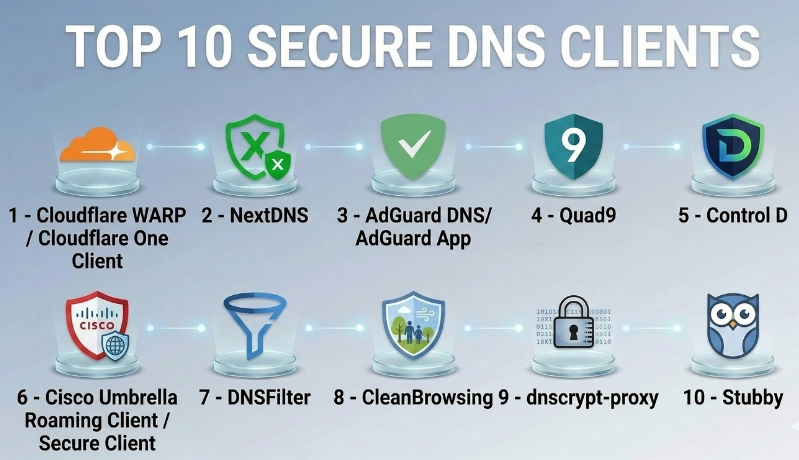
Top 10 Secure DNS Clients
#1 — Cloudflare WARP / Cloudflare One Client
Short description :
Cloudflare WARP is a secure DNS and traffic client designed for individuals, teams, and enterprises. It routes device traffic through Cloudflare’s network and can connect with Cloudflare Gateway for DNS filtering, web filtering, and Zero Trust policies. It is useful for companies that want DNS protection plus broader secure access controls. The product is especially strong for remote teams and organizations already using Cloudflare’s security ecosystem.
Key Features
- Secure DNS resolution with encrypted traffic options
- Device client for remote users
- Cloudflare Gateway policy enforcement
- Zero Trust access ecosystem support
- Device posture signal support in enterprise use cases
- Web filtering and DNS filtering options
- Centralized admin management for teams
Pros
- Strong fit for Zero Trust and remote workforce security
- Good ecosystem for DNS, web, access, and network controls
- Broad platform coverage
Cons
- May feel more complex if you only need basic DNS filtering
- Some advanced controls require broader Cloudflare setup
- Not a traditional VPN replacement for every privacy use case
Platforms / Deployment
Web / Windows / macOS / Linux / iOS / Android
Cloud / Hybrid
Security & Compliance
SSO/SAML, MFA, audit logs, RBAC, and policy controls are available in business and enterprise contexts. Compliance details vary by plan and use case.
Integrations & Ecosystem
Cloudflare WARP works best inside the Cloudflare One ecosystem. It connects DNS filtering with Zero Trust access, device posture, web filtering, and security policies.
- Cloudflare Gateway
- Cloudflare Access
- Identity providers
- Device posture checks
- Security dashboards
- Policy and logging systems
Support & Community
Cloudflare has strong documentation, community visibility, and enterprise support options. Support depth depends on plan level.
#2 — NextDNS
Short description :
NextDNS is a modern secure DNS platform for individuals, families, developers, and small teams. It provides DNS-level blocking for threats, ads, trackers, and unwanted categories. Users can create profiles, apply blocklists, manage logs, and use encrypted DNS across devices. It is popular because it offers strong control without requiring enterprise complexity.
Key Features
- DNS-over-HTTPS and DNS-over-TLS support
- Custom blocklists and allowlists
- Security threat blocking
- Parental control options
- Per-profile configuration
- Analytics and query logs
- Device setup across many platforms
Pros
- Excellent balance of power and simplicity
- Strong for families, privacy users, and SMBs
- Flexible filtering controls
Cons
- Enterprise-grade identity workflows may be limited compared with SASE platforms
- Requires careful profile setup for best results
- Too many blocklists can cause false positives
Platforms / Deployment
Web / Windows / macOS / Linux / iOS / Android
Cloud
Security & Compliance
Encrypted DNS is supported. SSO/SAML, SOC 2, ISO 27001, and HIPAA details are Not publicly stated.
Integrations & Ecosystem
NextDNS works well with native OS DNS settings, routers, browsers, mobile devices, and encrypted DNS clients.
- Routers
- Browser secure DNS settings
- Mobile profiles
- CLI configuration
- Blocklists
- Analytics dashboards
Support & Community
Documentation and community discussions are strong. Formal enterprise support details are Varies / Not publicly stated.
#3 — AdGuard DNS / AdGuard App
Short description :
AdGuard DNS is a secure DNS service focused on privacy, ad blocking, tracker blocking, and family-safe browsing. It works well for individuals, families, and small teams that want DNS-level protection without heavy administration. The AdGuard app and DNS profiles make it easier to apply filtering across devices. It is especially useful where ad and tracker blocking are important alongside security.
Key Features
- DNS filtering for ads and trackers
- Malware and phishing protection
- Family protection options
- Encrypted DNS support
- Custom filtering rules
- Device-level setup
- Cross-platform app ecosystem
Pros
- Strong for privacy and ad-blocking use cases
- Simple for personal and family use
- Good cross-device coverage
Cons
- Business security depth may not match enterprise DNS platforms
- Some filtering may break websites if rules are too strict
- Advanced reporting may be limited for larger teams
Platforms / Deployment
Web / Windows / macOS / Linux / iOS / Android
Cloud
Security & Compliance
Encrypted DNS is supported. Enterprise compliance details such as SOC 2, ISO 27001, and HIPAA are Not publicly stated.
Integrations & Ecosystem
AdGuard works through apps, DNS configuration, browser support, and router-level setup.
- AdGuard apps
- Browser extensions
- Router DNS configuration
- Mobile private DNS
- Custom DNS rules
- Family protection settings
Support & Community
AdGuard has strong user documentation and an active user base. Business-grade support varies by product and plan.
#4 — Quad9
Short description :
Quad9 is a security-focused public DNS resolver that blocks known malicious domains. It is widely used by individuals, organizations, and privacy-focused users who want a simple, low-friction security layer. Quad9 does not focus on ad blocking or content filtering in the same way as some consumer DNS tools. Its main value is blocking dangerous domains while keeping setup simple.
Key Features
- Malware and phishing domain blocking
- Privacy-focused DNS resolution
- DNSSEC validation
- Encrypted DNS support
- Public resolver model
- Simple device or router setup
- Security-first filtering approach
Pros
- Simple and free to use
- Strong fit for malware and phishing protection
- Good privacy positioning
Cons
- Limited admin dashboard features
- Not designed as a full enterprise policy platform
- No broad content filtering or ad-blocking focus
Platforms / Deployment
Windows / macOS / Linux / iOS / Android via DNS settings
Cloud
Security & Compliance
Encrypted DNS and DNSSEC validation are supported. SSO/SAML, audit logs, RBAC, SOC 2, ISO 27001, and HIPAA are Not publicly stated.
Integrations & Ecosystem
Quad9 is mainly integrated through DNS settings at device, router, operating system, or network level.
- Router DNS settings
- Operating system DNS settings
- DNS-over-HTTPS clients
- DNS-over-TLS clients
- Network-level DNS forwarding
- Security-focused resolver setup
Support & Community
Quad9 offers setup guides and public documentation. Enterprise-style onboarding and support are Varies / Not publicly stated.
#5 — Control D
Short description :
Control D is a configurable secure DNS service designed for users who want privacy, content filtering, location-aware rules, and custom DNS behavior. It is useful for individuals, advanced users, families, and teams that want more control than a basic public DNS resolver. It supports multiple filtering profiles and can be used across devices and networks.
Key Features
- Secure DNS resolver options
- Custom filtering profiles
- Malware, tracker, and content blocking
- Flexible rule-based controls
- Device and router setup
- Analytics and logs
- Advanced DNS customization
Pros
- Highly flexible for power users
- Good fit for privacy and filtering needs
- Useful profile-based management
Cons
- May require learning for non-technical users
- Enterprise security integrations may be limited
- Over-customization can create troubleshooting issues
Platforms / Deployment
Web / Windows / macOS / Linux / iOS / Android
Cloud
Security & Compliance
Encrypted DNS is supported. SSO/SAML, SOC 2, ISO 27001, GDPR, and HIPAA details are Not publicly stated.
Integrations & Ecosystem
Control D integrates mainly through DNS configuration, endpoint setup, routers, and encrypted DNS standards.
- Router configuration
- Mobile DNS profiles
- Browser secure DNS
- Device-level setup
- Custom rules
- Profile-based filtering
Support & Community
Documentation is available, and community awareness is growing. Formal support tiers are Varies / Not publicly stated.
#6 — Cisco Umbrella Roaming Client / Secure Client
Short description :
Cisco Umbrella is an enterprise-grade DNS-layer security platform. Its roaming client protects users even when they are outside the corporate network. It is designed for businesses that need policy enforcement, threat intelligence, reporting, identity controls, and integration with broader Cisco security tools. It is a strong fit for mid-market and enterprise security teams.
Key Features
- DNS-layer threat protection
- Roaming user protection
- Centralized policy management
- Security reporting and visibility
- Integration with Cisco security ecosystem
- Identity-aware policy support
- Enterprise administration controls
Pros
- Strong enterprise security fit
- Good for remote and hybrid workforces
- Mature policy and reporting capabilities
Cons
- May be too expensive or complex for small teams
- Best value comes inside broader Cisco ecosystem
- Setup may require security expertise
Platforms / Deployment
Windows / macOS / iOS / Android
Cloud / Hybrid
Security & Compliance
SSO/SAML, MFA, RBAC, and audit-related controls are commonly available in enterprise contexts. Specific compliance coverage varies by plan and contract.
Integrations & Ecosystem
Cisco Umbrella integrates well with enterprise identity, endpoint, network, and security operations workflows.
- Cisco Secure ecosystem
- Identity providers
- SIEM tools
- Endpoint security workflows
- Network security controls
- Admin and reporting dashboards
Support & Community
Cisco has strong enterprise documentation, partner support, onboarding options, and global support tiers. Community and partner ecosystem are strong.
#7 — DNSFilter
Short description :
DNSFilter is a DNS security and content filtering platform used by businesses, schools, MSPs, and distributed teams. It provides DNS-layer protection, policy management, reporting, and roaming clients. It is especially strong for organizations that need simple deployment, managed filtering, and scalable policy control across locations or customer environments.
Key Features
- DNS threat protection
- Content filtering categories
- Roaming client support
- MSP-friendly management
- Reporting and analytics
- Policy-based filtering
- Multi-site deployment options
Pros
- Strong for MSPs and SMBs
- Practical dashboard and filtering controls
- Good balance of security and usability
Cons
- Advanced enterprise security depth may vary by plan
- Requires tuning to reduce false positives
- Pricing can grow with users and locations
Platforms / Deployment
Web / Windows / macOS / iOS / Android
Cloud / Hybrid
Security & Compliance
SSO/SAML, MFA, RBAC, and audit controls may be available depending on plan. SOC 2, ISO 27001, and HIPAA details are Not publicly stated unless confirmed contractually.
Integrations & Ecosystem
DNSFilter fits into IT administration, MSP management, and security workflows.
- MSP consoles
- Directory and identity tools
- SIEM or reporting workflows
- Roaming clients
- Network deployments
- Policy dashboards
Support & Community
DNSFilter offers documentation, onboarding material, and business support options. MSP-focused support is one of its stronger ecosystem areas.
#8 — CleanBrowsing
Short description :
CleanBrowsing is a secure DNS filtering service focused on safe browsing, family protection, schools, and organizations that need controlled internet access. It offers DNS filters for security, adult content blocking, and family-safe browsing. It is useful for simple DNS-level protection where ease of setup matters more than complex enterprise workflows.
Key Features
- Family-safe DNS filtering
- Security filtering options
- Adult content blocking
- DNS-over-HTTPS support
- Router and device setup
- Simple policy profiles
- Business and education use cases
Pros
- Easy to understand and deploy
- Strong fit for families, schools, and small organizations
- Useful safe-browsing defaults
Cons
- Less suited for deep enterprise security operations
- Customization may be lighter than advanced platforms
- Reporting depth may vary by plan
Platforms / Deployment
Windows / macOS / Linux / iOS / Android via DNS settings
Cloud
Security & Compliance
Encrypted DNS is supported. SSO/SAML, SOC 2, ISO 27001, and HIPAA details are Not publicly stated.
Integrations & Ecosystem
CleanBrowsing is usually deployed through routers, device DNS settings, and operating system profiles.
- Router DNS setup
- Device DNS setup
- Browser secure DNS settings
- Family filtering profiles
- School filtering use cases
- DNS policy controls
Support & Community
Documentation is available for common setup scenarios. Formal support options vary by plan.
#9 — dnscrypt-proxy
Short description :
dnscrypt-proxy is an open-source DNS proxy that supports encrypted DNS protocols and gives technical users strong control over resolver selection and privacy behavior. It is popular among developers, Linux users, privacy-focused users, and advanced administrators. It is not a polished business dashboard product, but it is powerful for technical deployments.
Key Features
- Open-source secure DNS proxy
- DNSCrypt support
- DNS-over-HTTPS support
- Resolver selection controls
- Local DNS forwarding
- Filtering and blocklist support
- Strong configuration flexibility
Pros
- Excellent for technical users and custom setups
- Open-source and highly flexible
- Useful for privacy-focused DNS workflows
Cons
- Not beginner-friendly
- No native enterprise dashboard
- Requires manual configuration and maintenance
Platforms / Deployment
Windows / macOS / Linux
Self-hosted / Local
Security & Compliance
Encrypted DNS protocol support is available. SSO/SAML, MFA, audit logs, RBAC, SOC 2, ISO 27001, and HIPAA are Not publicly stated.
Integrations & Ecosystem
dnscrypt-proxy integrates through local DNS forwarding, resolver lists, scripts, and system DNS settings.
- Local resolvers
- Router setups
- Linux services
- Custom blocklists
- Automation scripts
- Privacy-focused resolver networks
Support & Community
Community support and documentation are available through open-source channels. Commercial support is Not publicly stated.
#10 — Stubby
Short description :
Stubby is an open-source local DNS privacy stub resolver focused on DNS-over-TLS. It is designed for users who want encrypted DNS resolution from their device or local system. Stubby is best suited for technical users, developers, Linux administrators, and privacy-focused environments. It is lightweight and standards-focused rather than a full filtering platform.
Key Features
- DNS-over-TLS support
- Local stub resolver model
- Open-source deployment
- Privacy-focused DNS forwarding
- Resolver configuration control
- Lightweight operation
- Suitable for technical environments
Pros
- Lightweight and privacy-focused
- Good for technical DNS-over-TLS setups
- Open-source and standards-aligned
Cons
- No built-in business dashboard
- No broad content filtering platform
- Requires technical setup
Platforms / Deployment
Linux / macOS / Windows support varies
Self-hosted / Local
Security & Compliance
DNS-over-TLS is supported. SSO/SAML, MFA, audit logs, RBAC, SOC 2, ISO 27001, and HIPAA are Not publicly stated.
Integrations & Ecosystem
Stubby is commonly used with local DNS services, technical resolver configurations, and privacy-focused DNS workflows.
- Local DNS forwarding
- DNS-over-TLS resolvers
- Linux networking stacks
- Router or gateway setups
- Privacy DNS configurations
- Open-source DNS tooling
Support & Community
Community documentation and open-source support are available. Enterprise support is Not publicly stated.
Comparison Table
| Tool Name | Best For | Platform(s) Supported | Deployment | Standout Feature | Public Rating |
|---|---|---|---|---|---|
| Cloudflare WARP / Cloudflare One Client | Remote teams and Zero Trust security | Windows, macOS, Linux, iOS, Android | Cloud / Hybrid | DNS plus Zero Trust ecosystem | N/A |
| NextDNS | Families, SMBs, privacy users | Web, Windows, macOS, Linux, iOS, Android | Cloud | Profile-based secure DNS filtering | N/A |
| AdGuard DNS / AdGuard App | Ad blocking and privacy-focused users | Web, Windows, macOS, Linux, iOS, Android | Cloud | DNS-level ad and tracker blocking | N/A |
| Quad9 | Simple malware and phishing DNS protection | Device and router DNS setup | Cloud | Security-focused public resolver | N/A |
| Control D | Power users and customizable filtering | Web, Windows, macOS, Linux, iOS, Android | Cloud | Flexible DNS rules and profiles | N/A |
| Cisco Umbrella | Mid-market and enterprise security | Windows, macOS, iOS, Android | Cloud / Hybrid | Enterprise DNS-layer security | N/A |
| DNSFilter | SMBs, MSPs, schools, distributed teams | Web, Windows, macOS, iOS, Android | Cloud / Hybrid | Business-friendly DNS filtering | N/A |
| CleanBrowsing | Families, schools, basic safe browsing | Device and router DNS setup | Cloud | Simple family-safe filtering | N/A |
| dnscrypt-proxy | Developers and advanced privacy users | Windows, macOS, Linux | Self-hosted / Local | Open-source encrypted DNS proxy | N/A |
| Stubby | Technical DNS-over-TLS users | Linux, macOS, Windows varies | Self-hosted / Local | Lightweight DNS-over-TLS resolver | N/A |
Evaluation & Secure DNS Clients
| Tool Name | Core (25%) | Ease (15%) | Integrations (15%) | Security (10%) | Performance (10%) | Support (10%) | Value (15%) | Weighted Total (0–10) |
|---|---|---|---|---|---|---|---|---|
| Cloudflare WARP / Cloudflare One Client | 9 | 8 | 9 | 9 | 9 | 8 | 8 | 8.60 |
| NextDNS | 8 | 9 | 7 | 8 | 8 | 7 | 9 | 8.05 |
| AdGuard DNS / AdGuard App | 8 | 9 | 7 | 7 | 8 | 7 | 8 | 7.80 |
| Quad9 | 7 | 9 | 6 | 8 | 8 | 6 | 9 | 7.55 |
| Control D | 8 | 8 | 7 | 7 | 8 | 7 | 8 | 7.70 |
| Cisco Umbrella | 9 | 7 | 9 | 9 | 9 | 9 | 7 | 8.45 |
| DNSFilter | 8 | 8 | 8 | 8 | 8 | 8 | 8 | 8.00 |
| CleanBrowsing | 7 | 9 | 6 | 7 | 8 | 6 | 8 | 7.35 |
| dnscrypt-proxy | 8 | 5 | 7 | 8 | 8 | 6 | 9 | 7.30 |
| Stubby | 6 | 5 | 6 | 7 | 8 | 5 | 8 | 6.35 |
These scores are comparative, not universal. A higher score means the tool is stronger across the listed criteria for a broad buyer profile. A lower score does not mean the tool is weak; it may simply serve a narrower audience. For example, Stubby is excellent for technical DNS-over-TLS use, but it does not compete with enterprise dashboard platforms. Always validate scores against your own device mix, compliance needs, policy rules, and budget.
Which Secure DNS Clients
Solo / Freelancer
Solo users usually need privacy, malware blocking, simple setup, and low cost. NextDNS, AdGuard DNS, Quad9, Control D, dnscrypt-proxy, and Stubby are good fits depending on technical skill.
For non-technical users, NextDNS or AdGuard DNS is easier. For technical users, dnscrypt-proxy or Stubby provides more control.
SMB
SMBs need simple policy management, reporting, and protection for remote workers. NextDNS, DNSFilter, Control D, and Cloudflare WARP are practical choices.
If the company has no dedicated security team, DNSFilter or NextDNS may be easier to operate. If the SMB is moving toward Zero Trust, Cloudflare WARP becomes more attractive.
Mid-Market
Mid-market companies need stronger admin controls, centralized visibility, and better identity integration. Cloudflare WARP, Cisco Umbrella, and DNSFilter are stronger candidates.
DNSFilter is useful for fast deployment. Cisco Umbrella is stronger for mature security operations. Cloudflare WARP is strong when secure DNS is part of a wider access strategy.
Enterprise
Enterprises should focus on identity, audit logs, RBAC, SSO, policy depth, reporting, device posture, and SIEM integration. Cisco Umbrella and Cloudflare WARP are the strongest enterprise-style choices here.
Large organizations should also test performance across regions, mobile users, remote users, and branch locations before rollout.
Budget vs Premium
For low-budget needs, Quad9, AdGuard DNS, NextDNS, dnscrypt-proxy, and Stubby are attractive. For premium business security, Cisco Umbrella, Cloudflare WARP, and DNSFilter provide stronger management and policy features.
The right choice depends on whether you need simple DNS privacy or full security operations visibility.
Feature Depth vs Ease of Use
NextDNS, AdGuard DNS, and CleanBrowsing are easier for non-technical users. Control D and dnscrypt-proxy provide more flexibility but need more setup knowledge.
Enterprise platforms offer deeper features, but they also require planning, policy design, and ongoing administration.
Integrations & Scalability-
Cloudflare WARP and Cisco Umbrella are stronger for integration-heavy environments. DNSFilter is strong for MSP and multi-site management. Open-source tools are flexible, but they require internal ownership.
Choose based on how DNS security will connect with identity, endpoint, SIEM, ticketing, and compliance workflows.
Security & Compliance Needs
If compliance, audit trails, identity-based access, and admin controls matter, prioritize enterprise-ready platforms. If privacy and encrypted DNS are the main goals, NextDNS, Quad9, AdGuard DNS, Control D, dnscrypt-proxy, or Stubby may be enough.
For regulated environments, always validate vendor documentation, contract terms, logging behavior, data retention, and compliance claims before purchase.
Frequently Asked Questions
1. What is a secure DNS client?
A secure DNS client protects DNS lookups by using encrypted DNS, filtering unsafe domains, or applying browsing policies. It helps reduce exposure to phishing, malware, tracking, and unwanted content.
2. Is secure DNS the same as a VPN?
No. Secure DNS protects DNS requests, while a VPN routes broader network traffic through a tunnel. Some tools combine DNS protection with VPN-like routing, but they are not always the same.
3. Do secure DNS clients block malware?
Many secure DNS clients block known malicious domains, phishing sites, and command-and-control infrastructure. The quality depends on threat intelligence, update speed, and filtering policy.
4. Are secure DNS clients expensive?
Pricing varies. Some public resolvers are free, while business platforms charge per user, device, site, or plan. For uncertain pricing, treat it as Varies / N/A until confirmed with the vendor.
5. What is the biggest implementation mistake?
The biggest mistake is enabling strict filtering without testing. This can block business apps, login systems, analytics tools, or internal services. Always pilot with a small group first.
6. Can secure DNS clients scale for enterprises?
Yes, but not every tool is built for enterprise scale. Enterprises should prioritize SSO, RBAC, audit logs, reporting, policy inheritance, SIEM integrations, and support tiers.
7. Do secure DNS clients work on mobile devices?
Many do. Tools such as Cloudflare WARP, NextDNS, AdGuard DNS, Control D, and enterprise roaming clients support mobile use cases through apps, profiles, or private DNS settings.
8. Can I switch from one secure DNS tool to another?
Yes. Switching usually requires changing DNS settings, profiles, clients, or router rules. Before switching, export policies, review blocklists, test critical apps, and compare logs.
9. Are open-source secure DNS clients good enough?
Open-source tools like dnscrypt-proxy and Stubby are excellent for technical users. However, they may not provide business dashboards, support contracts, user policies, or compliance reporting.
10. What alternatives should I consider?
Alternatives include secure web gateways, endpoint protection platforms, firewalls, SASE platforms, browser isolation, and full Zero Trust access solutions. DNS security is often one layer, not the entire security stack.
Conclusion
Secure DNS clients are now an important part of modern internet security because they protect one of the earliest steps in every online connection. For individuals, they can improve privacy, block risky domains, and reduce exposure to trackers or harmful sites. For businesses, they can protect remote workers, enforce safer browsing rules, and provide visibility before threats reach endpoints or applications. However, there is no single best secure DNS client for every situation. Cloudflare WARP and Cisco Umbrella fit larger security programs. DNSFilter works well for SMBs, MSPs, and managed environments.
