Introduction
Configuration Management Tools help IT teams define, apply, monitor, and maintain the desired state of servers, cloud resources, applications, operating systems, network devices, and infrastructure settings. In simple English, they help teams make sure systems stay configured correctly instead of depending on manual work.
For modern teams, this matters because infrastructure is now spread across cloud, hybrid, containers, remote devices, security controls, and fast-changing application environments. Manual configuration creates drift, outages, compliance gaps, and slow delivery.
Common use cases include:
- Server configuration and patch readiness
- Infrastructure as Code workflows
- Cloud and hybrid environment management
- Compliance baseline enforcement
- Application deployment configuration
- Drift detection and remediation
Buyers should evaluate ease of use, scalability, agent vs agentless model, integrations, security controls, audit logs, compliance support, community strength, pricing, and fit with current cloud platforms.
Best for: DevOps teams, platform teams, system administrators, SRE teams, security teams, MSPs, and enterprises managing repeated infrastructure changes.
Not ideal for: very small teams with only a few manually managed systems, teams needing only simple cloud provisioning, or teams already using a narrow platform-native tool that fully solves their needs.
Key Trends in Configuration Management Tools
- Infrastructure as Code is now standard: Teams prefer version-controlled configuration instead of manual console changes.
- AI-assisted automation is growing: Some platforms are adding AI help for writing playbooks, policies, scripts, and remediation workflows.
- Security is becoming central: Configuration tools are expected to support RBAC, audit logs, secrets handling, policy checks, and compliance reporting.
- Hybrid cloud support matters: Buyers need tools that work across cloud, on-premises, containers, and edge environments.
- Drift detection is a priority: Teams want to know when systems move away from the approved baseline.
- GitOps and CI/CD integration are expected: Configuration changes increasingly move through pull requests, approvals, and pipelines.
- Agentless and lightweight models are preferred by many teams: Faster onboarding and lower operational burden are strong buying factors.
- Compliance automation is rising: CIS benchmarks, internal security baselines, and audit readiness are becoming major use cases.
- Open-source plus enterprise support remains popular: Teams often test open-source tools first and move to enterprise editions later.
- Platform engineering teams need self-service: Internal developer portals and automation catalogs are becoming common.
How We Selected These Tools
The Top 10 list was selected using practical evaluation logic:
- Market adoption and long-term mindshare
- Fit for configuration management and infrastructure automation
- Support for cloud, hybrid, and on-premises environments
- Strength of integrations and ecosystem
- Documentation, community, and enterprise support availability
- Suitability for different business sizes
- Security and compliance posture signals
- Ability to reduce configuration drift
- Real-world usability for DevOps, SRE, and IT operations teams
- Balance between classic configuration management and modern IaC workflows
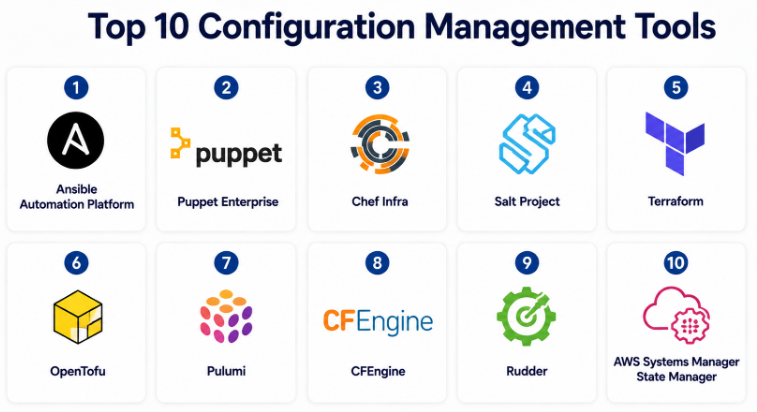
Top 10 Configuration Management Tools
#1 — Ansible Automation Platform
Short description :
Ansible Automation Platform is one of the most widely used automation and configuration management platforms. It is popular because it uses an agentless model and human-readable YAML playbooks. Teams use it for server configuration, application deployment, network automation, cloud tasks, and compliance workflows. It is suitable for small technical teams as well as large enterprises. It is especially strong when teams want quick adoption without installing agents on every managed system.
Key Features
- Agentless automation using SSH or platform APIs
- YAML-based playbooks for repeatable configuration
- Strong Linux, Windows, cloud, and network automation support
- Automation controller for enterprise workflow management
- Role-based access control and job templates
- Large collection ecosystem through Ansible Galaxy
- Useful for configuration, provisioning, orchestration, and remediation
Pros
- Easier to learn than many traditional configuration tools
- Strong community and enterprise ecosystem
- Good fit for both simple tasks and complex automation workflows
Cons
- Large playbook repositories need strong governance
- Complex workflows may require careful role design
- Enterprise features may require paid platform adoption
Platforms / Deployment
Linux / Windows managed nodes / Network devices / Cloud APIs
Cloud / Self-hosted / Hybrid
Security & Compliance
Supports RBAC, automation logs, credentials management, and enterprise security controls in the commercial platform. Specific compliance certifications vary by deployment and product edition.
Integrations & Ecosystem
Ansible has a strong integration ecosystem across cloud, network, security, CI/CD, ITSM, and infrastructure platforms.
- AWS, Azure, Google Cloud
- Kubernetes and OpenShift
- VMware
- ServiceNow
- Git-based workflows
- Network vendors and security platforms
Support & Community
Ansible has strong documentation, a large community, many public roles, and enterprise support through Red Hat. Onboarding is generally easier than agent-heavy tools.
#2 — Puppet Enterprise
Short description :
Puppet Enterprise is a mature configuration management and infrastructure automation platform designed for large, controlled environments. It uses a declarative model where teams define the desired state of infrastructure. Puppet is often used by enterprises that need strong compliance, reporting, policy enforcement, and long-term configuration control. It is a good fit for regulated teams and large server fleets.
Key Features
- Declarative configuration management model
- Strong desired-state enforcement
- Node classification and policy management
- Compliance and reporting capabilities
- Agent-based architecture for continuous enforcement
- Broad operating system support
- Enterprise workflow and access controls
Pros
- Strong for compliance-heavy environments
- Good at enforcing long-term configuration consistency
- Mature enterprise-grade platform
Cons
- Learning curve can be higher for new teams
- Agent management adds operational work
- Smaller teams may find it heavy
Platforms / Deployment
Linux / Windows / Unix-like systems / macOS support varies
Self-hosted / Hybrid
Security & Compliance
Supports RBAC, reporting, audit visibility, and enterprise security controls. Specific certifications should be validated during procurement.
Integrations & Ecosystem
Puppet integrates well with enterprise IT operations, CI/CD, monitoring, and compliance systems.
- Git workflows
- ServiceNow
- CI/CD platforms
- Monitoring tools
- Cloud platforms
- Security and compliance systems
Support & Community
Puppet has mature documentation, enterprise support, and a long-running community. It is especially strong for organizations with formal IT operations and compliance teams.
#3 — Chef Infra
Short description :
Chef Infra is a configuration management tool built around infrastructure as code and policy-based automation. Teams define infrastructure behavior using Chef recipes and cookbooks. It is powerful for teams that prefer code-driven configuration and need repeatable automation across Linux, Windows, and cloud environments. Chef is commonly used in enterprises with strong DevOps and compliance practices.
Key Features
- Cookbooks and recipes for reusable configuration
- Policy-as-code approach
- Strong automation for servers and applications
- Linux, Windows, and cloud support
- Large cookbook ecosystem
- Compliance-related capabilities through Chef ecosystem
- Suitable for complex enterprise environments
Pros
- Powerful for code-first infrastructure teams
- Strong reusable automation patterns
- Good for large and mixed environments
Cons
- Requires learning Chef language and structure
- Can feel complex for beginners
- Governance is important at scale
Platforms / Deployment
Linux / Windows / macOS support varies
Cloud / Self-hosted / Hybrid
Security & Compliance
Supports role-based workflows, policy controls, reporting, and compliance-oriented capabilities depending on product edition. Specific certifications are Not publicly stated here.
Integrations & Ecosystem
Chef works well with DevOps pipelines, cloud platforms, and compliance workflows.
- AWS, Azure, Google Cloud
- CI/CD tools
- Git repositories
- Monitoring platforms
- Compliance tools
- Enterprise IT platforms
Support & Community
Chef has mature documentation, enterprise support options, and an established community. It is best suited for teams comfortable with code-based automation.
#4 — Salt Project
Short description :
Salt Project is an automation, remote execution, and configuration management tool. It is known for event-driven automation and fast execution across large infrastructure. Teams use Salt to manage systems, run commands, apply states, and orchestrate infrastructure changes. It is useful when speed, scale, and remote execution are important.
Key Features
- Event-driven automation model
- Remote execution at scale
- Desired-state configuration management
- Master/minion architecture
- Python-based extensibility
- Strong orchestration capabilities
- Useful for large infrastructure operations
Pros
- Fast remote execution
- Flexible automation model
- Strong for large-scale infrastructure tasks
Cons
- Architecture may require more operational planning
- Smaller teams may find it complex
- Enterprise packaging and support vary by ecosystem
Platforms / Deployment
Linux / Windows / macOS support varies
Self-hosted / Hybrid
Security & Compliance
Security capabilities include controlled communication and access patterns, but specific compliance certifications are Not publicly stated.
Integrations & Ecosystem
Salt can integrate with infrastructure, cloud, monitoring, and custom Python-based workflows.
- Linux and Windows systems
- Cloud environments
- Monitoring tools
- Event-driven automation
- Custom Python modules
- Enterprise automation platforms
Support & Community
Salt has open-source documentation and community support. Enterprise support depends on the selected commercial distribution or vendor ecosystem.
#5 — Terraform
Short description :
Terraform is mainly an Infrastructure as Code tool, but it is often used alongside configuration management workflows. It helps teams define, provision, change, and version infrastructure across cloud and SaaS platforms. Terraform is best for infrastructure provisioning rather than deep operating system configuration. It is widely adopted by cloud, platform, and DevOps teams.
Key Features
- Declarative Infrastructure as Code
- Provider-based multi-cloud support
- Plan and apply workflow
- State management
- Reusable modules
- Strong CI/CD and Git workflow support
- Large ecosystem of providers
Pros
- Strong for cloud infrastructure provisioning
- Excellent ecosystem and team adoption
- Clear planning workflow before changes
Cons
- Not ideal for detailed OS-level configuration alone
- State management needs discipline
- Licensing and edition choices should be reviewed carefully
Platforms / Deployment
Windows / macOS / Linux
Cloud / Self-hosted / Hybrid
Security & Compliance
Supports secure workflows through remote state, access controls, policy features in enterprise editions, and cloud IAM integration. Specific compliance details vary by edition and hosting model.
Integrations & Ecosystem
Terraform has one of the strongest infrastructure ecosystems.
- AWS, Azure, Google Cloud
- Kubernetes
- VMware
- SaaS providers
- CI/CD platforms
- Policy tools
Support & Community
Terraform has extensive documentation, a large community, many modules, and enterprise support through HashiCorp offerings.
#6 — OpenTofu
Short description :
OpenTofu is an open-source Infrastructure as Code tool created as a Terraform-compatible alternative. It is useful for teams that want declarative infrastructure management with an open-source governance model. Like Terraform, it focuses more on provisioning and lifecycle management than deep server configuration. It is a strong option for teams evaluating open IaC strategy.
Key Features
- Open-source IaC workflow
- Terraform-compatible approach
- Provider and module ecosystem
- Declarative configuration files
- Plan and apply model
- Useful for multi-cloud infrastructure
- Community-driven development model
Pros
- Strong option for open-source-focused teams
- Familiar workflow for Terraform users
- Good for cloud and platform engineering
Cons
- Enterprise support ecosystem is still developing compared with older tools
- Not a full replacement for OS configuration tools
- Migration strategy should be tested carefully
Platforms / Deployment
Windows / macOS / Linux
Cloud / Self-hosted / Hybrid
Security & Compliance
Security depends heavily on backend, access controls, secrets handling, and implementation design. Specific certifications are Not publicly stated.
Integrations & Ecosystem
OpenTofu supports provider-based infrastructure workflows and Git-based automation.
- Cloud providers
- Kubernetes
- CI/CD tools
- Git repositories
- Policy tools
- Module registries
Support & Community
OpenTofu has active open-source momentum and community documentation. Enterprise support depends on vendors and implementation partners.
#7 — Pulumi
Short description :
Pulumi is an Infrastructure as Code platform that lets teams define cloud infrastructure using general-purpose programming languages. It is especially useful for developers and platform teams who want to use TypeScript, Python, Go, C#, Java, or YAML instead of a dedicated configuration language. Pulumi is strong for modern cloud engineering and developer-first infrastructure workflows.
Key Features
- Infrastructure as Code using real programming languages
- Supports major cloud providers and Kubernetes
- Automation API for embedded infrastructure workflows
- Stack-based environment management
- Policy and governance options
- Developer-friendly SDK approach
- Useful for platform engineering teams
Pros
- Great fit for software engineering teams
- Strong flexibility through programming languages
- Good for building internal platforms and automation products
Cons
- Requires programming discipline
- May be harder for traditional sysadmin teams
- Language flexibility can create governance challenges
Platforms / Deployment
Windows / macOS / Linux
Cloud / Self-hosted / Hybrid
Security & Compliance
Security features vary by Pulumi product and deployment model. Access control, secrets handling, and policy features are available in platform offerings. Specific certifications are Not publicly stated here.
Integrations & Ecosystem
Pulumi integrates deeply with cloud and developer ecosystems.
- AWS, Azure, Google Cloud
- Kubernetes
- GitHub and GitLab workflows
- CI/CD tools
- Programming language package ecosystems
- Policy and automation APIs
Support & Community
Pulumi has strong documentation, active community resources, and commercial support options. It is particularly strong for developer-led infrastructure teams.
#8 — CFEngine
Short description :
CFEngine is one of the long-standing configuration management tools used for automated system maintenance and policy-based infrastructure control. It is known for lightweight operation, policy enforcement, and suitability for large-scale environments. CFEngine is often considered by teams that value stability, performance, and mature configuration management concepts.
Key Features
- Policy-based configuration management
- Lightweight agent model
- Automated system maintenance
- Desired-state enforcement
- Open-source and commercial options
- Suitable for large distributed systems
- Strong focus on reliability and consistency
Pros
- Mature and stable configuration management approach
- Lightweight compared with some heavier platforms
- Good for controlled infrastructure environments
Cons
- Smaller modern mindshare than Ansible or Terraform
- Learning curve may be higher for new users
- Ecosystem is narrower than larger platforms
Platforms / Deployment
Unix-like systems / Windows support varies
Self-hosted / Hybrid
Security & Compliance
Security and compliance capabilities depend on edition and implementation. Specific certifications are Not publicly stated.
Integrations & Ecosystem
CFEngine can fit into traditional IT operations and automation environments.
- Linux and Unix-like systems
- Windows environments
- Monitoring tools
- Compliance workflows
- Custom automation scripts
- Enterprise infrastructure processes
Support & Community
CFEngine has documentation, open-source community resources, and commercial support options. It is best for teams that value mature infrastructure control.
#9 — Rudder
Short description :
Rudder is an IT automation and compliance platform focused on infrastructure configuration, visibility, and control. It helps teams automate system configuration while also tracking compliance against defined policies. Rudder is a practical choice for teams that need both configuration enforcement and compliance reporting in one platform.
Key Features
- IT automation and configuration management
- Compliance-focused reporting
- Centralized infrastructure visibility
- Policy and rule-based configuration
- Drift detection and correction
- Web-based management interface
- Suitable for hybrid infrastructure
Pros
- Strong compliance and visibility focus
- Useful for teams that want a central control interface
- Good balance between automation and reporting
Cons
- Smaller ecosystem than Ansible or Terraform
- May not suit teams wanting only developer-first IaC
- Advanced use cases may require careful setup
Platforms / Deployment
Linux / Windows support varies
Self-hosted / Hybrid
Security & Compliance
Supports compliance visibility and policy enforcement concepts. Specific certifications are Not publicly stated.
Integrations & Ecosystem
Rudder integrates with IT operations and infrastructure workflows.
- Linux infrastructure
- Windows environments
- Compliance reporting
- Monitoring systems
- APIs
- IT operations workflows
Support & Community
Rudder provides documentation and commercial support options. Community size is smaller than the largest open-source automation tools.
#10 — AWS Systems Manager State Manager
Short description :
AWS Systems Manager State Manager is a cloud-native configuration management capability for AWS and supported hybrid environments. It helps teams define and maintain desired state for managed nodes, such as ensuring software is installed, services are running, or settings remain correct. It is best for AWS-heavy teams that want native governance and operational control.
Key Features
- Desired-state configuration for managed nodes
- Native AWS Systems Manager integration
- Works with EC2 and supported hybrid nodes
- Association-based configuration model
- Useful for patching, software installation, and baseline enforcement
- Integrates with AWS IAM and logging services
- Strong fit for AWS operations teams
Pros
- Strong native fit for AWS environments
- Good for operational governance and drift reduction
- Integrates with AWS security and management services
Cons
- Less suitable for non-AWS-first environments
- Not a universal multi-cloud configuration platform
- Requires AWS Systems Manager setup and permissions design
Platforms / Deployment
AWS-managed nodes / Linux / Windows / supported hybrid nodes
Cloud / Hybrid
Security & Compliance
Uses AWS IAM, logging, encryption, and access controls depending on account configuration. Compliance depends on AWS service controls and customer implementation.
Integrations & Ecosystem
AWS Systems Manager State Manager works best inside the AWS ecosystem.
- AWS IAM
- Amazon EC2
- AWS CloudTrail
- Amazon CloudWatch
- AWS Automation documents
- Hybrid node management
Support & Community
Documentation and support are available through AWS resources and support plans. Community support is strong for AWS operations, but the tool is most useful for AWS-centric teams.
Comparison Table
| Tool Name | Best For | Platform(s) Supported | Deployment | Standout Feature | Public Rating |
|---|---|---|---|---|---|
| Ansible Automation Platform | DevOps, SRE, IT automation teams | Linux, Windows, network devices, cloud APIs | Cloud / Self-hosted / Hybrid | Agentless automation | N/A |
| Puppet Enterprise | Large enterprises and compliance-heavy teams | Linux, Windows, Unix-like systems | Self-hosted / Hybrid | Declarative desired-state enforcement | N/A |
| Chef Infra | Code-first DevOps and enterprise teams | Linux, Windows, macOS support varies | Cloud / Self-hosted / Hybrid | Cookbooks and policy-as-code | N/A |
| Salt Project | Large-scale infrastructure operations | Linux, Windows, macOS support varies | Self-hosted / Hybrid | Event-driven remote execution | N/A |
| Terraform | Cloud infrastructure provisioning | Windows, macOS, Linux | Cloud / Self-hosted / Hybrid | Provider-based IaC ecosystem | N/A |
| OpenTofu | Open-source IaC teams | Windows, macOS, Linux | Cloud / Self-hosted / Hybrid | Terraform-compatible open-source IaC | N/A |
| Pulumi | Developer-first platform teams | Windows, macOS, Linux | Cloud / Self-hosted / Hybrid | IaC using programming languages | N/A |
| CFEngine | Mature system configuration control | Unix-like systems, Windows support varies | Self-hosted / Hybrid | Lightweight policy-based automation | N/A |
| Rudder | Compliance-focused IT operations | Linux, Windows support varies | Self-hosted / Hybrid | Configuration plus compliance visibility | N/A |
| AWS Systems Manager State Manager | AWS-heavy operations teams | AWS managed Linux/Windows nodes | Cloud / Hybrid | Native AWS desired-state management | N/A |
Evaluation & Configuration Management Tools
| Tool Name | Core (25%) | Ease (15%) | Integrations (15%) | Security (10%) | Performance (10%) | Support (10%) | Value (15%) | Weighted Total (0–10) |
|---|---|---|---|---|---|---|---|---|
| Ansible Automation Platform | 9 | 8 | 9 | 8 | 8 | 9 | 8 | 8.50 |
| Puppet Enterprise | 9 | 6 | 8 | 9 | 8 | 8 | 7 | 7.95 |
| Chef Infra | 8 | 6 | 8 | 8 | 8 | 8 | 7 | 7.55 |
| Salt Project | 8 | 6 | 7 | 7 | 9 | 7 | 8 | 7.45 |
| Terraform | 9 | 7 | 10 | 8 | 8 | 9 | 8 | 8.50 |
| OpenTofu | 8 | 7 | 8 | 7 | 8 | 7 | 9 | 7.80 |
| Pulumi | 8 | 7 | 9 | 8 | 8 | 8 | 8 | 8.00 |
| CFEngine | 7 | 5 | 6 | 7 | 9 | 7 | 8 | 6.90 |
| Rudder | 7 | 7 | 6 | 8 | 7 | 7 | 7 | 6.95 |
| AWS Systems Manager State Manager | 8 | 7 | 8 | 9 | 8 | 8 | 8 | 7.95 |
These scores are comparative, not absolute. A higher score does not mean the tool is best for every company. For example, Terraform may score strongly for cloud infrastructure, while Puppet may be better for compliance-heavy server configuration. Always test tools against your own operating model, team skills, integrations, and security requirements.
Which Configuration Management Tools
Solo / Freelancer
Solo users and freelancers usually need simplicity, low setup time, and strong documentation. Ansible is a practical choice because it is easier to start with and does not require agent installation. Terraform or OpenTofu is useful if the work is mainly cloud provisioning. Pulumi is a good fit for freelancers with a software development background.
SMB
Small and mid-sized businesses should focus on tools that reduce manual work without creating too much operational overhead. Ansible, Terraform, OpenTofu, and AWS Systems Manager State Manager are strong options depending on the environment. If the company is AWS-focused, State Manager can be very practical. If the company is multi-cloud, Terraform or OpenTofu may be better.
Mid-Market
Mid-market teams usually need stronger governance, reusable automation, and integration with CI/CD. Ansible Automation Platform, Terraform, Pulumi, Chef, and Puppet are good candidates. The right choice depends on whether the team is more operations-driven, developer-driven, or compliance-driven.
Enterprise
Enterprises should evaluate security, auditability, RBAC, reporting, scale, support, and compliance workflows. Puppet Enterprise, Ansible Automation Platform, Chef Infra, Terraform enterprise offerings, and AWS Systems Manager can all fit enterprise needs. Large organizations may use more than one tool: Terraform for provisioning, Ansible for automation, and Puppet or Chef for configuration enforcement.
Budget vs Premium
Open-source tools can reduce starting cost, but teams must consider internal maintenance, training, and governance. Premium platforms may cost more, but they often add support, RBAC, reporting, dashboards, audit trails, and enterprise integrations. Budget-sensitive teams can start with Ansible, OpenTofu, or community editions, then upgrade only when governance needs increase.
Feature Depth vs Ease of Use
Ansible is easier for many teams to adopt. Puppet and Chef offer deep configuration control but need more learning. Terraform and OpenTofu are excellent for infrastructure provisioning but may need another tool for server-level configuration. Pulumi is powerful for developers but may not suit non-programming teams.
Integrations & Scalability-
If integrations matter most, Terraform, Ansible, and Pulumi are strong options because of their wide ecosystems. For AWS-heavy teams, AWS Systems Manager State Manager offers native integration advantages. For traditional server fleets, Puppet, Chef, Salt, CFEngine, and Rudder remain useful depending on scale and governance needs.
Security & Compliance Needs
Compliance-heavy teams should prioritize audit logs, RBAC, reporting, policy enforcement, secrets handling, and drift visibility. Puppet, Chef, Rudder, Ansible Automation Platform, and AWS Systems Manager are strong candidates. Teams should validate specific certifications and compliance claims directly during vendor review instead of assuming them.
Frequently Asked Questions
1. What are Configuration Management Tools?
Configuration Management Tools help teams define and maintain how systems should be configured. They reduce manual work, prevent drift, and make infrastructure changes repeatable.
2. Are configuration management tools the same as Infrastructure as Code tools?
Not always. Configuration management tools usually manage system state, packages, services, and settings. Infrastructure as Code tools often provision cloud resources. Many teams use both together.
3. Which tool is best for beginners?
Ansible is often easier for beginners because it is agentless and uses readable YAML. Terraform is also beginner-friendly for cloud provisioning, but it does not replace all configuration management needs.
4. Which tool is best for enterprise compliance?
Puppet, Chef, Ansible Automation Platform, Rudder, and AWS Systems Manager are strong options for compliance-focused teams. The best choice depends on reporting needs, audit controls, and infrastructure type.
5. What pricing models are common?
Pricing can include open-source editions, per-node pricing, enterprise subscriptions, cloud service usage, or support-based plans. If pricing is not public, teams should treat it as Varies / N/A.
6. How long does implementation take?
A small setup can start quickly, but enterprise implementation can take longer because teams need standards, repositories, roles, policies, testing, approvals, and security reviews.
7. What are common mistakes when adopting these tools?
Common mistakes include automating without standards, ignoring secrets management, skipping testing, not using version control, and allowing too many custom scripts without review.
8. Are these tools secure?
They can support secure operations when configured correctly. Security depends on RBAC, MFA, encryption, credential handling, audit logs, patching, and least-privilege access design.
9. Can configuration management tools scale?
Yes, but scalability depends on architecture, agent model, network design, state management, execution strategy, and governance. Large teams should test performance before full rollout.
10. Can I switch from one tool to another?
Yes, but switching requires planning. Teams must migrate scripts, policies, playbooks, states, modules, secrets, pipelines, and team knowledge. A phased migration is safer than a sudden cutover.
Conclusion
Configuration Management Tools are no longer only for traditional server administration. They now support modern DevOps, SRE, security, compliance, cloud operations, platform engineering, and hybrid infrastructure management. The best tool depends on your environment, team skills, scale, security needs, and automation maturity. Ansible is strong for broad automation and easier adoption. Puppet and Chef are strong for mature enterprise configuration control. Terraform, OpenTofu, and Pulumi are strong for Infrastructure as Code. Salt, CFEngine, and Rudder serve teams that need scale, policy, and operational control. AWS Systems Manager State Manager is a strong choice for AWS-focused teams.
