Introduction
Password Vault Consumer Apps are tools that help individuals and families store passwords, passkeys, payment details, secure notes, identity records, and login credentials in one encrypted vault. Instead of remembering many passwords or reusing weak ones, users can create strong unique passwords and access them safely across devices.
These apps matter more now because online accounts are increasing, phishing attacks are more common, and passkeys are slowly becoming part of everyday login. A good password vault helps users protect banking, email, shopping, social media, work portals, and family accounts.
Common use cases include:
- Storing personal passwords securely
- Sharing family subscriptions safely
- Creating strong passwords automatically
- Autofilling logins on mobile and desktop
- Managing passkeys and two-factor codes
- Monitoring weak, reused, or exposed passwords
Buyers should evaluate:
- Ease of use
- Cross-device support
- Password sharing
- Passkey support
- MFA options
- Breach alerts
- Offline access
- Family plans
- Export and migration options
- Price and long-term value
Best for: individuals, families, freelancers, students, remote workers, digital creators, and small teams that need simple password protection across devices.
Not ideal for: large enterprises needing advanced identity governance, privileged access management, deep compliance reporting, or full IT-admin lifecycle controls.
Key Trends in Password Vault Consumer Apps
- Passkey adoption is growing as users move toward passwordless sign-ins.
- Biometric unlock is becoming standard across mobile and desktop apps.
- Family sharing is now a major buying factor for consumer password vaults.
- Dark web and breach monitoring are becoming expected premium features.
- Privacy-first positioning is stronger, especially for users worried about data collection.
- Browser extension quality matters more because most users rely on autofill daily.
- Encrypted sharing is improving for families, freelancers, and small groups.
- AI-based security suggestions may grow, but users should prefer transparent and explainable alerts.
- Open-source trust signals are important for technical users.
- Migration tools are improving as users switch away from browsers or older password managers.
How We Selected These Tools
The tools were selected using practical buyer-focused criteria:
- Strong market recognition among consumer password vault users
- Availability across common platforms like web, desktop, iOS, and Android
- Core password vault features such as autofill, password generator, secure notes, and sharing
- Security posture signals such as encryption, MFA, breach alerts, and passkey support
- Usability for non-technical users and families
- Pricing flexibility for free, premium, and family plans
- Ecosystem strength, including browser extensions and mobile apps
- Support quality, documentation, and onboarding experience
- Fit for solo users, families, freelancers, and privacy-focused buyers
- Practical long-term value rather than short-term feature hype
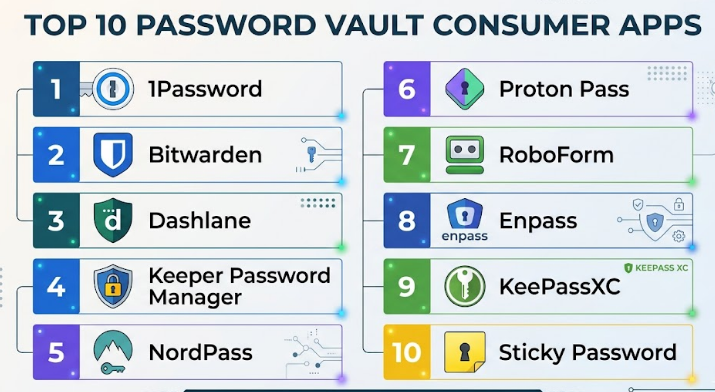
Top 10 Password Vault Consumer Apps
#1 — 1Password
Short description :
1Password is a polished password vault app for individuals, families, freelancers, and professionals who want strong security with a clean user experience. It stores passwords, passkeys, secure notes, payment cards, identities, documents, and other sensitive items. The app is known for its simple interface, strong family sharing, Watchtower alerts, and Travel Mode. It is a strong option for users who want premium usability rather than a basic free vault. It works well for people who use many devices and want reliable autofill.
Key Features
- Password and passkey storage
- Secure notes and private document storage
- Watchtower security alerts
- Travel Mode for hiding selected vaults
- Family sharing and shared vaults
- Browser extensions and mobile autofill
- Biometric unlock support
Pros
- Excellent user experience for families and individuals
- Strong security-focused features without feeling complex
- Good cross-platform support
Cons
- No permanent free plan for most users
- Some advanced features may feel unnecessary for basic users
- Premium pricing can be higher than simple alternatives
Platforms / Deployment
Web / Windows / macOS / Linux / iOS / Android
Cloud
Security & Compliance
Uses encryption, MFA options, biometric unlock, passkey support, and security alerts. SOC 2 and other compliance details for consumer plans are Not publicly stated.
Integrations & Ecosystem
1Password has a strong consumer ecosystem built around browser extensions, mobile apps, desktop apps, and family vault sharing.
- Chrome, Firefox, Edge, Safari browser extensions
- iOS and Android autofill
- Desktop applications
- Passkey-compatible websites
- Family vault sharing
- Import tools from other password managers
Support & Community
1Password offers helpful documentation, onboarding guides, email support options, and an active knowledge base. Community support is also strong compared with many consumer-focused tools.
#2 — Bitwarden
Short description :
Bitwarden is a popular password vault app for users who want strong security, open-source transparency, and affordable pricing. It works well for individuals, families, developers, and privacy-aware users. Bitwarden supports password storage, passkeys, secure sharing, password generation, and cross-device syncing. Its free plan is one of its biggest strengths. It is also a good fit for users who want more control and are comfortable with a slightly more technical interface.
Key Features
- Open-source password manager
- Unlimited password storage
- Password and passkey support
- Secure notes and identity storage
- Password generator
- Vault health reporting on paid plans
- Self-hosting option for advanced users
Pros
- Excellent value for individuals and families
- Strong open-source trust signal
- Broad platform coverage
Cons
- Interface is less polished than some premium competitors
- Some reports and advanced features require paid plans
- Self-hosting is not suitable for casual users
Platforms / Deployment
Web / Windows / macOS / Linux / iOS / Android
Cloud / Self-hosted
Security & Compliance
Supports encryption, MFA, passkeys, biometric unlock, and security reports. Some business compliance details exist for business plans, but consumer-plan compliance details are Not publicly stated.
Integrations & Ecosystem
Bitwarden has a wide ecosystem for browser, desktop, mobile, and technical users.
- Browser extensions
- Mobile autofill
- Desktop apps
- CLI for technical users
- Import and export tools
- Self-hosting ecosystem
Support & Community
Bitwarden has strong documentation, an active community, public discussions, and support resources. Its open-source community is a major advantage for technical users.
#3 — Dashlane
Short description :
Dashlane is a consumer password manager focused on security, simplicity, password health, and identity protection features. It is suitable for individuals and families who want guided password management with alerts and premium protection features. Dashlane is known for its clean web-first experience, autofill quality, and security dashboard. It is a strong fit for users who want a modern interface and do not mind paying for premium features.
Key Features
- Password vault and autofill
- Password health dashboard
- Dark web monitoring
- Secure password sharing
- Passkey support
- Payment and identity storage
- VPN availability on some plans
Pros
- Easy onboarding for non-technical users
- Strong password health visibility
- Good premium security bundle
Cons
- Free plan is limited
- Some features depend on plan level
- Desktop experience has shifted more toward web-based use
Platforms / Deployment
Web / iOS / Android / Browser extensions
Cloud
Security & Compliance
Uses encryption, MFA options, biometric unlock, and breach monitoring. SOC 2, ISO 27001, and HIPAA details for consumer use are Not publicly stated.
Integrations & Ecosystem
Dashlane is built around browser-based password management and mobile support.
- Chrome, Firefox, Edge, Safari extensions
- iOS and Android apps
- Autofill integrations
- Import tools
- Password health reports
- Secure sharing workflows
Support & Community
Dashlane provides documentation, help articles, and customer support based on plan level. Community visibility is moderate compared with open-source tools.
#4 — Keeper Password Manager
Short description :
Keeper is a security-focused password vault app for individuals, families, and professionals who want strong protection and optional add-ons. It supports password storage, secure file storage, dark web monitoring, emergency access, and encrypted sharing. Keeper is often chosen by users who value security controls and structured vault management. It can feel more feature-rich than simple consumer apps, which is useful for power users.
Key Features
- Password and passkey management
- Secure file storage
- Dark web monitoring add-on
- Emergency access
- Password sharing
- Biometric login
- Family vault features
Pros
- Strong security-focused feature set
- Good for families and power users
- Reliable cross-platform support
Cons
- Some useful features are paid add-ons
- Interface can feel more formal than lightweight apps
- Pricing may increase with extras
Platforms / Deployment
Web / Windows / macOS / Linux / iOS / Android
Cloud
Security & Compliance
Supports encryption, MFA, biometric login, and secure sharing. Specific consumer-plan compliance certifications are Not publicly stated.
Integrations & Ecosystem
Keeper has a mature ecosystem for users who need secure storage and sharing.
- Browser extensions
- Mobile apps
- Desktop apps
- Secure file storage
- Family sharing
- Import tools
Support & Community
Keeper offers documentation, support resources, and plan-based support. It is more support-oriented than community-driven.
#5 — NordPass
Short description :
NordPass is a consumer password vault from the Nord security ecosystem. It is built for users who want a clean interface, strong password storage, passkey support, and simple sharing. NordPass works well for individuals and families who already use other Nord products or want an easy password manager with modern security features. It focuses on simplicity, clean design, and broad device support.
Key Features
- Password and passkey storage
- Secure item sharing
- Password health tools
- Data breach scanner
- Secure notes
- Payment card storage
- Biometric unlock
Pros
- Simple and beginner-friendly interface
- Good fit for existing Nord ecosystem users
- Strong everyday autofill experience
Cons
- Some advanced features require premium plans
- Less flexible than open-source alternatives
- Family and business feature depth varies by plan
Platforms / Deployment
Web / Windows / macOS / Linux / iOS / Android
Cloud
Security & Compliance
Uses encryption, MFA options, biometric unlock, and breach monitoring features. Consumer compliance details are Not publicly stated.
Integrations & Ecosystem
NordPass fits well into a consumer security stack.
- Browser extensions
- Mobile apps
- Desktop apps
- Nord ecosystem alignment
- Password import tools
- Autofill integrations
Support & Community
NordPass provides documentation, onboarding guides, and support through Nord’s customer service channels. Community depth is moderate.
#6 — Proton Pass
Short description :
Proton Pass is a privacy-focused password vault app from Proton. It is built for users who care about privacy, email aliases, encrypted storage, and simple password management. It is a good choice for users already using Proton Mail, Proton VPN, or Proton’s privacy ecosystem. Proton Pass is also appealing to people who want a modern password manager with strong privacy positioning and useful free-plan capabilities.
Key Features
- Password and passkey storage
- Email alias support
- Secure notes
- Autofill on major platforms
- Proton ecosystem integration
- Password sharing
- Breach-related security alerts on some plans
Pros
- Strong privacy-first positioning
- Useful for Proton ecosystem users
- Good free and paid plan balance
Cons
- Newer than some long-established competitors
- Advanced ecosystem features may depend on Proton plans
- Enterprise-style controls are limited for consumer users
Platforms / Deployment
Web / Windows / macOS / Linux / iOS / Android
Cloud
Security & Compliance
Uses encryption and supports MFA through Proton account security options. Specific consumer compliance claims are Not publicly stated.
Integrations & Ecosystem
Proton Pass works best when combined with Proton’s broader privacy services.
- Proton Mail ecosystem
- Email alias workflows
- Browser extensions
- Mobile apps
- Desktop apps
- Import tools
Support & Community
Proton provides documentation, support resources, and a strong privacy-focused user community. Support depth may vary by plan.
#7 — RoboForm
Short description :
RoboForm is a long-running password manager known for form filling, password storage, and practical everyday usability. It is suitable for individuals, families, and users who frequently fill online forms. RoboForm works well for people who want a mature password vault without unnecessary complexity. It may not feel as modern as some newer apps, but it remains practical and dependable for routine password management.
Key Features
- Password storage and autofill
- Strong form-filling capabilities
- Password generator
- Secure sharing
- Emergency access
- Bookmarks storage
- Cross-device sync on paid plans
Pros
- Strong form-filling experience
- Mature and dependable tool
- Good for users who prefer simplicity
Cons
- Interface may feel less modern
- Some features require paid plans
- Less privacy-focused branding than Proton or Bitwarden
Platforms / Deployment
Web / Windows / macOS / iOS / Android / Browser extensions
Cloud
Security & Compliance
Supports encryption and MFA options. Specific consumer compliance details are Not publicly stated.
Integrations & Ecosystem
RoboForm’s ecosystem is focused on browser-based convenience and form completion.
- Browser extensions
- Mobile apps
- Desktop apps
- Import tools
- Autofill workflows
- Secure sharing
Support & Community
RoboForm provides help documentation, support resources, and user guides. Community activity is moderate.
#8 — Enpass
Short description :
Enpass is a password vault app for users who want more control over where their vault data is stored. Unlike many cloud-first tools, Enpass allows users to sync through third-party cloud services or keep data more locally controlled. It is a good option for privacy-aware users who do not want every vault feature tied to a vendor cloud. It is best for users who are comfortable managing sync settings carefully.
Key Features
- Local-first password storage approach
- Sync through third-party cloud services
- Password generator
- Secure notes
- Identity and card storage
- Biometric unlock
- Browser extensions
Pros
- More control over vault storage
- Good for privacy-aware users
- Works across major platforms
Cons
- Setup can be less simple for beginners
- Sync depends on user-selected services
- Collaboration features are not as strong as family-first tools
Platforms / Deployment
Web / Windows / macOS / Linux / iOS / Android
Local / Cloud sync through third-party services
Security & Compliance
Uses encryption and supports biometric unlock. Broader compliance details are Not publicly stated.
Integrations & Ecosystem
Enpass is useful for users who want flexible sync choices.
- Browser extensions
- Mobile apps
- Desktop apps
- Third-party cloud sync options
- Import tools
- Local vault workflows
Support & Community
Enpass provides documentation and support resources. Community strength is moderate and more technical than mainstream consumer tools.
#9 — KeePassXC
Short description :
KeePassXC is a free, open-source password vault for users who want local control and do not need a cloud-first password manager. It is best for technical users, privacy-focused individuals, and people who prefer keeping their password database offline or syncing it manually. KeePassXC is powerful but less beginner-friendly than modern consumer apps. It is not the best choice for families that need simple sharing and onboarding.
Key Features
- Open-source local password vault
- Offline database control
- Strong password generator
- Secure notes and custom fields
- Browser integration support
- Cross-platform desktop support
- No required vendor cloud
Pros
- Excellent control and privacy
- No subscription required
- Strong fit for technical users
Cons
- Less convenient for mobile-first users
- Manual sync can be challenging
- Not ideal for family sharing
Platforms / Deployment
Windows / macOS / Linux
Self-managed / Local
Security & Compliance
Uses encrypted local databases. Compliance details are Not publicly stated.
Integrations & Ecosystem
KeePassXC has a technical ecosystem centered on local vault control.
- Browser integration
- Local database files
- Community plugins and related tools
- Manual sync workflows
- Desktop-first usage
- Open-source ecosystem
Support & Community
KeePassXC has community documentation and open-source community support. Formal customer support is Varies / Not publicly stated.
#10 — Sticky Password
Short description :
Sticky Password is a consumer password manager designed for simple password storage, autofill, secure notes, and cross-device access. It is suitable for users who want a traditional password manager with familiar features. Sticky Password also offers local Wi-Fi sync options, which can appeal to users who want less dependence on cloud syncing. It is a practical option, though not as widely discussed as some newer competitors.
Key Features
- Password storage and autofill
- Password generator
- Secure notes
- Form filling
- Local Wi-Fi sync option
- Biometric login support on supported devices
- Browser extension support
Pros
- Simple for everyday password storage
- Local sync option may appeal to privacy-focused users
- Familiar password manager experience
Cons
- Less modern than newer competitors
- Smaller ecosystem and community
- Advanced family and collaboration features are limited
Platforms / Deployment
Windows / macOS / iOS / Android / Browser extensions
Cloud / Local sync
Security & Compliance
Uses encryption and supports MFA-related security options. Compliance details are Not publicly stated.
Integrations & Ecosystem
Sticky Password focuses on core consumer password management.
- Browser extensions
- Mobile apps
- Desktop apps
- Local Wi-Fi sync
- Autofill workflows
- Password import options
Support & Community
Sticky Password provides documentation and support resources. Community strength is smaller than larger competitors.
Comparison Table (Top 10)
| Tool Name | Best For | Platform(s) Supported | Deployment (Cloud/Self-hosted/Hybrid) | Standout Feature | Public Rating |
|---|---|---|---|---|---|
| 1Password | Families and premium users | Web, Windows, macOS, Linux, iOS, Android | Cloud | Travel Mode and Watchtower | N/A |
| Bitwarden | Value-focused and open-source users | Web, Windows, macOS, Linux, iOS, Android | Cloud / Self-hosted | Open-source transparency | N/A |
| Dashlane | Users wanting guided security | Web, iOS, Android, browser extensions | Cloud | Password health and monitoring | N/A |
| Keeper Password Manager | Security-focused families | Web, Windows, macOS, Linux, iOS, Android | Cloud | Secure storage and add-ons | N/A |
| NordPass | Simple everyday use | Web, Windows, macOS, Linux, iOS, Android | Cloud | Clean interface and Nord ecosystem | N/A |
| Proton Pass | Privacy-focused users | Web, Windows, macOS, Linux, iOS, Android | Cloud | Email aliases and privacy ecosystem | N/A |
| RoboForm | Form filling and simple vault use | Web, Windows, macOS, iOS, Android | Cloud | Strong form filling | N/A |
| Enpass | Users wanting storage control | Web, Windows, macOS, Linux, iOS, Android | Local / Third-party sync | Flexible vault storage | N/A |
| KeePassXC | Technical offline users | Windows, macOS, Linux | Self-managed / Local | Open-source offline control | N/A |
| Sticky Password | Traditional password management | Windows, macOS, iOS, Android | Cloud / Local sync | Local Wi-Fi sync option | N/A |
Evaluation & Password Vault Consumer Apps
| Tool Name | Core (25%) | Ease (15%) | Integrations (15%) | Security (10%) | Performance (10%) | Support (10%) | Value (15%) | Weighted Total (0–10) |
|---|---|---|---|---|---|---|---|---|
| 1Password | 9 | 9 | 9 | 9 | 9 | 9 | 8 | 8.80 |
| Bitwarden | 9 | 8 | 8 | 9 | 8 | 8 | 10 | 8.60 |
| Dashlane | 8 | 9 | 8 | 8 | 8 | 8 | 7 | 8.00 |
| Keeper Password Manager | 9 | 8 | 8 | 9 | 8 | 8 | 7 | 8.20 |
| NordPass | 8 | 9 | 8 | 8 | 8 | 8 | 8 | 8.15 |
| Proton Pass | 8 | 8 | 8 | 8 | 8 | 8 | 8 | 8.00 |
| RoboForm | 7 | 8 | 7 | 7 | 8 | 7 | 8 | 7.40 |
| Enpass | 7 | 7 | 7 | 8 | 8 | 7 | 8 | 7.35 |
| KeePassXC | 8 | 6 | 6 | 8 | 8 | 7 | 9 | 7.35 |
| Sticky Password | 7 | 7 | 6 | 7 | 7 | 6 | 7 | 6.75 |
These scores are comparative, not absolute. A higher total does not automatically mean the tool is best for every user. For example, KeePassXC scores lower on ease of use but may be excellent for technical users who want local control. Similarly, 1Password scores strongly for usability and polish, while Bitwarden stands out for value and open-source transparency.
Which Password Vault Consumer Apps
Solo / Freelancer
Solo users and freelancers should focus on ease of use, strong autofill, mobile support, secure notes, and affordable pricing. Bitwarden is a strong value choice, while 1Password is better for users who want a premium experience. Proton Pass is useful for privacy-focused freelancers who also want email aliases.
SMB
Small businesses may begin with consumer or family plans, but they should be careful. If employees need shared access, audit logs, role-based permissions, and offboarding, business password managers may be better. For simple small team use, 1Password, Bitwarden, and Keeper are practical starting points.
Mid-Market
Mid-market users usually need more than a consumer password vault. They should evaluate business plans with admin controls, reporting, SSO, user provisioning, and policy enforcement. 1Password, Bitwarden, and Keeper can be considered, but the business edition should be reviewed instead of only the consumer app.
Enterprise
Enterprises should not rely only on consumer password vault apps. They need identity governance, audit logs, SSO, SCIM, RBAC, compliance reporting, and security operations workflows. Enterprise buyers should evaluate business-grade versions of 1Password, Bitwarden, Keeper, or dedicated privileged access tools.
Budget vs Premium
For budget-conscious users, Bitwarden is one of the strongest options because it offers strong core features at a low cost. KeePassXC is useful for users who want a free local vault. Premium users who value polish, family sharing, and guided security may prefer 1Password, Dashlane, or Keeper.
Feature Depth vs Ease of Use
If ease of use is the top priority, 1Password, Dashlane, and NordPass are strong choices. If feature depth and control matter more, Bitwarden, Keeper, Enpass, and KeePassXC may be better. The right choice depends on whether the user wants simplicity or control.
Integrations & Scalability-
For most consumers, browser extensions, mobile autofill, and desktop apps are enough. Families and freelancers should check sharing, import tools, passkey support, and account recovery options. Users planning to grow into business use should consider 1Password, Bitwarden, or Keeper because they offer broader paths beyond personal use.
Security & Compliance Needs
Consumers should focus on encryption, MFA, passkey support, secure sharing, recovery options, and breach alerts. Businesses should also review audit logs, SSO, RBAC, compliance posture, and admin controls. Do not choose a password vault only because it looks simple; choose it because it matches your risk level.
Frequently Asked Questions (FAQs)
1. What is a password vault consumer app?
A password vault consumer app stores your passwords and sensitive information in an encrypted vault. It helps you create strong passwords, autofill logins, and avoid reusing the same password across many accounts.
2. Are password vault apps safe?
Most reputable password vault apps are designed with encryption and strong account protection. However, safety also depends on your master password, MFA setup, device security, and whether you respond carefully to phishing attempts.
3. Should I use a free or paid password manager?
A free password manager may be enough for basic personal use. Paid plans are better if you need family sharing, advanced security reports, emergency access, encrypted file storage, or stronger support.
4. What is the biggest mistake users make with password vaults?
The biggest mistake is using a weak master password or not enabling MFA. Another common mistake is saving passwords but not replacing old reused passwords with unique strong ones.
5. Can password vault apps store passkeys?
Many modern password vault apps now support passkeys, but the experience varies by app and platform. Buyers should test passkey creation, storage, autofill, and recovery before fully depending on it.
6. Can I share passwords with family members?
Yes, many password vault apps offer family plans and shared vaults. This is useful for streaming accounts, household bills, school portals, travel accounts, and emergency access.
7. How hard is it to switch password managers?
Switching is usually manageable because most tools support import and export. The main work is cleaning old passwords, checking duplicates, testing autofill, and confirming that shared vaults move correctly.
8. Are browser password managers enough?
Browser password managers are convenient, but dedicated vault apps usually offer stronger sharing, cross-browser support, security reports, secure notes, passkeys, and better family features. Basic users may be fine with browser storage, but serious users should compare carefully.
9. What should I check before buying a family plan?
Check the number of users, shared vault options, recovery features, platform support, mobile autofill quality, and price renewal terms. Also confirm whether non-technical family members can use it easily.
10. Do password managers work offline?
Some password managers provide offline access to already-synced vault data. Local-first tools like KeePassXC work offline by design, while cloud-first tools may need internet access for syncing and account changes.
Conclusion
Password Vault Consumer Apps are now essential tools for everyday digital safety. The best app is not the same for everyone. A family may prefer 1Password for simple sharing and strong usability. A budget-focused user may prefer Bitwarden. A privacy-focused user may choose Proton Pass, Enpass, or KeePassXC. A user who wants guided security may prefer Dashlane or Keeper. The right decision depends on your devices, budget, sharing needs, recovery expectations, and security comfort level.
