Introduction
Tax Filing Consumer Apps help individuals prepare, calculate, review, and submit their tax returns through a guided digital experience. These apps are designed for salaried employees, freelancers, self-employed professionals, investors, landlords, gig workers, and families who want a simpler way to manage taxes without starting from blank forms.
These tools matter because tax filing is becoming more digital, data-driven, and mobile-friendly. Users now expect automatic form imports, refund estimates, deduction suggestions, audit guidance, tax document storage, and expert help when needed.
Common use cases include filing annual income tax returns, claiming deductions, reporting investment income, handling freelance income, managing rental income, and reviewing refund or tax due estimates.
Buyers should evaluate:
- Ease of filing
- Supported tax situations
- State and federal filing support
- Document import options
- Deduction and credit guidance
- Expert assistance availability
- Pricing transparency
- Security and privacy controls
- Mobile app quality
- Customer support
Best for: Individual taxpayers, families, freelancers, gig workers, small self-employed users, students, retirees, and investors who want guided tax filing without using complex professional tax software.
Not ideal for: Large businesses, complex corporate tax cases, cross-border tax planning, advanced estate tax matters, or users who require a dedicated CPA for strategic tax planning.
Key Trends in Tax Filing Consumer Apps
- AI-assisted tax guidance is becoming more common for explaining deductions, credits, and filing steps in simple language.
- Document auto-import is improving for W-2s, 1099s, brokerage forms, and prior-year returns.
- Mobile-first filing is growing as more users prefer scanning documents and filing from phones.
- Freelancer and gig worker support is becoming more important due to changing work patterns.
- Real-time refund estimates help users understand tax impact as they enter income and deductions.
- Expert-assisted filing is now a major differentiator, especially for users who want review before submission.
- Security expectations are higher, including MFA, encryption, identity verification, and secure document storage.
- Pricing transparency is a key concern because many users dislike hidden upgrade prompts during filing.
- Audit support and accuracy guarantees are increasingly used to build user trust.
- Integration with finance apps and payroll systems is becoming more useful for faster filing.
How We Selected These Tools
- Chose widely recognized consumer tax filing apps with strong market presence.
- Prioritized tools that support common personal tax situations.
- Considered ease of use for beginners and non-tax professionals.
- Reviewed support for freelancers, investors, homeowners, and families.
- Considered availability of expert help or assisted filing.
- Evaluated document import, refund tracking, and filing workflows.
- Looked at mobile and web experience where applicable.
- Considered security posture signals where publicly known.
- Avoided guessing certifications, ratings, or compliance claims.
- Included a mix of free, budget-friendly, premium, and expert-assisted options.
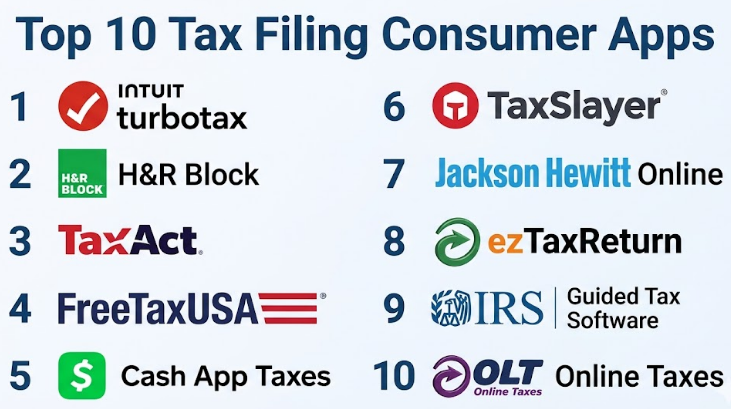
Top 10 Tax Filing Consumer Apps
#1 — TurboTax
Short description :
TurboTax is one of the most recognized consumer tax filing apps for individuals, families, freelancers, investors, and self-employed users. It provides a guided question-and-answer filing experience that helps users complete federal and state tax returns. The platform is useful for people who want step-by-step support instead of manually understanding tax forms. TurboTax also offers expert-assisted options for users who want professional review or live help. It is best suited for users who value ease of use and strong guidance.
Key Features
- Guided tax filing workflow
- W-2 and tax document import
- Deduction and credit suggestions
- Federal and state filing support
- Self-employed tax support
- Expert assistance options
- Refund estimate updates
Pros
- Very beginner-friendly interface.
- Strong guidance for many tax situations.
- Good support options for users who need help.
Cons
- Pricing can increase for complex tax situations.
- Some advanced features are locked behind paid plans.
- Not always the cheapest option.
Platforms / Deployment
Web / iOS / Android
Cloud
Security & Compliance
MFA, encryption, and secure account access are commonly associated with consumer tax platforms. Specific certifications are Not publicly stated.
Integrations & Ecosystem
TurboTax has a strong ecosystem for tax document import and assisted filing.
- W-2 import
- 1099 import
- Brokerage form import
- Prior-year return transfer
- Expert tax support options
Support & Community
TurboTax offers help resources, guided support, and paid expert assistance. Support depth depends on the selected plan.
#2 — H&R Block
Short description :
H&R Block is a consumer tax filing app backed by a well-known tax preparation brand. It supports online filing, assisted filing, and access to tax professionals in many cases. The app is useful for individuals who want a mix of digital filing and human support. It can handle simple returns as well as more detailed situations like self-employment, investments, and family deductions. H&R Block is a strong option for users who want both software and professional tax help.
Key Features
- Online tax filing
- Federal and state return support
- Tax expert assistance
- W-2 and 1099 support
- Deduction guidance
- Refund status tools
- In-person support availability in some cases
Pros
- Strong brand trust in tax preparation.
- Good mix of digital and expert support.
- Suitable for simple and moderately complex returns.
Cons
- Some support options may cost extra.
- Interface may feel less modern than some newer apps.
- Pricing depends on filing complexity.
Platforms / Deployment
Web / iOS / Android
Cloud
Security & Compliance
Encryption and secure login features are expected. Specific certifications are Not publicly stated.
Integrations & Ecosystem
H&R Block supports common tax document workflows and expert support channels.
- W-2 import
- Prior-year return transfer
- Tax document upload
- Expert review options
- State filing support
Support & Community
Support is one of H&R Block’s strengths, especially for users who may want professional help. Support level varies by plan and service model.
#3 — TaxAct
Short description :
TaxAct is a consumer tax filing app focused on guided filing at a more budget-conscious price point. It supports many common personal tax situations, including investments, dependents, homeowners, and self-employed users. The platform is useful for taxpayers who want structured filing without paying premium pricing. TaxAct provides step-by-step guidance and refund calculations as users complete the return. It is a practical option for users who are comfortable doing most of the filing themselves.
Key Features
- Guided federal and state filing
- Support for common tax forms
- Deduction and credit guidance
- Self-employed filing options
- Prior-year return import
- Refund estimate tracking
- Tax document support
Pros
- Often positioned as a cost-conscious option.
- Good for users who want guided filing.
- Supports many standard tax scenarios.
Cons
- Expert assistance may be more limited than premium providers.
- User experience may not feel as polished as top-tier tools.
- Some advanced situations require paid plans.
Platforms / Deployment
Web / iOS / Android
Cloud
Security & Compliance
Secure login and encryption are expected for tax filing platforms. Specific certifications are Not publicly stated.
Integrations & Ecosystem
TaxAct supports common tax filing imports and document workflows.
- W-2 support
- 1099 support
- Prior-year data import
- State filing
- Filing status tools
Support & Community
TaxAct provides help resources and customer support options. Support availability may depend on the selected product tier.
#4 — FreeTaxUSA
Short description :
FreeTaxUSA is a tax filing app known for affordable federal filing and simple online tax preparation. It is useful for individuals who want a lower-cost way to file taxes without unnecessary complexity. The platform supports many common tax situations, including dependents, deductions, investments, and self-employment. It may not feel as visually polished as some premium apps, but it is practical and cost-effective. FreeTaxUSA is best for confident users who want value and straightforward filing.
Key Features
- Federal tax filing support
- State filing support
- Common tax form coverage
- Prior-year tax return access
- Deduction and credit guidance
- Refund tracking
- Self-employed support
Pros
- Strong price-value appeal.
- Good for users comfortable with self-guided filing.
- Supports many common filing needs.
Cons
- Interface may feel basic compared with premium apps.
- Expert help options may be limited.
- Less hand-holding for nervous beginners.
Platforms / Deployment
Web
Cloud
Security & Compliance
Secure filing practices are expected. Specific certifications are Not publicly stated.
Integrations & Ecosystem
FreeTaxUSA focuses on practical tax filing rather than a large ecosystem.
- Tax form entry
- Prior-year return access
- State return filing
- Refund tracking
- Basic support resources
Support & Community
Support options are available, but the experience is more self-service compared with premium assisted filing platforms.
#5 — Cash App Taxes
Short description :
Cash App Taxes is a consumer tax filing tool designed for users who want a simple and low-cost filing experience. It supports many common personal tax situations and is especially attractive to users looking for free filing options. The app is suitable for straightforward returns and some moderately detailed cases. It may not be ideal for very complex tax situations or users who need deep expert support. Cash App Taxes is best for cost-sensitive users who want a clean filing process.
Key Features
- Federal and state filing support
- Free filing model for eligible users
- W-2 and 1099 support
- Deduction and credit guidance
- Refund estimate
- Mobile-friendly experience
- Simple tax filing workflow
Pros
- Good for budget-conscious users.
- Simple and clean filing flow.
- Useful for common tax situations.
Cons
- May not support every complex tax case.
- Expert help may be limited.
- Some users may prefer a dedicated tax brand.
Platforms / Deployment
Web / iOS / Android
Cloud
Security & Compliance
Security controls are expected for financial and tax data. Specific certifications are Not publicly stated.
Integrations & Ecosystem
Cash App Taxes connects naturally with the broader Cash App ecosystem for users already using the platform.
- Tax form entry
- Mobile filing
- Refund tracking
- Basic document support
- Cash App account ecosystem
Support & Community
Support is available through standard help channels. It may not offer the same depth of tax expert assistance as premium tax filing brands.
#6 — TaxSlayer
Short description :
TaxSlayer is a consumer tax filing app designed for individuals who want guided filing with practical pricing options. It supports simple returns, families, students, self-employed users, and investors depending on the plan. The platform is useful for people who want a balance between affordability and feature coverage. TaxSlayer provides step-by-step filing and helps users complete federal and state returns. It is a strong choice for users who do not need heavy hand-holding but still want structured support.
Key Features
- Online federal and state filing
- Guided tax preparation
- Self-employed tax support
- Deduction and credit guidance
- Refund estimate tools
- Prior-year return access
- Support options by plan
Pros
- Practical option for cost-conscious taxpayers.
- Covers many standard tax situations.
- Good balance of simplicity and capability.
Cons
- Interface may not feel as premium as leading competitors.
- Support levels may vary by plan.
- Complex users may need higher-tier options.
Platforms / Deployment
Web / iOS / Android
Cloud
Security & Compliance
Secure account access and encryption are expected. Specific certifications are Not publicly stated.
Integrations & Ecosystem
TaxSlayer supports common tax filing workflows.
- W-2 entry
- 1099 support
- State returns
- Prior-year return access
- Refund status tracking
Support & Community
TaxSlayer provides customer support and help resources. Support depth depends on product tier and user needs.
#7 — Jackson Hewitt Online
Short description :
Jackson Hewitt Online is a consumer tax filing option from a known tax preparation provider. It is useful for users who want online filing supported by a brand with tax preparation experience. The tool supports common tax situations and can be suitable for individuals, families, and self-employed users depending on available features. It offers a practical filing path for users who prefer a familiar tax service provider. It may appeal to users who want digital filing but still value brand-backed support.
Key Features
- Online tax filing
- Federal and state return support
- Common tax form coverage
- Refund estimate
- Deduction and credit support
- Self-employed filing options where available
- Tax preparation brand support
Pros
- Backed by a recognizable tax preparation brand.
- Useful for common personal filing needs.
- Practical for users who want guided filing.
Cons
- Feature depth may vary by filing situation.
- Digital experience may not be as advanced as some competitors.
- Support details can vary.
Platforms / Deployment
Web
Cloud
Security & Compliance
Not publicly stated.
Integrations & Ecosystem
Jackson Hewitt Online focuses on guided consumer tax filing.
- Tax form entry
- Federal filing
- State filing
- Refund tools
- Support resources
Support & Community
Support options are available through the provider’s help channels. Depth of support may vary by filing method.
#8 — ezTaxReturn
Short description :
ezTaxReturn is a consumer tax filing app designed to make simple tax filing easier for individuals. It is especially useful for users with straightforward tax situations who want a guided online experience. The platform helps users complete returns step by step without needing deep tax knowledge. It is not usually the first choice for highly complex investment, business, or multi-state tax needs. ezTaxReturn is best for simple filers who want a focused filing experience.
Key Features
- Guided tax filing
- Federal return support
- State filing support where available
- Simple tax workflow
- Refund estimate
- Common deduction support
- Basic document entry
Pros
- Simple experience for basic filers.
- Useful for users who do not want complex tools.
- Focused tax filing workflow.
Cons
- Not ideal for complex tax situations.
- Advanced features may be limited.
- Less broad ecosystem than larger platforms.
Platforms / Deployment
Web
Cloud
Security & Compliance
Not publicly stated.
Integrations & Ecosystem
ezTaxReturn focuses mainly on direct online tax filing rather than a large integration ecosystem.
- Basic tax form entry
- Federal return workflow
- State return workflow
- Refund calculation
- Filing guidance
Support & Community
Support resources are available, but community and ecosystem strength are smaller than major tax filing platforms.
#9 — IRS Free File Guided Tax Software
Short description :
IRS Free File Guided Tax Software is a free filing option available to eligible taxpayers through participating providers. It is useful for users who meet income and eligibility rules and want no-cost guided filing. This is not one single tax app but a filing program that connects taxpayers with approved guided filing options. It is best for simple to moderate tax situations where eligibility requirements are met. Users should carefully review criteria before choosing this route.
Key Features
- Free guided filing for eligible users
- Federal tax return support
- Participating provider options
- Basic step-by-step filing
- Income-based eligibility
- Common tax form coverage
- Electronic filing support
Pros
- Useful no-cost option for eligible taxpayers.
- Good for simple and moderate filing needs.
- Helps reduce filing cost.
Cons
- Eligibility rules apply.
- Experience depends on participating provider.
- May not suit complex tax situations.
Platforms / Deployment
Web
Cloud
Security & Compliance
Not publicly stated for the program overall; security depends on participating software providers.
Integrations & Ecosystem
The ecosystem depends on the participating filing provider selected by the taxpayer.
- Guided filing providers
- Federal filing support
- Basic tax return workflows
- Eligibility-based access
- Electronic filing
Support & Community
Support depends on the selected provider. Users should review available help options before starting.
#10 — OLT Online Taxes
Short description :
OLT Online Taxes is a consumer tax filing platform that supports online federal and state tax preparation. It is useful for users looking for a practical filing tool with common tax form coverage. The platform can serve individuals, families, and users with standard income or deduction needs. It may not feel as modern as some larger consumer tax apps, but it can be a functional option for online filing. OLT is best for users who want straightforward digital tax preparation.
Key Features
- Federal tax filing
- State tax filing
- Common tax form support
- Deduction and credit guidance
- Refund estimate
- Online filing workflow
- Prior-year filing support where available
Pros
- Practical for online tax filing.
- Supports common personal tax needs.
- May appeal to cost-conscious users.
Cons
- Interface may feel basic.
- Limited brand recognition compared with larger tools.
- Support and feature depth may vary.
Platforms / Deployment
Web
Cloud
Security & Compliance
Not publicly stated.
Integrations & Ecosystem
OLT Online Taxes focuses on direct tax filing rather than broad financial integrations.
- Tax form entry
- Federal filing
- State filing
- Refund calculation
- Basic filing support
Support & Community
Support resources are available, but public community strength is limited compared with larger platforms.
Comparison Table
| Tool Name | Best For | Platform(s) Supported | Deployment | Standout Feature | Public Rating |
|---|---|---|---|---|---|
| TurboTax | Guided filing and expert help | Web, iOS, Android | Cloud | Strong step-by-step filing experience | N/A |
| H&R Block | Digital filing with professional support | Web, iOS, Android | Cloud | Online filing plus tax expert access | N/A |
| TaxAct | Budget-conscious guided filing | Web, iOS, Android | Cloud | Practical filing at competitive pricing | N/A |
| FreeTaxUSA | Affordable self-guided filing | Web | Cloud | Strong value for federal filing | N/A |
| Cash App Taxes | Simple low-cost filing | Web, iOS, Android | Cloud | Free filing for common situations | N/A |
| TaxSlayer | Affordable filing with plan-based support | Web, iOS, Android | Cloud | Good balance of cost and coverage | N/A |
| Jackson Hewitt Online | Brand-backed online filing | Web | Cloud | Filing from a known tax preparation provider | N/A |
| ezTaxReturn | Simple personal tax returns | Web | Cloud | Easy guided workflow for basic filers | N/A |
| IRS Free File Guided Tax Software | Eligible taxpayers seeking free filing | Web | Cloud | Free guided filing for eligible users | N/A |
| OLT Online Taxes | Straightforward online tax filing | Web | Cloud | Practical federal and state filing | N/A |
Evaluation & Tax Filing Consumer Apps
| Tool Name | Core (25%) | Ease (15%) | Integrations (15%) | Security (10%) | Performance (10%) | Support (10%) | Value (15%) | Weighted Total |
|---|---|---|---|---|---|---|---|---|
| TurboTax | 9.0 | 9.0 | 8.5 | 8.5 | 8.5 | 9.0 | 7.5 | 8.55 |
| H&R Block | 8.5 | 8.5 | 8.0 | 8.0 | 8.0 | 9.0 | 7.5 | 8.23 |
| TaxAct | 8.0 | 8.0 | 7.5 | 7.5 | 8.0 | 7.5 | 8.5 | 7.88 |
| FreeTaxUSA | 7.5 | 7.5 | 7.0 | 7.5 | 8.0 | 7.0 | 9.0 | 7.73 |
| Cash App Taxes | 7.0 | 8.5 | 7.0 | 7.5 | 8.0 | 7.0 | 9.0 | 7.75 |
| TaxSlayer | 7.5 | 8.0 | 7.0 | 7.5 | 8.0 | 7.5 | 8.5 | 7.73 |
| Jackson Hewitt Online | 7.0 | 7.5 | 6.5 | 7.0 | 7.5 | 7.5 | 7.5 | 7.15 |
| ezTaxReturn | 6.5 | 8.0 | 6.0 | 7.0 | 7.5 | 6.5 | 7.5 | 6.95 |
| IRS Free File Guided Tax Software | 7.0 | 7.0 | 6.5 | 7.0 | 7.5 | 6.5 | 9.5 | 7.35 |
| OLT Online Taxes | 6.5 | 7.0 | 6.0 | 7.0 | 7.5 | 6.5 | 8.0 | 6.95 |
These scores are comparative and based on practical buyer-fit factors. A higher score does not mean the app is best for everyone. A simple filer may prefer a lower-cost option, while a freelancer may need stronger self-employed support. Users should compare pricing, supported forms, state filing needs, expert help, and data security before choosing.
Which Tax Filing Consumer Apps
Solo / Freelancer
Solo users and freelancers should choose apps that support 1099 income, deductions, expenses, estimated taxes, and self-employment forms. TurboTax, H&R Block, TaxAct, and TaxSlayer are practical options for this group.
Freelancers should not choose only based on price. They should confirm support for business expenses, home office deductions, mileage, payment app income, and retirement contributions.
SMB
Small business owners with simple tax needs may use consumer tax apps if they file personal returns with self-employment income. However, businesses with payroll, inventory, multi-member ownership, or complex deductions may need professional tax software or a tax advisor.
Good options for simple self-employed filing include TurboTax, H&R Block, TaxAct, and TaxSlayer.
Mid-Market
Mid-market businesses are usually not the target customer for consumer tax filing apps. These companies often need accounting systems, payroll tools, business tax preparation, compliance review, and professional support.
Consumer apps may still help owners file personal returns, but business tax filing should usually be handled through professional tax services or business-grade software.
Enterprise
Enterprise tax needs are far beyond consumer tax filing apps. Enterprises require corporate tax compliance, multi-state and international tax handling, audit workflows, indirect tax systems, transfer pricing support, and professional advisory.
Consumer apps are only relevant for employees or executives filing personal returns, not for enterprise tax operations.
Budget vs Premium
Budget users should consider FreeTaxUSA, Cash App Taxes, IRS Free File Guided Tax Software, OLT Online Taxes, or TaxSlayer. These options may work well for simple to moderate returns.
Premium users may prefer TurboTax or H&R Block because they offer stronger guidance, polished workflows, and expert assistance options.
Feature Depth vs Ease of Use
TurboTax and H&R Block are strong for ease of use and guided filing. TaxAct and TaxSlayer offer a good balance of feature depth and cost. FreeTaxUSA and Cash App Taxes are better for users who are comfortable with simpler workflows.
Users with complex tax situations should prioritize feature depth and support over the lowest price.
Integrations & Scalability-
For integrations, users should check W-2 import, 1099 import, brokerage form support, prior-year return transfer, payroll platform support, and document upload. TurboTax, H&R Block, TaxAct, and TaxSlayer are generally stronger for broader filing workflows.
Scalability matters when a user’s tax situation grows from simple salary income to freelance income, investments, rental income, dependents, or multi-state filing.
Security & Compliance Needs
Tax apps handle highly sensitive data, including income, identity, bank details, and social security information. Users should look for MFA, encryption, secure document upload, identity verification, and clear privacy practices.
If compliance details are not publicly stated, users should review vendor documentation carefully before uploading tax records.
Frequently Asked Questions
1. What is a Tax Filing Consumer App?
A Tax Filing Consumer App is a digital tool that helps individuals prepare and file their tax returns. It usually guides users through income, deductions, credits, forms, refund estimates, and electronic submission.
2. Are tax filing apps suitable for beginners?
Yes, many tax filing apps are designed for beginners. They use simple questions instead of showing complex tax forms directly, which makes the filing process easier for non-tax professionals.
3. How much do tax filing apps cost?
Pricing varies by provider and tax situation. Simple returns may be free or low-cost, while self-employed, investment, rental, or expert-assisted filing usually costs more.
4. Can tax filing apps handle freelance income?
Many major tax filing apps support freelance and 1099 income. Users should check whether the app supports business expenses, deductions, estimated taxes, and self-employment tax forms.
5. Are tax filing apps secure?
Most reputable tax filing apps use security controls such as encryption and secure login. Users should still confirm MFA, privacy policies, data handling practices, and account protection features.
6. What is the common mistake users make while filing taxes online?
A common mistake is rushing through the process without reviewing income forms, deductions, credits, and bank details. Users should also avoid choosing a plan before confirming that it supports their tax situation.
7. Can I switch from one tax filing app to another?
Yes, but users should download copies of prior-year returns and tax documents first. Some apps allow prior-year return import, but compatibility may vary.
8. Do these apps support state tax filing?
Most major tax filing apps support state tax filing, but availability and pricing may vary. Users should check state support before starting the return.
9. Do I still need a tax professional?
Simple filers may not need a tax professional. However, users with business income, rental property, large investments, multi-state income, foreign income, or audits may benefit from expert guidance.
10. What are alternatives to consumer tax filing apps?
Alternatives include hiring a CPA, using professional tax preparation services, using paper forms, or using business tax software. The right choice depends on complexity, confidence, budget, and support needs.
Conclusion
Tax Filing Consumer Apps make tax preparation easier by turning a complex filing process into a guided digital workflow. The best app depends on the taxpayer’s income type, deductions, investment activity, state filing needs, comfort level, and budget. A simple salaried user may prefer a free or low-cost option, while a freelancer or investor may need stronger form support and expert help. No single app is perfect for every taxpayer.
