Introduction
Veterinary Practice Management Software helps animal clinics manage daily operations such as appointments, patient records, treatment history, billing, inventory, reminders, lab results, prescriptions, and client communication. In simple words, it works like a central system for running a veterinary clinic smoothly.
It matters because pet owners now expect faster booking, digital communication, reminders, online payments, and better care updates. At the same time, veterinary teams need accurate medical records, controlled inventory, efficient billing, and better visibility into clinic performance.
Common use cases include:
- Appointment scheduling and calendar management
- Patient and client record management
- Vaccination reminders and treatment history
- Billing, invoicing, and payment collection
- Inventory and medicine stock tracking
- Lab, imaging, and diagnostic integrations
- Reporting for revenue, visits, and clinic performance
Best for: Veterinary clinics, animal hospitals, mobile vets, specialty hospitals, multi-location veterinary groups, and pet care teams that want better control over clinical and business workflows.
Not ideal for: Very small clinics that only need basic appointment tracking, individual vets who use simple spreadsheets, or organizations that already use a broader hospital management system with strong veterinary modules.
Key Trends in Veterinary Practice Management Software
- Cloud-based clinic management is becoming more popular because it supports remote access, easier updates, and better multi-location visibility.
- AI-assisted documentation is helping vets reduce time spent on notes, summaries, and routine client communication.
- Better client communication through SMS, email reminders, digital forms, online booking, and automated follow-ups is now a major requirement.
- Inventory automation is becoming more important because veterinary clinics deal with medicines, vaccines, food products, and consumables.
- Integrated payments and billing help clinics collect faster, reduce manual work, and improve revenue tracking.
- Telehealth and virtual consultation support are becoming useful for follow-up care, basic triage, and client convenience.
- Lab and diagnostic integrations are improving workflow speed by reducing manual result entry.
- Multi-location reporting is important for veterinary groups that need centralized performance, staff, and inventory visibility.
- Security expectations are increasing, especially for client data, payment information, and medical records.
- Mobile-friendly workflows are becoming useful for mobile vets, field services, and clinics that need access away from the front desk.
How We Selected These Tools
The tools below were selected based on practical veterinary clinic needs, market recognition, feature depth, and suitability for different practice sizes.
- Strong recognition in the veterinary software category
- Core practice management capabilities
- Appointment, medical record, and billing functionality
- Client communication and reminder tools
- Inventory and product management features
- Lab, diagnostic, and payment integration support
- Fit for solo clinics, small practices, hospitals, and groups
- Cloud and modern deployment availability
- Reporting and analytics capabilities
- Support, onboarding, and training strength
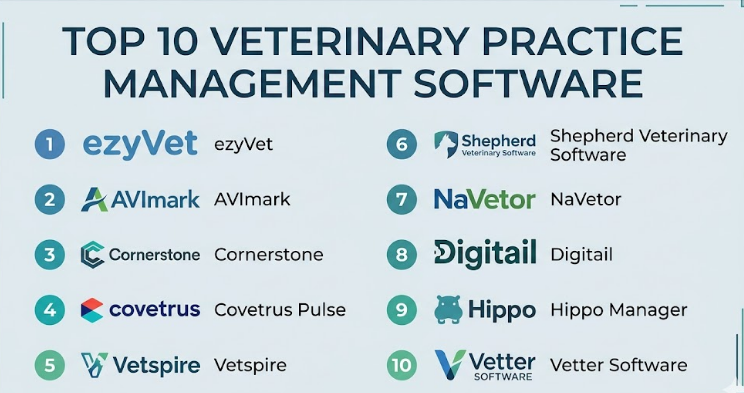
Top 10 Veterinary Practice Management Software
#1 — ezyVet
Short description:
ezyVet is a cloud-based veterinary practice management platform designed for clinics, hospitals, specialty practices, and larger veterinary groups. It helps manage appointments, medical records, billing, communication, inventory, and reporting from one system. The platform is known for flexibility and strong operational coverage. It is often suitable for growing practices that need advanced workflows. Clinics with complex processes may find ezyVet useful because of its configuration depth.
Key Features
- Cloud-based patient and client records
- Appointment scheduling and calendar tools
- Billing, invoicing, and payments
- Inventory and stock management
- Clinical notes and treatment history
- Reporting and analytics
- Lab and diagnostic integrations
Pros
- Strong feature depth for growing and complex clinics
- Cloud access supports multi-location teams
- Good fit for clinics needing customization
Cons
- May require training for new users
- Configuration can take time
- May be more than a small clinic needs
Platforms / Deployment
Web / iOS / Android where applicable
Cloud
Security & Compliance
Not publicly stated for all certification-level details. Buyers should verify MFA, encryption, role-based access, audit logs, backups, and regional data requirements.
Integrations & Ecosystem
ezyVet supports a wide veterinary ecosystem and can connect with common tools used in diagnostics, payments, communication, and reporting.
- Lab systems
- Diagnostic tools
- Payment processors
- Client communication tools
- Reporting tools
- Inventory workflows
Support & Community
Support and onboarding are available, but implementation planning is important. Larger clinics should confirm migration help, training options, and support response expectations.
#2 — AVImark
Short description:
AVImark is a long-established veterinary practice management software used by many animal clinics. It supports patient records, scheduling, billing, reminders, inventory, and medical history. It is often preferred by clinics that want a familiar and proven system. AVImark is useful for practices that need dependable daily workflow management. It may suit clinics that prefer traditional software with strong veterinary-specific functionality.
Key Features
- Appointment scheduling
- Patient and client records
- Billing and invoicing
- Inventory tracking
- Medical history management
- Reminder and recall tools
- Reporting features
Pros
- Established veterinary software with strong market history
- Covers common clinic workflows well
- Familiar to many veterinary professionals
Cons
- May feel less modern than newer cloud-first tools
- Some workflows may require training
- Cloud flexibility may depend on setup
Platforms / Deployment
Windows / Web components where applicable
Cloud / Hybrid / On-premise depending on setup
Security & Compliance
Not publicly stated. Buyers should verify user permissions, backups, encryption, access control, and data protection policies.
Integrations & Ecosystem
AVImark connects with several veterinary business and clinical workflows. Buyers should check exact integration needs before selecting.
- Lab integrations
- Payment workflows
- Reminder tools
- Inventory systems
- Diagnostic workflows
- Reporting tools
Support & Community
AVImark has an established user base and vendor support options. Clinics should confirm onboarding, upgrade support, and training resources.
#3 — Cornerstone
Short description:
Cornerstone is a veterinary practice management platform commonly used by clinics and hospitals that need strong clinical, billing, inventory, and diagnostic workflows. It is closely associated with veterinary diagnostics and practice operations. The software supports medical records, appointments, invoicing, inventory, and reporting. It can be a strong fit for practices that rely heavily on lab and diagnostic workflows. Cornerstone is often considered by established veterinary clinics.
Key Features
- Patient and client management
- Scheduling and appointments
- Medical records and treatment notes
- Billing and invoicing
- Inventory control
- Diagnostic workflow support
- Reporting and practice insights
Pros
- Strong veterinary-specific functionality
- Useful for diagnostic-heavy clinics
- Good fit for established practices
Cons
- May require training for efficient use
- Can feel complex for smaller teams
- Deployment experience may vary by setup
Platforms / Deployment
Windows / Web components where applicable
On-premise / Hybrid / Cloud where applicable
Security & Compliance
Not publicly stated. Buyers should validate encryption, access controls, audit logs, backups, and data security practices.
Integrations & Ecosystem
Cornerstone is often used with diagnostic and lab-related workflows, making it useful for clinics that need connected clinical data.
- Lab systems
- Diagnostic tools
- Payment workflows
- Inventory tools
- Reporting systems
- Client communication tools
Support & Community
Cornerstone has vendor-backed support and training options. Clinics should review implementation support, staff training, and data migration services.
#4 — Covetrus Pulse
Short description:
Covetrus Pulse is a cloud-based veterinary operating system designed to bring practice management, pharmacy, communication, payments, and analytics into a connected environment. It is built for modern veterinary clinics that want cloud access and integrated workflows. The platform can help reduce tool switching and improve visibility. It is suitable for clinics looking for a more connected technology stack. Practices already using Covetrus-related services may find it especially relevant.
Key Features
- Cloud-based practice management
- Scheduling and patient records
- Billing and payment tools
- Client communication features
- Pharmacy workflow support
- Analytics and reporting
- Connected veterinary ecosystem
Pros
- Cloud-first approach supports modern operations
- Useful for connected pharmacy and practice workflows
- Good fit for clinics wanting fewer disconnected systems
Cons
- Feature fit should be validated for each clinic type
- Migration planning may be required
- Pricing and packaging may vary
Platforms / Deployment
Web
Cloud
Security & Compliance
Not publicly stated for all certification-level details. Buyers should confirm MFA, encryption, role permissions, audit logs, backups, and data protection policies.
Integrations & Ecosystem
Covetrus Pulse is designed around a connected veterinary ecosystem, especially for practices that need operational, pharmacy, and communication workflows together.
- Pharmacy tools
- Payment workflows
- Client communication
- Analytics
- Inventory-related workflows
- Practice management tools
Support & Community
Support is available through vendor resources. Clinics should confirm onboarding, migration assistance, training, and support coverage.
#5 — Vetspire
Short description:
Vetspire is a modern cloud-based veterinary practice management platform designed for clinics, hospitals, and multi-location veterinary groups. It focuses on clean workflows, medical records, scheduling, communication, billing, and operational visibility. Vetspire is often considered by practices that want a modern user experience and cloud accessibility. It can be useful for growing veterinary groups that need better standardization. The platform is suitable for teams looking for a more flexible and modern PMS.
Key Features
- Cloud-based veterinary records
- Appointment scheduling
- Medical history and treatment workflows
- Billing and payment support
- Client communication tools
- Reporting and analytics
- Multi-location support
Pros
- Modern cloud-based interface
- Good fit for growing clinics and groups
- Supports standardized workflows
Cons
- Smaller clinics should check cost and fit carefully
- Advanced workflow setup may need planning
- Integration needs should be verified
Platforms / Deployment
Web
Cloud
Security & Compliance
Not publicly stated. Buyers should validate MFA, encryption, RBAC, audit logs, backups, and data security controls.
Integrations & Ecosystem
Vetspire supports modern veterinary workflows and can connect with important operational tools depending on practice requirements.
- Lab workflows
- Payment tools
- Communication systems
- Reporting tools
- Inventory workflows
- Client engagement tools
Support & Community
Vetspire offers vendor support and onboarding resources. Practices should ask about implementation timelines, data migration, and training support.
#6 — Shepherd Veterinary Software
Short description:
Shepherd Veterinary Software is a cloud-based veterinary practice management system built to simplify clinic workflows. It helps teams manage appointments, medical records, invoices, reminders, inventory, and client communication. Shepherd is designed with usability in mind, making it attractive for small and mid-sized practices. It can help clinics reduce manual work and improve daily efficiency. Practices looking for a clean and modern PMS may find Shepherd a good fit.
Key Features
- Cloud-based patient records
- Scheduling and appointment tools
- Medical notes and treatment plans
- Invoicing and payments
- Inventory management
- Client reminders
- Reporting tools
Pros
- Simple and modern user experience
- Good for small and mid-sized clinics
- Cloud access reduces local IT burden
Cons
- May not fit very complex enterprise workflows
- Buyers should validate advanced integrations
- Feature depth may vary by package
Platforms / Deployment
Web
Cloud
Security & Compliance
Not publicly stated. Buyers should verify encryption, access controls, MFA, audit logs, backups, and data protection terms.
Integrations & Ecosystem
Shepherd supports key veterinary clinic workflows and can connect with selected tools based on business needs.
- Payment tools
- Client communication
- Lab workflows
- Inventory management
- Reporting
- Reminder systems
Support & Community
Shepherd provides support and onboarding resources. Clinics should review training materials, migration assistance, and available support tiers.
#7 — NaVetor
Short description:
NaVetor is a cloud-based veterinary practice management software designed for small and growing veterinary practices. It supports appointment scheduling, medical records, invoicing, inventory, reminders, and reporting. The platform is built to reduce server dependency and improve accessibility. NaVetor can be useful for clinics wanting a modern cloud option without unnecessary complexity. It is suitable for teams that want practical PMS features in a web-based setup.
Key Features
- Cloud-based access
- Appointment scheduling
- Patient and client records
- Invoicing and billing
- Inventory tracking
- Reminders and communication
- Reporting tools
Pros
- Cloud-based and accessible from anywhere
- Practical fit for small and mid-sized clinics
- Covers essential veterinary workflows
Cons
- May not be ideal for very large hospital networks
- Advanced customization should be checked
- Integration requirements should be validated
Platforms / Deployment
Web
Cloud
Security & Compliance
Not publicly stated. Buyers should verify data encryption, user roles, access control, audit logs, backups, and vendor security policies.
Integrations & Ecosystem
NaVetor supports common veterinary workflows and selected integrations. Buyers should confirm required tools before final selection.
- Payment workflows
- Client communication
- Lab-related workflows
- Reporting
- Inventory tools
- Reminder systems
Support & Community
Support and learning resources are available. Clinics should check onboarding support, staff training, and data migration assistance.
#8 — Digitail
Short description:
Digitail is a cloud-based veterinary practice management platform focused on modern clinic workflows, client experience, automation, and digital engagement. It supports scheduling, medical records, invoicing, client communication, reminders, and online services. Digitail is useful for clinics that want a modern platform with strong digital interaction between clinic and pet owner. It may suit practices looking for better client engagement and smoother communication. The platform can be a strong choice for digitally focused veterinary teams.
Key Features
- Cloud-based practice management
- Online booking and scheduling
- Patient medical records
- Client communication tools
- Invoicing and payments
- Reminders and follow-ups
- Pet parent app experience where applicable
Pros
- Strong focus on digital client experience
- Modern cloud-based workflows
- Good fit for clinics improving communication
Cons
- Buyers should confirm regional availability and fit
- Advanced hospital workflows should be tested
- Integration needs may vary
Platforms / Deployment
Web / iOS / Android where applicable
Cloud
Security & Compliance
Not publicly stated. Buyers should verify encryption, access controls, MFA, audit logs, backups, and regional data protection requirements.
Integrations & Ecosystem
Digitail focuses on connected client and clinic workflows. It can support digital-first practices that want smoother engagement.
- Online booking
- Client communication
- Payment tools
- Reminder workflows
- Reporting
- Digital client experience tools
Support & Community
Digitail offers support resources and onboarding options. Clinics should ask about migration, training, support availability, and implementation timelines.
#9 — Hippo Manager
Short description:
Hippo Manager is a cloud-based veterinary practice management software designed for animal hospitals and clinics. It includes scheduling, medical records, invoicing, inventory, reminders, reporting, and client communication. The platform aims to provide an accessible cloud PMS for everyday veterinary operations. It can be useful for clinics that want core functionality without maintaining local servers. Hippo Manager is suitable for small to mid-sized veterinary practices.
Key Features
- Cloud-based scheduling
- Medical records management
- Billing and invoicing
- Inventory tracking
- Treatment notes
- Client reminders
- Reporting dashboards
Pros
- Cloud access supports flexible clinic work
- Covers common veterinary workflows
- Good option for clinics wanting simple PMS functionality
Cons
- May not offer the deepest enterprise features
- Buyers should validate integration availability
- Advanced reporting needs should be tested
Platforms / Deployment
Web
Cloud
Security & Compliance
Not publicly stated. Buyers should verify encryption, user permissions, audit logs, backups, MFA options, and data security controls.
Integrations & Ecosystem
Hippo Manager supports essential veterinary operations and selected connected workflows. Clinics should confirm whether current tools are supported.
- Client communication
- Payment workflows
- Lab-related workflows
- Inventory tools
- Reporting
- Reminder systems
Support & Community
Support resources are available. Clinics should confirm onboarding help, response times, training options, and data migration support.
#10 — Vetter Software
Short description:
Vetter Software is a cloud-based veterinary practice management system designed for animal clinics that need scheduling, medical records, billing, reminders, and client communication. It is known for providing practical cloud PMS features for veterinary teams. Vetter can help clinics move away from paper-heavy or server-based processes. It may suit practices looking for accessible, browser-based veterinary software. Clinics should evaluate current product availability, packaging, and fit before selection.
Key Features
- Cloud-based patient records
- Appointment scheduling
- Medical notes and history
- Billing and invoicing
- Reminder tools
- Client communication
- Reporting features
Pros
- Cloud-based access for flexible operations
- Covers important daily clinic workflows
- Useful for small and mid-sized practices
Cons
- Current packaging and availability should be confirmed
- May not fit highly complex enterprise needs
- Buyers should verify integration support
Platforms / Deployment
Web
Cloud
Security & Compliance
Not publicly stated. Buyers should verify encryption, MFA, user permissions, audit logs, backups, and data protection controls.
Integrations & Ecosystem
Vetter Software supports basic and common veterinary clinic workflows. Buyers should validate exact integrations before final purchase.
- Client communication
- Billing workflows
- Reminder tools
- Reporting
- Patient records
- Scheduling workflows
Support & Community
Support availability may vary. Clinics should confirm onboarding, migration, training resources, and support terms before selection.
Comparison Table
| Tool Name | Best For | Platform(s) Supported | Deployment | Standout Feature | Public Rating |
|---|---|---|---|---|---|
| ezyVet | Growing clinics and specialty hospitals | Web / iOS / Android where applicable | Cloud | Flexible cloud platform with deep workflow coverage | N/A |
| AVImark | Established veterinary clinics | Windows / Web components where applicable | Cloud / Hybrid / On-premise | Long-standing veterinary PMS functionality | N/A |
| Cornerstone | Diagnostic-heavy veterinary clinics | Windows / Web components where applicable | On-premise / Hybrid / Cloud where applicable | Strong diagnostic and clinical workflow support | N/A |
| Covetrus Pulse | Clinics wanting connected operations | Web | Cloud | Connected practice, pharmacy, and business workflows | N/A |
| Vetspire | Modern clinics and multi-location groups | Web | Cloud | Modern cloud-based veterinary workflow management | N/A |
| Shepherd Veterinary Software | Small and mid-sized clinics | Web | Cloud | Clean and simple cloud PMS experience | N/A |
| NaVetor | Small and growing practices | Web | Cloud | Practical cloud-based practice management | N/A |
| Digitail | Digital-first veterinary clinics | Web / iOS / Android where applicable | Cloud | Strong client engagement and online workflows | N/A |
| Hippo Manager | Small to mid-sized animal hospitals | Web | Cloud | Accessible cloud PMS for daily operations | N/A |
| Vetter Software | Clinics needing basic cloud PMS workflows | Web | Cloud | Browser-based veterinary practice management | N/A |
Evaluation & Veterinary Practice Management Software
| Tool Name | Core (25%) | Ease (15%) | Integrations (15%) | Security (10%) | Performance (10%) | Support (10%) | Value (15%) | Weighted Total (0–10) |
|---|---|---|---|---|---|---|---|---|
| ezyVet | 9 | 7 | 9 | 7 | 8 | 8 | 7 | 8.00 |
| AVImark | 8 | 7 | 8 | 7 | 8 | 8 | 7 | 7.60 |
| Cornerstone | 8 | 7 | 8 | 7 | 8 | 8 | 7 | 7.60 |
| Covetrus Pulse | 8 | 8 | 8 | 7 | 8 | 7 | 7 | 7.70 |
| Vetspire | 8 | 8 | 8 | 7 | 8 | 7 | 7 | 7.70 |
| Shepherd Veterinary Software | 7 | 8 | 7 | 7 | 8 | 7 | 8 | 7.35 |
| NaVetor | 7 | 8 | 7 | 7 | 7 | 7 | 8 | 7.25 |
| Digitail | 7 | 8 | 7 | 7 | 7 | 7 | 8 | 7.25 |
| Hippo Manager | 7 | 8 | 7 | 7 | 7 | 7 | 7 | 7.10 |
| Vetter Software | 7 | 7 | 6 | 7 | 7 | 6 | 7 | 6.75 |
These scores are comparative, not official ratings. A lower-scoring tool may still be the best fit for a specific clinic if it matches budget, workflow, region, and team comfort. Buyers should treat the table as a shortlist guide, then run demos and pilots using real clinic workflows.
Which Veterinary Practice Management Software Should You Choose?
Solo / Freelancer
Solo veterinarians and small mobile practices usually need simple scheduling, records, invoicing, reminders, and basic reporting. They should avoid overly complex systems unless growth is planned.
Good options:
- Shepherd Veterinary Software
- NaVetor
- Digitail
- Hippo Manager
- Vetter Software
The priority should be ease of use, mobile access, low setup effort, and simple billing.
SMB
Small and mid-sized veterinary clinics need stronger workflows for appointments, medical history, billing, inventory, reminders, and staff coordination.
Good options:
- ezyVet
- AVImark
- Cornerstone
- Shepherd Veterinary Software
- Covetrus Pulse
- Vetspire
These clinics should focus on daily workflow speed, client communication, and inventory control.
Mid-Market
Mid-market veterinary practices need better reporting, role permissions, multi-vet scheduling, inventory control, payment tracking, and integrations.
Good options:
- ezyVet
- Vetspire
- Covetrus Pulse
- Cornerstone
- AVImark
The key decision factors should be scalability, implementation quality, support, and integration fit.
Enterprise
Large veterinary groups and animal hospital networks need centralized reporting, multi-location controls, advanced permissions, strong integrations, and structured onboarding.
Good options:
- ezyVet
- Vetspire
- Covetrus Pulse
- Cornerstone
Enterprise buyers should carefully validate data migration, security controls, analytics, uptime expectations, and support terms.
Budget vs Premium
Budget-focused clinics should look for tools that cover essential workflows without forcing unnecessary add-ons. However, the cheapest platform is not always the best value.
- Budget-friendly direction: NaVetor, Hippo Manager, Vetter Software
- Balanced direction: Shepherd Veterinary Software, Digitail, AVImark
- Premium / advanced direction: ezyVet, Vetspire, Covetrus Pulse, Cornerstone
Always calculate total cost, including onboarding, migration, training, support, payment fees, and add-on modules.
Feature Depth vs Ease of Use
Feature-rich systems are useful for complex practices, but they may require more training. Simple systems are easier to adopt but may not support every advanced workflow.
- Choose ezyVet for deeper customization and complex operations.
- Choose Shepherd Veterinary Software or NaVetor for simpler cloud workflows.
- Choose Vetspire for modern cloud-based group practice management.
- Choose Cornerstone or AVImark for established veterinary workflows.
- Choose Digitail when client engagement is a top priority.
Integrations & Scalability
Veterinary clinics should check integrations before buying. Important integrations may include labs, diagnostics, payments, reminders, accounting, pharmacy, imaging, and client communication.
Strong integration needs may point toward:
- ezyVet
- Cornerstone
- Covetrus Pulse
- Vetspire
- AVImark
Before final selection, ask the vendor to show real integration workflows, not only mention them in sales material.
Security & Compliance Needs
Veterinary clinics handle client information, payment data, pet medical history, prescriptions, and business records. Security should be reviewed carefully.
Buyers should check:
- MFA availability
- Role-based permissions
- Audit logs
- Data encryption
- Backup and disaster recovery
- User access controls
- Payment security
- Data export options
- Regional data protection requirements
If security details are unclear, ask for written documentation before purchasing.
Frequently Asked Questions
1. What is Veterinary Practice Management Software?
Veterinary Practice Management Software helps clinics manage appointments, patient records, billing, inventory, reminders, and client communication. It keeps daily clinical and business tasks organized in one system.
2. How much does Veterinary Practice Management Software cost?
Pricing varies by vendor, users, locations, modules, support, and deployment model. Some tools charge monthly subscriptions, while others may include onboarding, migration, training, or add-on fees.
3. Is cloud-based veterinary software better?
Cloud-based software is useful for remote access, easier updates, and multi-location management. However, some clinics may still prefer on-premise or hybrid systems due to local workflow or infrastructure needs.
4. What features should a veterinary clinic look for?
Important features include scheduling, patient records, medical notes, invoicing, inventory, reminders, lab integrations, reporting, payments, and client communication. The best mix depends on clinic size and workflow complexity.
5. Can veterinary software manage inventory?
Yes, many platforms include inventory tools for medicines, vaccines, food products, consumables, and supplies. Clinics should test whether the inventory module supports reorder alerts, stock movement, pricing, and reporting.
6. Does veterinary PMS support lab integrations?
Many tools support lab and diagnostic integrations, but the depth varies. Clinics should confirm whether their preferred lab, imaging, or diagnostic provider is supported before purchase.
7. How long does implementation take?
Implementation time depends on clinic size, data migration, integrations, staff training, and workflow complexity. A small clinic may move faster, while multi-location groups need more planning.
8. What are common mistakes when choosing veterinary software?
Common mistakes include choosing only by price, skipping staff demos, ignoring data migration, not testing inventory workflows, and failing to validate integrations. Clinics should run real workflow tests before deciding.
9. Can a clinic switch from one veterinary software to another?
Yes, but switching requires planning. Clinics must review patient history, client records, invoices, reminders, inventory, attachments, and historical reports before migration.
10. What is the best veterinary software for small clinics?
There is no single best option. Shepherd Veterinary Software, NaVetor, Digitail, Hippo Manager, and Vetter Software can be good options depending on budget, features, and ease of use.
Conclusion
Veterinary Practice Management Software has become an important system for clinics that want smoother operations, better client communication, accurate medical records, stronger billing control, and improved inventory visibility. The best software depends on clinic size, workflow complexity, budget, deployment preference, and integration needs. A solo vet may need a simple cloud tool, while a large animal hospital may need advanced reporting, role permissions, diagnostics, and multi-location management.
