Introduction
Email Encryption Tools help businesses protect sensitive email messages and attachments so that only the intended recipients can read them. In simple words, these tools secure emails during sending, receiving, and storage. They are used to protect confidential business data, financial records, healthcare information, legal documents, customer details, employee records, and internal communication.
Email is still one of the most common channels for business communication, but it is also one of the easiest ways for sensitive data to leak. A single wrong recipient, unsecured attachment, or unencrypted message can create serious security and compliance problems. This is why email encryption is important for IT teams, security leaders, legal departments, healthcare providers, financial companies, SaaS businesses, and enterprises.
Real-world use cases include sending patient records securely, protecting invoices and contracts, sharing employee documents, securing customer support communication, and preventing accidental exposure of confidential data.
Buyers should evaluate encryption strength, ease of use, recipient experience, policy automation, DLP support, audit logs, admin controls, integrations, compliance support, scalability, and pricing flexibility.
Best for: IT teams, security teams, compliance teams, healthcare organizations, financial services, legal firms, SaaS companies, government contractors, and enterprises handling sensitive communication.
Not ideal for: very small teams that only send low-risk internal emails, personal users who only need basic private email, or businesses that already use a secure communication portal instead of email for sensitive data exchange.
Key Trends in Email Encryption Tools
- Policy-based encryption is becoming more important because businesses do not want users to manually decide when to encrypt every message.
- Email encryption is now connected with DLP workflows, helping companies detect sensitive data and automatically apply protection.
- Recipient experience is a major buying factor because difficult portals and passwords often reduce adoption.
- Integration with Microsoft 365 and Google Workspace is now expected, especially for modern business teams.
- Zero-trust security models are influencing email protection, with stronger access control, identity verification, and message revocation.
- Healthcare and financial industries are demanding stronger audit trails for compliance and proof of secure communication.
- AI-assisted threat and data detection is growing, especially in platforms that combine encryption with email security and data loss prevention.
- Cloud-based encryption platforms are becoming more common because they are easier to deploy and manage across remote teams.
- End-to-end encryption is gaining attention, but many businesses still prefer policy-based encryption that balances usability and governance.
- Secure attachment handling is becoming a core requirement, especially for contracts, medical files, invoices, and identity documents.
How We Selected These Tools
The following tools were selected based on practical business value, market visibility, and suitability for different types of organizations.
- Market adoption and recognition among security, compliance, healthcare, and enterprise email users.
- Feature completeness, including encryption, policy controls, secure attachments, recipient authentication, and audit trails.
- Ease of deployment across Microsoft 365, Google Workspace, and existing email environments.
- Security posture, including encryption methods, access controls, message tracking, and admin governance.
- Compliance support for industries such as healthcare, finance, legal, and regulated businesses.
- Integration ecosystem, including APIs, email platforms, DLP tools, SIEM tools, and identity systems.
- Customer fit across segments, including small businesses, healthcare teams, mid-market firms, and enterprises.
- Recipient experience, because secure communication should not become difficult for customers or partners.
- Scalability, especially for organizations with many users, departments, regions, or compliance workflows.
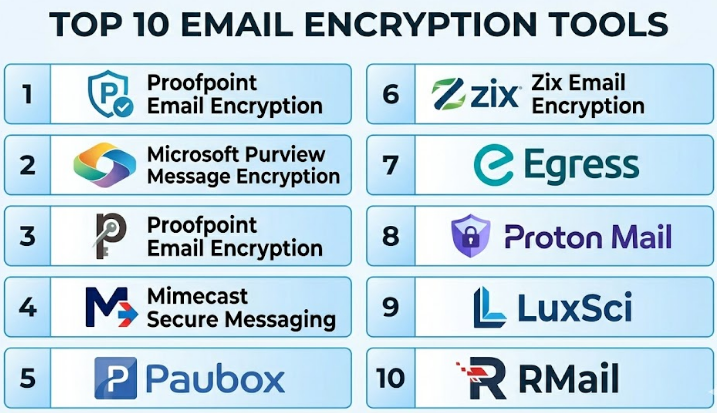
Top 10 Email Encryption Tools
#1 — Virtru
Short description :
Virtru is an email encryption and data protection platform designed for businesses that use Google Workspace and Microsoft Outlook. It helps users protect sensitive messages and attachments without making the email experience too complex. Virtru is useful for teams that need strong security but still want employees to work inside familiar email tools. It supports access control, message revocation, forwarding control, and secure file sharing. It is a strong option for healthcare, education, legal, government, and business teams that regularly exchange confidential data.
Key Features
- Email encryption for Google Workspace and Microsoft Outlook.
- Secure attachment protection.
- Access control for recipients.
- Message expiration and revocation.
- Forwarding control and watermarking options.
- Admin policy management.
- Audit and visibility features.
Pros
- Easy for users because it works inside familiar email workflows.
- Good balance between security and usability.
- Strong fit for teams sending sensitive attachments.
Cons
- May require user training for policy and access controls.
- Best value is usually seen in business environments, not casual personal use.
- Advanced governance needs proper admin configuration.
Platforms / Deployment
Web / Windows / macOS
Cloud
Security & Compliance
Supports encryption, access control, audit visibility, and data protection workflows. Commonly used in compliance-sensitive environments. Specific certification details should be validated directly with the vendor.
Integrations & Ecosystem
Virtru works well with common business email platforms and secure collaboration workflows. It is especially useful for organizations that want encryption inside existing productivity tools.
- Google Workspace.
- Microsoft Outlook.
- Gmail.
- Secure file sharing workflows.
- Admin policy controls.
- API-based data protection use cases.
Support & Community
Virtru provides business-focused documentation, onboarding resources, and support options. It is widely recognized in email encryption and secure collaboration discussions.
#2 — Microsoft Purview Message Encryption
Short description :
Microsoft Purview Message Encryption is a strong choice for organizations already using Microsoft 365. It helps businesses send encrypted emails from Outlook and Microsoft 365 environments while applying policies, permissions, and access controls. It is commonly used by enterprises that want encryption connected with Microsoft security, compliance, and information protection workflows. It is suitable for teams that already rely on Microsoft identity, admin controls, and compliance tools. For Microsoft-first organizations, it can reduce the need for a separate encryption platform.
Key Features
- Email encryption inside Microsoft 365.
- Message protection and permission controls.
- Integration with Microsoft Purview compliance tools.
- Support for policy-based encryption.
- Recipient access management.
- Admin configuration through Microsoft ecosystem.
- Works with Microsoft identity and security controls.
Pros
- Strong fit for Microsoft 365 organizations.
- Reduces tool sprawl for Microsoft-first teams.
- Good connection with broader compliance and data protection features.
Cons
- Less suitable for organizations not using Microsoft 365.
- Setup can be complex for non-technical admins.
- Recipient experience depends on configuration and recipient environment.
Platforms / Deployment
Web / Windows / macOS / iOS / Android
Cloud
Security & Compliance
Supports encryption, identity-based access, admin controls, and Microsoft compliance workflows. Compliance capabilities depend on Microsoft 365 licensing and configuration.
Integrations & Ecosystem
Microsoft Purview Message Encryption works best inside the Microsoft ecosystem. It is useful when email protection must align with identity, compliance, and data governance.
- Microsoft 365.
- Outlook.
- Exchange Online.
- Microsoft Entra ID.
- Microsoft Purview compliance tools.
- Microsoft information protection policies.
Support & Community
Microsoft provides extensive documentation, enterprise support plans, partner support, and a large administrator community. Support quality depends on licensing and internal Microsoft expertise.
#3 — Proofpoint Email Encryption
Short description :
Proofpoint Email Encryption is part of Proofpoint’s broader email security and information protection ecosystem. It is designed for organizations that need secure outbound email, policy-based encryption, DLP alignment, and enterprise-level reporting. Proofpoint is a good fit for large companies, regulated industries, and security teams that want encryption to work with threat protection and data loss prevention. It helps reduce manual decisions by applying encryption based on content, policy, and risk signals. It is especially useful for organizations with mature security operations.
Key Features
- Policy-based email encryption.
- Secure message delivery.
- Integration with DLP workflows.
- Admin reporting and audit visibility.
- Enterprise email security alignment.
- Recipient authentication options.
- Centralized policy management.
Pros
- Strong fit for enterprise security teams.
- Works well with broader email protection strategies.
- Good for automated encryption based on sensitive data rules.
Cons
- May be more advanced than smaller teams need.
- Implementation requires security and compliance planning.
- Pricing and packaging can vary by enterprise needs.
Platforms / Deployment
Web / Cloud
Security & Compliance
Supports enterprise email security, encryption, DLP-aligned policies, and audit workflows. Specific certifications and compliance details should be verified with the vendor.
Integrations & Ecosystem
Proofpoint fits into larger enterprise security environments. It is valuable when encryption must be part of email threat defense and data protection.
- Microsoft 365.
- Google Workspace.
- DLP workflows.
- SIEM and security operations tools.
- Identity and access systems.
- Enterprise policy engines.
Support & Community
Proofpoint provides enterprise documentation, implementation support, and professional services. It is commonly used by security teams and large organizations with formal governance needs.
#4 — Mimecast Secure Messaging
Short description :
Mimecast Secure Messaging is an email encryption solution available as part of Mimecast’s broader email security platform. It helps organizations send sensitive messages and attachments through secure delivery workflows without requiring complex recipient-side setup. Mimecast is suitable for businesses that want encryption alongside email security, continuity, archiving, and threat protection. It is commonly considered by enterprises and mid-market companies that need centralized email risk management. It is a practical choice when encryption is only one part of a larger email security strategy.
Key Features
- Secure message delivery.
- Email encryption for sensitive communication.
- Attachment protection.
- Policy-based controls.
- Integration with broader email security features.
- User and admin visibility.
- Cloud-based secure messaging workflow.
Pros
- Strong fit for organizations already using Mimecast.
- Combines encryption with broader email security.
- Useful for protecting attachments and sensitive conversations.
Cons
- Best value is usually within the full Mimecast ecosystem.
- May be more than needed for simple encryption use cases.
- Configuration quality strongly affects user experience.
Platforms / Deployment
Web / Cloud
Security & Compliance
Supports secure messaging, policy controls, and enterprise email security workflows. Specific compliance certifications should be validated directly with the vendor.
Integrations & Ecosystem
Mimecast works well in enterprise email security environments and can support secure communication across business workflows.
- Microsoft 365.
- Google Workspace.
- Email security gateways.
- Archiving workflows.
- DLP-related policies.
- Enterprise admin controls.
Support & Community
Mimecast provides enterprise documentation, onboarding, technical support, and partner ecosystem support. It is well known among IT and email security teams.
#5 — Paubox
Short description :
Paubox is a secure email platform with a strong focus on healthcare communication and HIPAA-related workflows. It is designed to let healthcare teams send encrypted emails without forcing recipients through complicated portals. Paubox is especially useful for clinics, medical groups, healthcare SaaS companies, and organizations that need secure patient communication. Its main value is ease of use: users can send secure emails in a familiar way while encryption happens automatically. It is a strong option for healthcare-focused businesses.
Key Features
- Automatic email encryption.
- HIPAA-focused secure email workflows.
- Secure inbound and outbound communication.
- No complex recipient portal for many workflows.
- Email security and filtering options.
- Secure forms and email API options.
- Healthcare-focused product design.
Pros
- Very practical for healthcare communication.
- Reduces user mistakes through automatic encryption.
- Good recipient experience compared with many portal-based tools.
Cons
- Best fit is healthcare and HIPAA-focused use cases.
- May not be the broadest enterprise security platform.
- Advanced needs may require reviewing available product modules.
Platforms / Deployment
Web / Cloud
Security & Compliance
Designed for HIPAA-focused secure communication workflows. Supports encrypted email and healthcare communication needs. Specific legal and compliance suitability should be validated by the buyer.
Integrations & Ecosystem
Paubox supports secure email communication and healthcare-related workflows. It can be useful for teams that want secure messaging without changing user behavior too much.
- Microsoft 365.
- Google Workspace.
- Secure email API.
- Healthcare communication workflows.
- Secure forms.
- Inbound email security options.
Support & Community
Paubox provides healthcare-focused documentation, onboarding, and support. It has strong visibility in secure healthcare communication use cases.
#6 — Zix Email Encryption
Short description :
Zix Email Encryption is a long-standing secure email solution used by businesses that need encrypted communication, policy enforcement, and compliance-friendly message delivery. It is often considered by healthcare, finance, legal, and enterprise organizations. Zix focuses on making secure email easier for both senders and recipients while supporting administrative controls. It can help organizations reduce exposure when employees send sensitive data outside the company. It is useful for teams that need a proven email encryption workflow.
Key Features
- Email encryption and secure delivery.
- Policy-based message protection.
- Recipient portal options.
- Compliance-focused workflows.
- Message tracking and reporting.
- Admin policy management.
- Support for regulated industries.
Pros
- Established name in business email encryption.
- Useful for regulated communication workflows.
- Good for organizations needing policy-based protection.
Cons
- Recipient experience may depend on portal and configuration.
- May feel traditional compared with newer user-friendly tools.
- Best results require careful policy tuning.
Platforms / Deployment
Web / Cloud
Security & Compliance
Supports secure email, policy controls, and compliance-focused communication. Specific certifications and compliance claims should be verified with the vendor.
Integrations & Ecosystem
Zix is commonly used in business email environments where secure delivery and compliance workflows are important.
- Microsoft 365.
- Google Workspace.
- Secure email gateways.
- Compliance workflows.
- Admin reporting tools.
- Enterprise email systems.
Support & Community
Zix provides business support and implementation resources. It is well known in secure email and regulated-industry communication.
#7 — Egress
Short description :
Egress is a human-layer security platform that includes secure email, encryption, data protection, and risk-based controls. It is designed to help organizations prevent accidental data loss and secure sensitive messages. Egress is useful for businesses that want more than basic encryption because it focuses on user behavior, risk detection, and secure collaboration. It can help reduce mistakes such as sending emails to the wrong recipient or sharing sensitive attachments incorrectly. It is suitable for enterprise and compliance-sensitive teams.
Key Features
- Secure email encryption.
- Risk-based protection.
- Wrong-recipient prevention.
- Secure file sharing.
- Policy controls and audit trails.
- Human error reduction features.
- Data loss prevention alignment.
Pros
- Strong focus on preventing human mistakes.
- Useful for sensitive outbound communication.
- Combines encryption with broader data protection.
Cons
- May require change management for users.
- More suitable for larger or risk-sensitive organizations.
- Feature depth may require proper configuration.
Platforms / Deployment
Web / Cloud
Security & Compliance
Supports secure email, encryption, access controls, and audit-focused workflows. Compliance suitability depends on configuration and business requirements.
Integrations & Ecosystem
Egress fits into environments where email security, human risk, and secure data sharing are important.
- Microsoft 365.
- Outlook workflows.
- Secure file sharing.
- DLP-related processes.
- Admin dashboards.
- Enterprise security workflows.
Support & Community
Egress provides business support, implementation guidance, and documentation. It is commonly used by security-conscious organizations that want to reduce human-layer risks.
#8 — Proton Mail
Short description :
Proton Mail is a secure email service known for privacy-focused email and end-to-end encryption between Proton users. It is suitable for individuals, small teams, journalists, privacy-conscious users, and businesses that want a secure email provider instead of only adding encryption to an existing inbox. Proton Mail provides encrypted email, secure storage, and privacy-focused account options. It is different from enterprise gateway encryption tools because it works as a secure email service. It is useful when privacy-first email hosting is the main requirement.
Key Features
- End-to-end encryption between Proton users.
- Secure email hosting.
- Encrypted mailbox storage.
- Custom domain support for business plans.
- Mobile and web apps.
- Password-protected messages for external recipients.
- Privacy-focused email experience.
Pros
- Strong privacy-first positioning.
- Easy for individuals and small teams to start.
- Good secure email service for privacy-conscious users.
Cons
- Not always ideal for large enterprise DLP workflows.
- External recipient experience may differ from internal Proton messages.
- Businesses already standardized on Microsoft or Google may need migration planning.
Platforms / Deployment
Web / Windows / macOS / iOS / Android
Cloud
Security & Compliance
Offers encrypted email and privacy-focused account protection. Compliance suitability for regulated businesses should be evaluated based on plan, configuration, and legal requirements.
Integrations & Ecosystem
Proton Mail is more of a secure email service than an enterprise encryption gateway. Its ecosystem works best for users adopting Proton’s privacy-focused tools.
- Proton Mail apps.
- Custom domains.
- Mobile apps.
- Desktop access options.
- Secure external messages.
- Proton privacy ecosystem.
Support & Community
Proton has documentation, support resources, and a large privacy-focused user community. Business support depends on the selected plan.
#9 — LuxSci
Short description :
LuxSci provides secure email, email encryption, and HIPAA-focused communication services for businesses, especially healthcare organizations. It is suitable for teams that need secure email hosting, outbound encryption, secure forms, and compliance-friendly communication workflows. LuxSci is often considered by healthcare providers, healthcare SaaS companies, and organizations handling protected health information. It focuses on flexible secure communication infrastructure. It is useful for teams that want both secure email capabilities and healthcare-oriented compliance support.
Key Features
- Secure email hosting.
- Email encryption options.
- HIPAA-focused workflows.
- Secure forms and web communication.
- Email API options.
- Secure marketing communication options.
- Admin controls and reporting.
Pros
- Strong healthcare communication focus.
- Flexible secure email and infrastructure options.
- Useful for businesses needing HIPAA-aligned workflows.
Cons
- May require configuration planning.
- Interface and workflow may feel more technical for some teams.
- Best suited for healthcare or compliance-sensitive environments.
Platforms / Deployment
Web / Cloud
Security & Compliance
Focused on HIPAA-aligned secure communication workflows. Supports encrypted email and secure data handling. Buyers should validate exact compliance requirements before deployment.
Integrations & Ecosystem
LuxSci supports secure communication workflows for healthcare and regulated organizations.
- Secure email hosting.
- Email APIs.
- Secure forms.
- Healthcare communication workflows.
- Custom domains.
- Secure outbound messaging.
Support & Community
LuxSci provides documentation, technical support, and compliance-focused guidance. It is best suited for teams that need secure communication with stronger administrative control.
#10 — RMail
Short description :
RMail is a secure email and e-delivery solution from RPost that supports email encryption, certified delivery, e-signature, and secure communication workflows. It is useful for legal, financial, insurance, government, and business teams that need proof of delivery along with secure messaging. RMail is different from many tools because it combines encryption with delivery tracking and legally useful evidence features. It is suitable for organizations that need both secure communication and strong proof that a message was sent, received, or opened.
Key Features
- Email encryption.
- Certified email delivery.
- E-signature capabilities.
- Secure file sharing.
- Proof of delivery and receipt.
- Recipient tracking.
- Business communication compliance support.
Pros
- Useful when proof of delivery matters.
- Combines encryption with e-signature and tracking.
- Good fit for legal, insurance, and regulated communication.
Cons
- May not be the first choice for broad enterprise DLP programs.
- Feature set may be more specialized than general encryption tools.
- Users may need training to use evidence and tracking features correctly.
Platforms / Deployment
Web / Cloud
Security & Compliance
Supports secure email, encryption, delivery proof, and business communication records. Specific compliance certifications should be validated directly with the vendor.
Integrations & Ecosystem
RMail is designed for secure business communication and evidence-based email workflows.
- Outlook workflows.
- Business email systems.
- E-signature processes.
- Secure file sharing.
- Certified delivery workflows.
- Legal and compliance communication use cases.
Support & Community
RMail provides product documentation and business support resources. Its ecosystem is strongest among users who need secure, trackable, and evidence-based communication.
Comparison Table
| Tool Name | Best For | Platform(s) Supported | Deployment | Standout Feature | Public Rating |
|---|---|---|---|---|---|
| Virtru | Google Workspace and Outlook users | Web / Windows / macOS | Cloud | User-friendly encryption inside existing email workflows | N/A |
| Microsoft Purview Message Encryption | Microsoft 365 organizations | Web / Windows / macOS / iOS / Android | Cloud | Native encryption inside Microsoft ecosystem | N/A |
| Proofpoint Email Encryption | Enterprise security teams | Web | Cloud | Policy-based encryption with DLP alignment | N/A |
| Mimecast Secure Messaging | Email security and secure messaging | Web | Cloud | Encryption inside broader email security suite | N/A |
| Paubox | Healthcare and HIPAA-focused teams | Web | Cloud | Automatic secure email for healthcare communication | N/A |
| Zix Email Encryption | Regulated business communication | Web | Cloud | Established secure email and policy-based delivery | N/A |
| Egress | Human-layer email security | Web | Cloud | Risk-based protection and wrong-recipient prevention | N/A |
| Proton Mail | Privacy-focused users and small teams | Web / Windows / macOS / iOS / Android | Cloud | Privacy-first encrypted email service | N/A |
| LuxSci | Healthcare secure email infrastructure | Web | Cloud | HIPAA-focused secure email and APIs | N/A |
| RMail | Legal and proof-based secure communication | Web | Cloud | Encryption with certified delivery and tracking | N/A |
Evaluation & Email Encryption Tools
| Tool Name | Core (25%) | Ease (15%) | Integrations (15%) | Security (10%) | Performance (10%) | Support (10%) | Value (15%) | Weighted Total (0–10) |
|---|---|---|---|---|---|---|---|---|
| Virtru | 9 | 9 | 8 | 9 | 8 | 8 | 8 | 8.45 |
| Microsoft Purview Message Encryption | 8 | 7 | 9 | 9 | 8 | 8 | 8 | 8.10 |
| Proofpoint Email Encryption | 9 | 7 | 9 | 9 | 9 | 9 | 7 | 8.35 |
| Mimecast Secure Messaging | 8 | 8 | 8 | 8 | 8 | 8 | 7 | 7.80 |
| Paubox | 8 | 9 | 7 | 8 | 8 | 8 | 8 | 8.00 |
| Zix Email Encryption | 8 | 7 | 8 | 8 | 8 | 8 | 7 | 7.65 |
| Egress | 8 | 7 | 8 | 8 | 8 | 8 | 7 | 7.65 |
| Proton Mail | 8 | 9 | 6 | 8 | 8 | 7 | 9 | 7.90 |
| LuxSci | 8 | 7 | 7 | 8 | 8 | 8 | 8 | 7.70 |
| RMail | 7 | 8 | 7 | 8 | 8 | 7 | 8 | 7.55 |
These scores are comparative and should be used as a starting point, not as a final buying decision. A tool with a lower score may still be the best choice for a specific need, such as healthcare email, Microsoft-native encryption, or certified delivery. Enterprise buyers should run a pilot, test recipient experience, review security controls, and validate integrations before final selection.
Which Email Encryption Tools
Solo / Freelancer
Solo professionals usually need simple, affordable, and easy-to-use secure email. Proton Mail is a strong option for privacy-focused users who want a secure email service. RMail may be useful for freelancers who need proof of delivery, signed documents, or secure client communication.
Freelancers should avoid complex enterprise tools unless a client or industry requirement demands them. The main focus should be simple encryption, clean user experience, and reliable access from web and mobile.
SMB
Small and medium businesses should choose tools that protect sensitive communication without creating heavy administrative work. Virtru, Paubox, Proton Mail, LuxSci, and Mimecast Secure Messaging can be useful depending on the industry.
A healthcare SMB may prefer Paubox or LuxSci. A Google Workspace or Outlook-based business may prefer Virtru. A business already using Microsoft 365 may start with Microsoft Purview Message Encryption before considering another vendor.
Mid-Market
Mid-market organizations usually need stronger admin controls, user policies, audit logs, and integration with identity and email systems. Virtru, Mimecast, Proofpoint, Microsoft Purview Message Encryption, and Egress are practical options.
At this level, buyers should test policy-based encryption, DLP integration, recipient experience, and reporting. The tool should reduce employee mistakes rather than depend on users manually selecting encryption every time.
Enterprise
Enterprises should prioritize governance, automation, compliance reporting, scalability, identity integration, and security operations alignment. Proofpoint, Microsoft Purview Message Encryption, Mimecast, Egress, and Virtru are strong options depending on the existing environment.
Large organizations should also evaluate admin roles, SIEM integration, message tracking, DLP rules, retention policies, data residency, and support quality. A formal proof of concept is highly recommended.
Budget vs Premium
Budget-focused users may prefer Proton Mail, Microsoft-native encryption, or focused secure email tools depending on their current setup. These options can work well when the use case is simple and the organization does not need deep policy automation.
Premium tools such as Proofpoint, Mimecast, Egress, and Virtru are better when encryption must work with DLP, threat protection, audit logs, identity systems, and enterprise governance.
Feature Depth vs Ease of Use
If ease of use is the top priority, Virtru, Paubox, Proton Mail, and RMail are easier to understand for many users. They focus on practical secure communication without making every message feel like a technical process.
If feature depth is more important, Proofpoint, Mimecast, Microsoft Purview Message Encryption, and Egress provide stronger enterprise controls, policy automation, and security integration options.
Integrations & Scalability
Integration is one of the most important factors in email encryption. A tool should work with your current email system, identity provider, DLP tools, security monitoring, and compliance workflows.
Microsoft-first organizations should review Microsoft Purview Message Encryption. Google Workspace and Outlook users may prefer Virtru. Large security teams may compare Proofpoint, Mimecast, and Egress for broader governance and security operations.
Security & Compliance Needs
Organizations in healthcare, finance, legal, insurance, government contracting, and SaaS should take security and compliance seriously. Buyers should validate encryption methods, audit logs, access controls, message revocation, admin roles, and support for compliance workflows.
Healthcare teams may shortlist Paubox and LuxSci. Enterprises with mature security programs may shortlist Proofpoint, Mimecast, Egress, Virtru, and Microsoft Purview Message Encryption.
Frequently Asked Questions
1. What is an Email Encryption Tool?
An Email Encryption Tool protects email messages and attachments so only approved recipients can read them. It helps prevent unauthorized access, accidental exposure, and data leakage. Businesses use it to secure sensitive communication with customers, partners, employees, and vendors.
2. How does email encryption work?
Email encryption usually converts readable email content into protected data that can only be opened by the right recipient. Some tools use end-to-end encryption, while others use secure portals, policy-based encryption, or identity-based access controls. The method depends on the tool and business setup.
3. Do users need technical knowledge to use email encryption?
Not always. Modern tools are designed to make encryption easier for normal business users. Some tools encrypt automatically based on policy, while others add a simple button inside Outlook or Gmail. The best tool should reduce manual steps and user confusion.
4. What pricing models are common for Email Encryption Tools?
Pricing is often based on number of users, mailboxes, message volume, security modules, compliance features, or enterprise support. Some secure email providers offer simple per-user plans, while enterprise tools usually provide custom pricing. Buyers should request pricing based on their real usage and compliance needs.
5. What is the difference between secure email and email encryption?
Secure email is a broader term that may include spam protection, phishing defense, malware filtering, archiving, and encryption. Email encryption specifically focuses on protecting message content and attachments. Some vendors offer both in one platform.
6. What are common mistakes when implementing email encryption?
Common mistakes include relying on users to manually encrypt messages, ignoring recipient experience, not testing mobile access, and failing to connect encryption with DLP policies. Another mistake is choosing a tool without checking how it works with Microsoft 365, Google Workspace, or existing identity systems.
7. Are Email Encryption Tools required for healthcare businesses?
Healthcare businesses often need secure communication when sending protected health information. Email encryption can help support secure communication workflows. However, compliance depends on proper configuration, contracts, policies, staff training, and legal review.
8. Can Email Encryption Tools integrate with Microsoft 365 and Google Workspace?
Yes, many modern tools support Microsoft 365, Outlook, Gmail, and Google Workspace. However, integration quality varies. Buyers should test user experience, admin controls, policy enforcement, mobile access, and recipient workflows before rollout.
9. Can encrypted emails be revoked after sending?
Some tools allow message revocation, expiration, access control, or permission changes after sending. This depends on the encryption model. Portal-based and access-controlled systems usually provide stronger post-send controls than basic email encryption methods.
10. What should enterprises check before buying an Email Encryption Tool?
Enterprises should check policy automation, DLP integration, audit logs, SSO, MFA, RBAC, encryption methods, data residency, admin reporting, recipient experience, and support quality. They should also run a pilot with real users and real business workflows.
Conclusion
Email Encryption Tools are essential for organizations that send sensitive information through email. The right solution helps protect confidential messages, reduce accidental data leaks, support compliance workflows, and build trust with customers, patients, partners, and employees. There is no single best tool for every business. A healthcare clinic may prefer Paubox or LuxSci, a Microsoft-first enterprise may choose Microsoft Purview Message Encryption, a Google Workspace team may like Virtru, and a large security-led organization may compare Proofpoint, Mimecast, and Egress.
