Introduction
Secure Messaging Apps help individuals and organizations communicate through encrypted chats, calls, file sharing, and group conversations. In simple words, these apps protect messages so that private conversations do not become easy targets for hackers, data leaks, account misuse, or unauthorized access.
Secure messaging is important because daily communication now includes customer details, business plans, passwords, financial discussions, legal notes, internal approvals, project files, and sensitive personal data. Normal chat apps may be convenient, but not every app gives strong privacy, encryption, admin control, or enterprise security features.
Common use cases include private team communication, secure client conversations, confidential leadership discussions, protected healthcare communication, secure field-team coordination, and encrypted file sharing.
Buyers should evaluate encryption quality, identity verification, device support, admin controls, message retention, compliance options, file protection, user experience, integrations, scalability, and pricing.
Best for: security-conscious individuals, startups, remote teams, legal firms, healthcare teams, journalists, consultants, financial teams, IT departments, and enterprises needing private communication.
Not ideal for: teams that only need casual social chat, businesses that require deep workflow automation inside a project management system, or organizations where all communication must stay inside an existing enterprise collaboration suite.
Key Trends in Secure Messaging Apps
- End-to-end encryption is becoming a baseline expectation for personal and business communication.
- Enterprise messaging needs stronger admin controls, including user management, device policies, retention rules, and audit visibility.
- Privacy-focused apps are growing in popularity because users are more aware of data collection and metadata risks.
- Secure file sharing is now as important as secure chat, especially for legal, healthcare, finance, and consulting teams.
- Disappearing messages and message control features are widely used for reducing long-term exposure of sensitive conversations.
- Cross-platform access matters more than before, as users expect secure messaging across desktop, mobile, and web environments.
- Identity verification is becoming more important, especially for sensitive business or investigative communication.
- Open-source and independently reviewed security models are valued by privacy-conscious users and technical teams.
- Business users want a balance between security and ease of use, because overly complex secure messaging tools often fail adoption.
- Secure messaging is moving beyond chat, with encrypted calls, video meetings, file vaults, channels, and collaboration spaces becoming more common.
How We Selected These Tools
The following tools were selected based on practical security value, market recognition, usability, and relevance across individual, SMB, and enterprise communication needs.
- Security model: Preference was given to apps known for encryption, private communication, and strong access control.
- Feature completeness: Chat, calls, file sharing, group messaging, device support, and message controls were considered.
- Ease of use: Secure messaging must be simple enough for real teams to use daily.
- Business readiness: Admin controls, team management, enterprise deployment, and compliance-friendly options were considered.
- Privacy reputation: Tools with strong privacy positioning and transparent security models were prioritized.
- Platform support: Mobile, desktop, and web availability were considered for practical adoption.
- Customer fit: The list includes tools for individuals, small teams, regulated teams, and large enterprises.
- Collaboration depth: Tools that go beyond basic messaging with file sharing, channels, calls, and team workflows were evaluated.
- Scalability: Apps suitable for teams, communities, and organizations with growing communication needs were included.
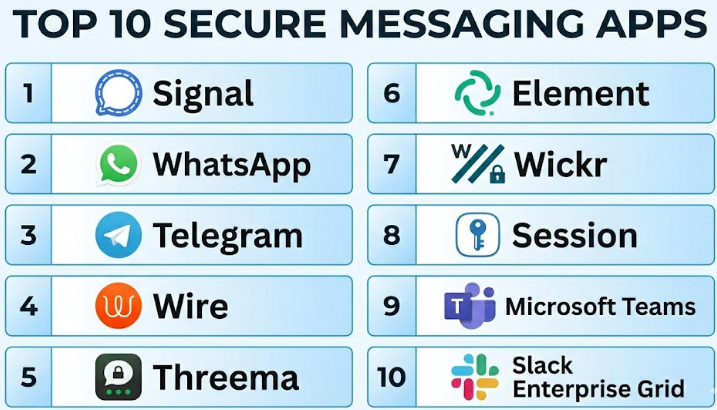
Top 10 Secure Messaging Apps
#1 — Signal
Short description :
Signal is one of the most trusted secure messaging apps for private communication. It is widely used by individuals, journalists, activists, security-conscious professionals, and small teams that want simple encrypted messaging. Signal supports private chats, group conversations, voice calls, video calls, disappearing messages, and secure media sharing. Its main strength is privacy-first communication with a clean user experience. It is best for users who want strong encryption without complex setup.
Key Features
- End-to-end encrypted messages.
- Encrypted voice and video calls.
- Disappearing messages.
- Secure group chats.
- Screen security and privacy controls.
- Minimal data collection approach.
- Cross-platform mobile and desktop apps.
Pros
- Very strong privacy reputation.
- Simple and easy for normal users.
- Good for sensitive personal and small-team communication.
Cons
- Limited enterprise admin controls.
- Not designed as a full business collaboration platform.
- Requires phone-number-based registration.
Platforms / Deployment
Web / Windows / macOS / Linux / iOS / Android
Cloud
Security & Compliance
End-to-end encryption is a core feature. Signal is strongly privacy-focused. Enterprise compliance features such as advanced audit logs, SSO, and RBAC are not the main focus.
Integrations & Ecosystem
Signal is mainly designed as a private messaging app rather than an integration-heavy enterprise platform.
- Mobile and desktop apps.
- Encrypted calls.
- Secure media sharing.
- Group chats.
- Disappearing messages.
- Contact-based communication.
Support & Community
Signal has documentation, help resources, and a strong privacy-focused user community. Formal enterprise support options are limited compared with business messaging platforms.
#2 — WhatsApp
Short description :
WhatsApp is one of the most widely used secure messaging apps globally. It provides end-to-end encrypted personal chats, group chats, voice calls, video calls, and file sharing. It is popular for both personal and small business communication because users already understand how to use it. WhatsApp Business also gives small companies a way to communicate with customers. It is best for broad reach and easy adoption, especially where customers already use it daily.
Key Features
- End-to-end encrypted personal messaging.
- Group chats and communities.
- Voice and video calls.
- File, image, and document sharing.
- WhatsApp Business features for customer communication.
- Broadcast and catalog features for small businesses.
- Multi-device support.
Pros
- Very easy adoption because many users already have it.
- Good for customer communication and small business messaging.
- Strong mobile-first experience.
Cons
- Limited enterprise governance compared with dedicated business platforms.
- Metadata and platform ownership may concern privacy-focused users.
- Not ideal for highly regulated internal business communication.
Platforms / Deployment
Web / Windows / macOS / iOS / Android
Cloud
Security & Compliance
Provides end-to-end encryption for personal messages and calls. Enterprise-grade compliance controls, advanced audit logs, and deep admin governance are limited compared with business platforms.
Integrations & Ecosystem
WhatsApp has strong reach and business messaging options, especially for customer communication.
- WhatsApp Business.
- Customer messaging workflows.
- Business profiles.
- Product catalogs.
- Broadcast messaging.
- API-based business communication options through approved providers.
Support & Community
WhatsApp has large user adoption and broad help resources. Business support depends on the product and service provider used.
#3 — Telegram
Short description :
Telegram is a fast and feature-rich messaging app used by individuals, communities, creators, businesses, and public groups. It supports large groups, channels, bots, file sharing, voice chats, and cloud-based messaging. Telegram offers secret chats with end-to-end encryption, while normal cloud chats are designed for fast multi-device access. It is best for communities, public channels, and teams that need flexible communication features. However, users should understand its encryption model clearly before using it for sensitive conversations.
Key Features
- Fast cloud-based messaging.
- Large groups and channels.
- Secret chats with end-to-end encryption.
- Bots and automation support.
- File sharing and media storage.
- Voice and video communication.
- Strong community-building features.
Pros
- Excellent for large communities and channels.
- Strong bot and automation ecosystem.
- Fast and flexible across devices.
Cons
- Not all chats are end-to-end encrypted by default.
- Enterprise compliance controls are limited.
- Users must understand secret chat vs normal chat behavior.
Platforms / Deployment
Web / Windows / macOS / Linux / iOS / Android
Cloud
Security & Compliance
Secret chats support end-to-end encryption. Standard cloud chats use Telegram’s cloud architecture. Enterprise compliance features such as SSO, RBAC, and audit logs are not the main focus.
Integrations & Ecosystem
Telegram has a strong ecosystem for automation, communities, and public messaging.
- Bots.
- Channels.
- Large groups.
- File sharing.
- Public communities.
- Developer APIs.
Support & Community
Telegram has a large global community and strong user adoption. Formal business support and enterprise governance are limited compared with dedicated enterprise messaging platforms.
#4 — Wire
Short description :
Wire is a secure messaging and collaboration platform built for privacy-focused business communication. It supports encrypted messaging, voice calls, video calls, file sharing, and team collaboration. Wire is suitable for organizations that want more business readiness than consumer messaging apps while keeping strong privacy and security controls. It can serve teams in consulting, legal, government-adjacent, and security-sensitive environments. It is a practical option for companies needing secure team communication.
Key Features
- End-to-end encrypted messaging.
- Encrypted voice and video calls.
- Team collaboration spaces.
- File sharing.
- Device management features.
- Business and enterprise plans.
- Admin controls for organizations.
Pros
- Stronger business focus than many consumer secure messengers.
- Good balance of privacy and collaboration.
- Useful for teams needing secure communication controls.
Cons
- Smaller user base than mainstream messaging apps.
- May require onboarding for teams unfamiliar with it.
- Some enterprise features may depend on selected plan.
Platforms / Deployment
Web / Windows / macOS / Linux / iOS / Android
Cloud / Self-hosted options may vary
Security & Compliance
Wire is privacy and security focused, with end-to-end encryption as a core part of the platform. Business security features vary by plan. Specific certifications should be validated directly with the vendor.
Integrations & Ecosystem
Wire supports secure team collaboration and business communication workflows.
- Team messaging.
- Secure file sharing.
- Voice and video calls.
- Admin controls.
- Enterprise deployment options.
- Business collaboration workflows.
Support & Community
Wire provides documentation, support options, and business onboarding resources. Its community is smaller than mainstream consumer apps but more aligned with secure business communication.
#5 — Threema
Short description :
Threema is a privacy-focused secure messaging app designed for individuals, teams, and organizations that want private communication with reduced personal data exposure. It does not require a phone number for basic identity in the same way many mainstream apps do. Threema supports encrypted chats, group messaging, voice calls, file sharing, and business-focused versions for organizations. It is a good option for privacy-sensitive users and teams that want a secure alternative to common messaging apps.
Key Features
- End-to-end encrypted messaging.
- Private identity model.
- Encrypted voice calls.
- Secure file sharing.
- Group chats.
- Business version for organizations.
- Polls and basic collaboration features.
Pros
- Strong privacy-focused design.
- Does not depend heavily on phone number identity.
- Useful for organizations wanting a secure communication alternative.
Cons
- Smaller network compared with WhatsApp or Signal.
- Paid model may reduce casual adoption.
- Limited broader collaboration features compared with enterprise suites.
Platforms / Deployment
Web / Windows / macOS / Linux / iOS / Android
Cloud
Security & Compliance
End-to-end encryption is central to the product. Threema is designed with privacy in mind. Enterprise compliance details and certifications should be validated based on the selected business offering.
Integrations & Ecosystem
Threema is focused on secure messaging rather than a broad integration ecosystem.
- Personal messaging.
- Group communication.
- Secure file exchange.
- Business messaging.
- Admin options for organizations.
- Cross-platform communication.
Support & Community
Threema provides documentation and support resources. Its user community is privacy-focused but smaller than mainstream messaging platforms.
#6 — Element
Short description :
Element is a secure messaging and collaboration app built on the Matrix protocol. It supports encrypted messaging, rooms, communities, file sharing, voice and video communication, and federation across servers. Element is useful for organizations that want more control over communication infrastructure, including self-hosting options. It is popular among technical teams, open-source communities, public sector organizations, and privacy-conscious businesses. It is best for teams that need secure collaboration with ownership and flexibility.
Key Features
- End-to-end encrypted messaging.
- Matrix-based decentralized communication.
- Rooms and communities.
- File sharing.
- Voice and video calling.
- Self-hosting and federation options.
- Enterprise deployment capabilities.
Pros
- Strong flexibility and infrastructure control.
- Suitable for technical and privacy-focused organizations.
- Open protocol approach supports interoperability.
Cons
- Can be more complex than simple messaging apps.
- Best results may require technical setup.
- User experience may need onboarding for non-technical teams.
Platforms / Deployment
Web / Windows / macOS / Linux / iOS / Android
Cloud / Self-hosted / Hybrid
Security & Compliance
Supports end-to-end encryption and self-hosting options. Security and compliance posture depends on deployment model, configuration, and hosting choice. Specific certifications should be validated directly with the vendor.
Integrations & Ecosystem
Element benefits from the Matrix ecosystem and can connect with different collaboration workflows.
- Matrix protocol.
- Federated communication.
- Bridges to other chat systems.
- Self-hosted deployments.
- Community rooms.
- Enterprise collaboration environments.
Support & Community
Element has documentation, commercial support options, and a strong open-source and technical community. It is especially attractive for teams that value control and interoperability.
#7 — Wickr
Short description :
Wickr is a secure messaging and collaboration platform known for encrypted communication, disappearing messages, and security-focused team collaboration. It is used by organizations that need strong privacy, controlled communication, and secure file sharing. Wickr is suitable for security-sensitive teams, government-adjacent use cases, enterprise teams, and organizations where message control is important. It supports secure rooms, voice calling, file sharing, and administrative controls. It is best for high-security communication scenarios.
Key Features
- End-to-end encrypted messaging.
- Secure rooms and group communication.
- Disappearing messages.
- Secure file sharing.
- Voice communication.
- Administrative controls.
- Security-focused collaboration features.
Pros
- Strong fit for sensitive communication.
- Message expiration and control features are useful.
- Suitable for teams needing privacy-focused collaboration.
Cons
- May feel more specialized than mainstream chat tools.
- User adoption may require training.
- Product availability and packaging should be checked before purchase.
Platforms / Deployment
Web / Windows / macOS / Linux / iOS / Android
Cloud
Security & Compliance
Built around secure communication, encryption, and message control. Compliance suitability depends on deployment, plan, and organizational requirements. Specific certifications should be validated directly with the vendor.
Integrations & Ecosystem
Wickr is focused on secure team communication and controlled collaboration.
- Secure rooms.
- Encrypted file sharing.
- Voice communication.
- Message expiration.
- Team administration.
- Security-focused workflows.
Support & Community
Wickr provides business support and documentation through its available product channels. It is better known in security-sensitive environments than general consumer messaging.
#8 — Session
Short description :
Session is a privacy-focused messaging app designed to reduce metadata exposure and support private communication without relying on a phone number. It is used by privacy-conscious individuals and small groups that want anonymous or low-identity messaging. Session supports encrypted chats, group messaging, and privacy-focused communication patterns. It is not mainly an enterprise collaboration tool, but it is useful for users who value privacy above business administration features. It is best for privacy-first personal communication.
Key Features
- Encrypted private messaging.
- No phone number required for signup.
- Privacy-focused identity model.
- Group chats.
- Cross-platform apps.
- Reduced metadata exposure approach.
- Simple private communication experience.
Pros
- Strong privacy positioning.
- No phone-number dependency.
- Useful for users concerned about identity exposure.
Cons
- Limited enterprise administration features.
- Smaller user base than mainstream apps.
- Not ideal for formal business collaboration workflows.
Platforms / Deployment
Windows / macOS / Linux / iOS / Android
Cloud / Decentralized network model
Security & Compliance
Session focuses on private encrypted communication and reduced metadata exposure. It is not primarily built as an enterprise compliance platform.
Integrations & Ecosystem
Session is designed for private messaging rather than business integrations.
- Private one-to-one messaging.
- Group chats.
- Cross-platform apps.
- Privacy-first identity.
- Minimal metadata approach.
- Personal secure communication.
Support & Community
Session has documentation and a privacy-focused community. Formal enterprise support is limited compared with business messaging platforms.
#9 — Microsoft Teams
Short description :
Microsoft Teams is a business collaboration platform used for chat, meetings, file sharing, calling, and workplace communication. While it is not usually positioned as a privacy-first secure messenger like Signal, it is widely used by businesses that need secure internal communication with enterprise controls. Teams is suitable for companies already using Microsoft 365 and requiring admin management, identity integration, compliance tools, and collaboration features. It is best for enterprise communication where governance and productivity are both important.
Key Features
- Business chat and team channels.
- Video meetings and voice calls.
- File sharing through Microsoft ecosystem.
- Microsoft 365 integration.
- Enterprise admin controls.
- Identity and access management.
- Compliance and retention features depending on plan.
Pros
- Strong fit for Microsoft 365 organizations.
- Good enterprise governance and admin control.
- Combines messaging, meetings, files, and collaboration.
Cons
- Not a privacy-first consumer secure messenger.
- Can feel heavy for small teams.
- Configuration and compliance controls require admin expertise.
Platforms / Deployment
Web / Windows / macOS / Linux / iOS / Android
Cloud
Security & Compliance
Supports enterprise security controls through Microsoft 365, including identity management, access controls, retention, and compliance features depending on licensing and configuration. Specific compliance status depends on Microsoft plan and setup.
Integrations & Ecosystem
Microsoft Teams has a large business ecosystem and deep Microsoft 365 integration.
- Microsoft 365.
- SharePoint.
- OneDrive.
- Outlook.
- Microsoft Entra ID.
- Third-party business apps.
Support & Community
Microsoft provides extensive documentation, enterprise support, partner support, and a large admin community. Teams is widely supported in business IT environments.
#10 — Slack Enterprise Grid
Short description :
Slack Enterprise Grid is a business messaging and collaboration platform designed for large organizations that need channels, direct messages, workflows, app integrations, and enterprise administration. Slack is not mainly a personal secure messenger, but its enterprise version provides strong governance, access management, retention, and security controls for workplace communication. It is suitable for organizations that need structured business collaboration with large integration ecosystems. It is best for companies that value productivity, workflow automation, and managed internal communication.
Key Features
- Enterprise team messaging.
- Channels and direct messages.
- Workflow automation.
- Large app integration ecosystem.
- Enterprise user management.
- Retention and governance controls depending on plan.
- Admin and security features for large organizations.
Pros
- Excellent collaboration and integration ecosystem.
- Strong user experience for business communication.
- Suitable for large teams and cross-functional workflows.
Cons
- Not designed as a privacy-first encrypted personal messenger.
- Costs can increase for large organizations.
- Requires governance planning to avoid channel clutter.
Platforms / Deployment
Web / Windows / macOS / Linux / iOS / Android
Cloud
Security & Compliance
Enterprise plans support security and governance features such as SSO, admin controls, retention options, and compliance-related controls depending on configuration. Specific certifications and compliance status should be validated directly with the vendor.
Integrations & Ecosystem
Slack has one of the strongest app ecosystems for business messaging and workflow collaboration.
- Project management tools.
- Developer tools.
- CRM systems.
- Incident management tools.
- Automation workflows.
- File and productivity apps.
Support & Community
Slack provides documentation, enterprise support options, partner resources, and a large user community. It is widely adopted in modern business collaboration environments.
Comparison Table
| Tool Name | Best For | Platform(s) Supported | Deployment | Standout Feature | Public Rating |
|---|---|---|---|---|---|
| Signal | Privacy-focused individuals and small teams | Web / Windows / macOS / Linux / iOS / Android | Cloud | Strong private messaging with simple UX | N/A |
| Broad personal and small business communication | Web / Windows / macOS / iOS / Android | Cloud | Large user adoption and easy customer reach | N/A | |
| Telegram | Communities, channels, and flexible messaging | Web / Windows / macOS / Linux / iOS / Android | Cloud | Large groups, channels, and bots | N/A |
| Wire | Secure business communication | Web / Windows / macOS / Linux / iOS / Android | Cloud / Self-hosted varies | Encrypted collaboration for teams | N/A |
| Threema | Privacy-sensitive users and organizations | Web / Windows / macOS / Linux / iOS / Android | Cloud | Private identity model without heavy phone dependency | N/A |
| Element | Technical teams and self-hosted communication | Web / Windows / macOS / Linux / iOS / Android | Cloud / Self-hosted / Hybrid | Matrix-based decentralized messaging | N/A |
| Wickr | High-security team communication | Web / Windows / macOS / Linux / iOS / Android | Cloud | Disappearing encrypted team communication | N/A |
| Session | Privacy-first personal messaging | Windows / macOS / Linux / iOS / Android | Cloud / Decentralized model | No phone number required | N/A |
| Microsoft Teams | Enterprise collaboration in Microsoft environments | Web / Windows / macOS / Linux / iOS / Android | Cloud | Microsoft 365 security and collaboration ecosystem | N/A |
| Slack Enterprise Grid | Large business collaboration and integrations | Web / Windows / macOS / Linux / iOS / Android | Cloud | Enterprise messaging with strong app ecosystem | N/A |
Evaluation & Secure Messaging Apps
| Tool Name | Core (25%) | Ease (15%) | Integrations (15%) | Security (10%) | Performance (10%) | Support (10%) | Value (15%) | Weighted Total (0–10) |
|---|---|---|---|---|---|---|---|---|
| Signal | 8 | 9 | 5 | 9 | 8 | 7 | 9 | 7.75 |
| 8 | 10 | 7 | 8 | 9 | 7 | 9 | 8.25 | |
| Telegram | 8 | 9 | 9 | 7 | 9 | 7 | 9 | 8.30 |
| Wire | 8 | 8 | 7 | 9 | 8 | 8 | 7 | 7.85 |
| Threema | 7 | 8 | 6 | 9 | 8 | 7 | 7 | 7.30 |
| Element | 9 | 7 | 8 | 8 | 7 | 8 | 8 | 8.00 |
| Wickr | 8 | 7 | 7 | 9 | 8 | 8 | 7 | 7.75 |
| Session | 7 | 8 | 5 | 8 | 7 | 6 | 8 | 7.00 |
| Microsoft Teams | 9 | 8 | 10 | 8 | 8 | 9 | 8 | 8.65 |
| Slack Enterprise Grid | 9 | 9 | 10 | 8 | 8 | 9 | 7 | 8.75 |
These scores are comparative and should not be treated as a universal ranking. A tool with strong enterprise collaboration features may score higher overall but may not be the best choice for privacy-first personal communication. Signal, Session, and Threema are strong for privacy-focused users, while Microsoft Teams and Slack Enterprise Grid are stronger for managed business collaboration. The right choice depends on whether your priority is privacy, business control, compliance, integrations, or user adoption.
Which Secure Messaging Apps
Solo / Freelancer
Solo users and freelancers usually need simple, private, and reliable communication. Signal is a strong option for private one-to-one communication. Proton-style secure email alternatives are not part of this messaging list, so for messaging-only needs, Signal, Threema, or Session can be practical.
If a freelancer works with clients who already use WhatsApp, then WhatsApp may be easier for adoption. However, for highly confidential work, Signal or Threema may be better choices.
SMB
Small and medium businesses should focus on ease of use, team adoption, security, and basic administration. WhatsApp Business may work for customer communication, but it is not always ideal for internal governance. Wire, Element, Microsoft Teams, or Slack may be better for structured internal business communication.
For an SMB already using Microsoft 365, Microsoft Teams is usually a practical starting point. For privacy-sensitive SMBs, Wire or Element may be more suitable.
Mid-Market
Mid-market companies need stronger administration, access control, group management, file sharing, and integration with business systems. Microsoft Teams, Slack Enterprise Grid, Element, and Wire are strong options depending on the company’s ecosystem.
A mid-market company should avoid choosing a messaging app only because employees already use it casually. The tool should support proper onboarding, role management, file handling, retention policies, and security controls.
Enterprise
Enterprises should prioritize governance, compliance, retention, identity integration, security administration, and scalability. Microsoft Teams and Slack Enterprise Grid are strong choices for large-scale workplace collaboration. Element can be valuable for organizations needing self-hosting, federation, or infrastructure control.
For high-security communication, Wire and Wickr may also be considered depending on organizational requirements. Enterprises should run formal security and compliance reviews before making a final decision.
Budget vs Premium
Budget-friendly users may prefer Signal, WhatsApp, Telegram, Session, or Threema depending on the use case. These tools can work well for individuals, small groups, and privacy-conscious users.
Premium business platforms such as Slack Enterprise Grid, Microsoft Teams, Wire, and Element enterprise offerings are better when the organization needs administration, scalability, support, compliance controls, and integration with business systems.
Feature Depth vs Ease of Use
If ease of use is the top priority, WhatsApp, Signal, and Telegram are easy for most users to adopt. They are familiar, mobile-friendly, and simple to start.
If feature depth matters more, Slack Enterprise Grid, Microsoft Teams, Element, and Wire offer stronger collaboration features, integrations, admin controls, and business workflows.
Integrations & Scalability
For integrations, Slack Enterprise Grid and Microsoft Teams are very strong because they connect with many business apps and workflows. Telegram also has a strong bot ecosystem, but it is more community-oriented than enterprise-governed.
For scalability with control, Element is attractive because of its Matrix-based architecture and self-hosting options. Enterprises should test how the tool handles user provisioning, access policies, data retention, file sharing, and external communication.
Security & Compliance Needs
For privacy-first personal communication, Signal, Session, Threema, and Wire are strong options. For enterprise security and compliance workflows, Microsoft Teams, Slack Enterprise Grid, Element, Wire, and Wickr may be better depending on the organization’s needs.
Security teams should validate encryption model, admin controls, retention options, identity management, audit features, data residency, device management, and vendor support before deployment.
Frequently Asked Questions
1. What is a Secure Messaging App?
A Secure Messaging App is a communication tool that protects chats, calls, files, and group conversations using encryption and privacy controls. It helps reduce the risk of unauthorized access, message leaks, and sensitive data exposure. Some apps focus on personal privacy, while others focus on enterprise collaboration.
2. What does end-to-end encryption mean?
End-to-end encryption means a message is protected so that only the sender and intended recipient can read it. The service provider should not be able to view message content in readable form. However, users should also understand metadata, backups, device security, and group settings.
3. Are all secure messaging apps the same?
No. Some apps are privacy-first, some are business-first, and some focus on large communities. Signal and Session are more privacy-focused. Microsoft Teams and Slack are business collaboration platforms. Telegram is strong for communities, but users must understand its encryption model.
4. Which secure messaging app is best for business teams?
For business teams, Microsoft Teams, Slack Enterprise Grid, Wire, and Element are often stronger choices because they offer collaboration features, administration, and team management. The best choice depends on whether the company values Microsoft integration, app ecosystem, self-hosting, or privacy controls.
5. Which app is best for personal privacy?
Signal is widely considered a strong choice for personal privacy because it is simple and privacy-focused. Session and Threema are also useful for users who want reduced identity exposure. The right choice depends on how much convenience, network size, and anonymity the user needs.
6. What are common mistakes when choosing a Secure Messaging App?
Common mistakes include choosing only based on popularity, ignoring admin controls, misunderstanding encryption settings, and failing to train users. Another mistake is using a consumer app for business workflows that require retention, compliance, or access management.
7. Can Secure Messaging Apps replace email?
They can reduce email usage, but they may not fully replace email. Messaging apps are better for quick communication, internal discussions, and group collaboration. Email is still useful for formal communication, long records, customer notices, and external business documentation.
8. Are Secure Messaging Apps safe for file sharing?
Many secure messaging apps support file sharing, but safety depends on encryption, access control, file size limits, retention, and device security. Businesses should also check whether files are stored, backed up, or synced to third-party systems. For highly sensitive files, a secure file-sharing platform may be better.
9. Should enterprises use consumer messaging apps?
Enterprises should be careful with consumer messaging apps because they may lack admin controls, audit logs, retention policies, and compliance management. For formal business communication, enterprise platforms are usually safer. Consumer apps may still be useful for limited external or emergency communication.
10. What is the difference between Signal and Telegram?
Signal focuses strongly on private end-to-end encrypted messaging by default. Telegram focuses on speed, cloud sync, channels, bots, and large communities. Telegram secret chats support end-to-end encryption, but normal cloud chats follow a different model, so users should choose based on their privacy needs.
Conclusion
Secure Messaging Apps are now an important part of private communication, team collaboration, and business security. The right app depends on the real use case. Signal, Session, and Threema are strong for privacy-focused personal communication. WhatsApp is useful where broad reach and customer familiarity matter. Telegram is strong for communities and channels. Wire, Element, and Wickr are better for secure team communication. Microsoft Teams and Slack Enterprise Grid are strong for enterprise collaboration, governance, and integrations. There is no single best secure messaging app for every user or company.
