Introduction
Punch List Management Tools help construction teams track, assign, fix, verify, and close remaining work items before a project is handed over. In simple words, these tools make it easier to manage unfinished, defective, incomplete, or correction-needed tasks found during inspections, walkthroughs, quality checks, and project closeout.
Punch lists are important because even when a construction project is almost complete, small issues can delay handover, create disputes, impact payments, and frustrate owners or clients. These issues may include paint touch-ups, missing fixtures, damaged materials, incomplete installations, cleaning tasks, safety corrections, equipment checks, documentation gaps, or final inspection items.
Common use cases include construction closeout, site inspections, quality control, defect tracking, subcontractor task assignment, final walkthroughs, owner handover, photo-based issue reporting, field verification, and completion tracking.
Buyers should evaluate mobile usability, photo capture, drawing markup, task assignment, due dates, status tracking, subcontractor access, offline support, reporting, permissions, notifications, integrations, audit history, and ease of field adoption.
Best for: general contractors, subcontractors, project managers, site supervisors, architects, owners, developers, construction consultants, quality teams, facilities teams, and companies managing project closeout or defect tracking.
Not ideal for: very small projects with only a few final tasks, teams that already manage punch lists effectively with a simple checklist, or companies that do not need photo proof, task assignment, field tracking, or formal closeout reporting.
Key Trends in Punch List Management Tools
- Mobile punch list tracking is becoming standard, allowing field teams to capture issues, photos, locations, and notes directly from phones or tablets.
- Photo-based issue documentation is now expected, because visual proof helps subcontractors understand problems faster and reduces confusion.
- Drawing-based punch lists are becoming more common, helping teams pin issues directly to plans, rooms, floors, or specific project areas.
- Real-time task assignment is improving closeout speed, allowing project managers to assign issues to subcontractors immediately during inspections.
- Status tracking is becoming more transparent, with open, in-progress, ready-for-review, rejected, and closed stages used to manage accountability.
- Owner and client visibility is increasing, especially for projects where owners want clear closeout progress and evidence of completion.
- Punch list workflows are merging with quality and inspection workflows, helping teams catch defects earlier instead of waiting until final handover.
- Integration with construction management platforms is now important, because punch items often connect with drawings, RFIs, submittals, field reports, and project documents.
- Analytics are becoming useful for quality improvement, helping teams identify recurring defects, delayed trades, subcontractor performance issues, and project closeout bottlenecks.
- AI-assisted issue summarization is emerging, helping teams convert site notes, photos, and voice inputs into clearer task descriptions.
How We Selected These Tools
The tools below were selected using practical construction-focused evaluation logic.
- Market recognition: Tools commonly known in construction field management, punch lists, inspections, quality control, and project closeout were prioritized.
- Feature completeness: Issue creation, photos, drawings, task assignment, status tracking, due dates, notifications, and reporting were reviewed.
- Field usability: Punch list tools must be simple for site supervisors, engineers, subcontractors, and inspectors to use on mobile devices.
- Closeout workflow fit: Tools that support verification, approvals, final inspections, and completion evidence were given stronger consideration.
- Drawing and location support: Ability to link issues to plans, rooms, floors, zones, or assets was considered important.
- Collaboration: Subcontractor access, comments, notifications, and assignment workflows were reviewed.
- Reporting quality: PDF reports, dashboards, export options, and owner-ready summaries were considered.
- Integration ecosystem: Construction management, document control, BIM, scheduling, and field reporting integrations were considered.
- Scalability: Tools suitable for small contractors, mid-market construction firms, and enterprise project teams were included.
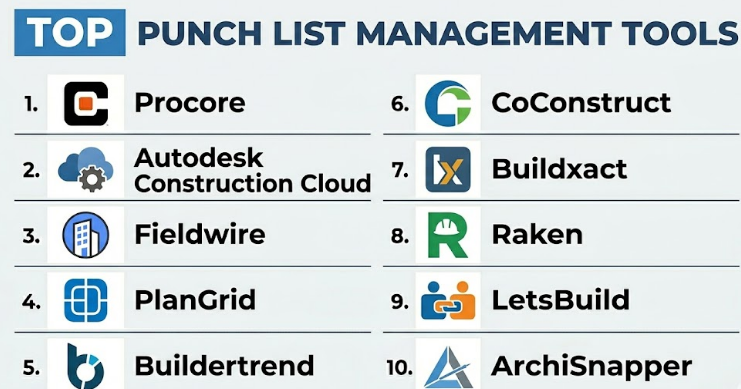
Top 10 Punch List Management Tools
#1 — Procore
Short description :
Procore is a broad construction management platform that includes punch list management as part of its field and project management workflows. It helps teams create punch items, assign tasks, attach photos, set due dates, track status, and manage closeout from the field or office. Procore is useful for general contractors, owners, subcontractors, and larger construction teams that need punch list workflows connected with drawings, documents, RFIs, submittals, inspections, and project records. It is best for construction companies that want punch list tracking inside a complete construction management platform.**
Key Features
- Punch item creation and assignment.
- Photo and attachment support.
- Due dates and status tracking.
- Mobile field access.
- Drawing and location-based issue context.
- Subcontractor collaboration.
- Closeout reporting and project records.
Pros
- Strong all-in-one construction platform.
- Punch lists connect well with broader project workflows.
- Good for large teams and multi-project construction companies.
Cons
- May be more than small contractors need.
- Implementation requires training and process setup.
- Pricing may be higher than standalone punch list apps.
Platforms / Deployment
Web / iOS / Android
Cloud
Security & Compliance
Supports role-based permissions, project access controls, user management, activity records, and document permissions depending on plan. Specific compliance details should be validated directly with the vendor.
Integrations & Ecosystem
Procore connects punch list workflows with broader construction operations.
- Drawing management.
- Document control.
- RFIs and submittals.
- Inspections.
- Field reports.
- Project financial workflows.
Support & Community
Procore provides onboarding, documentation, training resources, customer support, and a large construction technology ecosystem. It is suitable for teams that need structured closeout management across many projects.
#2 — Autodesk Construction Cloud
Short description :
Autodesk Construction Cloud supports punch list and issue management through its construction collaboration, field management, and document workflows. It helps teams create issues, pin them to drawings, add photos, assign responsibilities, track status, and manage field coordination. It is especially useful for teams already using Autodesk tools for drawings, BIM, document control, and construction project collaboration. Autodesk Construction Cloud is best for construction teams that want punch lists connected with design, BIM, field issues, and project documentation.**
Key Features
- Issue and punch item tracking.
- Drawing-based issue placement.
- Photo and attachment support.
- Assignment and due dates.
- Field mobile access.
- BIM and document coordination.
- Reporting and project dashboards.
Pros
- Strong for drawing and BIM-connected workflows.
- Useful for field coordination and issue tracking.
- Good fit for teams using Autodesk construction tools.
Cons
- May feel complex for teams not using Autodesk workflows.
- Some capabilities depend on selected modules.
- Setup requires clear project document structure.
Platforms / Deployment
Web / iOS / Android
Cloud
Security & Compliance
Supports project permissions, document access controls, issue activity history, and enterprise administration depending on plan. Specific compliance details should be validated directly with the vendor.
Integrations & Ecosystem
Autodesk Construction Cloud connects punch list tracking with design and construction workflows.
- BIM coordination.
- Drawing management.
- Document control.
- Field issues.
- Construction reports.
- Project collaboration.
Support & Community
Autodesk provides documentation, training resources, customer support, and a strong architecture, engineering, and construction ecosystem.
#3 — Fieldwire
Short description :
Fieldwire is a construction field management platform focused on tasks, drawings, punch lists, inspections, and site coordination. It helps field teams create punch items, assign them to trades, add photos, mark locations on plans, set priorities, and track completion. Fieldwire is useful for general contractors, subcontractors, architects, engineers, and site supervisors who need a practical field-first punch list tool. It is best for teams that want simple, mobile-friendly punch list management connected with plans and field tasks.**
Key Features
- Punch list task creation.
- Plan and drawing markup.
- Photo attachments.
- Task assignment and priorities.
- Status tracking.
- Mobile field access.
- Reports and exports.
Pros
- Strong field usability.
- Good for drawings, tasks, and punch tracking.
- Useful for subcontractors and jobsite teams.
Cons
- Not a full construction ERP or financial system.
- Advanced enterprise workflows may require additional systems.
- Best value depends on field team adoption.
Platforms / Deployment
Web / iOS / Android
Cloud
Security & Compliance
Supports project permissions, task access controls, user roles, and team administration depending on plan. Specific compliance details should be validated directly with the vendor.
Integrations & Ecosystem
Fieldwire connects punch list tasks with jobsite coordination.
- Drawing workflows.
- Task tracking.
- Field reports.
- Inspection workflows.
- Photo documentation.
- Project files.
Support & Community
Fieldwire provides documentation, onboarding resources, customer support, and field management guidance. It is practical for teams that need quick site coordination.
#4 — PlanGrid
Short description :
PlanGrid is a construction productivity tool known for digital drawings, field issue tracking, punch lists, and jobsite collaboration. It helps teams capture punch items, attach photos, mark locations on plans, assign work, and track issue resolution from mobile devices. PlanGrid is now part of the broader Autodesk construction ecosystem, but it remains widely recognized for field drawing access and punch list workflows. It is best for teams that need reliable mobile drawings and simple punch item tracking from the field.**
Key Features
- Drawing access and markups.
- Punch list and issue tracking.
- Photo documentation.
- Assignment and status updates.
- Mobile field collaboration.
- Field reports.
- Plan version control.
Pros
- Strong for digital drawings and field markups.
- Useful for jobsite punch tracking.
- Helps reduce confusion from outdated drawings.
Cons
- Best used within the Autodesk ecosystem.
- Not a full standalone construction financial platform.
- Advanced workflows may require broader connected tools.
Platforms / Deployment
Web / iOS / Android
Cloud
Security & Compliance
Supports project access controls, document permissions, activity records, and team management depending on plan and configuration. Specific security details should be validated directly with the vendor.
Integrations & Ecosystem
PlanGrid connects punch list work with field construction workflows.
- Drawing management.
- Field issues.
- Punch lists.
- Photo records.
- Jobsite reports.
- Autodesk workflows.
Support & Community
Support and documentation are available through the broader Autodesk construction ecosystem. It is useful for teams focused on plans and field issue coordination.
#5 — Buildertrend
Short description :
Buildertrend is construction management software designed mainly for residential builders, remodelers, and specialty contractors. It helps teams manage schedules, daily logs, photos, change orders, client communication, punch lists, and project closeout tasks. Buildertrend is useful for home builders who need to track incomplete items, assign tasks, communicate with clients, and manage job progress from one platform. It is best for residential construction teams that need punch list tracking connected with customer communication and project management.**
Key Features
- Punch list task tracking.
- Project scheduling.
- Photo documentation.
- Client communication.
- Daily logs.
- Change order workflows.
- Mobile project access.
Pros
- Strong fit for residential construction.
- Good customer communication workflows.
- Useful for builders managing final closeout tasks.
Cons
- Less suited for large commercial construction projects.
- Advanced enterprise issue tracking may be limited.
- Best value depends on residential builder workflows.
Platforms / Deployment
Web / iOS / Android
Cloud
Security & Compliance
Supports user permissions, client access controls, project data management, and administrative features depending on plan. Specific security details should be validated directly with the vendor.
Integrations & Ecosystem
Buildertrend connects punch list items with residential project workflows.
- Project schedules.
- Client portals.
- Photos and documents.
- Change orders.
- Invoicing and payments.
- Project communication.
Support & Community
Buildertrend provides onboarding, documentation, customer support, and residential construction workflow guidance.
#6 — CoConstruct
Short description :
CoConstruct is a construction management tool focused on custom home builders and remodelers. It helps teams manage project communication, schedules, selections, budgets, change orders, client approvals, and punch list items. CoConstruct is useful for residential projects where client-facing communication and final walkthrough items need to be tracked clearly. It supports collaboration between builders, homeowners, and subcontractors. It is best for custom builders and remodelers that need punch list management connected with selections, approvals, and closeout communication.**
Key Features
- Punch list and task tracking.
- Client communication.
- Project scheduling.
- Selections and approvals.
- Change order management.
- Budget visibility.
- Mobile access.
Pros
- Good for custom residential construction.
- Helps manage client-facing closeout items.
- Useful for builder-client-subcontractor coordination.
Cons
- Not ideal for large commercial contractor workflows.
- May overlap with other residential construction tools.
- Advanced field reporting may be limited compared with broader platforms.
Platforms / Deployment
Web / iOS / Android
Cloud
Security & Compliance
Supports project access controls, client permissions, user management, and document handling depending on plan. Specific security details should be validated directly with the vendor.
Integrations & Ecosystem
CoConstruct connects punch list workflows with residential construction operations.
- Project communication.
- Selections tracking.
- Change orders.
- Scheduling.
- Budget workflows.
- Client approvals.
Support & Community
CoConstruct provides documentation, customer support, onboarding resources, and residential construction guidance.
#7 — Buildxact
Short description :
Buildxact is construction management software for residential builders, remodelers, and small construction companies. It supports estimating, scheduling, job management, purchase orders, project tracking, and closeout workflows. While it is not only a punch list tool, it can help smaller builders manage final tasks, job notes, project actions, and customer-facing updates. Buildxact is useful for teams that want estimating and project management in one practical platform. It is best for small builders that need punch list tracking as part of broader job management.**
Key Features
- Job and task tracking.
- Project scheduling.
- Estimating and quoting.
- Purchase order management.
- Project notes and documentation.
- Client and job communication.
- Mobile-friendly project access.
Pros
- Good fit for small residential builders.
- Combines estimating and project management.
- Practical for teams moving away from spreadsheets.
Cons
- Not a dedicated enterprise punch list platform.
- Advanced drawing-based issue tracking may be limited.
- Best suited for smaller residential workflows.
Platforms / Deployment
Web
Cloud
Security & Compliance
Supports user access controls and project data management depending on plan. Specific security details should be validated directly with the vendor.
Integrations & Ecosystem
Buildxact connects punch tasks with small builder workflows.
- Estimating.
- Scheduling.
- Job costing.
- Purchase orders.
- Project documents.
- Accounting workflows.
Support & Community
Buildxact provides onboarding, customer support, documentation, and guidance for residential builders and remodelers.
#8 — Raken
Short description :
Raken is construction field management software focused on daily reports, time tracking, safety, production tracking, photos, and field documentation. It can support punch list-style workflows by helping teams document site issues, assign follow-ups, capture photos, and maintain project records. Raken is useful for general contractors, subcontractors, superintendents, and field teams that need strong daily field reporting and issue documentation. It is best for teams that want punch-related tracking connected with field reports, daily logs, and site documentation.**
Key Features
- Daily reports.
- Photo documentation.
- Field notes and observations.
- Safety and quality workflows.
- Task and follow-up tracking.
- Time tracking.
- Mobile field reporting.
Pros
- Strong for daily field documentation.
- Useful for photo-based issue tracking.
- Good for superintendents and field teams.
Cons
- Not as punch-list-specific as dedicated closeout tools.
- Advanced drawing-based punch workflows may be limited.
- Best value depends on daily report usage.
Platforms / Deployment
Web / iOS / Android
Cloud
Security & Compliance
Supports user permissions, project records, field documentation controls, and administrative features depending on plan. Specific compliance details should be validated directly with the vendor.
Integrations & Ecosystem
Raken connects field documentation with construction operations.
- Daily reports.
- Safety workflows.
- Time tracking.
- Photo records.
- Project management platforms.
- Field productivity reports.
Support & Community
Raken provides documentation, onboarding resources, customer support, and field reporting guidance.
#9 — LetsBuild
Short description :
LetsBuild is construction project management and field collaboration software that supports planning, quality, inspections, snagging, punch lists, and project coordination. It helps teams identify defects, assign responsibilities, track completion, and improve field communication. LetsBuild is useful for contractors, owners, consultants, and site teams managing inspections and closeout tasks. It is especially relevant for teams that need clear field issue tracking and progress visibility. It is best for construction teams that want punch list workflows connected with quality and project coordination.**
Key Features
- Snagging and punch list tracking.
- Inspections and quality checks.
- Task assignment.
- Photo documentation.
- Progress tracking.
- Mobile field access.
- Project dashboards.
Pros
- Strong for quality and field issue management.
- Useful for project closeout and defect tracking.
- Good collaboration between office and site teams.
Cons
- Market presence may vary by region.
- Integration needs should be validated carefully.
- May require training for consistent field use.
Platforms / Deployment
Web / iOS / Android
Cloud
Security & Compliance
Supports user permissions, project access controls, issue records, and administrative settings depending on plan. Specific security details should be validated directly with the vendor.
Integrations & Ecosystem
LetsBuild connects punch list workflows with construction quality and planning.
- Field inspections.
- Quality management.
- Project planning.
- Defect tracking.
- Photo records.
- Project dashboards.
Support & Community
LetsBuild provides documentation, onboarding support, and construction workflow resources. It is useful for teams focused on quality and closeout visibility.
#10 — ArchiSnapper
Short description :
ArchiSnapper is a field report and punch list app designed for architects, engineers, contractors, and construction professionals who need to create site reports, capture photos, annotate issues, and manage punch lists from mobile devices. It helps users document site observations, assign actions, generate reports, and track open items. ArchiSnapper is especially useful for site visits, inspections, architectural punch lists, and project reporting. It is best for architects, consultants, and smaller construction teams that need simple field reports and punch list documentation.**
Key Features
- Site report creation.
- Punch list tracking.
- Photo capture and annotation.
- Task assignment.
- Report generation.
- Mobile field access.
- Issue status tracking.
Pros
- Practical for architects and consultants.
- Good for field reports and punch documentation.
- Easy to use for site observations.
Cons
- May not replace full construction management platforms.
- Advanced enterprise workflows may be limited.
- Best fit is field reporting and punch documentation.
Platforms / Deployment
Web / iOS / Android
Cloud
Security & Compliance
Supports user access controls, project records, and report management features depending on plan. Specific security details should be validated directly with the vendor.
Integrations & Ecosystem
ArchiSnapper connects punch list documentation with site reporting workflows.
- Field reports.
- Photo documentation.
- Punch list reports.
- Site visit notes.
- Project observations.
- Task follow-ups.
Support & Community
ArchiSnapper provides documentation, customer support, and practical field reporting guidance. It is suitable for site professionals who need simple punch list reporting.
Comparison Table
| Tool Name | Best For | Platform(s) Supported | Deployment | Standout Feature | Public Rating |
|---|---|---|---|---|---|
| Procore | Large construction teams and project closeout | Web / iOS / Android | Cloud | Punch lists inside full construction management | N/A |
| Autodesk Construction Cloud | BIM and drawing-connected issue tracking | Web / iOS / Android | Cloud | Punch items linked with drawings and field issues | N/A |
| Fieldwire | Jobsite punch lists and field tasks | Web / iOS / Android | Cloud | Simple field task tracking on drawings | N/A |
| PlanGrid | Mobile drawings and punch tracking | Web / iOS / Android | Cloud | Digital plan access with issue markups | N/A |
| Buildertrend | Residential builders and remodelers | Web / iOS / Android | Cloud | Punch lists with client communication | N/A |
| CoConstruct | Custom home builders and remodelers | Web / iOS / Android | Cloud | Client-facing closeout and task tracking | N/A |
| Buildxact | Small residential builders | Web | Cloud | Job management with closeout task tracking | N/A |
| Raken | Field reports and site documentation | Web / iOS / Android | Cloud | Punch-related tracking through daily reports | N/A |
| LetsBuild | Quality, inspections, and snagging | Web / iOS / Android | Cloud | Defect tracking and quality closeout workflows | N/A |
| ArchiSnapper | Architects and site consultants | Web / iOS / Android | Cloud | Site reports with punch list documentation | N/A |
Evaluation & Punch List Management Tools
| Tool Name | Core (25%) | Ease (15%) | Integrations (15%) | Security (10%) | Performance (10%) | Support (10%) | Value (15%) | Weighted Total (0–10) |
|---|---|---|---|---|---|---|---|---|
| Procore | 10 | 8 | 9 | 9 | 9 | 9 | 7 | 8.80 |
| Autodesk Construction Cloud | 9 | 7 | 10 | 9 | 9 | 9 | 7 | 8.65 |
| Fieldwire | 9 | 9 | 8 | 8 | 8 | 8 | 9 | 8.55 |
| PlanGrid | 8 | 9 | 8 | 8 | 8 | 8 | 8 | 8.15 |
| Buildertrend | 8 | 9 | 8 | 8 | 8 | 8 | 8 | 8.20 |
| CoConstruct | 8 | 8 | 8 | 8 | 8 | 8 | 8 | 8.00 |
| Buildxact | 7 | 8 | 7 | 8 | 8 | 8 | 8 | 7.65 |
| Raken | 8 | 9 | 8 | 8 | 8 | 8 | 8 | 8.20 |
| LetsBuild | 8 | 8 | 8 | 8 | 8 | 8 | 8 | 8.00 |
| ArchiSnapper | 7 | 9 | 7 | 8 | 8 | 8 | 8 | 7.80 |
These scores are comparative and should be used as a practical guide, not a fixed ranking. Procore and Autodesk Construction Cloud are strong for larger construction teams that need punch list workflows connected with broader project systems. Fieldwire and PlanGrid are strong for field-first punch tracking. Buildertrend and CoConstruct are practical for residential builders. Raken is useful when punch tracking is connected with daily reporting, while ArchiSnapper is practical for architects and consultants.
Which Punch List Management Tools
Solo / Freelancer
Solo consultants, architects, inspectors, or small contractors usually need a simple tool for photos, notes, task lists, and reports. ArchiSnapper, Fieldwire, PlanGrid, or lightweight checklist tools may be enough.
A solo user should focus on fast issue capture, clean reporting, photo proof, and easy sharing. A large construction management platform may be unnecessary unless the user is working on projects where the main contractor already uses it.
SMB
Small and medium construction businesses should focus on mobile punch capture, task assignment, photos, due dates, status tracking, and simple reports. Fieldwire, Buildertrend, CoConstruct, Buildxact, and Raken are practical options.
Residential builders may prefer Buildertrend or CoConstruct. Small commercial contractors and subcontractors may prefer Fieldwire or PlanGrid for field coordination.
Mid-Market
Mid-market contractors usually need stronger punch tracking, subcontractor assignments, drawing references, mobile access, closeout reporting, and project documentation. Procore, Autodesk Construction Cloud, Fieldwire, PlanGrid, and LetsBuild are strong candidates.
At this stage, teams should define punch item categories, issue ownership, review stages, closeout deadlines, and reporting needs before choosing a platform.
Enterprise
Enterprises should prioritize permissions, project controls, document governance, drawing version control, reporting, audit history, subcontractor collaboration, and integration with construction management platforms. Procore, Autodesk Construction Cloud, Fieldwire, and LetsBuild may be relevant depending on project structure.
Large organizations should involve project managers, superintendents, quality teams, subcontractor coordinators, owners, IT, and document control teams before standardizing punch list workflows.
Budget vs Premium
Budget-conscious teams may prefer Fieldwire, ArchiSnapper, Buildxact, or residential-focused tools depending on project type.
Premium platforms such as Procore and Autodesk Construction Cloud are better when teams need punch list management connected with drawings, RFIs, submittals, documents, inspections, reporting, and broader project governance.
Feature Depth vs Ease of Use
If ease of use matters most, Fieldwire, PlanGrid, ArchiSnapper, and Buildertrend are practical choices. They are easier for field users and smaller teams to adopt quickly.
If feature depth matters more, Procore, Autodesk Construction Cloud, and LetsBuild provide stronger workflows for enterprise construction teams, quality management, document control, and closeout governance.
Integrations & Scalability
Punch list tools should integrate with construction management platforms, drawing tools, document control systems, BIM workflows, scheduling tools, daily reporting tools, and project dashboards.
For Procore-based teams, Procore punch lists are a natural choice. For Autodesk-based teams, Autodesk Construction Cloud or PlanGrid may fit better. For field-first teams, Fieldwire is strong. For residential teams, Buildertrend and CoConstruct are practical.
Security & Compliance Needs
Punch list tools may store project drawings, photos, defect records, subcontractor details, owner comments, inspection notes, completion evidence, and closeout documentation.
Buyers should validate role-based access, subcontractor permissions, project-level security, photo storage controls, audit logs, document version control, mobile access security, and data retention policies before rollout.
Frequently Asked Questions
1. What is a Punch List Management Tool?
A Punch List Management Tool helps construction teams track unfinished, defective, or correction-needed work before project handover. It allows users to create tasks, attach photos, assign owners, set due dates, track status, and verify completion.
2. How is punch list software different from a normal task management app?
A normal task app tracks general work. Punch list software is designed for construction closeout, field issues, drawings, photos, subcontractor assignments, inspections, and final verification. It gives better construction context than a generic task board.
3. What pricing models are common for Punch List Management Tools?
Pricing may depend on users, projects, storage, modules, mobile access, construction platform licenses, or enterprise agreements. Some punch list features are included inside broader construction management platforms, while standalone tools may use subscription pricing.
4. What are common mistakes when managing punch lists?
Common mistakes include creating vague issue descriptions, not attaching photos, failing to assign responsibility, not setting due dates, using outdated drawings, and closing items without verification. Another mistake is waiting until the end of the project instead of tracking issues continuously.
5. Which tool is best for small contractors?
Fieldwire, PlanGrid, Buildertrend, CoConstruct, Buildxact, and ArchiSnapper can be practical for small contractors. The best choice depends on whether the team needs drawing-based punch lists, residential client communication, or simple site reports.
6. Which tool is best for large construction teams?
Procore and Autodesk Construction Cloud are strong options for larger construction teams because punch list workflows can connect with drawings, documents, inspections, RFIs, submittals, and project reporting.
7. Which tool is best for architects and consultants?
ArchiSnapper, PlanGrid, Fieldwire, and Autodesk Construction Cloud can be useful for architects and consultants. These tools support site observations, photos, issue tracking, drawing references, and report generation.
8. Can punch list tools attach photos?
Yes, most modern punch list tools support photo attachments. Photos help subcontractors understand issues clearly and provide proof that work has been corrected.
9. Can punch list tools work with drawings?
Yes, many punch list tools allow users to pin issues directly to drawings or plans. This helps teams identify exactly where an issue is located and reduces confusion during closeout.
10. Do punch list tools support subcontractor assignments?
Yes, many tools allow punch items to be assigned to subcontractors, trades, team members, or responsible parties. This improves accountability and helps project managers track who is responsible for each correction.
Conclusion
Punch List Management Tools help construction teams close projects faster, reduce confusion, improve accountability, and create a clear record of final corrections before handover. The right tool depends on project size, team structure, field workflows, and existing construction software. Procore and Autodesk Construction Cloud are strong for larger teams that need punch lists connected with drawings, documents, inspections, and broader project controls. Fieldwire and PlanGrid are practical for field-first teams that need fast issue tracking on plans. Buildertrend and CoConstruct are better for residential builders and remodelers managing client-facing closeout tasks.
