Introduction
Digital Evidence Management Systems are platforms used to collect, store, organize, secure, review, share, and retain digital evidence. In simple terms, these systems help agencies and organizations manage evidence files such as body camera videos, CCTV footage, dashcam videos, interview recordings, photos, audio files, documents, mobile uploads, forensic media, and case-related digital records.
Digital evidence is growing quickly because public safety agencies, legal teams, investigators, security departments, and government organizations now handle large volumes of video, images, documents, and audio files. Without a proper system, evidence can become difficult to find, expensive to store, risky to share, and hard to defend in legal or internal review processes.
Common use cases include police evidence management, prosecutor case preparation, digital media review, evidence sharing, redaction, chain-of-custody tracking, legal discovery, internal investigations, audit management, and long-term evidence retention.
Buyers should evaluate chain of custody, storage scalability, access control, audit logs, redaction, integrations, file type support, search, retention policies, legal hold support, security controls, and total cost.
Best for: law enforcement agencies, prosecutors, courts, public safety departments, government agencies, forensic teams, internal investigation teams, corporate security teams, compliance teams, and legal departments.
Not ideal for: small teams that only need basic file storage, simple document sharing, or lightweight case notes without chain of custody, audit trails, redaction, retention control, or legal evidence workflows.
Key Trends in Digital Evidence Management Systems
- Cloud evidence storage is becoming more common because agencies need scalable storage for large video, image, audio, and document files.
- Multi-source evidence management is now essential as teams collect evidence from body cameras, dashcams, CCTV, drones, mobile phones, interview rooms, and public submissions.
- AI-assisted redaction is gaining importance because sensitive information such as faces, license plates, addresses, minors, and bystanders must often be protected before release.
- Chain-of-custody automation is a major requirement because every evidence action should be traceable, including upload, review, edit, share, export, and deletion.
- Secure sharing with prosecutors and legal partners is growing as agencies need faster evidence disclosure without losing control over files.
- Retention and legal hold workflows are becoming more complex because different evidence types may require different retention periods.
- Integration with CAD, RMS, case management, and body camera systems is becoming a key buying factor.
- Privacy-aware evidence workflows are now critical as agencies must balance transparency, public records requests, victim privacy, and investigation confidentiality.
- Search and metadata quality are improving because evidence teams need to find files quickly by case number, officer, location, date, tag, or incident type.
- Hybrid deployment remains relevant for agencies with strict infrastructure, data residency, or security requirements.
How We Selected These Tools
- We selected tools widely recognized in digital evidence, public safety technology, investigation workflows, legal evidence handling, and secure media management.
- We included a balanced mix of law enforcement evidence platforms, redaction-focused tools, forensic media systems, video evidence platforms, and broader digital evidence repositories.
- We considered core capabilities such as evidence upload, storage, search, sharing, redaction, retention, legal holds, audit logs, and chain of custody.
- We considered ecosystem fit with body cameras, CAD, RMS, video surveillance, case management, prosecutor workflows, and public records processes.
- We evaluated suitability for small agencies, mid-sized departments, enterprise public safety organizations, prosecutors, and corporate investigation teams.
- We avoided guessing exact public ratings, certifications, or compliance claims.
- We used “Not publicly stated” where details are unclear or should be confirmed directly with the vendor.
- We considered total operational value, including training, storage planning, evidence migration, user permissions, and long-term support.
- We included tools that support different evidence types rather than only one narrow file format.
- We scored tools comparatively based on digital evidence management fit, not as a universal ranking.
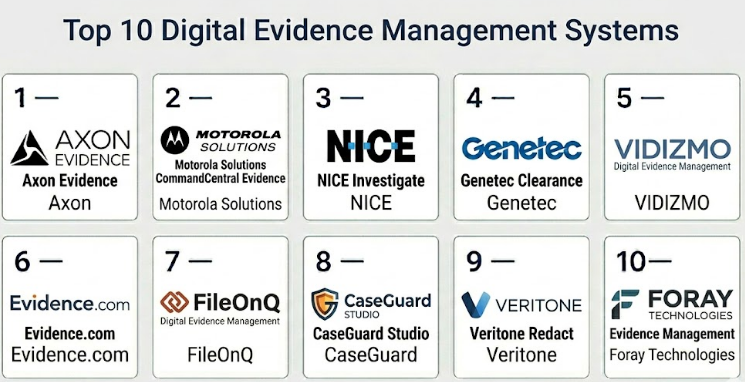
Top 10 Digital Evidence Management Systems
#1 — Axon Evidence
Short description :
Axon Evidence is a widely used digital evidence management platform designed for law enforcement and public safety agencies. It helps agencies manage body camera videos, in-car video, photos, audio, documents, and other evidence files. The platform supports secure evidence storage, case association, sharing, redaction workflows, auditability, and retention control. It is especially useful for agencies already using Axon body cameras and related public safety products. It is best for organizations that need a mature evidence platform connected to field video and law enforcement workflows.
Key Features
- Digital evidence storage and organization
- Body camera and in-car video evidence workflows
- Case and incident association
- Chain of custody and audit trail support
- Secure evidence sharing
- Redaction and review workflows
- Retention and lifecycle management
Pros
- Strong fit for agencies using Axon devices.
- Mature platform for large-scale law enforcement evidence workflows.
- Useful for body camera, in-car video, and broader digital evidence.
Cons
- Best value is usually within the Axon ecosystem.
- Storage and licensing costs should be reviewed carefully.
- Agencies using mixed camera vendors should validate compatibility.
Platforms / Deployment
Web / Mobile-supported workflows / Body camera hardware ecosystem
Cloud
Security & Compliance
SSO/SAML: Varies / N/A
MFA: Varies / N/A
Encryption: Not publicly stated
Audit logs: Varies / N/A
RBAC: Varies / N/A
CJIS alignment: Varies / N/A
SOC 2 / ISO 27001 / HIPAA: Not publicly stated
Integrations & Ecosystem
Axon Evidence works best when evidence workflows are connected with Axon body cameras, in-car systems, case workflows, and public safety operations.
- Axon body camera ecosystem
- In-car video workflows
- CAD and RMS workflows where configured
- Prosecutor sharing workflows
- Redaction workflows
- Evidence lifecycle workflows
Support & Community
Support is generally structured for public safety agencies. Agencies should confirm onboarding, evidence migration, retention configuration, user training, storage planning, and long-term export options.
#2 — Motorola Solutions CommandCentral Evidence
Short description :
Motorola Solutions CommandCentral Evidence is a digital evidence management platform built for public safety agencies that need to manage media and case evidence securely. It supports evidence from body cameras, in-car video, documents, photos, audio, and other digital sources. The platform is especially useful for agencies already using Motorola CAD, RMS, body cameras, or public safety tools. It helps teams connect evidence with cases, incidents, and operational workflows. It is best for agencies that want digital evidence management inside a broader Motorola public safety environment.
Key Features
- Digital evidence storage and management
- Case and incident evidence association
- Secure sharing and access workflows
- Body camera and video evidence support
- Audit and chain-of-custody workflows
- Search and evidence organization
- Integration with Motorola public safety ecosystem
Pros
- Strong fit for Motorola-centered public safety environments.
- Useful for agencies managing multiple evidence types.
- Supports connected workflows across dispatch, records, and evidence.
Cons
- Best fit may depend on broader Motorola ecosystem adoption.
- Agencies should validate camera and third-party system compatibility.
- Implementation planning is important for evidence migration.
Platforms / Deployment
Web / Mobile-supported workflows / Public safety hardware ecosystem
Cloud / Hybrid
Security & Compliance
SSO/SAML: Varies / N/A
MFA: Varies / N/A
Encryption: Not publicly stated
Audit logs: Varies / N/A
RBAC: Varies / N/A
CJIS alignment: Varies / N/A
SOC 2 / ISO 27001 / HIPAA: Not publicly stated
Integrations & Ecosystem
CommandCentral Evidence fits agencies that want digital evidence connected with public safety operations and case workflows.
- Motorola CAD and RMS workflows
- Body camera systems
- In-car video systems
- Case evidence workflows
- Digital evidence files
- Public safety command ecosystem
Support & Community
Support is generally enterprise and public-safety focused. Agencies should confirm implementation support, storage strategy, retention setup, training, and administrator controls.
#3 — NICE Investigate
Short description :
NICE Investigate is a digital evidence management and investigation platform used by public safety agencies, emergency communication centers, and justice partners. It helps teams collect, manage, review, analyze, and share evidence from many sources. These sources can include body camera video, CCTV, 911 audio, interview recordings, documents, photos, and case files. The platform is useful when evidence is spread across many systems and teams need a single investigation workflow. It is best for agencies and justice organizations that need broad digital investigation capabilities.
Key Features
- Multi-source digital evidence management
- Evidence collection and case organization
- Secure evidence sharing workflows
- Investigation collaboration support
- Chain of custody and auditability support
- Audio, video, document, and image evidence support
- Prosecutor and justice partner workflows
Pros
- Strong fit for multi-source digital investigation workflows.
- Useful when evidence comes from many departments and systems.
- Supports collaboration between agencies and legal partners.
Cons
- May be more advanced than smaller teams need.
- Setup requires clear evidence process design.
- Integration details should be validated before purchase.
Platforms / Deployment
Web / Digital evidence workflow ecosystem
Cloud / Hybrid / Varies / N/A
Security & Compliance
SSO/SAML: Varies / N/A
MFA: Varies / N/A
Encryption: Not publicly stated
Audit logs: Varies / N/A
RBAC: Varies / N/A
CJIS alignment: Varies / N/A
SOC 2 / ISO 27001 / HIPAA: Not publicly stated
Integrations & Ecosystem
NICE Investigate is strong where evidence needs to be gathered from multiple public safety and justice systems.
- Body camera evidence
- CCTV and surveillance video
- 911 audio and communication records
- Case management workflows
- Prosecutor sharing
- Investigation collaboration workflows
Support & Community
Support is usually enterprise and project-focused. Agencies should plan for source-system integration, training, evidence governance, user roles, and disclosure workflows.
#4 — Genetec Clearance
Short description :
Genetec Clearance is a digital evidence management system designed to collect, manage, organize, and share video and digital evidence. It is useful for law enforcement, transit agencies, cities, campuses, corporate security teams, and organizations managing video evidence from several sources. The platform can support evidence from surveillance systems, body cameras, mobile uploads, and external contributors. It is especially relevant for teams already using video security systems or managing many public safety video sources. It is best for organizations that need secure video evidence sharing and case-based evidence control.
Key Features
- Digital evidence collection and storage
- Case-based evidence organization
- Secure video evidence sharing
- Audit trail and access management workflows
- Support for video, files, and external evidence uploads
- Public safety and security evidence workflows
- Video surveillance ecosystem integration
Pros
- Strong fit for video-heavy evidence environments.
- Useful for security teams and public safety organizations.
- Supports controlled sharing and case organization.
Cons
- Agencies should validate body camera workflow depth.
- Best value may depend on broader video security needs.
- Setup can require clear evidence governance planning.
Platforms / Deployment
Web / Video evidence ecosystem
Cloud / Hybrid
Security & Compliance
SSO/SAML: Varies / N/A
MFA: Varies / N/A
Encryption: Not publicly stated
Audit logs: Varies / N/A
RBAC: Varies / N/A
CJIS alignment: Varies / N/A
SOC 2 / ISO 27001 / HIPAA: Not publicly stated
Integrations & Ecosystem
Genetec Clearance fits well in organizations that already manage many video sources and need structured evidence workflows.
- Genetec video surveillance ecosystem
- CCTV and security camera sources
- Body camera workflows where configured
- Case evidence sharing
- External evidence submission workflows
- Public safety and corporate security operations
Support & Community
Support is generally available through vendor and partner channels. Organizations should confirm implementation scope, training, storage planning, and supported integrations.
#5 — VIDIZMO Digital Evidence Management
Short description :
VIDIZMO Digital Evidence Management is a platform used for storing, managing, reviewing, redacting, and sharing digital evidence across different file types. It can support videos, images, documents, audio files, and body camera footage. The platform is useful for law enforcement, government agencies, legal teams, investigation units, and compliance teams. It offers secure access workflows, evidence organization, auditability, and case-based management. It is best for organizations that need a flexible digital evidence system across many evidence types.
Key Features
- Digital evidence storage and management
- Support for video, audio, images, and documents
- Case-based evidence organization
- Redaction support
- Audit logs and access control workflows
- Secure sharing and review processes
- Cloud, on-premise, and hybrid deployment options
Pros
- Flexible for multiple evidence file types.
- Useful for agencies that do not want to depend on one camera ecosystem.
- Strong fit where access control and governance matter.
Cons
- Camera-specific integrations should be validated.
- Implementation may require careful role and workflow design.
- Public compliance details should be reviewed directly.
Platforms / Deployment
Web / Mobile-supported workflows
Cloud / On-premise / Hybrid
Security & Compliance
SSO/SAML: Varies / N/A
MFA: Varies / N/A
Encryption: Not publicly stated
Audit logs: Varies / N/A
RBAC: Varies / N/A
CJIS alignment: Varies / N/A
SOC 2 / ISO 27001 / HIPAA: Not publicly stated
Integrations & Ecosystem
VIDIZMO fits evidence workflows where teams need governance across multiple media and document formats.
- Body camera footage workflows
- Video and audio evidence
- Document evidence
- Redaction workflows
- Case management workflows
- Secure evidence sharing
Support & Community
Support depends on deployment model and customer requirements. Buyers should confirm migration help, configuration support, administrator training, and retention setup.
#6 — Evidence.com
Short description :
Evidence.com is commonly associated with Axon’s evidence management ecosystem and is used by public safety agencies to manage digital evidence in the cloud. It helps agencies store body camera footage, organize evidence by case, manage retention, control access, and share files securely. The platform is useful for law enforcement teams that need reliable evidence workflows around body-worn camera data and related media files. It is best for organizations aligned with the Axon ecosystem. It can be a strong option for agencies needing structured, cloud-based evidence control.
Key Features
- Cloud-based digital evidence storage
- Body camera footage management
- Case and file organization
- Secure evidence sharing
- Retention and lifecycle workflows
- Auditability and access tracking support
- Integration with Axon camera workflows
Pros
- Strong fit for Axon body camera environments.
- Useful for high-volume video evidence storage.
- Supports evidence sharing and case organization.
Cons
- Best suited for Axon-centered workflows.
- Storage planning and cost control are important.
- Mixed camera environments should validate compatibility.
Platforms / Deployment
Web / Body camera ecosystem
Cloud
Security & Compliance
SSO/SAML: Varies / N/A
MFA: Varies / N/A
Encryption: Not publicly stated
Audit logs: Varies / N/A
RBAC: Varies / N/A
CJIS alignment: Varies / N/A
SOC 2 / ISO 27001 / HIPAA: Not publicly stated
Integrations & Ecosystem
Evidence.com works best when evidence collection and storage are linked to Axon devices and related workflows.
- Axon body cameras
- Video evidence workflows
- Redaction workflows
- Prosecutor sharing
- Case association
- Evidence lifecycle management
Support & Community
Support is generally agency-focused and connected to the Axon ecosystem. Buyers should confirm export options, storage rules, user permissions, retention configuration, and evidence migration support.
#7 — FileOnQ Digital Evidence Management
Short description :
FileOnQ Digital Evidence Management helps agencies manage both physical and digital evidence workflows. It is useful for property rooms, evidence units, law enforcement agencies, and public safety organizations that need chain-of-custody tracking. The platform can support evidence lifecycle management, item tracking, digital media records, and secure evidence workflows. It is especially relevant where digital evidence must be managed alongside physical property and case records. It is best for agencies that want evidence tracking across both digital and physical evidence operations.
Key Features
- Digital and physical evidence management
- Chain-of-custody tracking
- Evidence lifecycle workflows
- Case and item association
- Audit and access workflows
- Property room workflow support
- Digital media evidence support
Pros
- Strong fit for evidence rooms and property management.
- Useful for agencies managing both physical and digital evidence.
- Helps maintain structured custody workflows.
Cons
- Body camera-specific workflows should be validated.
- May require configuration for agency processes.
- Not always a camera-native evidence platform.
Platforms / Deployment
Web / Windows-supported workflows / Varies / N/A
Cloud / On-premise / Hybrid
Security & Compliance
SSO/SAML: Varies / N/A
MFA: Not publicly stated
Encryption: Not publicly stated
Audit logs: Varies / N/A
RBAC: Varies / N/A
CJIS alignment: Varies / N/A
SOC 2 / ISO 27001 / HIPAA: Not publicly stated
Integrations & Ecosystem
FileOnQ is most useful where evidence teams need custody workflows across digital files and physical evidence items.
- Digital evidence files
- Physical evidence tracking
- Property room systems
- Case association
- Barcode and inventory workflows
- Chain-of-custody reporting
Support & Community
Support is generally focused on evidence teams and agency workflows. Buyers should confirm configuration, migration, training, barcode workflows, and long-term evidence retention planning.
#8 — CaseGuard Studio
Short description :
CaseGuard Studio is a redaction and evidence processing platform used by law enforcement, public records teams, legal teams, government agencies, and compliance-heavy organizations. It helps users redact video, audio, images, and documents before disclosure or sharing. While it is not always used as a full evidence repository, it plays an important role in digital evidence workflows where sensitive information must be removed. It is best for teams that handle public records requests, legal discovery, body camera footage, interview recordings, and sensitive media. It is especially useful when redaction volume is high.
Key Features
- Video redaction
- Audio redaction
- Image and document redaction
- Body camera footage processing
- Public records workflow support
- Media review and export workflows
- Sensitive information protection
Pros
- Strong fit for redaction-heavy evidence workflows.
- Supports multiple media and document types.
- Useful for public records and disclosure teams.
Cons
- Not always a complete evidence repository.
- Redaction results should be reviewed by trained staff.
- Integration with existing evidence systems should be validated.
Platforms / Deployment
Windows / Web-supported workflows / Varies / N/A
Cloud / On-premise / Hybrid / Varies / N/A
Security & Compliance
SSO/SAML: Not publicly stated
MFA: Not publicly stated
Encryption: Not publicly stated
Audit logs: Varies / N/A
RBAC: Varies / N/A
CJIS alignment: Varies / N/A
SOC 2 / ISO 27001 / HIPAA: Not publicly stated
Integrations & Ecosystem
CaseGuard Studio fits workflows where digital evidence must be reviewed, redacted, and prepared for controlled release.
- Body camera redaction workflows
- Public records request workflows
- Legal discovery processes
- Video and audio review
- Document redaction
- Evidence export workflows
Support & Community
Support depends on licensing and deployment needs. Teams should confirm media format support, redaction training, workflow design, and export controls before adoption.
#9 — Veritone Redact
Short description :
Veritone Redact is a redaction-focused platform that helps teams redact sensitive information from video, audio, and image evidence. It is useful for law enforcement agencies, public records teams, prosecutors, and legal teams that handle sensitive digital media. The platform can reduce manual redaction effort when processing body camera video, interview recordings, surveillance footage, and other evidence files. It is best for organizations where redaction is a major bottleneck. While it may not replace a complete evidence repository, it can add strong value to the evidence disclosure workflow.
Key Features
- Video redaction workflows
- Audio redaction support
- Face and object redaction
- Public records disclosure support
- Media review and export workflows
- Body camera and surveillance footage processing
- AI-assisted redaction capabilities
Pros
- Strong for reducing redaction workload.
- Useful for high-volume public records teams.
- Can support faster evidence release preparation.
Cons
- Not a full digital evidence repository by itself.
- Human review is still necessary before release.
- Integration with existing systems should be tested.
Platforms / Deployment
Web / Digital media workflow ecosystem
Cloud / Varies / N/A
Security & Compliance
SSO/SAML: Varies / N/A
MFA: Not publicly stated
Encryption: Not publicly stated
Audit logs: Varies / N/A
RBAC: Varies / N/A
CJIS alignment: Varies / N/A
SOC 2 / ISO 27001 / HIPAA: Not publicly stated
Integrations & Ecosystem
Veritone Redact fits into digital evidence workflows where sensitive media must be reviewed and redacted before disclosure.
- Body camera footage
- Surveillance video
- Public records workflows
- Audio evidence
- Legal disclosure workflows
- Digital evidence platforms
Support & Community
Support depends on customer agreement and workflow complexity. Teams should confirm training, review procedures, media handling, export options, and user permission controls.
#10 — Foray Technologies Evidence Management
Short description :
Foray Technologies provides digital evidence and forensic media management tools for public safety agencies, forensic labs, and investigative teams. The platform helps manage photos, videos, and other digital media used in investigations. It is useful where evidence integrity, organization, search, and forensic workflows matter. It may support agencies that need structured management for crime scene photos, video files, forensic media, and investigative evidence. It is best for forensic and investigative teams that handle many digital media assets across cases.
Key Features
- Digital media evidence management
- Photo and video evidence workflows
- Forensic and investigative media support
- Case-based organization
- Search and retrieval workflows
- Evidence access management support
- Long-term media archive use cases
Pros
- Strong fit for forensic and investigative media workflows.
- Useful for organizing photos, videos, and case media.
- Supports structured evidence handling for investigative teams.
Cons
- Body camera-specific workflows should be validated.
- May not replace a full body camera vendor ecosystem.
- Deployment and integration details should be reviewed carefully.
Platforms / Deployment
Web / Windows-supported workflows / Varies / N/A
Cloud / On-premise / Hybrid / Varies / N/A
Security & Compliance
SSO/SAML: Not publicly stated
MFA: Not publicly stated
Encryption: Not publicly stated
Audit logs: Varies / N/A
RBAC: Varies / N/A
CJIS alignment: Varies / N/A
SOC 2 / ISO 27001 / HIPAA: Not publicly stated
Integrations & Ecosystem
Foray Technologies fits evidence environments where investigative media and forensic digital assets need structure and long-term control.
- Forensic photo workflows
- Video evidence management
- Case media archives
- Investigative review processes
- Evidence export workflows
- Public safety media systems
Support & Community
Support is typically specialized around forensic and evidence workflows. Agencies should confirm media compatibility, migration planning, training, and retention strategy.
Comparison Table
| Tool Name | Best For | Platform(s) Supported | Deployment | Standout Feature | Public Rating |
|---|---|---|---|---|---|
| Axon Evidence | Law enforcement digital evidence at scale | Web, mobile-supported workflows, camera ecosystem | Cloud | Mature body camera and digital evidence ecosystem | N/A |
| Motorola Solutions CommandCentral Evidence | Motorola public safety environments | Web, mobile-supported workflows, hardware ecosystem | Cloud / Hybrid | Evidence connected with CAD, RMS, and public safety tools | N/A |
| NICE Investigate | Multi-source digital investigations | Web, digital evidence workflow ecosystem | Cloud / Hybrid / Varies / N/A | Unified investigation evidence workflows | N/A |
| Genetec Clearance | Video evidence and security operations | Web, video evidence ecosystem | Cloud / Hybrid | Secure video evidence sharing | N/A |
| VIDIZMO Digital Evidence Management | Multi-format digital evidence control | Web, mobile-supported workflows | Cloud / On-premise / Hybrid | Flexible evidence management across file types | N/A |
| Evidence.com | Axon-centered evidence storage | Web, camera ecosystem | Cloud | Cloud evidence storage and case organization | N/A |
| FileOnQ Digital Evidence Management | Physical and digital evidence units | Web, Windows-supported workflows, varies / N/A | Cloud / On-premise / Hybrid | Chain of custody across evidence types | N/A |
| CaseGuard Studio | Redaction-heavy evidence workflows | Windows, web-supported workflows, varies / N/A | Cloud / On-premise / Hybrid / Varies / N/A | Video, audio, image, and document redaction | N/A |
| Veritone Redact | Public records and media redaction | Web, digital media workflow ecosystem | Cloud / Varies / N/A | AI-assisted redaction workflows | N/A |
| Foray Technologies Evidence Management | Forensic and investigative media teams | Web, Windows-supported workflows, varies / N/A | Cloud / On-premise / Hybrid / Varies / N/A | Forensic digital media evidence management | N/A |
Evaluation & Digital Evidence Management Systems
| Tool Name | Core (25%) | Ease (15%) | Integrations (15%) | Security (10%) | Performance (10%) | Support (10%) | Value (15%) | Weighted Total (0–10) |
|---|---|---|---|---|---|---|---|---|
| Axon Evidence | 9 | 8 | 9 | 8 | 9 | 8 | 6 | 8.15 |
| Motorola Solutions CommandCentral Evidence | 8 | 7 | 9 | 8 | 8 | 8 | 6 | 7.75 |
| NICE Investigate | 8 | 7 | 8 | 8 | 8 | 8 | 7 | 7.70 |
| Genetec Clearance | 8 | 7 | 8 | 8 | 8 | 7 | 7 | 7.60 |
| VIDIZMO Digital Evidence Management | 8 | 7 | 8 | 8 | 8 | 7 | 7 | 7.60 |
| Evidence.com | 9 | 8 | 8 | 8 | 9 | 8 | 6 | 8.00 |
| FileOnQ Digital Evidence Management | 7 | 7 | 7 | 7 | 7 | 7 | 7 | 7.00 |
| CaseGuard Studio | 7 | 8 | 7 | 7 | 8 | 7 | 7 | 7.30 |
| Veritone Redact | 7 | 8 | 7 | 7 | 8 | 7 | 7 | 7.30 |
| Foray Technologies Evidence Management | 7 | 7 | 7 | 7 | 7 | 7 | 7 | 7.00 |
These scores are comparative and should be used as a shortlist guide, not as a final buying decision. A body camera-heavy law enforcement agency may prioritize Axon Evidence or Evidence.com, while a multi-source investigation team may prefer NICE Investigate. A security-focused organization with many surveillance sources may consider Genetec Clearance. Teams with heavy redaction workloads may find CaseGuard Studio or Veritone Redact more useful than a full repository replacement.
Which Digital Evidence Management System Should You Choose?
Solo / Freelancer
Solo consultants, private investigators, and small legal support teams usually do not need a full enterprise digital evidence management platform unless they handle sensitive evidence at scale. If the need is basic storage, secure file organization, or small-case documentation, a simpler secure document system may be enough.
However, if evidence must be shared in legal proceedings, tracked with audit logs, protected with access controls, or retained under formal policies, a purpose-built evidence system becomes more important.
SMB
Small police departments, campus security teams, private investigation teams, and small government offices should focus on ease of use, affordability, chain of custody, retention controls, and secure sharing. VIDIZMO Digital Evidence Management, FileOnQ Digital Evidence Management, CaseGuard Studio, and Veritone Redact may be practical depending on the main use case.
If the team already uses Axon or Motorola cameras, staying within that evidence ecosystem may simplify upload and review workflows.
Mid-Market
Mid-sized public safety agencies, prosecutors, city departments, and security organizations often need stronger case association, redaction, external sharing, search, audit logs, and integrations. Axon Evidence, Motorola Solutions CommandCentral Evidence, NICE Investigate, Genetec Clearance, and VIDIZMO Digital Evidence Management can be strong options depending on evidence sources.
Mid-market teams should run real workflow tests involving evidence upload, tagging, review, redaction, legal sharing, retention, export, and user permissions.
Enterprise
Large law enforcement agencies, regional public safety organizations, prosecutors, transportation authorities, and citywide security operations need advanced scalability, storage planning, strong governance, integrations, and long-term evidence lifecycle control. Axon Evidence, Motorola Solutions CommandCentral Evidence, NICE Investigate, and Genetec Clearance are often stronger enterprise candidates.
Enterprise buyers should involve IT, legal, evidence managers, prosecutors, compliance teams, privacy officers, and frontline users before selection.
Budget vs Premium
Budget-focused teams should first identify the exact problem. If redaction is the main bottleneck, a redaction-focused tool may be more practical than replacing the full evidence repository. If chain of custody and secure storage are the main issues, a full evidence management platform is more appropriate.
Premium systems usually provide stronger integrations, larger storage capacity, more structured support, deeper governance, and better scalability. However, buyers should calculate total cost over multiple years, especially when storing large video files.
Feature Depth vs Ease of Use
Feature depth matters when an organization handles many evidence types, high file volume, external sharing, public records requests, and legal holds. However, ease of use matters just as much because officers, analysts, attorneys, evidence managers, and reviewers must use the system daily.
A good system should reduce evidence handling friction, not create extra administrative work.
Integrations & Scalability-
Important integrations include body cameras, dashcams, CCTV systems, CAD, RMS, case management, prosecutor systems, redaction tools, digital asset systems, identity providers, and archive storage.
Scalability should include storage growth, video resolution, file volume, user count, retention periods, external sharing, legal holds, and future evidence sources. Buyers should test growth assumptions before signing long-term contracts.
Security & Compliance Needs
Digital evidence often contains sensitive personal, legal, medical, investigative, and public safety information. Buyers should ask about encryption, audit logs, MFA, SSO, RBAC, legal holds, deletion controls, access reviews, evidence export, breach response, and data retention.
Do not assume security or compliance claims without official documentation. Legal, IT, records, and compliance teams should review the platform before purchase.
Frequently Asked Questions
1. What is a Digital Evidence Management System?
A Digital Evidence Management System is software used to store, organize, protect, review, share, redact, and retain digital evidence. It supports files such as video, audio, images, documents, body camera footage, CCTV clips, and investigation records.
2. How is it different from normal cloud storage?
Normal cloud storage may store files, but it often lacks chain of custody, audit logs, legal holds, retention rules, redaction workflows, case association, and controlled evidence sharing. Evidence platforms are designed for legal and investigative workflows.
3. What are the most important features to look for?
Important features include secure upload, search, chain of custody, access control, audit logs, redaction, case tagging, legal holds, retention policies, sharing permissions, and integrations with CAD, RMS, or case systems.
4. Do these systems support body camera footage?
Many digital evidence platforms support body camera footage, but compatibility varies. Agencies should validate camera support, upload process, metadata capture, storage cost, and integration with existing body camera systems.
5. Can digital evidence systems help with public records requests?
Yes, many platforms support review, redaction, controlled release, and audit tracking for public records workflows. Redaction tools are especially useful when evidence includes faces, license plates, minors, victims, or private information.
6. What is chain of custody?
Chain of custody is the record of how evidence is handled from upload to final disposition. It tracks actions such as access, edits, sharing, exports, redaction, deletion, and legal holds to protect evidence integrity.
7. How should organizations evaluate pricing?
Organizations should evaluate more than the license cost. They should review storage volume, retention periods, user count, video resolution, redaction needs, integrations, training, migration, support, and long-term archive costs.
8. Are AI redaction tools fully reliable?
AI redaction can save time, but it should not be treated as perfect. Human review is still important before releasing evidence, especially for public records, legal discovery, and sensitive investigations.
9. Can prosecutors access evidence directly?
Some platforms allow secure external sharing with prosecutors and legal partners. Buyers should confirm permission controls, expiration dates, download rules, audit logs, and whether external users only see approved evidence.
10. What are common mistakes when selecting these systems?
Common mistakes include underestimating storage costs, skipping legal review, ignoring redaction workload, failing to test integrations, not planning migration, and choosing a system that frontline users find difficult.
Conclusion
Digital Evidence Management Systems are now essential for organizations that handle video, audio, images, documents, and investigation files as part of legal, public safety, security, or compliance workflows. These platforms help protect evidence integrity, reduce manual file handling, improve search, support redaction, control access, maintain audit trails, and simplify secure sharing. However, the best system depends on the organization’s evidence sources, volume, security needs, legal requirements, integrations, and budget. A body camera-heavy agency may choose Axon Evidence or Evidence.com, while a multi-source investigation team may prefer NICE Investigate.
