Introduction
Government Permitting & Licensing Systems are digital platforms used by public sector agencies to manage applications, approvals, inspections, renewals, payments, documents, workflows, and citizen requests related to permits and licenses. In simple words, these tools help cities, counties, states, and agencies move permitting and licensing work from paper-based processes into structured online workflows.
These systems matter because residents, businesses, contractors, and internal government teams expect faster, clearer, and more transparent services. Manual permitting often creates delays, duplicate data entry, missing documents, payment issues, poor tracking, and heavy staff workload. A strong permitting and licensing platform can improve applicant experience, reduce back-office effort, support compliance, and give leaders better visibility into workload and service performance.
Common use cases include building permits, business licenses, contractor licenses, planning approvals, zoning applications, inspections, health permits, trade licenses, code enforcement cases, renewals, fee collection, and public portal submissions.
Buyers should evaluate workflow flexibility, citizen portal quality, payment processing, inspection scheduling, document management, GIS integration, reporting, security, scalability, mobile access, configuration options, and vendor support.
Best for: city governments, county agencies, state departments, planning teams, building departments, licensing boards, inspection teams, code enforcement teams, public works departments, and digital government teams.
Not ideal for: very small teams that only need a basic form, spreadsheet, or simple ticketing workflow without approvals, inspections, payments, renewals, compliance, and public-facing service requirements.
Key Trends in Government Permitting & Licensing Systems
- Citizen self-service portals are becoming essential because applicants expect to apply, upload documents, pay fees, track status, and receive updates online.
- No-code and low-code workflow configuration is growing as agencies need to adapt forms, approvals, fees, and rules without heavy custom development.
- Mobile inspection tools are now expected so inspectors can view assignments, capture notes, upload photos, update statuses, and complete inspections from the field.
- GIS integration is becoming more important for zoning checks, parcel lookup, property records, planning reviews, and location-based permitting.
- Online payments are now a standard requirement for permit fees, licensing fees, renewals, penalties, refunds, and receipts.
- Document management and digital plan review are becoming stronger priorities as agencies move away from paper submissions and manual review cycles.
- Automation is reducing repetitive staff work through routing rules, reminders, status updates, auto-calculated fees, and renewal notifications.
- Open data and reporting dashboards are helping leaders track workload, approval time, inspection volume, revenue, and service bottlenecks.
- Security and identity controls are becoming more important because these systems hold personal, business, property, payment, and regulatory data.
- Cloud-based platforms are becoming more common as agencies modernize legacy permitting systems and reduce on-premise maintenance.
How We Selected These Tools
- We selected platforms widely recognized in digital government, civic technology, permitting, licensing, land management, inspections, and public sector workflows.
- We included a balanced mix of enterprise government platforms, municipal permitting systems, licensing workflow tools, citizen service platforms, and cloud-first civic systems.
- We considered core capabilities such as online applications, workflow routing, approvals, payments, inspections, renewals, document management, reporting, and citizen portals.
- We considered public sector fit across cities, counties, states, departments, licensing boards, and regulatory agencies.
- We evaluated integration potential with GIS, finance, payment processors, document systems, CRM, inspections, ERP, and public records systems.
- We avoided guessing public ratings, certifications, pricing, or compliance claims.
- We used “Not publicly stated” where security, compliance, support, or deployment details are unclear.
- We considered usability for both applicants and internal agency staff.
- We considered scalability for agencies managing many departments, permit types, forms, inspections, and users.
- We scored tools comparatively based on permitting and licensing relevance, not as a universal ranking for every government agency.
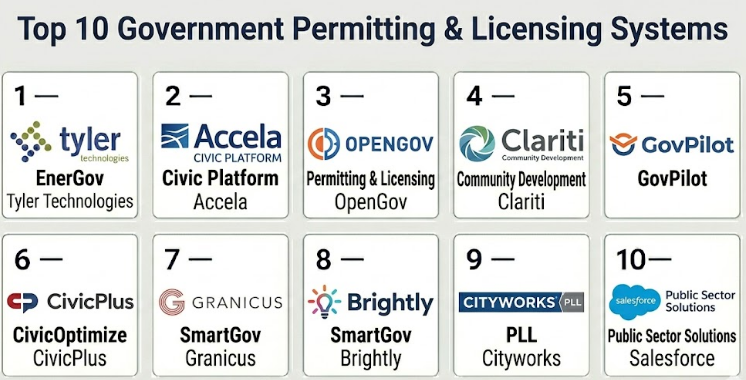
Top 10 Government Permitting & Licensing Systems
#1 — Tyler Technologies EnerGov
Short description :
Tyler Technologies EnerGov is a widely recognized permitting, licensing, planning, and land management platform used by cities, counties, and public sector agencies. It helps governments manage permits, inspections, planning applications, code enforcement, licensing, payments, and citizen-facing workflows. The platform is useful for agencies that need a structured system for complex permitting operations and multi-department review. It is especially relevant for organizations already using Tyler public sector products. It is best for medium to large government agencies that need configurable permitting and licensing workflows connected with broader civic operations.
Key Features
- Permit and license application management
- Planning and land management workflows
- Inspection scheduling and tracking
- Code enforcement support
- Online citizen portal workflows
- Fee calculation and payment support
- Reporting and operational dashboards
Pros
- Strong fit for city and county permitting departments.
- Useful for complex workflows involving many reviewers and departments.
- Works well when permitting must connect with broader government systems.
Cons
- Implementation can require significant planning and configuration.
- Smaller agencies may find it more complex than needed.
- Best value may depend on broader public sector system alignment.
Platforms / Deployment
Web / Windows / Mobile-supported workflows
Cloud / On-premise / Hybrid
Security & Compliance
SSO/SAML: Varies / N/A
MFA: Varies / N/A
Encryption: Not publicly stated
Audit logs: Varies / N/A
RBAC: Varies / N/A
SOC 2 / ISO 27001 / GDPR / HIPAA: Not publicly stated
Integrations & Ecosystem
EnerGov fits agencies that need permitting, planning, licensing, and inspection workflows connected with public sector operations.
- GIS and parcel systems
- Payment processors
- Finance and ERP systems
- Document management workflows
- Inspection tools
- Citizen portal workflows
Support & Community
Support is generally public-sector focused and depends on contract, deployment scope, and configuration. Agencies should confirm implementation services, staff training, migration support, and long-term maintenance.
#2 — Accela Civic Platform
Short description :
Accela Civic Platform is a government technology platform used for permitting, licensing, inspections, planning, code enforcement, and citizen services. It is designed for cities, counties, and state agencies that need configurable workflows and online public service delivery. The platform supports digital applications, approvals, payments, inspections, renewals, and reporting. It is useful for agencies modernizing paper-heavy regulatory processes. It is best for public sector organizations that need scalable permitting and licensing operations across multiple departments.
Key Features
- Online permitting and licensing workflows
- Citizen self-service portal
- Inspection scheduling and mobile workflows
- Planning and regulatory workflow support
- Payment and fee processing support
- Code enforcement capabilities
- Reporting and dashboards
Pros
- Strong fit for digital government transformation.
- Useful for multi-department permitting and licensing operations.
- Scalable for larger agencies and complex workflows.
Cons
- Configuration and implementation can be demanding.
- Agencies should validate total cost and support needs carefully.
- Smaller departments may need lighter tools.
Platforms / Deployment
Web / Mobile-supported workflows
Cloud / Hybrid / Varies / N/A
Security & Compliance
SSO/SAML: Varies / N/A
MFA: Varies / N/A
Encryption: Not publicly stated
Audit logs: Varies / N/A
RBAC: Varies / N/A
SOC 2 / ISO 27001 / GDPR / HIPAA: Not publicly stated
Integrations & Ecosystem
Accela Civic Platform is useful where permitting and licensing must connect with multiple civic systems.
- GIS and mapping systems
- Payment systems
- ERP and finance workflows
- Document management
- Inspection mobile tools
- Citizen service portals
Support & Community
Support is typically public-sector and implementation-focused. Agencies should plan for workflow design, data migration, staff training, portal rollout, and reporting setup.
#3 — OpenGov Permitting & Licensing
Short description :
OpenGov Permitting & Licensing is a cloud-based platform designed to help local governments manage permits, licenses, inspections, applications, renewals, and citizen-facing services. It focuses on modern user experience, configurable workflows, online forms, payments, and staff dashboards. The platform is useful for agencies that want to modernize permitting without relying heavily on paper or email-based processes. It works well for cities and counties seeking better transparency and faster application processing. It is best for governments that want cloud-first permitting and licensing workflows.
Key Features
- Online permit and license applications
- Configurable approval workflows
- Inspection scheduling and tracking
- Citizen portal and status updates
- Payment support
- Reporting and performance dashboards
- Document upload and review workflows
Pros
- Modern cloud-first experience for staff and citizens.
- Useful for agencies replacing paper or email workflows.
- Strong fit for local governments needing practical digital services.
Cons
- Agencies should validate complex land management requirements.
- Integration depth should be reviewed for existing systems.
- Advanced workflows may require careful configuration.
Platforms / Deployment
Web / Mobile-supported workflows
Cloud
Security & Compliance
SSO/SAML: Varies / N/A
MFA: Varies / N/A
Encryption: Not publicly stated
Audit logs: Varies / N/A
RBAC: Varies / N/A
SOC 2 / ISO 27001 / GDPR / HIPAA: Not publicly stated
Integrations & Ecosystem
OpenGov Permitting & Licensing fits agencies that need permitting connected with finance, reporting, and public-facing digital workflows.
- Payment workflows
- GIS and parcel data where configured
- Finance and budgeting systems
- Online forms
- Inspection workflows
- Reporting dashboards
Support & Community
Support is generally focused on local government adoption and implementation. Agencies should confirm onboarding, workflow configuration, training, and data migration support.
#4 — Clariti Community Development
Short description :
Clariti Community Development is a cloud-based platform for permitting, licensing, planning, inspections, code enforcement, and community development workflows. It helps agencies manage applications, approvals, reviews, inspections, fees, and public-facing services. The platform is useful for building departments, planning teams, licensing teams, and local governments that want configurable digital workflows. It is designed for agencies looking to improve both applicant experience and internal staff efficiency. It is best for governments modernizing community development and permitting processes.
Key Features
- Permit and license workflow management
- Planning and development review support
- Online applicant portal
- Inspection scheduling and mobile workflows
- Code enforcement support
- Fee calculation and payment workflows
- Reporting and operational insights
Pros
- Strong fit for community development departments.
- Useful for modernizing permitting, licensing, and inspections.
- Cloud-based workflows can simplify access and updates.
Cons
- Agencies should validate advanced integration requirements.
- Configuration effort depends on workflow complexity.
- Public security and compliance details should be reviewed directly.
Platforms / Deployment
Web / Mobile-supported workflows
Cloud
Security & Compliance
SSO/SAML: Varies / N/A
MFA: Varies / N/A
Encryption: Not publicly stated
Audit logs: Varies / N/A
RBAC: Varies / N/A
SOC 2 / ISO 27001 / GDPR / HIPAA: Not publicly stated
Integrations & Ecosystem
Clariti fits agencies that need connected community development workflows with public-facing access.
- GIS and parcel systems
- Payment processors
- Inspection workflows
- Document review workflows
- Citizen portals
- Reporting tools
Support & Community
Support is generally implementation and customer success focused. Agencies should confirm training, configuration assistance, migration planning, and ongoing support options.
#5 — GovPilot
Short description :
GovPilot is a cloud-based government management platform that includes permitting, licensing, code enforcement, inspections, public works, forms, and citizen services. It is useful for local governments that want configurable digital workflows across multiple departments. The platform helps agencies accept online applications, manage approvals, collect payments, schedule inspections, and track service requests. It is especially useful for agencies moving away from spreadsheets and paper forms. It is best for small to mid-sized local governments looking for flexible digital government workflows.
Key Features
- Online permitting and licensing workflows
- Digital forms and applications
- Code enforcement and inspections
- Citizen portal support
- Payment and fee workflows
- Workflow automation
- Reporting and department dashboards
Pros
- Practical fit for small and mid-sized local governments.
- Useful for replacing paper forms and manual tracking.
- Supports multiple municipal workflows beyond permitting.
Cons
- Very complex enterprise workflows should be validated carefully.
- Agencies should review integration needs before purchase.
- Configuration quality affects long-term usability.
Platforms / Deployment
Web / Mobile-supported workflows
Cloud
Security & Compliance
SSO/SAML: Varies / N/A
MFA: Not publicly stated
Encryption: Not publicly stated
Audit logs: Varies / N/A
RBAC: Varies / N/A
SOC 2 / ISO 27001 / GDPR / HIPAA: Not publicly stated
Integrations & Ecosystem
GovPilot fits local governments that need flexible online forms, permitting, licensing, and service workflows.
- Online application portals
- Payment processors
- GIS workflows where configured
- Inspection tools
- Citizen service requests
- Department reporting dashboards
Support & Community
Support is generally local-government focused. Agencies should confirm workflow setup, training, form configuration, and migration support before rollout.
#6 — CivicPlus CivicOptimize
Short description :
CivicPlus CivicOptimize helps governments digitize forms, workflows, payments, citizen requests, licensing, and service processes. It is useful for agencies that need flexible online forms and workflow automation for permits, licenses, renewals, and internal approvals. While it may not replace a full land management system for complex agencies, it can support many public-facing licensing and permitting workflows. It is especially useful for local governments that need digital service delivery across departments. It is best for agencies wanting configurable forms and workflow automation with citizen engagement capabilities.
Key Features
- Online forms and workflow automation
- Permit and license intake workflows
- Citizen portal and request management
- Payment workflow support
- Internal routing and approvals
- Status tracking and notifications
- Public service process digitization
Pros
- Useful for digitizing forms and citizen-facing workflows.
- Good fit for agencies needing flexible online intake.
- Can support multiple departments beyond permitting.
Cons
- May not replace a full enterprise permitting or land management system.
- Advanced inspections and parcel workflows should be validated.
- Agencies should review integration requirements carefully.
Platforms / Deployment
Web / Browser-based workflows
Cloud
Security & Compliance
SSO/SAML: Varies / N/A
MFA: Not publicly stated
Encryption: Not publicly stated
Audit logs: Varies / N/A
RBAC: Varies / N/A
SOC 2 / ISO 27001 / GDPR / HIPAA: Not publicly stated
Integrations & Ecosystem
CivicPlus CivicOptimize fits agencies that need digital forms, workflow routing, and public-facing service processes.
- Citizen service portals
- Payment workflows
- Website and digital government tools
- Internal approval workflows
- Licensing and renewal forms
- Notification workflows
Support & Community
Support is generally focused on government digital service teams. Agencies should confirm onboarding, form design support, workflow setup, and staff training.
#7 — Granicus SmartGov
Short description :
Granicus SmartGov is a permitting, licensing, inspections, and code enforcement platform designed for local government agencies. It helps manage applications, reviews, approvals, inspections, fees, and public-facing service requests. The platform is useful for cities and counties that need digital community development workflows and online access for applicants. It can support permitting teams that want better tracking, transparency, and communication. It is best for governments looking to manage permitting and licensing as part of a broader civic engagement and digital government approach.
Key Features
- Permit and license application management
- Inspection scheduling and tracking
- Code enforcement support
- Online public portal
- Fee and payment workflows
- Review and approval routing
- Reporting and operational visibility
Pros
- Good fit for local government permitting and licensing.
- Useful for agencies focused on public-facing transparency.
- Supports permitting, inspections, and code enforcement workflows.
Cons
- Agencies should validate current product fit and roadmap.
- Integration needs should be reviewed early.
- Configuration effort depends on agency workflow complexity.
Platforms / Deployment
Web / Mobile-supported workflows
Cloud / Varies / N/A
Security & Compliance
SSO/SAML: Varies / N/A
MFA: Not publicly stated
Encryption: Not publicly stated
Audit logs: Varies / N/A
RBAC: Varies / N/A
SOC 2 / ISO 27001 / GDPR / HIPAA: Not publicly stated
Integrations & Ecosystem
SmartGov fits agencies that need permitting and licensing connected with citizen service workflows.
- Citizen portals
- Payment systems
- Inspection workflows
- Code enforcement records
- Reporting dashboards
- Civic engagement tools
Support & Community
Support depends on agency contract and implementation scope. Buyers should confirm training, configuration, migration assistance, and product support expectations.
#8 — Brightly SmartGov
Short description :
Brightly SmartGov is used by local governments for permitting, licensing, inspections, code enforcement, and community development workflows. It supports online applications, plan reviews, fee collection, inspection scheduling, and public access to service status. The platform is useful for agencies that want to modernize community development operations and improve applicant visibility. It can help staff reduce manual tracking and manage permit lifecycle steps more clearly. It is best for small to mid-sized governments that need practical permitting and licensing functionality.
Key Features
- Permit and license management
- Online application intake
- Inspection scheduling and field updates
- Code enforcement workflows
- Plan review and document handling
- Fee and payment workflows
- Reporting and dashboard support
Pros
- Practical fit for local government permitting teams.
- Supports common community development workflows.
- Useful for improving public visibility and staff tracking.
Cons
- Agencies should validate current vendor packaging and availability.
- Advanced enterprise needs may require careful review.
- Integrations and migration effort should be assessed early.
Platforms / Deployment
Web / Mobile-supported workflows
Cloud / Varies / N/A
Security & Compliance
SSO/SAML: Varies / N/A
MFA: Not publicly stated
Encryption: Not publicly stated
Audit logs: Varies / N/A
RBAC: Varies / N/A
SOC 2 / ISO 27001 / GDPR / HIPAA: Not publicly stated
Integrations & Ecosystem
Brightly SmartGov fits government teams that need permitting, inspections, code enforcement, and application tracking.
- Online public portals
- Inspection workflows
- Code enforcement systems
- Payment processors
- Document workflows
- Reporting tools
Support & Community
Support is generally government-focused and may vary by contract. Agencies should confirm implementation help, migration support, workflow setup, and training.
#9 — Cityworks PLL
Short description :
Cityworks PLL, often associated with permitting, licensing, and land workflows, is useful for agencies that need permitting connected with GIS and asset management. It supports public sector workflows involving land, permits, inspections, and location-based government operations. The platform is especially relevant for agencies already using Cityworks for asset management or GIS-centric workflows. It can help connect permitting activity with properties, infrastructure, and operational records. It is best for governments that want GIS-centered permitting and public works alignment.
Key Features
- Permitting and licensing workflow support
- GIS-centered records and location workflows
- Inspection and review processes
- Land and property-related tracking
- Public sector workflow management
- Integration with asset management workflows
- Reporting and operational visibility
Pros
- Strong fit for GIS-centered government operations.
- Useful where permits connect with assets, parcels, and infrastructure.
- Good option for agencies already using Cityworks.
Cons
- Best value may depend on existing Cityworks or GIS adoption.
- Agencies should validate applicant portal and licensing needs.
- Configuration and integration planning are important.
Platforms / Deployment
Web / Mobile-supported workflows / GIS-supported workflows
Cloud / On-premise / Hybrid / Varies / N/A
Security & Compliance
SSO/SAML: Varies / N/A
MFA: Varies / N/A
Encryption: Not publicly stated
Audit logs: Varies / N/A
RBAC: Varies / N/A
SOC 2 / ISO 27001 / GDPR / HIPAA: Not publicly stated
Integrations & Ecosystem
Cityworks PLL fits agencies where permitting workflows need strong GIS and asset management context.
- GIS and parcel systems
- Asset management workflows
- Inspection tools
- Public works systems
- Permit records
- Reporting dashboards
Support & Community
Support is generally public-sector and implementation-focused. Agencies should confirm GIS configuration, integration planning, user training, and migration support.
#10 — Salesforce Public Sector Solutions
Short description :
Salesforce Public Sector Solutions can support licensing, permitting, inspections, grant workflows, case management, and public-facing digital services through configurable CRM-style workflows. It is useful for agencies that want a flexible platform approach rather than a narrow permitting-only system. The platform can support online intake, case routing, approvals, service tracking, communications, and integrations. It is best for agencies with strong internal platform teams or implementation partners that can configure workflows properly. It may be especially useful for state agencies and large departments managing multiple licensing programs.
Key Features
- Licensing and permitting workflow configuration
- Citizen and business service portals
- Case management and approval routing
- Inspection and compliance workflows where configured
- Payment and document integrations where configured
- Reporting and dashboards
- CRM-style public sector service management
Pros
- Flexible platform for many government service workflows.
- Useful for agencies managing multiple licensing or regulatory programs.
- Strong ecosystem for integrations and customization.
Cons
- Requires careful implementation and governance.
- May be more complex than a dedicated permitting system for smaller agencies.
- Costs and configuration effort should be reviewed carefully.
Platforms / Deployment
Web / Mobile-supported workflows
Cloud
Security & Compliance
SSO/SAML: Varies / N/A
MFA: Varies / N/A
Encryption: Not publicly stated
Audit logs: Varies / N/A
RBAC: Varies / N/A
SOC 2 / ISO 27001 / GDPR / HIPAA: Not publicly stated
Integrations & Ecosystem
Salesforce Public Sector Solutions fits agencies that need flexible licensing and permitting workflows connected with broader CRM and service delivery.
- Citizen portals
- Payment integrations
- Document management systems
- Identity and access systems
- Reporting dashboards
- Government service workflows
Support & Community
Support depends on licensing, implementation partner, internal platform capability, and agency needs. Agencies should confirm governance, configuration standards, administrator training, and long-term support.
Comparison Table
| Tool Name | Best For | Platform(s) Supported | Deployment | Standout Feature | Public Rating |
|---|---|---|---|---|---|
| Tyler Technologies EnerGov | Medium and large permitting departments | Web, Windows, mobile-supported workflows | Cloud / On-premise / Hybrid | Deep permitting, planning, and land management workflows | N/A |
| Accela Civic Platform | Multi-department government permitting and licensing | Web, mobile-supported workflows | Cloud / Hybrid / Varies / N/A | Scalable civic permitting and licensing platform | N/A |
| OpenGov Permitting & Licensing | Cloud-first local government permitting | Web, mobile-supported workflows | Cloud | Modern citizen portal and workflow automation | N/A |
| Clariti Community Development | Community development and planning teams | Web, mobile-supported workflows | Cloud | Cloud permitting and inspection workflows | N/A |
| GovPilot | Small to mid-sized local governments | Web, mobile-supported workflows | Cloud | Flexible municipal forms and workflow automation | N/A |
| CivicPlus CivicOptimize | Digital forms and service workflows | Web | Cloud | Online forms and public service automation | N/A |
| Granicus SmartGov | Local government permitting and code enforcement | Web, mobile-supported workflows | Cloud / Varies / N/A | Permitting with public-facing service workflows | N/A |
| Brightly SmartGov | Local permitting, inspections, and code workflows | Web, mobile-supported workflows | Cloud / Varies / N/A | Practical permit lifecycle management | N/A |
| Cityworks PLL | GIS-centered permitting and public works alignment | Web, mobile-supported workflows, GIS-supported workflows | Cloud / On-premise / Hybrid / Varies / N/A | GIS-connected permitting workflows | N/A |
| Salesforce Public Sector Solutions | Large configurable licensing and service workflows | Web, mobile-supported workflows | Cloud | Flexible platform for regulatory workflows | N/A |
Evaluation & Government Permitting & Licensing Systems
| Tool Name | Core (25%) | Ease (15%) | Integrations (15%) | Security (10%) | Performance (10%) | Support (10%) | Value (15%) | Weighted Total (0–10) |
|---|---|---|---|---|---|---|---|---|
| Tyler Technologies EnerGov | 9 | 7 | 9 | 8 | 8 | 8 | 7 | 8.05 |
| Accela Civic Platform | 9 | 7 | 9 | 8 | 8 | 8 | 7 | 8.05 |
| OpenGov Permitting & Licensing | 8 | 8 | 8 | 8 | 8 | 8 | 7 | 7.95 |
| Clariti Community Development | 8 | 8 | 8 | 8 | 8 | 7 | 7 | 7.85 |
| GovPilot | 8 | 8 | 7 | 7 | 7 | 7 | 8 | 7.50 |
| CivicPlus CivicOptimize | 7 | 8 | 7 | 7 | 7 | 7 | 8 | 7.25 |
| Granicus SmartGov | 8 | 7 | 7 | 7 | 7 | 7 | 7 | 7.20 |
| Brightly SmartGov | 8 | 7 | 7 | 7 | 7 | 7 | 7 | 7.20 |
| Cityworks PLL | 8 | 7 | 9 | 7 | 8 | 7 | 7 | 7.65 |
| Salesforce Public Sector Solutions | 8 | 7 | 9 | 8 | 8 | 8 | 6 | 7.80 |
These scores are comparative and should be used as a shortlist guide. A large city may value deep land management and GIS integrations more heavily, while a small municipality may prefer simple configuration and faster rollout. A licensing board may need renewals and compliance workflows more than inspections. Buyers should validate workflows, integrations, security controls, payment handling, reporting, migration, and user experience before selecting a system.
Which Government Permitting & Licensing System Should You Choose?
Solo / Freelancer
Solo consultants, permit expeditors, and independent professionals usually do not need a full government permitting platform. They may only need access to the official agency portal where permits and licenses are submitted.
However, consultants working with many clients may benefit from internal tracking tools for deadlines, documents, status updates, and client communication. A full government permitting system is mainly for agencies, not individual filers.
SMB
Small municipalities, town offices, small licensing boards, and local departments should focus on ease of setup, affordability, online forms, payments, status tracking, and basic reporting. GovPilot, CivicPlus CivicOptimize, OpenGov Permitting & Licensing, and Brightly SmartGov may be practical depending on workflow complexity.
Smaller agencies should avoid over-customizing too early. Start with the most common permits and licenses, then expand gradually.
Mid-Market
Mid-sized cities, counties, planning departments, building departments, and regulatory agencies need stronger workflow configuration, inspections, payments, document management, GIS, and reporting. OpenGov Permitting & Licensing, Clariti Community Development, Accela Civic Platform, Tyler Technologies EnerGov, and Cityworks PLL may be relevant.
Mid-market buyers should test real workflows such as building permit intake, plan review routing, inspection scheduling, fee calculation, applicant messaging, and renewal processing.
Enterprise
Large cities, counties, state agencies, and multi-department regulatory organizations need scalability, deep integrations, role-based controls, auditability, strong reporting, and long-term support. Tyler Technologies EnerGov, Accela Civic Platform, Salesforce Public Sector Solutions, OpenGov, and Clariti may be stronger candidates.
Enterprise agencies should involve IT, finance, permitting staff, inspectors, planning teams, legal, accessibility specialists, and public-facing service teams before final selection.
Budget vs Premium
Budget-focused agencies should focus on practical digital intake, online payments, staff routing, and status transparency. A lighter platform may be enough if workflows are simple.
Premium platforms are better when agencies need complex land management, many permit types, GIS, inspections, renewals, multiple departments, custom rules, and advanced integrations. Premium tools can create strong value, but only when implementation is well managed.
Feature Depth vs Ease of Use
A powerful system is useful only if citizens and staff can actually use it. Applicants should be able to submit forms without confusion, and staff should be able to review, approve, inspect, and communicate without excessive clicks.
Agencies should test the system with real applicants, clerks, reviewers, inspectors, supervisors, and finance teams before purchase.
Integrations & Scalability-
Important integrations include GIS, parcel data, finance, ERP, payments, document management, inspections, CRM, identity management, email, public records, asset management, and reporting systems.
Scalability should include permit volume, license renewals, departments, users, fee types, document size, inspections, public portal usage, and future program expansion. A system should handle both current needs and future modernization.
Security & Compliance Needs
Government permitting and licensing systems handle personal information, business data, property details, payment information, contractor records, inspection notes, and regulatory decisions. Security review should be mandatory.
Agencies should ask about SSO, MFA, RBAC, audit logs, encryption, payment security, access reviews, retention rules, backup, disaster recovery, data export, and breach response. Do not assume compliance without formal documentation.
Frequently Asked Questions
1. What is a Government Permitting & Licensing System?
A Government Permitting & Licensing System is software that helps agencies manage permit and license applications, reviews, approvals, inspections, payments, renewals, documents, and citizen communication through digital workflows.
2. How is it different from a basic online form?
A basic online form collects information, but a permitting and licensing system manages the full lifecycle. It can route applications, calculate fees, collect payments, schedule inspections, track approvals, send notifications, and maintain records.
3. What agencies use permitting and licensing systems?
Cities, counties, states, building departments, planning departments, health departments, licensing boards, code enforcement teams, public works departments, and regulatory agencies commonly use these systems.
4. What features matter most?
Important features include online applications, workflow routing, document uploads, plan review, inspections, fee calculation, payments, renewals, status tracking, reporting, GIS integration, audit logs, and role-based access.
5. Can these systems support inspections?
Yes, many systems include inspection scheduling, field updates, inspector notes, photos, checklists, corrections, and final inspection results. Agencies should validate mobile inspection functionality before buying.
6. Do these platforms support online payments?
Many permitting and licensing systems support online payment workflows, but payment processors, fee rules, refunds, receipts, and convenience fees vary. Agencies should test payment workflows carefully.
7. Can citizens track application status online?
Yes, many modern systems provide citizen portals where applicants can submit applications, upload documents, pay fees, view comments, respond to corrections, and track status. The quality of the portal varies by platform.
8. What are common mistakes when choosing these systems?
Common mistakes include ignoring staff workflows, underestimating data migration, over-customizing forms, failing to test payments, not involving inspectors, and choosing a system without validating GIS or finance integrations.
9. How long does implementation take?
Implementation depends on agency size, number of permit types, workflow complexity, integrations, payment setup, data migration, training, and public portal rollout. Larger agencies often need phased implementation.
10. Can these systems integrate with GIS?
Many systems support GIS or parcel integration, but depth varies. GIS integration is important for zoning, property lookup, land use checks, inspections, planning reviews, and location-based reporting.
Conclusion
Government Permitting & Licensing Systems help agencies deliver faster, more transparent, and more reliable public services. The right platform can reduce paper work, improve applicant experience, streamline approvals, support online payments, schedule inspections, manage renewals, and give leaders better operational insight. However, the best system depends on agency size, permit complexity, licensing rules, inspection needs, GIS requirements, public portal expectations, and integration environment. Large cities may prefer Tyler Technologies EnerGov, Accela Civic Platform, Salesforce Public Sector Solutions, or Clariti.
