Introduction
Public Health Surveillance Systems are software platforms used by health departments, government agencies, hospitals, laboratories, epidemiology teams, and public health organizations to collect, monitor, analyze, and report health-related data. In simple words, these systems help public health teams detect disease patterns, track outbreaks, monitor population health, manage alerts, and respond faster to public health risks.
These systems matter because public health teams need timely and reliable information to understand what is happening in communities. Without strong surveillance tools, agencies may depend on delayed reports, scattered spreadsheets, manual emails, and disconnected data sources. That can slow outbreak detection, weaken emergency response, and make it harder to protect communities.
Common use cases include infectious disease reporting, outbreak monitoring, syndromic surveillance, immunization tracking, laboratory result reporting, environmental health monitoring, hospital data feeds, case investigation, contact tracing, chronic disease monitoring, and public health dashboards.
Buyers should evaluate data interoperability, reporting speed, analytics, alerting, privacy controls, security, workflow flexibility, integration with laboratories and hospitals, dashboard quality, scalability, compliance readiness, and vendor support.
Best for: public health departments, state and local health agencies, hospitals, laboratories, epidemiology teams, emergency preparedness teams, government health programs, disease control units, and healthcare data teams.
Not ideal for: small clinics or private teams that only need basic patient management, simple appointment tracking, or internal reporting without disease surveillance, population health monitoring, outbreak response, and public health reporting workflows.
Key Trends in Public Health Surveillance Systems
- Real-time disease monitoring is becoming more important because health agencies need faster visibility into outbreaks, emergency risks, and community health patterns.
- Interoperability with healthcare systems is now essential as surveillance tools need data from hospitals, labs, clinics, pharmacies, immunization registries, and emergency departments.
- Syndromic surveillance is gaining importance because early symptoms and emergency visit patterns can help detect public health threats before confirmed lab results are available.
- Cloud-based public health systems are growing as agencies modernize older infrastructure and improve cross-agency access.
- Data visualization dashboards are now expected because public health leaders need clear views of disease trends, case counts, geography, demographics, and risk areas.
- Automated alerts and anomaly detection are becoming more useful for identifying unusual spikes in cases, symptoms, lab results, or geographic clusters.
- Privacy and consent controls are becoming stronger priorities because public health data may include sensitive medical, demographic, location, and identity information.
- Laboratory reporting integration is becoming more advanced as agencies need electronic lab reports, test results, specimen details, and case matching.
- Emergency preparedness workflows are becoming more connected with surveillance data, helping agencies prepare for outbreaks, environmental events, and public health emergencies.
- AI-assisted analytics are emerging carefully to support trend detection, case prioritization, data cleaning, and workload reduction, but human public health review remains critical.
How We Selected These Tools
- We selected tools recognized in public health surveillance, epidemiology, disease reporting, outbreak management, health analytics, and government health data workflows.
- We included a balanced mix of national surveillance platforms, public health agency systems, syndromic surveillance tools, disease case management systems, and open-source health platforms.
- We considered core capabilities such as case reporting, outbreak detection, dashboards, data feeds, alerts, laboratory reporting, analytics, and population health monitoring.
- We considered interoperability with healthcare providers, laboratories, electronic health records, immunization systems, emergency departments, and public health databases.
- We evaluated suitability for local health departments, state agencies, national health programs, hospitals, laboratories, and international public health organizations.
- We avoided guessing public ratings, certifications, pricing, or compliance claims.
- We used “Not publicly stated” where security, compliance, support, or deployment details are unclear.
- We considered usability for epidemiologists, data analysts, public health nurses, emergency response teams, and administrators.
- We considered scalability for agencies handling large populations, many facilities, multiple diseases, and high reporting volume.
- We scored tools comparatively based on public health surveillance relevance, not as a universal ranking for every agency.
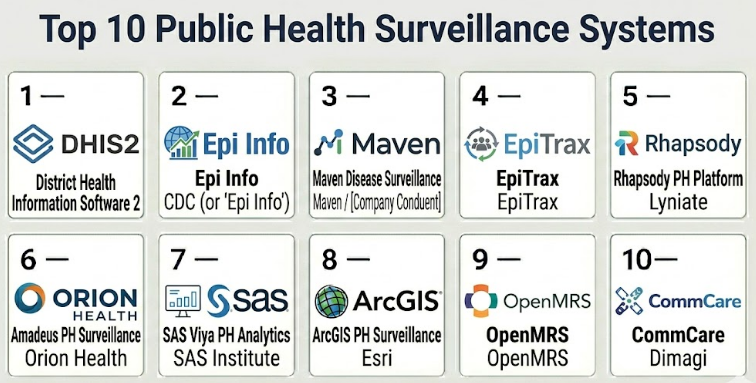
Top 10 Public Health Surveillance Systems
#1 — DHIS2
Short description :
DHIS2 is a widely used open-source health information platform used by governments, public health programs, NGOs, and international health organizations. It supports health data collection, disease surveillance, dashboards, reporting, indicators, analytics, and program monitoring. The platform is useful for national and regional public health systems that need flexible data models and large-scale reporting. It can support surveillance for infectious diseases, immunization programs, maternal health, community health, and other public health priorities. It is best for organizations that need configurable public health data collection and analytics at scale.
Key Features
- Health data collection and reporting
- Disease surveillance workflows
- Dashboards and analytics
- Indicator and program monitoring
- Mobile and offline data collection support
- Configurable forms and data models
- Large-scale public health program support
Pros
- Strong fit for national and regional public health programs.
- Open-source flexibility supports custom public health workflows.
- Useful for large-scale reporting and dashboard needs.
Cons
- Requires technical configuration and governance.
- Implementation quality depends on local capacity and partners.
- Advanced interoperability may require integration planning.
Platforms / Deployment
Web / Android / Mobile-supported workflows
Cloud / Self-hosted / Hybrid
Security & Compliance
SSO/SAML: Varies / N/A
MFA: Varies / N/A
Encryption: Not publicly stated
Audit logs: Varies / N/A
RBAC: Varies / N/A
HIPAA / SOC 2 / ISO 27001 / GDPR: Not publicly stated
Integrations & Ecosystem
DHIS2 fits public health environments where large-scale reporting, program monitoring, and disease surveillance need flexible data structures.
- Laboratory reporting workflows where configured
- Health facility reporting systems
- Mobile data collection
- GIS and mapping tools
- Public health dashboards
- Data exchange workflows
Support & Community
DHIS2 has a strong global community and implementation ecosystem. Formal support depends on implementation partners, internal technical capacity, and hosting model. Agencies should plan for training, data governance, hosting, and long-term maintenance.
#2 — Epi Info
Short description :
Epi Info is a public health data collection, analysis, and epidemiology tool commonly used by public health professionals for outbreak investigations, surveys, data entry, statistical analysis, and field epidemiology. It is useful for agencies and epidemiologists who need practical tools for quick data collection and analysis. The platform can support surveillance investigations, case forms, questionnaires, and outbreak response work. It is especially helpful where teams need flexible epidemiological tools without a large enterprise system. It is best for public health teams needing field-friendly epidemiology and analysis support.
Key Features
- Public health data collection
- Survey and questionnaire creation
- Epidemiological analysis tools
- Outbreak investigation support
- Case data entry workflows
- Basic visualization and reporting
- Field epidemiology use cases
Pros
- Useful for outbreak investigation and field data collection.
- Practical for epidemiologists and public health analysts.
- Can support rapid data collection without large infrastructure.
Cons
- Not a full enterprise surveillance platform by itself.
- Integration and scalability may be limited for large systems.
- Requires public health data skills for proper use.
Platforms / Deployment
Windows / Web-supported workflows / Mobile-supported workflows
Desktop / Self-hosted / Varies / N/A
Security & Compliance
SSO/SAML: Not publicly stated
MFA: Not publicly stated
Encryption: Not publicly stated
Audit logs: Not publicly stated
RBAC: Varies / N/A
HIPAA / SOC 2 / ISO 27001 / GDPR: Not publicly stated
Integrations & Ecosystem
Epi Info fits public health teams that need epidemiological tools for collection, analysis, and outbreak work.
- Survey workflows
- Case investigation datasets
- Statistical analysis workflows
- Field epidemiology projects
- Data exports
- Local public health reporting processes
Support & Community
Support depends on available documentation, public health user knowledge, and internal technical expertise. It is often used by trained epidemiology teams rather than general administrative users.
#3 — Maven Disease Surveillance and Outbreak Management
Short description :
Maven Disease Surveillance and Outbreak Management is a public health platform used for disease case management, outbreak tracking, reporting, investigations, and public health workflows. It helps agencies manage reportable diseases, case investigations, contact workflows, lab results, and epidemiology processes. The system is useful for state and local health departments that need configurable disease surveillance workflows. It can support public health staff in managing case data and outbreak response activities. It is best for agencies needing structured disease surveillance and investigation management.
Key Features
- Reportable disease case management
- Outbreak tracking and investigation workflows
- Laboratory result management
- Case interview and follow-up support
- Public health reporting and dashboards
- Configurable disease workflows
- Contact and exposure tracking support
Pros
- Strong fit for state and local disease surveillance teams.
- Useful for case investigation and outbreak management.
- Supports structured public health workflows.
Cons
- Implementation can require detailed configuration.
- Agencies should validate interoperability with existing systems.
- Public security and compliance details should be reviewed directly.
Platforms / Deployment
Web / Browser-based workflows
Cloud / On-premise / Hybrid / Varies / N/A
Security & Compliance
SSO/SAML: Varies / N/A
MFA: Varies / N/A
Encryption: Not publicly stated
Audit logs: Varies / N/A
RBAC: Varies / N/A
HIPAA: Varies / N/A
SOC 2 / ISO 27001 / GDPR: Not publicly stated
Integrations & Ecosystem
Maven fits public health agencies that need disease surveillance connected with labs, healthcare providers, and reporting workflows.
- Electronic lab reporting
- Case investigation workflows
- Public health databases
- Outbreak response processes
- Dashboards and analytics
- Contact and exposure workflows
Support & Community
Support is generally public-health and implementation-focused. Agencies should confirm configuration support, data migration, training, interoperability setup, and reporting assistance.
#4 — EpiTrax
Short description :
EpiTrax is a disease surveillance and public health case management system used by health agencies to manage reportable diseases, case investigations, outbreak workflows, lab results, and epidemiology data. It is designed to help agencies track disease activity and manage public health response processes. The platform is useful for teams that need structured surveillance workflows across multiple diseases and jurisdictions. It can support public health staff in case follow-up, investigation, and reporting. It is best for agencies needing a dedicated disease surveillance and case management tool.
Key Features
- Reportable disease tracking
- Case investigation workflows
- Outbreak management support
- Laboratory result integration where configured
- Epidemiology reporting and dashboards
- Configurable disease-specific forms
- Public health workflow management
Pros
- Strong focus on disease surveillance workflows.
- Useful for public health case management and investigations.
- Supports structured reporting for epidemiology teams.
Cons
- Integration needs should be validated early.
- Configuration may require public health workflow expertise.
- Agencies should review security and compliance documentation directly.
Platforms / Deployment
Web / Browser-based workflows
Cloud / On-premise / Hybrid / Varies / N/A
Security & Compliance
SSO/SAML: Varies / N/A
MFA: Not publicly stated
Encryption: Not publicly stated
Audit logs: Varies / N/A
RBAC: Varies / N/A
HIPAA: Varies / N/A
SOC 2 / ISO 27001 / GDPR: Not publicly stated
Integrations & Ecosystem
EpiTrax fits public health agencies that need disease reporting, case investigation, and lab data workflows connected.
- Laboratory reporting systems
- Public health databases
- Case investigation processes
- Outbreak management workflows
- Reporting dashboards
- Epidemiology data exports
Support & Community
Support is generally agency and implementation focused. Health departments should confirm onboarding, configuration, training, reporting setup, and integration assistance.
#5 — Rhapsody Public Health Data Platform
Short description :
Rhapsody Public Health Data Platform supports health data exchange, interoperability, public health reporting, and data integration workflows. It helps agencies connect data from hospitals, laboratories, healthcare providers, and public health systems. The platform is useful where surveillance depends on timely and accurate data feeds from many systems. It is especially relevant for agencies that need data integration, message processing, and interoperability rather than only case management. It is best for public health organizations focused on data exchange and modernization.
Key Features
- Health data interoperability
- Public health data exchange
- Laboratory and provider data integration
- Message processing workflows
- Data transformation and routing
- Reporting data pipelines
- Integration with health information systems
Pros
- Strong fit for public health data integration.
- Useful when surveillance depends on many external data feeds.
- Supports modernization of public health data pipelines.
Cons
- Not a full case management tool by itself.
- Requires technical implementation and integration expertise.
- Agencies may need separate analytics or case workflow systems.
Platforms / Deployment
Web / Integration platform workflows
Cloud / On-premise / Hybrid
Security & Compliance
SSO/SAML: Varies / N/A
MFA: Varies / N/A
Encryption: Not publicly stated
Audit logs: Varies / N/A
RBAC: Varies / N/A
HIPAA: Varies / N/A
SOC 2 / ISO 27001 / GDPR: Not publicly stated
Integrations & Ecosystem
Rhapsody fits public health teams that need reliable data exchange between healthcare and public health systems.
- Electronic lab reporting
- Healthcare provider data feeds
- Health information exchanges
- Public health reporting systems
- Data transformation workflows
- Interoperability standards where configured
Support & Community
Support is generally technical and implementation-focused. Agencies should plan for interface design, data governance, testing, monitoring, and long-term integration support.
#6 — Orion Health Amadeus
Short description :
Orion Health Amadeus is a health data platform used for population health, health information exchange, analytics, care coordination, and public health-related data use cases. It can help organizations combine health data from multiple systems and make it usable for reporting, analytics, and decision-making. For public health surveillance, it is useful when agencies need a strong data foundation across hospitals, labs, and healthcare networks. It is best for public health organizations and health systems that need integrated population health data rather than a standalone surveillance tool.
Key Features
- Health data platform capabilities
- Population health analytics
- Data aggregation and normalization
- Health information exchange workflows
- Reporting and dashboards
- Care coordination data support
- Public health data use cases where configured
Pros
- Strong fit for population health data integration.
- Useful where surveillance depends on multiple healthcare data sources.
- Supports analytics and connected health workflows.
Cons
- Not a disease surveillance case management system by itself.
- Implementation can be complex and data-heavy.
- Agencies should validate public health workflow fit.
Platforms / Deployment
Web / Health data platform workflows
Cloud / On-premise / Hybrid / Varies / N/A
Security & Compliance
SSO/SAML: Varies / N/A
MFA: Varies / N/A
Encryption: Not publicly stated
Audit logs: Varies / N/A
RBAC: Varies / N/A
HIPAA: Varies / N/A
SOC 2 / ISO 27001 / GDPR: Not publicly stated
Integrations & Ecosystem
Orion Health Amadeus fits environments where public health surveillance needs broad healthcare data aggregation and analytics.
- Health information exchanges
- Hospital systems
- Laboratory data
- Population health analytics
- Care coordination systems
- Public health reporting workflows
Support & Community
Support is generally enterprise and health-system focused. Agencies should confirm implementation planning, data governance, analytics setup, integration design, and training.
#7 — SAS Viya for Public Health Analytics
Short description :
SAS Viya can support public health surveillance through analytics, statistical modeling, dashboards, data preparation, forecasting, and advanced reporting. It is useful for agencies that need strong analytical capabilities for disease trends, outbreak risk, population health patterns, and public health program evaluation. The platform is not only a surveillance system, but it can enhance surveillance when connected to public health datasets. It is best for agencies with data science, epidemiology, and analytics teams that need advanced analysis and modeling.
Key Features
- Advanced analytics and modeling
- Public health data analysis
- Forecasting and trend detection
- Dashboards and reporting
- Data preparation and transformation
- Statistical analysis workflows
- AI and machine learning capabilities where configured
Pros
- Strong fit for advanced public health analytics.
- Useful for epidemiology teams and data scientists.
- Can support forecasting, trend analysis, and program evaluation.
Cons
- Not a full surveillance case management system.
- Requires analytics expertise.
- Licensing and implementation effort should be reviewed carefully.
Platforms / Deployment
Web / Analytics platform workflows
Cloud / On-premise / Hybrid
Security & Compliance
SSO/SAML: Varies / N/A
MFA: Varies / N/A
Encryption: Not publicly stated
Audit logs: Varies / N/A
RBAC: Varies / N/A
HIPAA / SOC 2 / ISO 27001 / GDPR: Not publicly stated
Integrations & Ecosystem
SAS Viya fits public health teams that need advanced analytics on surveillance and population health data.
- Public health datasets
- Laboratory reporting data
- Healthcare data warehouses
- GIS and demographic data
- Dashboards and reporting
- Data science workflows
Support & Community
Support is generally enterprise and analytics-focused. Agencies should plan for analyst training, data governance, model validation, dashboard design, and technical administration.
#8 — ArcGIS for Public Health Surveillance
Short description :
ArcGIS can support public health surveillance through mapping, spatial analysis, dashboards, field data collection, hotspot detection, and geographic visualization. It helps public health teams understand where diseases, risk factors, outbreaks, environmental hazards, or service gaps are located. The platform is especially useful when location is central to public health decision-making. It can support outbreak maps, vaccination coverage maps, facility mapping, environmental health monitoring, and emergency response dashboards. It is best for agencies that need strong geospatial surveillance and public health mapping.
Key Features
- Disease and outbreak mapping
- Spatial analysis and hotspot detection
- Public health dashboards
- Field data collection workflows
- Demographic and geographic overlays
- Facility and service area mapping
- Integration with public health datasets
Pros
- Strong fit for location-based public health analysis.
- Useful for visualizing outbreaks and community risk.
- Supports dashboards and field workflows.
Cons
- Not a disease case management platform by itself.
- Requires GIS skills and data governance.
- Agencies may need separate surveillance or reporting systems.
Platforms / Deployment
Web / Windows / Mobile-supported workflows
Cloud / On-premise / Hybrid
Security & Compliance
SSO/SAML: Varies / N/A
MFA: Varies / N/A
Encryption: Not publicly stated
Audit logs: Varies / N/A
RBAC: Varies / N/A
HIPAA / SOC 2 / ISO 27001 / GDPR: Not publicly stated
Integrations & Ecosystem
ArcGIS fits public health surveillance environments where spatial insight is important.
- Disease surveillance datasets
- Laboratory data layers
- Demographic data
- Field survey workflows
- Public dashboards
- Emergency response mapping
Support & Community
Support is generally strong through the GIS ecosystem, documentation, partners, and user community. Agencies should plan for GIS training, privacy controls, data quality management, and dashboard governance.
#9 — OpenMRS
Short description :
OpenMRS is an open-source medical record system used in healthcare and public health environments, especially in resource-constrained settings. While it is primarily an electronic medical record platform, it can support public health surveillance workflows when configured for disease programs, reporting, and patient-level data capture. It is useful for health programs that need clinical data collection connected with public health reporting. It can support disease registries, longitudinal patient tracking, and program monitoring. It is best for organizations with technical capacity and health program implementation support.
Key Features
- Patient and program record management
- Configurable clinical forms
- Disease program tracking
- Reporting workflows
- Open-source customization
- Integration with health data systems where configured
- Longitudinal patient data support
Pros
- Flexible open-source platform for health programs.
- Useful where clinical records support public health reporting.
- Strong global health implementation history.
Cons
- Not a surveillance platform out of the box.
- Requires technical implementation and health data governance.
- Advanced analytics may require additional tools.
Platforms / Deployment
Web / Browser-based workflows
Self-hosted / Cloud / Hybrid / Varies / N/A
Security & Compliance
SSO/SAML: Varies / N/A
MFA: Varies / N/A
Encryption: Not publicly stated
Audit logs: Varies / N/A
RBAC: Varies / N/A
HIPAA / SOC 2 / ISO 27001 / GDPR: Not publicly stated
Integrations & Ecosystem
OpenMRS fits public health programs where clinical data collection and disease program monitoring need flexible open-source workflows.
- Clinical data systems
- Disease registries
- Laboratory systems where configured
- Reporting dashboards
- Health data exchange tools
- Program monitoring workflows
Support & Community
OpenMRS has a global open-source community, but formal support depends on implementation partners and internal technical teams. Agencies should plan hosting, customization, training, security, and long-term maintenance.
#10 — CommCare
Short description :
CommCare is a mobile data collection and case management platform used by public health programs, community health workers, NGOs, and field teams. It supports mobile forms, case tracking, offline workflows, surveys, referrals, and program monitoring. For public health surveillance, it is useful where field workers collect health data from communities, facilities, or outreach programs. It can support outbreak response, symptom tracking, contact follow-up, immunization outreach, and community health reporting. It is best for field-based public health programs needing mobile-first surveillance data collection.
Key Features
- Mobile data collection
- Offline field workflows
- Case tracking and follow-up
- Survey and form builder tools
- Community health worker workflows
- Program monitoring dashboards
- Data export and reporting support
Pros
- Strong fit for field-based public health programs.
- Useful in low-connectivity environments.
- Practical for community health surveillance and outreach.
Cons
- Not a full enterprise disease surveillance system by itself.
- Requires good form design and program governance.
- Integration with national systems should be planned carefully.
Platforms / Deployment
Web / Android / Mobile-supported workflows
Cloud / Offline-capable mobile workflows / Varies / N/A
Security & Compliance
SSO/SAML: Varies / N/A
MFA: Varies / N/A
Encryption: Not publicly stated
Audit logs: Varies / N/A
RBAC: Varies / N/A
HIPAA / SOC 2 / ISO 27001 / GDPR: Not publicly stated
Integrations & Ecosystem
CommCare fits public health programs that need data from field teams and community workers.
- Mobile health workflows
- Community health worker programs
- Case follow-up workflows
- Survey and outreach programs
- Public health reporting systems
- Data export and analytics tools
Support & Community
Support depends on plan, implementation partner, and program scale. Organizations should confirm training, mobile deployment support, data export workflows, offline use, and integration planning.
Comparison Table
| Tool Name | Best For | Platform(s) Supported | Deployment | Standout Feature | Public Rating |
|---|---|---|---|---|---|
| DHIS2 | National and regional health surveillance programs | Web, Android, mobile-supported workflows | Cloud / Self-hosted / Hybrid | Open-source health data collection and dashboards | N/A |
| Epi Info | Field epidemiology and outbreak investigations | Windows, web-supported workflows, mobile-supported workflows | Desktop / Self-hosted / Varies / N/A | Epidemiological analysis and survey tools | N/A |
| Maven Disease Surveillance and Outbreak Management | State and local disease surveillance agencies | Web | Cloud / On-premise / Hybrid / Varies / N/A | Disease case management and outbreak workflows | N/A |
| EpiTrax | Reportable disease and case investigation teams | Web | Cloud / On-premise / Hybrid / Varies / N/A | Public health case investigation workflows | N/A |
| Rhapsody Public Health Data Platform | Public health data integration teams | Web, integration platform workflows | Cloud / On-premise / Hybrid | Health data exchange and interoperability | N/A |
| Orion Health Amadeus | Population health and data aggregation programs | Web, health data platform workflows | Cloud / On-premise / Hybrid / Varies / N/A | Health data aggregation and analytics | N/A |
| SAS Viya for Public Health Analytics | Advanced public health analytics teams | Web, analytics platform workflows | Cloud / On-premise / Hybrid | Statistical modeling and forecasting | N/A |
| ArcGIS for Public Health Surveillance | GIS-based disease mapping and dashboards | Web, Windows, mobile-supported workflows | Cloud / On-premise / Hybrid | Spatial analysis and outbreak mapping | N/A |
| OpenMRS | Open-source health program data collection | Web | Self-hosted / Cloud / Hybrid / Varies / N/A | Flexible medical records for public health programs | N/A |
| CommCare | Field-based public health data collection | Web, Android, mobile-supported workflows | Cloud / Offline-capable mobile workflows / Varies / N/A | Mobile-first surveillance data collection | N/A |
Evaluation & Public Health Surveillance Systems
| Tool Name | Core (25%) | Ease (15%) | Integrations (15%) | Security (10%) | Performance (10%) | Support (10%) | Value (15%) | Weighted Total (0–10) |
|---|---|---|---|---|---|---|---|---|
| DHIS2 | 9 | 7 | 8 | 7 | 8 | 8 | 9 | 8.10 |
| Epi Info | 7 | 7 | 6 | 6 | 7 | 6 | 9 | 6.95 |
| Maven Disease Surveillance and Outbreak Management | 9 | 7 | 8 | 8 | 8 | 8 | 7 | 8.00 |
| EpiTrax | 8 | 7 | 8 | 7 | 8 | 7 | 7 | 7.50 |
| Rhapsody Public Health Data Platform | 8 | 6 | 9 | 8 | 8 | 8 | 7 | 7.75 |
| Orion Health Amadeus | 8 | 6 | 9 | 8 | 8 | 8 | 7 | 7.75 |
| SAS Viya for Public Health Analytics | 8 | 6 | 8 | 8 | 9 | 8 | 6 | 7.55 |
| ArcGIS for Public Health Surveillance | 8 | 7 | 9 | 8 | 9 | 9 | 7 | 8.10 |
| OpenMRS | 7 | 6 | 7 | 7 | 7 | 7 | 9 | 7.15 |
| CommCare | 8 | 8 | 7 | 7 | 8 | 8 | 8 | 7.80 |
These scores are comparative and should be used as a shortlist guide. A national health program may value DHIS2, while a local disease surveillance unit may prefer Maven or EpiTrax. A data integration team may need Rhapsody or Orion Health, while a GIS-heavy public health team may prioritize ArcGIS. Field-based outreach programs may find CommCare more practical than a large enterprise surveillance platform. Buyers should validate interoperability, privacy controls, reporting needs, security, data migration, and user workflows before final selection.
Which Public Health Surveillance System Should You Choose?
Solo / Freelancer
Solo epidemiologists, public health consultants, and independent researchers usually do not need a full enterprise surveillance system. They may only need data collection, statistical analysis, mapping, or reporting tools for specific projects.
For field analysis or outbreak investigation, Epi Info, QGIS-style workflows, or spreadsheet-based analysis may be enough depending on project scope. A full surveillance platform is more appropriate when ongoing case reporting, lab integration, multi-user workflows, and official public health response are required.
SMB
Small health departments, local public health teams, NGOs, and community health programs should focus on ease of use, cost, field data collection, dashboards, and basic reporting. CommCare, DHIS2, Epi Info, and OpenMRS may be practical depending on whether the program is community-based, facility-based, or disease-specific.
Smaller teams should avoid overbuilding complex integrations before they have clear reporting workflows, data quality standards, and staff capacity.
Mid-Market
Mid-sized public health agencies, regional health networks, and disease control programs need stronger data management, case tracking, lab reporting, dashboards, and reporting workflows. Maven, EpiTrax, DHIS2, Rhapsody, and ArcGIS may be relevant depending on whether the priority is case management, data exchange, analytics, or mapping.
Mid-market buyers should test workflows such as case intake, lab result matching, outbreak investigation, data validation, dashboard review, and alert generation.
Enterprise
National health agencies, state health departments, large hospital networks, and multi-region surveillance programs need scalability, interoperability, security, advanced analytics, dashboards, and emergency response readiness. DHIS2, Maven, Rhapsody, Orion Health Amadeus, SAS Viya, and ArcGIS may be stronger candidates depending on architecture.
Enterprise buyers should involve epidemiologists, IT teams, data governance leaders, privacy officers, labs, hospitals, emergency preparedness teams, analytics teams, and program managers before final selection.
Budget vs Premium
Budget-focused programs may start with open-source or lower-cost tools such as DHIS2, Epi Info, OpenMRS, or field tools like CommCare. These can work well when implementation capacity exists.
Premium systems are better when agencies need vendor-backed support, complex integrations, enterprise security, data pipelines, advanced analytics, and long-term scalability. Agencies should consider total cost across hosting, configuration, integration, training, and maintenance.
Feature Depth vs Ease of Use
Public health surveillance systems must balance deep data capability with practical usability. Epidemiologists may need detailed analytics, while case investigators need simple forms, clear alerts, and fast follow-up workflows.
A system should not force public health staff to spend more time managing software than responding to cases. Real user testing is important before full rollout.
Integrations & Scalability-
Important integrations include laboratories, hospitals, electronic health records, immunization registries, emergency departments, pharmacies, health information exchanges, GIS platforms, reporting systems, and national health databases.
Scalability should include population size, disease programs, reporting facilities, case volume, lab feeds, dashboard users, data storage, outbreak response spikes, and long-term reporting needs.
Security & Compliance Needs
Public health surveillance systems may store sensitive health, demographic, location, laboratory, exposure, and identity data. Privacy and security review should be mandatory.
Agencies should ask about SSO, MFA, RBAC, audit logs, encryption, consent workflows where applicable, data retention, backup, disaster recovery, breach response, HIPAA relevance, and regional privacy requirements. Do not assume compliance without formal documentation.
Frequently Asked Questions
1. What is a Public Health Surveillance System?
A Public Health Surveillance System collects, tracks, analyzes, and reports health data to help agencies detect disease patterns, monitor outbreaks, understand population health, and guide public health response.
2. How is surveillance different from normal health reporting?
Normal health reporting may focus on routine data submission, while surveillance focuses on continuous monitoring, trend detection, alerts, outbreak response, case investigation, and public health decision-making.
3. What data sources do these systems use?
They may use laboratory reports, hospital data, emergency department visits, clinic reports, immunization data, pharmacy data, field surveys, community health worker reports, environmental data, and manual case reports.
4. What features matter most?
Important features include case reporting, data integration, dashboards, alerts, laboratory reporting, outbreak management, GIS mapping, privacy controls, audit logs, analytics, mobile data collection, and interoperability.
5. Can these systems detect outbreaks automatically?
Some systems can support alerts, anomaly detection, and trend analysis, but human public health review is still essential. Automated signals should be treated as decision support, not final outbreak confirmation.
6. Are open-source surveillance systems reliable?
Open-source tools can be reliable when implemented well, governed properly, hosted securely, and supported by skilled teams. Agencies should plan long-term maintenance, training, security, and data quality processes.
7. Can public health surveillance systems integrate with labs?
Yes, many systems can integrate with laboratory reporting workflows, but integration depth varies. Agencies should validate data formats, result matching, specimen details, reporting rules, and error handling before rollout.
8. What are common mistakes when choosing these systems?
Common mistakes include ignoring interoperability, underestimating data quality issues, skipping privacy review, not involving epidemiologists, choosing dashboards without workflow support, and failing to plan long-term maintenance.
9. Why is GIS important in public health surveillance?
GIS helps agencies understand where diseases, risk factors, exposures, facilities, and service gaps are located. Location-based analysis can support outbreak response, resource planning, and targeted interventions.
10. How should agencies evaluate pricing?
Agencies should evaluate software licensing, hosting, implementation, integrations, data migration, training, support, analytics, dashboards, user count, maintenance, and long-term scalability. The lowest software cost may not mean the lowest total cost.
Conclusion
Public Health Surveillance Systems help agencies move from delayed, fragmented reporting to faster, more organized, and more actionable public health intelligence. The right system can improve outbreak detection, case investigation, laboratory reporting, dashboard visibility, field data collection, geospatial analysis, and emergency response planning. However, the best platform depends on the agency’s size, technical capacity, disease programs, reporting sources, analytics needs, and privacy requirements. National and regional programs may consider DHIS2, Maven, Rhapsody, Orion Health, SAS Viya, or ArcGIS, while smaller field programs may find CommCare, Epi Info, or OpenMRS more practical.
