Introduction
Geographic Information Systems, commonly called GIS, are software platforms used to collect, manage, analyze, visualize, and share location-based data. In simple words, GIS helps organizations understand where things are happening and why location matters. It connects maps with data so teams can make better decisions about land, assets, infrastructure, risk, customers, resources, environment, transportation, utilities, and public services.
GIS is used by governments, urban planners, utilities, telecom companies, logistics teams, environmental agencies, real estate firms, emergency response teams, agriculture organizations, defense teams, and businesses that depend on location intelligence.
Real-world GIS use cases include:
- City planning and zoning
- Utility network mapping
- Road and transport planning
- Disaster risk mapping
- Environmental monitoring
- Land records and cadastral mapping
- Asset tracking and field data collection
- Retail site selection and market analysis
- Public health mapping
- Infrastructure maintenance
Buyers should evaluate:
- Mapping and visualization quality
- Spatial analysis tools
- Data management and editing capabilities
- Field data collection support
- 2D and 3D mapping
- Cloud, desktop, and mobile availability
- Integration with databases, CAD, BIM, IoT, and APIs
- Security and access control
- Scalability for large datasets
- Training, documentation, and community support
Best for: GIS analysts, urban planners, government departments, utilities, infrastructure teams, environmental consultants, telecom companies, logistics teams, engineering firms, and data teams working with location-based information.
Not ideal for: teams that only need basic map viewing, simple address lookup, or lightweight visualization. In such cases, a basic mapping tool, BI map widget, or spreadsheet-based map add-on may be enough.
Key Geographic Information Systems GIS Trends
- Cloud GIS is becoming more common. Many organizations prefer web-based GIS platforms because they support easier collaboration, sharing, and remote access.
- Field data collection is now a core requirement. Mobile GIS apps help field workers capture photos, coordinates, asset details, inspections, and survey responses directly from the site.
- 3D GIS is growing in planning and infrastructure. Cities, utilities, and engineering teams are using 3D maps for buildings, terrain, underground networks, and digital twins.
- AI and automation are entering GIS workflows. AI can help classify imagery, detect change, automate mapping tasks, and analyze large spatial datasets faster.
- Open-source GIS remains very strong. Many organizations use open-source GIS to reduce cost, customize workflows, and avoid vendor lock-in.
- GIS and BIM integration is becoming important. Infrastructure teams increasingly need to connect maps with building models, engineering drawings, and asset lifecycle data.
- Real-time GIS is expanding. IoT sensors, vehicles, mobile devices, and live feeds are making real-time location monitoring more useful.
- Geospatial analytics is moving into business intelligence. Business teams now use GIS for market planning, customer analysis, delivery optimization, and risk assessment.
- Data governance is becoming critical. Large GIS programs need strong metadata, access control, versioning, data quality rules, and publishing workflows.
- Interoperability matters more than ever. GIS platforms must work with spatial databases, CAD tools, cloud platforms, APIs, satellite imagery, and open data standards.
How We Selected These Tools
The tools below were selected based on:
- Recognition and adoption in GIS, mapping, spatial analytics, and geospatial data management
- Strength of core mapping, editing, and spatial analysis features
- Suitability for different users, including enterprises, governments, researchers, developers, and small teams
- Support for desktop, cloud, mobile, and web mapping workflows
- Integration with spatial databases, CAD, BIM, cloud, APIs, and open standards
- Availability of field data collection and collaboration features
- Scalability for large geospatial datasets
- Flexibility for both technical and non-technical users
- Strength of documentation, learning ecosystem, and professional community
- Balanced mix of commercial, open-source, desktop, cloud, and developer-friendly GIS platforms
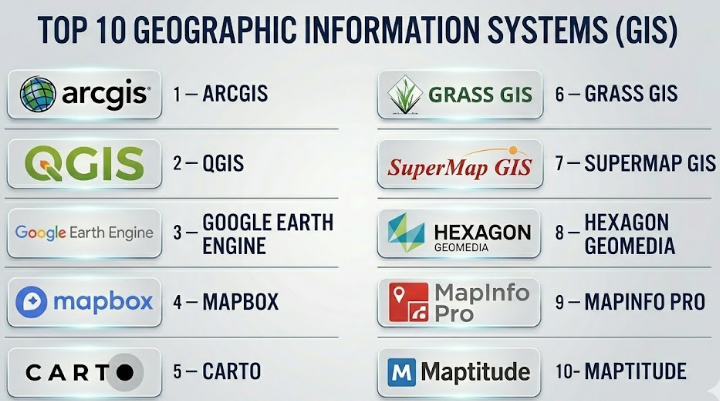
Top 10 Geographic Information Systems GIS
#1 — ArcGIS
Short description :
ArcGIS by Esri is one of the most widely used GIS platforms for professional mapping, spatial analysis, field operations, data management, and geospatial application development. It is used by governments, utilities, telecom teams, environmental agencies, defense organizations, engineering companies, and enterprises that need strong location intelligence. ArcGIS includes desktop, cloud, web, mobile, and enterprise GIS capabilities. It is especially strong for large organizations that need scalable GIS workflows, advanced analysis, geospatial data sharing, and ecosystem depth. ArcGIS is often considered a leading choice for enterprise-grade GIS programs.
Key Features
- Advanced mapping and cartography
- Spatial analysis and geoprocessing tools
- Web GIS and cloud-based sharing
- Field data collection and mobile apps
- 2D and 3D visualization
- GIS dashboards and story-based maps
- Enterprise GIS server and data management capabilities
Pros
- Very strong ecosystem for professional GIS
- Suitable for large-scale enterprise and government use
- Excellent support for maps, analytics, apps, and field workflows
Cons
- Licensing can be expensive for smaller teams
- Full platform can be complex for beginners
- Advanced administration may require trained GIS professionals
Platforms / Deployment
Windows / Web / iOS / Android
Cloud / Self-hosted / Hybrid
Security & Compliance
Not publicly stated. Buyers should validate SSO/SAML, MFA, encryption, audit logs, RBAC, SOC 2, ISO 27001, GDPR, FedRAMP, and data residency requirements based on deployment model.
Integrations & Ecosystem
ArcGIS has one of the strongest GIS ecosystems and integrates well with enterprise, cloud, and geospatial systems.
- Spatial databases
- CAD and BIM workflows
- Field data collection apps
- Web mapping APIs
- BI and dashboard tools
- Imagery and remote sensing workflows
Support & Community
ArcGIS has extensive documentation, training resources, certification paths, partner ecosystem, and a large professional GIS community. Enterprise support depends on license and service agreement.
#2 — QGIS
Short description :
QGIS is a powerful open-source desktop GIS platform used by analysts, researchers, governments, consultants, students, and organizations that need professional GIS capabilities without commercial licensing costs. It supports mapping, spatial analysis, geoprocessing, editing, plugins, data conversion, and integration with many geospatial formats. QGIS is especially strong for technical users who want flexibility, transparency, and open-source freedom. It is widely used for environmental mapping, urban planning, academic research, land analysis, and data visualization. QGIS is a strong choice when budget control and customization matter.
Key Features
- Open-source desktop GIS
- Strong support for many geospatial data formats
- Spatial analysis and geoprocessing tools
- Plugin ecosystem for extended capabilities
- Map layout and cartographic design
- Integration with PostGIS and other spatial databases
- Support for raster, vector, and remote sensing workflows
Pros
- No license cost for core software
- Strong plugin ecosystem and community support
- Good fit for technical GIS users and budget-conscious teams
Cons
- Enterprise support depends on third-party providers
- Collaboration and cloud workflows need additional setup
- Some advanced workflows require technical knowledge
Platforms / Deployment
Windows / macOS / Linux
Desktop deployment
Can connect to cloud and server-based systems
Security & Compliance
Varies / N/A. Security depends on local environment, database connections, plugins, and deployment practices. Buyers should validate authentication, data storage, access control, encryption, and governance based on their setup.
Integrations & Ecosystem
QGIS integrates well with open geospatial tools and databases.
- PostGIS
- GeoPackage
- WMS, WFS, and other geospatial services
- Python scripting
- Remote sensing plugins
- Open-source geospatial libraries
Support & Community
QGIS has a large open-source community, documentation, tutorials, forums, and training providers. Formal support may be available through consultants and specialist vendors.
#3 — Google Earth Engine
Short description :
Google Earth Engine is a cloud-based geospatial analysis platform mainly used for planetary-scale environmental analysis, satellite imagery processing, remote sensing, land monitoring, climate research, and large-scale raster analytics. It is especially useful for researchers, environmental agencies, universities, NGOs, and data scientists working with satellite imagery and earth observation data. Unlike traditional desktop GIS, Google Earth Engine is more focused on cloud-scale computation and scripting. It is a strong choice when teams need to analyze very large geospatial datasets without managing heavy infrastructure. It is not a replacement for every desktop GIS workflow, but it is powerful for remote sensing and environmental intelligence.
Key Features
- Cloud-based geospatial computation
- Large-scale satellite imagery analysis
- Remote sensing workflows
- JavaScript and Python API support
- Time-series environmental analysis
- Data catalog access
- Machine learning and classification workflows
Pros
- Excellent for large-scale imagery and environmental analysis
- Reduces need for local processing infrastructure
- Strong for research, climate, agriculture, and land monitoring
Cons
- Requires scripting and technical knowledge
- Not ideal for traditional parcel editing or desktop cartography
- Workflow is different from classic GIS tools
Platforms / Deployment
Web-based platform
Cloud deployment
APIs for developer workflows
Security & Compliance
Not publicly stated. Buyers should validate authentication, access control, encryption, audit logging, data governance, and compliance requirements based on organizational use.
Integrations & Ecosystem
Google Earth Engine fits well with cloud data science and remote sensing workflows.
- Python and JavaScript APIs
- Cloud storage workflows
- Satellite imagery datasets
- Machine learning pipelines
- Data export for GIS tools
- Environmental monitoring workflows
Support & Community
Google Earth Engine has documentation, examples, developer resources, and a strong research community. Enterprise-level support may depend on commercial arrangements and cloud services.
#4 — Mapbox
Short description :
Mapbox is a developer-focused mapping and location platform used to build custom maps, navigation experiences, geospatial applications, and location-aware products. It is popular among developers, product teams, logistics companies, mobility platforms, real estate apps, media teams, and businesses that need flexible map design and APIs. Mapbox is not a traditional desktop GIS platform, but it is very strong for building interactive maps into web and mobile applications. It is especially useful when teams need beautiful custom maps, geocoding, navigation, routing, and scalable map APIs.
Key Features
- Custom map design and styling
- Web and mobile map SDKs
- Geocoding and search
- Navigation and routing APIs
- Location data visualization
- Real-time and interactive map experiences
- Developer-friendly APIs and documentation
Pros
- Strong for custom mapping applications
- Good developer experience and flexible design
- Useful for mobility, logistics, apps, and consumer-facing maps
Cons
- Not a full traditional GIS analysis suite
- Pricing can depend heavily on usage volume
- Requires developer skills for custom implementation
Platforms / Deployment
Web / iOS / Android
Cloud-based APIs and SDKs
Security & Compliance
Not publicly stated. Buyers should validate API security, access tokens, encryption, usage controls, SSO, audit logs, GDPR, and data handling requirements.
Integrations & Ecosystem
Mapbox works well in application development and product engineering workflows.
- Web applications
- Mobile applications
- Navigation systems
- Location search
- Data visualization tools
- APIs and SDKs
Support & Community
Mapbox provides developer documentation, examples, and support options. Community strength is strong among developers, but support level depends on plan and contract.
#5 — CARTO
Short description :
CARTO is a cloud-native geospatial analytics platform focused on helping organizations analyze location data at scale. It is useful for businesses, data teams, analysts, and enterprises that want to combine spatial analysis with modern cloud data warehouses. CARTO is especially strong for location intelligence, site selection, customer analysis, mobility analytics, urban analytics, and business geospatial dashboards. It is not just a map-making tool; it is designed for advanced spatial analytics in cloud data environments. CARTO is a good fit for organizations that want GIS capabilities connected to modern data stacks.
Key Features
- Cloud-native spatial analytics
- Location intelligence dashboards
- Integration with cloud data warehouses
- Spatial analysis and enrichment
- Map-based analytics applications
- Developer and data science workflows
- Scalable geospatial data processing
Pros
- Strong for business location intelligence
- Good fit for cloud data teams
- Useful for large-scale spatial analytics and visualization
Cons
- May be less suitable for traditional desktop GIS editing
- Requires data maturity for best results
- Pricing and value depend on usage and data stack
Platforms / Deployment
Web-based platform
Cloud deployment
Security & Compliance
Not publicly stated. Buyers should validate SSO/SAML, MFA, encryption, RBAC, audit logs, SOC 2, ISO 27001, GDPR, and cloud data governance requirements.
Integrations & Ecosystem
CARTO is strongest when connected with cloud data platforms and analytics tools.
- Cloud data warehouses
- BI tools
- APIs
- Spatial data enrichment
- Data science notebooks
- Web mapping applications
Support & Community
CARTO provides documentation, enterprise support options, and resources for data teams and developers. Support level depends on plan and contract.
#6 — GRASS GIS
Short description :
GRASS GIS is a mature open-source GIS platform known for advanced geospatial analysis, raster processing, terrain analysis, image processing, and scientific workflows. It is often used by researchers, environmental scientists, academic institutions, hydrology experts, and advanced GIS professionals. GRASS GIS is powerful but more technical than many modern commercial GIS tools. It is especially useful when deep analytical capability matters more than a polished beginner-friendly interface. GRASS GIS is a strong option for scientific, environmental, and research-heavy geospatial work.
Key Features
- Advanced raster and vector analysis
- Terrain and hydrological modeling
- Image processing and remote sensing support
- Scientific geospatial computation
- Open-source architecture
- Command-line and scripting capabilities
- Integration with other open-source GIS tools
Pros
- Very powerful analytical engine
- Strong for research and environmental modeling
- Open-source and highly flexible
Cons
- Steeper learning curve than many GIS tools
- Less beginner-friendly interface
- Enterprise support depends on community or specialist providers
Platforms / Deployment
Windows / macOS / Linux
Desktop deployment
Can be used in server or scripted environments
Security & Compliance
Varies / N/A. Security depends on local deployment, data storage, access control, scripts, and infrastructure. Buyers should validate governance and compliance based on environment.
Integrations & Ecosystem
GRASS GIS works well with scientific and open-source geospatial workflows.
- QGIS integration
- Python scripting
- Raster and vector processing
- Remote sensing workflows
- Open geospatial libraries
- Scientific modeling pipelines
Support & Community
GRASS GIS has an active open-source and academic community. Formal support depends on consultants, research teams, or internal technical expertise.
#7 — SuperMap GIS
Short description :
SuperMap GIS is an enterprise GIS platform that supports 2D and 3D GIS, cloud GIS, big data GIS, AI GIS, mobile GIS, and spatial database workflows. It is used by governments, smart city teams, infrastructure organizations, natural resources departments, and enterprises needing large-scale geospatial systems. SuperMap is especially known for its broad GIS platform coverage, including desktop, server, cloud, mobile, and 3D capabilities. It is a strong option for organizations looking for an enterprise GIS suite with advanced spatial technology. Buyers should carefully evaluate regional support, ecosystem fit, and integration requirements.
Key Features
- 2D and 3D GIS capabilities
- Desktop, server, cloud, and mobile GIS
- Big data GIS support
- AI-assisted GIS workflows
- Spatial database management
- Smart city and digital twin use cases
- Enterprise geospatial application development
Pros
- Broad enterprise GIS platform
- Strong 3D and smart city potential
- Useful for large government and infrastructure projects
Cons
- Regional ecosystem and support should be validated
- May require specialist GIS implementation skills
- Buyers should test compatibility with existing standards and workflows
Platforms / Deployment
Windows / Web / Mobile
Cloud / Self-hosted / Hybrid
Specific platform details may vary by product
Security & Compliance
Not publicly stated. Buyers should validate SSO/SAML, MFA, encryption, audit logs, RBAC, ISO 27001, GDPR, data residency, and sector-specific compliance.
Integrations & Ecosystem
SuperMap supports enterprise geospatial systems and application development workflows.
- Spatial databases
- 3D GIS and digital twin workflows
- Mobile GIS
- Cloud GIS
- Enterprise GIS services
- Smart city platforms
Support & Community
Support depends on region, partner ecosystem, and contract. Buyers should review local implementation partners, documentation, training, and enterprise support availability.
#8 — Hexagon GeoMedia
Short description :
Hexagon GeoMedia is a professional GIS platform designed for geospatial data management, mapping, analysis, and enterprise workflows. It is used in government, defense, utilities, transportation, public safety, and infrastructure environments. GeoMedia is suitable for organizations that need to work with multiple geospatial data sources and maintain professional GIS workflows. It is especially relevant where GIS connects with engineering, public safety, asset management, and spatial data infrastructure. GeoMedia is a strong option for experienced GIS teams that need robust desktop and enterprise capabilities.
Key Features
- Professional GIS mapping and analysis
- Support for multiple spatial data formats
- Enterprise geospatial data management
- Spatial query and visualization
- Integration with Hexagon geospatial ecosystem
- Infrastructure and public-sector workflows
- Support for complex geospatial datasets
Pros
- Strong for professional GIS users
- Useful in government, defense, utilities, and infrastructure
- Good fit for organizations using Hexagon ecosystem tools
Cons
- May feel complex for casual users
- Ecosystem fit should be evaluated carefully
- Pricing and product packaging may vary
Platforms / Deployment
Windows / Web components may vary
Desktop / Enterprise deployment
Cloud / Self-hosted / Hybrid details vary
Security & Compliance
Not publicly stated. Buyers should validate SSO/SAML, MFA, encryption, RBAC, audit logs, GDPR, ISO 27001, and sector-specific security needs.
Integrations & Ecosystem
GeoMedia works best in professional geospatial and infrastructure environments.
- Spatial databases
- Hexagon geospatial tools
- Remote sensing and imagery workflows
- CAD and engineering data
- Public safety systems
- Enterprise GIS infrastructure
Support & Community
Hexagon provides enterprise-focused support, documentation, and professional services depending on product and contract. Buyers should validate local support availability.
#9 — MapInfo Pro
Short description :
MapInfo Pro is a desktop GIS software platform used for mapping, location analysis, demographic analysis, territory planning, asset mapping, and business geospatial workflows. It is commonly used by analysts, businesses, local governments, telecom teams, insurance companies, and location intelligence users. MapInfo Pro is known for practical desktop GIS capabilities and business-friendly mapping workflows. It is especially useful when organizations need spatial analysis without adopting a very large GIS ecosystem. It remains relevant for teams that want a traditional desktop GIS tool with strong business mapping use cases.
Key Features
- Desktop GIS mapping and analysis
- Location intelligence workflows
- Thematic mapping and visualization
- Spatial queries and data editing
- Demographic and business data analysis
- Support for multiple geospatial formats
- Map layout and reporting tools
Pros
- Practical for business and local government mapping
- Good for desktop GIS users
- Useful for location intelligence and territory analysis
Cons
- Less cloud-native than modern web GIS platforms
- Collaboration may require additional systems
- Advanced enterprise workflows may need other tools
Platforms / Deployment
Windows
Desktop deployment
Cloud or enterprise options may vary
Security & Compliance
Not publicly stated. Buyers should validate licensing controls, local data security, encryption, access management, compliance, and enterprise deployment requirements.
Integrations & Ecosystem
MapInfo Pro supports practical GIS and business data workflows.
- Spatial data formats
- Business data analysis
- Location intelligence workflows
- Desktop mapping outputs
- Data exports
- Enterprise geospatial connections may vary
Support & Community
Support depends on vendor package, region, and contract. Documentation and user resources are available, but buyers should validate training and enterprise support options.
#10 — Maptitude
Short description :
Maptitude is a desktop GIS and mapping software platform focused on business mapping, territory planning, demographic analysis, site selection, logistics, and location intelligence. It is suitable for businesses, public agencies, nonprofits, sales operations teams, logistics planners, and analysts who need practical mapping without heavy enterprise GIS complexity. Maptitude is especially useful for organizations that need maps and analytics for planning decisions, customer locations, service areas, and market analysis. It is a good option for users who want a desktop GIS tool with built-in business mapping features.
Key Features
- Business mapping and GIS analysis
- Territory planning and optimization
- Demographic and market analysis
- Site selection tools
- Routing and logistics planning
- Thematic maps and reports
- Desktop-based spatial analysis
Pros
- Strong for business mapping and territory planning
- Useful for non-enterprise GIS users
- Practical for market, sales, logistics, and service area analysis
Cons
- Less suitable for large enterprise GIS ecosystems
- Cloud collaboration may be limited compared with web GIS platforms
- Advanced scientific GIS workflows may require other tools
Platforms / Deployment
Windows
Desktop deployment
Security & Compliance
Not publicly stated. Buyers should validate local data security, access control, encryption, licensing, and compliance needs based on deployment environment.
Integrations & Ecosystem
Maptitude works well for business and planning teams that need desktop location intelligence.
- Business datasets
- Customer and territory data
- Routing workflows
- Demographic analysis
- Map exports
- Planning and reporting workflows
Support & Community
Support is vendor-led and may include documentation, tutorials, and customer support. Buyers should validate training, onboarding, and support response expectations.
Comparison Table
| Tool Name | Best For | Platform(s) Supported | Deployment | Standout Feature | Public Rating |
|---|---|---|---|---|---|
| ArcGIS | Enterprise GIS, government, utilities, and field operations | Windows / Web / iOS / Android | Cloud / Self-hosted / Hybrid | Full enterprise GIS ecosystem | N/A |
| QGIS | Open-source desktop GIS and spatial analysis | Windows / macOS / Linux | Desktop / Self-managed | Powerful free and open-source GIS | N/A |
| Google Earth Engine | Satellite imagery and large-scale environmental analysis | Web / APIs | Cloud | Planetary-scale geospatial computation | N/A |
| Mapbox | Developer-built maps and location applications | Web / iOS / Android | Cloud APIs | Custom map design and developer SDKs | N/A |
| CARTO | Cloud-native location intelligence and spatial analytics | Web | Cloud | Spatial analytics for modern data stacks | N/A |
| GRASS GIS | Scientific GIS and advanced raster analysis | Windows / macOS / Linux | Desktop / Self-managed | Advanced open-source geospatial analysis | N/A |
| SuperMap GIS | Enterprise, smart city, 3D, and big data GIS | Windows / Web / Mobile | Cloud / Self-hosted / Hybrid | Broad 2D, 3D, cloud, and AI GIS suite | N/A |
| Hexagon GeoMedia | Professional GIS for infrastructure and public-sector teams | Windows / Web varies | Desktop / Enterprise | Multi-source professional geospatial workflows | N/A |
| MapInfo Pro | Business mapping and desktop location analysis | Windows | Desktop | Practical desktop GIS for business analysis | N/A |
| Maptitude | Territory planning, demographics, and site selection | Windows | Desktop | Business mapping and territory planning | N/A |
Evaluation & Geographic Information Systems GIS
| Tool Name | Core (25%) | Ease (15%) | Integrations (15%) | Security (10%) | Performance (10%) | Support (10%) | Value (15%) | Weighted Total (0–10) |
|---|---|---|---|---|---|---|---|---|
| ArcGIS | 10 | 7 | 10 | 8 | 9 | 9 | 7 | 8.65 |
| QGIS | 9 | 7 | 9 | 6 | 8 | 8 | 10 | 8.20 |
| Google Earth Engine | 9 | 6 | 8 | 7 | 10 | 8 | 9 | 8.20 |
| Mapbox | 8 | 8 | 9 | 7 | 9 | 8 | 8 | 8.10 |
| CARTO | 8 | 8 | 9 | 7 | 9 | 8 | 8 | 8.10 |
| GRASS GIS | 9 | 5 | 8 | 6 | 9 | 7 | 10 | 7.95 |
| SuperMap GIS | 9 | 7 | 8 | 7 | 8 | 7 | 7 | 7.90 |
| Hexagon GeoMedia | 8 | 6 | 8 | 7 | 8 | 8 | 7 | 7.35 |
| MapInfo Pro | 7 | 8 | 7 | 6 | 7 | 7 | 8 | 7.20 |
| Maptitude | 7 | 8 | 6 | 6 | 7 | 7 | 8 | 7.05 |
These scores are comparative and should be treated as a practical buying guide, not a final verdict. The best GIS platform depends on your use case. ArcGIS is strong for enterprise GIS, QGIS is strong for open-source flexibility, Google Earth Engine is strong for satellite imagery, Mapbox is strong for custom map apps, and CARTO is strong for cloud-based location analytics. Buyers should adjust the scoring weights based on their own priorities.
Which Geographic Information Systems GIS Should You Choose?
Solo / Freelancer
Solo GIS consultants, researchers, students, and independent analysts usually need a cost-effective and flexible GIS tool. QGIS is often a strong starting point because it provides professional GIS features without license cost. GRASS GIS is useful for advanced scientific analysis, while Google Earth Engine is strong for remote sensing and large-scale environmental analysis.
For freelancers building client-facing maps or web applications, Mapbox can be useful because it provides flexible APIs and modern map design capabilities.
Recommended direction: QGIS for general GIS work, Google Earth Engine for imagery analysis, Mapbox for web mapping, and Maptitude for business mapping.
SMB
Small and midsize businesses usually need GIS for practical decisions such as customer mapping, territory design, logistics, asset location, site selection, and market planning. They may not need a large enterprise GIS platform unless location data is central to their operations.
Maptitude, MapInfo Pro, CARTO, and QGIS can be strong options depending on budget and technical ability. If the business is building location-based software, Mapbox may be a better fit.
Recommended direction: Maptitude or MapInfo Pro for business mapping, QGIS for flexible analysis, CARTO for cloud analytics, and Mapbox for custom applications.
Mid-Market
Mid-market organizations often need stronger collaboration, more datasets, better integrations, and repeatable workflows. They may have multiple departments using maps for planning, assets, customers, operations, and reporting.
At this level, buyers should decide whether they need desktop GIS, cloud GIS, developer APIs, or spatial analytics. A mixed approach may work best.
Recommended direction: ArcGIS, QGIS with supporting infrastructure, CARTO, Mapbox, MapInfo Pro, or SuperMap GIS depending on operating model.
Enterprise
Large enterprises, national agencies, utilities, telecom operators, defense organizations, and infrastructure teams need governance, scalability, security, role management, integrations, and long-term GIS strategy.
Enterprise buyers should evaluate cloud, self-hosted, and hybrid deployment options. They should also review user roles, data governance, metadata, APIs, field workflows, and enterprise support.
Recommended direction: ArcGIS, SuperMap GIS, Hexagon GeoMedia, CARTO, Mapbox, or QGIS with enterprise support.
Budget vs Premium
Budget-focused teams should consider QGIS, GRASS GIS, and other open-source geospatial tools. These can deliver excellent capability, but teams must manage training, workflows, support, and governance themselves.
Premium GIS platforms are better when organizations need enterprise support, polished workflows, integrated mobile apps, dashboards, web GIS, security controls, and long-term vendor accountability.
Budget direction: QGIS, GRASS GIS, Google Earth Engine for suitable use cases.
Premium direction: ArcGIS, CARTO, SuperMap GIS, Hexagon GeoMedia, Mapbox, MapInfo Pro, Maptitude.
Feature Depth vs Ease of Use
Powerful GIS platforms can be complex. Beginners may struggle with advanced geoprocessing, projections, spatial databases, and data modeling. Easy tools can be faster to adopt but may have limitations in deep analysis.
If your team has trained GIS professionals, choose feature depth. If business users need maps quickly, choose ease of use.
Feature depth: ArcGIS, QGIS, GRASS GIS, SuperMap GIS, Hexagon GeoMedia.
Ease of use: Maptitude, MapInfo Pro, CARTO, Mapbox for developers, ArcGIS web tools for non-technical users.
Integrations & Scalability
GIS platforms should integrate with spatial databases, cloud storage, data warehouses, CAD tools, BIM systems, APIs, BI platforms, imagery services, IoT feeds, and mobile field apps.
Large organizations should test scalability using real datasets, not sample data. Performance can change when working with large rasters, high-volume vector data, real-time feeds, or many concurrent users.
Strong integration candidates: ArcGIS, QGIS, Mapbox, CARTO, SuperMap GIS, Hexagon GeoMedia, Google Earth Engine.
Security & Compliance Needs
GIS data can be sensitive. It may include infrastructure details, utility networks, land ownership, public safety assets, customer locations, environmental risks, and critical facility information.
Buyers should validate:
- SSO/SAML
- MFA
- Encryption in transit and at rest
- Role-based access control
- Audit logs
- Data classification
- Data residency
- Backup and disaster recovery
- API security
- Compliance with local and industry rules
- Access control for public and private layers
For government, utilities, defense, and public safety, security review should happen before deployment, not after purchase.
Frequently Asked Questions
1. What is a Geographic Information System GIS?
A GIS is a software system used to create, manage, analyze, and visualize location-based data. It connects maps with information so users can understand patterns, relationships, and decisions based on geography.
2. How is GIS different from a normal map?
A normal map shows location visually. GIS goes further by allowing users to analyze data, edit layers, run spatial queries, calculate distances, model risks, create dashboards, and combine many data sources.
3. Who uses GIS software?
GIS is used by governments, urban planners, utilities, telecom companies, logistics teams, environmental agencies, emergency responders, agriculture teams, defense organizations, real estate firms, and business analysts.
4. What pricing models are common for GIS tools?
Pricing may be based on users, modules, storage, API calls, cloud usage, enterprise agreements, or desktop licenses. Open-source tools may have no license cost but still require training, hosting, support, and maintenance.
5. Is open-source GIS good enough for professional work?
Yes, open-source GIS tools like QGIS and GRASS GIS can be very powerful for professional work. However, teams must plan for training, support, plugin management, updates, and governance.
6. What is the best GIS tool for beginners?
QGIS is a strong choice for learners because it is accessible and powerful. Maptitude and MapInfo Pro may be easier for business users. ArcGIS web tools may also be suitable where organizations already use the Esri ecosystem.
7. What is the best GIS tool for enterprises?
ArcGIS is a common enterprise choice because of its broad ecosystem. SuperMap GIS, Hexagon GeoMedia, CARTO, and QGIS with enterprise support can also be strong depending on region, budget, data needs, and technical strategy.
8. Can GIS work with real-time data?
Yes, GIS can work with real-time data from sensors, vehicles, mobile devices, IoT systems, weather feeds, and operational systems. Real-time GIS is useful for logistics, emergency response, utilities, traffic, and asset monitoring.
9. What integrations matter most in GIS?
Important integrations include spatial databases, cloud data warehouses, CAD, BIM, APIs, mobile field apps, BI tools, satellite imagery, IoT feeds, and identity management systems.
10. Is GIS useful for business teams?
Yes, GIS is useful for customer mapping, territory planning, site selection, logistics optimization, delivery planning, market analysis, risk modeling, and branch location planning.
Conclusion
Geographic Information Systems are essential for organizations that need to understand location, patterns, assets, risks, and relationships across space. The right GIS platform depends on your team size, technical skill, data type, budget, and business purpose. ArcGIS is strong for enterprise GIS programs. QGIS is excellent for open-source professional GIS. Google Earth Engine is powerful for satellite imagery and environmental analysis. Mapbox is ideal for custom map applications. CARTO is strong for cloud-based spatial analytics. GRASS GIS is valuable for scientific and advanced analysis. SuperMap GIS, Hexagon GeoMedia, MapInfo Pro, and Maptitude each serve specific enterprise, professional, and business mapping needs.
