Introduction
GPU cluster scheduling tools are software systems that manage, allocate, and optimize the use of GPU resources across multiple machines in a computing cluster. In simple terms, they decide which workload gets which GPU, when, and for how long, ensuring that expensive GPU hardware is used efficiently and fairly across teams and applications.
In 2026 and beyond, these tools are becoming critical due to the explosive demand for AI training, generative AI workloads, large-scale simulation, and high-performance computing (HPC). As GPU resources remain expensive and limited, organizations need intelligent scheduling systems to avoid waste, reduce queue times, and maximize throughput.
Common real-world use cases include:
- Training large language models and diffusion models
- Multi-tenant AI research environments
- High-performance scientific simulations (physics, genomics, climate modeling)
- Rendering workloads in VFX and gaming studios
- Shared enterprise AI infrastructure for multiple teams
When evaluating GPU cluster scheduling tools, buyers should focus on:
- Scheduling efficiency and fairness policies
- Multi-tenant workload isolation
- Support for heterogeneous GPUs (NVIDIA, AMD, mixed clusters)
- Integration with Kubernetes or HPC systems
- Autoscaling and elasticity
- Resource utilization visibility and monitoring
- Queue management and priority handling
- Security controls (RBAC, isolation, multi-user governance)
- Hybrid cloud support
- Ease of deployment and maintenance
Best for:
MLOps engineers, DevOps teams, AI infrastructure architects, HPC administrators, and enterprises running large-scale AI training or simulation workloads.
Not ideal for:
Small-scale projects with a single GPU machine, hobbyists, or teams that do not manage shared compute infrastructure or distributed AI workloads.
Key Trends in GPU Cluster Scheduling Tools
- Rapid adoption of Kubernetes-native GPU scheduling frameworks
- Increased demand for multi-tenant AI infrastructure in enterprises
- Integration of AI-driven scheduling optimization (predictive workload placement)
- Support for heterogeneous GPU environments (NVIDIA + AMD + cloud GPUs)
- Growth of serverless GPU scheduling models for burst workloads
- Stronger focus on cost-aware scheduling and GPU utilization efficiency
- Deep integration with MLOps pipelines and CI/CD workflows
- Expansion of hybrid cloud + on-prem GPU orchestration
- Improved observability for GPU memory, utilization, and queue metrics
- Emergence of policy-driven governance for enterprise AI workloads
How We Selected These Tools (Methodology)
- Market adoption across enterprise and research environments
- Real-world production usage in GPU-heavy workloads
- Feature completeness for scheduling, orchestration, and isolation
- Integration support with Kubernetes and HPC ecosystems
- Performance efficiency and cluster utilization optimization
- Security and multi-tenant governance capabilities
- Support for hybrid cloud and on-prem deployments
- Ecosystem maturity and extensibility via APIs/plugins
- Community adoption and documentation quality
- Flexibility across AI, HPC, and rendering workloads
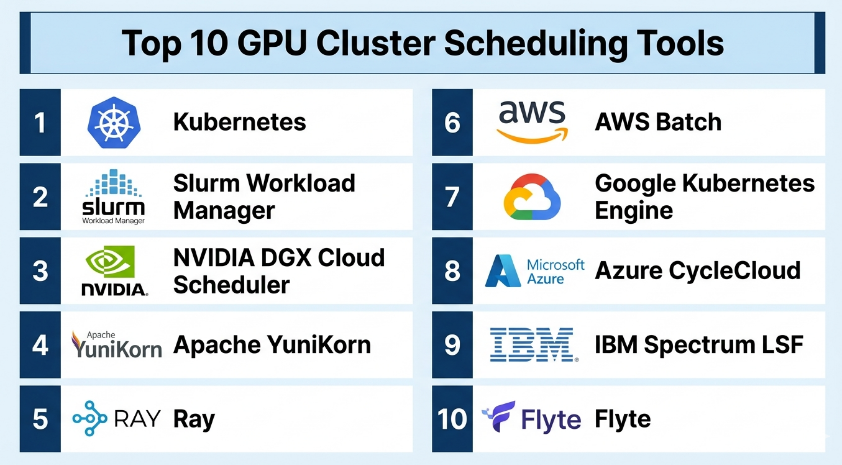
Top 10 GPU Cluster Scheduling Tools
#1 — Kubernetes (with GPU Scheduling Extensions)
Short description:
Kubernetes is the most widely used container orchestration system, and with GPU scheduling extensions, it becomes a powerful platform for managing distributed GPU workloads. It is used by enterprises to orchestrate AI training, inference, and HPC workloads at scale. GPU scheduling is enabled through device plugins and custom resource definitions, making it highly flexible for multi-tenant environments.
Key Features
- Container-based workload orchestration
- GPU resource allocation via device plugins
- Horizontal and vertical scaling support
- Namespace-based multi-tenancy
- Advanced scheduling policies
- Integration with autoscaling systems
- Workload isolation and resource quotas
Pros
- Extremely flexible and extensible
- Strong ecosystem for AI and cloud workloads
- Works across hybrid environments
Cons
- Complex setup and management
- Requires strong DevOps expertise
Platforms / Deployment
- Linux
- Cloud / Self-hosted / Hybrid
Security & Compliance
- RBAC (role-based access control)
- Namespace isolation
- Encryption support (varies by setup)
Integrations & Ecosystem
Kubernetes integrates with GPU operators, monitoring systems, CI/CD pipelines, and cloud providers.
- NVIDIA GPU Operator
- Prometheus/Grafana monitoring
- Helm and ArgoCD
- MLOps frameworks
Support & Community
Massive open-source ecosystem with strong enterprise adoption and cloud vendor support.
#2 — Slurm Workload Manager
Short description:
Slurm is a leading open-source workload manager widely used in HPC environments for scheduling compute and GPU resources. It is especially popular in research institutions and scientific computing clusters where high-performance scheduling is critical.
Key Features
- Job queue management system
- Advanced scheduling policies
- GPU-aware resource allocation
- Fair-share scheduling
- Job prioritization and backfilling
- Multi-node cluster management
- Accounting and resource tracking
Pros
- Extremely mature HPC scheduler
- Highly efficient for batch workloads
- Strong resource control
Cons
- Steep learning curve
- Less cloud-native compared to Kubernetes
Platforms / Deployment
- Linux
- Self-hosted / Hybrid
Security & Compliance
- Authentication plugins
- Access control policies
- Audit logging (config-dependent)
Integrations & Ecosystem
- MPI workloads
- HPC storage systems
- Research computing environments
- GPU drivers and libraries
Support & Community
Strong academic and enterprise HPC community support.
#3 — NVIDIA DGX Cloud Scheduler
Short description:
NVIDIA DGX Cloud Scheduler is designed for managing GPU-intensive AI workloads across DGX systems and cloud environments. It is optimized for large-scale deep learning training and inference workloads.
Key Features
- GPU-optimized workload scheduling
- Multi-node distributed training support
- High-performance cluster orchestration
- AI workload prioritization
- Integration with NVIDIA AI stack
- Resource isolation for multi-tenancy
- Cloud-native GPU orchestration
Pros
- Highly optimized for NVIDIA hardware
- Excellent performance for AI workloads
- Strong enterprise focus
Cons
- NVIDIA ecosystem dependency
- Limited flexibility outside NVIDIA stack
Platforms / Deployment
- Cloud / Hybrid
Security & Compliance
- Not publicly stated
Integrations & Ecosystem
- NVIDIA AI Enterprise
- CUDA, cuDNN
- Kubernetes-based workloads
- MLOps pipelines
Support & Community
Enterprise-grade NVIDIA support ecosystem.
#4 — Apache YuniKorn
Short description:
Apache YuniKorn is a universal resource scheduler designed for cloud-native environments, particularly Kubernetes. It improves fairness and resource allocation efficiency for GPU and CPU workloads.
Key Features
- Hierarchical queue-based scheduling
- Kubernetes-native integration
- Fair-share scheduling policies
- Multi-tenant workload isolation
- Resource-aware scheduling
- Dynamic queue management
- Extensible plugin architecture
Pros
- Strong Kubernetes integration
- Flexible scheduling policies
- Good multi-tenant support
Cons
- Still evolving ecosystem
- Requires tuning for optimal performance
Platforms / Deployment
- Linux
- Cloud / Self-hosted
Security & Compliance
- RBAC integration via Kubernetes
Integrations & Ecosystem
- Kubernetes clusters
- Container workloads
- Monitoring systems
Support & Community
Open-source community with growing enterprise adoption.
#5 — Ray (Ray Core Scheduler)
Short description:
Ray is a distributed computing framework designed for scaling AI and Python workloads, including GPU scheduling for machine learning training and inference pipelines.
Key Features
- Distributed task scheduling
- GPU-aware resource management
- Dynamic task scaling
- Actor-based execution model
- Python-native API
- Integration with ML frameworks
- Cluster autoscaling support
Pros
- Easy for Python ML workloads
- Excellent for distributed AI training
- Flexible execution model
Cons
- Not a full HPC scheduler
- Requires tuning for large clusters
Platforms / Deployment
- Linux
- Cloud / Self-hosted / Hybrid
Security & Compliance
- Not publicly stated
Integrations & Ecosystem
- PyTorch
- TensorFlow
- Hugging Face ecosystem
- Kubernetes deployments
Support & Community
Strong open-source AI/ML community support.
#6 — AWS Batch (GPU Support)
Short description:
AWS Batch is a fully managed batch computing service that supports GPU workloads. It automatically schedules jobs across compute environments, including GPU-enabled instances.
Key Features
- Fully managed job scheduling
- GPU instance support
- Dynamic scaling of compute resources
- Job queue prioritization
- Containerized workload execution
- Integration with AWS services
- Retry and dependency management
Pros
- No infrastructure management required
- Scales automatically
- Deep AWS integration
Cons
- AWS lock-in
- Limited customization compared to open-source schedulers
Platforms / Deployment
- Cloud (AWS)
Security & Compliance
- IAM-based access control
- Encryption in transit and at rest (AWS-managed)
Integrations & Ecosystem
- AWS EC2 GPU instances
- S3 storage
- CloudWatch monitoring
- AWS Step Functions
Support & Community
Strong enterprise AWS support.
#7 — Google Kubernetes Engine (GKE) GPU Scheduler
Short description:
GKE provides managed Kubernetes with built-in GPU scheduling support, enabling scalable AI workloads on Google Cloud infrastructure.
Key Features
- Managed Kubernetes environment
- GPU node pool scheduling
- Autoscaling cluster support
- Workload isolation
- Preemptible GPU instances
- Monitoring and logging integration
- Multi-region deployment options
Pros
- Easy Kubernetes management
- Strong scalability
- Deep Google Cloud integration
Cons
- Cloud dependency
- Costs can scale quickly
Platforms / Deployment
- Cloud (Google Cloud)
Security & Compliance
- IAM integration
- Workload identity controls
- Encryption (managed by Google Cloud)
Integrations & Ecosystem
- Vertex AI
- BigQuery
- Cloud Monitoring
- ML pipelines
Support & Community
Strong enterprise-grade Google Cloud support.
#8 — Azure CycleCloud
Short description:
Azure CycleCloud is a HPC and AI cluster orchestration tool designed for managing GPU and compute workloads in Azure environments.
Key Features
- HPC cluster lifecycle management
- GPU workload scheduling
- Auto-scaling cluster resources
- Hybrid cloud support
- Job queue management
- Integration with Azure services
- Template-based cluster deployment
Pros
- Strong Azure ecosystem integration
- Good HPC and AI workload support
- Flexible hybrid deployment
Cons
- Best suited for Azure users
- Requires configuration expertise
Platforms / Deployment
- Cloud / Hybrid
Security & Compliance
- Azure Active Directory integration
- Role-based access control
Integrations & Ecosystem
- Azure Machine Learning
- Azure Storage
- Kubernetes
- HPC tools
Support & Community
Strong Microsoft enterprise support.
#9 — IBM Spectrum LSF
Short description:
IBM Spectrum LSF is a powerful enterprise-grade workload scheduler used for HPC and AI workloads, including GPU-intensive tasks.
Key Features
- Advanced job scheduling engine
- GPU resource management
- Multi-cluster workload distribution
- Job prioritization and fairness
- High scalability for enterprise HPC
- Resource accounting and reporting
- Workflow automation
Pros
- Highly reliable enterprise scheduler
- Excellent scalability for HPC environments
- Strong policy control
Cons
- Complex configuration
- Enterprise licensing required
Platforms / Deployment
- Linux
- Self-hosted / Hybrid
Security & Compliance
- Role-based access control
- Enterprise-grade authentication (varies by setup)
Integrations & Ecosystem
- HPC systems
- Storage clusters
- Cloud integrations (varies)
- AI frameworks
Support & Community
Strong enterprise IBM support.
#10 — Flyte
Short description:
Flyte is a cloud-native workflow orchestration platform designed for scalable machine learning and data workflows, including GPU scheduling for ML pipelines.
Key Features
- Workflow-based GPU scheduling
- Kubernetes-native architecture
- Reproducible ML pipelines
- Versioned workflows
- Distributed execution support
- Strong observability
- Dynamic resource allocation
Pros
- Excellent for ML pipelines
- Strong reproducibility support
- Kubernetes-native design
Cons
- Requires Kubernetes expertise
- Not a general HPC scheduler
Platforms / Deployment
- Cloud / Self-hosted (Kubernetes-based)
Security & Compliance
- Kubernetes RBAC integration
- Not publicly stated
Integrations & Ecosystem
- Kubernetes
- ML frameworks
- Data pipelines
- CI/CD tools
Support & Community
Strong open-source ML community.
Comparison Table (Top 10)
| Tool Name | Best For | Platform(s) Supported | Deployment | Standout Feature | Public Rating |
|---|---|---|---|---|---|
| Kubernetes | General GPU orchestration | Linux | Cloud/Self/Hybrid | Flexible scheduling engine | N/A |
| Slurm | HPC research clusters | Linux | Self/Hybrid | Batch job scheduling | N/A |
| NVIDIA DGX Scheduler | AI training clusters | Linux/Cloud | Cloud/Hybrid | GPU-optimized scheduling | N/A |
| Apache YuniKorn | Kubernetes scheduling | Linux | Cloud/Self | Fair-share queues | N/A |
| Ray | Distributed AI workloads | Linux | Cloud/Hybrid | Python-native scaling | N/A |
| AWS Batch | Managed GPU jobs | Cloud | Cloud | Fully managed scheduling | N/A |
| GKE Scheduler | Cloud AI workloads | Linux | Cloud | Managed Kubernetes GPU scheduling | N/A |
| Azure CycleCloud | Azure HPC clusters | Linux | Cloud/Hybrid | HPC lifecycle management | N/A |
| IBM Spectrum LSF | Enterprise HPC | Linux | Self/Hybrid | Enterprise-grade scheduling | N/A |
| Flyte | ML workflows | Linux | Cloud/Self | Reproducible pipelines | N/A |
Evaluation & Scoring (GPU Cluster Scheduling Tools)
| Tool Name | Core (25%) | Ease (15%) | Integrations (15%) | Security (10%) | Performance (10%) | Support (10%) | Value (15%) | Total |
|---|---|---|---|---|---|---|---|---|
| Kubernetes | 10 | 6 | 10 | 8 | 9 | 9 | 9 | 8.9 |
| Slurm | 9 | 6 | 8 | 8 | 10 | 8 | 9 | 8.6 |
| NVIDIA DGX | 9 | 7 | 9 | 8 | 10 | 9 | 8 | 8.7 |
| YuniKorn | 8 | 7 | 9 | 8 | 8 | 7 | 9 | 8.1 |
| Ray | 9 | 8 | 9 | 7 | 8 | 8 | 10 | 8.5 |
| AWS Batch | 8 | 9 | 9 | 9 | 8 | 9 | 8 | 8.6 |
| GKE Scheduler | 9 | 8 | 9 | 9 | 8 | 9 | 8 | 8.7 |
| Azure CycleCloud | 9 | 7 | 9 | 9 | 8 | 9 | 8 | 8.6 |
| IBM Spectrum LSF | 9 | 6 | 8 | 9 | 10 | 9 | 7 | 8.4 |
| Flyte | 8 | 7 | 9 | 8 | 8 | 8 | 9 | 8.2 |
Scores are comparative and reflect overall suitability for GPU scheduling workloads. Higher scores indicate stronger enterprise readiness, scalability, and ecosystem maturity. No tool is universally best—each serves different infrastructure needs, workload types, and organizational maturity levels.
Which GPU Cluster Scheduling Tools
Solo / Freelancer
Best for experimentation or small-scale workloads:
Ray, Flyte, basic Kubernetes setups
SMB
Balanced orchestration and ease of use:
AWS Batch, GKE Scheduler, Ray
Mid-Market
Scaling AI workloads across teams:
YuniKorn, Flyte, Kubernetes, Azure CycleCloud
Enterprise
High-performance GPU infrastructure:
Slurm, NVIDIA DGX Scheduler, IBM Spectrum LSF, Kubernetes at scale
Budget vs Premium
- Budget-friendly: Ray, Flyte, Kubernetes (self-managed)
- Premium: IBM Spectrum LSF, NVIDIA DGX Cloud, managed cloud schedulers
Feature Depth vs Ease of Use
- Deep control: Slurm, Kubernetes, LSF
- Easier adoption: AWS Batch, Ray, GKE Scheduler
Integrations & Scalability-
- Strong scalability: Kubernetes, Slurm, LSF
- Strong integrations: AWS/GCP/Azure schedulers, Flyte, Ray
Security & Compliance Needs
- Enterprise-grade governance: IBM LSF, AWS, Azure, GCP
- Self-managed flexibility: Kubernetes, Slurm (depends on configuration)
Frequently Asked Questions (FAQs)
1. What is a GPU cluster scheduling tool?
It is software that allocates GPU resources across multiple users and workloads in a compute cluster. It ensures efficient usage, fairness, and prioritization of jobs.
2. Why are GPU schedulers important?
They maximize expensive GPU utilization, reduce idle time, and ensure multiple teams can share infrastructure efficiently without conflicts.
3. What workloads use GPU scheduling tools?
AI training, deep learning, HPC simulations, rendering pipelines, and large-scale data processing workloads.
4. Are these tools cloud-only?
No. Many tools support hybrid and on-prem environments, including Kubernetes, Slurm, and IBM LSF.
5. What is the difference between Kubernetes and Slurm?
Kubernetes is container-focused and cloud-native, while Slurm is HPC-focused and optimized for batch scientific workloads.
6. Do GPU schedulers support multi-cloud?
Yes, many Kubernetes-based and workflow tools support multi-cloud deployments, depending on configuration.
7. Are GPU scheduling tools expensive?
Open-source tools are free but require infrastructure expertise. Managed solutions involve cloud or enterprise licensing costs.
8. Can small teams use GPU schedulers?
Yes, lightweight tools like Ray or managed cloud services are suitable for small teams.
9. What are common mistakes when using GPU schedulers?
Overprovisioning GPUs, poor queue management, and lack of monitoring are common issues.
10. What is the future of GPU scheduling?
Future systems will include AI-driven scheduling optimization, serverless GPUs, and tighter integration with MLOps pipelines.
Conclusion
GPU cluster scheduling tools are becoming foundational infrastructure for modern AI, HPC, and data-intensive workloads. As GPU demand continues to grow, efficient scheduling determines how effectively organizations can scale AI systems while controlling costs and maximizing performance.There is no single best tool—each platform serves different needs. Kubernetes and Ray excel in cloud-native environments, Slurm dominates HPC, and enterprise schedulers like IBM LSF provide deep control for large-scale deployments. Cloud-native managed services simplify operations, while open-source tools provide flexibility and customization.
