Introduction
Remote Sensing & Satellite Image Analysis tools help users collect, process, analyze, visualize, and interpret data captured from satellites, drones, aircraft, and other sensors. In simple words, these tools help organizations understand the Earth from above. They convert satellite images and sensor data into useful insights for agriculture, forestry, climate monitoring, disaster response, urban planning, mining, defense, insurance, environmental protection, and infrastructure management.
These platforms are useful when teams need to detect changes, classify land cover, monitor vegetation, identify water bodies, map flood zones, analyze crop health, study urban growth, track deforestation, or compare satellite images over time.
Modern remote sensing tools now combine satellite imagery, AI, machine learning, cloud computing, geospatial analytics, and automation. Some tools are built for scientists and researchers, while others are designed for enterprises, governments, developers, or analysts who need faster access to satellite insights.
Buyers should evaluate:
- Satellite imagery processing capabilities
- Support for raster and vector data
- AI and machine learning features
- Change detection and classification tools
- Cloud processing and scalability
- Support for multispectral, hyperspectral, radar, and thermal data
- Integration with GIS platforms
- Data visualization and mapping
- APIs and automation support
- Pricing, licensing, and technical learning curve
Best for: GIS analysts, remote sensing specialists, environmental researchers, agriculture teams, urban planners, climate scientists, defense analysts, disaster management teams, mining companies, forestry departments, and data science teams working with Earth observation data.
Not ideal for: teams that only need basic map viewing, simple location search, or small manual image annotation tasks. In those cases, a basic GIS viewer, map platform, or image editing tool may be enough.
Key Remote Sensing & Satellite Image Analysis Trends
- Cloud-based satellite analysis is becoming more common. Large satellite datasets are difficult to download and process locally, so many teams now prefer cloud platforms that process imagery at scale.
- AI-based classification is becoming practical. Machine learning helps classify land cover, detect objects, identify crop stress, monitor forests, and automate repetitive interpretation tasks.
- Radar imagery is gaining more attention. Synthetic Aperture Radar can observe through clouds and in low-light conditions, making it useful for disaster response, agriculture, and monitoring difficult regions.
- Multispectral and hyperspectral analysis are expanding. More industries now use spectral signatures to detect vegetation health, minerals, water quality, soil conditions, and environmental changes.
- Change detection is a core business requirement. Organizations want to compare images over time to detect construction, flooding, deforestation, erosion, crop changes, and land-use transformation.
- Remote sensing is becoming more connected with GIS. Satellite analysis is more useful when combined with roads, boundaries, assets, population data, weather data, and field observations.
- Automation is replacing manual image review. Teams are using scripts, models, and workflows to process large image collections faster and more consistently.
- Drones and satellite data are being used together. High-resolution drone imagery can validate satellite observations and support detailed local analysis.
- Open-source tools remain very important. Many researchers and public agencies prefer open-source remote sensing tools for flexibility, reproducibility, and cost control.
- Data governance and accuracy validation are now critical. Buyers must validate model accuracy, training data quality, metadata, licensing rights, and uncertainty before making decisions from satellite imagery.
How We Selected These Tools
The tools below were selected using a practical evaluation approach based on:
- Recognition in remote sensing, satellite image processing, Earth observation, and geospatial analytics
- Strength of raster processing, classification, change detection, and spectral analysis features
- Support for cloud, desktop, developer, and enterprise workflows
- Fit for different users, including researchers, GIS teams, enterprises, governments, and data scientists
- Ability to work with satellite, aerial, drone, multispectral, radar, and large geospatial datasets
- Integration with GIS, spatial databases, Python, APIs, and cloud platforms
- Support for AI, machine learning, automation, and scalable processing
- Documentation, learning resources, and community strength
- Balance between commercial platforms and open-source tools
- Practical usefulness across agriculture, environment, urban planning, disaster response, and climate monitoring
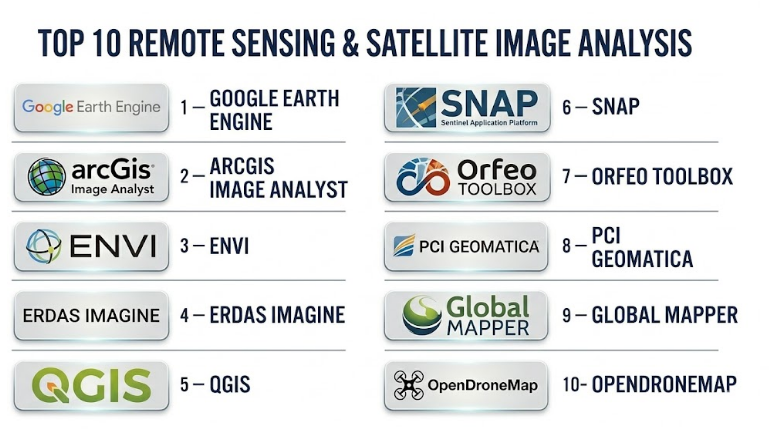
Top 10 Remote Sensing & Satellite Image Analysis Tools
#1 — Google Earth Engine
Short description :
Google Earth Engine is a cloud-based platform for planetary-scale geospatial analysis and satellite image processing. It is widely used by researchers, environmental analysts, governments, NGOs, universities, and data scientists working with large Earth observation datasets. The platform is especially strong for time-series analysis, land cover mapping, vegetation monitoring, climate studies, deforestation detection, water monitoring, and large-scale environmental research. Instead of downloading huge satellite datasets, users can process imagery in the cloud using code. Google Earth Engine is powerful, but it requires scripting knowledge and a strong understanding of remote sensing concepts.
Key Features
- Cloud-based satellite image processing
- Large Earth observation data catalog access
- Time-series analysis for environmental monitoring
- JavaScript and Python API support
- Machine learning and image classification workflows
- Vegetation, water, land cover, and climate analysis
- Scalable processing for large geographic areas
Pros
- Excellent for large-scale satellite analysis
- Reduces local storage and processing burden
- Strong for research, environment, agriculture, and climate use cases
Cons
- Requires coding skills for serious work
- Not ideal for users wanting a simple point-and-click desktop tool
- Workflow may be difficult for beginners without remote sensing background
Platforms / Deployment
Web-based platform
Cloud deployment
API-based developer access
Security & Compliance
Not publicly stated. Buyers should validate authentication, access control, encryption, audit logs, data governance, privacy, and organizational compliance requirements based on their use case.
Integrations & Ecosystem
Google Earth Engine works well with cloud analytics and data science workflows.
- Python workflows
- JavaScript code editor
- Cloud storage workflows
- GIS data exports
- Machine learning pipelines
- Environmental and climate analysis workflows
Support & Community
Google Earth Engine has strong documentation, examples, academic usage, developer resources, and a large remote sensing community. Enterprise support may depend on broader cloud service arrangements.
#2 — ArcGIS Image Analyst
Short description :
ArcGIS Image Analyst is an advanced imagery analysis extension within the ArcGIS ecosystem. It is designed for GIS professionals, defense analysts, environmental teams, urban planners, and organizations that need image interpretation, raster analysis, stereo mapping, classification, and feature extraction. It works well for users already using ArcGIS for mapping, data management, and enterprise GIS workflows. ArcGIS Image Analyst is suitable for analyzing satellite imagery, aerial imagery, drone imagery, elevation data, and other raster datasets. It is especially strong when image analysis needs to connect with maps, field data, dashboards, and enterprise GIS systems.
Key Features
- Advanced raster and image analysis
- Image classification and feature extraction
- Stereo mapping and image interpretation
- Support for satellite, aerial, and drone imagery
- Integration with ArcGIS Pro and enterprise GIS workflows
- Change detection and spatial analysis tools
- Visualization and mapping of image-derived insights
Pros
- Strong fit for organizations already using ArcGIS
- Good integration between imagery, GIS layers, and enterprise workflows
- Suitable for professional and mission-critical image analysis
Cons
- Licensing can be expensive for smaller teams
- Best value comes within the ArcGIS ecosystem
- Requires GIS and imagery analysis training for advanced use
Platforms / Deployment
Windows desktop through ArcGIS Pro
Cloud / Self-hosted / Hybrid through broader ArcGIS ecosystem
Security & Compliance
Not publicly stated. Buyers should validate SSO/SAML, MFA, encryption, RBAC, audit logs, data residency, SOC 2, ISO 27001, GDPR, and sector-specific compliance based on deployment model.
Integrations & Ecosystem
ArcGIS Image Analyst works best when connected with the broader GIS ecosystem.
- ArcGIS Pro
- ArcGIS Enterprise
- ArcGIS Online
- Field data collection tools
- Spatial databases
- Dashboards and web maps
Support & Community
ArcGIS has extensive documentation, formal training, professional support, partner ecosystem, and a large GIS user community. Support depends on license and service agreement.
#3 — ENVI
Short description :
ENVI is a professional remote sensing and image analysis software platform used for scientific, defense, environmental, commercial, and government applications. It is known for advanced image processing, spectral analysis, classification, change detection, feature extraction, and sensor data handling. ENVI is suitable for analysts who work with multispectral, hyperspectral, thermal, radar, and other remote sensing data. It is especially useful when teams need deep image science capabilities and specialized workflows beyond basic GIS mapping. ENVI is a strong choice for professional remote sensing teams that need advanced analysis depth.
Key Features
- Advanced remote sensing image processing
- Spectral analysis and hyperspectral workflows
- Image classification and change detection
- Feature extraction and target detection
- Support for multiple sensor data types
- Raster analytics and scientific image workflows
- Integration with GIS and programming workflows
Pros
- Strong for professional remote sensing analysis
- Good support for complex sensor and spectral workflows
- Useful in scientific, defense, environmental, and commercial projects
Cons
- Can be expensive for small teams
- Learning curve may be high for beginners
- Best suited for trained remote sensing professionals
Platforms / Deployment
Windows / Linux
Desktop deployment
Additional enterprise or server options may vary
Security & Compliance
Not publicly stated. Buyers should validate access control, encryption, licensing controls, audit logs, data handling, and compliance based on organizational requirements.
Integrations & Ecosystem
ENVI fits well into advanced image science and GIS workflows.
- GIS platforms
- Python and scripting workflows
- Sensor-specific data formats
- Scientific analysis pipelines
- Raster data processing
- Export to maps and reports
Support & Community
ENVI has professional documentation, training options, and vendor-led support. It is commonly used by advanced analysts, research teams, and enterprise users.
#4 — ERDAS IMAGINE
Short description :
ERDAS IMAGINE is a professional remote sensing and geospatial image processing platform used for raster analysis, photogrammetry, classification, terrain analysis, and image interpretation. It is suitable for government agencies, defense teams, environmental organizations, mapping companies, and advanced geospatial professionals. ERDAS IMAGINE is known for strong image processing workflows and support for large raster datasets. It is especially useful when teams need deep desktop-based remote sensing and photogrammetry capabilities. It is a strong choice for organizations with established geospatial production workflows.
Key Features
- Advanced raster and image processing
- Remote sensing classification tools
- Photogrammetry and image correction workflows
- Terrain and elevation analysis
- Large imagery dataset handling
- Feature extraction and change detection
- Professional geospatial production tools
Pros
- Strong for advanced image processing and production workflows
- Suitable for professional mapping and remote sensing teams
- Good fit for large raster and imagery-heavy projects
Cons
- Can be complex for new users
- Licensing and implementation may be costly
- Best for specialized teams rather than casual GIS users
Platforms / Deployment
Windows desktop
Enterprise deployment options may vary
Security & Compliance
Not publicly stated. Buyers should validate licensing security, access control, data handling, encryption, audit logs, and compliance requirements.
Integrations & Ecosystem
ERDAS IMAGINE works well in professional geospatial production environments.
- GIS and mapping workflows
- Photogrammetry systems
- Raster datasets
- Remote sensing data formats
- Terrain modeling workflows
- Enterprise geospatial systems
Support & Community
Support is vendor-led and may include documentation, training, technical support, and professional services depending on contract and region.
#5 — QGIS
Short description :
QGIS is a free and open-source GIS platform that can also support remote sensing and satellite image analysis through plugins, raster tools, geospatial libraries, and integrations. It is widely used by researchers, students, governments, NGOs, consultants, and analysts who need flexible geospatial workflows without commercial license costs. QGIS is not only for maps; it can handle raster data, spectral indices, classification workflows, and image visualization when extended with the right tools. It is especially useful for teams that want open-source flexibility and control. QGIS is a strong practical option for many remote sensing projects, especially when paired with other open-source tools.
Key Features
- Raster and vector data analysis
- Satellite image visualization
- Plugin ecosystem for remote sensing workflows
- Integration with GRASS GIS and Orfeo Toolbox
- Support for many geospatial file formats
- Map layout and reporting tools
- Python automation support
Pros
- Free and open-source
- Strong community and plugin ecosystem
- Good for flexible GIS and remote sensing workflows
Cons
- Advanced remote sensing may require plugins and configuration
- Performance depends on local hardware and data size
- Enterprise support depends on third-party providers
Platforms / Deployment
Windows / macOS / Linux
Desktop deployment
Can connect to cloud, database, and server systems
Security & Compliance
Varies / N/A. Security depends on local setup, data storage, plugins, databases, and organization policies. Buyers should validate access control, encryption, plugin governance, and data security practices.
Integrations & Ecosystem
QGIS has a strong open-source geospatial ecosystem.
- GRASS GIS
- Orfeo Toolbox
- PostGIS
- Python scripting
- Raster processing libraries
- WMS, WFS, and other spatial services
Support & Community
QGIS has a large global community, documentation, tutorials, forums, and training providers. Formal support is available through specialist consultants and vendors.
#6 — SNAP
Short description :
SNAP, also known as Sentinel Application Platform, is an open-source toolset used for processing and analyzing Earth observation data, especially Sentinel satellite data. It is commonly used by researchers, students, environmental analysts, ocean scientists, agriculture teams, and remote sensing professionals. SNAP is especially useful for workflows involving optical, radar, and atmospheric data. It supports preprocessing, visualization, calibration, classification, and analysis of satellite imagery. SNAP is a strong option for users working with Sentinel data and other Earth observation datasets in a scientific environment.
Key Features
- Open-source satellite data processing
- Strong support for Sentinel data
- Optical and radar image workflows
- Image calibration and preprocessing
- Raster visualization and analysis
- Graph processing tools for workflow automation
- Scientific Earth observation use cases
Pros
- Strong for Sentinel satellite data workflows
- Free and suitable for research and education
- Useful for both optical and radar remote sensing
Cons
- Interface can feel technical for beginners
- Performance can be limited by local hardware
- Support is community and documentation driven
Platforms / Deployment
Windows / macOS / Linux
Desktop deployment
Security & Compliance
Varies / N/A. Security depends on local installation, data sources, storage, and organizational policies. Buyers should validate data handling and access practices based on use case.
Integrations & Ecosystem
SNAP is useful in scientific and Earth observation workflows.
- Sentinel satellite data
- Radar processing workflows
- Optical image analysis
- Graph processing pipelines
- Export to GIS tools
- Research and academic workflows
Support & Community
SNAP has documentation, tutorials, user forums, and an active scientific user base. Formal enterprise support may be limited compared with commercial tools.
#7 — Orfeo Toolbox
Short description :
Orfeo Toolbox is an open-source remote sensing image processing library used for large-scale satellite image analysis, classification, segmentation, feature extraction, and workflow automation. It is suitable for researchers, developers, GIS analysts, and organizations that need programmable remote sensing capabilities. Orfeo Toolbox can be used through command-line tools, APIs, and integrations with QGIS and other geospatial workflows. It is especially strong for users who want open-source image processing power without relying only on desktop interfaces. It is best suited for technical teams comfortable with scripting and geospatial processing.
Key Features
- Open-source remote sensing image processing
- Large-scale raster processing
- Classification and segmentation tools
- Feature extraction workflows
- Command-line and API support
- Integration with QGIS
- Automation-friendly architecture
Pros
- Powerful and flexible for technical users
- Strong open-source image processing capabilities
- Useful for automation and repeatable workflows
Cons
- Requires technical knowledge
- Less beginner-friendly than visual desktop tools
- Support depends on community and technical expertise
Platforms / Deployment
Windows / macOS / Linux
Desktop / Command-line / Library-based deployment
Security & Compliance
Varies / N/A. Security depends on local environment, scripts, data storage, and deployment architecture. Buyers should validate internal governance and data security practices.
Integrations & Ecosystem
Orfeo Toolbox works well with open-source geospatial workflows.
- QGIS integration
- Command-line processing
- Python and C++ workflows
- Raster processing pipelines
- Classification and segmentation workflows
- Scientific remote sensing applications
Support & Community
Orfeo Toolbox has an open-source community, documentation, and technical resources. Formal support depends on internal expertise or specialist service providers.
#8 — PCI Geomatica
Short description :
PCI Geomatica is a professional remote sensing and image processing software suite used for photogrammetry, satellite image correction, radar analysis, classification, and geospatial production. It is suitable for mapping agencies, defense organizations, environmental teams, commercial remote sensing providers, and technical analysts. The platform is especially useful for organizations that need accurate image correction, orthorectification, mosaicking, and production-grade remote sensing workflows. PCI Geomatica is a strong choice where image processing quality, sensor support, and professional production workflows matter.
Key Features
- Satellite image processing and correction
- Orthorectification and mosaicking
- Radar and optical imagery workflows
- Photogrammetry tools
- Image classification and analysis
- Large raster dataset handling
- Professional geospatial production workflows
Pros
- Strong for production-grade image processing
- Useful for optical and radar remote sensing
- Good fit for mapping agencies and technical teams
Cons
- May be too specialized for casual users
- Licensing can be expensive for small teams
- Requires trained remote sensing professionals
Platforms / Deployment
Windows / Linux options may vary
Desktop deployment
Enterprise options may vary
Security & Compliance
Not publicly stated. Buyers should validate licensing controls, data security, encryption, access management, audit logs, and compliance requirements.
Integrations & Ecosystem
PCI Geomatica is valuable in professional image processing and mapping production workflows.
- Satellite imagery workflows
- Radar and optical processing
- GIS and mapping tools
- Photogrammetry workflows
- Raster production pipelines
- Data export and delivery systems
Support & Community
Support is vendor-led and may include documentation, training, technical support, and professional services depending on contract and region.
#9 — Global Mapper
Short description :
Global Mapper is a GIS and geospatial data processing tool that supports raster, vector, elevation, LiDAR, and imagery workflows. It is used by GIS professionals, surveyors, environmental consultants, civil engineers, drone mapping teams, and remote sensing users who need practical data conversion, visualization, terrain analysis, and mapping tools. While it is not a dedicated satellite analysis platform like ENVI or SNAP, it is very useful for working with large geospatial datasets and combining imagery with elevation and vector layers. Global Mapper is a strong practical tool for analysts who need flexible geospatial processing without heavy enterprise complexity.
Key Features
- Raster, vector, elevation, and LiDAR support
- Image visualization and geospatial data conversion
- Terrain analysis and contour generation
- Map creation and data editing
- Drone and aerial imagery workflows
- Support for many geospatial file formats
- Practical GIS and analysis tools
Pros
- Practical and flexible geospatial processing
- Good support for many file formats
- Useful for survey, engineering, terrain, and mapping workflows
Cons
- Not as specialized for advanced spectral analysis
- Some advanced remote sensing workflows require other tools
- Best suited for practical geospatial processing rather than deep image science
Platforms / Deployment
Windows
Desktop deployment
Security & Compliance
Not publicly stated. Buyers should validate local data handling, licensing, encryption, access control, and compliance needs based on deployment environment.
Integrations & Ecosystem
Global Mapper works well as a practical geospatial data processing tool.
- Raster and vector data
- Elevation and terrain workflows
- LiDAR data
- Drone imagery
- GIS file conversion
- Mapping and reporting workflows
Support & Community
Support is vendor-led and includes documentation, training resources, and user support. Community strength is practical and professional, especially among GIS and survey users.
#10 — OpenDroneMap
Short description :
OpenDroneMap is an open-source toolkit for processing drone imagery into maps, point clouds, elevation models, orthophotos, and 3D models. While it focuses more on drone remote sensing than satellite imagery, it is highly relevant for remote sensing workflows that combine aerial and satellite data. It is useful for agriculture, surveying, construction, environmental monitoring, infrastructure inspection, and local-scale mapping. OpenDroneMap is especially valuable for teams that want open-source photogrammetry and aerial image processing. It requires technical setup, but it provides strong value for organizations that need drone-based remote sensing.
Key Features
- Open-source drone image processing
- Orthophoto generation
- Point cloud and 3D model creation
- Digital surface and elevation model support
- Web-based and command-line options
- Local-scale remote sensing workflows
- Useful for agriculture, surveying, and inspection
Pros
- Open-source and cost-effective
- Strong for drone mapping and aerial image workflows
- Useful complement to satellite image analysis
Cons
- Not a satellite image analysis platform by itself
- Processing can require strong hardware
- Setup and optimization may require technical skill
Platforms / Deployment
Windows / macOS / Linux through supported setup options
Self-hosted / Local / Server-based deployment
Security & Compliance
Varies / N/A. Security depends on local deployment, hosting, user access, storage, and organizational controls. Buyers should validate data protection, access management, and backup processes.
Integrations & Ecosystem
OpenDroneMap fits well into open-source geospatial and drone mapping workflows.
- QGIS
- Drone imagery workflows
- Orthophoto exports
- Point cloud tools
- Elevation model analysis
- GIS and mapping outputs
Support & Community
OpenDroneMap has an open-source community, documentation, and community-driven support. Commercial support may be available through specialist providers depending on deployment needs.
Comparison Table
| Tool Name | Best For | Platform(s) Supported | Deployment | Standout Feature | Public Rating |
|---|---|---|---|---|---|
| Google Earth Engine | Large-scale satellite and environmental analysis | Web / APIs | Cloud | Planetary-scale cloud image processing | N/A |
| ArcGIS Image Analyst | Enterprise imagery analysis inside GIS workflows | Windows / Web ecosystem | Cloud / Self-hosted / Hybrid | Advanced image analysis within ArcGIS ecosystem | N/A |
| ENVI | Professional remote sensing and spectral analysis | Windows / Linux | Desktop / Enterprise varies | Advanced multispectral and hyperspectral analysis | N/A |
| ERDAS IMAGINE | Professional image processing and photogrammetry | Windows | Desktop / Enterprise varies | Production-grade raster and image workflows | N/A |
| QGIS | Open-source GIS and remote sensing workflows | Windows / macOS / Linux | Desktop / Self-managed | Flexible open-source GIS with raster support | N/A |
| SNAP | Sentinel satellite data processing | Windows / macOS / Linux | Desktop | Strong optical and radar workflows for Sentinel data | N/A |
| Orfeo Toolbox | Technical remote sensing automation | Windows / macOS / Linux | Desktop / Library / Command-line | Open-source image processing library | N/A |
| PCI Geomatica | Professional image correction and mapping production | Windows / Linux varies | Desktop / Enterprise varies | Orthorectification, mosaicking, and radar workflows | N/A |
| Global Mapper | Practical geospatial and imagery data processing | Windows | Desktop | Raster, vector, elevation, and LiDAR support | N/A |
| OpenDroneMap | Drone-based remote sensing and photogrammetry | Windows / macOS / Linux varies | Self-hosted / Local / Server | Open-source drone image processing | N/A |
Evaluation & Remote Sensing & Satellite Image Analysis Tools
| Tool Name | Core (25%) | Ease (15%) | Integrations (15%) | Security (10%) | Performance (10%) | Support (10%) | Value (15%) | Weighted Total (0–10) |
|---|---|---|---|---|---|---|---|---|
| Google Earth Engine | 10 | 6 | 9 | 7 | 10 | 8 | 9 | 8.65 |
| ArcGIS Image Analyst | 9 | 7 | 10 | 8 | 9 | 9 | 7 | 8.50 |
| ENVI | 9 | 6 | 8 | 7 | 9 | 8 | 7 | 7.95 |
| ERDAS IMAGINE | 9 | 6 | 8 | 7 | 9 | 8 | 7 | 7.95 |
| QGIS | 8 | 7 | 9 | 6 | 8 | 8 | 10 | 8.00 |
| SNAP | 8 | 6 | 7 | 6 | 8 | 7 | 10 | 7.45 |
| Orfeo Toolbox | 8 | 5 | 8 | 6 | 8 | 7 | 10 | 7.40 |
| PCI Geomatica | 8 | 6 | 8 | 7 | 9 | 8 | 7 | 7.70 |
| Global Mapper | 7 | 8 | 7 | 6 | 8 | 8 | 8 | 7.45 |
| OpenDroneMap | 7 | 5 | 7 | 6 | 7 | 7 | 10 | 7.05 |
These scores are comparative and should be used as a starting point, not a final buying decision. A tool with a high score may not be the best fit for every use case. Google Earth Engine is excellent for large-scale cloud analysis, while ENVI and ERDAS IMAGINE are stronger for professional image science. QGIS, SNAP, Orfeo Toolbox, and OpenDroneMap provide strong open-source value but require more technical ownership. ArcGIS Image Analyst is strongest when imagery analysis must connect with enterprise GIS workflows.
Which Remote Sensing & Satellite Image Analysis Tool Should You Choose?
Solo / Freelancer
Solo analysts, consultants, students, and independent researchers should focus on tools that provide strong capability without heavy licensing cost. QGIS, SNAP, Orfeo Toolbox, Google Earth Engine, and OpenDroneMap are practical options.
If the work involves satellite imagery and time-series analysis, Google Earth Engine is a strong choice. If the work involves Sentinel data, SNAP is useful. If the work involves drone imagery, OpenDroneMap can be valuable.
Recommended direction: QGIS for general GIS and raster work, Google Earth Engine for cloud-scale satellite analysis, SNAP for Sentinel workflows, and OpenDroneMap for drone mapping.
SMB
Small and midsize businesses may need remote sensing for agriculture, construction, mining, logistics, environmental monitoring, insurance, or asset inspection. They should avoid overbuying complex enterprise systems unless image analysis is central to the business.
Global Mapper, QGIS, Google Earth Engine, and OpenDroneMap can be strong practical options. If deeper image analysis is required, ENVI or ERDAS IMAGINE may be worth evaluating.
Recommended direction: Start with QGIS, Global Mapper, or Google Earth Engine, then move to ENVI, ERDAS IMAGINE, or PCI Geomatica if advanced image science is required.
Mid-Market
Mid-market organizations often need stronger workflows, repeatable analysis, data management, reporting, and integration with GIS or business systems. They may process satellite data for many regions, projects, clients, or departments.
At this level, buyers should think carefully about whether they need desktop analysis, cloud processing, enterprise GIS integration, or automated pipelines.
Recommended direction: ArcGIS Image Analyst, ENVI, ERDAS IMAGINE, Google Earth Engine, QGIS, PCI Geomatica, or Global Mapper depending on workflow maturity.
Enterprise
Enterprise teams, national agencies, defense organizations, large agriculture companies, insurance firms, climate teams, and infrastructure operators need scalable processing, governance, access control, integration, support, and repeatability.
They should evaluate platform strategy carefully. The best setup may combine cloud platforms for scale, desktop tools for expert analysis, GIS platforms for operational mapping, and APIs for automation.
Recommended direction: ArcGIS Image Analyst, Google Earth Engine, ENVI, ERDAS IMAGINE, PCI Geomatica, or a hybrid ecosystem using QGIS and open-source tools.
Budget vs Premium
Budget-focused users can build strong workflows using QGIS, SNAP, Orfeo Toolbox, Google Earth Engine, and OpenDroneMap. These tools can be highly capable, but users need technical skill and process discipline.
Premium platforms are better when organizations need vendor support, advanced image science, enterprise integration, training, repeatable production workflows, and accountability.
Budget direction: QGIS, SNAP, Orfeo Toolbox, OpenDroneMap, Google Earth Engine for suitable use cases.
Premium direction: ArcGIS Image Analyst, ENVI, ERDAS IMAGINE, PCI Geomatica, Global Mapper.
Feature Depth vs Ease of Use
Remote sensing tools can be difficult because they require knowledge of sensors, bands, projections, atmospheric correction, classification, spectral indices, validation, and uncertainty. A simple interface is helpful, but deep analysis often requires technical expertise.
If your team has trained remote sensing professionals, choose feature depth. If your team needs quick practical mapping, choose easier GIS and visualization tools.
Feature depth: ENVI, ERDAS IMAGINE, ArcGIS Image Analyst, PCI Geomatica, Google Earth Engine.
Ease of use: Global Mapper, QGIS for GIS users, ArcGIS ecosystem tools for trained teams.
Integrations & Scalability
Remote sensing workflows often need to connect satellite data, GIS layers, spatial databases, cloud storage, machine learning tools, reporting dashboards, and field validation data.
Scalability is especially important when working with time-series imagery, large raster datasets, national coverage, or frequent monitoring workflows.
Strong integration candidates: Google Earth Engine, ArcGIS Image Analyst, QGIS, Orfeo Toolbox, ENVI, PCI Geomatica, Global Mapper.
Security & Compliance Needs
Remote sensing data may include sensitive infrastructure, defense locations, land ownership information, industrial sites, critical assets, or environmental risk areas. Even when satellite imagery is public, analysis outputs may be sensitive.
Buyers should validate:
- User authentication
- Access control
- Role-based permissions
- Encryption
- Data storage location
- Audit logs
- API security
- Export controls where applicable
- Data licensing rights
- Privacy and confidentiality rules
- Backup and disaster recovery
Security review is especially important for defense, utilities, government, mining, energy, and critical infrastructure use cases.
Frequently Asked Questions
1. What is Remote Sensing & Satellite Image Analysis?
Remote sensing is the process of collecting information about the Earth without direct physical contact, often through satellites, drones, or aircraft. Satellite image analysis means processing and interpreting those images to detect patterns, changes, objects, land cover, vegetation, water, or environmental conditions.
2. How is remote sensing different from GIS?
GIS focuses on managing and analyzing location-based data, while remote sensing focuses on imagery and sensor data collected from above the Earth. In practice, both are often used together because satellite analysis becomes more useful when combined with maps, boundaries, roads, assets, and field data.
3. Who uses remote sensing tools?
Remote sensing tools are used by environmental agencies, agriculture companies, urban planners, disaster response teams, defense analysts, researchers, mining companies, forestry teams, climate scientists, insurance firms, and infrastructure operators.
4. What pricing models are common?
Pricing varies widely. Some tools are open-source, some use desktop licenses, some require enterprise contracts, and cloud platforms may price based on usage, storage, compute, or API access. Buyers should check total cost, not only license cost.
5. Are open-source tools good enough for professional remote sensing?
Yes, open-source tools such as QGIS, SNAP, Orfeo Toolbox, and OpenDroneMap can support serious professional workflows. However, users need technical knowledge, process discipline, and proper validation to produce reliable results.
6. What is the best tool for satellite time-series analysis?
Google Earth Engine is a strong option for large-scale satellite time-series analysis because it supports cloud processing and large Earth observation datasets. However, technical users may also use Python, QGIS, SNAP, or custom cloud workflows depending on project needs.
7. What is the best tool for hyperspectral analysis?
ENVI is commonly considered strong for advanced spectral and hyperspectral workflows. Other professional remote sensing tools may also support spectral analysis, but buyers should test sensor support, classification methods, and workflow requirements before choosing.
8. What is the best tool for radar satellite data?
SNAP is widely used for Sentinel radar workflows, while ENVI, ERDAS IMAGINE, and PCI Geomatica may support professional radar processing use cases. The best choice depends on sensor type, preprocessing needs, analysis goals, and team skill.
9. Can remote sensing tools detect changes automatically?
Yes, many remote sensing tools support change detection. They can compare images from different times to identify changes in vegetation, water, buildings, land cover, floods, deforestation, mining, or infrastructure development. Accuracy depends on image quality, method, and validation.
10. What skills are needed for satellite image analysis?
Important skills include GIS basics, coordinate systems, raster data, spectral bands, image correction, classification, statistics, Python or scripting, machine learning basics, and domain knowledge such as agriculture, environment, urban planning, or disaster response.
Conclusion
Remote Sensing & Satellite Image Analysis tools help organizations turn raw imagery into meaningful decisions about land, environment, infrastructure, agriculture, climate, disaster risk, and business operations. The best tool depends on the type of imagery, analysis depth, team skill, budget, and operational needs. Google Earth Engine is excellent for cloud-scale satellite analysis. ArcGIS Image Analyst is strong for enterprise GIS imagery workflows. ENVI, ERDAS IMAGINE, and PCI Geomatica are powerful for professional image science and production-grade remote sensing. QGIS, SNAP, Orfeo Toolbox, and OpenDroneMap provide strong open-source value for technical teams. Global Mapper is practical for flexible geospatial processing.
