Introduction
Municipal Tax Collection Systems are software platforms used by cities, counties, towns, and local government agencies to manage tax billing, collections, payments, delinquencies, exemptions, adjustments, refunds, reporting, and taxpayer communication. In simple words, these systems help local governments collect property tax, business tax, utility-related fees, local assessments, licenses, penalties, and other municipal revenues in a structured digital workflow.
These systems matter because tax collection is one of the most important revenue functions for local governments. When billing, payment, and reporting processes are manual or disconnected, agencies can face delayed collections, taxpayer confusion, revenue leakage, duplicate records, poor audit trails, and heavy staff workload.
Common use cases include property tax billing, business tax collection, special assessments, online payment processing, delinquency tracking, penalty calculation, taxpayer portals, installment plans, refunds, lien workflows, receipts, and financial reporting.
Buyers should evaluate billing accuracy, payment options, taxpayer portal quality, integration with finance systems, property data integration, audit logs, security, reporting, workflow automation, scalability, support, and ease of staff use.
Best for: municipalities, counties, tax collector offices, treasurer offices, finance departments, revenue departments, local government agencies, property tax offices, utility billing teams, and public sector digital service teams.
Not ideal for: very small teams that only need basic spreadsheet tracking or one-time payment collection without tax rules, billing cycles, delinquencies, auditability, and public-facing taxpayer workflows.
Key Trends in Municipal Tax Collection Systems
- Online taxpayer portals are becoming essential because residents and businesses expect to view bills, pay taxes, download receipts, and track balances digitally.
- Integrated payment processing is now a core requirement for card payments, bank transfers, recurring payments, installment plans, refunds, and receipts.
- Property tax and GIS integration is growing because tax records often depend on parcel data, ownership records, assessments, exemptions, and property classifications.
- Automation is reducing manual collection work through automated penalty calculations, reminders, delinquency notices, status updates, and payment confirmations.
- Cloud-based tax systems are becoming more common as local governments modernize legacy finance and revenue platforms.
- Better reporting dashboards are helping finance leaders track collections, outstanding balances, exemptions, revenue trends, and delinquency risk.
- Self-service document access is improving as taxpayers want digital bills, statements, certificates, receipts, and tax history.
- Security and role-based permissions are now critical because tax systems store personal, property, financial, business, and payment information.
- Integration with ERP and accounting systems is becoming more important so collections, adjustments, refunds, and revenue postings stay accurate.
- Citizen experience is now a major buying factor because confusing payment processes increase calls, complaints, late payments, and staff workload.
How We Selected These Tools
- We selected platforms recognized in municipal finance, property tax, billing, revenue collection, public sector ERP, payments, and local government administration.
- We included a balanced mix of enterprise public sector tax platforms, local government ERP systems, payment-focused systems, property tax tools, and configurable revenue collection platforms.
- We considered core capabilities such as tax billing, online payments, taxpayer accounts, delinquency tracking, penalty calculation, receipts, refunds, and reporting.
- We considered integration with property records, assessment systems, GIS, finance, ERP, accounting, permitting, licensing, and public portals.
- We evaluated suitability for small towns, mid-sized cities, counties, tax collector offices, treasurer departments, and larger local government agencies.
- We avoided guessing public ratings, certifications, or exact compliance claims.
- We used “Not publicly stated” where security, compliance, support, or deployment details are unclear.
- We considered usability for internal staff and taxpayers because both groups must use the system regularly.
- We considered scalability for agencies managing many accounts, parcels, bills, payments, fees, and reporting requirements.
- We scored tools comparatively based on municipal tax collection relevance, not as a universal ranking for every agency.
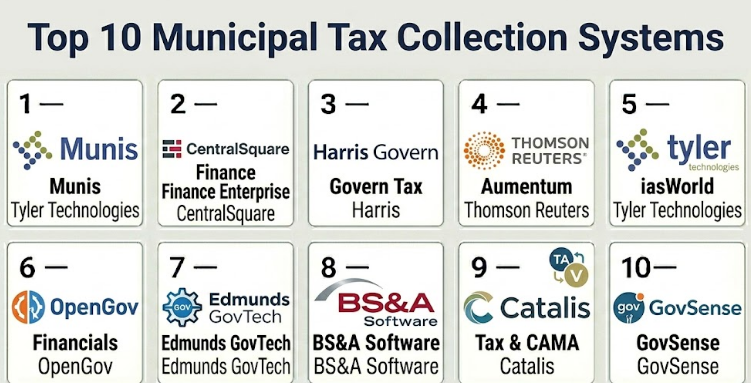
Top 10 Municipal Tax Collection Systems
#1 — Tyler Technologies Munis
Short description :
Tyler Technologies Munis is a public sector ERP platform used by local governments for finance, tax, billing, revenue, accounting, budgeting, and administrative operations. It can support municipal tax collection workflows when connected with property, billing, receivables, and payment processes. The system is useful for municipalities that want tax collection connected with general ledger, finance, budgeting, reporting, and citizen services. It is especially relevant for cities and counties already using Tyler public sector products. It is best for agencies that need tax collection as part of a broader government finance environment.
Key Features
- Municipal finance and revenue management
- Tax billing and receivables support
- Payment and cashiering workflows
- General ledger and accounting integration
- Reporting and dashboards
- Citizen-facing payment workflows where configured
- Public sector ERP ecosystem connectivity
Pros
- Strong fit for municipalities needing finance and tax workflows together.
- Useful when revenue collection must post accurately into accounting.
- Broad public sector ecosystem supports multiple departments.
Cons
- May be more complex than needed for very small agencies.
- Implementation can require detailed finance workflow planning.
- Agencies should validate tax-specific modules and local rules.
Platforms / Deployment
Web / Windows / Mobile-supported workflows
Cloud / On-premise / Hybrid
Security & Compliance
SSO/SAML: Varies / N/A
MFA: Varies / N/A
Encryption: Not publicly stated
Audit logs: Varies / N/A
RBAC: Varies / N/A
PCI DSS: Varies / N/A
SOC 2 / ISO 27001 / GDPR / HIPAA: Not publicly stated
Integrations & Ecosystem
Tyler Munis fits local governments that need tax collection connected with finance, accounting, payments, and citizen services.
- General ledger systems
- Property and assessment workflows
- Payment processors
- Citizen payment portals
- Reporting dashboards
- Broader Tyler public sector products
Support & Community
Support is generally public-sector focused and depends on contract, modules, deployment model, and agency size. Municipalities should confirm implementation help, staff training, data migration, payment setup, and reporting support.
#2 — CentralSquare Finance Enterprise
Short description :
CentralSquare Finance Enterprise supports municipal finance, revenue collection, accounting, billing, and local government administration. It can help agencies manage taxpayer accounts, receivables, payments, adjustments, reporting, and financial workflows. The platform is useful for cities, counties, and public sector agencies that want tax collection connected with broader finance operations. It is especially relevant for agencies already using CentralSquare public administration or public safety systems. It is best for local governments that need structured revenue management and finance integration.
Key Features
- Municipal finance and revenue workflows
- Tax and receivable management support
- Payment processing workflows
- Accounting and general ledger connectivity
- Reporting and financial dashboards
- Cashiering and receipt handling
- Public sector system integrations
Pros
- Good fit for local government finance departments.
- Useful when tax collection must connect with accounting workflows.
- Can support broader municipal administrative needs.
Cons
- Exact tax collection depth should be validated.
- Implementation quality depends on workflow design and data migration.
- Agencies should review integrations with property and assessment systems.
Platforms / Deployment
Web / Windows / Mobile-supported workflows
Cloud / On-premise / Hybrid
Security & Compliance
SSO/SAML: Varies / N/A
MFA: Varies / N/A
Encryption: Not publicly stated
Audit logs: Varies / N/A
RBAC: Varies / N/A
PCI DSS: Varies / N/A
SOC 2 / ISO 27001 / GDPR / HIPAA: Not publicly stated
Integrations & Ecosystem
CentralSquare Finance Enterprise fits agencies that need revenue collection connected with local government finance systems.
- General ledger workflows
- Payment processors
- Citizen portals
- Property and billing systems
- Reporting tools
- Public sector administration platforms
Support & Community
Support depends on contract, product version, and implementation scope. Agencies should confirm migration support, training, configuration, and long-term maintenance options.
#3 — Harris Govern Tax
Short description :
Harris Govern Tax is designed for local governments and public sector agencies managing property tax, assessment, collections, and land-related revenue workflows. It helps agencies connect property data, ownership details, tax billing, valuation, and collection processes. The platform is useful for counties, municipalities, assessor offices, treasurer offices, and tax collector departments. It is especially relevant where property tax collection must connect with assessment and parcel data. It is best for agencies seeking a tax system focused on property and local government revenue administration.
Key Features
- Property tax billing and collection support
- Assessment and appraisal workflow connectivity
- Taxpayer account management
- Payment and receipt workflows
- Delinquency and penalty tracking
- Reporting and revenue dashboards
- Integration with GIS and property records
Pros
- Strong fit for property tax-focused agencies.
- Useful where tax collection depends on assessment and parcel data.
- Supports local government property revenue workflows.
Cons
- Agencies should validate support for non-property taxes.
- Implementation can require careful data cleansing and migration.
- Public security and compliance details should be reviewed directly.
Platforms / Deployment
Web / Windows-supported workflows / Varies / N/A
Cloud / On-premise / Hybrid / Varies / N/A
Security & Compliance
SSO/SAML: Varies / N/A
MFA: Not publicly stated
Encryption: Not publicly stated
Audit logs: Varies / N/A
RBAC: Varies / N/A
PCI DSS: Varies / N/A
SOC 2 / ISO 27001 / GDPR / HIPAA: Not publicly stated
Integrations & Ecosystem
Harris Govern Tax fits municipalities and counties where tax collection must connect with property, assessment, and land data.
- Assessment systems
- GIS parcel data
- Property records
- Payment processors
- Public tax portals
- Reporting and finance workflows
Support & Community
Support is generally public-sector focused. Buyers should confirm tax rule configuration, data migration, payment setup, staff training, and support for local reporting requirements.
#4 — Thomson Reuters Aumentum
Short description :
Thomson Reuters Aumentum is a property tax, land records, valuation, and revenue administration platform used by government agencies. It helps agencies manage property data, assessments, tax billing, collections, recording, and land administration workflows. The platform is useful for jurisdictions that need property tax collection connected with assessment and land records. It can support large-scale property data and revenue operations. It is best for agencies that require strong property tax and land administration capabilities in one connected environment.
Key Features
- Property tax administration
- Assessment and valuation workflow support
- Tax billing and collection workflows
- Land records and property data connectivity
- Payment and receivable support
- Reporting and analytics
- Public sector property revenue workflows
Pros
- Strong fit for property tax and land records environments.
- Useful for agencies managing large property datasets.
- Supports connected workflows across assessment and tax collection.
Cons
- May be broader than needed for small municipalities.
- Implementation and migration can be complex.
- Agencies should validate specific collection and payment workflows.
Platforms / Deployment
Web / Windows-supported workflows / Varies / N/A
Cloud / On-premise / Hybrid / Varies / N/A
Security & Compliance
SSO/SAML: Varies / N/A
MFA: Varies / N/A
Encryption: Not publicly stated
Audit logs: Varies / N/A
RBAC: Varies / N/A
PCI DSS: Varies / N/A
SOC 2 / ISO 27001 / GDPR / HIPAA: Not publicly stated
Integrations & Ecosystem
Aumentum fits agencies that need tax collection tied to assessment, property records, and land administration.
- Property assessment systems
- Land records systems
- GIS parcel layers
- Payment systems
- Public taxpayer portals
- Finance and reporting workflows
Support & Community
Support is generally implementation-focused for public sector agencies. Municipalities should confirm migration planning, tax configuration, training, integrations, and reporting setup.
#5 — Tyler Technologies iasWorld
Short description :
Tyler Technologies iasWorld is used by property assessment and tax offices to manage property records, valuation, assessment, and related tax administration workflows. It can support municipal tax collection when connected with billing, treasury, payment, and revenue processes. The platform is useful for agencies that need accurate property data and assessment records to support tax billing and collections. It is especially relevant for assessor offices and property tax teams. It is best for jurisdictions where property data quality and valuation workflows are central to tax collection.
Key Features
- Property assessment and appraisal workflows
- Ownership and property record management
- Parcel and valuation data support
- Tax administration connectivity
- Reporting and analytics
- Integration with GIS and land records
- Public sector property data workflows
Pros
- Strong fit for property assessment-driven tax workflows.
- Useful where property data accuracy affects collection quality.
- Works well within a broader Tyler ecosystem.
Cons
- Not a standalone payment portal by itself in every setup.
- Agencies may need additional finance or treasury integrations.
- Municipalities should validate full tax collection lifecycle needs.
Platforms / Deployment
Web / Windows-supported workflows / Varies / N/A
Cloud / On-premise / Hybrid / Varies / N/A
Security & Compliance
SSO/SAML: Varies / N/A
MFA: Varies / N/A
Encryption: Not publicly stated
Audit logs: Varies / N/A
RBAC: Varies / N/A
PCI DSS: Varies / N/A
SOC 2 / ISO 27001 / GDPR / HIPAA: Not publicly stated
Integrations & Ecosystem
iasWorld fits agencies that need property and assessment data connected with tax administration.
- GIS parcel systems
- Land records databases
- Tax billing workflows
- Public search portals
- Finance and collection systems
- Tyler public sector products
Support & Community
Support is generally public-sector focused. Agencies should confirm configuration support, migration planning, training, reporting, and integration options.
#6 — OpenGov Financials
Short description :
OpenGov Financials supports cloud-based government finance, budgeting, accounting, procurement, and revenue-related workflows. For municipal tax collection, it can help agencies manage revenue visibility, payment posting, reporting, and finance-side integration when paired with billing or tax workflows. It is useful for local governments seeking modern cloud finance tools and better transparency across revenue operations. The platform is especially relevant for agencies already using OpenGov for permitting, budgeting, or public sector operations. It is best for municipalities that need cloud-based finance modernization with revenue management capabilities.
Key Features
- Government finance and accounting workflows
- Revenue visibility and reporting
- Payment and receivable support where configured
- Budgeting and financial dashboards
- Public sector workflow automation
- Integration with permitting and licensing workflows
- Cloud-based finance operations
Pros
- Modern cloud-first finance experience.
- Useful for municipalities modernizing finance and revenue operations.
- Strong reporting and transparency focus.
Cons
- Agencies should validate tax-specific billing and collection depth.
- May need integration with dedicated property tax systems.
- Advanced local tax rules should be reviewed carefully.
Platforms / Deployment
Web / Mobile-supported workflows
Cloud
Security & Compliance
SSO/SAML: Varies / N/A
MFA: Varies / N/A
Encryption: Not publicly stated
Audit logs: Varies / N/A
RBAC: Varies / N/A
PCI DSS: Varies / N/A
SOC 2 / ISO 27001 / GDPR / HIPAA: Not publicly stated
Integrations & Ecosystem
OpenGov Financials fits governments that need revenue and finance workflows connected with broader digital government operations.
- Accounting and finance workflows
- Budgeting dashboards
- Payment systems
- Permitting and licensing workflows
- Reporting and analytics
- Public sector ERP processes
Support & Community
Support is generally local-government focused. Buyers should confirm implementation, integration planning, chart-of-accounts setup, reporting configuration, and staff training.
#7 — Edmunds GovTech
Short description :
Edmunds GovTech provides local government software for finance, tax, utility billing, payments, and municipal administration. It is commonly used by small and mid-sized local governments that need practical tools for billing, receivables, collections, and financial operations. The platform can support municipal tax workflows, taxpayer accounts, payments, receipts, and reporting. It is useful for towns, boroughs, cities, and public agencies looking for a municipal-focused system. It is best for smaller and mid-sized municipalities that need reliable finance and tax collection functionality without unnecessary complexity.
Key Features
- Municipal finance and tax workflows
- Billing and accounts receivable support
- Payment and receipt management
- Utility and local revenue workflows
- Reporting and financial dashboards
- Cashiering support
- Local government administration tools
Pros
- Practical fit for small and mid-sized municipalities.
- Useful for finance, billing, and collection teams.
- Can support day-to-day local government revenue operations.
Cons
- Large enterprise agencies should validate scalability.
- Advanced integrations should be reviewed before selection.
- Public security and compliance details should be confirmed directly.
Platforms / Deployment
Web / Windows-supported workflows / Varies / N/A
Cloud / On-premise / Hybrid / Varies / N/A
Security & Compliance
SSO/SAML: Varies / N/A
MFA: Not publicly stated
Encryption: Not publicly stated
Audit logs: Varies / N/A
RBAC: Varies / N/A
PCI DSS: Varies / N/A
SOC 2 / ISO 27001 / GDPR / HIPAA: Not publicly stated
Integrations & Ecosystem
Edmunds GovTech fits municipalities that need finance, tax, and billing workflows connected.
- Municipal finance systems
- Utility billing workflows
- Payment processors
- Tax and receivable records
- Reporting tools
- Local government administrative workflows
Support & Community
Support is generally focused on local government customers. Agencies should confirm onboarding, conversion support, training, reporting assistance, and payment workflow setup.
#8 — BS&A Software
Short description :
BS&A Software provides municipal software for property tax, assessing, accounting, utility billing, permitting, and local government administration. It is widely relevant for small and mid-sized governments that need tax collection connected with assessment, finance, and municipal operations. The platform can support property tax billing, payments, receivables, reporting, and taxpayer information workflows. It is especially useful for municipalities that want a connected suite for core local government functions. It is best for local governments needing practical property tax and finance workflow support.
Key Features
- Property tax workflow support
- Assessing and property record connectivity
- Accounting and finance workflows
- Payment and receivable management
- Utility billing support where configured
- Reporting and dashboards
- Municipal administration modules
Pros
- Strong fit for small and mid-sized local governments.
- Useful where tax, assessing, and finance workflows need to connect.
- Practical suite approach for municipal operations.
Cons
- Agencies outside supported markets should validate fit.
- Advanced enterprise customization may require review.
- Integration and deployment details should be confirmed.
Platforms / Deployment
Web / Windows-supported workflows / Varies / N/A
Cloud / On-premise / Hybrid / Varies / N/A
Security & Compliance
SSO/SAML: Varies / N/A
MFA: Not publicly stated
Encryption: Not publicly stated
Audit logs: Varies / N/A
RBAC: Varies / N/A
PCI DSS: Varies / N/A
SOC 2 / ISO 27001 / GDPR / HIPAA: Not publicly stated
Integrations & Ecosystem
BS&A Software fits local governments that need connected property tax, assessing, accounting, and billing workflows.
- Property assessment systems
- Accounting modules
- Payment processing
- Utility billing workflows
- Permitting systems
- Reporting tools
Support & Community
Support is generally local-government focused. Agencies should confirm conversion services, staff training, reporting assistance, payment setup, and update support.
#9 — Catalis Tax & CAMA
Short description :
Catalis Tax & CAMA supports property tax, assessment, computer-assisted mass appraisal, billing, collections, and local government revenue workflows. It is useful for counties, municipalities, assessor offices, and tax collector departments that need property data, valuation, and collection processes connected. The platform can help agencies manage property tax lifecycle workflows from assessment to billing and collection. It is especially relevant for agencies modernizing property tax administration. It is best for governments focused on property tax and appraisal-driven revenue processes.
Key Features
- Property tax billing and collection support
- Assessment and CAMA workflows
- Property record management
- Payment and receivable workflows
- Delinquency tracking
- Reporting and dashboards
- Public sector tax administration workflows
Pros
- Strong fit for property tax and assessment workflows.
- Useful for agencies needing tax and CAMA connectivity.
- Supports government revenue administration.
Cons
- Non-property tax requirements should be validated.
- Implementation can require data migration and configuration.
- Public security details should be reviewed during procurement.
Platforms / Deployment
Web / Windows-supported workflows / Varies / N/A
Cloud / On-premise / Hybrid / Varies / N/A
Security & Compliance
SSO/SAML: Varies / N/A
MFA: Not publicly stated
Encryption: Not publicly stated
Audit logs: Varies / N/A
RBAC: Varies / N/A
PCI DSS: Varies / N/A
SOC 2 / ISO 27001 / GDPR / HIPAA: Not publicly stated
Integrations & Ecosystem
Catalis Tax & CAMA fits agencies that need assessment, tax billing, and collection workflows connected.
- CAMA systems
- Property tax records
- GIS parcel data
- Payment processors
- Public tax portals
- Reporting and finance systems
Support & Community
Support is generally public-sector focused. Agencies should confirm migration services, tax rule configuration, training, payment workflows, and reporting setup.
#10 — GovSense
Short description :
GovSense is a cloud-based local government ERP platform that supports finance, billing, revenue, payments, permits, licensing, and municipal operations. It can help agencies manage tax-related workflows, receivables, taxpayer accounts, online payments, and revenue reporting. The platform is useful for municipalities that want modern cloud-based tools for several departments instead of separate disconnected systems. It is especially relevant for local governments looking for a flexible and integrated approach. It is best for small to mid-sized agencies seeking cloud-based municipal administration with revenue collection capabilities.
Key Features
- Municipal finance and revenue workflows
- Billing and payment management
- Tax and receivables support where configured
- Citizen-facing online services
- Permitting and licensing workflows
- Reporting and dashboards
- Cloud-based local government operations
Pros
- Useful for municipalities seeking cloud-first administration.
- Can connect revenue, permitting, licensing, and finance workflows.
- Practical for small to mid-sized local government teams.
Cons
- Tax-specific depth should be validated before purchase.
- Larger agencies should review scalability and integrations.
- Public security and compliance details should be confirmed directly.
Platforms / Deployment
Web / Mobile-supported workflows
Cloud
Security & Compliance
SSO/SAML: Varies / N/A
MFA: Not publicly stated
Encryption: Not publicly stated
Audit logs: Varies / N/A
RBAC: Varies / N/A
PCI DSS: Varies / N/A
SOC 2 / ISO 27001 / GDPR / HIPAA: Not publicly stated
Integrations & Ecosystem
GovSense fits local governments that need revenue collection connected with broader municipal workflows.
- Finance and accounting workflows
- Online payments
- Permitting and licensing systems
- Citizen service portals
- Reporting dashboards
- Billing and receivables workflows
Support & Community
Support is generally local-government focused. Municipalities should confirm onboarding, data migration, user training, workflow setup, and payment processing support.
Comparison Table
| Tool Name | Best For | Platform(s) Supported | Deployment | Standout Feature | Public Rating |
|---|---|---|---|---|---|
| Tyler Technologies Munis | Municipal finance and tax workflows | Web, Windows, mobile-supported workflows | Cloud / On-premise / Hybrid | Tax collection connected with public sector ERP | N/A |
| CentralSquare Finance Enterprise | Local government finance and revenue teams | Web, Windows, mobile-supported workflows | Cloud / On-premise / Hybrid | Revenue and accounting workflow integration | N/A |
| Harris Govern Tax | Property tax-focused agencies | Web, Windows-supported workflows, varies / N/A | Cloud / On-premise / Hybrid / Varies / N/A | Property tax connected with assessment and GIS | N/A |
| Thomson Reuters Aumentum | Large property tax and land records agencies | Web, Windows-supported workflows, varies / N/A | Cloud / On-premise / Hybrid / Varies / N/A | Property tax, valuation, and land administration | N/A |
| Tyler Technologies iasWorld | Assessment and property tax offices | Web, Windows-supported workflows, varies / N/A | Cloud / On-premise / Hybrid / Varies / N/A | Property assessment and tax data workflows | N/A |
| OpenGov Financials | Cloud-first municipal finance modernization | Web, mobile-supported workflows | Cloud | Modern financial reporting and revenue visibility | N/A |
| Edmunds GovTech | Small and mid-sized municipalities | Web, Windows-supported workflows, varies / N/A | Cloud / On-premise / Hybrid / Varies / N/A | Practical municipal billing and finance workflows | N/A |
| BS&A Software | Local governments needing tax and assessing workflows | Web, Windows-supported workflows, varies / N/A | Cloud / On-premise / Hybrid / Varies / N/A | Property tax and assessing suite | N/A |
| Catalis Tax & CAMA | Property tax and appraisal-driven agencies | Web, Windows-supported workflows, varies / N/A | Cloud / On-premise / Hybrid / Varies / N/A | CAMA and tax collection connectivity | N/A |
| GovSense | Small to mid-sized cloud municipal operations | Web, mobile-supported workflows | Cloud | Integrated cloud revenue and municipal workflows | N/A |
Evaluation & Municipal Tax Collection Systems
| Tool Name | Core (25%) | Ease (15%) | Integrations (15%) | Security (10%) | Performance (10%) | Support (10%) | Value (15%) | Weighted Total (0–10) |
|---|---|---|---|---|---|---|---|---|
| Tyler Technologies Munis | 9 | 7 | 9 | 8 | 8 | 8 | 7 | 8.05 |
| CentralSquare Finance Enterprise | 8 | 7 | 8 | 7 | 8 | 7 | 7 | 7.50 |
| Harris Govern Tax | 8 | 7 | 8 | 7 | 8 | 7 | 7 | 7.50 |
| Thomson Reuters Aumentum | 9 | 7 | 8 | 8 | 8 | 8 | 7 | 7.95 |
| Tyler Technologies iasWorld | 8 | 7 | 8 | 8 | 8 | 8 | 7 | 7.70 |
| OpenGov Financials | 8 | 8 | 8 | 8 | 8 | 8 | 7 | 7.95 |
| Edmunds GovTech | 7 | 8 | 7 | 7 | 7 | 7 | 8 | 7.25 |
| BS&A Software | 8 | 8 | 7 | 7 | 7 | 7 | 8 | 7.50 |
| Catalis Tax & CAMA | 8 | 7 | 8 | 7 | 8 | 7 | 7 | 7.50 |
| GovSense | 7 | 8 | 7 | 7 | 7 | 7 | 8 | 7.25 |
These scores are comparative and should be used as a shortlist guide. A property tax office may value assessment and parcel integration more heavily, while a finance department may prioritize accounting, receivables, and reporting. Smaller municipalities may prefer ease of use and value, while larger governments may require deep integrations, advanced workflows, and stronger scalability. Buyers should validate local tax rules, payment workflows, integrations, security controls, data migration, and reporting before choosing a system.
Which Municipal Tax Collection System Should You Choose?
Solo / Freelancer
Solo consultants, tax advisors, and independent accountants usually do not need a municipal tax collection system. These platforms are designed for government agencies that issue bills, collect payments, manage public revenue, and maintain official taxpayer records.
A solo professional may only need access to the official tax payment portal or property tax lookup system. Full municipal tax software is mainly for agencies that manage tax billing and revenue operations.
SMB
Small towns, boroughs, villages, and local revenue offices should focus on simplicity, affordability, billing accuracy, payment handling, receipts, reporting, and staff usability. Edmunds GovTech, BS&A Software, GovSense, and OpenGov Financials may be practical depending on agency needs and region.
Smaller agencies should avoid over-customization and start with core workflows such as billing, payments, receipts, adjustments, delinquency tracking, and basic reporting.
Mid-Market
Mid-sized municipalities, counties, and tax collector offices need stronger property integration, online payment options, finance connectivity, delinquency workflows, taxpayer portals, and reporting dashboards. Tyler Technologies Munis, CentralSquare Finance Enterprise, Harris Govern Tax, Catalis Tax & CAMA, and OpenGov Financials may be suitable.
Mid-market buyers should test real workflows such as annual billing, partial payments, penalty calculation, refunds, exemptions, receipts, delinquency notices, and finance posting.
Enterprise
Large cities, counties, regional tax authorities, and agencies with high-volume property tax operations need advanced scalability, strong integrations, auditability, reporting, role controls, and long-term support. Tyler Technologies Munis, Thomson Reuters Aumentum, Tyler Technologies iasWorld, Harris Govern Tax, and OpenGov Financials may be stronger candidates.
Enterprise buyers should involve tax collectors, assessors, finance teams, IT, GIS teams, legal teams, auditors, payment teams, and public service staff before final selection.
Budget vs Premium
Budget-focused municipalities should first identify the most painful tax process. If online payments are the main issue, a payment portal or lighter municipal finance tool may help. If the issue is property tax accuracy, a stronger tax and assessment platform may be needed.
Premium systems usually offer deeper finance integration, property data connectivity, advanced reporting, better scalability, and broader public sector workflows. However, premium software also requires stronger implementation planning and staff training.
Feature Depth vs Ease of Use
Tax collection software must handle complex rules, but staff and taxpayers should still find it easy to use. A system with many features can create problems if bill creation, payment posting, or taxpayer lookup is confusing.
Municipalities should test workflows with real users, including clerks, tax collectors, finance staff, supervisors, and residents when possible.
Integrations & Scalability-
Important integrations include property assessment systems, GIS parcel data, finance and ERP systems, payment processors, bank reconciliation, document management, permitting, licensing, utility billing, citizen portals, and reporting tools.
Scalability should include taxpayer accounts, parcel count, bill volume, payment volume, users, online portal traffic, historical records, reporting needs, and future local revenue programs. A system should support both current workloads and future growth.
Security & Compliance Needs
Municipal tax systems store sensitive taxpayer, property, financial, business, and payment data. Security review should be required before selection.
Agencies should ask about SSO, MFA, RBAC, audit logs, encryption, payment security, PCI-related responsibilities, backup, disaster recovery, retention rules, access reviews, and breach response. Do not assume compliance without formal documentation.
Frequently Asked Questions
1. What is a Municipal Tax Collection System?
A Municipal Tax Collection System is software used by local governments to manage tax billing, payments, taxpayer accounts, receipts, delinquencies, penalties, refunds, reports, and revenue workflows.
2. How is it different from normal accounting software?
Normal accounting software records financial activity, while municipal tax collection software manages taxpayer accounts, tax bills, payment schedules, exemptions, penalties, property records, receipts, and public-facing tax services.
3. What types of taxes can these systems manage?
Many systems can support property tax, business tax, local assessments, fees, penalties, and other municipal revenues. Exact tax support depends on the platform and local configuration.
4. What features matter most?
Important features include tax billing, online payments, taxpayer portals, receipts, delinquency tracking, penalty calculation, exemptions, adjustments, refunds, reporting, audit logs, and integration with finance or assessment systems.
5. Can taxpayers pay online?
Many modern municipal tax systems support online payments through citizen portals. Payment options may include cards, bank transfers, installment plans, and digital receipts depending on configuration and payment processor.
6. Can tax systems integrate with property records?
Yes, many municipal tax systems integrate with property assessment, ownership, parcel, GIS, and land records data. This is especially important for property tax billing and exemptions.
7. What are common mistakes when selecting these systems?
Common mistakes include ignoring local tax rules, underestimating data migration, failing to test payments, not involving finance staff, skipping security review, and choosing a system that taxpayers find difficult to use.
8. How long does implementation usually take?
Implementation depends on tax complexity, account volume, data migration, integrations, payment setup, reporting needs, staff training, and citizen portal configuration. Large agencies often need phased rollout.
9. Why are audit logs important?
Audit logs show who changed tax records, adjusted balances, processed refunds, updated accounts, or accessed sensitive data. They help support accountability, fraud prevention, and financial review.
10. Can these systems help with delinquent taxes?
Yes, many systems support delinquency tracking, penalty calculations, reminders, payment plans, notices, liens, and reporting. Agencies should validate delinquency workflows against local policy.
Conclusion
Municipal Tax Collection Systems help local governments manage one of their most important public finance responsibilities: collecting revenue accurately, transparently, and efficiently. The right system can improve billing accuracy, simplify online payments, reduce staff workload, strengthen auditability, improve taxpayer experience, and connect revenue collection with finance, property, GIS, and reporting workflows. However, the best platform depends on the agency’s size, tax types, property data needs, finance environment, payment model, and reporting requirements.
