Introduction
Court e-Filing Systems are digital platforms that allow attorneys, law firms, government agencies, self-represented litigants, clerks, and courts to submit legal documents electronically instead of filing paper documents at the courthouse. In simple words, these systems help users upload pleadings, motions, petitions, exhibits, notices, orders, and other court documents through an online portal.
Court e-filing matters because courts are moving toward faster, more transparent, and more efficient digital case workflows. Paper filing can create delays, manual errors, storage problems, and long processing times. A strong e-filing system helps courts receive documents faster, validate submissions, collect filing fees, route documents to clerks, update case records, and notify parties.
Common use cases include civil case filings, criminal filings, family court documents, appellate filings, probate filings, traffic case submissions, attorney filings, government agency filings, electronic service, and court fee payments.
Buyers should evaluate filing workflow flexibility, court case management integration, payment processing, document validation, user experience, security, audit logs, accessibility, support, scalability, and jurisdiction-specific configuration.
Best for: courts, judicial agencies, clerks’ offices, law firms, attorneys, government legal departments, public sector justice agencies, e-filing service providers, and legal operations teams.
Not ideal for: small private teams that only need internal document storage, legal drafting tools, or general file sharing without official court submission, clerk review, fee payment, and case management integration.
Key Trends in Court e-Filing Systems
- Court digitization is becoming standard as judicial systems reduce paper dependency and modernize public access to justice workflows.
- Self-service filing portals are improving so attorneys and self-represented litigants can submit documents with clearer instructions.
- Integration with court case management systems is critical because filings must update case records, docket entries, party information, and document queues.
- Electronic service is becoming more common where parties receive documents digitally instead of relying only on physical delivery.
- Payment integration is now expected because filing fees, convenience fees, refunds, waivers, and receipts must be handled smoothly.
- Document validation and automated review are improving to catch missing signatures, incorrect formats, missing attachments, or incomplete filing details.
- Accessibility and plain-language design are becoming more important because courts serve attorneys, agencies, and self-represented users with different skill levels.
- Security and privacy requirements are rising because court filings can include personal, financial, medical, criminal, family, and confidential information.
- Cloud-based court platforms are gaining interest as courts look for scalable infrastructure and easier updates.
- Analytics and operational dashboards are becoming useful for tracking filing volume, clerk workload, rejection reasons, processing times, and user adoption.
How We Selected These Tools
- We selected platforms and systems recognized in court technology, legal filing, judicial case management, and public sector justice workflows.
- We included a mix of court e-filing platforms, court case management vendors with e-filing modules, legal filing service providers, and justice technology solutions.
- We considered filing functionality such as document upload, filing review, court routing, fee payment, electronic service, notifications, and status tracking.
- We considered integration with case management, docketing, document management, payment systems, identity tools, and public access workflows.
- We evaluated suitability for courts, attorneys, law firms, government agencies, and self-represented users.
- We considered scalability for county courts, statewide systems, appellate courts, and multi-jurisdiction environments.
- We avoided guessing public ratings, certifications, or compliance claims.
- We used “Not publicly stated” where security, compliance, pricing, or deployment details are unclear.
- We considered usability because e-filing systems must work for both legal professionals and non-technical users.
- We scored tools comparatively based on court e-filing relevance, not as a universal ranking for every jurisdiction.
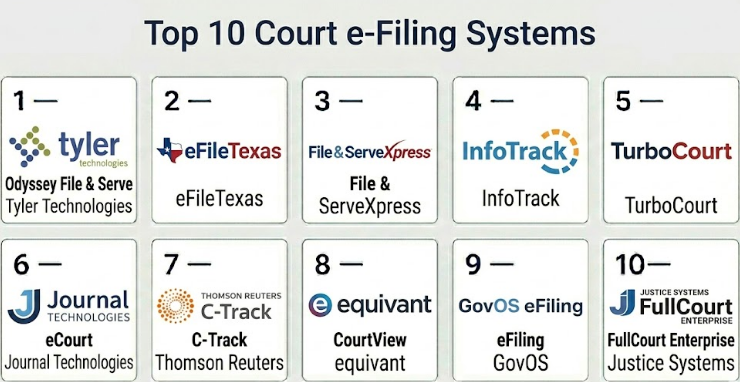
Top 10 Court e-Filing Systems
#1 — Tyler Technologies Odyssey File & Serve
Short description :
Tyler Technologies Odyssey File & Serve is a widely used court e-filing platform designed for courts, attorneys, clerks, and justice agencies. It supports electronic document submission, filing fee payments, clerk review workflows, notifications, and filing status tracking. It is commonly used in environments where e-filing must connect with court case management and judicial records. The platform is especially relevant for courts using Tyler’s broader court technology ecosystem. It is best for jurisdictions that need structured e-filing workflows with court system integration.
Key Features
- Electronic filing submission workflows
- Clerk review and acceptance processes
- Filing fee payment support
- Electronic service workflows
- Filing status tracking and notifications
- Integration with court case management systems
- Support for court-specific filing rules and configurations
Pros
- Strong fit for courts using Tyler justice technology.
- Useful for structured court filing and clerk review workflows.
- Supports large-scale court e-filing environments.
Cons
- Best value may depend on Tyler ecosystem usage.
- Jurisdiction-specific setup can require planning.
- User experience may vary by court configuration.
Platforms / Deployment
Web / Browser-based workflows
Cloud / Hybrid / Varies / N/A
Security & Compliance
SSO/SAML: Varies / N/A
MFA: Varies / N/A
Encryption: Not publicly stated
Audit logs: Varies / N/A
RBAC: Varies / N/A
CJIS alignment: Varies / N/A
SOC 2 / ISO 27001 / GDPR / HIPAA: Not publicly stated
Integrations & Ecosystem
Odyssey File & Serve is strongest when connected with broader court case management and justice workflows.
- Court case management systems
- Clerk review queues
- Payment processing workflows
- Electronic service workflows
- Attorney filing portals
- Court document management workflows
Support & Community
Support is generally court and public-sector focused. Courts should confirm implementation support, clerk training, attorney onboarding, payment configuration, and ongoing jurisdiction-specific support.
#2 — eFileTexas
Short description :
eFileTexas is a court e-filing system used for electronic court document submission in Texas courts. It supports attorneys and filers in submitting documents online, paying filing fees, tracking status, and serving parties electronically where applicable. The platform is useful for courts that need a standardized e-filing workflow across multiple counties and case types. It helps reduce paper filing and improves filing visibility for legal users. It is best for Texas-related court filing workflows and users practicing in supported jurisdictions.
Key Features
- Online court document filing
- Filing fee payment support
- Filing status tracking
- Electronic service workflows where configured
- Support for multiple court types and case categories
- Attorney and filer portal workflows
- Clerk review and submission routing
Pros
- Strong fit for Texas court filing workflows.
- Useful for attorneys handling filings across multiple courts.
- Standardized e-filing process improves consistency.
Cons
- Region-specific and not suitable for unrelated jurisdictions.
- User experience may depend on court rules and configurations.
- Filing requirements can vary by case type and county.
Platforms / Deployment
Web / Browser-based workflows
Cloud / Varies / N/A
Security & Compliance
SSO/SAML: Not publicly stated
MFA: Varies / N/A
Encryption: Not publicly stated
Audit logs: Varies / N/A
RBAC: Varies / N/A
CJIS alignment: Varies / N/A
SOC 2 / ISO 27001 / GDPR / HIPAA: Not publicly stated
Integrations & Ecosystem
eFileTexas fits court filing workflows where legal documents must be submitted through approved electronic channels.
- Court case management workflows
- Filing fee payments
- Clerk review queues
- Electronic service workflows
- Attorney filing accounts
- Case document submission workflows
Support & Community
Support is generally tied to the e-filing service and court filing environment. Users should follow court-specific instructions and confirm filing acceptance rules before submission.
#3 — File & ServeXpress
Short description :
File & ServeXpress is an electronic filing and service platform used by courts, law firms, attorneys, government agencies, and legal professionals. It supports electronic court filing, electronic service, document exchange, and case-related filing workflows. The platform is useful in jurisdictions and legal environments where filing and service must be handled securely and efficiently. It can support complex litigation workflows where multiple parties, documents, and service requirements are involved. It is best for law firms and courts that need structured legal filing and service management.
Key Features
- Court e-filing workflows
- Electronic service support
- Document submission and exchange
- Filing status tracking
- Multi-party case support
- Legal document workflow management
- Notifications and delivery confirmation workflows
Pros
- Strong fit for legal filing and electronic service.
- Useful for litigation teams handling document-heavy cases.
- Supports structured document exchange between parties.
Cons
- Availability depends on jurisdiction and court adoption.
- May be more than needed for simple filings.
- Pricing and filing rules can vary by court or service model.
Platforms / Deployment
Web / Browser-based workflows
Cloud
Security & Compliance
SSO/SAML: Varies / N/A
MFA: Varies / N/A
Encryption: Not publicly stated
Audit logs: Varies / N/A
RBAC: Varies / N/A
SOC 2 / ISO 27001 / GDPR / HIPAA: Not publicly stated
Integrations & Ecosystem
File & ServeXpress supports legal workflows where filing, service, and document exchange must be organized and traceable.
- Court filing systems
- Electronic service workflows
- Law firm document workflows
- Case participant notifications
- Legal document exchange
- Filing status management
Support & Community
Support is generally available for courts, attorneys, and legal users. Law firms should confirm jurisdiction availability, service rules, account setup, and training needs.
#4 — InfoTrack
Short description :
InfoTrack is a legal technology platform that supports electronic filing, court services, document workflows, and law firm productivity. It helps legal professionals submit court documents electronically where supported, manage filing details, connect with case information, and streamline legal administrative tasks. The platform is useful for law firms that want e-filing connected with document management, practice management, and workflow automation. It is especially valuable for firms that file frequently and need a more efficient process. It is best for law firms seeking filing support connected to daily legal operations.
Key Features
- Court e-filing support where available
- Legal document workflow automation
- Filing status and submission tracking
- Integration with legal practice workflows
- Court services and filing-related tasks
- Document and matter workflow support
- Law firm productivity features
Pros
- Strong fit for law firms handling frequent filings.
- Useful when e-filing needs to connect with practice workflows.
- Can reduce administrative filing friction.
Cons
- Court availability depends on jurisdiction.
- Not a court-owned case management replacement.
- Pricing and service coverage should be reviewed carefully.
Platforms / Deployment
Web / Browser-based workflows
Cloud
Security & Compliance
SSO/SAML: Varies / N/A
MFA: Varies / N/A
Encryption: Not publicly stated
Audit logs: Varies / N/A
RBAC: Varies / N/A
SOC 2 / ISO 27001 / GDPR / HIPAA: Not publicly stated
Integrations & Ecosystem
InfoTrack fits law firm environments where e-filing is part of a broader legal operations workflow.
- Practice management systems
- Document management workflows
- Matter workflows
- Court filing services
- Legal billing and administrative workflows
- Filing status notifications
Support & Community
Support is generally oriented toward law firms and legal users. Firms should confirm supported jurisdictions, onboarding, integration setup, and user training before adoption.
#5 — TurboCourt
Short description :
TurboCourt is an e-filing and guided legal document platform used by courts, agencies, attorneys, and self-represented litigants in supported jurisdictions. It is designed to help users prepare and submit court forms and legal documents online. The platform can be useful where courts want to support both professional filers and public users with more guided filing workflows. It is especially relevant for access-to-justice use cases because self-represented users may need simpler filing steps. It is best for courts and users who need guided electronic filing and form-based submission.
Key Features
- Electronic court filing workflows
- Guided form preparation
- Support for self-represented litigants
- Online document submission
- Filing fee payment workflows where configured
- Court routing and clerk review support
- Notifications and filing status tracking
Pros
- Useful for public-facing court filing workflows.
- Supports guided filing for non-attorney users.
- Good fit for courts focused on accessibility and access to justice.
Cons
- Availability depends on court and jurisdiction.
- May not fit every complex litigation workflow.
- Court-specific rules and forms require careful configuration.
Platforms / Deployment
Web / Browser-based workflows
Cloud / Varies / N/A
Security & Compliance
SSO/SAML: Not publicly stated
MFA: Not publicly stated
Encryption: Not publicly stated
Audit logs: Varies / N/A
RBAC: Varies / N/A
SOC 2 / ISO 27001 / GDPR / HIPAA: Not publicly stated
Integrations & Ecosystem
TurboCourt fits court systems that need guided filing, online forms, and digital submission workflows.
- Court form workflows
- Clerk review queues
- Filing fee payment processes
- Self-represented litigant portals
- Court case management workflows
- Filing status notifications
Support & Community
Support depends on the jurisdiction, user type, and court implementation. Courts should plan for public user support, clerk training, form maintenance, and filing workflow updates.
#6 — Journal Technologies eCourt
Short description :
Journal Technologies eCourt is a court case management and justice platform that can support electronic filing, document management, case processing, and court operations. It is designed for courts, justice agencies, and public sector legal environments. For e-filing, it can support digital submission workflows connected with case management and court processing. It is useful for courts that want e-filing as part of a broader court technology modernization effort. It is best for jurisdictions that need court operations, case processing, and electronic filing workflows connected in one environment.
Key Features
- Court case management workflows
- Electronic filing support where configured
- Document and docket management
- Clerk processing workflows
- Court operations support
- Reporting and operational visibility
- Public sector justice workflow configuration
Pros
- Strong fit for courts seeking broader case management modernization.
- Useful when e-filing must connect with case processing.
- Supports configurable court workflows.
Cons
- E-filing capabilities depend on configuration and deployment.
- Implementation can require significant court process planning.
- May be more complex than a standalone e-filing portal.
Platforms / Deployment
Web / Browser-based workflows
Cloud / On-premise / Hybrid / Varies / N/A
Security & Compliance
SSO/SAML: Varies / N/A
MFA: Varies / N/A
Encryption: Not publicly stated
Audit logs: Varies / N/A
RBAC: Varies / N/A
CJIS alignment: Varies / N/A
SOC 2 / ISO 27001 / GDPR / HIPAA: Not publicly stated
Integrations & Ecosystem
Journal Technologies eCourt fits court environments where e-filing is connected with broader court case management.
- Court case management systems
- Docketing workflows
- Document management
- Clerk queues
- Public access workflows
- Court reporting dashboards
Support & Community
Support is generally public-sector and court-focused. Courts should confirm implementation services, configuration support, clerk training, and long-term maintenance.
#7 — Thomson Reuters C-Track
Short description :
Thomson Reuters C-Track is a court case management and judicial workflow system used by courts and justice organizations. It supports case tracking, document workflows, court operations, and e-filing-related processes where configured. The platform is especially relevant for appellate courts, trial courts, and justice agencies that need structured case and document management. It can support electronic court workflows when paired with filing and document submission processes. It is best for courts seeking strong case tracking and judicial workflow support.
Key Features
- Court case management
- Document and docket workflow support
- E-filing-related capabilities where configured
- Judicial workflow management
- Reporting and case tracking
- Public access support where configured
- Court process configuration
Pros
- Strong fit for court case tracking and judicial workflows.
- Useful for courts needing structured document and docket processes.
- Can support complex court operational needs.
Cons
- E-filing functionality depends on configuration and court environment.
- May require significant implementation planning.
- Not a simple standalone filing portal for every use case.
Platforms / Deployment
Web / Browser-based workflows
Cloud / On-premise / Hybrid / Varies / N/A
Security & Compliance
SSO/SAML: Varies / N/A
MFA: Varies / N/A
Encryption: Not publicly stated
Audit logs: Varies / N/A
RBAC: Varies / N/A
SOC 2 / ISO 27001 / GDPR / HIPAA: Not publicly stated
Integrations & Ecosystem
C-Track fits court environments where filing, case management, docketing, and judicial review workflows must be connected.
- Court case management workflows
- Document management
- Docketing systems
- Judicial review workflows
- Reporting tools
- Public access workflows where configured
Support & Community
Support is generally court and justice-agency focused. Courts should confirm implementation support, workflow configuration, training, and integration planning.
#8 — equivant CourtView
Short description :
equivant CourtView is a court case management platform used by courts and justice agencies to manage cases, documents, workflows, and court operations. It can support electronic filing-related processes when integrated or configured with digital submission workflows. The platform is useful for courts that need case processing, document control, clerk workflows, and operational reporting. It is often evaluated as part of broader court modernization projects. It is best for courts that want case management and e-filing workflows connected to daily clerk and judicial operations.
Key Features
- Court case management
- Document and docket workflow support
- Clerk processing workflows
- E-filing-related integration support
- Court reporting and operational data
- Case tracking and workflow configuration
- Public sector justice operations support
Pros
- Useful for courts seeking structured case and document workflows.
- Supports broader court operations beyond filing alone.
- Can fit courts with clerk-driven processing needs.
Cons
- E-filing depth depends on implementation and integrations.
- Requires court-specific configuration.
- May be too broad for users needing only simple filing submission.
Platforms / Deployment
Web / Browser-based workflows / Varies / N/A
Cloud / On-premise / Hybrid / Varies / N/A
Security & Compliance
SSO/SAML: Varies / N/A
MFA: Varies / N/A
Encryption: Not publicly stated
Audit logs: Varies / N/A
RBAC: Varies / N/A
SOC 2 / ISO 27001 / GDPR / HIPAA: Not publicly stated
Integrations & Ecosystem
CourtView fits court environments where electronic filing must connect with case processing and court operations.
- Court case management workflows
- Document management
- E-filing integrations where configured
- Clerk queues
- Docketing workflows
- Reporting dashboards
Support & Community
Support is generally vendor-led and court-focused. Courts should confirm implementation planning, training, integration support, and post-launch assistance.
#9 — GovOS eFiling
Short description :
GovOS eFiling supports digital filing workflows for government and public sector organizations, including court and agency document submission use cases where configured. It can help agencies accept electronic documents, payments, forms, and submission data through online workflows. The platform is useful for government organizations that need a more digital and citizen-facing filing experience. While not always a traditional court-only e-filing system, it can support public sector filing modernization. It is best for agencies seeking configurable online filing and submission workflows.
Key Features
- Online filing and submission workflows
- Digital form support
- Payment workflow support where configured
- Government service portal functionality
- Document intake and routing
- Status tracking and notifications
- Public-facing filing experience
Pros
- Useful for digital government filing workflows.
- Can support citizen-facing online submissions.
- Flexible for public sector filing and form intake use cases.
Cons
- Court-specific fit should be validated carefully.
- May require integration with court case management systems.
- Not always a dedicated court e-filing platform for every jurisdiction.
Platforms / Deployment
Web / Browser-based workflows
Cloud / Varies / N/A
Security & Compliance
SSO/SAML: Varies / N/A
MFA: Not publicly stated
Encryption: Not publicly stated
Audit logs: Varies / N/A
RBAC: Varies / N/A
SOC 2 / ISO 27001 / GDPR / HIPAA: Not publicly stated
Integrations & Ecosystem
GovOS eFiling fits public sector environments where online filing, forms, payments, and document routing are needed.
- Digital government portals
- Payment workflows
- Form intake workflows
- Document submission systems
- Agency routing workflows
- Case or record systems where configured
Support & Community
Support is generally government-focused and depends on implementation scope. Agencies should confirm court-specific workflow configuration, payment setup, training, and integration support.
#10 — Justice Systems FullCourt Enterprise
Short description :
Justice Systems FullCourt Enterprise is a court case management platform used by courts and justice agencies to manage cases, documents, dockets, payments, and court operations. It can support electronic filing-related workflows when configured or integrated with e-filing processes. The platform is useful for courts that need case management connected with document handling, clerk workflows, and operational reporting. It is best for courts seeking a broader court management system where e-filing can be part of a larger digital court environment. It may not be the right fit for law firms seeking only a filing service.
Key Features
- Court case management
- Document and docket workflow support
- Payment-related court workflows
- E-filing-related support where configured
- Clerk processing and court operations
- Reporting and operational dashboards
- Court workflow configuration
Pros
- Useful for courts seeking broader case management capabilities.
- Supports court operations beyond basic filing.
- Can help connect filings with docket and case workflows.
Cons
- E-filing functionality depends on configuration and integrations.
- Implementation can require court process redesign.
- Not designed as a simple standalone attorney filing tool only.
Platforms / Deployment
Web / Browser-based workflows / Varies / N/A
Cloud / On-premise / Hybrid / Varies / N/A
Security & Compliance
SSO/SAML: Varies / N/A
MFA: Varies / N/A
Encryption: Not publicly stated
Audit logs: Varies / N/A
RBAC: Varies / N/A
SOC 2 / ISO 27001 / GDPR / HIPAA: Not publicly stated
Integrations & Ecosystem
FullCourt Enterprise fits court environments where e-filing workflows must connect with case processing and court administration.
- Court case management
- Docketing workflows
- Document management
- Payment workflows
- Clerk queues
- Court reporting systems
Support & Community
Support is generally court and implementation-focused. Courts should confirm migration planning, clerk training, workflow configuration, and long-term maintenance support.
Comparison Table
| Tool Name | Best For | Platform(s) Supported | Deployment | Standout Feature | Public Rating |
|---|---|---|---|---|---|
| Tyler Technologies Odyssey File & Serve | Courts using structured e-filing and case management workflows | Web | Cloud / Hybrid / Varies / N/A | Court e-filing connected with case workflows | N/A |
| eFileTexas | Texas court filing workflows | Web | Cloud / Varies / N/A | Standardized electronic filing for supported Texas courts | N/A |
| File & ServeXpress | Attorneys, courts, and multi-party litigation filing | Web | Cloud | Electronic filing and service workflows | N/A |
| InfoTrack | Law firms needing e-filing connected with legal workflows | Web | Cloud | E-filing connected with law firm productivity tools | N/A |
| TurboCourt | Guided filing and self-represented litigant workflows | Web | Cloud / Varies / N/A | Guided forms and online court submission | N/A |
| Journal Technologies eCourt | Courts modernizing case and filing workflows | Web | Cloud / On-premise / Hybrid / Varies / N/A | Court case management with filing workflow support | N/A |
| Thomson Reuters C-Track | Courts needing case tracking and judicial workflows | Web | Cloud / On-premise / Hybrid / Varies / N/A | Court case and judicial workflow management | N/A |
| equivant CourtView | Courts needing case and document workflow management | Web / Varies / N/A | Cloud / On-premise / Hybrid / Varies / N/A | CourtView case management and clerk workflows | N/A |
| GovOS eFiling | Government online filing and form submission workflows | Web | Cloud / Varies / N/A | Public-facing filing and submission workflows | N/A |
| Justice Systems FullCourt Enterprise | Courts needing case management and filing-related workflows | Web / Varies / N/A | Cloud / On-premise / Hybrid / Varies / N/A | Court operations and docket workflow support | N/A |
Evaluation & Court e-Filing Systems
| Tool Name | Core (25%) | Ease (15%) | Integrations (15%) | Security (10%) | Performance (10%) | Support (10%) | Value (15%) | Weighted Total (0–10) |
|---|---|---|---|---|---|---|---|---|
| Tyler Technologies Odyssey File & Serve | 9 | 7 | 9 | 8 | 8 | 8 | 7 | 8.05 |
| eFileTexas | 8 | 7 | 8 | 7 | 8 | 7 | 8 | 7.60 |
| File & ServeXpress | 8 | 7 | 8 | 7 | 8 | 7 | 7 | 7.45 |
| InfoTrack | 8 | 8 | 8 | 7 | 8 | 8 | 7 | 7.75 |
| TurboCourt | 8 | 8 | 7 | 7 | 7 | 7 | 8 | 7.55 |
| Journal Technologies eCourt | 8 | 7 | 8 | 7 | 8 | 8 | 7 | 7.60 |
| Thomson Reuters C-Track | 8 | 7 | 8 | 7 | 8 | 8 | 7 | 7.60 |
| equivant CourtView | 8 | 7 | 8 | 7 | 8 | 7 | 7 | 7.50 |
| GovOS eFiling | 7 | 8 | 7 | 7 | 7 | 7 | 8 | 7.35 |
| Justice Systems FullCourt Enterprise | 8 | 7 | 8 | 7 | 8 | 7 | 7 | 7.50 |
These scores are comparative and should be used as a shortlist guide, not as a final buying decision. A statewide court system may value deep case management integration more than law firm usability. A law firm may prefer a filing service that connects with daily matter workflows. A court serving self-represented litigants may prioritize guided forms and plain-language filing. Buyers should validate jurisdiction fit, integrations, filing rules, payment workflows, security controls, and user support before choosing.
Which Court e-Filing System Should You Choose?
Solo / Freelancer
Solo attorneys and independent legal professionals should focus on ease of filing, supported jurisdictions, filing status tracking, electronic service, and clear fee handling. A full court case management system is usually not necessary for a solo user.
For solo legal professionals, tools like InfoTrack, File & ServeXpress, or jurisdiction-specific systems such as eFileTexas may be practical where supported. The main priority should be reliable filing submission and clear confirmation.
SMB
Small and mid-sized law firms need e-filing workflows that reduce administrative burden and connect with matter management, document preparation, billing, and legal support processes. InfoTrack, File & ServeXpress, and jurisdiction-approved filing systems can be strong choices depending on the court environment.
SMBs should evaluate whether the system supports multiple users, filing history, payment tracking, filing templates, rejected filing correction, and user permissions.
Mid-Market
Mid-sized courts, larger law firms, government legal departments, and county justice agencies need stronger workflow control, integrations, document routing, reporting, and support. Tyler Technologies Odyssey File & Serve, Journal Technologies eCourt, equivant CourtView, and Thomson Reuters C-Track may be relevant depending on the buyer’s role.
Mid-market buyers should test how filings move from submission to clerk review to docket update. They should also validate payment workflows, document format rules, electronic service, and reporting.
Enterprise
Statewide court systems, large judicial agencies, appellate courts, and major county court systems need scalable, secure, configurable, and highly integrated e-filing environments. Tyler Technologies Odyssey File & Serve, Journal Technologies eCourt, Thomson Reuters C-Track, equivant CourtView, and Justice Systems FullCourt Enterprise may be more suitable for enterprise court environments.
Enterprise buyers should involve clerks, judges, IT, legal administration, finance, public access teams, accessibility specialists, and security teams before selection.
Budget vs Premium
Budget-focused buyers should avoid overbuying if they only need basic document submission. A simpler filing service or jurisdiction-supported e-filing portal may be enough.
Premium systems are better when e-filing must connect deeply with court case management, docketing, fee processing, public access, clerk review, and long-term court modernization. Courts should calculate total cost across implementation, training, support, payment processing, integrations, and maintenance.
Feature Depth vs Ease of Use
Feature depth is important for courts with complex case types, multiple filing rules, sealed documents, fee waivers, electronic service, and clerk review queues. However, ease of use is equally important because filers may include attorneys, agency users, and self-represented litigants.
A strong e-filing system should make correct filing easier, reduce rejected filings, and help users understand what information is required.
Integrations & Scalability-
Important integrations include court case management, docketing, payment processing, document management, identity systems, notification systems, public access portals, attorney registration systems, and reporting platforms.
Scalability should include filing volume, case types, user accounts, document size, multi-court configuration, public user support, payment transactions, and future court modernization needs.
Security & Compliance Needs
Court e-filing systems handle sensitive legal information, including sealed filings, personal identifiers, family court records, criminal records, financial information, medical details, and confidential exhibits. Security review should be mandatory.
Courts should ask about encryption, access controls, audit logs, SSO, MFA, user roles, sealed document handling, payment security, retention rules, data backup, disaster recovery, and breach response processes. Do not assume compliance without official documentation.
Frequently Asked Questions
1. What is a Court e-Filing System?
A Court e-Filing System is an online platform that allows legal users to submit court documents electronically. It can support document upload, filing fee payment, clerk review, electronic service, notifications, and filing status tracking.
2. How is e-filing different from regular document upload?
Regular document upload simply stores a file, while court e-filing submits a document into an official court workflow. It may include case selection, filing codes, fees, clerk review, docket updates, rejection handling, and legal service rules.
3. Who uses court e-filing systems?
Attorneys, law firms, government agencies, clerks, courts, judges, legal assistants, self-represented litigants, and public sector legal teams may use e-filing systems depending on the court’s rules.
4. What features matter most in a court e-filing system?
Important features include document submission, fee payment, clerk review, case management integration, filing status tracking, electronic service, rejection correction, notifications, sealed document handling, and audit logs.
5. Can self-represented litigants use e-filing systems?
Some systems support self-represented litigants, especially platforms with guided forms and plain-language filing steps. However, availability depends on court rules, case type, and jurisdiction.
6. Why do filings get rejected?
Filings may be rejected due to incorrect case information, wrong filing code, missing signatures, wrong document format, missing attachments, unpaid fees, improper service details, or non-compliance with court rules.
7. Do e-filing systems collect court fees?
Many e-filing systems support filing fee payments, convenience fees, fee waivers, receipts, and payment status tracking. Payment rules depend on the court, case type, and platform configuration.
8. Are court e-filing systems secure?
They can be secure when properly designed and configured, but buyers should validate access controls, encryption, audit logs, user roles, sealed filing handling, payment security, and data retention policies before deployment.
9. Can e-filing systems integrate with case management systems?
Yes, many court e-filing platforms integrate with case management systems so filings can update docket entries, case records, document queues, party records, and clerk workflows. Integration quality should be tested carefully.
10. What are common mistakes when selecting an e-filing system?
Common mistakes include ignoring self-represented users, underestimating clerk workflow needs, failing to test payment processing, not validating case management integration, and choosing a system that is difficult for filers to use.
Conclusion
Court e-Filing Systems help courts and legal users move from paper-heavy filing to faster, more organized, and more accessible digital filing workflows. The right system can improve filing speed, reduce manual clerk work, support electronic service, simplify payment collection, improve status visibility, and connect filings with court case management systems. However, the best platform depends on the buyer’s role and environment. A law firm may need a practical filing service connected to legal workflows, while a court system may need a secure, scalable, and deeply integrated platform tied to docketing and case management.
