Introduction
Crowd Management Tools are software platforms, analytics systems, and operational tools used to monitor, guide, communicate with, and control large groups of people in public spaces, venues, events, transport hubs, campuses, stadiums, festivals, retail centers, and city environments. In simple words, these tools help teams understand where people are, how crowds are moving, where congestion is forming, and what action is needed to keep people safe and comfortable.
Crowd management matters more now because venues and event teams face higher expectations around safety, real-time visibility, emergency readiness, visitor experience, and operational efficiency. A crowd issue can quickly become a safety, reputation, or compliance problem if teams do not have the right visibility.
Common use cases include stadium crowd flow monitoring, festival entry planning, airport passenger movement analysis, emergency communication, retail footfall tracking, campus safety, public event control, and transportation hub monitoring.
Buyers should evaluate real-time visibility, accuracy, privacy controls, integrations, reporting, scalability, hardware compatibility, alerting, ease of use, and support.
Best for: stadium operators, event managers, security teams, city authorities, transport hubs, airports, retail malls, universities, public safety teams, and large venue operators.
Not ideal for: very small events, private meetings, or low-risk indoor gatherings where manual staff coordination and basic communication tools are enough.
Key Trends in Crowd Management Tools
- Real-time crowd intelligence is becoming more important as venues need live visibility into crowd density, movement patterns, queues, and bottlenecks.
- AI-powered video analytics is helping teams detect congestion, unusual movement, crowd build-up, and operational risks faster than manual monitoring alone.
- Privacy-aware crowd tracking is gaining attention, especially where tools use cameras, sensors, Wi-Fi, Bluetooth, or mobile location data.
- Predictive crowd planning is becoming useful for stadiums, transport hubs, and festivals that need to forecast peak arrival and exit times.
- Integration with access control and ticketing systems is improving crowd planning because teams can compare expected attendance with real-time entry data.
- Emergency communication tools are becoming part of crowd management strategies, especially for alerts, evacuations, and incident response.
- Multi-site dashboards are useful for organizations managing several venues, campuses, terminals, or event zones from a central command center.
- Sensor-based analytics is growing because people-counting sensors can provide useful data without depending only on manual observation.
- Queue analytics is now a major focus for airports, stadiums, theme parks, retail stores, and large exhibitions.
- Hybrid deployment models are becoming common, with cloud dashboards, edge processing, on-premise cameras, and integrated security systems working together.
How We Selected These Tools
- We selected tools that are commonly associated with crowd analytics, people counting, venue safety, public safety communication, and operational command.
- We included a balanced mix of AI video analytics, sensor-based people counting, event command tools, emergency communication platforms, and crowd intelligence systems.
- We prioritized tools that support real-world use cases such as stadiums, transport hubs, retail spaces, campuses, public events, and large venues.
- We considered feature completeness, including crowd density monitoring, alerts, reporting, dashboards, and operational visibility.
- We looked at integration potential with cameras, sensors, access control, building systems, emergency tools, and security operations platforms.
- We considered ease of deployment for different teams, from facility managers to enterprise security teams.
- We avoided guessing public ratings, certifications, or compliance claims.
- We used “Not publicly stated” wherever security, compliance, pricing, or platform details are not confidently known.
- We considered the practical value each tool can bring to crowd safety, flow optimization, and incident response.
- We scored tools comparatively based on category fit, not as a universal ranking for every buyer.
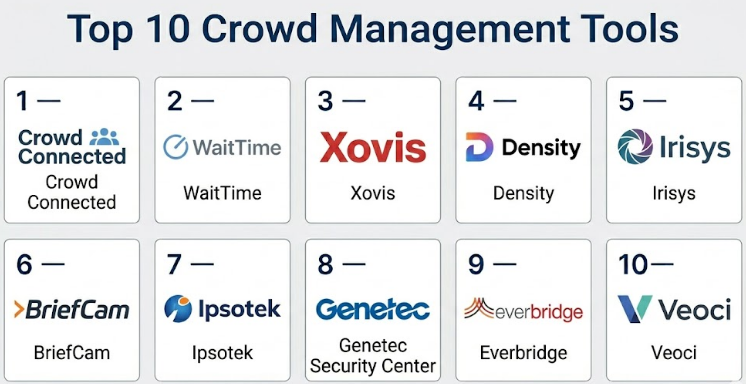
Top 10 Crowd Management Tools
#1 — Crowd Connected
Short description :
Crowd Connected is a location intelligence and crowd analytics platform designed for venues, events, and visitor-heavy environments. It helps organizations understand visitor movement, dwell time, crowd flow, and engagement patterns. The platform is useful for event organizers, stadiums, festivals, exhibitions, and large public venues that need better insight into how people move through physical spaces. It can support operational planning, sponsor reporting, wayfinding, and visitor experience improvement. It is best suited for teams that want crowd insights from mobile and location-based data rather than only manual observation.
Key Features
- Visitor movement analytics
- Crowd flow and location intelligence
- Dwell time and zone-based insights
- Event and venue analytics dashboards
- Useful for festivals, stadiums, exhibitions, and public venues
- Can support visitor engagement and wayfinding use cases
- Operational reporting for event teams
Pros
- Strong fit for event and venue crowd intelligence.
- Useful for understanding visitor movement across zones.
- Can support both operational and commercial reporting needs.
Cons
- May require careful planning around privacy and user consent.
- Best results depend on data availability and deployment setup.
- May be more advanced than needed for small events.
Platforms / Deployment
Web / Mobile-supported workflows
Cloud / Hybrid
Security & Compliance
SSO/SAML: Not publicly stated
MFA: Not publicly stated
Encryption: Not publicly stated
Audit logs: Not publicly stated
RBAC: Varies / N/A
SOC 2 / ISO 27001 / GDPR / HIPAA: Not publicly stated
Integrations & Ecosystem
Crowd Connected fits well into event technology ecosystems where location data, visitor movement, and venue analytics are important.
- Event mobile apps
- Venue analytics workflows
- Location-based engagement tools
- Reporting dashboards
- Data export workflows
- Wayfinding and visitor experience systems
Support & Community
Support is generally more business and project-focused because implementation may depend on venue layout, event goals, and data collection methods. Documentation and onboarding details may vary by customer agreement.
#2 — WaitTime
Short description :
WaitTime is a crowd intelligence and line management platform focused on real-time crowd density, queue visibility, and operational decision-making. It is often relevant for stadiums, entertainment venues, arenas, transport locations, and high-traffic facilities. The tool helps operators understand where crowds are forming and where staff or routing changes may be needed. It can support better guest movement, reduced wait times, and improved venue experience. It is especially useful for teams that need live visibility into crowd pressure points.
Key Features
- Real-time crowd density insights
- Queue and wait-time visibility
- Venue operations dashboards
- Support for crowd flow optimization
- Useful for stadiums, arenas, and entertainment venues
- Operational alerts and visual reporting
- Helps improve staff deployment decisions
Pros
- Strong focus on crowd flow and queue reduction.
- Useful for high-traffic venues with peak entry and exit periods.
- Can improve guest experience by identifying congestion points.
Cons
- May need venue-specific setup and sensor/camera integration.
- Best suited for larger venues rather than small events.
- Public security and compliance details are limited.
Platforms / Deployment
Web / Venue monitoring ecosystem
Cloud / Hybrid
Security & Compliance
SSO/SAML: Not publicly stated
MFA: Not publicly stated
Encryption: Not publicly stated
Audit logs: Not publicly stated
RBAC: Varies / N/A
SOC 2 / ISO 27001 / GDPR / HIPAA: Not publicly stated
Integrations & Ecosystem
WaitTime is strongest where crowd data needs to connect with venue operations, guest experience, and staffing decisions.
- Venue operations dashboards
- Camera or sensor-based workflows
- Queue monitoring systems
- Guest experience reporting
- Command center workflows
- Operational analytics
Support & Community
Support is usually implementation-led because each venue may have different camera positions, traffic patterns, and operational goals. Larger customers may need guided setup and staff training.
#3 — Xovis
Short description :
Xovis provides people counting and flow measurement solutions used in airports, retail environments, transportation hubs, and large facilities. It is known for sensor-based people counting and queue analytics. The platform helps organizations measure occupancy, movement patterns, wait times, and operational flow. It is useful for teams that need accurate footfall data without relying only on manual counting. Xovis is a strong option for transport hubs, smart buildings, airports, and retail spaces where people flow data is a core operational requirement.
Key Features
- People counting sensors
- Queue measurement and wait-time analytics
- Occupancy monitoring
- Passenger and visitor flow analysis
- Useful for airports, retail, transportation, and facilities
- Data dashboards and reporting
- Supports operational optimization
Pros
- Strong fit for people counting and queue analytics.
- Useful for environments where flow accuracy matters.
- Suitable for transport hubs and large facilities.
Cons
- Hardware deployment and placement require planning.
- May need technical setup for best accuracy.
- Broader event management features may require other tools.
Platforms / Deployment
Sensor hardware / Web dashboards
Cloud / Hybrid / Edge-supported workflows
Security & Compliance
SSO/SAML: Not publicly stated
MFA: Not publicly stated
Encryption: Not publicly stated
Audit logs: Not publicly stated
RBAC: Varies / N/A
SOC 2 / ISO 27001 / GDPR / HIPAA: Not publicly stated
Integrations & Ecosystem
Xovis is useful where people counting data needs to feed into facility operations, passenger flow planning, and queue management.
- People counting sensors
- Airport operations systems
- Retail analytics workflows
- Facility management dashboards
- Queue analytics tools
- Data export and reporting workflows
Support & Community
Support is typically tied to hardware deployment, system design, partner implementation, and technical configuration. Community visibility may be limited, but enterprise and partner support can be important for large projects.
#4 — Density
Short description :
Density is a space analytics and occupancy intelligence platform used to measure how physical spaces are used. It helps organizations understand occupancy, space utilization, traffic patterns, and people flow. While it is often used for workplaces and buildings, it can also support crowd visibility in shared spaces, campuses, facilities, and large properties. The tool is useful for teams that want sensor-based insights without depending only on cameras. It is best for organizations that need occupancy data for safety, planning, and space optimization.
Key Features
- Occupancy monitoring
- Space utilization analytics
- People counting and movement insights
- Sensor-based data collection
- Useful for workplaces, campuses, and facilities
- Dashboards for operational decision-making
- Supports space planning and capacity awareness
Pros
- Strong fit for occupancy and space usage analytics.
- Useful for organizations that need privacy-aware people counting.
- Good for facilities and workplace operations teams.
Cons
- Not a full event ticketing or access control platform.
- May require hardware deployment and physical planning.
- Best suited for space analytics rather than full crowd command.
Platforms / Deployment
Sensor hardware / Web dashboards
Cloud / Hybrid
Security & Compliance
SSO/SAML: Varies / N/A
MFA: Not publicly stated
Encryption: Not publicly stated
Audit logs: Varies / N/A
RBAC: Varies / N/A
SOC 2 / ISO 27001 / GDPR / HIPAA: Not publicly stated
Integrations & Ecosystem
Density can support facility and workplace ecosystems where occupancy data needs to connect with building operations or planning workflows.
- Space management systems
- Workplace analytics platforms
- Building operations workflows
- Data dashboards
- Occupancy reporting
- API-supported workflows where available
Support & Community
Support is usually business-focused and may include onboarding for sensor placement, analytics configuration, and dashboard usage. Documentation and customer support availability may vary by plan and deployment size.
#5 — Irisys
Short description :
Irisys provides people counting and occupancy monitoring solutions for retail, transportation, public spaces, and facilities. It helps organizations understand how many people enter, leave, and move through spaces. The tool is useful for crowd planning, occupancy control, queue improvement, and space usage decisions. It is often relevant for environments where footfall and capacity data matter. Irisys is a good fit for teams that need reliable sensor-based people counting rather than a broad event management platform.
Key Features
- People counting technology
- Occupancy monitoring
- Footfall analytics
- Queue and flow measurement use cases
- Useful for retail, transport, and public facilities
- Reporting and data insights
- Supports operational planning
Pros
- Strong focus on people counting and occupancy visibility.
- Useful for facilities that need footfall and capacity insights.
- Can support crowd monitoring without full event software complexity.
Cons
- Not designed as a complete event operations platform.
- Hardware deployment may require planning.
- Integrations and security details may vary by project.
Platforms / Deployment
Sensor hardware / Web-supported reporting
Cloud / Hybrid / Varies / N/A
Security & Compliance
SSO/SAML: Not publicly stated
MFA: Not publicly stated
Encryption: Not publicly stated
Audit logs: Not publicly stated
RBAC: Varies / N/A
SOC 2 / ISO 27001 / GDPR / HIPAA: Not publicly stated
Integrations & Ecosystem
Irisys fits best where people counting data needs to support operations, planning, and reporting.
- People counting sensors
- Footfall analytics dashboards
- Retail operations workflows
- Facility management systems
- Queue monitoring workflows
- Data export options
Support & Community
Support may depend on reseller, deployment partner, project size, and hardware setup. For larger installations, proper planning and configuration support are important.
#6 — BriefCam
Short description :
BriefCam is a video analytics platform used for video search, review, and operational intelligence. It can help security and operations teams analyze video footage, identify patterns, and understand movement in monitored spaces. For crowd management, it can support investigations, crowd movement analysis, and situational awareness when connected with video surveillance systems. It is best suited for security teams, smart cities, transportation hubs, campuses, and enterprise facilities. It is more advanced than a simple people counting tool and should be evaluated carefully for privacy and governance needs.
Key Features
- Video analytics and search
- Movement and object-based video review
- Operational intelligence from video data
- Supports security and investigation workflows
- Useful for smart cities, transport, campuses, and facilities
- Can assist with crowd and activity analysis
- Works with video surveillance ecosystems
Pros
- Strong video analytics capabilities for security teams.
- Useful for post-event analysis and operational review.
- Can support large-scale surveillance environments.
Cons
- Requires strong privacy, governance, and legal review.
- May be too advanced for simple crowd counting needs.
- Setup can be more complex than basic dashboard tools.
Platforms / Deployment
Web / Video surveillance ecosystem
Cloud / On-premise / Hybrid
Security & Compliance
SSO/SAML: Varies / N/A
MFA: Varies / N/A
Encryption: Not publicly stated
Audit logs: Varies / N/A
RBAC: Varies / N/A
SOC 2 / ISO 27001 / GDPR / HIPAA: Not publicly stated
Integrations & Ecosystem
BriefCam is strongest when integrated with video management systems and security operations platforms.
- Video management systems
- Surveillance camera networks
- Security operations centers
- Investigation workflows
- Smart city systems
- Enterprise security platforms
Support & Community
Support is typically enterprise-focused and may depend on deployment model, partner ecosystem, and security environment. Training is important because video analytics tools require careful configuration and responsible use.
#7 — Ipsotek
Short description :
Ipsotek is an AI video analytics platform used for security, safety, and operational monitoring. It helps organizations detect events, analyze activity, and improve situational awareness across monitored environments. In crowd management, it can support detection of crowd build-up, movement behavior, restricted area breaches, and operational safety scenarios. It is suitable for transport hubs, critical infrastructure, public spaces, stadiums, and enterprise security environments. The platform is best for organizations with existing camera infrastructure and advanced security monitoring needs.
Key Features
- AI-based video analytics
- Crowd and movement monitoring use cases
- Event detection and alerts
- Security and safety analytics
- Useful for transport, public spaces, and large venues
- Supports command center workflows
- Can work with surveillance infrastructure
Pros
- Strong fit for advanced security and safety monitoring.
- Useful where crowd management connects with surveillance operations.
- Can support real-time alerting for operational risks.
Cons
- Requires careful configuration and governance.
- May be too complex for small or low-risk events.
- Public compliance and pricing details are not clearly stated.
Platforms / Deployment
Video surveillance ecosystem / Web-supported workflows
Cloud / On-premise / Hybrid
Security & Compliance
SSO/SAML: Not publicly stated
MFA: Not publicly stated
Encryption: Not publicly stated
Audit logs: Varies / N/A
RBAC: Varies / N/A
SOC 2 / ISO 27001 / GDPR / HIPAA: Not publicly stated
Integrations & Ecosystem
Ipsotek works best as part of a broader physical security and video analytics environment.
- Video management systems
- Surveillance camera infrastructure
- Security operations centers
- Alerting workflows
- Public safety systems
- Command center platforms
Support & Community
Support is generally enterprise and partner-driven. Successful use depends on proper planning, camera coverage, analytics rules, training, and operational procedures.
#8 — Genetec Security Center
Short description :
Genetec Security Center is a unified security platform used for video surveillance, access control, automatic license plate recognition, and operational security management. For crowd management, it can support centralized monitoring, incident response, access visibility, and security coordination across large sites. It is suitable for airports, stadiums, campuses, transport hubs, cities, and enterprise facilities. It is not only a crowd management tool, but it can play an important role in crowd safety and command center operations. It is best for organizations that already manage complex physical security infrastructure.
Key Features
- Unified video surveillance and access control
- Centralized security operations
- Incident monitoring and response workflows
- Useful for large venues and public infrastructure
- Supports multi-site security management
- Integration with cameras, access systems, and sensors
- Scalable for enterprise security environments
Pros
- Strong fit for enterprise physical security operations.
- Useful for centralized monitoring across large sites.
- Broad ecosystem for cameras, access control, and security workflows.
Cons
- More complex than dedicated crowd analytics tools.
- Requires technical deployment and security expertise.
- May not be cost-effective for small venues.
Platforms / Deployment
Windows / Web-supported workflows / Mobile-supported workflows
On-premise / Cloud / Hybrid
Security & Compliance
SSO/SAML: Varies / N/A
MFA: Varies / N/A
Encryption: Not publicly stated
Audit logs: Varies / N/A
RBAC: Varies / N/A
SOC 2 / ISO 27001 / GDPR / HIPAA: Not publicly stated
Integrations & Ecosystem
Genetec Security Center has a broad security ecosystem and is often used in environments with complex camera, sensor, and access control needs.
- Video surveillance systems
- Access control systems
- Intrusion detection workflows
- License plate recognition
- Security operations dashboards
- Third-party security integrations
Support & Community
Support is generally strong through enterprise channels, partners, documentation, and implementation teams. Because deployments can be complex, professional planning and administrator training are important.
#9 — Everbridge
Short description :
Everbridge is a critical event management and emergency communication platform used by enterprises, government agencies, healthcare organizations, campuses, and public safety teams. In crowd management, it is useful for mass notifications, emergency alerts, incident communication, evacuation updates, and operational coordination. It does not primarily count crowds, but it helps teams communicate quickly when crowd risk, weather, security incidents, or emergencies occur. It is best for organizations that need structured communication during incidents. It can be used alongside crowd analytics and physical security tools.
Key Features
- Mass notification and emergency communication
- Critical event management workflows
- Incident alerts and response coordination
- Multi-channel communication
- Useful for campuses, enterprises, cities, and public safety teams
- Supports emergency readiness planning
- Helps coordinate response during crowd-related incidents
Pros
- Strong fit for emergency communication and public safety.
- Useful when crowd management includes alerts and response plans.
- Can support large, distributed organizations.
Cons
- Not a people counting or crowd density analytics platform.
- Best used with other operational or security systems.
- Implementation may require communication planning and governance.
Platforms / Deployment
Web / iOS / Android
Cloud
Security & Compliance
SSO/SAML: Varies / N/A
MFA: Varies / N/A
Encryption: Not publicly stated
Audit logs: Varies / N/A
RBAC: Varies / N/A
SOC 2 / ISO 27001 / GDPR / HIPAA: Not publicly stated
Integrations & Ecosystem
Everbridge fits well with emergency planning, public safety, and incident response ecosystems.
- Emergency notification workflows
- HR and contact databases
- Public safety systems
- Security operations workflows
- Incident management platforms
- Multi-channel communication tools
Support & Community
Support is usually enterprise-oriented, with onboarding, documentation, training, and implementation guidance available depending on plan and contract. Strong internal process design is important for successful use.
#10 — Veoci
Short description :
Veoci is an emergency management, incident response, and operations platform used by airports, universities, healthcare systems, government teams, and enterprises. For crowd management, it helps teams coordinate incidents, manage tasks, document response actions, and communicate across departments. It is useful for planned events, emergency preparedness, public safety operations, and large venue coordination. Veoci is not a pure crowd analytics sensor platform, but it is valuable for command, coordination, and response workflows. It is best for organizations that need structured operational control during large events or incidents.
Key Features
- Incident and emergency management workflows
- Task tracking and response coordination
- Forms, dashboards, and operational logs
- Useful for airports, campuses, venues, and public agencies
- Supports planned event operations
- Communication and command center workflows
- Reporting for after-action review
Pros
- Strong fit for incident coordination and operational command.
- Useful for planned events and emergency response.
- Flexible workflows for different organizations and scenarios.
Cons
- Not a dedicated people counting or video analytics platform.
- Requires process design and staff training.
- May be more useful as part of a broader crowd management stack.
Platforms / Deployment
Web / iOS / Android
Cloud
Security & Compliance
SSO/SAML: Varies / N/A
MFA: Varies / N/A
Encryption: Not publicly stated
Audit logs: Varies / N/A
RBAC: Varies / N/A
SOC 2 / ISO 27001 / GDPR / HIPAA: Not publicly stated
Integrations & Ecosystem
Veoci fits into emergency operations, command center, and incident response ecosystems where teams need structured coordination.
- Emergency operations workflows
- Incident response dashboards
- Forms and reporting systems
- Task management workflows
- Communication processes
- Public safety and operations teams
Support & Community
Support is generally implementation-focused because workflows often need to match each organization’s emergency plans and operating procedures. Training and internal adoption are important for success.
Comparison Table
| Tool Name | Best For | Platform(s) Supported | Deployment | Standout Feature | Public Rating |
|---|---|---|---|---|---|
| Crowd Connected | Event and venue location intelligence | Web, mobile-supported workflows | Cloud / Hybrid | Visitor movement and crowd flow insights | N/A |
| WaitTime | Stadiums, arenas, and high-traffic venues | Web, venue monitoring ecosystem | Cloud / Hybrid | Real-time queue and crowd density visibility | N/A |
| Xovis | Airports, retail, and transport hubs | Sensor hardware, web dashboards | Cloud / Hybrid / Edge-supported workflows | People counting and queue analytics | N/A |
| Density | Workplaces, campuses, and facilities | Sensor hardware, web dashboards | Cloud / Hybrid | Occupancy and space utilization analytics | N/A |
| Irisys | Retail, public spaces, and facilities | Sensor hardware, web-supported reporting | Cloud / Hybrid / Varies / N/A | Footfall and occupancy monitoring | N/A |
| BriefCam | Security video analytics and investigations | Web, video surveillance ecosystem | Cloud / On-premise / Hybrid | Video analytics for operational intelligence | N/A |
| Ipsotek | AI video analytics for public safety | Video surveillance ecosystem, web-supported workflows | Cloud / On-premise / Hybrid | AI-based event and crowd behavior detection | N/A |
| Genetec Security Center | Enterprise physical security operations | Windows, web-supported workflows, mobile-supported workflows | On-premise / Cloud / Hybrid | Unified security and access monitoring | N/A |
| Everbridge | Emergency communication and mass alerts | Web, iOS, Android | Cloud | Critical event communication | N/A |
| Veoci | Incident response and event operations | Web, iOS, Android | Cloud | Emergency operations and task coordination | N/A |
Evaluation & Crowd Management Tools
| Tool Name | Core (25%) | Ease (15%) | Integrations (15%) | Security (10%) | Performance (10%) | Support (10%) | Value (15%) | Weighted Total (0–10) |
|---|---|---|---|---|---|---|---|---|
| Crowd Connected | 8 | 7 | 8 | 6 | 8 | 7 | 7 | 7.35 |
| WaitTime | 8 | 7 | 7 | 6 | 8 | 7 | 7 | 7.20 |
| Xovis | 8 | 7 | 8 | 6 | 8 | 7 | 7 | 7.35 |
| Density | 8 | 8 | 7 | 6 | 8 | 7 | 7 | 7.40 |
| Irisys | 7 | 7 | 7 | 6 | 8 | 7 | 7 | 7.00 |
| BriefCam | 8 | 6 | 8 | 7 | 8 | 8 | 6 | 7.35 |
| Ipsotek | 8 | 6 | 8 | 7 | 8 | 7 | 6 | 7.25 |
| Genetec Security Center | 9 | 6 | 9 | 7 | 9 | 8 | 6 | 7.90 |
| Everbridge | 8 | 7 | 8 | 7 | 8 | 8 | 6 | 7.50 |
| Veoci | 8 | 7 | 8 | 7 | 8 | 8 | 7 | 7.65 |
These scores are comparative and should be used as a practical buying guide, not as a fixed universal ranking. A tool with a higher score may not be the best choice for every organization. For example, Genetec Security Center is strong for enterprise security operations, while Density may be better for occupancy analytics. Buyers should shortlist based on use case, then validate hardware, privacy, integrations, security, support, and pilot results.
Which Crowd Management Tools
Solo / Freelancer
Solo event planners and small independent organizers usually do not need advanced AI video analytics or enterprise command systems. For small events, manual staff coordination, guest list management, basic signage, and simple communication may be enough.
However, if a solo organizer is handling repeated events with crowd flow concerns, a lightweight analytics or communication tool may help. The main priority should be simplicity, cost control, and low setup effort. Avoid enterprise systems unless crowd safety risk is high.
SMB
Small and mid-sized venues, retail spaces, community event teams, and local event operators should focus on tools that improve visibility without creating operational complexity. Density, Irisys, and Xovis may be useful for occupancy and footfall tracking, while Everbridge or Veoci can support communication and incident coordination.
SMBs should ask whether the tool is easy to deploy, whether staff can understand dashboards quickly, and whether the system provides useful alerts instead of overwhelming teams with data.
Mid-Market
Mid-market organizations often need a more connected approach. A stadium, shopping center, university, airport terminal, or festival operator may need both crowd analytics and incident response workflows. In this case, Crowd Connected, WaitTime, Xovis, Density, Veoci, and Everbridge can support different parts of the crowd management process.
The best setup may not be one tool. A mid-market team may use one platform for people counting, another for emergency communication, and another for operations coordination.
Enterprise
Enterprise buyers should focus on scalability, security, integration depth, multi-site visibility, support, and governance. Genetec Security Center, BriefCam, Ipsotek, Everbridge, and Veoci are more suitable for complex organizations with security teams, command centers, and formal incident response procedures.
Large organizations should validate deployment architecture, camera and sensor compatibility, audit trails, admin controls, privacy policies, and vendor support before purchase. Crowd management at enterprise scale is not just about dashboards; it is about response readiness.
Budget vs Premium
Budget-conscious buyers should start with tools that solve one clear problem, such as occupancy counting, footfall reporting, or emergency communication. Buying a broad enterprise platform without a clear use case can waste money.
Premium tools are better when crowd management is tied to safety, compliance, transportation flow, stadium operations, or public security. Premium systems usually offer deeper integrations, advanced analytics, stronger support, and better scalability.
Feature Depth vs Ease of Use
If ease of use is most important, choose tools with simple dashboards, clear alerts, and limited setup complexity. Density, Irisys, and Xovis may be easier to understand for occupancy and people counting.
If feature depth is more important, BriefCam, Ipsotek, Genetec Security Center, Veoci, and Everbridge may be stronger because they support broader security, incident response, and command center workflows.
Integrations & Scalability-
For integrations, check whether the tool connects with cameras, sensors, access control systems, ticketing platforms, emergency communication tools, building systems, and data dashboards. This is important because crowd management works best when different operational systems share useful data.
For scalability, test whether the tool can support multiple zones, gates, buildings, campuses, or event areas. Also check dashboard performance, alert accuracy, reporting speed, and staff access controls.
Security & Compliance Needs
Security-sensitive buyers should review privacy, data retention, encryption, role-based access, audit logs, SSO, MFA, and compliance documentation. This is especially important when tools use video analytics, people tracking, location intelligence, or personal communication data.
Do not assume a vendor has compliance certifications unless they clearly provide proof. For public spaces, legal and privacy teams should review the solution before deployment.
Frequently Asked Questions
1. What are Crowd Management Tools?
Crowd Management Tools help organizations monitor, guide, communicate with, and manage groups of people in physical spaces. They can include people counting systems, video analytics, emergency communication tools, queue monitoring platforms, and operations command software.
2. How are Crowd Management Tools priced?
Pricing varies widely depending on software, hardware, number of locations, cameras, sensors, users, and support needs. Some tools use subscriptions, some use project-based pricing, and enterprise systems often require custom quotes.
3. What is the difference between crowd analytics and crowd management?
Crowd analytics focuses on measuring crowd behavior, density, footfall, and movement. Crowd management is broader and includes planning, communication, incident response, staff coordination, safety controls, and operational decisions based on that data.
4. Do these tools require cameras?
Not always. Some tools use cameras, while others use sensors, mobile location data, Wi-Fi, Bluetooth, manual inputs, access data, or communication workflows. The right option depends on the environment, privacy needs, and operational goals.
5. Are Crowd Management Tools useful for small events?
For very small events, they may not be necessary. However, if the event has crowd flow risks, multiple entry points, safety concerns, or public attendance, even a simple crowd monitoring or communication tool can be helpful.
6. What are common mistakes when buying these tools?
Common mistakes include buying too much technology too early, ignoring privacy requirements, failing to train staff, not testing alerts, and choosing tools that do not integrate with existing cameras, sensors, ticketing, or security systems.
7. Can these tools help during emergencies?
Yes, some tools can support emergency alerts, evacuation coordination, incident tracking, and real-time communication. However, they should be part of a larger emergency plan that includes trained staff, clear procedures, and regular drills.
8. How important is privacy in crowd management?
Privacy is very important, especially when using video analytics, location tracking, or personal communication data. Buyers should review data collection methods, retention policies, user consent requirements, and regional privacy rules before deployment.
9. Can Crowd Management Tools integrate with ticketing systems?
Some platforms can integrate with ticketing, access control, security, or venue systems, but integration depth varies. Buyers should validate this during procurement instead of assuming all tools will connect easily.
10. What is the best alternative to a dedicated Crowd Management Tool?
For smaller teams, alternatives may include manual observation, walkie-talkies, CCTV monitoring, spreadsheets, signage, simple messaging tools, and basic incident logs. These can work for low-risk environments but may not scale for large venues.
Conclusion
Crowd Management Tools help organizations move from reactive crowd control to informed, planned, and safer crowd operations. The right platform can improve visibility, reduce congestion, support emergency response, optimize staff deployment, and create a better visitor experience. However, there is no single best tool for every organization. A retail space may need people counting, a stadium may need queue analytics, a city authority may need video intelligence, and a university may need emergency communication and incident response workflows. The best choice depends on crowd size, risk level, venue type, privacy expectations, available infrastructure, and internal team maturity.
