Introduction
Community Forum Software helps organizations create online spaces where users, customers, members, employees, students, developers, creators, or fans can ask questions, share ideas, discuss topics, solve problems, and build long-term relationships. In simple words, it is a platform for structured online discussions, support communities, knowledge sharing, peer-to-peer help, and member engagement.
This software matters because communities are becoming an important part of customer support, product education, brand loyalty, learning, and digital engagement. Instead of answering the same questions repeatedly through email or chat, organizations can build a searchable forum where answers, discussions, and best practices stay available for everyone. Community forums also help users feel heard, connected, and involved.
Real-world use cases include:
- Customer support and self-service help communities
- Product feedback and feature request discussions
- Developer communities and technical Q&A forums
- Membership communities and private discussion groups
- Education, coaching, and course communities
- Employee knowledge sharing and internal collaboration
- Fan, creator, and interest-based communities
Buyers should evaluate:
- Discussion and moderation features
- Member profiles and permissions
- Search and knowledge discovery
- Customization and branding
- Private and public community options
- Mobile experience
- Integrations with CRM, support, SSO, analytics, and email tools
- Security and admin controls
- Scalability and performance
- Pricing and hosting model
- Support quality and community ecosystem
Best for: SaaS companies, product teams, customer support teams, developer relations teams, associations, creators, schools, nonprofits, membership communities, online course providers, and brands that want long-term user engagement.
Not ideal for: teams that only need one-way announcements, small groups that can manage with a simple chat app, or organizations that do not plan to moderate and maintain community activity. A forum needs consistent management, clear rules, and active participation to succeed.
Key Trends in Community Forum Software
- Self-service support communities: Companies are using forums to reduce repeated support tickets and help users find answers faster.
- AI-assisted moderation and search: Modern platforms are adding smarter search, suggested answers, spam detection, content recommendations, and moderation assistance.
- Customer community plus knowledge base: Forums are increasingly connected with help centers, documentation, tutorials, and product education content.
- Private membership communities: Creators, coaches, associations, and online schools are building gated communities for paid members and students.
- Product feedback loops: Forum platforms are being used to collect feature requests, bug reports, roadmap feedback, and user ideas.
- Stronger moderation tools: Spam control, reporting, user roles, approval queues, trust levels, and community guidelines are now critical.
- Mobile-first participation: Members expect clean mobile access for reading, posting, notifications, and private messages.
- Single sign-on and identity integration: Larger organizations want forum login connected with existing customer portals, learning systems, or enterprise identity tools.
- Community analytics: Teams want visibility into active members, popular topics, unanswered questions, engagement trends, and content performance.
- Hybrid discussion models: Communities now combine forums, Q&A, events, groups, courses, messaging, and resource libraries in one experience.
How We Selected These Tools Methodology
The tools below were selected based on community forum relevance, market recognition, feature depth, flexibility, scalability, and practical fit across different organization types.
- Forum feature depth: Discussion threads, categories, moderation, user roles, search, notifications, and member profiles were key criteria.
- Community use cases: Tools were evaluated for customer support, product communities, developer communities, memberships, education, and internal collaboration.
- Ease of use: Both admin experience and member experience were considered.
- Customization: Branding, themes, permissions, plugins, and configuration flexibility were reviewed.
- Deployment options: Cloud, self-hosted, open-source, and enterprise-ready models were considered.
- Moderation and safety: Spam prevention, reporting, approval workflows, trust levels, and admin controls were important.
- Integrations: CRM, support desk, SSO, analytics, email, developer tools, and automation connections were considered.
- Scalability: Platforms suitable for small communities, growing communities, and enterprise communities were included.
- Support and ecosystem: Documentation, marketplace, developer community, and vendor support were considered.
- Practical buyer fit: The goal is to compare tools by use case, not to declare one universal winner.
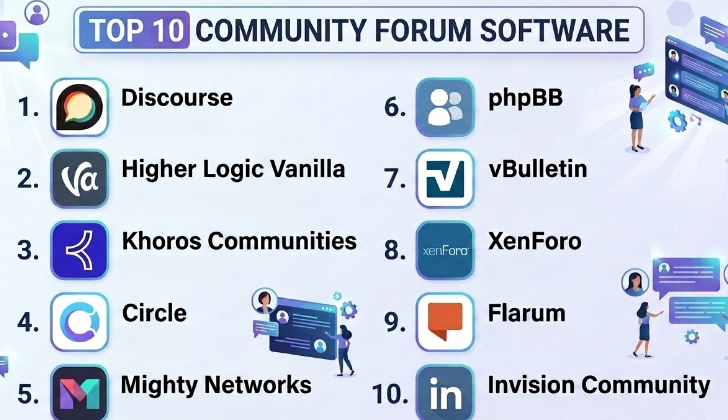
Top 10 Community Forum Software
#1 — Discourse
Short description :
Discourse is a modern community forum platform used by product communities, developer communities, support forums, education groups, and public discussion communities. It is known for clean discussions, strong moderation controls, trust levels, notifications, and a powerful open-source foundation. Discourse can be used as a hosted service or self-hosted depending on the organization’s technical preference. It is a strong option for teams that want a modern forum experience with flexibility and an active ecosystem. Discourse works especially well for communities that need structured, searchable, long-form discussions instead of fast-moving chat only.
Key Features
- Modern threaded discussions and categories
- Trust levels and moderation workflows
- User profiles and community permissions
- Strong search and topic organization
- Email and notification support
- Plugin and theme ecosystem
- Hosted and self-hosted deployment options
Pros
- Strong modern forum experience
- Flexible for public and private communities
- Active open-source ecosystem and plugin support
Cons
- Self-hosting requires technical skill
- Admin configuration can take time
- Not ideal if the team only needs lightweight chat
Platforms / Deployment
Web
Cloud / Self-hosted / Hybrid depending on setup
Security & Compliance
Role-based permissions, admin controls, moderation tools, and authentication options are available depending on configuration. Specific certifications should be verified directly for hosted or enterprise use.
Not publicly stated.
Integrations & Ecosystem
Discourse has a strong ecosystem for community, product, support, and developer workflows.
- SSO and identity workflows
- Analytics tools
- Email and notification systems
- Support and help desk workflows
- Developer plugins
- Custom themes and extensions
Support & Community
Discourse has strong documentation, community support, plugin ecosystem, and hosted support options. It is one of the strongest choices for teams that value open community knowledge and flexibility.
#2 — Higher Logic Vanilla
Short description :
Higher Logic Vanilla is a community forum and customer community platform designed for brands, associations, SaaS companies, support teams, and enterprise communities. It helps organizations build branded communities with discussions, Q&A, knowledge sharing, ideation, moderation, and engagement tools. The platform is especially useful for organizations that want a managed community experience with enterprise support and integration options. It can support customer support communities, member communities, and product engagement spaces. Higher Logic Vanilla is a strong fit for organizations that want a polished community platform with business-focused features.
Key Features
- Branded community forums
- Discussion boards and Q&A
- Moderation and admin workflows
- Knowledge sharing and ideation tools
- Member profiles and roles
- Analytics and engagement reporting
- Enterprise integration options
Pros
- Strong fit for branded customer communities
- Good for associations and enterprise use cases
- Business-focused moderation and engagement features
Cons
- May be more expensive than open-source tools
- Less suitable for teams wanting full self-hosted control
- Buyers should validate customization and pricing needs
Platforms / Deployment
Web
Cloud deployment
Security & Compliance
Enterprise permissions, admin controls, moderation features, and authentication options are expected. Specific certifications such as SOC 2, ISO 27001, HIPAA, or GDPR should be verified directly.
Not publicly stated.
Integrations & Ecosystem
Higher Logic Vanilla works well when community data needs to connect with customer, member, or support systems.
- CRM workflows
- Support desk systems
- SSO and identity tools
- Marketing automation
- Analytics platforms
- Association and member systems
Support & Community
Support is generally vendor-led, with onboarding, customer success, documentation, and enterprise assistance depending on plan. It is useful for teams that want managed community operations.
#3 — Khoros Communities
Short description :
Khoros Communities is an enterprise community platform built for large brands, customer support communities, product communities, and digital engagement programs. It is designed for organizations that need scalable discussion spaces, moderation, analytics, knowledge sharing, and customer engagement workflows. Khoros is especially relevant for companies with large customer bases and mature support or community teams. The platform can support self-service support, peer-to-peer help, product feedback, and brand communities. It is best suited for enterprise organizations that need deep control, analytics, and integration readiness.
Key Features
- Enterprise-grade community forums
- Customer support and peer-to-peer help workflows
- Moderation and governance tools
- Community analytics and reporting
- Knowledge sharing and accepted solutions
- User roles and permissions
- Integration with customer experience workflows
Pros
- Strong fit for enterprise customer communities
- Scalable for large user bases
- Useful analytics and governance capabilities
Cons
- May be too complex for small communities
- Cost and implementation effort can be significant
- Requires dedicated community management resources
Platforms / Deployment
Web
Cloud deployment
Security & Compliance
Enterprise security controls, permissions, moderation workflows, and access management are expected. Specific certifications should be verified directly.
Not publicly stated.
Integrations & Ecosystem
Khoros is suitable for organizations that need community engagement connected with support, CRM, analytics, and customer experience systems.
- CRM systems
- Support platforms
- Identity and SSO
- Analytics and reporting tools
- Customer experience workflows
- Knowledge base systems
Support & Community
Khoros typically serves enterprise customers, so support may include customer success, implementation services, strategic guidance, and technical support depending on contract.
#4 — Circle
Short description :
Circle is a modern community platform used by creators, educators, coaches, course providers, membership businesses, and brands that want private or public community spaces. It supports discussions, member spaces, events, courses, live sessions, payments, and community engagement workflows. Circle is not only a traditional forum; it combines community, content, events, and membership-style engagement. It is especially useful for paid communities and learning communities. Circle is a strong option for teams that want a polished member experience without self-hosting technical complexity.
Key Features
- Community spaces and discussion areas
- Member profiles and permissions
- Events and live session support
- Course and content organization
- Paid membership workflows
- Direct messaging and notifications
- Branding and customization options
Pros
- Strong user experience for modern private communities
- Good for creators, educators, and membership businesses
- Combines discussions, content, and events
Cons
- Not a traditional open-source forum
- May be less suitable for large public technical communities
- Advanced enterprise customization may be limited
Platforms / Deployment
Web / mobile app availability
Cloud deployment
Security & Compliance
Member access controls, private spaces, permissions, and payment-related workflows are expected. Specific certifications should be verified directly.
Not publicly stated.
Integrations & Ecosystem
Circle works well for membership, learning, and creator-led communities.
- Payment and subscription workflows
- Email marketing tools
- Course and content workflows
- Event and webinar tools
- Automation platforms
- Analytics and engagement tracking
Support & Community
Circle provides support resources and has an active user base among creators, course builders, and membership community owners.
#5 — Mighty Networks
Short description :
Mighty Networks is a community platform for creators, coaches, educators, brands, and membership-based businesses. It supports communities, courses, events, paid memberships, groups, member profiles, and mobile engagement. The platform is designed for organizations that want to build a branded social-style community rather than a traditional forum only. Mighty Networks is especially useful for learning communities, coaching programs, creator communities, and paid member networks. It is a good choice when community, content, courses, and payments need to work together.
Key Features
- Community spaces and groups
- Member profiles and activity feeds
- Courses and learning content
- Events and live sessions
- Paid membership options
- Mobile app experience
- Notifications and engagement tools
Pros
- Good for creator and learning communities
- Combines community, courses, and payments
- Strong mobile-first member experience
Cons
- Not ideal for traditional technical support forums
- Less control than self-hosted platforms
- Forum-style structure may not fit every use case
Platforms / Deployment
Web / iOS / Android
Cloud deployment
Security & Compliance
Member permissions, private spaces, account security, and payment-related controls are expected. Specific certifications should be verified directly.
Not publicly stated.
Integrations & Ecosystem
Mighty Networks is useful for communities that combine content, courses, and paid memberships.
- Payment workflows
- Course content
- Events and live sessions
- Member engagement tools
- Email and notification workflows
- Community analytics
Support & Community
Mighty Networks provides customer support, learning resources, and a creator-focused community. It is especially useful for teams that want to build an owned community experience.
#6 — phpBB
Short description :
phpBB is a long-standing open-source forum software platform used for public forums, hobby communities, support forums, gaming communities, and private discussion boards. It is highly customizable and can be self-hosted, giving organizations full control over their forum environment. phpBB is a practical option for teams that want traditional forum features without subscription-based platform dependency. It supports categories, topics, users, permissions, moderation, themes, and extensions. It is best for technically comfortable teams that want open-source control and classic forum functionality.
Key Features
- Traditional forum boards and topics
- User roles and permissions
- Moderation tools
- Themes and customization
- Extensions and add-ons
- Private and public forums
- Self-hosted control
Pros
- Open-source and highly customizable
- Good for traditional discussion forums
- No dependency on a closed SaaS community platform
Cons
- Requires hosting and maintenance
- Interface may feel traditional compared with modern SaaS tools
- Security depends on updates, hosting, and admin practices
Platforms / Deployment
Web
Self-hosted deployment
Security & Compliance
Security depends on hosting, configuration, updates, extensions, and admin practices. Specific certifications are not standard across deployments.
Varies / N/A.
Integrations & Ecosystem
phpBB has a long-standing open-source ecosystem with themes, extensions, and community knowledge.
- Web hosting environments
- Custom themes
- Forum extensions
- User authentication workflows
- Analytics tools
- Custom development
Support & Community
phpBB has a large open-source community, documentation, and community-based support. Organizations should have technical support for hosting, maintenance, and security updates.
#7 — vBulletin
Short description :
vBulletin is a traditional forum and community software platform used by online communities, support forums, interest groups, and businesses needing structured discussions. It supports forums, user profiles, private messages, moderation, groups, content publishing, and community management. vBulletin is suitable for organizations that want a more classic forum structure with long-form discussions and user-generated content. It can be used for public communities, customer communities, or private member forums. It is best for teams that prefer a mature forum model over modern social-community platforms.
Key Features
- Forum categories and discussion threads
- User profiles and private messages
- Moderation and admin controls
- Groups and community areas
- Content and publishing features
- Themes and customization
- User permissions and access rules
Pros
- Mature forum platform
- Good for traditional community structures
- Useful for long-form discussion communities
Cons
- May feel less modern than newer community tools
- Customization and maintenance may require technical effort
- Buyers should validate current support and update expectations
Platforms / Deployment
Web
Cloud / Self-hosted depending on edition and setup
Security & Compliance
Permissions, moderation, and admin controls are available. Security depends on deployment model, updates, hosting, and configuration. Specific certifications should be verified directly.
Not publicly stated.
Integrations & Ecosystem
vBulletin supports traditional online community workflows.
- User registration and authentication
- Forum themes
- Plugins and extensions
- Content publishing
- Analytics
- Custom integrations
Support & Community
Support availability depends on licensing and deployment. There is also a long history of forum admin knowledge around vBulletin, but organizations should evaluate current ecosystem fit.
#8 — XenForo
Short description :
XenForo is a modern forum software platform used by online communities, hobby forums, support communities, fan communities, and membership-based discussion spaces. It provides forum discussions, user profiles, reactions, moderation, permissions, add-ons, and customization. XenForo is known for a clean forum experience and strong admin flexibility. It is useful for teams that want a dedicated forum platform with more modern interaction patterns than older forum systems. XenForo is a good fit for communities that need structured discussion, strong member identity, and self-managed control.
Key Features
- Forum discussions and categories
- User profiles and reactions
- Moderation and spam controls
- Add-ons and theme customization
- User permissions and groups
- Alerts and notifications
- Self-hosted community control
Pros
- Strong dedicated forum experience
- Good customization and add-on ecosystem
- Useful for active discussion communities
Cons
- Requires hosting and technical maintenance
- Not as turnkey as fully managed SaaS platforms
- Enterprise integrations may require custom work
Platforms / Deployment
Web
Self-hosted deployment
Security & Compliance
Security depends on hosting, configuration, updates, add-ons, and admin practices. Specific certifications are not standard across all deployments.
Varies / N/A.
Integrations & Ecosystem
XenForo supports dedicated forum communities with customization options.
- Add-ons and plugins
- Custom themes
- Web hosting environments
- Analytics tools
- Authentication workflows
- Custom development
Support & Community
XenForo has documentation, official support options, and an active community of forum administrators and developers. It is useful for teams comfortable with self-hosted community management.
#9 — Flarum
Short description :
Flarum is a modern open-source forum software platform designed to be lightweight, clean, and extensible. It is useful for teams that want a modern forum experience with open-source flexibility. Flarum supports discussions, tags, extensions, user accounts, moderation, and responsive design. It is especially attractive for developers and technically capable teams that want a simple but modern forum foundation. Flarum is best for organizations that want self-hosted control without the heavier feel of older forum systems.
Key Features
- Lightweight modern forum interface
- Tag-based discussion organization
- Extensions and customization
- User accounts and permissions
- Moderation tools
- Responsive design
- Open-source flexibility
Pros
- Clean and modern open-source forum experience
- Lightweight and developer-friendly
- Good for smaller or technical communities
Cons
- Requires technical setup and maintenance
- Extension maturity may vary
- Not ideal for teams needing enterprise managed support
Platforms / Deployment
Web
Self-hosted deployment
Security & Compliance
Security depends on hosting, updates, extensions, configuration, and admin practices. Specific certifications are not standard across deployments.
Varies / N/A.
Integrations & Ecosystem
Flarum works well for teams that want a developer-friendly forum foundation.
- Extensions
- Custom themes
- Authentication workflows
- Analytics tools
- Web hosting environments
- Developer customization
Support & Community
Flarum has an open-source community, documentation, and developer ecosystem. Organizations should have technical resources for setup and ongoing maintenance.
#10 — Invision Community
Short description :
Invision Community is a community platform that supports forums, clubs, commerce, subscriptions, events, pages, blogs, downloads, and member engagement. It is suitable for online communities, membership sites, creator communities, brands, and organizations that want forum functionality with broader community features. Invision Community can support both discussion forums and richer community experiences such as paid memberships, content areas, and resource downloads. It is useful for teams that want more than a basic forum. The platform fits organizations that need structured discussions plus community content and member engagement.
Key Features
- Forums and discussion boards
- Member profiles and groups
- Clubs and private community areas
- Subscriptions and commerce features
- Events and calendars
- Blogs, pages, and downloads
- Moderation and admin tools
Pros
- Broad community feature set
- Good for forums plus paid membership features
- Useful for content-rich online communities
Cons
- May require setup time to configure properly
- Smaller teams may not need all modules
- Buyers should validate hosting and support needs
Platforms / Deployment
Web
Cloud / Self-hosted depending on setup
Security & Compliance
Permissions, moderation tools, account controls, and payment-related features are available depending on configuration. Specific certifications should be verified directly.
Not publicly stated.
Integrations & Ecosystem
Invision Community supports broader community and membership workflows.
- Forums and content areas
- Payment and subscription workflows
- Member groups and clubs
- Event and calendar tools
- Downloads and resource libraries
- Custom themes and integrations
Support & Community
Invision Community provides documentation, support options, and an established user ecosystem. It is useful for organizations that want forum discussions plus broader community features.
Comparison Table Top 10
| Tool Name | Best For | Platform(s) Supported | Deployment | Standout Feature | Public Rating |
|---|---|---|---|---|---|
| Discourse | Modern public and private discussion communities | Web | Cloud / Self-hosted / Hybrid | Trust levels, moderation, and open-source flexibility | N/A |
| Higher Logic Vanilla | Branded customer and member communities | Web | Cloud | Enterprise community engagement and moderation | N/A |
| Khoros Communities | Large enterprise customer communities | Web | Cloud | Scalable support and customer community platform | N/A |
| Circle | Creator, course, and private membership communities | Web, mobile app availability | Cloud | Community spaces with events and content | N/A |
| Mighty Networks | Paid communities, courses, and creator networks | Web, iOS, Android | Cloud | Community, courses, events, and memberships together | N/A |
| phpBB | Traditional open-source discussion forums | Web | Self-hosted | Classic open-source forum control | N/A |
| vBulletin | Mature traditional forum communities | Web | Cloud / Self-hosted | Long-standing forum and community features | N/A |
| XenForo | Dedicated self-hosted discussion communities | Web | Self-hosted | Modern forum experience with add-ons | N/A |
| Flarum | Lightweight developer-friendly forums | Web | Self-hosted | Simple modern open-source forum foundation | N/A |
| Invision Community | Forums plus broader community and membership features | Web | Cloud / Self-hosted | Forums, clubs, commerce, and content tools | N/A |
Evaluation & Community Forum Software
| Tool Name | Core 25% | Ease 15% | Integrations 15% | Security 10% | Performance 10% | Support 10% | Value 15% | Weighted Total 0–10 |
|---|---|---|---|---|---|---|---|---|
| Discourse | 9.2 | 8.2 | 8.7 | 8.3 | 8.8 | 8.5 | 8.7 | 8.69 |
| Higher Logic Vanilla | 8.8 | 8.2 | 8.5 | 8.5 | 8.6 | 8.5 | 7.8 | 8.42 |
| Khoros Communities | 9.0 | 7.5 | 8.8 | 8.8 | 9.0 | 8.5 | 7.2 | 8.37 |
| Circle | 8.2 | 9.0 | 8.0 | 8.0 | 8.4 | 8.2 | 8.3 | 8.32 |
| Mighty Networks | 8.0 | 8.8 | 7.6 | 7.8 | 8.3 | 8.0 | 8.2 | 8.10 |
| phpBB | 7.8 | 7.0 | 7.5 | 7.2 | 8.0 | 7.2 | 9.0 | 7.73 |
| vBulletin | 8.0 | 7.3 | 7.5 | 7.5 | 8.0 | 7.5 | 8.0 | 7.70 |
| XenForo | 8.5 | 7.8 | 8.0 | 7.8 | 8.4 | 8.0 | 8.5 | 8.19 |
| Flarum | 7.8 | 8.0 | 7.5 | 7.3 | 8.0 | 7.2 | 8.8 | 7.84 |
| Invision Community | 8.5 | 8.0 | 8.0 | 8.0 | 8.4 | 8.0 | 8.0 | 8.16 |
These scores are comparative and should be used as a starting point. A developer community may rate Discourse, XenForo, or Flarum higher because flexibility and discussion structure matter. A large enterprise customer community may prefer Khoros or Higher Logic Vanilla. A creator or course community may prefer Circle or Mighty Networks because content, events, and memberships are part of the experience.
Which Community Forum Software Should You Choose?
Solo / Small Community Group
Small communities should start with simplicity. If the goal is to create a discussion space for a small audience, Circle, Mighty Networks, Flarum, or phpBB may work depending on technical comfort.
If the group has no technical support, a hosted platform is easier. If the group has technical skills and wants control, open-source platforms can be cost-effective.
Small Business or Creator Community
Small businesses, creators, coaches, and course providers usually need member discussions, content areas, events, notifications, and simple admin workflows. Circle and Mighty Networks are strong options for this use case.
If the goal is a traditional public forum with strong search and structured discussions, Discourse may be a better fit.
Mid-Market Company
Mid-market companies often need a community for customer support, product feedback, onboarding, and user engagement. Discourse, Higher Logic Vanilla, Invision Community, and XenForo are good platforms to compare.
At this stage, teams should evaluate moderation needs, SSO, CRM integration, analytics, content organization, and support team workflows.
Enterprise
Large enterprises usually need scalability, governance, integrations, analytics, moderation workflows, and customer support alignment. Khoros Communities, Higher Logic Vanilla, and Discourse are strong options depending on the organization’s community model.
Enterprise buyers should involve support, product, customer success, IT, security, marketing, and community managers before choosing a platform.
Budget vs Premium
Budget-focused teams may prefer open-source or self-hosted platforms such as phpBB, Flarum, Discourse self-hosted, or XenForo. However, self-hosting still requires time, hosting, maintenance, security updates, and technical support.
Premium platforms are useful when the organization needs managed hosting, enterprise support, analytics, SSO, integrations, moderation workflows, and customer success help.
Feature Depth vs Ease of Use
Discourse, Khoros, Higher Logic Vanilla, and Invision Community provide deeper community capabilities. Circle and Mighty Networks are easier for membership and creator communities. phpBB, XenForo, and Flarum provide more control but require more technical ownership.
The best platform is the one that matches the community’s purpose, not the one with the longest feature list.
Integrations & Scalability
Community forum software may need to connect with CRM, help desk, learning platforms, payment systems, SSO, analytics, email marketing, product feedback tools, and automation platforms. Integration needs become more important as the community grows.
Scalability also includes moderation, search quality, category structure, member permissions, spam control, and analytics.
Security & Compliance Needs
Forum platforms store member profiles, posts, messages, emails, private discussions, and sometimes customer or internal business information. Buyers should review permissions, private categories, SSO, authentication, moderation logs, data exports, encryption, backups, and admin access.
Organizations with enterprise, healthcare, education, finance, or customer support use cases should review security and privacy needs carefully.
Frequently Asked Questions FAQs
1. What is Community Forum Software?
Community Forum Software is a platform that allows users to create discussions, ask questions, share answers, post updates, and interact around topics. It is commonly used for support communities, product forums, membership communities, and knowledge sharing.
2. How is forum software different from chat software?
Forum software is better for structured, searchable, long-term discussions. Chat software is better for fast, real-time conversations. Forums are useful when answers need to be found later by many people.
3. What features should I look for first?
Start with discussion categories, search, member profiles, permissions, moderation tools, notifications, mobile experience, analytics, and integrations. For business communities, also check SSO, CRM, and support desk integrations.
4. Can forum software reduce support tickets?
Yes, a well-managed support community can reduce repeated questions by allowing users to search existing answers. It also allows experienced users to help others, which can reduce support workload over time.
5. What is the best platform for a developer community?
Discourse, XenForo, Flarum, and phpBB can be strong options for developer communities depending on technical needs. Discourse is especially strong for modern structured discussions, while Flarum is lightweight and developer-friendly.
6. What is the best platform for a private paid community?
Circle and Mighty Networks are strong options for private paid communities because they combine discussions, member spaces, events, content, and membership-style workflows. Invision Community can also support paid community features.
7. Is open-source forum software a good choice?
Open-source forum software can be a good choice if your team has technical skills. It gives more control and flexibility, but the organization must handle hosting, updates, security, backups, and maintenance.
8. What are common mistakes when choosing forum software?
Common mistakes include choosing a platform without a moderation plan, ignoring member experience, skipping search quality, underestimating community management effort, and selecting software that does not fit the community’s real purpose.
9. Can forum software integrate with CRM and support tools?
Many forum platforms support integrations or APIs, but depth varies. Businesses should check whether user data, support tickets, SSO, analytics, and customer records can connect properly.
10. Is community forum software secure?
Good platforms provide permissions, admin controls, authentication options, moderation tools, and data protection features. Buyers should verify security details directly, especially for private, enterprise, or customer support communities.
Conclusion
Community Forum Software helps organizations create spaces where people can ask questions, share ideas, solve problems, and build stronger relationships. The best platform depends on the type of community you want to build. Discourse is excellent for modern structured discussions and technical communities. Higher Logic Vanilla and Khoros Communities are strong for enterprise customer and member communities. Circle and Mighty Networks are practical for creators, course providers, and private membership communities. phpBB, XenForo, and Flarum are useful for self-hosted and open-source-friendly teams. Invision Community works well when forums need to combine with clubs, content, and subscriptions.
