Introduction
Video Surveillance Management Software (VMS) is the system that helps you manage, monitor, and analyze video feeds from cameras across locations. In simple terms, it acts as the brain behind your CCTV or IP camera setup—allowing you to view live footage, record events, search past incidents, and automate alerts.
In the current landscape, VMS is no longer just about watching cameras. It is now deeply connected with AI-based analytics, real-time threat detection, cloud storage, and enterprise security workflows. With increasing security concerns, remote work environments, and compliance needs, organizations are moving toward smarter, scalable surveillance solutions.
Real-world use cases:
- Retail stores preventing theft and monitoring customer behavior
- Manufacturing plants ensuring safety compliance
- Smart cities managing traffic and public safety
- Offices tracking access control and employee safety
- Warehouses optimizing operations and security
What buyers should evaluate:
- Scalability (number of cameras and locations)
- AI capabilities (object detection, facial recognition)
- Storage options (cloud vs on-prem)
- Integration with access control and IoT
- Security features (encryption, RBAC)
- Ease of deployment and use
- Cost and licensing model
- Mobile and remote access
- Reliability and uptime
Best for: IT managers, security teams, facility managers, enterprises, retail chains, logistics companies, and government organizations.
Not ideal for: Very small setups with 1–2 cameras where basic DVR/NVR systems are enough, or users who only need simple video recording without analytics.
Key Trends in Video Surveillance Management Software
- AI-driven analytics: Facial recognition, license plate detection, behavior analysis
- Cloud-based VMS adoption: Reduced infrastructure overhead and remote access
- Edge computing integration: Processing data directly on cameras for faster insights
- Cybersecurity focus: Encryption, zero-trust models, and secure video storage
- Open platform ecosystems: Better integration with IoT, alarms, and access control
- Subscription pricing models: Shift from one-time licenses to SaaS-based billing
- Smart automation: Event-triggered alerts and automated workflows
- Mobile-first monitoring: Real-time alerts and control via mobile apps
- Compliance requirements: GDPR, data privacy, and audit logging becoming critical
- Hybrid deployments: Combining on-prem and cloud for flexibility
How We Selected These Tools (Methodology)
- Evaluated market adoption and brand recognition
- Compared core VMS features and AI capabilities
- Assessed performance and reliability indicators
- Reviewed security architecture and compliance readiness
- Analyzed integration capabilities and ecosystem strength
- Considered deployment flexibility (cloud, hybrid, on-prem)
- Looked at customer fit across SMB to enterprise
- Evaluated ease of use and operational complexity
- Reviewed support availability and documentation quality
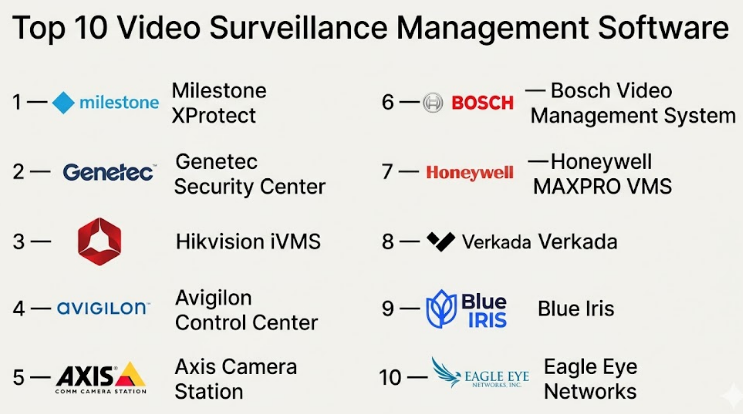
Top 10 Video Surveillance Management Software
#1 — Milestone XProtect
Short description:
A widely used enterprise-grade VMS known for its scalability and open-platform design. It supports thousands of cameras and integrates well with third-party systems. Ideal for large enterprises and smart city deployments.
Key Features
- Open platform architecture
- Advanced video analytics support
- Centralized management system
- Multi-site monitoring
- Event-based recording
- Integration APIs
Pros
- Highly scalable for large environments
- Strong ecosystem of integrations
Cons
- Complex setup for beginners
- Licensing can be expensive
Platforms / Deployment
Windows / Web
Self-hosted / Hybrid
Security & Compliance
RBAC, encryption, audit logs; other certifications not publicly stated
Integrations & Ecosystem
Milestone integrates with access control systems, IoT devices, and analytics tools.
- API-based integrations
- Third-party plugins
- Smart city integrations
Support & Community
Strong enterprise support with documentation and partner ecosystem
#2 — Genetec Security Center
Short description:
An enterprise security platform combining VMS, access control, and ALPR in one system. Known for unified security operations.
Key Features
- Unified security dashboard
- Video + access control integration
- License plate recognition
- Cloud-ready architecture
- Advanced analytics
Pros
- All-in-one platform
- Strong security features
Cons
- High cost
- Requires trained personnel
Platforms / Deployment
Windows / Web
Hybrid / On-prem
Security & Compliance
Encryption, RBAC; certifications not publicly stated
Integrations & Ecosystem
- IoT integrations
- Security devices
- Enterprise APIs
Support & Community
Enterprise-grade support with global presence
#3 — Hikvision iVMS
Short description:
A popular VMS solution for SMBs and enterprises using Hikvision hardware. Known for cost-effectiveness and ease of use.
Key Features
- Real-time monitoring
- Video playback and search
- Alarm management
- Mobile access
- Basic analytics
Pros
- Affordable solution
- Easy to deploy
Cons
- Limited third-party integration
- Security concerns in some regions
Platforms / Deployment
Windows / Mobile
On-prem
Security & Compliance
Not publicly stated
Integrations & Ecosystem
- Hikvision ecosystem
- Limited external APIs
Support & Community
Good documentation; community support varies
#4 — Avigilon Control Center
Short description:
A high-performance VMS with strong AI capabilities, designed for security-critical environments.
Key Features
- AI-based video analytics
- Facial recognition
- High-definition video support
- Smart search
- Centralized control
Pros
- Strong AI features
- Excellent video quality
Cons
- Expensive
- Hardware dependency
Platforms / Deployment
Windows / Mobile
On-prem / Hybrid
Security & Compliance
Encryption, RBAC
Integrations & Ecosystem
- AI integrations
- Access control systems
Support & Community
Enterprise-level support
#5 — Axis Camera Station
Short description:
A reliable VMS designed specifically for Axis hardware, ideal for small to mid-sized deployments.
Key Features
- Easy setup
- Live monitoring
- Video recording
- Event management
- Mobile access
Pros
- User-friendly
- Reliable performance
Cons
- Limited to Axis ecosystem
- Not ideal for large enterprises
Platforms / Deployment
Windows / Mobile
On-prem
Security & Compliance
Basic encryption features
Integrations & Ecosystem
- Axis devices
- Limited external integrations
Support & Community
Good vendor support
#6 — Bosch Video Management System
Short description:
Enterprise-grade VMS with strong security and scalability features, often used in critical infrastructure.
Key Features
- High scalability
- Video analytics
- Failover support
- Centralized monitoring
- Event-driven alerts
Pros
- Highly reliable
- Strong security focus
Cons
- Complex setup
- Expensive
Platforms / Deployment
Windows
On-prem
Security & Compliance
Encryption, audit logs
Integrations & Ecosystem
- Bosch ecosystem
- Security integrations
Support & Community
Enterprise support available
#7 — Honeywell MAXPRO VMS
Short description:
A scalable VMS solution suitable for enterprise and industrial environments.
Key Features
- Multi-site management
- Video analytics
- Alarm integration
- Centralized monitoring
Pros
- Scalable architecture
- Strong enterprise features
Cons
- Steep learning curve
- Licensing complexity
Platforms / Deployment
Windows
On-prem
Security & Compliance
Not publicly stated
Integrations & Ecosystem
- Honeywell ecosystem
- Security systems
Support & Community
Enterprise-grade support
#8 — Verkada
Short description:
A modern cloud-based VMS offering simplicity, scalability, and AI-driven analytics.
Key Features
- Cloud-native platform
- AI search capabilities
- Remote monitoring
- Automatic updates
- Smart alerts
Pros
- Easy to use
- No on-prem infrastructure
Cons
- Subscription cost
- Vendor lock-in
Platforms / Deployment
Web / Mobile
Cloud
Security & Compliance
Encryption, SSO
Integrations & Ecosystem
- Cloud APIs
- SaaS integrations
Support & Community
Strong cloud support
#9 — Blue Iris
Short description:
A cost-effective VMS solution for small businesses and advanced home users.
Key Features
- Video recording
- Motion detection
- Remote access
- Custom alerts
Pros
- Affordable
- Flexible setup
Cons
- Limited enterprise features
- Requires manual configuration
Platforms / Deployment
Windows
Self-hosted
Security & Compliance
Not publicly stated
Integrations & Ecosystem
- Basic integrations
- Community plugins
Support & Community
Strong community support
#10 — Eagle Eye Networks
Short description:
A cloud-based VMS designed for scalability and remote management.
Key Features
- Cloud video storage
- AI analytics
- Remote access
- Automatic updates
- Multi-site management
Pros
- Scalable cloud platform
- Easy remote access
Cons
- Internet dependency
- Subscription model
Platforms / Deployment
Web / Mobile
Cloud
Security & Compliance
Encryption, audit logs
Integrations & Ecosystem
- API integrations
- Cloud services
Support & Community
Good support and onboardi
Comparison Table (Top 10)
| Tool Name | Best For | Platform(s) Supported | Deployment | Standout Feature | Public Rating |
|---|---|---|---|---|---|
| Milestone XProtect | Enterprise | Windows/Web | Hybrid | Open platform | N/A |
| Genetec Security Center | Large enterprises | Windows/Web | Hybrid | Unified security | N/A |
| Hikvision iVMS | SMB | Windows/Mobile | On-prem | Cost-effective | N/A |
| Avigilon Control Center | Security-critical orgs | Windows/Mobile | Hybrid | AI analytics | N/A |
| Axis Camera Station | SMB | Windows/Mobile | On-prem | Ease of use | N/A |
| Bosch VMS | Infrastructure | Windows | On-prem | Reliability | N/A |
| Honeywell MAXPRO | Enterprise | Windows | On-prem | Scalability | N/A |
| Verkada | Modern businesses | Web/Mobile | Cloud | Cloud-native | N/A |
| Blue Iris | Small setups | Windows | Self-hosted | Low cost | N/A |
| Eagle Eye Networks | Multi-site orgs | Web/Mobile | Cloud | Remote access | N/A |
Evaluation & Scoring of Video Surveillance Management Software
| Tool Name | Core | Ease | Integrations | Security | Performance | Support | Value | Weighted Total |
|---|---|---|---|---|---|---|---|---|
| Milestone XProtect | 9 | 7 | 9 | 8 | 9 | 8 | 7 | 8.4 |
| Genetec Security Center | 9 | 7 | 9 | 9 | 9 | 8 | 6 | 8.5 |
| Hikvision iVMS | 7 | 8 | 6 | 6 | 7 | 6 | 8 | 7.0 |
| Avigilon Control Center | 9 | 7 | 8 | 8 | 9 | 8 | 6 | 8.3 |
| Axis Camera Station | 7 | 9 | 6 | 7 | 8 | 7 | 8 | 7.5 |
| Bosch VMS | 9 | 6 | 7 | 9 | 9 | 8 | 6 | 8.2 |
| Honeywell MAXPRO | 8 | 6 | 7 | 8 | 8 | 7 | 6 | 7.5 |
| Verkada | 8 | 9 | 8 | 8 | 8 | 8 | 7 | 8.2 |
| Blue Iris | 6 | 7 | 6 | 6 | 7 | 6 | 9 | 6.9 |
| Eagle Eye Networks | 8 | 8 | 8 | 8 | 8 | 7 | 7 | 7.9 |
How to interpret scores:
These scores compare tools relative to each other, not absolute performance. Higher scores indicate stronger overall capability across features, usability, and value. Enterprises should prioritize core and security scores, while SMBs may focus more on ease and value.
Which Video Surveillance Management Software
Solo / Freelancer
Blue Iris is ideal due to low cost and flexibility.
SMB
Axis Camera Station or Hikvision iVMS offer simplicity and affordability.
Mid-Market
Avigilon or Verkada provide a balance of features and ease.
Enterprise
Milestone XProtect and Genetec Security Center are top choices.
Budget vs Premium
- Budget: Blue Iris, Hikvision
- Premium: Genetec, Bosch
Feature Depth vs Ease of Use
- Feature-heavy: Milestone, Genetec
- Easy to use: Verkada, Axis
Integrations & Scalability
- Best integrations: Milestone, Genetec
- Moderate: Verkada, Eagle Eye
Security & Compliance Needs
- High security: Bosch, Genetec
- Moderate: Verkada, Avigilon
Frequently Asked Questions (FAQs)
1. What is VMS software used for?
It is used to manage video surveillance systems, including recording, monitoring, and analyzing footage.
2. Is cloud VMS better than on-prem?
Cloud VMS offers flexibility, while on-prem provides control. The choice depends on needs.
3. How much does VMS cost?
Pricing varies widely based on cameras, storage, and features.
4. Can VMS integrate with other systems?
Yes, most modern VMS tools integrate with access control and IoT systems.
5. Is AI important in VMS?
Yes, AI improves detection, automation, and insights.
6. How secure is VMS software?
Security depends on vendor features like encryption and access control.
7. Can small businesses use VMS?
Yes, there are affordable solutions for SMBs.
8. What is hybrid deployment?
It combines cloud and on-prem infrastructure.
9. How scalable are VMS systems?
Enterprise systems can scale to thousands of cameras.
10. How to choose the right VMS?
Evaluate features, scalability, security, and budget.
Conclusion
Choosing the right Video Surveillance Management Software depends heavily on your organization’s size, security requirements, and long-term scalability needs. While enterprise solutions like Milestone and Genetec offer unmatched flexibility and integration capabilities, cloud-native platforms like Verkada simplify deployment and management for modern teams. Smaller organizations may find cost-effective tools like Blue Iris sufficient for their needs. The key is not to chase the most feature-rich option, but to select a system that aligns with your operational goals, infrastructure, and security expectations.