Introduction
Home Security Monitoring Apps are mobile and web applications that allow users to monitor, manage, and control their home security systems remotely. These apps connect with cameras, sensors, alarms, and smart devices to provide real-time visibility and alerts. In simple terms, they act as a digital control center for keeping your home safe.
With rising concerns around safety, urban living, and remote property management, these apps have become essential. Modern solutions now go beyond simple alerts—they use AI for motion detection, facial recognition, and anomaly detection. As smart homes continue to evolve, these apps are becoming central to integrated security ecosystems.
Real-world use cases:
- Monitoring live camera feeds remotely
- Receiving instant alerts for motion or intrusion
- Managing smart locks and alarm systems
- Checking home activity while traveling
- Integrating security with lighting and automation
What buyers should evaluate:
- Ease of use and interface
- Camera and sensor compatibility
- Real-time alert capabilities
- Video storage options (cloud/local)
- AI detection features
- Integration with smart home systems
- Security and privacy controls
- Subscription pricing models
- Reliability and uptime
- Multi-device and multi-location support
Best for: homeowners, renters, property managers, and small businesses needing real-time monitoring and control.
Not ideal for: users who prefer offline security systems, those without internet access, or individuals looking for basic non-connected alarm systems.
Key Trends in Home Security Monitoring Apps
- AI-powered motion and facial recognition for smarter alerts
- Cloud-based video storage with remote access
- Integration with smart home ecosystems
- Real-time push notifications and automation triggers
- Subscription-based premium features
- Geofencing for automated arming/disarming
- Privacy-focused features like end-to-end encryption
- Multi-device monitoring dashboards
- Edge computing for faster processing
- Voice assistant compatibility for control
How We Selected These Tools (Methodology)
- Evaluated based on market popularity and adoption
- Reviewed feature completeness and AI capabilities
- Assessed performance and reliability signals
- Considered security and privacy features
- Analyzed integration with smart ecosystems
- Evaluated ease of use and onboarding
- Checked multi-platform support
- Considered scalability across user segments
- Assessed support quality and documentation
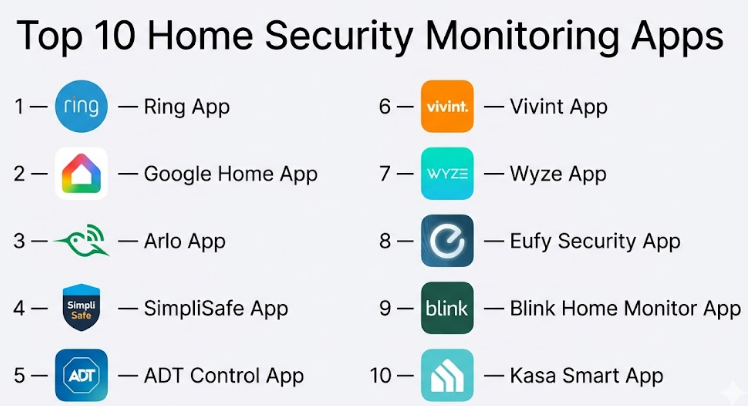
Top 10 Home Security Monitoring Apps
#1 — Ring App
Short description:
A widely used home security app offering real-time monitoring, alerts, and smart device control. It is ideal for homeowners seeking a comprehensive yet easy-to-use solution. The app integrates seamlessly with Ring cameras, doorbells, and alarms, providing centralized control and monitoring.
Key Features
- Live video streaming
- Motion detection alerts
- Two-way communication
- Cloud video storage
- Customizable alert zones
- Integration with smart devices
Pros
- User-friendly interface
- Strong ecosystem integration
Cons
- Subscription required for advanced features
- Limited third-party compatibility
Platforms / Deployment
iOS / Android / Web
Cloud
Security & Compliance
MFA supported, encryption
Other details: Not publicly stated
Integrations & Ecosystem
Works well within smart home environments.
- Cameras and doorbells
- Smart lighting
- Alarm systems
Support & Community
Strong support and large user base
#2 — Google Home App
Short description:
A smart home control app that includes security monitoring features. It is best suited for users already invested in the Google ecosystem.
Key Features
- Camera monitoring
- Smart alerts
- Device automation
- Voice control
- Integration with Nest devices
Pros
- Seamless integration
- Easy setup
Cons
- Limited outside ecosystem
- Dependency on Google devices
Platforms / Deployment
iOS / Android
Cloud
Security & Compliance
Encryption, MFA
Other details: Not publicly stated
Integrations & Ecosystem
Deep integration with smart home devices
- Cameras
- Sensors
- Automation systems
Support & Community
Strong documentation and ecosystem
#3 — Arlo App
Short description:
A powerful security app designed for advanced camera monitoring and alerts. Suitable for users needing high-quality video and detailed alerts.
Key Features
- HD video monitoring
- Motion detection alerts
- Smart notifications
- Cloud storage
- Activity zones
Pros
- High-quality video
- Flexible camera support
Cons
- Subscription required
- Higher cost
Platforms / Deployment
iOS / Android
Cloud
Security & Compliance
Not publicly stated
Integrations & Ecosystem
Supports multiple smart integrations
- Cameras
- Voice assistants
Support & Community
Good support and user base
#4 — SimpliSafe App
Short description:
A security-focused app designed for alarm systems and monitoring. Ideal for users wanting a simple and reliable setup.
Key Features
- Real-time alerts
- Remote arming/disarming
- Alarm monitoring
- Activity logs
- Sensor integration
Pros
- Easy to use
- Reliable alerts
Cons
- Limited advanced features
- Requires hardware
Platforms / Deployment
iOS / Android
Cloud
Security & Compliance
Not publicly stated
Integrations & Ecosystem
Works with security systems
- Sensors
- Alarm devices
Support & Community
Good customer support
#5 — ADT Control App
Short description:
An enterprise-grade home security monitoring app with professional monitoring services. Best for users wanting full-service security.
Key Features
- Professional monitoring
- Smart alerts
- Video monitoring
- Automation
- Remote control
Pros
- High reliability
- Professional support
Cons
- Higher cost
- Contract requirements
Platforms / Deployment
iOS / Android
Cloud
Security & Compliance
Not publicly stated
Integrations & Ecosystem
Supports multiple integrations
- Cameras
- Sensors
- Automation systems
Support & Community
Strong support services
#6 — Vivint App
Short description:
A premium smart home security app offering automation and monitoring. Ideal for users seeking advanced features and integrations.
Key Features
- Smart automation
- Video monitoring
- Real-time alerts
- Remote control
- Integration
Pros
- Advanced automation
- Strong ecosystem
Cons
- Expensive
- Requires setup
Platforms / Deployment
iOS / Android
Cloud
Security & Compliance
Not publicly stated
Integrations & Ecosystem
Comprehensive smart home integration
- Cameras
- Sensors
- Automation tools
Support & Community
Reliable support
#7 — Wyze App
Short description:
A budget-friendly home security app with essential monitoring features. Suitable for cost-conscious users.
Key Features
- Live streaming
- Motion alerts
- Video storage
- Device control
- Notifications
Pros
- Affordable
- Easy setup
Cons
- Limited advanced features
- Basic analytics
Platforms / Deployment
iOS / Android
Cloud
Security & Compliance
Not publicly stated
Integrations & Ecosystem
Basic integrations
- Cameras
- Sensors
Support & Community
Moderate support
#8 — Eufy Security App
Short description:
A privacy-focused security app with local storage options. Ideal for users concerned about data privacy.
Key Features
- Local video storage
- Real-time alerts
- Motion detection
- Smart notifications
- Device control
Pros
- Strong privacy focus
- No mandatory subscription
Cons
- Limited cloud features
- Smaller ecosystem
Platforms / Deployment
iOS / Android
Cloud / Local
Security & Compliance
Encryption
Other details: Not publicly stated
Integrations & Ecosystem
Supports smart devices
- Cameras
- Sensors
Support & Community
Good support resources
#9 — Blink Home Monitor App
Short description:
A simple and efficient app for monitoring Blink devices. Best for users needing straightforward camera monitoring.
Key Features
- Live video feed
- Motion alerts
- Remote control
- Notifications
- Basic automation
Pros
- Easy to use
- Reliable alerts
Cons
- Limited advanced features
- Ecosystem dependency
Platforms / Deployment
iOS / Android
Cloud
Security & Compliance
Not publicly stated
Integrations & Ecosystem
Works within Blink ecosystem
- Cameras
- Sensors
Support & Community
Basic support
#10 — Kasa Smart App
Short description:
A smart home app with security monitoring capabilities integrated with TP-Link devices. Suitable for users already using Kasa ecosystem.
Key Features
- Device control
- Camera monitoring
- Alerts
- Scheduling
- Automation
Pros
- Easy setup
- Affordable
Cons
- Limited advanced security features
- Ecosystem dependency
Platforms / Deployment
iOS / Android
Cloud
Security & Compliance
Not publicly stated
Integrations & Ecosystem
Works with TP-Link devices
- Cameras
- Smart plugs
Support & Community
Moderate support
Comparison Table (Top 10)
| Tool Name | Best For | Platform(s) Supported | Deployment | Standout Feature | Public Rating |
|---|---|---|---|---|---|
| Ring | Smart homes | iOS, Android, Web | Cloud | Real-time alerts | N/A |
| Google Home | Ecosystem users | iOS, Android | Cloud | Integration | N/A |
| Arlo | Camera quality | iOS, Android | Cloud | HD video | N/A |
| SimpliSafe | Alarm systems | iOS, Android | Cloud | Reliability | N/A |
| ADT Control | Enterprise users | iOS, Android | Cloud | Professional monitoring | N/A |
| Vivint | Premium automation | iOS, Android | Cloud | Smart automation | N/A |
| Wyze | Budget users | iOS, Android | Cloud | Affordability | N/A |
| Eufy Security | Privacy users | iOS, Android | Cloud/Local | Local storage | N/A |
| Blink | Simple monitoring | iOS, Android | Cloud | Ease of use | N/A |
| Kasa Smart | TP-Link users | iOS, Android | Cloud | Integration | N/A |
Evaluation & Scoring of Home Security Monitoring Apps
| Tool Name | Core | Ease | Integrations | Security | Performance | Support | Value | Weighted Total |
|---|---|---|---|---|---|---|---|---|
| Ring | 9 | 9 | 8 | 8 | 9 | 8 | 8 | 8.6 |
| Google Home | 8 | 9 | 9 | 8 | 8 | 8 | 8 | 8.5 |
| Arlo | 9 | 8 | 8 | 7 | 9 | 8 | 7 | 8.3 |
| SimpliSafe | 8 | 9 | 7 | 7 | 8 | 8 | 8 | 8.0 |
| ADT Control | 9 | 7 | 8 | 8 | 9 | 9 | 7 | 8.4 |
| Vivint | 9 | 7 | 9 | 8 | 9 | 8 | 7 | 8.3 |
| Wyze | 7 | 9 | 6 | 7 | 7 | 7 | 9 | 7.8 |
| Eufy Security | 8 | 8 | 7 | 8 | 8 | 7 | 8 | 8.0 |
| Blink | 7 | 9 | 6 | 7 | 7 | 7 | 8 | 7.6 |
| Kasa Smart | 7 | 8 | 7 | 7 | 7 | 7 | 8 | 7.5 |
How to interpret scores:
Scores reflect relative performance across features, usability, and value. Higher scores indicate better overall balance but not necessarily the best fit for every use case.
Which Home Security Monitoring Apps
Solo / Freelancer
Wyze and Blink are cost-effective and easy to manage.
SMB
Ring and SimpliSafe provide a balance of features and affordability.
Mid-Market
Google Home and Arlo offer better integrations and analytics.
Enterprise
ADT Control and Vivint provide professional monitoring and advanced automation.
Budget vs Premium
Budget users should consider Wyze or Blink; premium users should go for Vivint or ADT.
Feature Depth vs Ease of Use
Advanced users benefit from Arlo or Vivint; beginners should choose Ring or Blink.
Integrations & Scalability
Google Home leads in integration; Vivint offers scalable automation.
Security & Compliance Needs
Choose apps with encryption and strong authentication features.
Frequently Asked Questions (FAQs)
1. What is a home security monitoring app?
It is an app that allows users to monitor cameras, sensors, and alarms remotely.
2. Do these apps require subscriptions?
Many offer free basic features but charge for advanced services.
3. Can I monitor multiple locations?
Yes, most apps support multiple properties.
4. Are these apps secure?
Security varies; choose apps with encryption and authentication.
5. Do they work without internet?
Most require internet connectivity.
6. Can I integrate them with smart devices?
Yes, many support smart home ecosystems.
7. How easy is installation?
Installation depends on hardware but apps are generally simple.
8. What is cloud storage?
It stores video recordings online for remote access.
9. Can I switch apps easily?
Switching depends on device compatibility.
10. Which app is best?
The best app depends on your needs and budget.
Conclusion
Home Security Monitoring Apps have transformed how individuals and businesses protect their spaces. They provide real-time visibility, automation, and control, making security more proactive and intelligent. However, selecting the right solution depends on your priorities—whether that is affordability, advanced automation, integration, or privacy. There is no universal best option. A practical approach is to shortlist two or three apps that align with your needs, test their usability, verify compatibility with your devices, and evaluate security features before committing. This ensures you choose a solution that fits your lifestyle and long-term requirements.