Introduction
Webinar platforms are software solutions that allow individuals and organizations to host live or recorded online events such as presentations, training sessions, product demos, and virtual conferences. These platforms combine video streaming, audience engagement tools, and analytics to deliver interactive experiences at scale.
In today’s digital-first environment, webinars have become essential for marketing, education, internal communication, and customer engagement. As remote work, global audiences, and content-driven marketing continue to grow, webinar platforms are evolving with AI features, automation, and deeper integrations.
Real-world use cases:
- Lead generation and marketing webinars
- Employee training and onboarding
- Product demos and customer education
- Virtual events and hybrid conferences
- Thought leadership and community building
What buyers should evaluate:
- Video/audio quality and scalability
- Engagement features (polls, Q&A, chat)
- Automation and scheduling
- Analytics and reporting
- Integrations with CRM/marketing tools
- Security and compliance
- Ease of use for hosts and attendees
- Pricing and scalability
- Branding and customization options
Best for: Marketers, educators, startups, enterprises, and SaaS companies looking to scale communication, lead generation, or training.
Not ideal for: Small teams needing only basic video calls—simpler meeting tools may be sufficient.
Key Trends in Webinar Platforms
- AI-powered automation: Automated webinar scheduling, transcription, summaries, and audience insights.
- On-demand and hybrid webinars: Pre-recorded sessions blended with live Q&A.
- Deeper CRM integrations: Direct syncing with marketing automation and sales pipelines.
- Personalized attendee journeys: Dynamic content and segmented engagement.
- Advanced analytics: Heatmaps, engagement scoring, and conversion tracking.
- Security-first design: Increased focus on encryption, access control, and compliance.
- Multi-channel broadcasting: Streaming to social platforms and websites simultaneously.
- No-download browser experiences: Web-based participation without apps.
- Scalable cloud infrastructure: Supporting thousands of attendees globally.
How We Selected These Tools (Methodology)
- Evaluated market adoption and brand recognition
- Assessed feature completeness across webinar workflows
- Considered performance and reliability signals
- Reviewed security posture and enterprise readiness
- Analyzed integration capabilities and ecosystem strength
- Ensured coverage across SMB to enterprise use cases
- Looked at ease of onboarding and usability
- Considered pricing flexibility and value
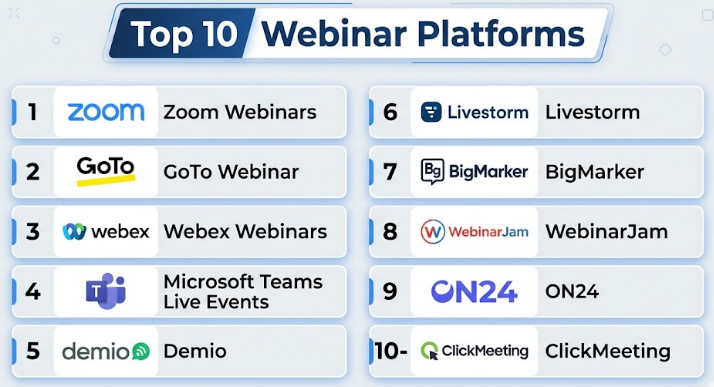
Top 10 Webinar Platforms
#1 — Zoom Webinars
Short description:
Zoom Webinars is a widely used platform for hosting large-scale webinars with high-quality video and audio. It is ideal for enterprises and SMBs already using Zoom for meetings. It offers strong scalability and reliability. Suitable for training, marketing, and internal communication. Easy to adopt with familiar UI.
Key Features
- HD video and audio streaming
- Large audience support
- Q&A, polls, and chat
- Webinar registration and reporting
- Breakout rooms (limited in webinar mode)
- Recording and cloud storage
Pros
- Reliable and widely adopted
- Easy for users already familiar with Zoom
Cons
- Limited branding customization
- Can be expensive at scale
Platforms / Deployment
Web / Windows / macOS / Linux / iOS / Android
Cloud
Security & Compliance
SSO/SAML, MFA, encryption, GDPR support
Integrations & Ecosystem
Zoom integrates with CRM, marketing tools, and productivity apps.
- Salesforce
- HubSpot
- Slack
- Microsoft Teams
Support & Community
Strong documentation and global support. Large user community.
#2 — GoTo Webinar
Short description:
GoTo Webinar is a mature platform focused on professional webinars with strong reliability and analytics. It is widely used by enterprises for marketing and training. Offers automation and audience insights. Suitable for recurring webinars and structured events.
Key Features
- Automated webinars
- Detailed analytics
- Polls and surveys
- Custom registration pages
- Recording and replay
Pros
- Strong analytics capabilities
- Reliable performance
Cons
- UI feels dated
- Limited modern engagement features
Platforms / Deployment
Web / Windows / macOS / iOS / Android
Cloud
Security & Compliance
Encryption, SSO, GDPR support
Integrations & Ecosystem
- Salesforce
- Marketo
- HubSpot
Support & Community
Good enterprise support; documentation is solid.
#3 — Webex Webinars
Short description:
Webex Webinars by Cisco is designed for enterprise-grade events with strong security and scalability. It supports large audiences and offers advanced engagement tools. Ideal for corporate environments.
Key Features
- Large-scale webinar hosting
- Interactive polling and Q&A
- AI-powered transcription
- Branding and customization
- Event analytics
Pros
- Strong security features
- Enterprise scalability
Cons
- Complex setup
- Higher learning curve
Platforms / Deployment
Web / Windows / macOS / iOS / Android
Cloud
Security & Compliance
SSO, encryption, compliance frameworks (varies)
Integrations & Ecosystem
- Microsoft tools
- Salesforce
- APIs for customization
Support & Community
Enterprise-level support with detailed documentation.
#4 — Microsoft Teams Live Events
Short description:
Microsoft Teams Live Events extends Teams capabilities for large webinars. It integrates deeply with Microsoft 365, making it ideal for organizations already in that ecosystem.
Key Features
- Large audience streaming
- Integration with Microsoft 365
- Live captions and translation
- Recording and replay
- Moderation controls
Pros
- Seamless Microsoft integration
- Familiar interface
Cons
- Limited external audience features
- Less marketing-focused
Platforms / Deployment
Web / Windows / macOS / iOS / Android
Cloud
Security & Compliance
SSO, encryption, enterprise compliance
Integrations & Ecosystem
- Microsoft 365
- Power BI
- SharePoint
Support & Community
Strong enterprise support; large user base.
#5 — Demio
Short description:
Demio is a browser-based webinar platform focused on marketing and ease of use. It provides a clean interface and automation features. Ideal for marketers and SMBs.
Key Features
- No-download webinars
- Automated sessions
- Engagement tools
- Analytics and tracking
- Branding options
Pros
- Easy to use
- Marketing-focused features
Cons
- Limited scalability
- Fewer enterprise features
Platforms / Deployment
Web
Cloud
Security & Compliance
Not publicly stated
Integrations & Ecosystem
- HubSpot
- Mailchimp
- Zapier
Support & Community
Good onboarding and support for SMB users.
#6 — Livestorm
Short description:
Livestorm is a modern webinar platform with strong automation and analytics. It supports live, on-demand, and automated webinars. Ideal for SaaS and marketing teams.
Key Features
- Automated webinars
- Analytics dashboard
- Engagement tools
- CRM integrations
- On-demand replay
Pros
- Modern UI
- Strong automation
Cons
- Pricing can scale quickly
- Limited offline support
Platforms / Deployment
Web
Cloud
Security & Compliance
GDPR support, encryption
Integrations & Ecosystem
- Salesforce
- HubSpot
- Slack
Support & Community
Strong documentation and responsive support.
#7 — BigMarker
Short description:
BigMarker is a feature-rich webinar platform with strong customization and branding capabilities. It supports virtual events, webinars, and hybrid experiences.
Key Features
- Custom branding
- Virtual event hosting
- Engagement tools
- Analytics
- White-label capabilities
Pros
- Highly customizable
- Supports complex events
Cons
- Learning curve
- Pricing complexity
Platforms / Deployment
Web
Cloud
Security & Compliance
Not publicly stated
Integrations & Ecosystem
- CRM tools
- Marketing platforms
- APIs
Support & Community
Strong support; documentation available.
#8 — WebinarJam
Short description:
WebinarJam is a marketing-focused webinar platform designed for lead generation and sales. It offers automation and engagement tools.
Key Features
- Live and automated webinars
- Chat and engagement tools
- Analytics
- Replay hosting
- Email integrations
Pros
- Marketing-friendly
- Easy automation
Cons
- Performance inconsistencies
- Limited enterprise features
Platforms / Deployment
Web
Cloud
Security & Compliance
Not publicly stated
Integrations & Ecosystem
- Email marketing tools
- Zapier
Support & Community
Decent support; mixed user feedback.
#9 — ON24
Short description:
ON24 is an enterprise-grade webinar and digital experience platform focused on marketing and analytics. It provides deep insights into audience behavior.
Key Features
- Advanced analytics
- Engagement tracking
- Custom branding
- Content hubs
- AI insights
Pros
- Strong analytics
- Enterprise-ready
Cons
- Expensive
- Complex setup
Platforms / Deployment
Web
Cloud
Security & Compliance
Enterprise-grade security (varies)
Integrations & Ecosystem
- Salesforce
- Marketo
- Eloqua
Support & Community
Enterprise-level support and onboarding.
#10 — ClickMeeting
Short description:
ClickMeeting is a flexible webinar platform suitable for SMBs and educators. It supports live, automated, and on-demand webinars with a user-friendly interface.
Key Features
- Automated webinars
- Screen sharing
- Polls and Q&A
- Recording
- Branding
Pros
- Affordable
- Easy to use
Cons
- Limited advanced features
- Smaller ecosystem
Platforms / Deployment
Web
Cloud
Security & Compliance
Not publicly stated
Integrations & Ecosystem
- Zapier
- CRM tools
Support & Community
Good support for SMB users.
Comparison Table (Top 10)
| Tool Name | Best For | Platform(s) Supported | Deployment | Standout Feature | Public Rating |
|---|---|---|---|---|---|
| Zoom Webinars | Enterprises, SMBs | Multi-platform | Cloud | Reliability | N/A |
| GoTo Webinar | Professional webinars | Multi-platform | Cloud | Analytics | N/A |
| Webex Webinars | Enterprise | Multi-platform | Cloud | Security | N/A |
| Microsoft Teams Live Events | Corporate users | Multi-platform | Cloud | Microsoft integration | N/A |
| Demio | SMB marketers | Web | Cloud | Ease of use | N/A |
| Livestorm | SaaS teams | Web | Cloud | Automation | N/A |
| BigMarker | Virtual events | Web | Cloud | Customization | N/A |
| WebinarJam | Lead generation | Web | Cloud | Marketing tools | N/A |
| ON24 | Enterprise marketing | Web | Cloud | Analytics | N/A |
| ClickMeeting | SMB, educators | Web | Cloud | Affordability | N/A |
Evaluation & Scoring of Webinar Platforms
| Tool Name | Core (25%) | Ease (15%) | Integrations (15%) | Security (10%) | Performance (10%) | Support (10%) | Value (15%) | Weighted Total |
|---|---|---|---|---|---|---|---|---|
| Zoom Webinars | 9 | 9 | 8 | 9 | 9 | 9 | 7 | 8.6 |
| GoTo Webinar | 8 | 7 | 8 | 8 | 8 | 8 | 7 | 7.8 |
| Webex Webinars | 9 | 6 | 8 | 9 | 9 | 8 | 6 | 8.0 |
| Microsoft Teams Live Events | 8 | 8 | 9 | 9 | 8 | 8 | 7 | 8.2 |
| Demio | 7 | 9 | 7 | 6 | 7 | 7 | 8 | 7.5 |
| Livestorm | 8 | 9 | 8 | 7 | 8 | 8 | 7 | 8.0 |
| BigMarker | 8 | 7 | 8 | 6 | 7 | 7 | 7 | 7.4 |
| WebinarJam | 7 | 8 | 6 | 5 | 6 | 6 | 7 | 6.7 |
| ON24 | 9 | 6 | 9 | 9 | 8 | 9 | 6 | 8.2 |
| ClickMeeting | 7 | 8 | 6 | 6 | 7 | 7 | 8 | 7.1 |
How to interpret:
- Scores are relative comparisons, not absolute benchmarks.
- Higher scores indicate stronger overall capabilities.
- Enterprises should prioritize security and integrations.
- SMBs may prioritize ease of use and value.
Which Webinar Platforms
Solo / Freelancer
Use Demio or ClickMeeting for simplicity and affordability.
SMB
Livestorm or Zoom Webinars offer a good balance of features and scalability.
Mid-Market
GoTo Webinar or BigMarker provide advanced capabilities and flexibility.
Enterprise
Webex, ON24, or Microsoft Teams Live Events are best for scale and compliance.
Budget vs Premium
- Budget: ClickMeeting, Demio
- Premium: ON24, Webex
Feature Depth vs Ease of Use
- Feature-rich: ON24, BigMarker
- Easy: Demio, Zoom
Integrations & Scalability
Choose Zoom, ON24, or Teams for strong ecosystem support.
Security & Compliance Needs
Webex and Microsoft Teams are ideal for regulated industries.
Frequently Asked Questions (FAQs)
1. What is a webinar platform?
A webinar platform is software that enables hosting live or recorded online events with interactive features like chat and polls.
2. How much do webinar platforms cost?
Pricing varies widely depending on features and audience size; many offer tiered plans.
3. Can I automate webinars?
Yes, many platforms support automated or on-demand webinars.
4. Are webinar platforms secure?
Most offer encryption and access controls; enterprise tools provide advanced compliance features.
5. What is the difference between webinars and meetings?
Webinars are one-to-many broadcasts, while meetings are interactive sessions.
6. Can I integrate webinar platforms with CRM tools?
Yes, most modern platforms support CRM integrations.
7. How scalable are webinar platforms?
Enterprise platforms can handle thousands of attendees.
8. Do attendees need to install software?
Many platforms offer browser-based access.
9. What are common mistakes when choosing a platform?
Ignoring scalability, integrations, and security needs.
10. Can I switch platforms easily?
Switching is possible but may require data migration and retraining.
Conclusion
Webinar platforms have evolved into powerful tools for communication, marketing, and education. While many platforms offer similar core features, the right choice depends heavily on your specific needs—whether that’s scalability, integrations, automation, or ease of use. Enterprises may prioritize security and analytics, while smaller teams might focus on simplicity and cost-effectiveness. There is no one-size-fits-all solution. The best approach is to shortlist two or three platforms, run pilot sessions, and evaluate real-world performance, integrations, and user experience before committing.
