Introduction
Computerized Maintenance Management Systems (CMMS) are software platforms designed to help organizations manage maintenance operations, assets, work orders, and equipment lifecycle in a centralized system. Instead of relying on manual logs or spreadsheets, CMMS solutions automate maintenance workflows, track asset performance, and ensure timely preventive maintenance.
In modern operations, especially with increasing reliance on automation and connected infrastructure, CMMS tools are critical. They reduce downtime, extend asset life, and improve operational visibility. With AI, IoT, and mobile-first capabilities becoming standard, CMMS platforms now act as the backbone of maintenance strategy across industries.
Common use cases include:
- Scheduling preventive and predictive maintenance
- Managing work orders and technician assignments
- Tracking asset performance and lifecycle costs
- Managing spare parts inventory
- Ensuring compliance and audit readiness
What buyers should evaluate:
- Ease of implementation and usability
- Mobile capabilities for field technicians
- Preventive and predictive maintenance features
- Asset tracking and lifecycle management
- Integration with ERP, IoT, and finance systems
- Reporting and analytics capabilities
- Automation workflows and alerts
- Scalability for multi-site operations
- Security and compliance readiness
Best for: Maintenance managers, facility teams, manufacturing plants, healthcare facilities, logistics companies, and enterprises with critical infrastructure.
Not ideal for: Very small teams with minimal assets or those only needing basic task tracking—simple ticketing or project tools may be sufficient.
Key Trends in Computerized Maintenance Management Systems (CMMS)
- Predictive maintenance using AI: Systems now forecast equipment failures using historical and sensor data.
- IoT-enabled monitoring: Real-time asset tracking through connected sensors is becoming standard.
- Mobile-first workforce management: Technicians rely on apps for real-time updates and task execution.
- Automation of maintenance workflows: Work orders, alerts, and approvals are increasingly automated.
- Cloud-native platforms: SaaS CMMS solutions dominate due to scalability and ease of deployment.
- Integration with ERP and supply chain systems: Seamless data flow improves operational efficiency.
- Sustainability tracking: Energy usage and maintenance efficiency metrics are tracked for ESG goals.
- User-friendly interfaces: Vendors are focusing on simplified UX to reduce training time.
- Data-driven decision making: Advanced dashboards and analytics are now core features.
How We Selected These Tools (Methodology)
- Evaluated market presence and adoption across industries
- Assessed depth of maintenance and asset management features
- Reviewed ease of use and onboarding experience
- Considered mobile capabilities for field operations
- Analyzed integration ecosystem and API availability
- Checked scalability across SMB to enterprise use cases
- Evaluated modern capabilities like AI, automation, and IoT
- Reviewed support quality and vendor reputation
- Balanced cost vs feature value across segments
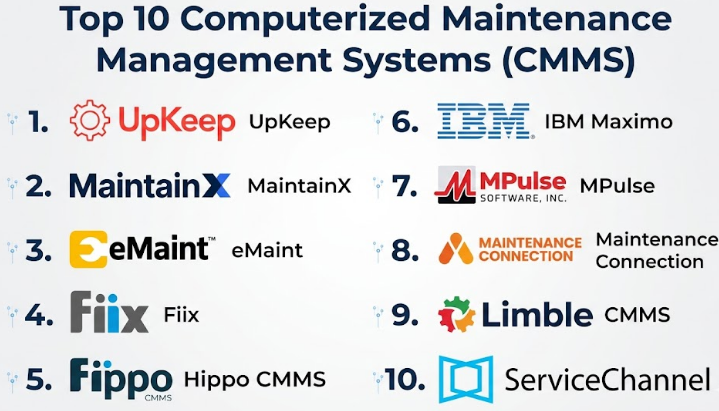
Top 10 Computerized Maintenance Management Systems (CMMS)
#1 — UpKeep
Short description:
UpKeep is a modern, mobile-first CMMS platform designed for maintenance teams that need simplicity and speed. It focuses on work order management, asset tracking, and preventive maintenance. The platform is widely used by SMBs and mid-market companies. Its intuitive interface reduces training time significantly. UpKeep is ideal for organizations transitioning from manual systems. It prioritizes usability and quick deployment.
Key Features
- Work order management
- Preventive maintenance scheduling
- Asset tracking
- Mobile-first interface
- Inventory management
- Reporting dashboards
Pros
- Easy to use and deploy
- Strong mobile capabilities
Cons
- Limited advanced analytics
- Not ideal for highly complex enterprises
Platforms / Deployment
Web / iOS / Android
Cloud
Security & Compliance
RBAC, MFA
Compliance: Not publicly stated
Integrations & Ecosystem
Offers integration flexibility through APIs and connectors.
- Slack
- Zapier
- APIs
Support & Community
Strong documentation and responsive customer support.
#2 — MaintainX
Short description:
MaintainX is a collaborative CMMS platform built for maintenance and operations teams. It emphasizes real-time communication and mobile usability. The platform is ideal for SMBs and mid-sized companies. It simplifies maintenance workflows and improves team coordination. Its clean UI makes onboarding fast. MaintainX is popular for its ease of use.
Key Features
- Work order management
- Preventive maintenance
- Team messaging and collaboration
- Mobile-first design
- Reporting tools
Pros
- Excellent user experience
- Strong collaboration features
Cons
- Limited enterprise scalability
- Fewer advanced integrations
Platforms / Deployment
Web / Mobile
Cloud
Security & Compliance
Not publicly stated
Integrations & Ecosystem
Supports integration with modern tools.
- APIs
- Third-party tools
Support & Community
Good support and growing user community.
#3 — eMaint (Fluke)
Short description:
eMaint is a flexible CMMS platform designed for mid-market and enterprise organizations. It offers strong asset management and reporting capabilities. The platform supports customization and workflow automation. It is widely used across industries. eMaint balances flexibility with scalability.
Key Features
- Asset lifecycle management
- Preventive maintenance
- Work order tracking
- Reporting and analytics
- Inventory management
Pros
- Strong reporting features
- Flexible configuration
Cons
- User interface feels dated
- Learning curve for new users
Platforms / Deployment
Web / Mobile
Cloud
Security & Compliance
Not publicly stated
Integrations & Ecosystem
Supports integration with enterprise systems.
- ERP systems
- APIs
Support & Community
Comprehensive training and support resources.
#4 — Fiix
Short description:
Fiix is a cloud-based CMMS platform focused on simplifying maintenance operations. It offers a modern interface and strong asset tracking features. The platform is suitable for SMBs and mid-market organizations. Fiix also provides analytics for maintenance optimization. It is known for its ease of use and scalability.
Key Features
- Asset tracking
- Preventive maintenance
- Work order management
- Analytics and reporting
- Inventory tracking
Pros
- User-friendly interface
- Good reporting tools
Cons
- Limited customization
- Integration complexity in some cases
Platforms / Deployment
Web / Mobile
Cloud
Security & Compliance
Not publicly stated
Integrations & Ecosystem
Integration support via APIs.
- ERP systems
- IoT integrations
Support & Community
Good documentation and customer support.
#5 — Hippo CMMS
Short description:
Hippo CMMS is designed for small teams looking for an easy-to-use maintenance solution. It focuses on simplicity and affordability. The platform offers essential features for managing assets and work orders. It is ideal for organizations upgrading from spreadsheets.
Key Features
- Work order management
- Asset tracking
- Preventive maintenance
- Reporting tools
- Mobile access
Pros
- Simple interface
- Affordable pricing
Cons
- Limited advanced features
- Not scalable for large enterprises
Platforms / Deployment
Web
Cloud
Security & Compliance
Not publicly stated
Integrations & Ecosystem
Basic integration support.
- APIs
Support & Community
Helpful onboarding and support.
#6 — IBM Maximo
Short description:
IBM Maximo is a powerful enterprise CMMS and asset management platform. It supports complex maintenance workflows and predictive analytics. The platform is ideal for large organizations managing critical infrastructure. It offers deep customization and scalability.
Key Features
- Asset lifecycle management
- Predictive maintenance
- Work order automation
- IoT integration
- Advanced analytics
Pros
- Highly scalable
- Strong AI capabilities
Cons
- Complex implementation
- High cost
Platforms / Deployment
Web / Mobile
Cloud / Hybrid
Security & Compliance
RBAC, encryption
Compliance: Not publicly stated
Integrations & Ecosystem
Extensive integration ecosystem.
- ERP systems
- IoT platforms
- APIs
Support & Community
Enterprise-level support with global reach.
#7 — MPulse
Short description:
MPulse is a CMMS platform designed for maintenance and asset management across industries. It offers a balance between usability and functionality. The platform supports preventive maintenance and asset tracking. It is suitable for SMBs and mid-sized organizations.
Key Features
- Preventive maintenance
- Asset management
- Work order tracking
- Inventory management
- Reporting tools
Pros
- Easy to implement
- Good feature balance
Cons
- UI could be improved
- Limited advanced features
Platforms / Deployment
Web
Cloud
Security & Compliance
Not publicly stated
Integrations & Ecosystem
Supports integrations through APIs.
- ERP systems
- APIs
Support & Community
Reliable support with training resources.
#8 — Maintenance Connection
Short description:
Maintenance Connection is a robust CMMS platform offering maintenance and asset management features. It is designed for organizations requiring scalable solutions. The platform supports customization and workflow automation. It is widely used in manufacturing and facilities.
Key Features
- Work order management
- Asset tracking
- Preventive maintenance
- Reporting tools
- Workflow automation
Pros
- Scalable platform
- Strong feature set
Cons
- Learning curve
- UI may feel outdated
Platforms / Deployment
Web / Mobile
Cloud
Security & Compliance
Not publicly stated
Integrations & Ecosystem
Supports enterprise integrations.
- ERP systems
- APIs
Support & Community
Strong support and training.
#9 — Limble CMMS
Short description:
Limble CMMS is a modern, user-friendly platform designed for maintenance teams. It focuses on ease of use and quick implementation. The platform supports preventive maintenance and asset tracking. It is popular among SMBs and mid-market organizations.
Key Features
- Preventive maintenance
- Work order management
- Asset tracking
- Reporting dashboards
- Mobile access
Pros
- Easy to use
- Fast implementation
Cons
- Limited advanced analytics
- Not ideal for complex enterprises
Platforms / Deployment
Web / Mobile
Cloud
Security & Compliance
Not publicly stated
Integrations & Ecosystem
Supports integrations via APIs.
- ERP systems
- APIs
Support & Community
Responsive support and helpful onboarding.
#10 — ServiceChannel
Short description:
ServiceChannel is a CMMS platform focused on vendor and facilities maintenance management. It is widely used in retail and multi-location businesses. The platform helps manage contractors, work orders, and costs. It is ideal for organizations with distributed operations.
Key Features
- Vendor management
- Work order tracking
- Invoice management
- Analytics and reporting
- Compliance tracking
Pros
- Strong vendor coordination
- Good analytics
Cons
- Limited customization
- Pricing not transparent
Platforms / Deployment
Web / Mobile
Cloud
Security & Compliance
Not publicly stated
Integrations & Ecosystem
Supports integrations with enterprise systems.
- ERP systems
- APIs
Support & Community
Enterprise-grade support.
Comparison Table (Top 10)
| Tool Name | Best For | Platform(s) Supported | Deployment | Standout Feature | Public Rating |
|---|---|---|---|---|---|
| UpKeep | SMB teams | Web, Mobile | Cloud | Mobile-first CMMS | N/A |
| MaintainX | Collaboration | Web, Mobile | Cloud | Team communication | N/A |
| eMaint | Mid-market | Web, Mobile | Cloud | Reporting flexibility | N/A |
| Fiix | SMB scaling | Web, Mobile | Cloud | User-friendly design | N/A |
| Hippo CMMS | Small teams | Web | Cloud | Simplicity | N/A |
| IBM Maximo | Enterprise | Web, Mobile | Hybrid | Predictive maintenance | N/A |
| MPulse | SMB/mid-market | Web | Cloud | Balanced features | N/A |
| Maintenance Connection | Large teams | Web, Mobile | Cloud | Scalability | N/A |
| Limble CMMS | SMB | Web, Mobile | Cloud | Ease of use | N/A |
| ServiceChannel | Multi-location | Web, Mobile | Cloud | Vendor management | N/A |
Evaluation & Scoring of Computerized Maintenance Management Systems (CMMS)
| Tool Name | Core | Ease | Integrations | Security | Performance | Support | Value | Weighted Total |
|---|---|---|---|---|---|---|---|---|
| UpKeep | 7 | 9 | 7 | 7 | 8 | 8 | 9 | 7.9 |
| MaintainX | 7 | 9 | 6 | 7 | 7 | 8 | 9 | 7.8 |
| eMaint | 8 | 7 | 8 | 7 | 8 | 8 | 7 | 7.6 |
| Fiix | 7 | 8 | 7 | 7 | 7 | 7 | 8 | 7.4 |
| Hippo CMMS | 6 | 8 | 5 | 6 | 7 | 7 | 8 | 6.8 |
| IBM Maximo | 9 | 6 | 9 | 8 | 9 | 9 | 6 | 8.1 |
| MPulse | 7 | 7 | 7 | 7 | 7 | 7 | 7 | 7.0 |
| Maintenance Connection | 8 | 7 | 8 | 7 | 8 | 8 | 7 | 7.6 |
| Limble CMMS | 7 | 9 | 6 | 7 | 7 | 8 | 9 | 7.8 |
| ServiceChannel | 8 | 7 | 7 | 7 | 8 | 8 | 7 | 7.6 |
How to interpret the scores:
These scores are comparative across tools listed. Higher scores indicate stronger performance in that category. Enterprise tools score higher in features, while SMB tools excel in usability and value. Choose based on your operational needs rather than total score alone.
Which Computerized Maintenance Management Systems (CMMS)
Solo / Freelancer
Use simple tools like MaintainX or Limble for quick setup and ease of use.
SMB
UpKeep, Limble, and Fiix provide the best balance of features and affordability.
Mid-Market
eMaint and Maintenance Connection offer scalability and deeper capabilities.
Enterprise
IBM Maximo is the top choice for complex operations and large infrastructure.
Budget vs Premium
- Budget: Hippo CMMS, MaintainX
- Premium: IBM Maximo
Feature Depth vs Ease of Use
- Deep features: Maximo, eMaint
- Ease of use: UpKeep, Limble
Integrations & Scalability
Choose tools with strong API ecosystems for future growth.
Security & Compliance Needs
Enterprises should prioritize platforms with strong RBAC, encryption, and audit capabilities.
Frequently Asked Questions (FAQs)
1. What is a CMMS?
A CMMS is software used to manage maintenance operations, including work orders, assets, and preventive maintenance scheduling.
2. How does CMMS improve efficiency?
It automates maintenance workflows, reduces downtime, and centralizes data for better decision-making.
3. Is CMMS suitable for small businesses?
Yes, many tools are designed for SMBs with easy interfaces and affordable pricing.
4. How long does implementation take?
SMB tools can be deployed in days, while enterprise systems may take months.
5. What industries use CMMS?
Manufacturing, healthcare, logistics, retail, and facilities management industries widely use CMMS.
6. Does CMMS support mobile usage?
Most modern CMMS platforms offer mobile apps for field technicians.
7. Can CMMS integrate with ERP systems?
Yes, many platforms support ERP integrations through APIs.
8. What are common mistakes when selecting CMMS?
Choosing overly complex systems or ignoring integration needs.
9. Is data secure in CMMS platforms?
Most platforms offer security features, but compliance varies by vendor.
10. Can CMMS support predictive maintenance?
Yes, advanced platforms use AI and IoT data for predictive maintenance.
Conclusion
Computerized Maintenance Management Systems have become essential tools for organizations aiming to improve operational efficiency, reduce downtime, and extend asset lifespan. While enterprise platforms like IBM Maximo offer deep capabilities and scalability, SMB-focused tools like UpKeep and MaintainX provide simplicity and rapid deployment. The right choice depends on your operational complexity, budget, and long-term growth plans. Instead of selecting the most feature-rich tool, focus on alignment with your workflows and team capabilities. As a next step, shortlist two or three CMMS platforms, test them with real maintenance scenarios, and evaluate usability, integration readiness, and reporting effectiveness before making a final decision.
