Introduction
Work Order Management Software helps organizations create, assign, track, and complete maintenance or service tasks in a structured way. In simple terms, it replaces manual paperwork, spreadsheets, and disconnected communication with a centralized system where teams can manage jobs efficiently.
In today’s environment—where operations are increasingly digital, distributed, and data-driven—this category has become critical. Businesses are expected to deliver faster service, maintain assets proactively, and ensure compliance, all while controlling costs. Modern platforms now include automation, mobile access, analytics, and even AI-driven scheduling.
Real-world use cases:
- Facility maintenance teams managing repair tickets
- Manufacturing plants tracking equipment maintenance
- Field service teams handling customer service jobs
- IT operations managing internal service requests
- Property management tracking tenant issues
What buyers should evaluate:
- Ease of use and mobile capabilities
- Automation and scheduling features
- Asset management integration
- Reporting and analytics depth
- Integration ecosystem (ERP, CRM, IoT)
- Security and compliance controls
- Scalability for future growth
- Cost vs value
- Offline functionality
- Custom workflows
Best for: Maintenance teams, operations managers, facility managers, field service organizations, manufacturing companies, and enterprises managing physical assets or service workflows.
Not ideal for: Very small teams with minimal task tracking needs or organizations that only require simple ticketing—basic task management tools may be sufficient in those cases.
Key Trends in Work Order Management Software
- AI-powered scheduling: Tools now optimize technician assignments based on workload, location, and skillset.
- Predictive maintenance: Integration with IoT sensors enables early detection of equipment failures.
- Mobile-first design: Field teams rely heavily on mobile apps with offline capabilities.
- Automation workflows: Auto-creation of work orders from triggers like alerts, emails, or sensor data.
- Integration with enterprise systems: Deep connectivity with ERP, CRM, and asset management platforms.
- Cloud-first deployment: SaaS dominates, though hybrid models still exist for regulated industries.
- Real-time analytics dashboards: Live visibility into KPIs such as response time and completion rates.
- Compliance tracking: Built-in audit logs and maintenance records for regulatory compliance.
- Low-code customization: Business users can configure workflows without heavy IT dependency.
- Subscription pricing models: Flexible pricing tiers based on users, assets, or features.
How We Selected These Tools (Methodology)
- Strong market presence and adoption across industries
- Comprehensive work order and maintenance features
- Proven reliability and performance in operational environments
- Security posture and enterprise readiness signals
- Depth of integrations with common enterprise tools
- Flexibility for SMB to enterprise use cases
- Mobile capabilities and field usability
- Customer feedback trends and usability reputation
- Innovation in automation, AI, and predictive maintenance
- Balance of cost vs value across segments
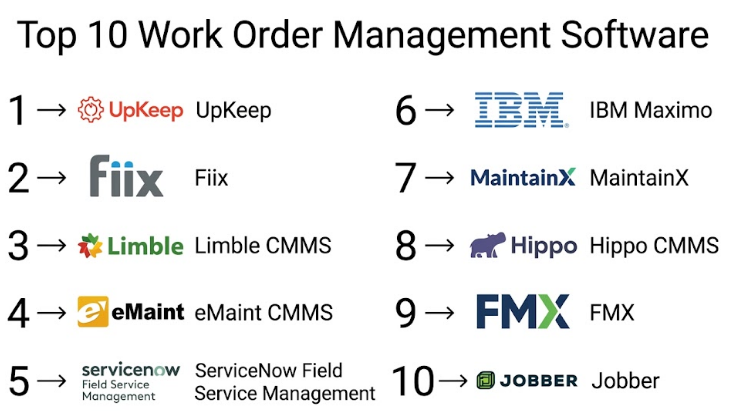
Top 10 Work Order Management Software
#1 — UpKeep
Short description (5-6 lines):
UpKeep is a modern, mobile-first work order management platform designed for maintenance teams and asset-heavy organizations. It simplifies preventive maintenance, work order tracking, and asset lifecycle management. Known for its ease of use, it is widely adopted by SMBs and mid-market companies. The platform emphasizes mobility and real-time collaboration. It also includes reporting and analytics capabilities. Ideal for teams transitioning from spreadsheets.
Key Features
- Preventive maintenance scheduling
- Mobile-first work order management
- Asset tracking and lifecycle management
- Real-time notifications
- Inventory management
- Reporting dashboards
Pros
- Easy to use interface
- Strong mobile experience
Cons
- Limited advanced customization
- May not meet complex enterprise needs
Platforms / Deployment
Web / iOS / Android
Cloud
Security & Compliance
MFA, RBAC, encryption (Not publicly stated in detail)
Integrations & Ecosystem
UpKeep integrates with ERP, IoT devices, and reporting tools. It provides API access for customization.
- Zapier
- QuickBooks
- IoT integrations
- API support
Support & Community
Good onboarding support and documentation; community presence is moderate.
#2 — Fiix
Short description (5-6 lines):
Fiix is a cloud-based CMMS (Computerized Maintenance Management System) designed for maintenance teams. It offers advanced analytics and asset tracking. The platform is suitable for mid-sized to enterprise companies. Fiix emphasizes predictive maintenance and integrations. It is backed by enterprise-grade capabilities. Ideal for data-driven maintenance teams.
Key Features
- Predictive maintenance
- Asset management
- Work order automation
- Analytics dashboards
- Inventory tracking
Pros
- Strong analytics
- Scalable for enterprises
Cons
- Learning curve
- Higher cost
Platforms / Deployment
Web / Mobile
Cloud
Security & Compliance
Not publicly stated
Integrations & Ecosystem
Fiix integrates with ERP and IoT platforms.
- SAP
- Oracle
- API access
Support & Community
Enterprise-grade support; documentation is strong.
#3 — Limble CMMS
Short description (5-6 lines):
Limble CMMS is designed for ease of use and quick deployment. It offers preventive maintenance and asset tracking features. The platform is ideal for SMBs and mid-market companies. It focuses on usability and fast onboarding. Limble provides strong mobile support. It balances simplicity with functionality.
Key Features
- Preventive maintenance
- Work order tracking
- Asset management
- Reporting tools
- Mobile access
Pros
- Fast implementation
- User-friendly
Cons
- Limited enterprise features
- Basic integrations
Platforms / Deployment
Web / iOS / Android
Cloud
Security & Compliance
Not publicly stated
Integrations & Ecosystem
- API
- Basic integrations
Support & Community
Strong onboarding and customer support.
#4 — eMaint CMMS
Short description (5-6 lines):
eMaint is a flexible CMMS solution designed for asset-intensive industries. It provides customizable workflows and detailed reporting. It is suitable for mid-market and enterprise organizations. The platform supports preventive maintenance and compliance tracking. It offers scalability and flexibility. Ideal for complex operations.
Key Features
- Custom workflows
- Asset tracking
- Preventive maintenance
- Reporting tools
- Compliance tracking
Pros
- Highly customizable
- Strong reporting
Cons
- Complex setup
- Steeper learning curve
Platforms / Deployment
Web / Mobile
Cloud
Security & Compliance
Not publicly stated
Integrations & Ecosystem
- ERP integrations
- API support
Support & Community
Strong enterprise support; documentation available.
#5 — ServiceNow Field Service Management
Short description (5-6 lines):
ServiceNow FSM is an enterprise-grade platform for managing field service operations. It integrates deeply with ITSM workflows. It is designed for large enterprises with complex needs. The platform offers automation, scheduling, and analytics. It is highly scalable. Ideal for large organizations.
Key Features
- AI-based scheduling
- Workflow automation
- Asset tracking
- Analytics
- Integration with ITSM
Pros
- Highly scalable
- Strong automation
Cons
- Expensive
- Complex implementation
Platforms / Deployment
Web / Mobile
Cloud
Security & Compliance
SSO, RBAC, audit logs (Not publicly stated in detail)
Integrations & Ecosystem
- Extensive enterprise integrations
- API ecosystem
Support & Community
Strong enterprise support and large community.
#6 — IBM Maximo
Short description (5-6 lines):
IBM Maximo is a leading enterprise asset management platform. It supports work order management at scale. It is used in industries like utilities and manufacturing. The platform offers predictive maintenance and analytics. It is highly configurable. Best for large enterprises.
Key Features
- Asset lifecycle management
- Predictive maintenance
- Work order tracking
- Analytics
- IoT integration
Pros
- Enterprise-grade
- Highly scalable
Cons
- Complex
- High cost
Platforms / Deployment
Web / Mobile
Cloud / On-prem
Security & Compliance
Enterprise security controls (Not publicly stated in detail)
Integrations & Ecosystem
- ERP integrations
- IoT integrations
- API
Support & Community
Strong enterprise support.
#7 — MaintainX
Short description (5-6 lines):
MaintainX is a modern work order platform focused on simplicity and communication. It combines messaging with work order management. It is ideal for SMBs and operations teams. The platform is mobile-first. It emphasizes collaboration. Suitable for fast-moving teams.
Key Features
- Work order tracking
- Messaging and collaboration
- Asset management
- Mobile access
- Reporting
Pros
- Easy to use
- Strong communication features
Cons
- Limited advanced features
- Not ideal for large enterprises
Platforms / Deployment
Web / iOS / Android
Cloud
Security & Compliance
Not publicly stated
Integrations & Ecosystem
- API
- Basic integrations
Support & Community
Good support for SMBs.
#8 — Hippo CMMS
Short description (5-6 lines):
Hippo CMMS is designed for simplicity and ease of use. It helps manage maintenance operations efficiently. It is ideal for small to mid-sized businesses. The platform offers basic work order management features. It is cost-effective. Suitable for teams starting with CMMS.
Key Features
- Work order tracking
- Preventive maintenance
- Asset tracking
- Reporting
Pros
- Affordable
- Easy to use
Cons
- Limited scalability
- Basic features
Platforms / Deployment
Web
Cloud
Security & Compliance
Not publicly stated
Integrations & Ecosystem
Limited integrations.
Support & Community
Basic support available.
#9 — FMX
Short description (5-6 lines):
FMX is a work order management solution tailored for facilities management. It is widely used in schools and public sector organizations. The platform is user-friendly. It focuses on maintenance workflows. It offers reporting capabilities. Suitable for non-technical teams.
Key Features
- Work order management
- Preventive maintenance
- Reporting
- Asset tracking
Pros
- Easy to adopt
- Good for public sector
Cons
- Limited customization
- Basic integrations
Platforms / Deployment
Web / Mobile
Cloud
Security & Compliance
Not publicly stated
Integrations & Ecosystem
Basic integrations.
Support & Community
Good support for target segment.
#10 — Jobber
Short description (5-6 lines):
Jobber is a field service management platform with work order capabilities. It is designed for service-based businesses. It includes scheduling, invoicing, and CRM features. It is ideal for SMBs. The platform focuses on service delivery. Suitable for service professionals.
Key Features
- Scheduling
- Work order tracking
- Invoicing
- CRM features
- Mobile access
Pros
- All-in-one solution
- Easy to use
Cons
- Limited for complex operations
- Not asset-focused
Platforms / Deployment
Web / iOS / Android
Cloud
Security & Compliance
Not publicly stated
Integrations & Ecosystem
- Payment integrations
- CRM integrations
Support & Community
Strong SMB support.
Comparison Table (Top 10)
| Tool Name | Best For | Platform(s) Supported | Deployment | Standout Feature | Public Rating |
|---|---|---|---|---|---|
| UpKeep | SMB maintenance teams | Web, Mobile | Cloud | Mobile-first design | N/A |
| Fiix | Mid-market/enterprise | Web, Mobile | Cloud | Predictive analytics | N/A |
| Limble CMMS | SMBs | Web, Mobile | Cloud | Ease of use | N/A |
| eMaint CMMS | Enterprise | Web, Mobile | Cloud | Custom workflows | N/A |
| ServiceNow FSM | Enterprise | Web, Mobile | Cloud | AI scheduling | N/A |
| IBM Maximo | Large enterprise | Web, Mobile | Hybrid | Asset lifecycle | N/A |
| MaintainX | SMB teams | Web, Mobile | Cloud | Messaging integration | N/A |
| Hippo CMMS | Small businesses | Web | Cloud | Simplicity | N/A |
| FMX | Public sector | Web, Mobile | Cloud | Ease of adoption | N/A |
| Jobber | Service SMBs | Web, Mobile | Cloud | CRM + work orders | N/A |
Evaluation & Scoring of Work Order Management Software
| Tool Name | Core (25%) | Ease (15%) | Integrations (15%) | Security (10%) | Performance (10%) | Support (10%) | Value (15%) | Weighted Total |
|---|---|---|---|---|---|---|---|---|
| UpKeep | 8 | 9 | 7 | 7 | 8 | 8 | 8 | 8.0 |
| Fiix | 9 | 7 | 8 | 7 | 8 | 8 | 7 | 8.0 |
| Limble CMMS | 8 | 9 | 6 | 6 | 7 | 8 | 8 | 7.8 |
| eMaint CMMS | 9 | 6 | 8 | 7 | 8 | 8 | 7 | 7.9 |
| ServiceNow FSM | 10 | 6 | 10 | 8 | 9 | 9 | 6 | 8.6 |
| IBM Maximo | 10 | 5 | 9 | 8 | 9 | 9 | 6 | 8.5 |
| MaintainX | 7 | 9 | 6 | 6 | 7 | 7 | 8 | 7.6 |
| Hippo CMMS | 6 | 8 | 5 | 6 | 6 | 6 | 8 | 6.8 |
| FMX | 7 | 8 | 5 | 6 | 7 | 7 | 7 | 7.1 |
| Jobber | 7 | 9 | 7 | 6 | 7 | 8 | 8 | 7.7 |
How to interpret scores:
These scores are comparative, not absolute. A higher score reflects stronger performance across weighted criteria. Enterprise tools score higher in core features but may score lower in ease of use or value. SMB tools typically excel in usability and cost efficiency. Buyers should prioritize criteria aligned with their needs rather than focusing solely on total score.
Which Work Order Management Software
Solo / Freelancer
Jobber is ideal due to its simplicity and built-in CRM features. MaintainX is also a good lightweight option.
SMB
UpKeep, Limble CMMS, and MaintainX offer the best balance of usability and features without heavy implementation.
Mid-Market
Fiix and eMaint provide stronger analytics and customization while remaining manageable.
Enterprise
ServiceNow FSM and IBM Maximo are best suited for large-scale, complex environments with integration needs.
Budget vs Premium
- Budget: Hippo CMMS, FMX
- Premium: ServiceNow, IBM Maximo
Feature Depth vs Ease of Use
- Feature depth: IBM Maximo, ServiceNow
- Ease of use: Limble, MaintainX
Integrations & Scalability
- Strong integrations: ServiceNow, IBM Maximo
- Moderate: Fiix, eMaint
- Basic: Hippo, FMX
Security & Compliance Needs
- Enterprise-grade: ServiceNow, IBM Maximo
- Moderate: Fiix, eMaint
- Basic: SMB tools
Frequently Asked Questions (FAQs)
1. What is work order management software?
It is a system that helps create, assign, track, and complete maintenance or service tasks. It centralizes workflows and improves efficiency.
2. How much does it cost?
Pricing varies widely depending on features and scale. Most tools use subscription models based on users or assets.
3. How long does implementation take?
SMB tools can be deployed in days, while enterprise solutions may take weeks or months.
4. Can it integrate with ERP systems?
Yes, many platforms support ERP integrations, especially enterprise-grade tools.
5. Is mobile access important?
Yes, especially for field teams who need real-time updates and offline capabilities.
6. What are common mistakes when choosing a tool?
Overlooking scalability, ignoring integration needs, and focusing only on price are common mistakes.
7. Can small businesses benefit from it?
Yes, many tools are designed specifically for SMBs with simple interfaces.
8. Is it secure?
Most platforms include basic security features, but enterprise tools offer more advanced controls.
9. Can I switch tools later?
Yes, but data migration and retraining can be challenging, so initial selection matters.
10. Are there alternatives?
Basic task management tools can be alternatives, but they lack specialized features for maintenance workflows.
Conclusion
Work order management software has evolved from simple task tracking into a strategic operations platform. Today’s tools combine automation, analytics, and mobility to help organizations improve efficiency, reduce downtime, and make better decisions. However, the “best” tool depends entirely on your context—team size, complexity, budget, and integration needs. SMBs often benefit from ease-of-use platforms like UpKeep or Limble, while enterprises require the depth of ServiceNow or IBM Maximo. The smartest approach is to shortlist 2–3 tools that align with your requirements, run a pilot, and validate real-world performance—especially integrations, usability, and reporting—before committing.
