Introduction
CCTV Monitoring Software is used to view, manage, record, and analyze video feeds from security cameras. It acts as the control center of a surveillance system, allowing users to monitor live footage, review recordings, receive alerts, and automate security operations.
Today, CCTV software has evolved beyond simple recording. Modern systems include AI-based detection, cloud access, mobile monitoring, and real-time alerts, making them essential for both security and operational intelligence. With increasing safety concerns, remote work environments, and digital transformation, CCTV monitoring is becoming smarter and more proactive.
Real-world use cases:
- Retail stores detecting theft and monitoring customer movement
- Offices ensuring employee safety and access control
- Warehouses tracking logistics and inventory security
- Residential complexes managing entry and surveillance
- Factories ensuring compliance with safety protocols
What buyers should evaluate:
- Number of supported cameras and scalability
- AI features (motion detection, face recognition)
- Storage (local, cloud, hybrid)
- Mobile access and remote monitoring
- Integration with alarms and access control
- Security features (encryption, access roles)
- Ease of installation and maintenance
- Cost and licensing model
- Reliability and uptime
Best for: Security teams, IT administrators, facility managers, small businesses, enterprises, and residential societies.
Not ideal for: Users needing only basic recording without monitoring, or setups with very few cameras where DVR systems are enough.
Key Trends in CCTV Monitoring Software
- AI-powered surveillance with smart alerts and behavior detection
- Cloud-based monitoring platforms reducing hardware dependency
- Edge analytics for faster real-time processing
- Mobile-first control panels for remote monitoring
- Cybersecurity enhancements like encryption and access control
- Subscription pricing models replacing one-time licenses
- Integration with smart home and IoT devices
- Automation workflows for alerts and responses
- Compliance and privacy controls becoming mandatory
- Hybrid deployments combining local and cloud storage
How We Selected These Tools (Methodology)
- Considered global adoption and brand recognition
- Evaluated core CCTV monitoring capabilities
- Reviewed AI and automation features
- Assessed performance and reliability
- Compared security and access control features
- Analyzed integration capabilities
- Evaluated deployment flexibility
- Considered ease of use and learning curve
- Reviewed support quality and community presence
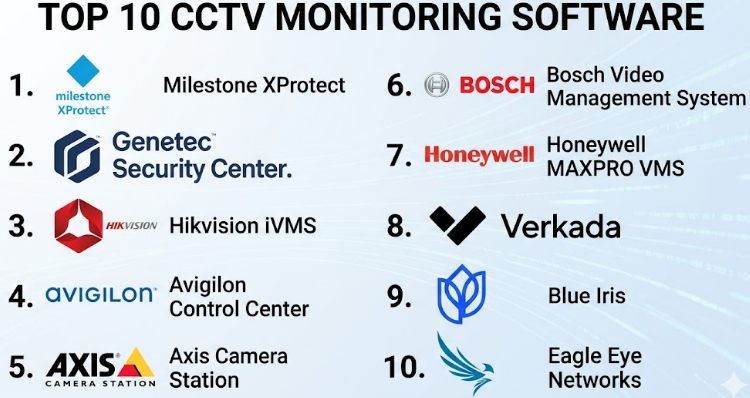
Top 10 CCTV Monitoring Software
#1 — Milestone XProtect
Short description:
A leading CCTV monitoring software known for its open-platform architecture and high scalability. Designed for large enterprises and complex surveillance systems.
Key Features
- Centralized video management
- Multi-site monitoring
- Advanced analytics support
- Event-triggered alerts
- Integration APIs
Pros
- Highly scalable
- Strong integration ecosystem
Cons
- Complex setup
- Expensive licensing
Platforms / Deployment
Windows / Web
Self-hosted / Hybrid
Security & Compliance
Encryption, RBAC, audit logs
Integrations & Ecosystem
Supports integration with access control systems, analytics tools, and IoT devices.
- Open APIs
- Third-party plugins
- Smart city systems
Support & Community
Enterprise-level support with extensive documentation
#2 — Genetec Security Center
Short description:
A unified security platform combining CCTV monitoring, access control, and analytics in one system.
Key Features
- Unified monitoring dashboard
- Real-time alerts
- AI analytics
- Multi-site control
- License plate recognition
Pros
- All-in-one solution
- Strong security features
Cons
- High cost
- Requires expertise
Platforms / Deployment
Windows / Web
Hybrid / On-prem
Security & Compliance
Encryption, RBAC
Integrations & Ecosystem
- IoT integrations
- Security hardware
- Enterprise APIs
Support & Community
Strong enterprise support
#3 — Hikvision iVMS
Short description:
A widely used CCTV monitoring solution offering affordable and easy-to-use features, especially for SMBs.
Key Features
- Live monitoring
- Video playback
- Alarm management
- Mobile access
- Motion detection
Pros
- Budget-friendly
- Easy to deploy
Cons
- Limited integrations
- Security concerns in some regions
Platforms / Deployment
Windows / Mobile
On-prem
Security & Compliance
Not publicly stated
Integrations & Ecosystem
- Hikvision devices
- Limited external integrations
Support & Community
Moderate support availability
#4 — Avigilon Control Center
Short description:
A high-performance CCTV monitoring platform with strong AI capabilities and advanced search features.
Key Features
- AI video analytics
- Facial recognition
- High-resolution support
- Smart search
- Centralized management
Pros
- Powerful analytics
- High-quality video
Cons
- Expensive
- Hardware dependency
Platforms / Deployment
Windows / Mobile
Hybrid
Security & Compliance
Encryption, RBAC
Integrations & Ecosystem
- Access control integration
- AI tools
Support & Community
Enterprise support
#5 — Axis Camera Station
Short description:
A reliable and simple CCTV monitoring software tailored for Axis camera systems.
Key Features
- Live monitoring
- Recording and playback
- Event notifications
- Mobile access
- Easy setup
Pros
- User-friendly
- Stable performance
Cons
- Limited scalability
- Vendor-specific
Platforms / Deployment
Windows / Mobile
On-prem
Security & Compliance
Basic encryption
Integrations & Ecosystem
- Axis devices
- Limited integrations
Support & Community
Good vendor support
#6 — Bosch Video Management System
Short description:
A robust CCTV monitoring system designed for large-scale deployments and critical infrastructure.
Key Features
- High scalability
- Video analytics
- Failover support
- Centralized control
- Event alerts
Pros
- Highly reliable
- Strong security
Cons
- Complex setup
- High cost
Platforms / Deployment
Windows
On-prem
Security & Compliance
Encryption, audit logs
Integrations & Ecosystem
- Bosch ecosystem
- Security integrations
Support & Community
Enterprise support
#7 — Honeywell MAXPRO VMS
Short description:
A scalable CCTV monitoring solution for enterprise environments with strong monitoring capabilities.
Key Features
- Multi-site monitoring
- Alarm integration
- Video analytics
- Centralized dashboard
Pros
- Enterprise-ready
- Scalable
Cons
- Steep learning curve
- Licensing complexity
Platforms / Deployment
Windows
On-prem
Security & Compliance
Not publicly stated
Integrations & Ecosystem
- Honeywell ecosystem
- Security systems
Support & Community
Enterprise support
#8 — Verkada
Short description:
A modern cloud-based CCTV monitoring platform offering simplicity, scalability, and AI-powered insights.
Key Features
- Cloud-based monitoring
- AI search
- Remote access
- Automatic updates
- Smart alerts
Pros
- Easy to use
- No hardware management
Cons
- Subscription model
- Vendor lock-in
Platforms / Deployment
Web / Mobile
Cloud
Security & Compliance
Encryption, SSO
Integrations & Ecosystem
- Cloud APIs
- SaaS integrations
Support & Community
Strong cloud support
#9 — Blue Iris
Short description:
A cost-effective CCTV monitoring software suitable for small businesses and advanced home users.
Key Features
- Video recording
- Motion alerts
- Remote access
- Custom configurations
Pros
- Affordable
- Flexible
Cons
- Limited enterprise features
- Requires setup effort
Platforms / Deployment
Windows
Self-hosted
Security & Compliance
Not publicly stated
Integrations & Ecosystem
- Basic integrations
- Community plugins
Support & Community
Strong community support
#10 — Eagle Eye Networks
Short description:
A cloud-based CCTV monitoring solution designed for remote access and scalable surveillance systems.
Key Features
- Cloud storage
- AI analytics
- Remote monitoring
- Multi-site management
Pros
- Scalable
- Easy remote access
Cons
- Internet dependency
- Subscription cost
Platforms / Deployment
Web / Mobile
Cloud
Security & Compliance
Encryption, audit logs
Integrations & Ecosystem
- API integrations
- Cloud services
Support & Community
Good onboarding and support
Comparison Table (Top 10)
| Tool Name | Best For | Platform(s) Supported | Deployment | Standout Feature | Public Rating |
|---|---|---|---|---|---|
| Milestone XProtect | Enterprise | Windows/Web | Hybrid | Open platform | N/A |
| Genetec Security Center | Enterprise | Windows/Web | Hybrid | Unified system | N/A |
| Hikvision iVMS | SMB | Windows/Mobile | On-prem | Low cost | N/A |
| Avigilon Control Center | Security-critical | Windows/Mobile | Hybrid | AI analytics | N/A |
| Axis Camera Station | SMB | Windows/Mobile | On-prem | Easy setup | N/A |
| Bosch VMS | Infrastructure | Windows | On-prem | Reliability | N/A |
| Honeywell MAXPRO | Enterprise | Windows | On-prem | Scalability | N/A |
| Verkada | Modern businesses | Web/Mobile | Cloud | Cloud-native | N/A |
| Blue Iris | Small setups | Windows | Self-hosted | Low cost | N/A |
| Eagle Eye Networks | Multi-site | Web/Mobile | Cloud | Remote access | N/A |
Evaluation & Scoring of CCTV Monitoring Software
| Tool Name | Core | Ease | Integrations | Security | Performance | Support | Value | Weighted Total |
|---|---|---|---|---|---|---|---|---|
| Milestone XProtect | 9 | 7 | 9 | 8 | 9 | 8 | 7 | 8.4 |
| Genetec Security Center | 9 | 7 | 9 | 9 | 9 | 8 | 6 | 8.5 |
| Hikvision iVMS | 7 | 8 | 6 | 6 | 7 | 6 | 8 | 7.0 |
| Avigilon Control Center | 9 | 7 | 8 | 8 | 9 | 8 | 6 | 8.3 |
| Axis Camera Station | 7 | 9 | 6 | 7 | 8 | 7 | 8 | 7.5 |
| Bosch VMS | 9 | 6 | 7 | 9 | 9 | 8 | 6 | 8.2 |
| Honeywell MAXPRO | 8 | 6 | 7 | 8 | 8 | 7 | 6 | 7.5 |
| Verkada | 8 | 9 | 8 | 8 | 8 | 8 | 7 | 8.2 |
| Blue Iris | 6 | 7 | 6 | 6 | 7 | 6 | 9 | 6.9 |
| Eagle Eye Networks | 8 | 8 | 8 | 8 | 8 | 7 | 7 | 7.9 |
How to interpret scores:
These scores are relative comparisons. A higher score indicates better overall capability across features, usability, and value. Choose based on your specific needs rather than just the highest score.
Which CCTV Monitoring Software
Solo / Freelancer
Blue Iris is a strong choice for affordability and flexibility.
SMB
Axis Camera Station and Hikvision iVMS offer simplicity and cost efficiency.
Mid-Market
Avigilon and Verkada provide a balance of features and usability.
Enterprise
Milestone XProtect and Genetec Security Center are ideal.
Budget vs Premium
- Budget: Blue Iris, Hikvision
- Premium: Genetec, Bosch
Feature Depth vs Ease of Use
- Feature-rich: Milestone, Genetec
- Easy: Verkada, Axis
Integrations & Scalability
- Strong integrations: Milestone, Genetec
- Moderate: Eagle Eye, Verkada
Security & Compliance Needs
- High: Bosch, Genetec
- Moderate: Avigilon, Verkada
Frequently Asked Questions (FAQs)
1. What is CCTV monitoring software?
It is software used to manage, monitor, and analyze camera footage in real time.
2. Is cloud CCTV software secure?
Yes, if it includes encryption, access control, and proper authentication.
3. How much does CCTV software cost?
Costs vary depending on features, number of cameras, and deployment type.
4. Can I monitor CCTV remotely?
Yes, most modern tools offer mobile and web access.
5. What is AI in CCTV software?
AI helps detect objects, faces, and unusual behavior automatically.
6. Do I need internet for CCTV software?
Cloud systems require internet, while on-prem systems may not.
7. Can CCTV software scale?
Yes, enterprise solutions can support thousands of cameras.
8. How do I choose the right software?
Consider scalability, features, cost, and ease of use.
9. Can CCTV integrate with alarms?
Yes, many systems support alarm and access control integration.
10. Is installation difficult?
Some systems are simple, while enterprise tools require expertise.
Conclusion
CCTV Monitoring Software has evolved into a powerful platform that goes far beyond basic video recording. Today, it plays a critical role in security, operations, and even business intelligence. While enterprise solutions like Milestone and Genetec offer deep integrations and scalability, cloud-native platforms such as Verkada and Eagle Eye Networks simplify management and remote access. Smaller setups can benefit from cost-effective tools like Blue Iris without compromising essential features. The best choice depends on your environment, budget, and long-term needs. Start by identifying your key requirements, shortlist two or three tools, and test them in a real-world scenario before finalizing your decision.