Introduction
Integrated Development Environments (IDEs) are software applications that provide developers with a comprehensive set of tools for writing, testing, debugging, and managing code—all in one place. In simple terms, an IDE combines a code editor, compiler/interpreter, debugger, and additional development tools into a single interface to streamline the development process.
As software development becomes more complex—with multi-language stacks, cloud-native architectures, and AI-assisted coding—IDEs have evolved into powerful productivity platforms. They help developers write cleaner code, reduce errors, and accelerate development cycles.
Common use cases include:
- Writing and debugging code across multiple languages
- Building web, mobile, and desktop applications
- Managing large codebases
- Integrating with version control systems
- Running and testing applications locally
Key evaluation criteria:
- Language support and extensibility
- Code intelligence (autocomplete, suggestions)
- Debugging capabilities
- Performance and responsiveness
- Integration with SCM and CI/CD tools
- Plugin ecosystem
- User interface and developer experience
- Cross-platform support
- Cloud and remote development capabilities
- Cost and licensing
Best for: Developers, software engineers, DevOps teams, and organizations building applications across various platforms and technologies.
Not ideal for: Non-technical users or very simple coding tasks where lightweight text editors may be sufficient.
Key Trends in Integrated Development Environments (IDEs)
- AI-powered coding assistants: Intelligent code completion and suggestions
- Cloud-based development environments: Browser-based IDEs gaining popularity
- Remote development support: Working seamlessly with containers and remote servers
- Language server protocol (LSP) adoption: Standardized language support
- Lightweight yet powerful editors: Faster startup and performance optimization
- Integrated DevOps workflows: Built-in Git, CI/CD, and deployment tools
- Cross-platform development: Unified development for web, mobile, and backend
- Plugin-driven ecosystems: Customization through extensions
- Security scanning integration: Detecting vulnerabilities during coding
- Collaboration features: Real-time coding and pair programming
How We Selected These Tools (Methodology)
We evaluated IDEs based on:
- Popularity and developer adoption
- Language and framework support
- Feature completeness (editing, debugging, extensions)
- Ease of use and onboarding
- Performance and stability
- Integration with development workflows
- Plugin ecosystem strength
- Cross-platform compatibility
- Community and vendor support
- Suitability for different developer needs
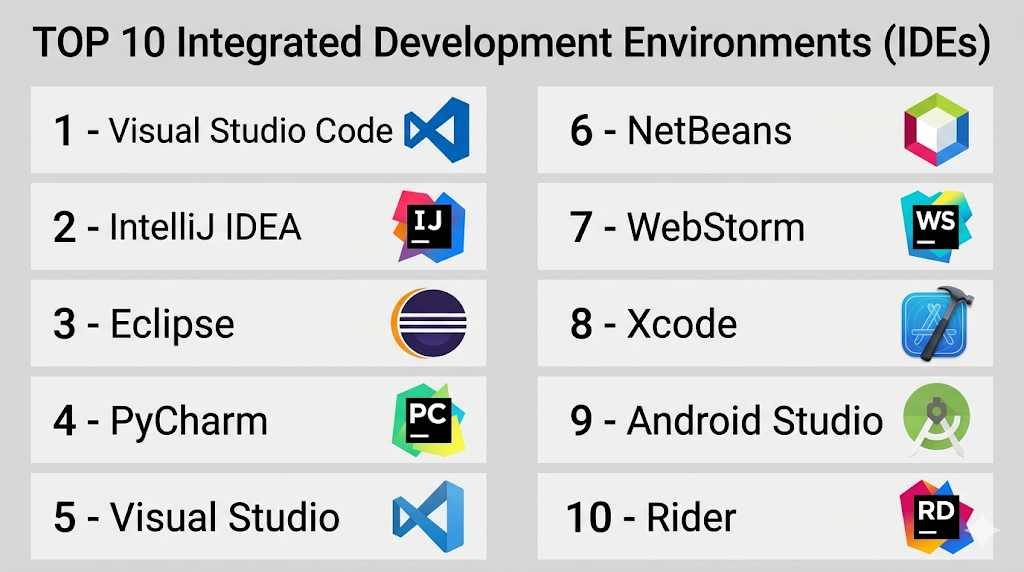
Top 10 Integrated Development Environments (IDEs)
#1 — Visual Studio Code
Short description: A lightweight yet powerful code editor with extensive plugin support, widely used across languages and platforms.
Key Features
- Intelligent code completion (IntelliSense)
- Large extension marketplace
- Built-in Git integration
- Debugging support
- Remote development capabilities
- Cross-platform support
Pros
- Highly customizable
- Free and widely adopted
Cons
- Requires extensions for full IDE features
- Can become heavy with many plugins
Platforms / Deployment
Windows / macOS / Linux
Security & Compliance
Not publicly stated
Integrations & Ecosystem
VS Code integrates with a vast range of development tools, making it suitable for almost any workflow.
- GitHub
- Docker
- Kubernetes
- CI/CD tools
Support & Community
Very large global community and extensive documentation.
#2 — IntelliJ IDEA
Short description: A powerful IDE primarily for Java and JVM-based development, with strong automation and productivity features.
Key Features
- Advanced code analysis
- Smart code completion
- Built-in version control
- Debugging tools
- Framework support (Spring, etc.)
Pros
- Excellent for Java development
- Intelligent automation
Cons
- Resource-intensive
- Paid version required for full features
Platforms / Deployment
Windows / macOS / Linux
Security & Compliance
Not publicly stated
Integrations & Ecosystem
Strong ecosystem for JVM languages and frameworks.
- Git
- Build tools
- CI/CD pipelines
Support & Community
Strong community and vendor support.
#3 — Eclipse
Short description: An open-source IDE known for its flexibility and strong Java development support.
Key Features
- Plugin-based architecture
- Multi-language support
- Debugging tools
- Version control integration
- Customizable environment
Pros
- Free and open-source
- Highly extensible
Cons
- Complex setup
- Outdated UI
Platforms / Deployment
Windows / macOS / Linux
Security & Compliance
Not publicly stated
Integrations & Ecosystem
Large plugin ecosystem.
- Git
- Maven
- CI/CD tools
Support & Community
Large but declining community.
#4 — PyCharm
Short description: A dedicated Python IDE with powerful features for professional development.
Key Features
- Intelligent code completion
- Debugging and testing tools
- Django and Flask support
- Database tools
- Virtual environment management
Pros
- Best-in-class Python support
- Rich feature set
Cons
- Paid version for advanced features
- Resource-heavy
Platforms / Deployment
Windows / macOS / Linux
Security & Compliance
Not publicly stated
Integrations & Ecosystem
Strong Python ecosystem integration.
- Git
- Docker
- CI/CD tools
Support & Community
Strong community.
#5 — Visual Studio
Short description: A full-featured IDE for .NET and enterprise application development.
Key Features
- Advanced debugging tools
- Integrated development tools
- Support for multiple languages
- Built-in Git support
- UI designers
Pros
- Enterprise-grade features
- Strong Microsoft ecosystem
Cons
- Windows-focused
- Heavy resource usage
Platforms / Deployment
Windows
Security & Compliance
Not publicly stated
Integrations & Ecosystem
Works with Microsoft ecosystem.
- Azure
- Git
- CI/CD tools
Support & Community
Strong enterprise support.
#6 — NetBeans
Short description: An open-source IDE supporting Java, PHP, and other languages.
Key Features
- Built-in tools for Java development
- GUI builder
- Debugging support
- Plugin system
- Cross-platform support
Pros
- Free and easy to use
- Good for beginners
Cons
- Slower performance
- Smaller ecosystem
Platforms / Deployment
Windows / macOS / Linux
Security & Compliance
Not publicly stated
Integrations & Ecosystem
Supports standard development tools.
- Git
- Maven
- CI/CD tools
Support & Community
Moderate community.
#7 — WebStorm
Short description: A powerful IDE for JavaScript and front-end development.
Key Features
- Advanced JavaScript support
- Debugging tools
- Framework integration (React, Angular)
- Code refactoring
- Testing tools
Pros
- Excellent for frontend development
- Smart code assistance
Cons
- Paid tool
- Resource-intensive
Platforms / Deployment
Windows / macOS / Linux
Security & Compliance
Not publicly stated
Integrations & Ecosystem
Strong frontend ecosystem support.
- Node.js
- Git
- CI/CD tools
Support & Community
Strong developer community.
#8 — Xcode
Short description: Apple’s IDE for developing applications for macOS and iOS platforms.
Key Features
- Swift and Objective-C support
- Interface builder
- Debugging tools
- Simulator for testing
- Performance analysis tools
Pros
- Essential for Apple development
- Deep platform integration
Cons
- macOS-only
- Limited outside Apple ecosystem
Platforms / Deployment
macOS
Security & Compliance
Not publicly stated
Integrations & Ecosystem
Works within Apple ecosystem.
- Apple SDKs
- Development tools
Support & Community
Strong Apple developer community.
#9 — Android Studio
Short description: The official IDE for Android application development.
Key Features
- Android SDK integration
- Layout editor
- Emulator support
- Debugging tools
- Performance profiling
Pros
- Best for Android development
- Strong tooling
Cons
- Resource-heavy
- Limited outside Android
Platforms / Deployment
Windows / macOS / Linux
Security & Compliance
Not publicly stated
Integrations & Ecosystem
Android ecosystem integration.
- Gradle
- Git
- CI/CD tools
Support & Community
Large developer community.
#10 — Rider
Short description: A cross-platform .NET IDE from JetBrains designed for modern development workflows.
Key Features
- .NET support
- Cross-platform development
- Debugging tools
- Code analysis
- Integration with ReSharper
Pros
- Cross-platform .NET support
- High productivity
Cons
- Paid tool
- Smaller community
Platforms / Deployment
Windows / macOS / Linux
Security & Compliance
Not publicly stated
Integrations & Ecosystem
Works with .NET ecosystem.
- Git
- CI/CD tools
Support & Community
Growing community.
Comparison Table (Top 10)
| Tool Name | Best For | Platform(s) Supported | Deployment | Standout Feature | Public Rating |
|---|---|---|---|---|---|
| VS Code | General dev | Cross-platform | Local | Extensions | N/A |
| IntelliJ IDEA | Java dev | Cross-platform | Local | Smart analysis | N/A |
| Eclipse | Open-source | Cross-platform | Local | Plugin system | N/A |
| PyCharm | Python dev | Cross-platform | Local | Python support | N/A |
| Visual Studio | Enterprise | Windows | Local | Microsoft integration | N/A |
| NetBeans | Beginners | Cross-platform | Local | Ease of use | N/A |
| WebStorm | Frontend | Cross-platform | Local | JS support | N/A |
| Xcode | Apple dev | macOS | Local | Native tools | N/A |
| Android Studio | Android dev | Cross-platform | Local | Emulator | N/A |
| Rider | .NET dev | Cross-platform | Local | Cross-platform .NET | N/A |
Integrated Development Environments (IDEs) Scoring
| Tool Name | Core (25%) | Ease (15%) | Integrations (15%) | Security (10%) | Performance (10%) | Support (10%) | Value (15%) | Weighted Total |
|---|---|---|---|---|---|---|---|---|
| VS Code | 9 | 9 | 10 | 7 | 9 | 10 | 10 | 9.2 |
| IntelliJ IDEA | 9 | 8 | 9 | 7 | 8 | 9 | 8 | 8.5 |
| Eclipse | 8 | 6 | 8 | 7 | 7 | 8 | 10 | 7.9 |
| PyCharm | 9 | 8 | 9 | 7 | 8 | 9 | 8 | 8.5 |
| Visual Studio | 9 | 7 | 9 | 8 | 8 | 9 | 8 | 8.4 |
| NetBeans | 7 | 7 | 7 | 7 | 7 | 7 | 10 | 7.4 |
| WebStorm | 9 | 8 | 9 | 7 | 8 | 9 | 7 | 8.3 |
| Xcode | 8 | 7 | 7 | 7 | 8 | 8 | 9 | 7.8 |
| Android Studio | 9 | 7 | 8 | 7 | 8 | 9 | 9 | 8.3 |
| Rider | 8 | 8 | 8 | 7 | 8 | 8 | 8 | 8.0 |
How to interpret scores:
- Scores are relative across developer needs
- Higher scores indicate balanced performance
- Lightweight tools score higher in ease and value
- Specialized IDEs excel in their ecosystems
- Choose based on language and workflow
Which Integrated Development Environments (IDEs) Is Right for You?
Solo / Freelancer
- Use VS Code or NetBeans
- Focus on flexibility and ease
SMB
- VS Code or PyCharm for balanced features
- Ensure plugin support
Mid-Market
- IntelliJ IDEA or WebStorm for productivity
- Focus on automation and integrations
Enterprise
- Visual Studio or IntelliJ IDEA
- Focus on scalability and advanced tools
Budget vs Premium
- Free tools offer great value
- Paid tools provide advanced productivity features
Feature Depth vs Ease of Use
- IntelliJ = powerful
- VS Code = simple and flexible
Integrations & Scalability
- Choose tools with strong plugin ecosystems
- Ensure CI/CD compatibility
Security & Compliance Needs
- Focus on integration with secure pipelines
- Enterprise IDEs offer better controls
Frequently Asked Questions (FAQs)
What is an IDE?
An IDE is a software application that provides tools for coding, debugging, and testing.
Are IDEs free?
Many IDEs offer free versions, while some require licenses.
Which IDE is best for beginners?
VS Code and NetBeans are beginner-friendly.
Do IDEs support multiple languages?
Yes, many IDEs support multiple programming languages.
Can IDEs integrate with Git?
Yes, most modern IDEs include Git integration.
Are IDEs necessary for coding?
Not strictly, but they improve productivity significantly.
What is the difference between IDE and code editor?
IDEs offer more built-in tools, while editors are lightweight.
Can IDEs run code?
Yes, most IDEs allow running and debugging code.
Which IDE is best for Python?
PyCharm is widely used for Python development.
Can I switch IDEs later?
Yes, but configuration and workflows may change.
Conclusion
Integrated Development Environments (IDEs) are essential tools for modern software development, offering everything developers need to write, test, and deploy code efficiently.
