Introduction
Incident Reporting (Safety) Tools are software platforms used to capture, manage, investigate, and analyze workplace incidents such as accidents, near-misses, hazards, and compliance issues. In simple terms, they help organizations record what went wrong, understand why it happened, and prevent it from happening again.
In the current operational landscape, safety is no longer just about compliance—it’s about real-time visibility, proactive risk management, and employee accountability. Organizations across industries are moving from paper-based or reactive reporting systems to digital, mobile-first, and AI-enabled platforms.
Real-world use cases include:
- Logging workplace accidents in manufacturing plants
- Tracking near-miss incidents in construction sites
- Managing compliance reports in healthcare environments
- Recording safety observations in oil & gas operations
- Investigating operational incidents in logistics and warehousing
What buyers should evaluate:
- Ease of incident reporting (mobile, offline capability)
- Workflow automation and escalation rules
- Root cause analysis tools
- Compliance and audit readiness
- Integration with EHS, HR, and ERP systems
- Data analytics and reporting dashboards
- Security and role-based access controls
- Scalability for multi-location operations
- Customization flexibility
Best for: Safety managers, compliance officers, HR teams, operations leaders, and organizations in industries like manufacturing, construction, healthcare, logistics, and energy.
Not ideal for: Very small teams with minimal compliance requirements or organizations that only need basic issue tracking—simpler task management tools may suffice.
Key Trends in Incident Reporting (Safety) Tools
- AI-powered incident classification to automatically categorize and prioritize risks
- Mobile-first reporting enabling real-time submissions from field workers
- Voice-to-text reporting for faster incident documentation
- Predictive analytics to identify risk patterns before incidents occur
- Integration with IoT devices (sensors, wearables) for automated incident detection
- Workflow automation for approvals, escalations, and corrective actions
- Regulatory compliance mapping across multiple regions and standards
- Cloud-native deployments replacing legacy on-prem systems
- Low-code customization for workflows and reporting formats
- Advanced dashboards for executive-level safety insights
How We Selected These Tools (Methodology)
- Evaluated market adoption and brand recognition across industries
- Assessed feature completeness for incident reporting and investigation
- Reviewed reliability and performance indicators from enterprise usage
- Considered security posture and compliance readiness
- Analyzed integration capabilities with enterprise systems
- Included tools suitable for SMB to enterprise-scale organizations
- Balanced ease of use vs advanced capabilities
- Prioritized modern, scalable, and cloud-first platforms
- Considered global applicability and industry coverage
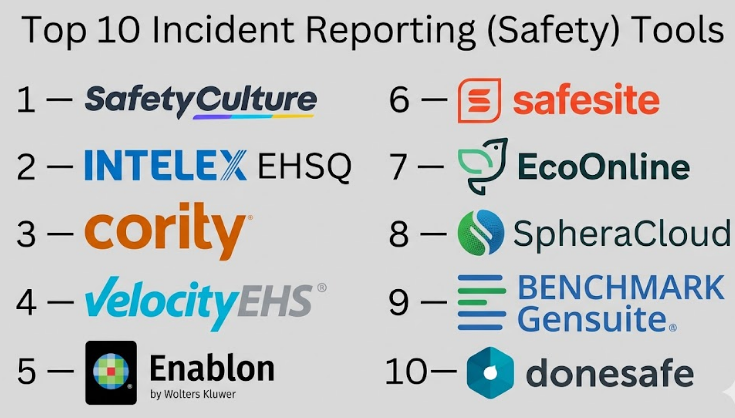
Top 10 Incident Reporting (Safety) Tools
#1 — SafetyCulture (iAuditor)
Short description:
A widely used safety inspection and incident reporting platform designed for frontline teams. It allows quick reporting via mobile devices and supports digital checklists, audits, and corrective actions. Ideal for SMBs and enterprises looking for a simple yet powerful tool. Strong focus on usability and field adoption.
Key Features
- Mobile-first incident reporting
- Customizable forms and templates
- Real-time notifications and alerts
- Photo and video attachments
- Workflow automation for corrective actions
- Offline data capture
- Analytics dashboards
Pros
- Extremely easy to use for field teams
- Fast deployment with minimal training
Cons
- Limited deep compliance features compared to enterprise tools
- Advanced customization can be restricted
Platforms / Deployment
Web / iOS / Android
Cloud
Security & Compliance
SSO, encryption, RBAC (details not fully publicly stated)
Integrations & Ecosystem
Integrates with common business tools via APIs and connectors
- Zapier integrations
- Cloud storage platforms
- Reporting tools
- API-based integrations
Support & Community
Strong documentation and onboarding support; widely adopted globally
#2 — Intelex EHSQ
Short description:
An enterprise-grade EHS platform with robust incident management capabilities. Designed for large organizations needing compliance, audits, and advanced reporting. Offers configurable workflows and deep analytics.
Key Features
- Incident tracking and investigation
- Root cause analysis tools
- Compliance management
- Risk assessment modules
- Workflow automation
- Reporting and dashboards
- Audit management
Pros
- Highly configurable for enterprise needs
- Strong compliance and audit capabilities
Cons
- Complex implementation
- Higher cost for small teams
Platforms / Deployment
Web
Cloud / Hybrid
Security & Compliance
Not publicly stated
Integrations & Ecosystem
Supports enterprise integrations
- ERP systems
- HR platforms
- APIs
- Data analytics tools
Support & Community
Enterprise-grade support with onboarding programs
#3 — Cority
Short description:
A comprehensive EHS and safety platform offering incident reporting, compliance tracking, and analytics. Used by large enterprises for managing workplace safety programs.
Key Features
- Incident and near-miss reporting
- Compliance tracking
- Data analytics
- Workflow automation
- Risk management
- Reporting tools
Pros
- Strong analytics capabilities
- Scalable for large enterprises
Cons
- User interface can be complex
- Requires training
Platforms / Deployment
Web
Cloud
Security & Compliance
Not publicly stated
Integrations & Ecosystem
- ERP integrations
- APIs
- Data platforms
Support & Community
Enterprise-level support
#4 — VelocityEHS
Short description:
A cloud-based EHS solution focused on safety incident tracking and compliance. Known for user-friendly interfaces and scalable deployment.
Key Features
- Incident reporting
- Risk assessments
- Compliance management
- Workflow automation
- Dashboard analytics
Pros
- Easy to deploy
- Good user experience
Cons
- Limited customization
- May lack advanced features for niche industries
Platforms / Deployment
Web
Cloud
Security & Compliance
Not publicly stated
Integrations & Ecosystem
- API integrations
- HR systems
- Compliance tools
Support & Community
Strong support and onboarding
#5 — Enablon
Short description:
A powerful EHS platform used by large enterprises for managing incidents, compliance, and sustainability. Offers deep analytics and integration capabilities.
Key Features
- Incident reporting and investigation
- Risk management
- Compliance tracking
- Workflow automation
- Advanced analytics
Pros
- Highly scalable
- Comprehensive feature set
Cons
- Expensive
- Complex setup
Platforms / Deployment
Web
Cloud / Hybrid
Security & Compliance
Not publicly stated
Integrations & Ecosystem
- ERP systems
- Data analytics tools
- APIs
Support & Community
Enterprise-level support
#6 — Safesite
Short description:
A mobile-first safety management tool designed for small and mid-sized businesses. Focuses on simplifying incident reporting and safety tracking.
Key Features
- Mobile incident reporting
- Safety inspections
- Risk scoring
- Alerts and notifications
- Reporting dashboards
Pros
- Simple and intuitive
- Affordable for SMBs
Cons
- Limited enterprise features
- Basic analytics
Platforms / Deployment
Web / iOS / Android
Cloud
Security & Compliance
Not publicly stated
Integrations & Ecosystem
- Limited integrations
- Basic API support
Support & Community
Good support for SMB users
#7 — EcoOnline
Short description:
A safety and chemical management platform with incident reporting capabilities. Popular in regulated industries requiring compliance tracking.
Key Features
- Incident management
- Chemical safety tracking
- Compliance management
- Risk assessments
- Reporting tools
Pros
- Strong compliance features
- Industry-specific capabilities
Cons
- Less intuitive UI
- Requires configuration
Platforms / Deployment
Web
Cloud
Security & Compliance
Not publicly stated
Integrations & Ecosystem
- Compliance systems
- APIs
- Reporting tools
Support & Community
Standard enterprise support
#8 — SpheraCloud
Short description:
A comprehensive EHS and risk management platform designed for global enterprises. Focuses on incident reporting, sustainability, and operational risk.
Key Features
- Incident tracking
- Risk management
- Compliance tracking
- Analytics dashboards
- Workflow automation
Pros
- Strong enterprise capabilities
- Global compliance support
Cons
- Complex implementation
- High cost
Platforms / Deployment
Web
Cloud
Security & Compliance
Not publicly stated
Integrations & Ecosystem
- Enterprise integrations
- APIs
- Data platforms
Support & Community
Enterprise-level support
#9 — Benchmark Gensuite
Short description:
A modular EHS platform offering incident reporting and compliance tools. Known for flexibility and scalability.
Key Features
- Incident management
- Risk assessments
- Compliance tracking
- Workflow automation
- Reporting tools
Pros
- Modular design
- Scalable across industries
Cons
- Learning curve
- Customization complexity
Platforms / Deployment
Web
Cloud
Security & Compliance
Not publicly stated
Integrations & Ecosystem
- APIs
- ERP integrations
- Data tools
Support & Community
Strong enterprise support
#10 — Donesafe
Short description:
A modern cloud-based safety platform focused on simplifying incident reporting and compliance management. Known for flexibility and ease of use.
Key Features
- Incident reporting
- Compliance tracking
- Risk management
- Workflow automation
- Analytics dashboards
Pros
- User-friendly interface
- Flexible workflows
Cons
- Limited enterprise depth
- Fewer integrations
Platforms / Deployment
Web
Cloud
Security & Compliance
Not publicly stated
Integrations & Ecosystem
- APIs
- Basic integrations
- Reporting tools
Support & Community
Good support and onboarding
Comparison Table (Top 10)
| Tool Name | Best For | Platform(s) Supported | Deployment | Standout Feature | Public Rating |
|---|---|---|---|---|---|
| SafetyCulture | SMB, field teams | Web, iOS, Android | Cloud | Mobile-first reporting | N/A |
| Intelex EHSQ | Enterprise compliance | Web | Cloud/Hybrid | Advanced workflows | N/A |
| Cority | Large enterprises | Web | Cloud | Analytics capabilities | N/A |
| VelocityEHS | Mid-market | Web | Cloud | Ease of use | N/A |
| Enablon | Global enterprises | Web | Cloud/Hybrid | Comprehensive EHS | N/A |
| Safesite | SMB | Web, iOS, Android | Cloud | Simplicity | N/A |
| EcoOnline | Regulated industries | Web | Cloud | Compliance tracking | N/A |
| SpheraCloud | Enterprise risk mgmt | Web | Cloud | Global compliance | N/A |
| Benchmark Gensuite | Modular enterprises | Web | Cloud | Flexibility | N/A |
| Donesafe | Mid-market | Web | Cloud | User-friendly workflows | N/A |
Evaluation & Incident Reporting (Safety) Tools
| Tool Name | Core | Ease | Integrations | Security | Performance | Support | Value | Weighted Total |
|---|---|---|---|---|---|---|---|---|
| SafetyCulture | 8 | 9 | 7 | 7 | 8 | 8 | 9 | 8.2 |
| Intelex EHSQ | 9 | 6 | 8 | 8 | 9 | 9 | 7 | 8.2 |
| Cority | 9 | 6 | 8 | 8 | 9 | 8 | 7 | 8.1 |
| VelocityEHS | 8 | 8 | 7 | 7 | 8 | 8 | 8 | 7.9 |
| Enablon | 10 | 5 | 9 | 9 | 9 | 9 | 6 | 8.3 |
| Safesite | 7 | 9 | 6 | 6 | 7 | 7 | 9 | 7.6 |
| EcoOnline | 8 | 6 | 7 | 8 | 8 | 7 | 7 | 7.5 |
| SpheraCloud | 9 | 5 | 9 | 9 | 9 | 9 | 6 | 8.2 |
| Benchmark Gensuite | 9 | 6 | 8 | 8 | 8 | 8 | 7 | 7.9 |
| Donesafe | 8 | 8 | 7 | 7 | 8 | 7 | 8 | 7.8 |
How to interpret:
- Scores are comparative across tools, not absolute
- Higher “Core” indicates stronger feature depth
- “Ease” reflects usability and adoption speed
- “Value” considers pricing vs capabilities
- Weighted totals help shortlist tools but should be validated with real use cases
Which Incident Reporting (Safety) Tools
Solo / Freelancer
Lightweight tools like SafetyCulture or Safesite are sufficient for basic reporting and tracking.
SMB
Choose tools like Safesite or Donesafe for affordability, ease of use, and quick deployment.
Mid-Market
VelocityEHS and Donesafe offer a balance of features and usability.
Enterprise
Intelex, Enablon, Cority, and SpheraCloud are better suited for compliance-heavy, large-scale operations.
Budget vs Premium
- Budget: Safesite, SafetyCulture
- Premium: Enablon, SpheraCloud
Feature Depth vs Ease of Use
- Deep features: Enablon, Intelex
- Easy to use: SafetyCulture, Safesite
Integrations & Scalability
Enterprise tools offer better integrations and scalability.
Security & Compliance Needs
Highly regulated industries should prioritize enterprise-grade platforms.
Frequently Asked Questions (FAQs)
1. What is incident reporting software?
It is a tool used to log, track, and analyze workplace incidents for safety and compliance.
2. How much does it cost?
Pricing varies based on features and scale. It may be subscription-based.
3. Is mobile reporting important?
Yes, it enables real-time reporting from field workers.
4. Can it integrate with HR systems?
Most tools offer integration capabilities via APIs.
5. How long does implementation take?
It ranges from days for SMB tools to months for enterprise platforms.
6. Is data secure?
Most tools include encryption and access controls.
7. What industries use these tools?
Manufacturing, healthcare, construction, logistics, and energy.
8. Can it scale with business growth?
Yes, especially cloud-based solutions.
9. What are common mistakes?
Choosing overly complex tools or ignoring user adoption.
10. Are there alternatives?
Basic issue tracking tools can be used for simple needs.
Conclusion
Incident Reporting (Safety) Tools are becoming essential for modern organizations that want to move beyond reactive safety management and build proactive, data-driven safety cultures. While some tools focus on simplicity and quick adoption, others provide deep compliance, analytics, and enterprise integration capabilities. The right choice depends on your organization’s size, industry requirements, and operational complexity. Instead of looking for a single “best” tool, it is more effective to shortlist two or three options that align with your needs. Run a pilot, involve your safety teams, validate integrations, and ensure the platform fits your workflows before making a final decision.