Introduction
Emergency Notification Systems (ENS) are software platforms used to quickly send alerts and critical information to employees, customers, or the public during emergencies. These systems help organizations communicate in real time across multiple channels such as SMS, email, mobile apps, voice calls, and collaboration tools.
In today’s environment, where risks range from natural disasters and workplace incidents to cyber threats and infrastructure outages, fast and reliable communication is essential. Modern ENS platforms go beyond basic alerts—they include automation, geo-targeting, AI-driven decision support, and integration with enterprise systems to ensure the right message reaches the right people instantly.
Real-world use cases include:
- Sending evacuation alerts during fire or natural disasters
- Notifying employees about IT outages or cybersecurity incidents
- Coordinating emergency response in hospitals or campuses
- Communicating safety instructions during industrial accidents
- Alerting field teams in logistics or construction environments
What buyers should evaluate:
- Multi-channel communication (SMS, voice, push, email)
- Delivery speed and reliability
- Geo-targeting and segmentation capabilities
- Automation and escalation workflows
- Integration with HR, ITSM, and security tools
- Mobile app usability and offline capabilities
- Compliance and audit logging
- Scalability for large user bases
- Ease of message creation and templates
Best for: Enterprises, government agencies, healthcare providers, educational institutions, logistics companies, and organizations with distributed workforces or safety-critical operations.
Not ideal for: Very small teams or organizations that only need simple communication—basic messaging apps or email systems may be sufficient.
Key Trends in Emergency Notification Systems
- AI-assisted alerting to recommend message templates and response actions
- Omnichannel communication ensuring redundancy across SMS, voice, apps, and email
- Geo-fencing and location intelligence for targeted alerts
- Integration with IoT and sensors for automated alerts (fire alarms, weather systems)
- Cloud-native scalability to handle millions of notifications instantly
- Two-way communication enabling recipients to respond and confirm safety
- Mobile-first platforms for field and frontline workforce communication
- Advanced analytics dashboards to track delivery and engagement
- Compliance automation for audit trails and reporting
- Zero-trust security models for communication integrity
How We Selected These Tools (Methodology)
- Evaluated global market adoption and enterprise usage
- Assessed alert delivery reliability and speed
- Reviewed feature completeness across communication channels
- Considered security, compliance, and audit capabilities
- Analyzed integration ecosystem with IT and HR systems
- Included tools for SMB, mid-market, and enterprise segments
- Prioritized cloud-first and scalable architectures
- Balanced ease of use with advanced functionality
- Considered industry versatility and use-case coverage
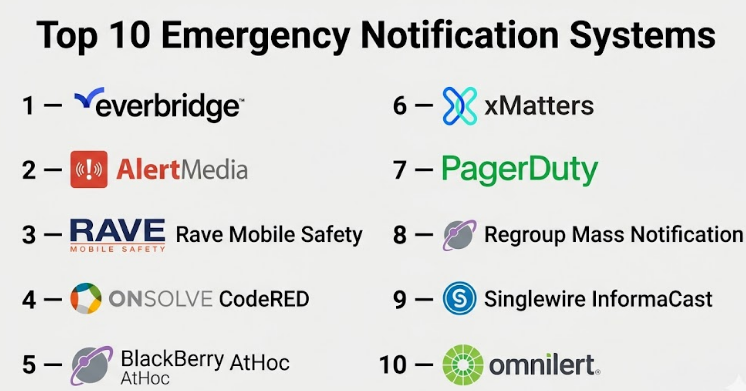
Top 10 Emergency Notification Systems
#1 — Everbridge
Short description:
A leading enterprise-grade critical event management platform. Everbridge is widely used by governments and large enterprises for mass notification and emergency communication. It provides real-time alerts, automation, and situational awareness capabilities.
Key Features
- Multi-channel alerting (SMS, voice, email, push)
- Geo-targeting and location-based alerts
- Automated workflows and escalation
- Incident management integration
- Real-time analytics and dashboards
- Two-way communication
- Crisis management tools
Pros
- Highly reliable and scalable
- Strong global presence and adoption
Cons
- Expensive for smaller organizations
- Complex setup and configuration
Platforms / Deployment
Web / iOS / Android
Cloud
Security & Compliance
Not publicly stated
Integrations & Ecosystem
Supports integration with enterprise systems
- ITSM platforms
- HR systems
- APIs for custom workflows
- Security and monitoring tools
Support & Community
Enterprise-grade support with onboarding programs
#2 — AlertMedia
Short description:
A modern emergency communication platform focused on simplicity and fast deployment. Designed for businesses needing reliable communication during crises.
Key Features
- Multi-channel messaging
- Geo-targeted alerts
- Two-way messaging
- Emergency templates
- Reporting dashboards
- Mobile app support
Pros
- Easy to use interface
- Fast implementation
Cons
- Limited deep customization
- Fewer enterprise modules
Platforms / Deployment
Web / iOS / Android
Cloud
Security & Compliance
Not publicly stated
Integrations & Ecosystem
- HR systems
- APIs
- Collaboration tools
Support & Community
Strong onboarding and customer support
#3 — Rave Mobile Safety
Short description:
A widely used ENS platform, especially in education and public safety sectors. Offers robust alerting and emergency response tools.
Key Features
- Mass notification
- Panic button integration
- Geo-targeting
- Incident management
- Two-way communication
Pros
- Strong in public safety use cases
- Reliable alert delivery
Cons
- Interface can feel outdated
- Limited flexibility
Platforms / Deployment
Web / iOS / Android
Cloud
Security & Compliance
Not publicly stated
Integrations & Ecosystem
- Public safety systems
- APIs
- Campus systems
Support & Community
Strong sector-specific support
#4 — OnSolve CodeRED
Short description:
A high-performance notification system used by government and emergency agencies. Known for mass communication and geo-targeting.
Key Features
- Mass alerting
- Geo-fencing alerts
- Voice and SMS notifications
- Emergency communication tools
- Real-time dashboards
Pros
- Strong public alerting capabilities
- Reliable delivery
Cons
- Enterprise-focused pricing
- Limited SMB appeal
Platforms / Deployment
Web
Cloud
Security & Compliance
Not publicly stated
Integrations & Ecosystem
- Government systems
- APIs
- Emergency services tools
Support & Community
Enterprise support
#5 — BlackBerry AtHoc
Short description:
A secure crisis communication platform widely used by government and defense organizations. Focuses on secure and reliable communication.
Key Features
- Secure messaging
- Mass notifications
- Geo-targeting
- Incident management
- Compliance tracking
Pros
- Strong security focus
- Trusted in critical sectors
Cons
- Complex setup
- Higher cost
Platforms / Deployment
Web / Mobile
Cloud / Hybrid
Security & Compliance
Encryption, RBAC (details not fully publicly stated)
Integrations & Ecosystem
- Security systems
- APIs
- Enterprise platforms
Support & Community
Enterprise-level support
#6 — xMatters
Short description:
An incident communication platform focused on IT and DevOps environments. Helps automate alerting and incident response workflows.
Key Features
- Automated alerting workflows
- On-call management
- Multi-channel notifications
- Incident escalation
- Integration with DevOps tools
Pros
- Strong for IT incident response
- Highly automatable
Cons
- Not focused on physical safety use cases
- Requires configuration
Platforms / Deployment
Web
Cloud
Security & Compliance
Not publicly stated
Integrations & Ecosystem
- DevOps tools
- ITSM platforms
- APIs
Support & Community
Strong developer and IT community
#7 — PagerDuty
Short description:
A popular incident response and alerting platform used in IT operations. Supports real-time notifications and escalation workflows.
Key Features
- Incident alerting
- On-call scheduling
- Multi-channel notifications
- Automation workflows
- Analytics dashboards
Pros
- Excellent for IT teams
- Strong automation capabilities
Cons
- Not designed for physical safety scenarios
- Pricing can scale quickly
Platforms / Deployment
Web / Mobile
Cloud
Security & Compliance
Not publicly stated
Integrations & Ecosystem
- DevOps tools
- Cloud platforms
- APIs
Support & Community
Large global community
#8 — Regroup Mass Notification
Short description:
A flexible ENS platform offering multi-channel communication and emergency alerting. Suitable for education, government, and businesses.
Key Features
- Multi-channel alerts
- Geo-targeting
- Two-way communication
- Templates and automation
- Reporting tools
Pros
- Flexible deployment
- Good feature coverage
Cons
- UI could be improved
- Limited advanced analytics
Platforms / Deployment
Web / Mobile
Cloud
Security & Compliance
Not publicly stated
Integrations & Ecosystem
- APIs
- Communication tools
- Enterprise systems
Support & Community
Standard support
#9 — Singlewire InformaCast
Short description:
A mass notification system focused on internal communication within organizations. Commonly used in schools and enterprises.
Key Features
- Mass notification
- Voice and SMS alerts
- Integration with communication systems
- Real-time alerts
- Automation workflows
Pros
- Strong internal communication capabilities
- Reliable delivery
Cons
- Limited external alerting
- Requires setup
Platforms / Deployment
Web
Cloud / On-prem
Security & Compliance
Not publicly stated
Integrations & Ecosystem
- Telephony systems
- APIs
- Enterprise tools
Support & Community
Good enterprise support
#10 — Omnilert
Short description:
A modern ENS platform focused on speed and AI-driven alerting. Used in education and public safety sectors.
Key Features
- AI-driven alerts
- Multi-channel communication
- Geo-targeting
- Two-way messaging
- Emergency templates
Pros
- Modern UI
- AI capabilities
Cons
- Limited enterprise features
- Smaller ecosystem
Platforms / Deployment
Web / Mobile
Cloud
Security & Compliance
Not publicly stated
Integrations & Ecosystem
- APIs
- Communication tools
- Security systems
Support & Community
Standard support
Comparison Table (Top 10)
| Tool Name | Best For | Platform(s) Supported | Deployment | Standout Feature | Public Rating |
|---|---|---|---|---|---|
| Everbridge | Enterprise crisis mgmt | Web, iOS, Android | Cloud | Global alerting | N/A |
| AlertMedia | SMB & mid-market | Web, iOS, Android | Cloud | Ease of use | N/A |
| Rave Mobile Safety | Public safety | Web, iOS, Android | Cloud | Panic button | N/A |
| OnSolve CodeRED | Government alerts | Web | Cloud | Geo-targeting | N/A |
| BlackBerry AtHoc | Secure communication | Web, Mobile | Cloud/Hybrid | Security focus | N/A |
| xMatters | IT incident alerts | Web | Cloud | Automation workflows | N/A |
| PagerDuty | DevOps alerts | Web, Mobile | Cloud | Incident response | N/A |
| Regroup | Flexible ENS | Web, Mobile | Cloud | Multi-channel alerts | N/A |
| InformaCast | Internal alerts | Web | Cloud/On-prem | Voice alerts | N/A |
| Omnilert | AI-driven alerts | Web, Mobile | Cloud | AI alerting | N/A |
Evaluation & Emergency Notification Systems
| Tool Name | Core | Ease | Integrations | Security | Performance | Support | Value | Weighted Total |
|---|---|---|---|---|---|---|---|---|
| Everbridge | 10 | 6 | 9 | 9 | 10 | 9 | 7 | 8.7 |
| AlertMedia | 8 | 9 | 7 | 7 | 8 | 8 | 8 | 8.1 |
| Rave Mobile Safety | 8 | 7 | 7 | 7 | 8 | 8 | 7 | 7.7 |
| CodeRED | 9 | 6 | 7 | 8 | 9 | 8 | 7 | 8.0 |
| AtHoc | 9 | 5 | 8 | 9 | 9 | 9 | 6 | 8.1 |
| xMatters | 8 | 7 | 9 | 7 | 8 | 8 | 7 | 7.9 |
| PagerDuty | 8 | 8 | 10 | 8 | 9 | 9 | 7 | 8.4 |
| Regroup | 7 | 8 | 7 | 7 | 7 | 7 | 8 | 7.5 |
| InformaCast | 7 | 7 | 6 | 7 | 8 | 7 | 7 | 7.2 |
| Omnilert | 8 | 8 | 6 | 7 | 8 | 7 | 7 | 7.6 |
Interpretation:
- Scores compare tools relative to each other
- Enterprise tools score higher in “Core” and “Security”
- SMB tools score higher in “Ease” and “Value”
- Use scores for shortlisting, not final decisions
Which Emergency Notification Systems
Solo / Freelancer
Basic tools or messaging apps are sufficient; ENS tools are usually unnecessary.
SMB
AlertMedia or Regroup provide simplicity and quick deployment.
Mid-Market
Omnilert or AlertMedia offer balance between features and usability.
Enterprise
Everbridge, AtHoc, and CodeRED provide scalability and compliance.
Budget vs Premium
- Budget: Regroup, Omnilert
- Premium: Everbridge, AtHoc
Feature Depth vs Ease of Use
- Deep features: Everbridge, AtHoc
- Easy to use: AlertMedia
Integrations & Scalability
Enterprise tools provide stronger integration ecosystems.
Security & Compliance Needs
Highly regulated sectors should prioritize secure platforms like AtHoc.
Frequently Asked Questions (FAQs)
1. What is an emergency notification system?
It is a platform used to send urgent alerts across multiple communication channels during emergencies.
2. How do these systems send alerts?
They use SMS, voice calls, emails, mobile apps, and integrations with communication platforms.
3. Are they suitable for small businesses?
Some tools are designed for SMBs, but many are enterprise-focused.
4. How reliable are these systems?
Top platforms are designed for high availability and rapid delivery.
5. Can they integrate with existing systems?
Yes, most tools support APIs and integrations with HR, ITSM, and security tools.
6. Is data secure?
Most tools provide encryption and access controls.
7. What industries use ENS tools?
Government, healthcare, education, logistics, and enterprises.
8. How long does implementation take?
From days for simple tools to weeks/months for enterprise solutions.
9. Can alerts be targeted?
Yes, geo-targeting and segmentation are common features.
10. What are alternatives?
Basic communication tools, though they lack automation and reliability.
Conclusion
Emergency Notification Systems have become critical infrastructure for organizations that need to respond quickly and effectively during crises. Whether it’s ensuring employee safety, managing operational disruptions, or maintaining compliance, these platforms provide the speed, reliability, and automation needed in high-pressure situations. However, not every organization needs the most advanced system. Smaller teams may benefit from simpler, cost-effective solutions, while enterprises require scalable, secure, and highly integrated platforms. The best approach is to identify your communication needs, shortlist two or three tools, and test them in real scenarios. Focus on delivery reliability, ease of use, and integration capabilities before making a final decision.