Introduction
Expense Management Tools are software platforms that help businesses track, control, and optimize employee expenses such as travel, reimbursements, and corporate spending. In simple terms, they replace spreadsheets, paper receipts, and manual approvals with automated workflows and real-time visibility.
In the modern business environment, especially post-digital transformation, expense management has become critical. With remote teams, global travel, and distributed operations, companies need tools that provide transparency, compliance, and control. These tools now integrate AI for receipt scanning, fraud detection, and predictive insights.
Real-world use cases include:
- Automating employee expense reporting and approvals
- Managing corporate cards and tracking spending in real time
- Ensuring compliance with company and regulatory policies
- Simplifying reimbursements and reducing processing time
- Integrating with accounting systems for accurate financial reporting
What buyers should evaluate:
- Ease of use and mobile experience
- Automation capabilities (OCR, AI categorization)
- Integration with accounting/ERP systems
- Policy enforcement and compliance controls
- Reporting and analytics features
- Security and data protection
- Pricing model and scalability
- Global support (multi-currency, tax handling)
- Customer support and onboarding
Best for: Finance teams, startups, SMBs, enterprises, and distributed organizations that need visibility and control over employee spending.
Not ideal for: Very small businesses or individuals who manage minimal expenses and may prefer basic accounting tools or spreadsheets.
Key Trends in Expense Management Tools
- AI-powered automation: Receipt scanning, auto-categorization, and anomaly detection are becoming standard
- Real-time expense tracking: Instant visibility into spending via corporate cards and mobile apps
- Embedded finance: Integration of corporate cards directly into expense platforms
- Policy automation: Smart rules that enforce compliance automatically
- Globalization support: Multi-currency, tax compliance, and localization features
- API-first platforms: Easy integration with ERP, HR, and payroll systems
- Mobile-first experience: Strong focus on iOS and Android usability
- Subscription-based pricing: Flexible SaaS pricing models replacing legacy licensing
- Fraud detection & risk scoring: Advanced analytics to detect misuse or anomalies
- Sustainability tracking: Some tools track carbon footprint of business travel
How We Selected These Tools (Methodology)
- Evaluated market adoption and brand recognition across global businesses
- Assessed feature completeness, including automation, reporting, and compliance
- Considered reliability and performance signals from enterprise usage
- Reviewed security posture indicators like SSO, encryption, and compliance readiness
- Analyzed integration ecosystems with accounting, ERP, and HR tools
- Included tools suitable for different business sizes (freelancer to enterprise)
- Looked at user experience and mobile capabilities
- Considered pricing flexibility and scalability
- Balanced innovation (AI features) with proven reliability
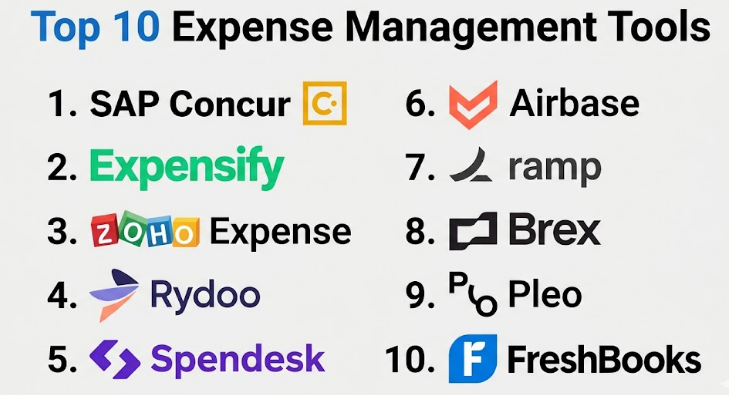
Top 10 Expense Management Tools
#1 — SAP Concur
Short description (2–3 lines): Enterprise-grade expense and travel management platform widely used by large organizations. Best for companies requiring deep compliance and global capabilities.
Key Features
- End-to-end travel and expense management
- Automated receipt capture and expense reporting
- Policy compliance and audit trails
- Integration with SAP ERP systems
- Global tax and currency support
- Advanced analytics and reporting
Pros
- Highly scalable for global enterprises
- Strong compliance and audit capabilities
Cons
- Complex setup and onboarding
- Expensive for small businesses
Platforms / Deployment
Web / iOS / Android — Cloud
Security & Compliance
SSO/SAML, MFA, encryption, audit logs, GDPR (others not publicly stated)
Integrations & Ecosystem
Strong integration with enterprise systems and SAP ecosystem
- SAP ERP
- HR systems
- Travel booking platforms
- Accounting tools
Support & Community
Enterprise-level support with structured onboarding; strong documentation but limited community engagement.
#2 — Expensify
Short description (2–3 lines): Popular expense management tool for SMBs and startups, known for its simplicity and automation.
Key Features
- SmartScan receipt capture
- Automatic expense categorization
- Corporate card reconciliation
- Approval workflows
- Real-time expense tracking
- Mobile-first design
Pros
- Very easy to use
- Fast expense submission
Cons
- Limited advanced enterprise features
- Reporting depth can be limited
Platforms / Deployment
Web / iOS / Android — Cloud
Security & Compliance
MFA, encryption, audit logs (others not publicly stated)
Integrations & Ecosystem
- QuickBooks
- Xero
- NetSuite
- Slack
Support & Community
Good documentation and responsive support; strong SMB user base.
#3 — Zoho Expense
Short description (2–3 lines): Cost-effective expense management tool with strong automation and integration within the Zoho ecosystem.
Key Features
- OCR-based receipt scanning
- Multi-currency support
- Policy-based approvals
- Mileage tracking
- Custom workflows
- Detailed reporting
Pros
- Affordable pricing
- Strong automation features
Cons
- Limited advanced analytics
- Best suited within Zoho ecosystem
Platforms / Deployment
Web / iOS / Android — Cloud
Security & Compliance
Encryption, MFA (others not publicly stated)
Integrations & Ecosystem
- Zoho Books
- Zoho CRM
- QuickBooks
Support & Community
Good support and documentation; strong ecosystem advantage.
#4 — Rydoo
Short description (2–3 lines): Expense management platform focused on real-time tracking and automation for mid-sized companies.
Key Features
- Real-time expense submission
- Smart receipt scanning
- Policy enforcement
- Corporate card integration
- Approval workflows
- Travel expense management
Pros
- Clean user interface
- Real-time expense tracking
Cons
- Limited enterprise features
- Integration depth varies
Platforms / Deployment
Web / iOS / Android — Cloud
Security & Compliance
Not publicly stated
Integrations & Ecosystem
- Accounting tools
- HR systems
- APIs available
Support & Community
Moderate support and documentation; smaller community.
#5 — Spendesk
Short description (2–3 lines): All-in-one spend management platform combining expense tracking, corporate cards, and invoice management.
Key Features
- Virtual and physical corporate cards
- Budget tracking
- Approval workflows
- Invoice management
- Real-time spending visibility
- Expense automation
Pros
- Unified spend management
- Strong budgeting controls
Cons
- Pricing may be high
- Limited customization
Platforms / Deployment
Web / iOS / Android — Cloud
Security & Compliance
MFA, encryption (others not publicly stated)
Integrations & Ecosystem
- Accounting tools
- HR platforms
- API integrations
Support & Community
Good onboarding support; growing community.
#6 — Airbase
Short description (2–3 lines): Modern finance platform combining expense management, accounts payable, and corporate cards.
Key Features
- Expense and bill management
- Corporate card integration
- Automated approvals
- Real-time reporting
- Vendor payments
- Audit trails
Pros
- All-in-one finance platform
- Strong automation
Cons
- Best suited for US-based companies
- Pricing transparency limited
Platforms / Deployment
Web / iOS — Cloud
Security & Compliance
Not publicly stated
Integrations & Ecosystem
- NetSuite
- QuickBooks
- HR tools
Support & Community
Strong support; enterprise onboarding available.
#7 — Ramp
Short description (2–3 lines): Corporate card and expense management platform focused on cost savings and automation.
Key Features
- Corporate card management
- Spend controls and limits
- Automated expense categorization
- Real-time insights
- Vendor management
- Savings recommendations
Pros
- Strong cost optimization features
- Easy to deploy
Cons
- Limited international support
- Focused on card-based expenses
Platforms / Deployment
Web / iOS — Cloud
Security & Compliance
Not publicly stated
Integrations & Ecosystem
- QuickBooks
- NetSuite
- Slack
Support & Community
Good support; fast-growing user base.
#8 — Brex
Short description (2–3 lines): Financial platform offering corporate cards, expense management, and cash management.
Key Features
- Corporate cards with controls
- Expense tracking
- Budgeting tools
- Real-time analytics
- Rewards system
- Multi-entity support
Pros
- Strong financial ecosystem
- Good for startups
Cons
- Limited outside US
- Complex pricing
Platforms / Deployment
Web / iOS — Cloud
Security & Compliance
Not publicly stated
Integrations & Ecosystem
- Accounting tools
- HR systems
- APIs
Support & Community
Strong support; startup-focused community.
#9 — Pleo
Short description (2–3 lines): European-focused expense management tool with corporate cards and automation features.
Key Features
- Smart company cards
- Receipt capture
- Expense categorization
- Budget tracking
- Approval workflows
- Real-time notifications
Pros
- Easy onboarding
- Strong European coverage
Cons
- Limited global reach
- Feature depth varies
Platforms / Deployment
Web / iOS / Android — Cloud
Security & Compliance
Not publicly stated
Integrations & Ecosystem
- Accounting tools
- APIs
Support & Community
Good support; regional strength.
#10 — FreshBooks
Short description (2–3 lines): Accounting software with built-in expense tracking, ideal for freelancers and small businesses.
Key Features
- Expense tracking
- Receipt capture
- Invoicing integration
- Time tracking
- Reporting
- Client billing
Pros
- Simple and user-friendly
- Great for freelancers
Cons
- Not a dedicated expense tool
- Limited enterprise features
Platforms / Deployment
Web / iOS / Android — Cloud
Security & Compliance
Not publicly stated
Integrations & Ecosystem
- Payment gateways
- Accounting tools
Support & Community
Strong support; large user base.
Comparison Table (Top 10)
| Tool Name | Best For | Platform(s) Supported | Deployment | Standout Feature | Public Rating |
|---|---|---|---|---|---|
| SAP Concur | Enterprise | Web, Mobile | Cloud | Global compliance | N/A |
| Expensify | SMBs | Web, Mobile | Cloud | SmartScan OCR | N/A |
| Zoho Expense | SMBs | Web, Mobile | Cloud | Cost-effective automation | N/A |
| Rydoo | Mid-market | Web, Mobile | Cloud | Real-time tracking | N/A |
| Spendesk | SMBs | Web, Mobile | Cloud | Corporate cards | N/A |
| Airbase | Mid-market | Web, Mobile | Cloud | Unified finance platform | N/A |
| Ramp | Startups | Web, Mobile | Cloud | Cost optimization | N/A |
| Brex | Startups | Web, Mobile | Cloud | Financial ecosystem | N/A |
| Pleo | SMBs EU | Web, Mobile | Cloud | Smart cards | N/A |
| FreshBooks | Freelancers | Web, Mobile | Cloud | Simple expense tracking | N/A |
Evaluation & Scoring of Expense Management Tools
| Tool Name | Core (25%) | Ease (15%) | Integrations (15%) | Security (10%) | Performance (10%) | Support (10%) | Value (15%) | Weighted Total |
|---|---|---|---|---|---|---|---|---|
| SAP Concur | 9 | 6 | 9 | 9 | 9 | 8 | 6 | 8.0 |
| Expensify | 8 | 9 | 7 | 7 | 8 | 8 | 9 | 8.2 |
| Zoho Expense | 8 | 8 | 7 | 7 | 8 | 8 | 9 | 8.1 |
| Rydoo | 7 | 8 | 6 | 6 | 7 | 7 | 7 | 7.1 |
| Spendesk | 8 | 8 | 7 | 7 | 8 | 8 | 7 | 7.7 |
| Airbase | 9 | 7 | 8 | 7 | 8 | 8 | 7 | 8.0 |
| Ramp | 8 | 9 | 7 | 6 | 8 | 7 | 9 | 8.1 |
| Brex | 8 | 8 | 7 | 6 | 8 | 7 | 8 | 7.8 |
| Pleo | 7 | 8 | 6 | 6 | 7 | 7 | 7 | 7.0 |
| FreshBooks | 6 | 9 | 6 | 6 | 7 | 8 | 9 | 7.5 |
How to interpret scores:
- Scores are comparative across tools, not absolute
- Higher scores indicate better overall fit for most use cases
- Enterprise tools may score lower on ease but higher on depth
- SMB tools often score higher on value and usability
- Choose based on your specific business needs, not just score
Which Expense Management Tools
Solo / Freelancer
FreshBooks or Expensify are ideal due to simplicity and low overhead.
SMB
Zoho Expense or Spendesk offer good balance between cost and features.
Mid-Market
Rydoo or Airbase provide better control and integration capabilities.
Enterprise
SAP Concur is the clear choice for global compliance and scalability.
Budget vs Premium
- Budget: Zoho Expense, FreshBooks
- Premium: SAP Concur, Airbase
Feature Depth vs Ease of Use
- Easy: Expensify, FreshBooks
- Advanced: SAP Concur, Airbase
Integrations & Scalability
- Strong integrations: SAP Concur, Airbase
- Moderate: Zoho Expense, Spendesk
Security & Compliance Needs
- High compliance: SAP Concur
- Moderate: Expensify, Zoho Expense
Frequently Asked Questions (FAQs)
1. What is the typical pricing model for expense management tools?
Most tools follow a subscription-based pricing model per user per month. Some include free tiers, while enterprise solutions offer custom pricing based on features and scale.
2. How long does it take to implement these tools?
Implementation can range from a few hours for SMB tools to several weeks for enterprise platforms requiring integrations and customization.
3. What are common mistakes when choosing a tool?
Choosing based only on price, ignoring integrations, and not considering scalability are common mistakes.
4. Are these tools secure?
Most tools provide encryption, MFA, and audit logs. However, compliance certifications vary, so verification is important.
5. Can these tools integrate with accounting software?
Yes, most integrate with popular accounting tools like QuickBooks, NetSuite, and Xero.
6. How scalable are these platforms?
Most tools are scalable, but enterprise tools offer better support for global operations and complex workflows.
7. Can I switch tools easily?
Switching is possible but may require data migration and process adjustments.
8. Do these tools support multi-currency transactions?
Yes, most modern tools support multi-currency and international expense tracking.
9. Are mobile apps important?
Yes, mobile apps improve adoption and allow real-time expense submission.
10. What alternatives exist?
Basic accounting software or manual spreadsheets can be alternatives for very small teams.
Conclusion
Expense management tools have evolved from simple tracking systems into intelligent financial control platforms. Today, they combine automation, AI, compliance, and real-time visibility to help organizations manage spending effectively. However, the “best” tool depends entirely on your business size, complexity, and integration needs. A startup may prioritize ease of use and cost, while an enterprise will focus on compliance and scalability. The smartest approach is to shortlist two or three tools that align with your requirements, run a pilot with real workflows, and validate integrations, usability, and reporting capabilities before making a final decision.
